xPickaxes
# ⛏️ xPickaxes
**xPickaxes** is a professional Spigot/Paper plugin that adds fully customizable pickaxes with area mining, an intuitive GUI, permission-based access, and special effects — all configurable without touching a single line of Java.
> Compatible with **Minecraft 1.19 – 1.21+** (Paper & Spigot)
—
## ✨ Features
– **Area Mining** — Mine 3×3, 5×5, 7×7, or 9×9 areas with a single block break
– **In-game GUI** — Right-click any custom pickaxe to open a clean configuration menu
– **Special Effects**
– 🔥 **Auto-Smelting** — Ores are smelted directly into ingots
– ✨ **Fortune Boost** — Increased drops on all mined blocks
– ⛏ **Vein Miner** — Mines entire connected ore veins at once (up to 64 blocks)
– 🔍 **Ore Highlight** — Visual glow effect on nearby ores *(framework ready)*
– **Per-player Settings** — Each player can toggle area mining and effects individually
– **Permission System** — Fine-grained control over which players access which pickaxes and effects
– **Custom Area Sizes** — Players can choose their preferred area size from the GUI
– **Blacklist Support** — Prevent area mining on specific blocks (bedrock, command blocks, etc.)
– **WorldGuard Compatible** — Respects protected regions
– **Sound & Particle Effects** — Satisfying feedback on area mines (toggleable)
– **Fully Config-Driven** — Add or edit pickaxe types entirely from `config.yml`
—
## 📦 Pickaxe Tiers
| Tier | Area | Material | Effects | Permission |
|——|——|———-|———|————|
| **Novice** | 3×3 | Iron Pickaxe | — | `xpickaxes.pickaxe.novice` |
| **Adept** | 5×5 | Golden Pickaxe | Fortune Boost | `xpickaxes.pickaxe.adept` |
| **Master** | 7×7 | Diamond Pickaxe | Fortune + Auto-Smelting | `xpickaxes.pickaxe.master` |
| **Titan** | 9×9 | Netherite Pickaxe | Fortune + Auto-Smelting + Vein Miner | `xpickaxes.pickaxe.titan` |
All tiers are fully editable or removable in `config.yml`. You can also add your own!
—
## 🎮 Commands
| Command | Description | Permission |
|———|————-|————|
| `/xpickaxe give [player]` | Give a custom pickaxe | `xpickaxes.give` |
| `/xpickaxe list` | List all available pickaxe types | `xpickaxes.use` |
| `/xpickaxe menu` | Open the GUI for your held pickaxe | `xpickaxes.use` |
| `/xpickaxe reload` | Reload the plugin config | `xpickaxes.reload` |
| `/xpickaxe help` | Show help | — |
**Aliases:** `/xpick`, `/xp`
—
## 🔑 Permissions
| Permission | Default | Description |
|————|———|————-|
| `xpickaxes.use` | Everyone | Use custom pickaxes |
| `xpickaxes.give` | OP | Give custom pickaxes |
| `xpickaxes.reload` | OP | Reload the plugin |
| `xpickaxes.admin` | OP | Full admin access (includes give + reload) |
| `xpickaxes.pickaxe.novice` | Everyone | Access to Novice pickaxe |
| `xpickaxes.pickaxe.adept` | OP | Access to Adept pickaxe |
| `xpickaxes.pickaxe.master` | OP | Access to Master pickaxe |
| `xpickaxes.pickaxe.titan` | OP | Access to Titan pickaxe |
| `xpickaxes.effect.autosmelting` | OP | Use Auto-Smelting effect |
| `xpickaxes.effect.veinminer` | OP | Use Vein Miner effect |
| `xpickaxes.effect.fortune` | OP | Use Fortune Boost effect |
| `xpickaxes.effect.xray` | OP | Use Ore Highlight effect |
—
## 🖥️ GUI Overview
**Right-click** any xPickaxes custom pickaxe (or run `/xpickaxe menu`) to open the configuration panel:
“`
┌─────────────────────────────────────────────────────┐
│ [Pickaxe] [Pickaxe Configuration] │
│ │
│ [Toggle Area] [Compass] [3×3][5×5][7×7][9×9][✗]│
│ │
│ [★] [Effect1] [Effect2] [Effect3] [Effect4] │
│ │
│ [ℹ Info] │
│ [✖ Close] │
└─────────────────────────────────────────────────────┘
“`
– **Toggle Area Mining** — Enable/disable area mining for this session
– **Area Size** — Select 3×3, 5×5, 7×7, or 9×9 (or reset to pickaxe default)
– **Effects** — Toggle each special effect independently (respects permissions)
—
## ⚙️ Configuration
All pickaxe types, effects, messages, and behavior is defined in `config.yml`. Here’s an example of adding a custom pickaxe:
“`yaml
pickaxes:
my_custom_pick:
enabled: true
display-name: “&5✦ Void Pickaxe”
lore:
– “&7Area Mining: &e11x11”
– “”
– “&8▸ Right-click to configure”
material: NETHERITE_PICKAXE
area-size: 11
durability-multiplier: 4.0
enchantments:
EFFICIENCY: 5
UNBREAKING: 3
FORTUNE: 3
effects:
– FORTUNE
– AUTOSMELTING
– VEINMINER
permission: myplugin.voidpickaxe
give-command-enabled: true
custom-model-data: 0
“`
### Auto-Smelt Mappings
Add custom smelting recipes in `config.yml`:
“`yaml
smelt-map:
IRON_ORE: IRON_INGOT
GOLD_ORE: GOLD_INGOT
SAND: GLASS
# Add your own!
“`
—
## 🔧 Installation
1. Download `xPickaxes-1.0.0.jar`
2. Drop it into your `plugins/` folder
3. Restart or reload your server
4. Edit `plugins/xPickaxes/config.yml` to customize
5. Run `/xpickaxe reload` to apply changes live
**Requirements:**
– Java 17+
– Paper or Spigot 1.19+
XP Level = World Border
## Description
This datapack makes the world border grow with your experience level, resulting in a unique and challenging experience.
You can configure how large the border will be at the start and how much it grows with gained levels. When used in multiplayer, the experience of all online players gets added up.
## Configuration
### Menu
Use “`/trigger levelborder“` to open the configuration menu.
### Start Size
To configure how large the border should be at the start, use “`/trigger borderStartSize set “` (replace value with the size is blocks).
### Multiplier
Change how much the border will grow for each level gained, by using “`/trigger borderMultiplier set “` (replace value with the growth in blocks/level).
xJumPads

🌌 xJumPads
xJumPads is a powerful and highly customizable plugin that introduces advanced jump pads to your Minecraft server. Whether you’re building immersive parkour courses, interactive lobbies, or creative minigames, xJumPads gives you all the tools you need to design unique gameplay experiences with style and precision.
Jump pads can be configured to launch players in any direction, add particle effects, play sounds, or trigger special actions. Everything is easily managed through a modern GUI system and fully supports HEX colors, PlaceholderAPI, and translations for any language.
✨ Key Features
✅ Supports Minecraft 1.16+ (regularly updated to stay compatible)
🎨 Full HEX color support for vibrant messages, GUIs, and placeholders
🌍 Multi-language support: suitable for global communities
🔧 PlaceholderAPI integration for dynamic customization
📑 Intuitive in-game menu system (/xjp) to create and manage jump pads easily
🎆 Customizable effects: particles, sounds, velocities, and more
🚀 Lightweight & optimized for both small and large networks
🛡️ User-friendly permissions system
🕹️ Common Use Cases
Parkour maps with spectacular jump mechanics
Server hubs and lobbies with interactive movement features
Minigames where jump pads add strategic depth and excitement
Creative builds that benefit from mobility and visual effects
📜 Commands
/xjp menu – Opens the main xJumPads menu (easy GUI setup and management).
/xjp help – Displays the full list of available commands and usage.
/xjp create – Create a new jump pad at your current location.
/xjp remove – Remove an existing jump pad.
/xjp list – View all existing jump pads on your server.
/xjp reload – Reload configuration files without restarting the server.
⚙️ Permissions
xjumpads.admin → Full access to all commands and menus
👉 With xJumPads, you can transform your server into a dynamic playground where movement is part of the fun. From parkour challenges to stylish hub navigation, this plugin gives you complete control over how players interact with your world.
📜 Config
“`yaml
# _____ __ _
## | / / ___ _ __ | |_ _ __ _
# | | / _ | ‘_ | _| |/ _` | Plugin By
# | __/ (_) | | | | | | | (_| | WillfryDev
# ____/___/|_| |_|_| |_|__, |
# __/ | .yml
#
# Particles that will constantly appear above the JumpPad block.
# Particle list: https://jd.papermc.io/paper/1.20/org/bukkit/Particle.html
# __
# ( _/ /_
#__)/(/((-
# /
idle-particles:
enabled: true
type: “ENCHANTMENT_TABLE”
count: 15
# Effects when using a JumpPad.
launch-effects:
sound:
# Sound list: https://hub.spigotmc.org/javapods/spigot/org/bukkit/Sound.html
type: “ENTITY_ENDER_DRAGON_FLAP”
volume: 1.0 # 0.1 – 2.0
pitch: 1.2 # 0.1 – 2.0
particles:
enabled: true
type: “PORTAL”
count: 50
# __♥__♥_____♥__♥___ Want To
# _♥_____♥_♥_____♥__ Work As
# _♥______♥______♥__ A
# __♥___________♥__ Translator?
# ___♥_________♥___ Join Our
# ____♥______♥_____ Discord At
# ______♥_♥_______ https://discord.gg/
# ________♥_________ AH5k9YE78b
“`
👑 Messanges (All editable, if you want configuration in Spanish open a ticket to discord) 🙂
“`yaml
# __ __
# | / |___ ______ __ _ _ _ __ _ ___ ___
# | |/| / -_|_-<_- ”
remove: “%prefix%Usage: &a/jp remove ”
help-menu:
– “&8&m———– &#FFD1DCxJumPads Help &8&m———–”
– “”
– “&#E0E0E0/jp set » &#AEC6CFCreate a JumpPad.”
– “&#E0E0E0/jp remove » &#AEC6CFRemove a JumpPad.”
– “&#E0E0E0/jp list » &#AEC6CFShow the list of JumpPads.”
– “&#E0E0E0/jp menu » &#AEC6CFOpen the JumpPads menu.”
– “&#E0E0E0/jp reload » &#AEC6CFReload the configuration.”
– “”
– “&8&m————————————”
menu:
title: “&#AEC6CF» &#FFD1DCJumpPads &#AEC6CF«”
item-name: “&#B8E986%name%”
item-lore:
– “&#E0E0E0Location:”
– “&#AEC6CF X: %x%, Y: %y%, Z: %z%”
– “”
– “&#FFD1DCClick to teleport!”
no-pads: “&cThere are no JumpPads to display.”
teleport: “%prefix%&aYou have been teleported to JumpPad &#B8E986%name%&a.”
“`
🏃Jumps (Data saver) 😀
“`yaml
# ____.
# | |__ ________ ______
# | | | ____ / ___/ ⋆˙
# /__| | | / |_> >___
# ________|____/| __/____ > ⋆˙⟡
# |__| / .yml
pads:
test:
location:
world: ‘world’
x: 100.0
y: 64.0
z: -250.0
pitch: 0.0
yaw: 0.0
power: 3.0
directionType: FORWARD
angle: 0.0
“`
Show/Hide Api :3
package com.example.soydev;
import jn.willfrydev.xjumpads.xJumPads;
import jn.willfrydev.xjumpads.api.xJumPadsAPI;
import org.bukkit.plugin.java.JavaPlugin;
public class SoyDev extends JavaPlugin {
private xJumPadsAPI jumpPadsAPI;
@Override
public void onEnable() {
// Comprobación de seguridad
if (getServer().getPluginManager().getPlugin(“xJumPads”) == null) {
getLogger().severe(“xJumPads no fue encontrado. El plugin SoyDev se desactivará.”);
getServer().getPluginManager().disablePlugin(this);
return;
}
this.jumpPadsAPI = xJumPads.getApi();
getLogger().info(“¡Conectado exitosamente con la API de xJumPads!”);
}
}
xJobs
# 👷 xJobs | The Ultimate Professional Job System 👷

—
**xJobs** is a high-performance, premium-grade job system designed for modern Minecraft servers. Featuring a stunning **Cyan & Midnight Blue** interface, seamless **Discord integration**, and a robust **database-driven** backend, it provides your players with an immersive and rewarding professional experience.
—
> ## ✨ Premium Features
* **💎 High-End GUI**: A modern, columnar selection menu with custom heads and vibrant accent colors.
* **🌐 100% Internationalized**: Professionally translated into English, with global label management.
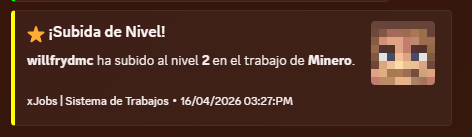
* **🤖 Discord Webhooks**: Real-time notifications for level-ups, job changes, and more with fully customizable embeds.
* **📊 Optimized Backend**: Support for H2 and MySQL databases with efficient caching.
* **🎭 Dynamic Lore**: Each job features unique premium descriptions and action hints.
* **🛠️ Developer Friendly**: Full PlaceholderAPI support and a simple yet powerful YML API for creating jobs.
* **⚡ Lightweight**: Built for performance, ensuring zero impact on your server’s TPS.
—
> ## 🚀 How to Create a Custom Job
Adding new professions to your server is incredibly simple. Follow this step-by-step guide:
1. Navigate to the `/plugins/xJobs/jobs/` folder.
2. Create a new file named `your_job_id.yml` (e.g., `alchemist.yml`).
3. Copy and customize the template below:
“`yaml
name: “Alchemist”
permission: “default”
max-level: 200
icon:
material: PLAYER_HEAD
base64: “eyJ0ZXh0dXJlcyI6eyJTS0lOIjp7InVybCI6Imh0dHA6Ly90ZXh0dXJlcy5taW5lY3JhZnQubmV0L3RleHR1cmUv…”
slot: 10
name: “Alchemist”
lore:
– “”
– ” &#A2FF5C✦ &f{info_label}:”
– ” &e⭐ &f{level_label}: &e{level}&f/&e{max_level}”
– ” &a👥 &f{workers_label}: &#D0FFD3{workers}”
– “”
– ” &#A2FF5C✦ &f{blurb_label}:”
– ” &7A master of volatile reactions. Brew concoctions”
– ” &7and elixirs that grant inhuman strength and life.”
– “”
– ” &#A2FF5C✦ &f{actions_label}:”
– ” &8▪ &7Brew magical potions”
– “”
– ” {join_action}”
actions:
block_break: # Logic for breaking blocks
‘WHEAT’:
xp: 5
money: 10.0
kill_mob: # Logic for hunting
‘ZOMBIE’:
xp: 15
money: 20.0
“`
4. Use `/jobs reload` in-game to apply your new profession immediately!
—
> ## 📌 Placeholders & Variables
Enhance your GUIs and chat with our dynamic placeholders:
| Placeholder | Description |
| :— | :— |
| `{player}` | The name of the player |
| `{job}` | The current profession name |
| `{level}` | The player’s current job level |
| `{max_level}` | The maximum level reachable |
| `{xp}` | Current experience points |
| `{xp_needed}` | Experience needed for next level |
| `{progress}` | A visual progress bar (e.g., `|||||…..`) |
| `{workers}` | Total number of players in that job |
—
> ## 🛠️ Commands & Permissions
Manage your professions with these simple commands:
| Command | Description | Permission |
| :— | :— | :— |
| `/jobs` | Open the main professional selection menu | *None* |
| `/jobs stats` | View your personal progress and statistics | *None* |
| `/jobs leave` | Resign from your current job | *None* |
| `/jobs help` | Show the command help menu | *None* |
| `/jobs reload` | Reload all configurations and jobs | `xjobs.admin` |
—
> ## 📦 Requirements
Ensure your server meets these criteria for optimal performance:
| Requirement | Description | Status |
| :— | :— | :— |
| **Vault** | Essential for economy rewards and money management | **Required** |
| **Java 17+** | Modern runtime required for high-performance execution | **Required** |
| **PlaceholderAPI** | Enables dynamic labels and custom variables | *Recommended* |
—
> ## 🛰️ Discord Integration
Keep your community engaged by linking your Discord server.
In `config.yml`, set `webhooks.discord.enabled: true` and paste your URL.
**Features:**
* **Custom Embeds**: Edit colors, footers, and thumbnails per event.
* **Async Processing**: Webhooks never lag your server.
* **Player Avatars**: Automatically fetches the player’s head for the notification.
—
> **Pro Tip**: You can edit the titles of all GUI sections (like “Information” or “Active Workers”) globally in `messages.yml`. Edit once, update everywhere!
> Got some cash? Get a PREMIUM (ES/EN) config on Discord.
XiaoXue’s Delta Force mod
本模组在我的世界中添加了三角洲行动的部分变卖物,使你可以在我的世界中玩到三角洲行动 将来还会有更多的东西
现在有27个变卖物,分别是 非洲之心 海洋之泪 装甲车电池 复苏呼吸机 微型反应炉 电子脚铐 笔记本电脑 飞行记录仪 量子存储 军用电台 纵横 军用炮弹 强化碳纤维板 试制聚变功能单元 自动体外除颤器 万泪金冠 绝密服务器 云存储阵列 实验数据 便携军用雷达 主站坦克模型 印象派名画 扫拖一体机器人 曼德尔超算单元 克劳迪乌斯半身像 步战车模型 赛伊德的怀表 雷斯的留声机 名贵机械表 军用控制终端 超声波切割刀 鎏金卡牌 Alpha脑机实验数据-渡鸦 名窑瓷器 定位接收器 滑膛枪展品 “钻石”鱼子酱
This mod adds some of the assets from Delta Force to Minecraft, allowing you to play Delta Force in Minecraft. More content will be added in the future.
There are currently 27 items for sale, which are: Heart of Africa, Tear of the Ocean, Armored Vehicle Battery, Revival Ventilator, Miniature Reactor, Electronic Ankle Bracelet, Laptop, Flight Data Recorder, Quantum Storage, Military Radio, Latitude and Longitude, Military Shells, Reinforced Carbon Fiber Plate, Prototype Fusion Unit, Automated External Defibrillator, Ten Thousand Tears Golden Crown, Top Secret Server, Cloud Storage Array, Experimental Data, Portable Military Radar, Main Station Tank Model, Impressionist Masterpiece, Sweeping and Mopping Robot, Mandel Supercomputer Unit, Claudius Bust, Infantry Combat Vehicle Model, Said’s Pocket Watch, Les’s Phonograph, Precious Mechanical Watch, Military Control Terminal, Ultrasonic Cutting Knife, Gilded Card, Alpha Brain-Machine Experiment Data – Raven, Famous Kiln Porcelain, Positioning Receiver, Smoothbore Gun Exhibit, “Diamond” Caviar
xHubBlocks
# 🧱 xHubBlocks V2
### The Ultimate Lobby Practice Plugin
**Infinite blocks. Auto-despawn. Database support.**
  
__UPDATE COMING SOON!__
—
## 👋 Overview
**xHubBlocks** is a lightweight but powerful plugin designed for Hubs and Lobbies. It gives your players an infinite stack of blocks to practice bridging, clutching, or building while waiting in the lobby.
The best part? **The blocks disappear automatically** after a configurable time, keeping your lobby clean and lag-free.
### 🔥 What’s New in V2?
We have completely rewritten the core to include professional features:
* **Persistent Data:** Blocks placed statistics are now saved forever.
* **Database Support:** Built-in support for **H2** (local, no setup) and **MySQL** (for networks).
* **Developer API:** Hook your own plugins into xHubBlocks.
* **High Performance:** Powered by HikariCP for database connections.
—
## ✨ Features
* **♾️ Infinite Items:** Players get a stack of blocks that never runs out.
* **✨ Auto-Despawn:** Blocks vanish after X seconds with a satisfying particle effect.
* **🔒 Secure:** Prevents players from dropping the block or moving it in their inventory.
* **🎨 Fully Configurable:** Customize the material, name, lore, slot, and messages.
* **📊 PlaceholderAPI:** Display stats on scoreboards or holograms.
* **⚡ Legacy Support:** Works flawlessly from **1.8.8** up to the latest versions.
—
## 💾 Database & Storage
xHubBlocks V2 supports two storage types defined in `config.yml`:
1. **H2 (Default):** Zero configuration required. Stores data in a local file. Perfect for single servers.
2. **MySQL:** Connect to an external database. Ideal for networks or if you want to display stats on a website.
“`yaml
storage:
type: H2 # Or MYSQL
mysql:
host: “localhost”
port: 3306
database: “xhubblocks”
# …
“`
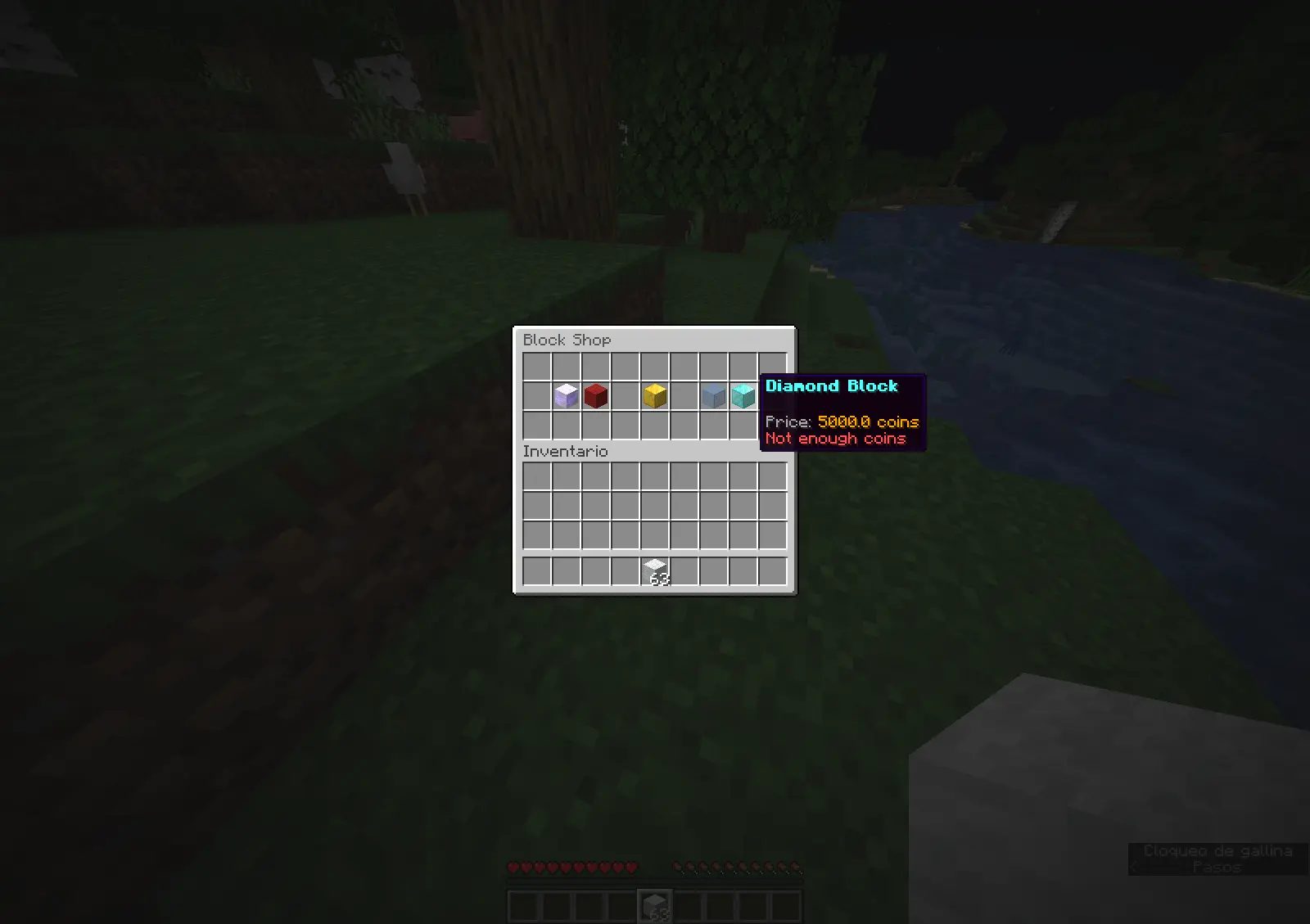
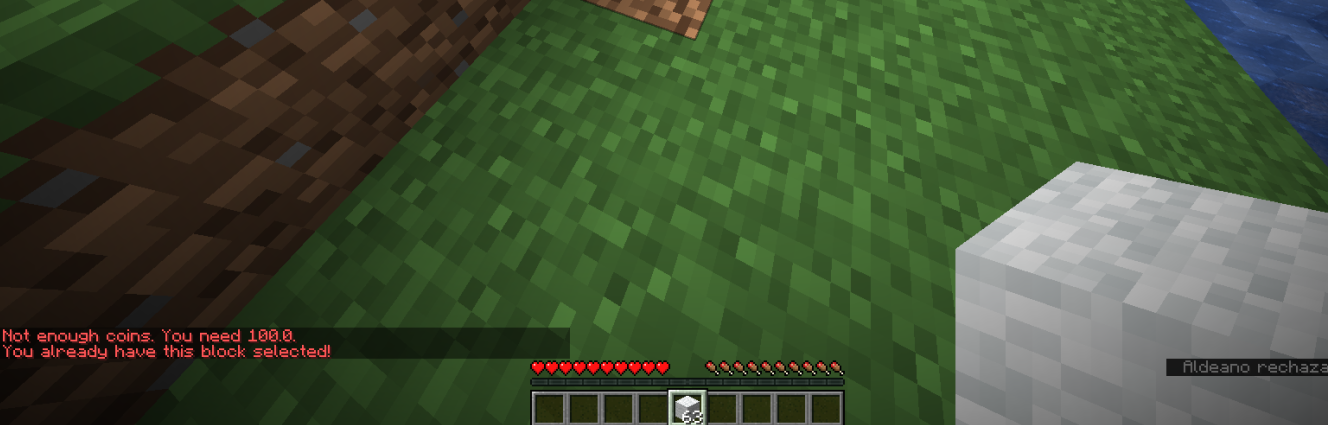
## 🏀Images

—
## 🚀 Commands & Permissions
*The commands are editable.*
| Command | Permission | Description |
| :— | :— | :— |
| `/xhubblocks` | `xhubblocks.admin` | View plugin info and help. |
| `/xhubblocks reload` | `xhubblocks.reload` | Reload the configuration file. |
| `/blocks shop` | `editable` | Block store. |
—
## 📊 Placeholders
Requires **PlaceholderAPI**.
* `%xhubblocks_placed_player%` – Total blocks placed by the player (Saved in DB).
* `%xhubblocks_placed_session%` – Blocks placed in the current session.
* `%xhubblocks_placed_total%` – Total blocks placed by everyone on the server.
—
## 👨💻 Developer API
Want to use xHubBlocks stats in your own plugin? It’s easy.
**1. Get the instance:**
“`java
if (Bukkit.getPluginManager().getPlugin(“xHubBlocks”) != null) {
xHubBlocksAPI api = xHubBlocksAPI.getApi();
// Get stats
int total = api.getPlayerTotalPlaced(player.getUniqueId());
}
“`
**2. Maven/Gradle:**
You can add the plugin as a dependency to your project.
—
## 📥 Installation
1. Download `xHubBlocks.jar`.
2. Drop it into your server’s `plugins` folder.
3. Restart your server.
4. (Optional) Edit `config.yml` to change the block style or database settings.
5. Enjoy!

Created with ❤️ by xPlugins
xHub
# 🛡️ xHub Core (Beta)
### The Ultimate All-in-One Lobby Solution | 1.20+




**xHub** is a high-performance, premium core designed to replace multiple lobby plugins.
It now includes advanced features like Parkour, Cosmetics, Developer API, and dynamic permissions.
[Discord Support](https://discord.gg/xplugins) • [Website](https://xplugins.es)

—
## ✨ Key Features (v1.0.1)
* **🏃 Parkour System:** Automatic checkpoints, rewards, void detection, and Double Jump.
* **🎩 Cosmetics:** Particle trails and hats with a GUI menu.
* **💻 Developer API:** `xHubAPI` class for easy integration with other plugins.
* **🎨 Full RGB/Hex Support:** Use `&#RRGGBB` colors anywhere.
* **📂 Modular Menu System:** Create unlimited GUI menus using YAML files.
* **📊 Animated Boards:** Flicker-free Scoreboard and Tablist (PAPI supported).
* **🎒 Hotbar Manager:** Custom items on join (Compass, PvP Sword, Cosmetics).
* **📢 Chat Manager:** Formatting with Rank support (`[Admin] Player: Hello`).
* **🤖 Discord Logs:** Built-in Webhooks for Join/Quit events.
—
## 🚀 Installation
1. Download `xHub-1.0.0.jar`.
2. Place it in your server’s `plugins` folder.
3. **(Required)** Install [PlaceholderAPI](https://papi.extendedclip.com/) for variables.
4. **(Optional)** Install [Vault](https://www.spigotmc.org/resources/vault.34315/) for economy rewards.
5. Restart the server.
—
## 📂 Directory Structure
“`text
plugins/xHub/
├── config.yml <-- Main settings
└── menus/ <-- Drop your menu files here
├── principal.yml <-- Main Menu
├── selector.yml <-- Server Selector
├── socials.yml <-- Social Media
└── cosmetics.yml <-- Cosmetics Menu
```
---
## 📜 Commands & Permissions
| Command | Permission | Description |
| :--- | :--- | :--- |
| `/xhub setlobby` | `xhub.admin` | Sets the spawn point. |
| `/xhub spawn` | `xhub.spawn` | Teleports you to the lobby spawn. |
| `/xhub reload` | `xhub.admin` | Reloads all configs and menus. |
| `/xhub menu ` | `xhub.menu` | Opens a specific menu. |
| `/xhub cosmetic` | `xhub.cosmetic` | Manage cosmetic effects. |
> **Note:** Permissions can be disabled in `config.yml` by setting them to `false`.
—
## 👨💻 Developer API
xHub exports a static API class for developers to hook into the core:
“`java
// Teleport a player to the Hub
xHubAPI.teleportToSpawn(player);
// Check if player is doing parkour
if (xHubAPI.isInParkour(player)) {
// do something
}
// Activate a cosmetic trail
xHubAPI.setTrail(player, “FLAME”);
“`
—
## 🛠️ Default Configuration
Below is the full generated `config.yml` file explaining every feature.
“`yaml
# _
# __ __ / /_ _| |__
# / // /_/ / | | | ‘_
# > Developed with ❤️ by **xPlugins.
Copyright** © 2026 xPlugins. All rights reserved.
xHeadTurns
# 💀 xHeadTurns
### Advanced Floating Heads, Holograms & Animations

[](https://discord.gg/mNdxNVx6cU)
[](https://modrinth.com/plugin/xheadturns)
[]()
—
## 📝 Overview
**xHeadTurns** is the ultimate solution for decorating your server lobbies, hubs, and spawn areas. Bring your server to life with fully interactive **Floating Heads** that support custom textures, real-time rotation, scaling, and dynamic holographic displays.
Now with a **Full In-Game Editor**, you can modify every property of your heads without ever touching a configuration file.
## ✨ Key Features
* **🎮 Full In-Game Editor:** Modify scale, speed, textures, and hologram lines in real-time with `/xhte`.
* **🎨 Custom Textures:** Support for **Base64** values (Minecraft-Heads) and **Player Names**.
* **🔄 Dynamic Rotation:** Fully customizable rotation speed and manual angle (Yaw/Pitch) control.
* **💬 Advanced Holograms:**
* Multi-line support with **HEX Colors** (e.g., `&#a7c7e7`).
* **PlaceholderAPI** support (updates based on the nearest player).
* Customizable backgrounds (RGB + Opacity), billboards, and shadows.
* **✨ Particle Animations:** Styles like `HELIX` and `SPHERE` with custom particle types.
* **⚡ Interactivity:** Execute **Console** or **Player** commands on click with per-head cooldowns.
* **🌍 Multi-Language:** 100% translatable (English and Spanish included).
—
## 🛠️ Commands & Permissions
| Command | Description | Permission |
| :— | :— | :— |
| `/xht help` | Shows the help menu with all commands. | `xheadturns.help` |
| `/xht list` | Opens a GUI with all active floating heads. | `xheadturns.list` |
| `/xhtc ` | Spawns a head at your target location. | `xheadturns.create` |
| `/xhtd ` | Deletes a specific floating head. | `xheadturns.delete` |
| `/xhtm ` | Moves a head to your current target location. | `xheadturns.move` |
| `/xhte ` | **Advanced Editor:** Edit any property in-game. | `xheadturns.edit` |
| `/xht reload` | Reloads configurations and head data. | `xheadturns.reload` |
—
## ⚙️ Advanced Editing Examples
Using the new **Editor System**, you can customize your heads on the fly:
“`bash
# Change the scale of a head
/xhte MyHead head scale 2.0
# Add a new line to a hologram
/xhte MyHead hologram add &fVisit our &b/store
# Change hologram background to a semi-transparent blue
/xhte MyHead hologram background 0,0,255 100
# Update head texture to a player’s skin
/xhte MyHead head texture Dream
“`
> ## 🚀 Installation
1. Download the xHeadTurns .jar.
2. Upload it to your /plugins/ folder.
3. Requirement: Ensure you have PlaceholderAPI installed for dynamic names.
– Restart the server.
> Use /xhtc to start creating your first floating heads!
> ## 🤝 Support & Community
Need help? Found a bug? Join our Discord server!
Plugin developed with ❤️ by xPlugins x WillfryDev
Copyright © 2026 xPlugins. All rights reserved.
xEvents
# ⚡ xEvents — Dynamic Automatic Events
> Keep your server alive. Surprise your players. Reward the brave.
**xEvents** automatically launches dynamic events on your server at random intervals — no admin input required. From meteor showers to acid rain, every event is a fully configurable experience that drives engagement and keeps your community coming back.
—
## 🎮 Built-in Events
### ☄️ Meteor Shower
Meteors fall from the sky targeting random players. Configure the block type, explosion radius, fire, damage, particles, and sounds. Players who survive until the end earn configurable rewards.
### 👾 Mob Invasion
Waves of buffed mobs spawn near players throughout the event. Customize which mobs spawn, how many, their health and damage multipliers, custom names, and loot drops. Top killers are rewarded at the end.
### ⚔️ PvP Tournament
Server-wide PvP is forced for the duration. A live sidebar scoreboard tracks kills in real time. Top 3 players earn configurable prizes. Disconnect to dodge? There’s a configurable punishment for that too.
### 🗺️ Treasure Hunt
A chest is secretly placed somewhere in the world. Players receive automatic directional hints (distance + compass direction) on a configurable interval. First to open it wins — and the chest loot is fully customizable.
### ☣️ Acid Rain
Rain turns toxic. Players standing outside take configurable damage and receive poison, wither, and slowness effects. Helmets reduce damage. A solid roof provides shelter. Players who survive earn rewards.
—
## ✨ Everything is Configurable
Every single setting of every event can be changed in `config.yml`:
– ⏱️ Auto-trigger intervals (min/max per event)
– ⚖️ Weighted random selection between events
– 💬 All messages (with full `&` color code support)
– 🔊 Sounds (broadcast sound, impact sounds, etc.)
– ✨ Particle effects
– 💥 Damage values, explosion radii, effect durations
– 🧟 Mob types, quantities, health/damage multipliers
– 📦 Loot tables with per-item drop chances
– 🏆 Reward commands (per survivor, top killer, winner, etc.)
– 🌍 Allowed worlds — globally or per event
– 🌐 Language — English or Spanish (`language: en` / `language: es`)
—
## 📋 Commands
| Command | Description |
|———|————-|
| `/xevents help` | Show the help menu |
| `/xevents list` | List all events and their status |
| `/xevents info` | Show info about the active event |
| `/xevents start [world]` | Manually start an event |
| `/xevents stop` | Stop the active event |
| `/xevents reload` | Reload config without restarting |
**Aliases:** `/xe`, `/events`
—
## 🔑 Permissions
| Permission | Default |
|————|———|
| `xevents.use` — View event info and list | Everyone |
| `xevents.start` — Start events manually | OP |
| `xevents.stop` — Stop active events | OP |
| `xevents.reload` — Reload configuration | OP |
| `xevents.bypass` — Ignore event effects (acid rain, etc.) | OP |
—
## 📦 Installation
1. Drop `xEvents.jar` into your `plugins/` folder
2. Start or restart your server
3. Configure `plugins/xEvents/config.yml`
4. Run `/xevents reload` — no restart needed
**Requires:** Paper or Spigot · Minecraft 1.20.1 – 1.21.x · Java 17+
—
*Made with ❤️ by Vnxsitoow for xPlugins*
xDay
Total
## xDay Time & Weather Control per World
Summary (Short Description)
Independently control the time and weather of each world. Set worlds to always be day, always night, rain-free, and customize all messages with full HEX color support!
Body (Full Description)
Tired of unpredictable weather in your lobby? Want to create a mining world that’s perpetually dark and storm-free? xDay is the definitive solution. This extremely lightweight and efficient plugin gives you absolute control over the day-night cycle and the weather, all on a per-world basis.
Its intuitive configuration and total message customization make it an essential tool for any server type, from Survival to minigames.
✨ Key Features
✅ Total Per-World Control: The main event! Assign a fixed time and weather to specific worlds (world, world_nether, lobby, etc.) and let the rest run normally.
⚙️ Simple & Intuitive Configuration: Everything is managed from a very easy-to-understand config.yml file. No complex in-game commands needed!
🎨 100% Customizable Messages: Edit every plugin message from messages.yml. Full support for classic Minecraft color codes (&a) and HEX color codes (<#FF5733>) for unique color palettes!
📖 Dynamic Help Menu: Add or remove lines from the help menu directly in the messages.yml file. Tailor the help message to your server!
🚀 Lightweight & High-Performance: Designed to be as efficient as possible, with no impact on your server’s performance.
🤝 Developer API: Includes a simple API for other plugins to hook into xDay and get a world’s configuration.
⌨️ Command Tab-Completion: The /xday help and /xday reload commands have tab completion for faster use.
🔧 Configuration
The plugin generates two configuration files in the /plugins/xDay/ folder.
config.yml
“`yaml
# _________ _____.__
# _ ___ ____ _____/ ______| ____
# / / / _ / __| |/ ___
# ___( <_> ) | | | / /_/ >
# ______ /____/|___| /__| |_____ /
# / / /_____/
# Hecho con amor por 777 Studios – xPlugins
# Configuración por defecto para mundos que no estén en la lista de abajo.
default-settings:
lock-weather: ‘disabled’ # Opciones: ‘clear’, ‘rain’, ‘disabled’
set-time: ‘disabled’ # Opciones: ‘day’, ‘noon’, ‘night’, ‘disabled’, o un número (0-24000)
# Configuración para mundos específicos.
worlds:
# Mundo principal normal
world:
lock-weather: ‘clear’
set-time: ‘day’
# Mundo del Nether
world_nether:
lock-weather: ‘disabled’
set-time: ‘disabled’
# Mundo del End
world_the_end:
lock-weather: ‘disabled’
set-time: ‘disabled’
# Ejemplo para un mundo de minería donde siempre es de noche:
# minas:
# lock-weather: ‘clear’
# set-time: ‘night’
“`
Messanges:
“`yaml
# _____ ____ ____ ___________ |__| ____ ______
# / _/ __ / / ___/__ | |/ __ / ___/
# | Y Y ___/| | \___ / __ _ | ___/ ___
# |__|_| /___ >___| /____ >(____ /__| |___ >____ >
# Hecho con amor por 777 Studios – xPlugins
# Usa colores HEX (<#RRGGBB>) o de Minecraft (&a, &b, etc.)
prefix: “<#FFB347> [xDay] ”
reload: “<#77DD77>¡La configuración y los mensajes han sido recargados!”
no-permission: “<#FF6961>No tienes permiso para ejecutar este comando.”
help-message:
– “&7—————–&f Ayuda de <#FFB347>xDay &7——————–”
– ”
– “<#AEC6CF> /xday help <#878787>➛&f Muestra este mensaje de ayuda.”
– “<#AEC6CF> /xday reload <#878787>➛&f Recarga la configuración del plugin.”
– “”
– “<#C3B1E1>💕 Plugin creado por WillfryDev. 💕”
– ”
– “&7—————————————”
“`
💻 Commands & Permissions
/xday help (Alias: /xd)
Description: Displays the configurable help menu.
Permission: xday.help (granted to all by default).
/xday reload
Description: Reloads the config.yml and messages.yml files without a server restart.
Permission: xday.reload (granted to OPs by)

📘 For Developers (API)
“`
xDay includes a static API to make integration with other plugins easy.
1. Add softdepend to your plugin.yml:
YAML
softdepend: [xDay]
2. Access the API in your code:
Java
// Check if xDay is on the server
if (getServer().getPluginManager().getPlugin(“xDay”) != null) {
// Get the API instance
jn.willfrydev.xday.api.xDayAPI api = jn.willfrydev.xday.xDay.getApi();
// Example Usage
World lobbyWorld = Bukkit.getWorld(“lobby”);
if (lobbyWorld != null) {
String weather = api.getLockedWeather(lobbyWorld); // Returns “clear”, “rain”, or “disabled”
String time = api.getLockedTime(lobbyWorld); // Returns “day”, “night”, etc.
System.out.println(“The weather in the lobby is locked to: ” + weather);
// You can also force an update
api.forceUpdate(lobbyWorld);
}
}
Download xDay and take absolute control over your worlds’ atmosphere!