Lifesteal-Plugin
# LifeSteal Plugin
A lightweight lifesteal plugin for Paper 1.21 and above build by theTWIXhunter
## Features
– **Heart Stealing**: When a player kills another player, the victim loses 1 heart and the killer gains it
– **Elimination System**: Execute custom commands when a player reaches less than 1 heart
– **World-Specific**: Only active in configured worlds
– **Configurable**: Fully customizable through config.yml
– **/giftheart**: Players can gift other players hearts, gifting hearts to an eliminated player revives them.
## Default Configuration
“`yaml
# +————————————————————————–+
# | ——====== Lifesteal PLUGIN ======—— |
# | — By TheTWIXhunter — |
# +————————————————————————–+
# | | |
# | More information about this config file can be found here: (WIP) |
# | https://thetwixhunter.nekoweb.org/lifesteal/guides/configuration.html |
# | |
# +————————————————————————–+
# +————————————————————————–+
# | ——====== GENERAL SETTINGS ======—— |
# +————————————————————————–+
# Messages file (located in the plugin’s folder)
# Set to ‘messages.yml’ to use the default messages file
# You can create custom message files and reference them here
messages-file: “messages.yml”
# Worlds where lifesteal is enabled
enabled-worlds:
– world
– world_nether
– world_the_end
# +————————————————————————–+
# | ——====== ELIMINATION & REVIVE SETTINGS ======—— |
# +————————————————————————–+
# Commands to run when a player reaches the elimination threshold (with operator permissions)
# Use %player% placeholder for the player’s name
elimination-commands:
– “kick %player% You have been eliminated!”
– “broadcast %player% has been eliminated from the server!”
– “ban %player% You ran out of hearts!” # REMOVE IF YOU DON’T WANT PLAYERS TO BE BANNED UPON ELIMINATION
# Revive settings
# Commands to run when a player is revived by an operator
# Users can revive other users by gifting them hearts.
revive:
# Hearts to set when a player is revived by an opertator (using the /lifestealplugin revive command.)
hearts: 10.0
# Commands to run when a player is revived (with operator permissions)
# Use %player% placeholder for the player’s name
commands:
– “broadcast %player% has been revived!”
– “pardon %player% You have been revived by an operator!” # REMOVE IF YOU DON’T WANT PLAYERS TO BE UNBANNED UPON REVIVAL
# +————————————————————————–+
# | ——====== HEARTS SETTINGS ======—— |
# +————————————————————————–+
# | The settings below are in hearts, not health points. |
# | (1 heart = 2 health points.) |
# | Please always check this to avoid issues with heart values. |
# | You can use decimal values for hearts but only .5 increments |
# | (e.g., 0.5 = 1 health point, Minecraft’s minimum). |
# +————————————————————————–+
hearts:
# Amount of hearts a new player starts with
starting: 10.0
# Amount of hearts gained/lost per kill (1 heart = 2 health points)
amount: 1.0
# Hearts at or below which a player gets eliminated (0.5 = 1 health point, Minecraft’s minimum)
eliminate-at: 0.5
# Maximum hearts a player can have
maximum: 20.0
# Heart crafting recipe
crafting:
# Enable or disable heart crafting
enabled: true
# Recipe pattern (3×3 crafting grid)
# Use material names from https://hub.spigotmc.org/javadocs/spigot/org/bukkit/Material.html
recipe:
row1: “DIAMOND,GOLD_INGOT,DIAMOND”
row2: “REDSTONE,NETHER_STAR,REDSTONE”
row3: “DIAMOND,EMERALD,DIAMOND”
“`
## Building
Run `mvn clean package` to build the plugin. The compiled JAR will be in the `target` folder.
## Installation
1. Build the plugin or download the JAR
2. Place the JAR in your server’s `plugins` folder
3. Restart the server
4. Configure the plugin in `plugins/LifeSteal/config.yml`
5. Reload or restart the server
## Author
me.thetwixhunter
TwitchRandomizer
# TwitchRandomizer


TwitchRandomizer is a powerful Minecraft (Paper 1.21+) plugin that brings interactive, randomized challenges to your server — all controlled by your Twitch viewers! It seamlessly integrates your Minecraft gameplay with Twitch chat, letting your audience influence and trigger in-game events in real time.
—
## 📌 Key Features
– **Twitch Chat Integration:**
Twitch viewers can trigger random events by subscribing or donating bits to your channel!
– **Play this Challenge with your Twitch Friends:**
The plugin can read subscriptions and bits from multiple Twitch accounts — including StreamElements and Tipeeestream donations. So you can play this challenge with your Twitch friends!
– **StreamElements & Tipeeestream Donation Integration:**
Donations via StreamElements or Tipeeestream trigger in-game events. Both support **multiple streamer accounts simultaneously**. Configuration is done exclusively via `donations.yml` in the plugin folder.
– **Channel Name Display:**
When playing with multiple Twitch channels, the source channel is shown in brackets after every trigger — e.g. `exnfachjan (fuxelbau) deals 4 hearts`.
– **Twitch Role Colors:**
Viewer names appear color-coded in Minecraft chat — Broadcaster (red), Moderator (green), VIP (pink), Donation (aqua), and regular viewers (white).
– **Event Weighting and Customization:**
Adjust the likelihood of each event — make some more common, some rare, or disable them entirely. Easily reload or adjust settings on the fly. Reset all weights to defaults with one click.
– **Recent Event Cooldown:**
A built-in cooldown system reduces the chance of the same event appearing multiple times in a row, automatically — no configuration needed.
– **Synced Multi-Player Events:**
When playing with multiple players, all random values within an event (duration, item, mob type, etc.) are identical for every player. No more player 1 getting 10 seconds of Floor is Lava while player 2 gets 69.
– **Spectator After Death:**
When a player dies, all players are moved to Spectator mode simultaneously. The timer and queue pause until a new run begins. Configurable per-run as “Tries” (team lives) or classic “Deaths” counter.
– **Death Counter and Statistics:**
Built-in death tracking and player statistics, perfect for challenge runs and community competitions.
– **Queue System:**
Viewer-triggered events can be queued and managed, ensuring smooth pacing and no event spam. The queue persists across server restarts and world resets!
– **Pause System:**
Timer and queue automatically pause when a player is in the death screen or when all players are in spectator mode. Fully configurable.
– **Pause Aura:**
When the timer is paused, a spiral flame particle aura appears around all online players — a clear visual indicator that the challenge is on hold.
– **Graphical Interface (GUI):**
Tweak plugin settings, manage event weights, control the timer, and configure behaviors directly from an in-game GUI. Perfect for easy setup without any OP permissions!
– **Multi-Language Support:**
Full German and English UI with automatic client language detection. Players can override their language in the GUI.
– **Session and World Reset:**
Reset your seed after a death if you want a REAL challenge! Supports BungeeCord fallback servers.
—
## ✔️ Main Commands
– `/trgui` — Open the graphical config GUI.
Optional commands (not necessary, because you can manage everything seamlessly from the GUI):
– `/timer` — Start, stop, pause, or reset the challenge timer.
– `/reset` — Initiate a world/session reset with confirmation.
– `/queue add ` — Manually add events to the queue.
– `/cleardeath` — Clear the death counter.
– `/trconfig` — Configure the plugin via command (tab completion supported).
—
## 🎉 Events
| Event | Description |
| ——————— | ——————————————————————————– |
| **spawn_mobs** | Spawn random mobs near the player (hostile mobs chase you!) |
| **potion** | Apply a random potion effect |
| **give_item** | Give a random item |
| **clear_inventory** | Clear random slots from the player’s inventory |
| **teleport** | Teleport to a random location (safe Y-level) |
| **damage_half_heart** | Take heart damage |
| **fire** | Set the player on fire |
| **inv_shuffle** | Shuffle the entire inventory |
| **hot_potato** | A fast zombie chases you — if it catches you, it explodes! |
| **no_crafting** | Block crafting for a random duration (with boss bar countdown) |
| **safe_creepers** | Creepers surround you clock-style and explode (no damage, no block destruction) |
| **floor_is_lava** | The floor beneath you turns to magma blocks (with block restore) |
| **nasa_call** | Launch the player sky-high |
| **slippery_ground** | The ground turns to packed ice (with block restore) |
| **hell_is_calling** | Homing fireballs rain down on you |
| **tnt_rain** | TNT Minecarts rain from the sky |
| **anvil_rain** | Anvils fall from the sky |
| **skyblock** | All players are teleported together — surrounding chunks get deleted! |
| **fake_totem** | Receive a Totem of Undying that doesn’t actually work |
| **equipment_shuffle** | All tiered tools and armor in your inventory are randomly upgraded or downgraded |
—
## 🛠 Getting Started
You can configure the plugin through the config.yml or without OP permissions directly through the GUI in-game.
1. **Install:**
Place `TwitchRandomizer.jar` into your server’s plugins folder.
2. **Configure Twitch Integration:**
– Open the GUI with `/trgui`; in the top left, you’ll find the “twitch-info” book.
– Insert your `Broadcaster Username` by left-clicking on the book, then confirm with `done`.
You can enter multiple channels separated by commas, semicolons, or new lines.
– Insert your `Bot OAuth` by right-clicking on the book, then confirm with `done`.
You can get your OAuth token here: https://twitchtokengenerator.com/quick/1KRFjxyoNE
Make sure the following scopes are active: `bits.read`, `chat:read`, `channel:read:subscriptions` and `user:read:subscriptions`.
3. **Configure StreamElements (optional):**
Edit `plugins/TwitchRandomizer/donations.yml` — this file is created automatically on first start and is **never overwritten** by the plugin.
“`yaml
se_enabled: true
se_accounts: “YOUR_CHANNEL:YOUR_JWT_TOKEN”
“`
For multiple streamers, separate entries with a semicolon:
“`yaml
se_accounts: “Channel1:JWT1;Channel2:JWT2”
“`
Get your JWT token from: https://streamelements.com/dashboard/account/channels
4. **Configure Tipeeestream (optional):**
In the same `donations.yml`:
“`yaml
tipeee_enabled: true
tipeee_accounts: “YOUR_CHANNEL:YOUR_APIKEY”
“`
Multiple accounts work the same way: `”Ch1:KEY1;Ch2:KEY2″`
Get your API key from: https://tipeeestream.com/dashboard/stream
After editing `donations.yml`, apply it in-game with `/trconfig donations reload` — no server restart required.
5. **Reload/Restart:**
If you use the GUI, you don’t need to restart the server.
6. **Set up your trigger**
You can test your connection. With the test triggers enabled (find them in the `Debug Menu`), you can simulate events like a sub (`!test`), a gift sub (`!gift`), or a sub gift bomb (`!giftbomb [N]`).
**MAKE SURE YOUR TIMER IS RUNNING! OTHERWISE, YOU CAN’T ADD EVENTS TO THE QUEUE THROUGH TWITCH!**
If you want to add some events to the queue, you can simply use the command `/queue add `. This also works when the timer isn’t running!
—
## 🔍 Permissions for non-OP users (LuckPerms required)
| Permission | Description |
| —————————– | ——————————- |
| twitchrandomizer.gui | Full GUI access (super-node) |
| twitchrandomizer.gui.use | Use GUI (basic) |
| twitchrandomizer.admin.save | Save & hot-reload config |
| twitchrandomizer.admin.edit | Edit values via GUI |
| twitchrandomizer.admin.twitch | Set Twitch channel/token |
| twitchrandomizer.timer.start | Start the timer |
| twitchrandomizer.timer.stop | Stop/pause the timer |
| twitchrandomizer.timer.reset | Reset the timer |
| twitchrandomizer.reset | Reset flow |
| twitchrandomizer.reset.force | Force reset (skip confirmation) |
The GUI uses sensible permission checks for each action.
## 📎 Requirements
– Minecraft Paper server 1.21+
– Java 21 or newer
– Twitch account (at least affiliate) and OAuth token for chat integration
—
## 📋 Changelog
### v1.5.0
– **Tipeeestream multi-account support** — `donations.yml` now uses `tipeee_accounts` with the same `”Channel:APIKEY;Channel2:APIKEY2″` format as StreamElements.
– **Channel tag display** — When playing with multiple Twitch channels, the source channel name is shown in brackets after every event trigger.
– **Synced multi-player events** — All random values (duration, item, mob type, potion effect, etc.) are now identical for every player in the same event dispatch.
– **Skyblock team fix** — All players are now teleported to a single meeting point before chunks are cleared. Prevents players from voiding each other.
– **Spectator-after-death team fix** — When a player dies, all online players are now moved to Spectator simultaneously. Timer and queue pause correctly.
– **Tries vs Deaths counter** — When Spectator-after-death is enabled, the counter is labeled “Tries/Versuche” and only counts once per team-death. When disabled, it counts individual deaths as before.
– **Euro/Event maximum** — The donation value per event is now capped at 5.0€ (the standard price). You can only go lower, not higher.
– **Recent event cooldown** — A new anti-repeat algorithm reduces the weight of recently triggered events for the next 2–3 picks, making the event pool feel more varied.
– **Queue pause on all-spectator** — Timer and queue now correctly pause as soon as all players are in Spectator mode.
### v1.4.0
– **New event: `equipment_shuffle`** — All tiered tools and armor in the inventory are randomly upgraded or downgraded by one tier. Enchantments, display names, and lore are preserved.
– **StreamElements donation integration** — Donations via StreamElements now trigger in-game events. Supports multiple streamer accounts simultaneously.
– **Pause aura** — A spiral flame particle effect is displayed around all online players while the timer is paused.
– **Weights:** small default value changes.
### v1.3.1
– Initial public release.
—
## 🗝 Credits
Built by exnfachjan with the help of AI (Claude by Anthropic).
Thanks to the Paper/Spigot communities and Twitch4J for solid foundations.
—
## 🔒 License
This project is licensed under the **GNU General Public License v3.0** —
see [LICENSE](LICENSE) for details.

—
## ❤️ Support
Do you like my plugin? Feel free to support my work: https://streamelements.com/exnfachjan/tip
TwitchINT
_TwitchINT_ , **Integrate your twitch chat into minecraft**.
Hello,i am making this plugin because i want streamers to get a unique experience with their twitch chat, and yes i will be updating it everyweek not everyday, this plugin is only in french (TEMPORARY) so dont get mad i will translate everything to english soon
## KEY FEATURES :
Spoiler
1) when your twitch chat does !join an npc spawn with their name.
2) the player can do !jump to jump and !leave to leave and !chat “message” to send messages in the chat.(more commands in the future updates)
3) the streamer can do /settings for settings or /twitchint kick to kick a player from the game.(more commands in the future updates)
**HOW TO SETUP THIS PLUGIN INTO YOUR MINECRAFT SERVER:(only text but video pretty soon)**
first install it and make sure its on paper, then go to config.yml and change your channel username and verification oaunth token(go to https://twitchtokengenerator.com and click on bot chat token, then authorize your account then copy click acces token), after that restart your minecraft server then there you go you have a working twitch int plugin !
## changelog :
### 1.1.0 :
added /twitchint freeze and /twitchint unfreeze for npc’s , added /twitchint stop and /twitchint start for lettings viewrs join or not, added /twitchint onelife on/off for making a player if it dies it doesnt respawn.
### 1.3.0 :
fixed the whole plugin and now it works, now its a dependency to have Citizens 2 plugin in your minecraft server.
Turbosled
Turbosled is a Minecraft paper plugin that allows you to equip a sled and go sledding!
It features wall sliding, jump boosts, and incredibly fun physics
# Getting started
Use this recipe to craft a Sledder:
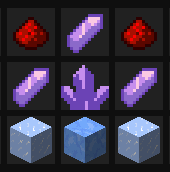
Or use this command with operator permissions:
“`
/give @p amethyst_shard[custom_name='{“italic”:false,”text”:”Sledder”}’] 1
“`
# Usage
Once you have your Sledder item, you can right-click it to begin sledding, and right-click again to stop.
If you ride against a wall and are not touching the ground, you’ll perform a wallslide
And if you ride over a lime concrete block, you’ll perform a jump boost, which you can adjust your pitch to change the way it jumps.
You can also ride over slabs to go up blocks
Tunnel Rats
# Tunnel Rats
### Xisuma has released an official version of his Tunnel Rats game here. Go check that out instead!
—
A recreation of the Tunnel Rats game by Xisuma on the Hermitcraft server. Create custom tunnels with ease and play with your friends in 2 or 4 teams modes!
## How to Setup
This plugin requires Java 21+. Please ensure `enable-command-block` in `server.properties` is set to `true`.
Download the plugin from the Versions tab. This plugin requires WorldEdit to function, so download the correct version of WorldEdit as specified. Upon server startup, a `world.zip` file will be created in the server’s root directory. Unzip the file and replace the default `world` folder with the file. The plugin **must** be used together with that specific world.
## Features
– `/tunnel ` – Generates the specified tunnel. Omit `` to list all tunnels.
– `/start` – Starts the game.
– `/savemiddle ` – Teleports the player to the correct postion to save the middle schematic file.
– `/mode` – Switch between 2 and 4 teams mode.
You will need OP permissions to run these commands.
## Creating custom tunnels
The data for each tunnel is stored in YAML files inside the folder `plugins/TunnelRats/tunnels/`. Custom tunnels can be created by adding new YAML files that follow the tunnel template. A detailed explanation of the tunnel template can be found in the README files inside the `plugins/TunnelRats/` folder.
TSManhunt

1. Mode Selection
Players can choose a game mode before starting the game.
Available Modes:
Normal Mode:
The Runner gets basic items like stone tools (wooden sword, stone pickaxe, 24 bread). Hunters receive 24 bread and a wooden sword. In the menu, the wooden sword appears as a stone axe.
OP Mode:
The Runner gets netherite axe, diamond sword, diamond pickaxe, and 34 steaks. Hunters get iron axe, iron sword, iron pickaxe, and 34 steaks.
Ultra OP Mode:
The Runner gets enchanted netherite axe, enchanted diamond sword, enchanted diamond pickaxe, 64 steaks, and full diamond armor. Hunters receive enchanted diamond sword, enchanted diamond axe, enchanted diamond pickaxe, 64 steaks, and full iron armor.
2. Game Start Process & Mode Voting
At the start of the game, players can select a mode.
There is a vote for the mode selection. The mode with the most votes becomes active. If no mode is voted, the Normal Mode will be selected by default.
Players cannot start the game without selecting a mode.
3. Slot Usage & Menu
Slot 0: Queue to join the game
Slot 4: Mode Selection Menu (where players select the mode)
Slot 8: Leave the game
The mode selection can be done via a compass. Players click the compass to choose a mode.
4. Player and Runner Count
As the number of players increases, the number of Runners also increases:
15 players = 2 Runners
30 players = 3 Runners
Every 15 additional players adds 1 more Runner.
Runners cannot attack each other: PVP is disabled between Runners.
5. Compass Usage
Hunters can use the compass to follow the nearest Runner. This compass is only valid for Hunters.
6. Wait Time After Game Ends
There is a 10-second waiting period after the game ends. During this time, the winning team (Runner or Hunter) is decided.
7. Runner-Specific Features
The items for Runner players vary based on the selected mode (Normal, OP, Ultra OP).
Hunters receive different items, and the differences between Hunter and Runner are defined based on the selected mode.
8. Lobby Return
After the game ends, players automatically return to the lobby.
Additionally, spec mode is activated, and players return to survival mode after the game.
Technical Details:
Customizable Settings for the Game: The plugin’s features can be customized using a configuration file, allowing the server admins to adjust a wide range of settings.
Placeholder API Support: There are placeholders available to display in-game statistics, game times, and more. This makes it easy to customize in-game text and data.
High Performance: The plugin is optimized to handle large player counts, ensuring smooth performance even with a significant number of players.
Extra Features:
Statistics Tracking: Players’ wins, losses, kills, deaths, and total games played are tracked and displayed in-game.
Advanced Menu System: With user-friendly interfaces and menus, players can easily make their selections (such as choosing a mode, joining a game, etc.).
Flexible Configuration: The config file is designed to allow for complete customization, making it easy to change modes, items, PVP rules, and much more.
“`
TSManhunt 1.1.0 Update is here!
– Mod Selection Menu
– +1 Runner for every 15 players
– Performance Improvements
“`
When the Ender Dragon is killed, the game automatically ends and the winner is determined
The plugin is fully optimized for competitive gameplay and is suitable for public servers.

“`
%tsmanhunt_games% → Total games played
%tsmanhunt_wins% → Total wins
%tsmanhunt_losses% → Total losses
%tsmanhunt_points% → Total points
%tsmanhunt_runner_wins% → Wins as Runner
%tsmanhunt_hunter_wins% → Wins as Hunter
%tsmanhunt_kills_as_hunter% → Kills made as Hunter
%tsmanhunt_runner_deaths% → Runner deaths
%tsmanhunt_dragon_kills% → Ender Dragon kills
%tsmanhunt_best_time% → Best win time
————————–
%tsmanhunt_top1%
%tsmanhunt_top2%
%tsmanhunt_top3%
“`

**Config**
Spoiler
“`
settings:
startPlayers: 10 # kaç kişi olunca sayaç başlasın
maxPlayers: 50 # sıraya en fazla kaç kişi girebilsin (oyun maksimum)
countdownSeconds: 50
headstartSeconds: 10
# Tracker
trackerUpdateSeconds: 1
requireSameDimensionForCompass: true
# Mode preset (NORMAL, OP, ULTRA_OP)
defaultMode: NORMAL
# Join behavior
clearInventoryOnJoinGame: true
teleportOnJoinGame: “lobby”
ui:
display-name: “TSManhunt” # menüde görünen isim
menu-title: “&3TSManhunt” # envanter menü başlığı
actionbar:
enabled: true
prefix: “&bTSManhunt&r”
countdown: “&6{prefix} &7• &eBaşlıyor: &f{seconds}s &7• &eSıra: &f{count}&7/&f{max}”
headstartRunner: “&a{prefix} &7• &2KAÇ! &7({seconds}s)”
headstartHunter: “&c{prefix} &7• &4BEKLE! &7({seconds}s)”
runningHunter: “&b{prefix} &7• &eRUNNER: &f{runner} &7• &eMesafe: &f{distance}m”
runningRunner: “&a{prefix} &7• &2KAÇIYORSUN &7• &eHunter: &f{hunters}”
# Placeholder: {count} {start} {max} {seconds} {runner}
titleCountdown: “&6Oyun başlıyor: &e{seconds}s”
titleHeadstart: “&eHeadstart: &a{seconds}s”
titleRunning: “&bRunner: &a{runner} &7| &eTakip aktif”
arenaReset:
enabled: true
# Reset worlds after game ends. Use DEDICATED arena worlds only!
# If worlds is empty -> arena world + suffixes
worlds: []
netherSuffix: “_nether”
endSuffix: “_the_end”
denyJoinWhileResetting: true
# Spawns (use /tsmanhunt setlobby and /tsmanhunt setarena)
spawns:
lobby: “”
arena: “”
lobbyProtection:
enabled: true
blockBreak: true
blockPlace: true
pvp: true
mobSpawn: true
titles:
enabled: true
runnerWin:
title: “&a{player}”
subtitle: “&eOyunu Kazandı!”
huntersWin:
title: “&cHunterlar!”
subtitle: “&eOyunu Kazandı!”
messages:
start_sound: “ENTITY_PLAYER_LEVELUP”
prefix: “&b[TSManhunt]&r ”
join_game: “&aTSManhunt’e katıldın!”
already_joined: “&eZaten TSManhunt’tesin.”
need_join_first: “&cÖnce menüden oyuna gir!”
leave_to_lobby: “&eLobiye döndün.”
queue_joined: “&aSıraya girdin. (&e{count}&7/&e{max}&a)”
queue_left: “&eSıradan çıktın. (&e{count}&7/&e{max}&e)”
queue_full: “&cSıra dolu! (&e{max}&c)”
mode_voted: “&d{player} &7mod için oy verdi: &f{mode}”
mode_selected_final: “&6Oylama bitti! Seçilen mod: &f{mode}”
countdown_start: “&6{start} kişi tamam! Geri sayım başladı: &e{seconds}&6 saniye”
countdown_cancel: “&cYeterli oyuncu kalmadı. Geri sayım iptal!”
runner_title: “&aRUNNER”
runner_subtitle: “&e{seconds} saniye kaç!”
hunter_title: “&cHUNTER”
hunter_subtitle: “&e{seconds} saniye bekle!”
start_title: “&6BAŞLA!”
start_subtitle: “&7Runner’ı yakala!”
runner_left: “&cRunner oyundan çıktı! Hunter kazandı.”
runner_dead: “&cRunner öldü! Hunter kazandı.”
dragon_dead: “&aEnder Dragon öldü! Runner kazandı.”
reset: “&7Oyun sıfırlandı.”
no_permission: “&cYetkin yok.”
spawn_set_lobby: “&aLobby spawn ayarlandı.”
spawn_set_arena: “&aArena spawn ayarlandı.”
spawn_missing: “&cSpawn ayarlı değil. /tsmanhunt setlobby ve /tsmanhunt setarena kullan.”
arena_resetting: “&eArena sıfırlanıyor, lütfen bekle…”
arena_reset_done: “&aArena sıfırlandı!”
# — Stats / Leaderboard —
stats:
storage: sqlite # sqlite | yaml
leaderboardSize: 10
points:
runnerWin: 3
hunterWin: 1
titlesEnabled: true
“`
**Start.bat**
Spoiler
“`
@echo off
title TSManhunt Server 1.20.4
color a
echo ===============================
echo TSManhunt 1.20.4 Sunucu
echo ===============================
:: RAM AYARI
set MIN_RAM=2G
set MAX_RAM=4G
:: Paper jar adı
set JAR=paper-1.20.4.jar
:: eula kontrol
if not exist eula.txt (
echo eula=true > eula.txt
echo EULA kabul edildi.
)
:START
echo Sunucu baslatiliyor…
java -Xms%MIN_RAM% -Xmx%MAX_RAM% -jar %JAR% nogui
echo.
echo Sunucu kapandi. 5 saniye sonra yeniden baslatiliyor…
timeout /t 5
goto START
“`

“`
/tsmanhunt stats [player] – statistics
/tsmanhunt top
/tsmanhunt setlobby – Set spawn point for lobby
/tsmanhunt setarena – Set spawn point for arena
/tsmanhunt stop – stop the game
/tsmanhunt status – debug status
/tsmanhunt resetme – It resets itself in the lobby.
/tsmanhunt reload – config reload
/tsmanhunt resetstats [player] – stats zeros
/tsmanhunt help
“`
TSLscale
# TSLscale – Minecraft body size adjustment plug-in
## Introduction
TSLscale is a body size adjustment plug-in designed for Minecraft servers, allowing players to dynamically adjust their character size. Whether you want to be smaller, cute, or taller, TSLscale can meet your personal needs!
## Functional Features
– 🎮 **Simple and easy to use** – Adjust body shape with just one command
– 🔒 **Permission Control** – Flexible permission system ensures server security
– 📝 **Smart Completion** – Support Tab key automatic completion command
– ⚡ **Effect instantly** – Body size adjustments take effect immediately without logging in again
– 🎨 **Custom configuration** – Customize body size range and all message texts
– 🔄 **Hot reload** – Supports configuration file hot reload without restarting the server
## compatibility
– **Minecraft version**: 1.21+
– **Server Type**: Spigot, Paper, Folia
– **Java Version**: Java 21+
## Installation method
1. download`TSLscale.jar`document
2. Put the file into the server`plugins`Folders
3. Restart the server or use`/reload`Order
4. The plugin will automatically generate configuration files
## Command usage
### Basic commands
“`
/TSLscale – Adjust size to specified size
/scale – Command abbreviation
“`
### Functional examples
“`bash
# Adjust size to 0.8 times (to get smaller)
/TSLscale 0.8
/tscale 0.8
# Adjust size to 1.1 times (to grow larger)
/TSLscale 1.1
/tscale 1.1
# Reset body size to default size
/TSLscale reset
/tscale reset
“`
### Administrator commands
“`bash
# Reload plugin configuration (OP only available)
/TSLscale reload
/tscale reload
“`
## Permission system
| Permission Node | Description | Default Value |
|———|——|——–|
| `tslscale.use`| All players |
| `tslscale.reload`| Allow reload plugin configuration | OP only |
### Permission configuration example
Use permission management plugins (such as LuckPerms) to configure permissions:
“`bash
# Give players permission to use
/lp user permission set tslscale.use true
# Give administrators permission to reload
/lp user permission set tslscale.reload true
“`
## Configuration File
After the plugin is run for the first time, it will be in`plugins/TSLscale/`Generate in the directory`config.yml`Configuration file:
“`yaml
# Body size adjustment range
scale_min: 0.8 # Minimum size (0.8 times)
scale_max: 1.1 # Maximum size (1.1 times)
# Message configuration
messages:
prefix: “&c[TSL Meow]&r ”
set: “%prefix%Your body size is adjusted to %scale%”
reset: “%prefix%Your body size is restored to default”
usage: “%prefix%Usage: /TSLscale ”
no-permission: “%prefix%You don’t have permission”
console-only: “%prefix%Only players can execute this command”
“`
### Configuration instructions
– **scale_min/scale_max**: Set the allowed body size adjustment range
– **messages**: Customize all plug-in messages, support color codes (&a, &c, etc.)
– **%prefix%**: Message prefix placeholder
– **%scale%**: Body size numerical placeholder
## Use scenarios
### Suitable use
– 🎭 **Roleplay Server** – Play roles of different races or ages
– 🏗️ **Building Server** – Adjust the size to enter the small space to build
– 🎪 **Entertainment Server** – Increase the fun and interactive game
– 📸 **Screenshots and photos** – Adjust your body shape to get better photo effects
### Body size suggestions
– **0.8** – Small and cute, suitable for children’s roles
– **0.9** – Slightly small in size, suitable for teenagers
– **1.0** – Default body type (for reset)
– **1.1** – Tall and large, suitable for adult roles
## Frequently Asked Questions
### Q: Why did I change after adjusting my body shape?
A: Please make sure:
1. You have`tslscale.use`Permissions
2. The input value is within the configuration range (default 0.8-1.1)
3. Server version support (requires 1.21+)
### Q: Will body size adjustment affect the balance of the game?
A: Body size adjustment is mainly visual effects, which has little impact on the game mechanism. It is recommended that administrators set the adjustment range reasonably according to the server type.
### Q: Can you adjust the body size of other players?
A: The current version only supports adjusting your own body shape. Subsequent versions may add the function of administrators to adjust other people’s body shapes.
### Q: Will the size reset after restarting the server?
A: Yes, body size adjustment will not be saved permanently, and it needs to be reset after restart.
## Technical support
If you encounter problems or have functional suggestions, please contact:
– **Author**: Zvbj
– ** Version**: 1.0-SNAPSHOT
– **Support**: TSL server
## Update log
### v1.0-SNAPSHOT
– First release
– Basic body size adjustment function
– Permission system
– Configuration file support
– Tab completion function
—
Thanks for using TSLscale! Hopefully this plugin will add more fun to your Minecraft experience! 🎮✨
Three Slots Challenge
## **MAKE SURE TO NOT ENTER A WORLD YOU LIKE WITH THE MOD.**
### **Welcome to THREE Slots Challenge!**
– **About the datapack**
– **You have 3 slots.**
– **Offhand is available!**
### **How to Install Resource Pack**
– **Press the DOWNLOAD button**
– **Open the File**
– **Grab the resource pack and put it in Resource Pack Folder**
– **Activate the resource pack**
### **How to Install Datapack**
– **If you already have the File, Open it and follow the instructions down below!**
– **Go to SINGLEPLAYER, CREATE NEW WORLD, MORE, DATA PACKS, OPEN PACK FOLDER and put the datapack inside.**
– **Activate the Datapack and you are ready to go.**
TrustMeBro – Bundle
TrustMeBro – Bundle brings the funniest and most ridiculous features inspired by the r/shittymcsuggestions community straight to your Minecraft server. Enable or disable each challenge with simple commands and enjoy chaotic, meme-worthy gameplay with your friends. Perfect for streamers, community servers, or anyone looking to spice up their Minecraft experience with unexpected twists!
– Features / Commands:
– /extremebabyzombie on|off — Toggle if baby zombies are extreme
– /shearmobs on|off — Toggle if you can shear: Villagers, Endermen, Spiders, Striders
– /breadrename on|off — Toggle bread rename (to “Raw Toast”) and potatoes to “Raw Potatoes”
– /powderwater on|off — Toggle if powder dissolves in water
– /nearmobsbecomeinvis on|off — Toggle if near mobs become invisible
– /moss on|off — Toggle if moss duplicates in your inventory and if moss is edible
– /sunblind on|off — Toggle if you could be blinded by looking directly at the sun
– /trowabledragonegg on|off — Toggle if you can throw the dragon egg, like an normal egg, to spawn the ender dragon
– /hotsand on|off — Toggle whether you take damage while sneaking on sand.
– /throwingsnowballvillager on|off — Toggle if you become a really cool advancement if you throw a snowball against a villager.
CODE MADE BY ME!
Keywords:
minecraft, plugin, fun, meme, r/shittymcsuggestions, challenge, bundle, chaos, minigame, server, dumb ideas, community, gameplay, commands
TrustButton
# TrustButton – A Dynamic Path and Area Toggle System for Paper and Purpur (Minecraft 1.20+)
TrustButton introduces a clean and powerful system that allows server administrators to create special buttons which toggle a custom path or area on and off. When a player interacts with a Trust Button, the plugin hides or restores selected blocks and broadcasts a global message. This creates dynamic gameplay moments that fit perfectly into adventure maps, quests, puzzles, parkour shortcuts, and event-based mechanics.
—
## Overview
A Trust Button is a custom button created by an admin. Each button can be linked to a set of blocks that will vanish or reappear when the button is clicked. The system is fully configurable, persistent across restarts, and designed to work smoothly on both Paper and Purpur servers running Java 17 or higher.
The plugin also includes an admin GUI that provides full control over all registered Trust Buttons.
—
## Key Features
– Create custom Trust Buttons using /trustbutton create
– Define toggleable areas using /trustbutton areacreate
– Blocks disappear when activated and return when deactivated
– Global messages for activation and deactivation
– Fully configurable messages with HEX color support
– Persistent storage in data.yml
– Safe event handling to prevent item stealing or accidental breaking
– Tab completion for all commands
– Works on Paper and Purpur for Minecraft 1.20 and above
—
## Admin GUI
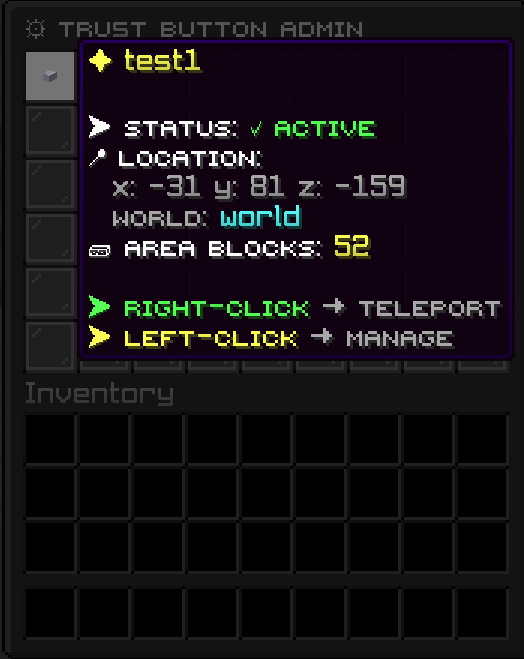
The command /trustbutton admin opens a management GUI that displays all Trust Buttons placed in the world.
Each button entry in the GUI includes:
– Left-click: Opens a detailed button menu with options such as delete and view coordinates
– Right-click: Instantly teleports the admin to the button’s location
– Visual list of all registered buttons for quick navigation
This makes it easy to manage large numbers of buttons across multiple worlds.
—
## Commands
/trustbutton create
Gives the admin a special Trust Button item.
/trustbutton areacreate
Gives area-defining blocks linked to the selected button.
/trustbutton admin
Opens the admin GUI showing all Trust Buttons, with teleport and management options.
/trustbutton reload
Reloads the plugin configuration.
Permission required: trustbutton.admin
—
## Configuration
The plugin includes a clean and simple config.yml that allows you to customize:
– Activation and deactivation messages
– HEX color formatting
– General behavior settings
All button data, block locations, and toggle states are stored in data.yml and persist after server restarts.
—
## Use Cases
TrustButton is ideal for servers that want interactive world mechanics, including:
– Adventure maps with hidden or timed paths
– Parkour shortcuts that open and close
– Dungeon puzzles and quest triggers
– Secret entrances and hidden rooms
– Event-based toggles for server activities
– Roleplay mechanics that require world interaction
—
## Compatibility
– Minecraft 1.20+
– Java 17+
– PaperMC and Purpur
TrustButton is designed to be lightweight, stable, and easy to integrate into any server environment that needs interactive world elements.