# 
VanillaFactions allows survival players to create, join, and edit teams without using the /team command (or any commands, for that matter). Features include:
– Choosing a custom team name.
– Choosing a team color from 16 options, with no restrictions on duplicate colors.
– Choosing a custom team prefix, which displays before player usernames in chat and nametags.
– Support for up to 32 teams in a server.
By default, teams prevent friendly fire between team members, and allows players to see their invisible team members.

## Creating and Disbanding Factions
1. Make a Banner.
2. Give the Banner a custom name in an anvil. This will be the name of your Faction.
3. Place a Lodestone.
4. Whilst standing directly on top of the Lodestone, look down and place your Banner on top of it.
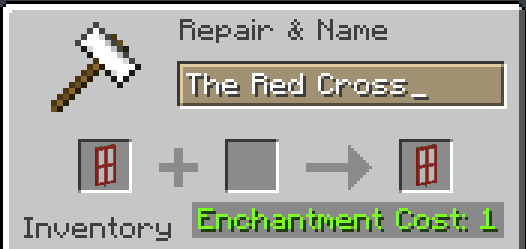
A nametag should appear above the Banner stating your Faction’s name. Additionally, a chat message will state that you have founded a Faction.

To disband a Faction, simply destroy the Banner and/or the Lodestone beneath it. A chat message will announce that your Faction has disbanded.

## Joining and Leaving Factions
In order to join a Faction, simply attune a compass to the Lodestone beneath the Faction Banner. A message will be sent in chat to announce that you have joined the Faction.

In order to leave a Faction, you must drop Shears on the Faction Banner. This will also send a message in chat.

## Customizing your Faction
To change the color of your Faction (affecting player usernames in chat and in nametags, as well as the color of the Glowing effect), drop a piece of Dye on the Faction Banner. A message will be sent to your team notifying them of the change.

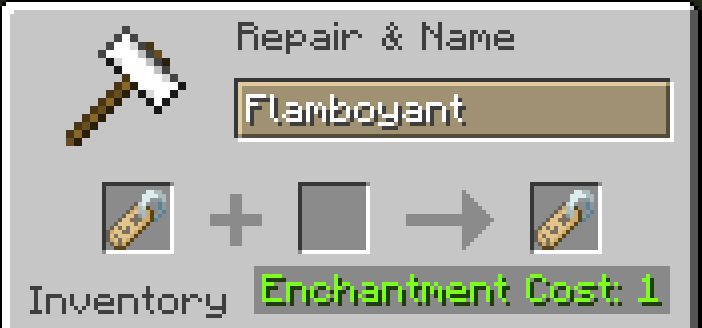
To change the player prefix for your Faction (which displays before usernames in chat and nametags), use an anvil to name a nametag your desired prefix. Then, drop the nametag on the Faction Banner. A message will be sent to your team notifying them of the change. **Remember to include a space (or other delimiting character) after the prefix, or else there will be no separation between the prefix text and the username.**

Vanilla NPC
## 🤵♂️ Vanilla NPC’s (1.21.9+)
Easily create your own NPC in Minecraft thanks to the new mannequins! No Command knowledge required!
**How to use:** Press ESC or open the Quick Options Menu (default Keybind is G) or use the following command: “`/function vanillanpc:menu“` in order to open the main menu.

## 📚 How to Install the Datapack
### 👤 Singleplayer
Drag the downloaded .zip file into the “`”.minecraftsavesYOURWORLDdatapacks”“` folder.
Now enter your world. You can check whether the datapack is enabled with /datapack list.
### 👥 Multiplayer (Server)
Drag the downloaded .zip file into the datapack folder, which is located in the default “world” folder.
Now join your server. You can check whether the datapack is enabled with /datapack list.
Enjoy!
Doublejump
# Double Jump
## Features
– Double jump by pressing jump a second time in the air
– Cloud particle burst on every jump
– Sound changes based on your boot material (leather, chainmail, iron, gold, diamond, netherite)
– Costs 3 hunger bars per jump
– 10-second cooldown shown live on the action bar
– Momentum follows your look direction
– Configurable launch power (horizontal and vertical separately)
## Server Opt-In
The client mod is completely inert on vanilla servers. Double jump only activates when the server has the mod installed and has it enabled.
## Admin Commands
*Requires op level 2*
| Command | Description |
|—|—|
| `/doublejump enable` | Enable double jump |
| `/doublejump disable` | Disable double jump |
| `/doublejump cooldown ` | Set cooldown (1–300) |
| `/doublejump hunger ` | Set hunger cost (0–10) |
| `/doublejump nether allow|deny` | Toggle double jump in the Nether |
| `/doublejump launch horizontal ` | Set horizontal launch power (0.1–3.0) |
| `/doublejump launch vertical ` | Set vertical launch power (0.1–3.0) |
| `/doublejump grant ` | Restore double jump for a player |
| `/doublejump revoke ` | Remove double jump from a player |
| `/doublejump status` | Show current settings |
| `/doublejump reload` | Reload config from disk |
Play a complete game of chess inside Minecraft, no mods required.
This datapack recreates the classic strategy game with real chess rules, interactive piece selection, legal move detection, sound effects, and win conditions.
Whether you want a fun challenge with friends or a unique server minigame, this pack turns Minecraft into a functional chess board.
⚠️ Version Notice — Please Read
This is Version 1 of the datapack.
While fully playable, you should expect:
– Occasional bugs
– Edge-case rule issues
– Visual quirks
– Ongoing balance / polish updates
If you encounter a problem, please report it on the discord, feedback helps improve the project significantly. [bug-report-discord](https://discord.gg/FbhtcF75bt)
Designed to be fast, responsive, and playable without heavy lag.
📦 Requirements
– Minecraft Java Edition 1.21+
– No mods required — this is a datapack.
– A resource pack is included for sounds and visuals. needs [EMF] Entity Model Features.
▶️ How To Use
After installing, generate a chess board in your world:
/trigger create_board
Basic Controls:
– Punch a piece to select it
– Interact a highlighted square to move
– Captures occur automatically
– The game enforces legal moves, illegal actions will be blocked.
⚠️ Known Limitations
This is an ambitious technical datapack, and some things are still improving:
– Rare edge-case rule behavior
– Sound balancing may change
– Performance depends on server hardware
– Future versions will focus heavily on polish and stability.
🐛 Reporting Bugs
If something breaks, please report it with:
– What happened
– What you expected
– Minecraft version
– Singleplayer or server
This helps fix issues much faster.
⭐ Why This Project Exists
Minecraft is an incredible sandbox, this project explores how far datapacks can push complex game logic inside vanilla mechanics.
If you enjoy technical creations like this, consider following the project for updates.
SPECIAL THANKS to chatGPT 5.2 although 90% of this project was created by me things like this description and bug fixes were all from the help of chatGPT.
It’s a plugin that allows you to manage daily challenges to promote competition within the server!
Designed for a Vanilla but usable in all modalities (Prison, Factions, Vanilla, Survival, Towny…), it is also configurable in many ways such as the points to give, the boost if you want more competitive and the give points at every minutes online for improve the loyalty of online players.
# ⚡️Features⚡️
– Possibility to create and set infinity Challenges with a creation of a File in the correct Folder;
– Possibility to create and set a Event Challenge;
– Possibility to reset points at every challenge or accumulate points;
– Possibility to give points if player is online;
– Possibility to set Brodcast Message;
– Possibility to view top in times or yesterday;
– Possibility to use PlaceholderAPI;
– Possibility to select Db you want use;
– Possibility to configure all messages;
– No Dependency;
– RGB Support for messages;
– Possibility to generate random Challenges order;
– Possibility to set boost global with points;
– Possibility to set boost for single player with points;
– Possibility to set start hour and time duration for all Challenges;
– Possibility to configure an interface of all Challenges;
– Possibility to configure an infinite positions for the top;
– Possibility to configure a reward for each position in the top;
– Possibility to configure a series of rewards for each position in the top;
– Possibility to randomize the challenges;
– Possibility to disable the schedule in any moment with just a command;
– vc for add points at player
– vc for see the current daily challenge
– vc for clear all Challenges and Points
– vc for stop Event Challenge
– vc [time] for start Event Challenge with file configuration
– vc [time] for start a random Event Challenge with file configuration
– vc for see the list of Challenges (Player Only)
– vc [skip] for go to the next challenge and if you want skip the peaceful time
– vc for see your points (Player Only)
– vc for see points of another player
– vc for reload plugin configurations
– vc for see the list of backup files (Console Only)
– vc for restore a backup file with H2Database (Console Only)
– vc for remove points at player
– vc for receive reward of win
– vc [time] for add a challenge in the schedule
– vc [time] for add a random challenge in the schedule
– vc for remove a challenge from the schedule
– vc for disable the schedule
– vc
# Random: if you want random generation of Challenges
# Normal: if you want basic plugin schedule
# Single: if you want a single random challenge generated
# Nothing: if you don”t want a scheduler
ChallengeGeneration: ‘Normal’
# Points Gesture
Points:
# If you want to reset the player points at the end of every challenge
ResetPointsAtNewChallenge: false
# If you want resume points without zero (Ex 1.000 = 1k)
PointsResume: true
# Points if remain online for x minutes
OnlinePoints:
# If You want this feature
Enabled: false
# Point at minutes
Point: 10
# Every time you want player remain online for give points
Minutes: 10
# Minimum points for give rewards (-1 for disabling)
MinimumPoints: 0
# This gesture is for give points at player only if the player have the permission configured
# P.S. Empty -> Disabled
Permission: ”
# Chest for ItemCollectionChallenge
CollectionChallengeItem:
Type: CHEST
Name: “&7Chest Collector”
Lore:
– “&7Place this chest and use it for collect items”
BroadcastMessage:
# time in minutes 0 to disabled
TimeTitleChallenges: 10
Top:
# if you want top yesterday with broadcast and commands
YesterdayTop: false
# if you want a reward for each place in the ranking
RankingReward: false
# if you want to give a random reward (ATTENTION if you use RankingReward this features is false of default)
RandomReward: false
# how many players you want reward?
NumberOfReward: 3
# If you want to use H2, MySql or .yml file for data storage (write H2, MySql or Yaml)
Database: ‘H2’
# These configurations work only for MySql database
MySql:
Url: “jdbc:mysql://localhost:3306/vanillachallenges”
Username: “eliotesta98”
Password: “eliotesta98”
Prefix: “”
Backup:
Enabled: true
NumberOfFilesInFolder: 4
# If you want to obfuscate the following challenges in the interface
LockedInterface: false
# If you want to not regenerate a file of a specific challenge or a list of challenges files
ChallengeRegeneration:
# What do you want? Blacklist or Whitelist?
Type: “Blacklist”
# Global Challenges
Globals:
– “FileName”
# Event Challenges
Events:
– “FileName”
# If you want a cooldown between challenges
# Possible values are:
# – {time}t (ticks)
# – {time}s (seconds)
# – {time}m (minutes)
# – {time}h (seconds)
# where {time} is a number
Cooldown: “0t”
Interfaces:
Challenges:
Title: “&aChallenges”
OpenSound: minecraft:entity.ender_dragon.flap # ENDERDRAGON_WINGS <1.13
Slots:
- 'bbbbbbbbb'
- 'bhhhhhhhb'
- 'bhhhhhhhb'
- 'bhhhhhhhb'
- 'bhhhhhhhb'
- 'bbblbrbbb'
Items:
Challenge:
Letter: 'h'
Name: '&a{challengeName}'
Type: 'PLAYER_HEAD'
Texture: '' # set to '' to disable
Lore:
- '&7&oTime Duration: &f{time}'
- '&7&oDescription: &f{challengeDescription}'
- '&7&oPoints: &f{challengePoint}'
- '&7&oWords: {words}.&f * {word}'
- '&7&oRewards: {rewards}.&f * {reward} x {number}'
- '&7&oBlocks: {challengeBlocks}.&f * {block}'
- '&7&oItems in hand: {challengeItemsInHand}.&f * {item}'
- '&7&oSneaking: &f{challengeSneaking}'
- '&7&oBlocks On Place: {challengeBlocksOnPlane}.&f * {block}'
- '&7&oVehicles: {challengeVehicles}.&f * {vehicle}'
- '&7&oMobs: {challengeMobs}.&f * {mob}'
- '&7&oItems: {challengeItems}.&f * {item}'
- '&7&oCauses: {challengeCauses}.&f * {cause}'
- '&7&oColors: {challengeColors}.&f * {color}'
SoundClick: ''
Border:
Letter: 'b'
Name: " "
Type: GRAY_STAINED_GLASS_PANE # STAINED_GLASS_PANE;7 <1.13
Texture: '' # set to '' to disable
Lore: [ ]
SoundClick: ''
LeftPage:
Letter: 'l'
Type: 'PLAYER_HEAD'
Name: '&6&lPage {number}'
Texture: 'eyJ0ZXh0dXJlcyI6eyJTS0lOIjp7InVybCI6Imh0dHA6Ly90ZXh0dXJlcy5taW5lY3JhZnQubmV0L3RleHR1cmUvZWVkNzg4MjI1NzYzMTdiMDQ4ZWVhOTIyMjdjZDg1ZjdhZmNjNDQxNDhkY2I4MzI3MzNiYWNjYjhlYjU2ZmExIn19fQ=='
SoundClick: ''
Lore: [ ]
RightPage:
Letter: 'r'
Type: 'PLAYER_HEAD'
Name: '&6&lPage {number}'
Texture: 'eyJ0ZXh0dXJlcyI6eyJTS0lOIjp7InVybCI6Imh0dHA6Ly90ZXh0dXJlcy5taW5lY3JhZnQubmV0L3RleHR1cmUvNzE1NDQ1ZGExNmZhYjY3ZmNkODI3ZjcxYmFlOWMxZDJmOTBjNzNlYjJjMWJkMWVmOGQ4Mzk2Y2Q4ZTgifX19'
SoundClick: ''
Lore: [ ]
Locked:
Letter: 'h1'
Name: '&a{challengeName}'
Type: 'PLAYER_HEAD'
Texture: '' # set to '' to disable
Lore:
- '&7&oTime Duration: &f{time}'
- '&7&oDescription: &f{challengeDescription}'
- '&7&oPoints: &f{challengePoint}'
- '&7&oWords: {words}.&f * {word}'
- '&7&oRewards: {rewards}.&f * {reward} x {number}'
- '&7&oBlocks: {challengeBlocks}.&f * {block}'
- '&7&oItems in hand: {challengeItemsInHand}.&f * {item}'
- '&7&oSneaking: &f{challengeSneaking}'
- '&7&oBlocks On Place: {challengeBlocksOnPlane}.&f * {block}'
- '&7&oVehicles: {challengeVehicles}.&f * {vehicle}'
- '&7&oMobs: {challengeMobs}.&f * {mob}'
- '&7&oItems: {challengeItems}.&f * {item}'
- '&7&oCauses: {challengeCauses}.&f * {cause}'
- '&7&oColors: {challengeColors}.&f * {color}'
SoundClick: ''
# you can use a different coloring by using a hexadecimal. for all messages Ex. &{#FFFF00}(yellow).
# Example for a command: '/vc &{#FFFF00}&{#000000} command reload Plugin’
Messages:
Prefix: ‘&eVanillaChallenges &r’
Commands:
Footer: ‘&7(&7&l(&c&l!&7&l)&7) &9[] optional value, <> required’
Economy: ‘ &e/vc &6 &7for add or remove points of a player’
Challenge: ‘ &e/vc &6 &7for see the daily challenge selected and time resume’
Clear: ‘ &e/vc &6 &7for clear all informations of databases and refresh’
Event: ‘ &e/vc &6 [time] &7for start or stop a challenge event’
List: ‘ &e/vc &6 &7for see the list of Challenges’
Next: ‘ &e/vc &6 [skip] &7go to the next challenge and if you want skip the peaceful time’
Points: ‘ &e/vc &6 [playerName] &7for see your points or points of another player’
Reload: ‘ &e/vc &6 &7command reload Plugin’
Reward: ‘ &e/vc &6 &7for receive reward of win’
Schedule: ‘ &e/vc &6 [[challenge|random] [time]] &7for add or remove a challenge from schedule or disable it’
Time: ‘ &e/vc &6
Errors:
YouAreNotAPlayer: ‘{prefix}&cYou are not a player’
CommandNotFound: ‘{prefix}&cCommand not found’
NoPerms: ‘{prefix}&cInsufficient permission’
AlreadyPlacedChest: ‘{prefix}&7You already placed a chest for Collection Item Challenge’
AlreadyStartEvent: ‘{prefix}&cYou already start a Challenge Event! If you want stop it write vc ‘
AlreadyStopEvent: ‘{prefix}&cYou already stopped the Challenge Event! If you want start a new Challenge write vc ‘
CaseBroken: ‘{prefix}&7Your chest location is broken, please replace it’
Schedule: ‘{prefix}&cYou cannot remove the current challenge from the schedule, if you want to remove it use the /vc command’
Add: ‘{prefix}&cYou cannot add this challenge because is already scheduled’
AlreadyDisable: ‘{prefix}&7You already disabled the schedule, if you want enable it configure it in config.yml and restart the plugin’
Time: ‘{prefix}&cThis value {value} is not valid! please use h,m or s. For example: 5m’
Success:
Add: ‘{prefix}&aSuccessfully scheduled this challenge’
Remove: ‘{prefix}&aSuccessfully removed form schedule this challenge’
Restored: ‘{prefix}&aSuccessfully restored database’
TimeAdd: ‘{prefix}&aSuccessfully add {time} at the current challenge, time remaining: &5{hours}h {minutes}m {seconds}s’
TimeRemove: ‘{prefix}&aSuccessfully remove {time} at the current challenge, time remaining: &5{hours}h {minutes}m {seconds}s’
TimeSet: ‘{prefix}&aSuccessfully set {time} at the current challenge’
Points:
Info: ‘{prefix}&e{player} &7have &b{number}&7 points’
PlayerPlaceholder: ‘You’
ActuallyInTop: ‘{prefix}&7Actually in top there are:’
TopPlayers:
– ‘&6{number}° &e{player}&7 with &b{points}&7 points’
– ‘&7{number}° &e{player}&7 with &b{points}&7 points’
– ‘&8{number}° &e{player}&7 with &b{points}&7 points’
PointsEveryMinutes: ‘{prefix}&7You collect &b{points}&7 points in &e{minutes}&7 minutes’
ChallengeReward: ‘{prefix}&7You complete the challenge and arrive at top 3 players, receive x&b{number}&7 of &e{item}’
BoostMessage: ‘{prefix}&5Start boosting!&7 You have &bx{number}&7 points for &e{minutes}&7 minutes’
BoostMessageSinglePlayer: ‘{prefix}&5Start personal boosting!&7Only you have &bx{number}&7 points for &e{minutes}&7 minutes’
PointsRemainForBoosting: ‘{prefix}&7Remain &b{points}&7 points for start next boost!’
PointsRemainForBoostingSinglePlayer: ‘{prefix}&7Remain &b{points}&7 points for start next personal boost!’
PointsRemainForReward: ‘{prefix}&7Remain &b{points}&7 points for get the reward!’
ChatWord: ‘{prefix}&7Write this word for receive &b{points}&7 points: &5{word}’
CorrectAnswer: ‘{prefix}&e{player} &7write the correct answer!’
PointsAdd: ‘{prefix}&b{points} &7points added at &e{player}’
PointsRemove: ‘{prefix}&b{points} &7points removed at &e{player}’
ChallengeList: ‘{prefix}&bList of Challenges:{challengeList}’
ChallengeofList: ‘&b{challenge}’
Cooldown: ‘{prefix}&b{hours}h {minutes}m {seconds}s &7until the start of the next challenge’
TimeRemaining: ‘{prefix}&b{hours}h {minutes}m {seconds}s &7until the finish of the challenge’
“`yaml
BlockPlacer:
TypeChallenge: ‘BlockPlaceChallenge’
# if you want to enable or disable the challenge
Enabled: true
# Time settings
# If you want a random start or end set ‘Random’
TimeSettings:
# What time do you want the challenge to start?
Start: ’05:00′
# What time do you want the challenge to end?
End: ’24:00′
# How much time you want for this challenge?
# Possible values are:
# – {time}t (ticks)
# – {time}s (seconds)
# – {time}m (minutes)
# – {time}h (seconds)
# where {time} is a number
# P.S. if you don’t set this value the plugin calculate it with Start and End values
# For Ex. 24:00-05:00 = 19h
Time: ‘0h’ # Worlds where you want the challenge to work, if you want all worlds set []
Worlds: []
# Blocks you want placed for the challenge, if you want all blocks set []
# add RANDOM at the end of list for select only one item random from list
# Ex. Items:
# – DIRT
# – COBBLESTONE
# – RANDOM
Blocks: []
# Block on you want to place the block, if you want all block set []
# add RANDOM at the end of list for select only one item random from list
# Ex. Items:
# – DIRT
# – COBBLESTONE
# – RANDOM
BlocksOnPlaced:
– GRASS_BLOCK
# Able or disable Sneak when place Es. true or false or NOBODY
Sneaking: ‘NOBODY’
# How many points you want give at place?
Point: 1
# if you want a multiplier based on all players
Boost:
Enabled: false
#Number you want reached for give the multiplier
Points: 10000
# Multiplier you want give when reached the number
Multiplier: 2
# For how many minutes you want give the multiplier?
Minutes: 10
# if you want a multiplier based on a single player
BoostPlayer:
Enabled: false
# Number you want reached for give the multiplier
Points: 5000
# Multiplier you want give when reached the number
Multiplier: 4
# For how many minutes you want give the multiplier?
Minutes: 2
# Name of Challenge
NameChallenge: “&7Block Place Challenge”
# item representing challenge
ItemChallenge: ‘DIRT’
# Title challenge
# Placeholder List:
# – {challengeName}
# – {block#} where # is a number (start with 1) Ex. {block1}
# – {blockOnPlaced#} where # is a number (start with 1) Ex. {blockOnPlaced1}
# – {points}
# – {minutes}
# – {slots}
# – {sneaking}
# – {world#} where # is a number (start with 1) Ex. {world1}
# – {item#} where # is a number (start with 1) Ex. {item1}
# – {itemInHand#} where # is a number (start with 1) Ex. {itemInHand1}
# – {vehicle#} where # is a number (start with 1) Ex. {vehicle1}
# – {cause#} where # is a number (start with 1) Ex. {cause1}
# – {color#} where # is a number (start with 1) Ex. {color1}
# – {mob#} where # is a number (start with 1) Ex. {mob1}
# – {force}
# – {power}
# – {onGround}
# – {keepInventory}
Title:
– ‘&8’
– ‘&8██&b███&8███&b██’
– ‘&8█&b██&8████&b███ {challengeName}’
– ‘&b██&6█&8███&b███&8█’
– ‘&b█&8██&6█&8█&b███&8██&7Place block on Grass Block for receive {points} point’
– ‘&b█&8███&6██&b█&8███ &7{hours}h {minutes}m {seconds}s to the end of the challenge’
– ‘&8████&6██&8████’
– ‘&8███&6█&8██&6█&8███’
– ‘&8██&6█&8████&6█&8██’
– ‘&8’
# Reward in blocks EX: IRON_INGOT:16 Type:Quantity
# Reward with command EX: [command]:give %player% TNT 1
Rewards:
– ‘[command]:give %player% TURTLE_HELMET 1’
“`
Challenges/Event/BlockPlacer.yml
“`yaml
BlockPlacer:
TypeChallenge: ‘BlockPlaceChallenge’
# Time settings
# If you want a random start or end set ‘Random’
TimeSettings:
# What time do you want the challenge to start?
Start: ’05:00′
# What time do you want the challenge to end?
End: ’24:00′
# How much time you want for this challenge?
# Possible values are:
# – {time}t (ticks)
# – {time}s (seconds)
# – {time}m (minutes)
# – {time}h (seconds)
# where {time} is a number
# P.S. if you don’t set this value the plugin calculate it with Start and End values
# For Ex. 24:00-05:00 = 19h
Time: ‘0h’ # Worlds where you want the challenge to work, if you want all worlds set []
Worlds: []
# Blocks you want placed for the challenge, if you want all blocks set []
# add RANDOM at the end of list for select only one item random from list
# Ex. Items:
# – DIRT
# – COBBLESTONE
# – RANDOM
Blocks: []
# Block on you want place the block, if you want all block set []
# add RANDOM at the end of list for select only one item random from list
# Ex. Items:
# – DIRT
# – COBBLESTONE
# – RANDOM
BlocksOnPlaced:
– GRASS_BLOCK
# Able or disable Sneak when place Es. true or false or NOBODY
Sneaking: ‘NOBODY’
# How many points you want give at place?
Point: 1
# if you want a multiplier based on all players
Boost:
Enabled: false
#Number you want reached for give the multiplier
Points: 10000
# Multiplier you want give when reached the number
Multiplier: 2
# For how many minutes you want give the multiplier?
Minutes: 10
# if you want a multiplier based on a single player
BoostPlayer:
Enabled: false
# Number you want reached for give the multiplier
Points: 5000
# Multiplier you want give when reached the number
Multiplier: 4
# For how many minutes you want give the multiplier?
Minutes: 2
# Name of Challenge
NameChallenge: “&7Block Place Challenge”
# item representing challenge
ItemChallenge: ‘DIRT’
# Title challenge
# Placeholder List:
# – {challengeName}
# – {block#} where # is a number (start with 1) Ex. {block1}
# – {blockOnPlaced#} where # is a number (start with 1) Ex. {blockOnPlaced1}
# – {points}
# – {minutes}
# – {slots}
# – {sneaking}
# – {world#} where # is a number (start with 1) Ex. {world1}
# – {item#} where # is a number (start with 1) Ex. {item1}
# – {itemInHand#} where # is a number (start with 1) Ex. {itemInHand1}
# – {vehicle#} where # is a number (start with 1) Ex. {vehicle1}
# – {cause#} where # is a number (start with 1) Ex. {cause1}
# – {color#} where # is a number (start with 1) Ex. {color1}
# – {mob#} where # is a number (start with 1) Ex. {mob1}
# – {force}
# – {power}
# – {onGround}
# – {keepInventory}
Title:
– ‘&8’
– ‘&8██&b███&8███&b██’
– ‘&8█&b██&8████&b███ {challengeName}’
– ‘&b██&6█&8███&b███&8█’
– ‘&b█&8██&6█&8█&b███&8██&7Place block on {blockOnPlaced1} for receive {points} point’
– ‘&b█&8███&6██&b█&8███ &7{hours}h {minutes}m {seconds}s to the end of the challenge’
– ‘&8████&6██&8████’
– ‘&8███&6█&8██&6█&8███’
– ‘&8██&6█&8████&6█&8██’
– ‘&8’
# Reward in blocks EX: IRON_INGOT:16 Type:Quantity
# Reward with command EX: [command]:give %player% TNT 1
Rewards:
– ‘[command]:give %player% TURTLE_HELMET 1’
If you want support or add a specific Challenge, don’t hesitate to report it either on Discord or via Modrinth.
– Thanks [xSavior_of_God](https://modrinth.com/user/xSavior-of-God) for helping me to realize one of my project.
– NBT API (https://www.spigotmc.org/resources/nbt-api.7939/) Used to make the item in hand look better.
– BIG THANKS goes to Ome_R (https://www.mc-market.org/members/40228/) from BG-Softwarse who allowed us to use his class for handling configuration files <3
Vampires: The datapack
# Vampires: The Datapack
A halloween themed, Among Us like, minigame to add to your server. Contains unique abilities, custom models, and loot bags!
Add a competitive, but fun, minigame that can be customized to your servers likings for timings. Add some spooky to your days!
## The goal
### The Players
Each player will be given an item to place a ‘Core’ in their base. This is the lifeblood of your characters while the game is active. Defend it, hide it, do what you need to stop the vampires from finding your base.
### The Vampires

Using their abilities, the vampires must seek and convert each player to be one of their own kind. At the same time, they must find the players bases as this keep them strong.
### Rewards

When the vampires convert a player or find all the bases they are rewarded with a goodie bag to help them further.
When players surive the night, they are rewarded for if they don’t get infected, or if their base remains to be found.
Goodie bags will contain useful items, tools/weapons, and much more.
## How to setup
Setup is simple, install and enable the datapack, and every player will be given their base creation item and joined into the game on their first log in to the server. While not technically required, the [resource pack](https://modrinth.com/resourcepack/vampires-resourcepack) should be used for best usecase as custom items will be missing their textures, and abilities will be viewable by non-vampires.
Once your players are ready, an admin can run one of the following commands to begin the game:
“`
/function vampires:start
“`
or
“`
/function vampires:start_custom {delay:X}
“`
Where X is the amount of seconds you wish a round to begin, by default this is set to 24000 seconds (just around 6.5 hours).
## Removal/Uninstall
“`
/function vampires:utility/cleanup
“`
This should remove most things added via the datapack and cleanup any bases in the world. Somethings may be left behind is some players are offline.
ValoCraft
# 🔫 **ValoCraft** – Turn Minecraft into Valorant!
**ValoCraft** is a comprehensive Minecraft plugin that transforms your server into a Valorant-style experience. Choose your agent, buy your weapons, and face off against your opponents in intense tactical combat!
### **🎯 Realistic Physical Bullets**
– **Real visible bullets** with ballistic trajectory
– **Unique visual effects** per weapon type
– Immersive **firing and impact sounds**
– **Real damage** based on the weapon used
| Command | Alias | Description |
|———-|——-|————-|
| `/valocraft agent-selector` | `/vc agent` | Opens the agent selector |
| `/valocraft shop` | `/vc shop` | Opens the weapon shop |
| `/valocraft credits` | `/vc money` | View your credits |
| `/valocraft give ` | `/vc give` | Gives a weapon (admin) |
—
## 🎯 **Why ValoCraft?**
### **🏆 Competitive Experience**
– **Tactical gameplay** inspired by Valorant
– **Carefully balanced** weapons and abilities
– Strategic **economic progression**
### **🎮 Total Immersion**
– **Agents with unique personalities**
– **Weapons with realistic behavior**
– High-quality **visual and sound effects**
### **🔧 Ease of Use**
– **Simple installation**: drop-in plugin
– **Minimal configuration** required
– **Compatible** with most servers
—
## 📦 **Installation**
1. **Download** the `ValoCraft-1.1.1.jar` file
2. **Place it** in your `plugins/` folder
3. **Restart** your server
4. **Enjoy** the Valorant experience!
> **⚡ Turn your Minecraft server into a tactical combat arena!**
>
> **ValoCraft**: The Valorant experience you’ve been waiting for in Minecraft.
—
*Made by sti_moi*
V&C`s Uno cards
# V&C`s Uno cards
This resource pack includes a set of cards for the board game Uno.
To use the resource pack, you will need an anvil.
When renamed, the texture is superimposed on the “paper”.
For the resource pack to work correctly, you must install modifications such as “CIT resewn”, “Entity Texture Features”, “Entity Model Features” or “Optifine”.
UwUChat

UwU Chat is the ultimate plugin for adding a touch of kawaii to your server! Whether you want to spice up your conversations or just spread some wholesome fun, UwU Chat has got you covered. With its customizable chance and a variety of adorable suffixes to choose from, your chat messages will never be the same!
# Translation color (format: “&x” where x is a color code or color name)
translation-color: “&d”
# List of commands to run when a player sends a UwU message
uwu-commands:
– “give %player% cookie 1”
brewery-hook: true
“`
—
Need Support? Join our discord server!
[https://discord.gg/GCxYsMG3u6](https://discord.gg/GCxYsMG3u6)
Hey thewe! Youw feedback, suggestions, and bug weports would be supew hewpfuw in the thwead. I would be weally gwateful if uwu could shawe youw thoughts and hewp me improve the plugin. Don’t be shy, wet me know what uwu think! (◡ ω ◡)
URLium
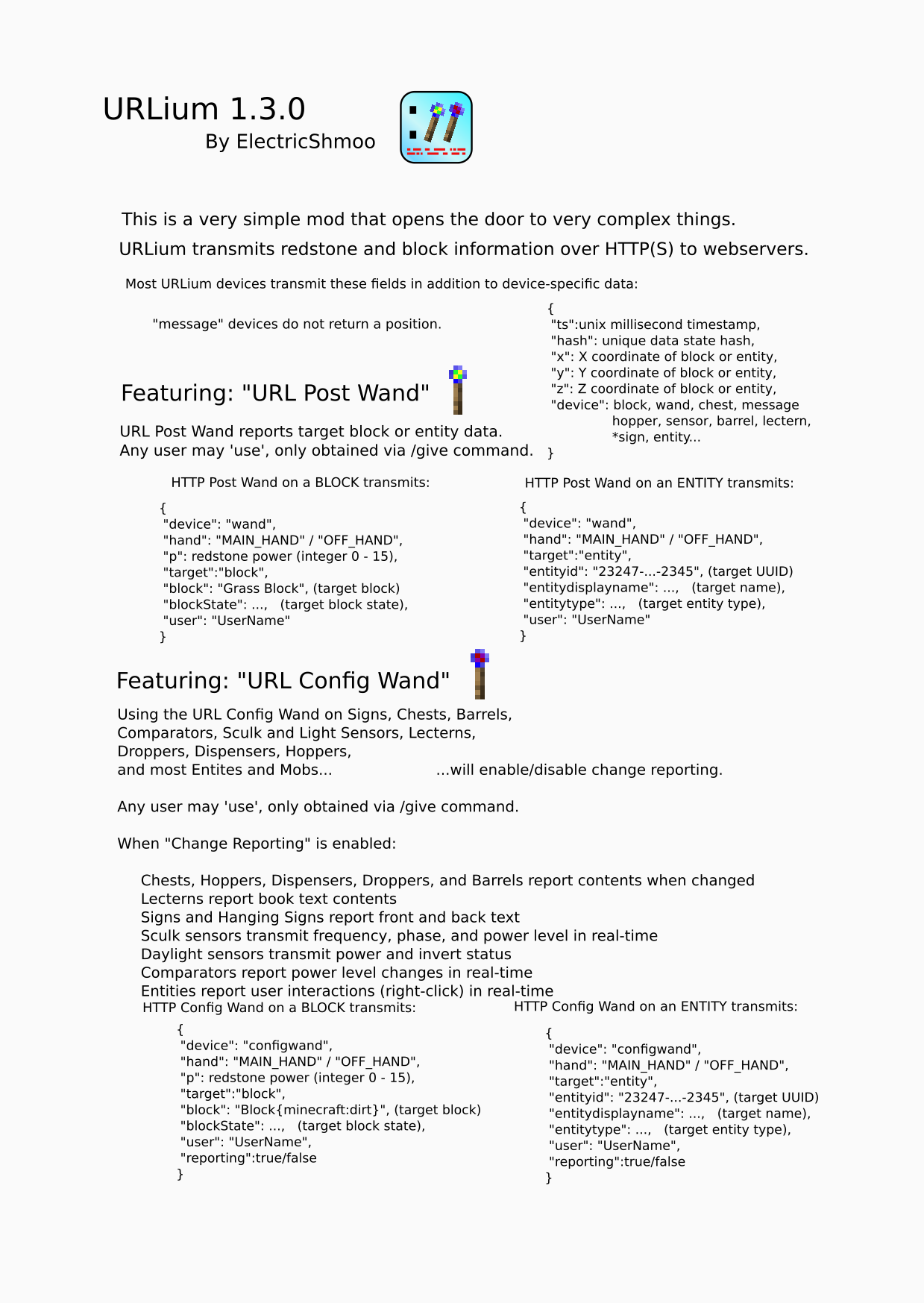
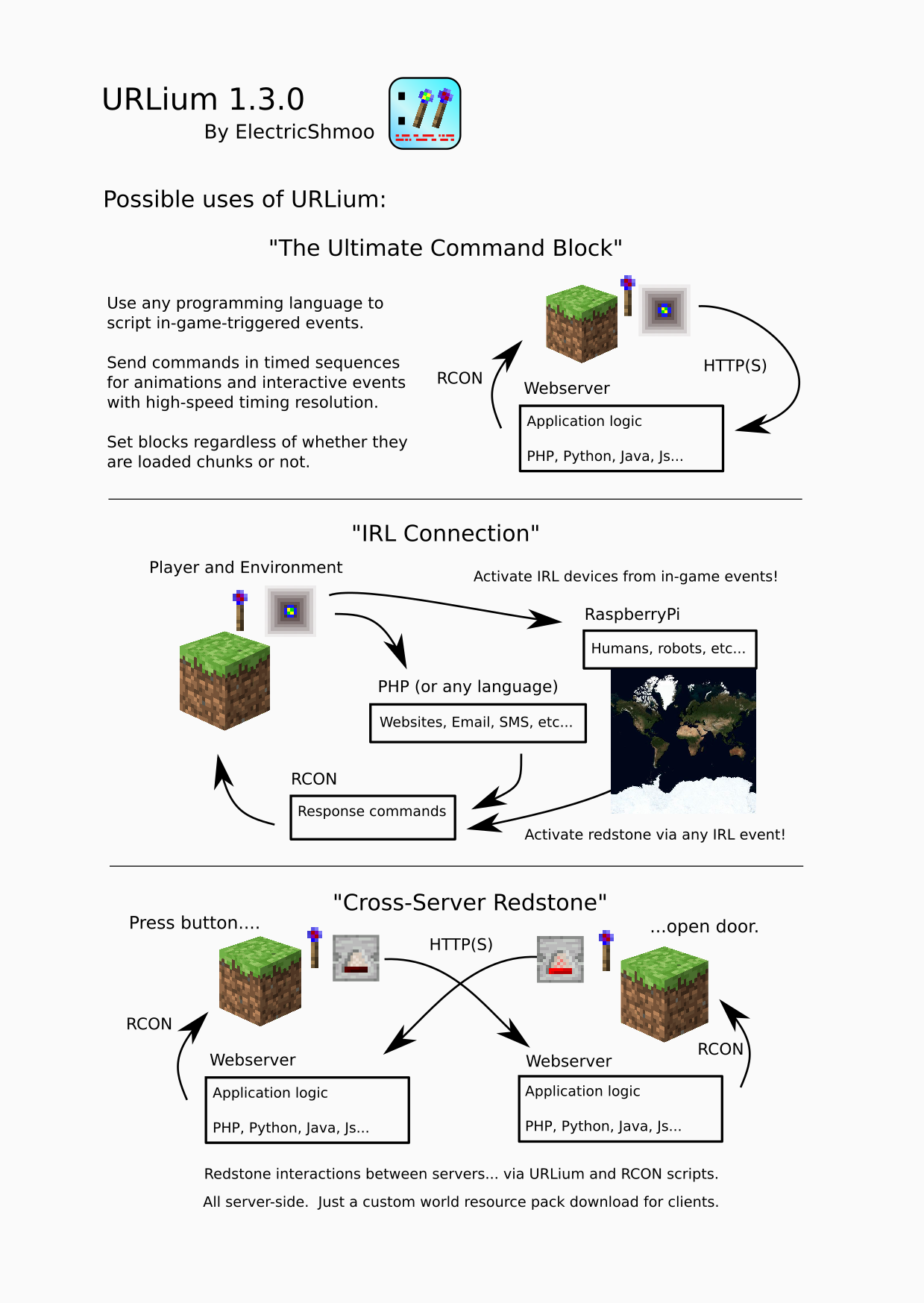
URLium is a Polymer Library server-side mod that transmits redstone, entity, command, and blockstate data over HTTP(S) to a configurable URL.
URLium only transmits outbound requests and logs the HTTP response data to the server log. URLium does not allow incoming commands or controls. Any in-bound control of the server is performed by existing native RCON connections, not any feature of URLium.
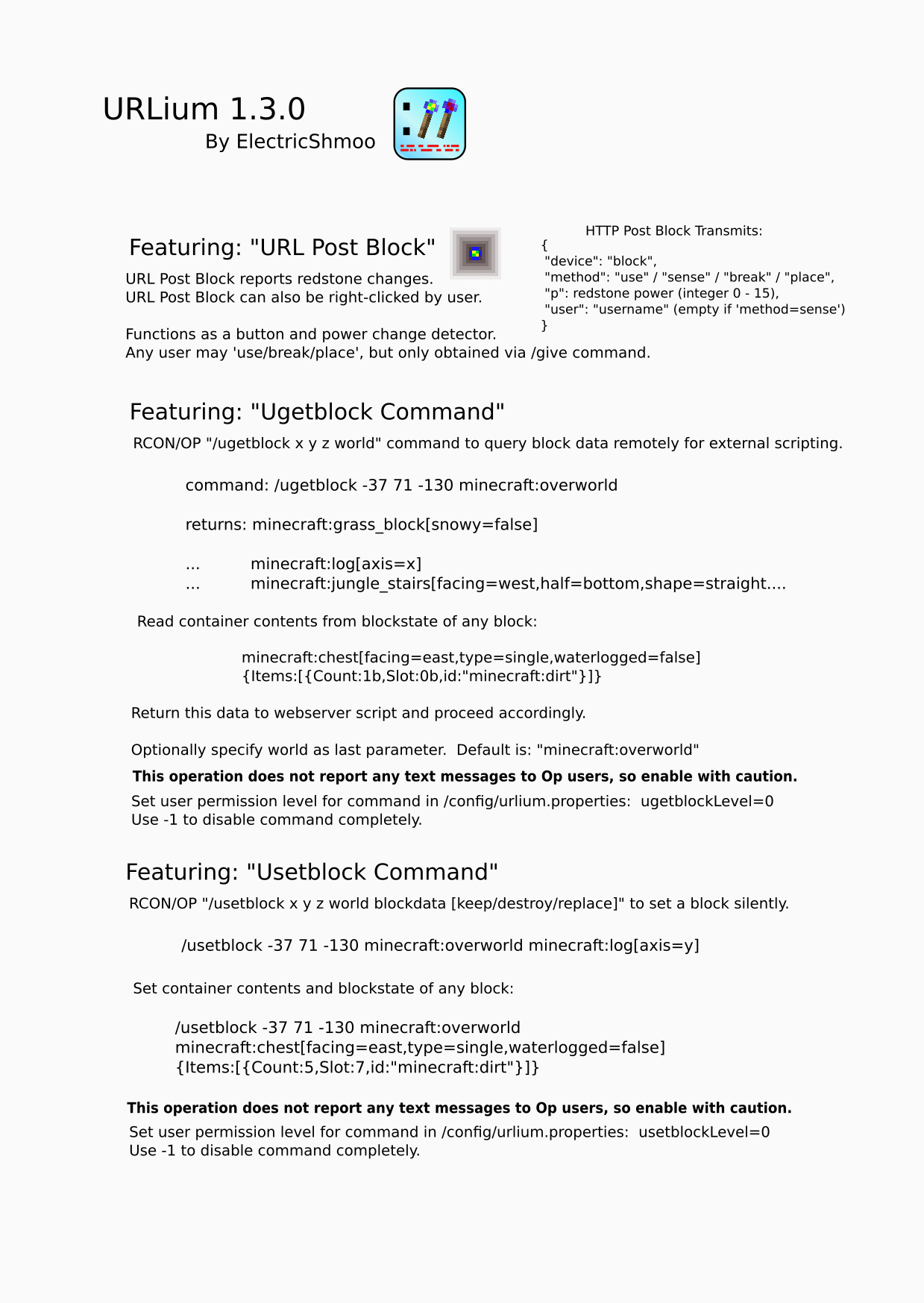
– URLium Block
– reports redstone power level changes
– can also be right-clicked by user
– transmits ‘place’, ‘break’, ‘use’, and ‘sense’ events
– URL Post Wand
– use as tool to report target block or entity data
– URL Config Wand
– use on Signs, Chests, Barrels, Comparators, Light Sensors, Sculk Sensors, Hoppers, Droppers, Dispensers, Lecterns, and Mobs will enable/disable change reporting
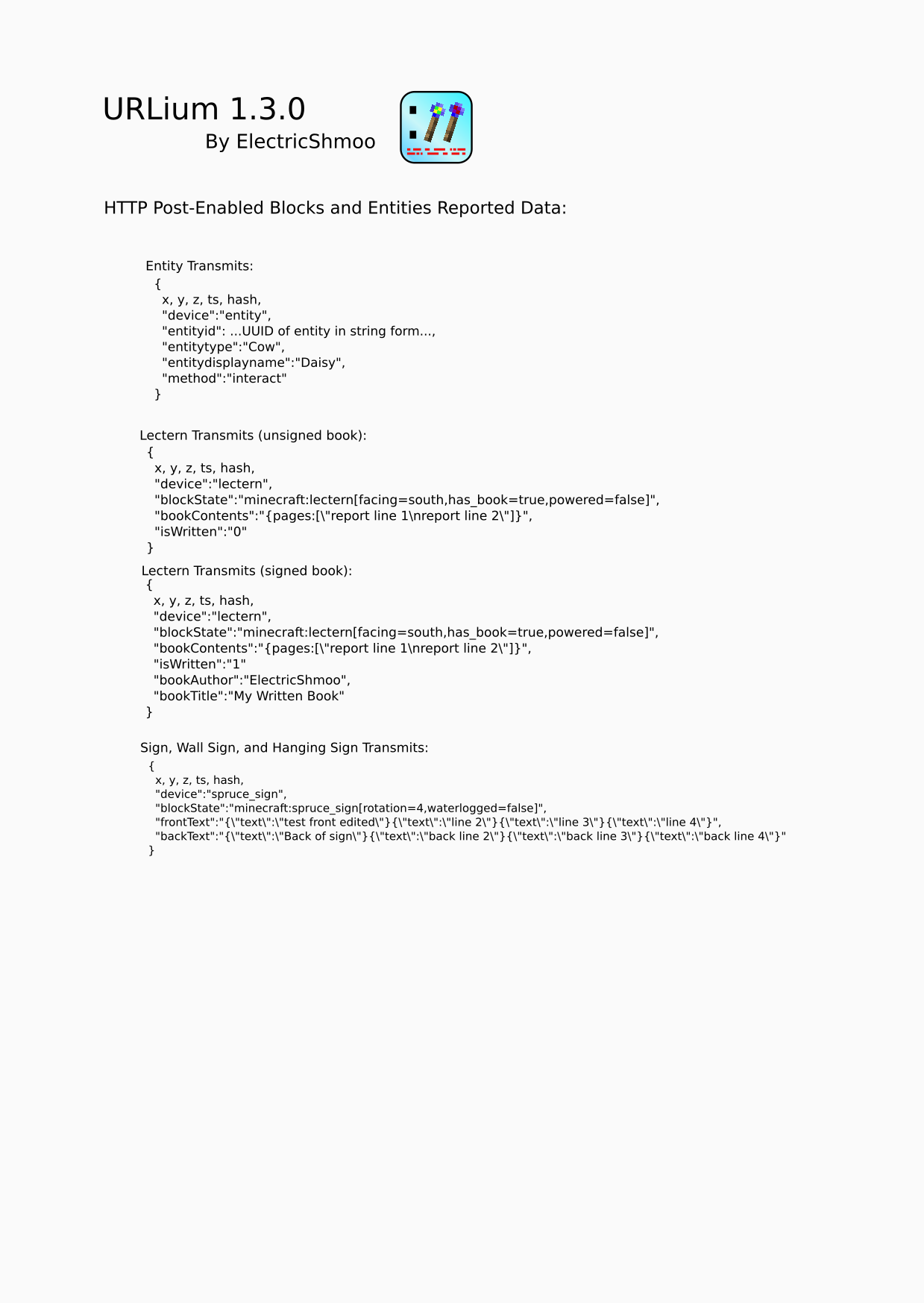
– chest contents sent when changed or block update occurs (not always real-time)
– sign front and back text content sent when changed
– comparator power level sent when changed
– sculk sensor power, phase, and frequency sent when changed
– light sensor power level sent when changed
– when a writable book or written book is placed on lectern, contents will be sent
– mobs and entities with change reporting send an “interact” event when right-clicked by any user
– Ugetblock Command
– Usetblock Command
– RCON-accessible command to query and set block data for remote webserver RCON response
– allows external server to perform lightweight query and get raw (‘F3+i’ debug query) block data
– forces block loading / generation if unloaded
– specify dimension (unlike regualr /setblock)
– silent execution
– webserver application/game logic can be written in ANY web language that can respond via RCON
– PHP, Python, Java, JS, Go, C#… anything!
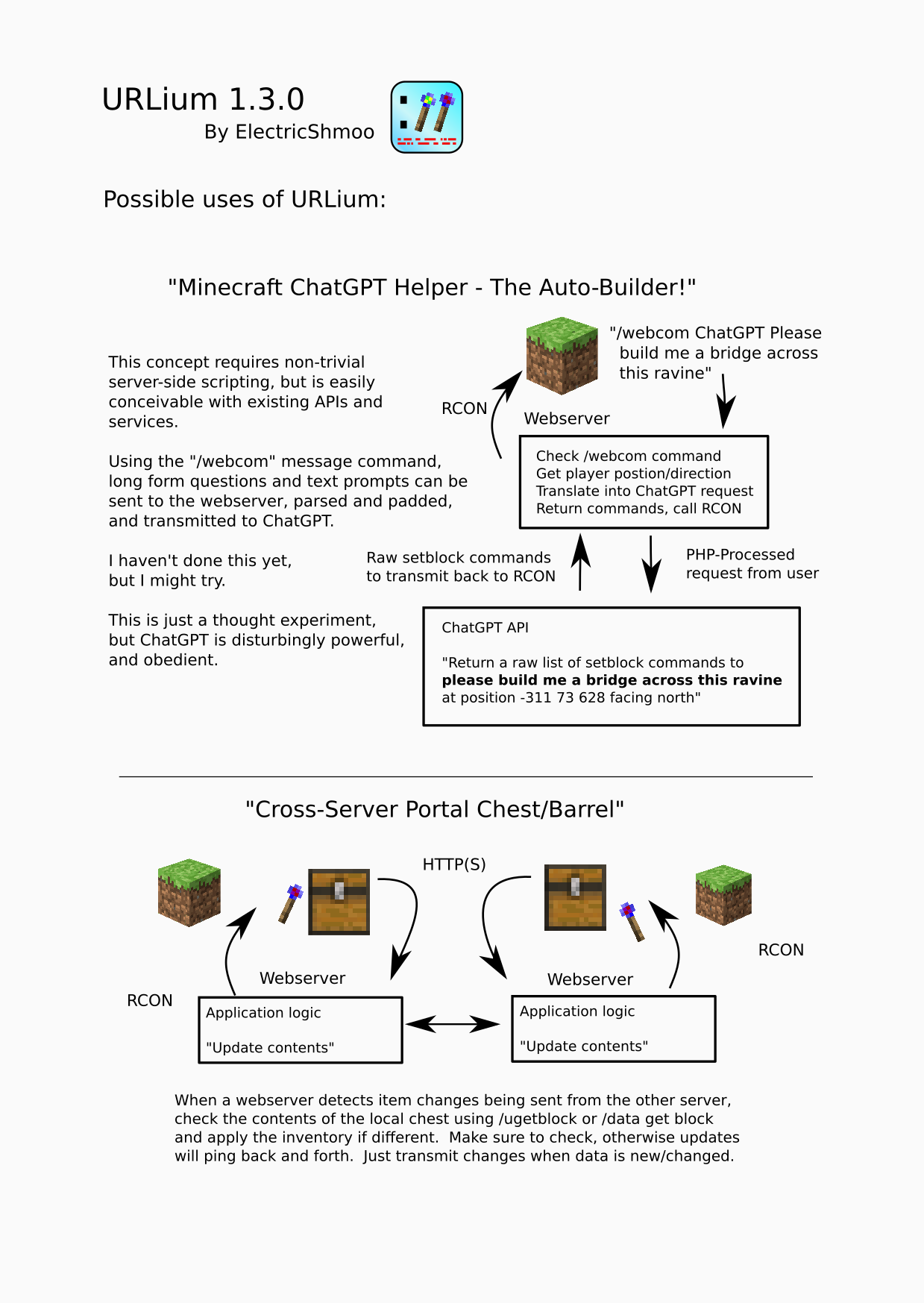
– “/webcom” Commands
– Users may send message to webserver with “/webcom …message text…”
– Set command name (“webcom”) in config file to any unused command name
– Up to 3 custom commands!
Respond to the Minecraft server via RCON to complete the circuit of input/output.
Possible uses:
– server-to-server redstone circuitry
– compare written book text for a quiz show competition
– get interactive I/O from the web:
– audience voting survival competition
– public HTML browser-viewable scoreboards
– update your player’s status on a website from text on a hanging sign
– treasure-hunt
– with a reporting-enabled chest to see who collects items first
– with a Post Wand to see who can click the blocks first
– water real-life plants from in-game events triggering a RaspberryPi plant-watering system
– Anything That Can Be Done Via HTTP
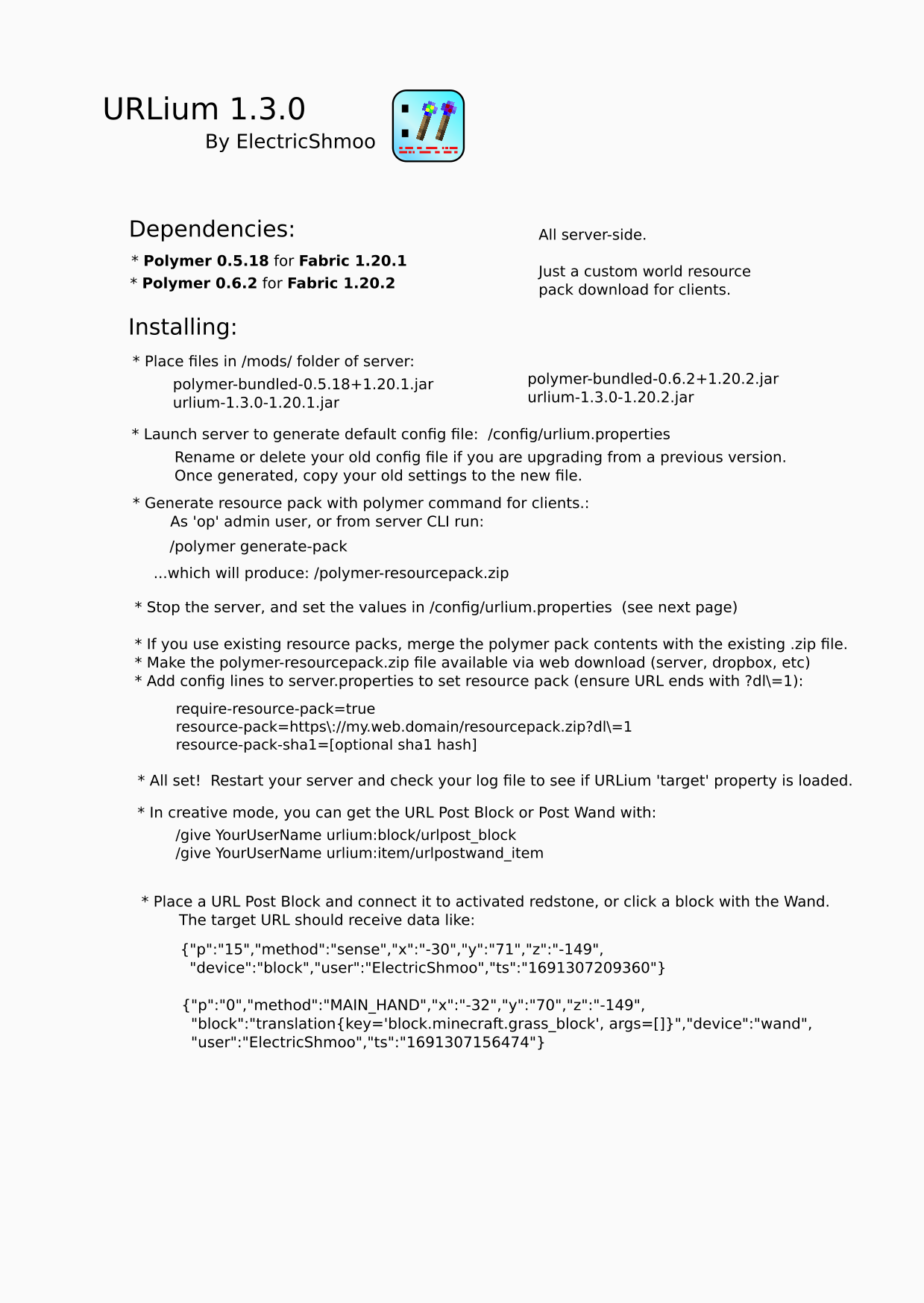
Dependencies:
– Polymer 0.5.18 for Fabric 1.20.1
– Polymer 0.6.2 for Fabric 1.20.2
– Be sure to run ‘/polymer generate-pack’ to produce the client-side resource pack and update the SHA1 key in server settings or URLium items will not be visible.
Config:
– set URL in /config/urlium.properties:
– target=https://my.web.server/full/path/
– agent=optional_user_agent_name
– messageCommand=webcom
– securityToken=secret_token
(token is included in Authentication: Bearer header)