Wallrun
WallRun introduces smooth, momentum-based wall-running to Minecraft.
Players can run along walls, extend jumps, and chain movements for fast, fluid parkour.
Perfect for Parkour maps, Minigames, and PvP, while staying lightweight, responsive, and performance-friendly.
Walk Tracker
WalkTracker is a plugin that turns exploration into a friendly server-wide competition. By leveraging Minecraft’s accurate, built-in statistics, the plugin tracks every block a player travels on foot and displays this data on a scoreboard visible to everyone. This board features a “Top 10 Travelers” ranking that updates periodically, ensuring it doesn’t impact server performance.
In addition to the public ranking, the plugin includes the /distance command for players to check their personal records and provides admin tools to set or add distance to any user’s stats, making it perfect for events or manual adjustments. It’s an ideal addition for survival, RPG, or exploration-focused servers, adding a new layer of engagement that rewards the most dedicated adventurers.
🕑Waiting Screen🕒
# 🕒 Waiting Screen Plugin – BossBar & Titles! 🏆
Give your server a professional touch with a waiting screen system that is fully customizable! This plugin manages player waiting before a game or event, featuring an attractive and configurable visual interface.
—
## ✨ Features
– **📊 Custom BossBar** – Personalize the BossBar with colors, styles, and custom messages.
– **🏆 Titles & Subtitles** – Display customizable messages with adjustable timing.
– **⬆️ Dynamic BossBar** – The BossBar updates as players join (only counts non-OP players).
– **💫 Effects** – Apply potion effects to players while they wait, configurable in `config.yml`.
– **🔊 Sounds** – Play sound effects when players join or leave the waiting list.
– **🚷 Movement Restriction** – Enable or disable player movement while in the waiting screen.
—
## ⚙️ Configuration
The plugin includes a `config.yml` file where you can customize:
– 🎨 **BossBar colors and styles**
– 🏆 **Title and Subtitle messages**
– ⏳ **Potion effects and duration**
– 🔊 **Entry and exit sounds**
– 🚷 **Allow or block player movement**
—
## 🛠️ Commands
This plugin includes the following commands to help you manage the waiting screen system:
—
### **/waitingscreen**
– **Description**: Shows the list of available commands.
– **Usage**:
– `/waitingscreen` – Displays all the available commands for managing the waiting screen.
—
### **/toggleWaitScreen**
– **Description**: Toggles the waiting screen on or off.
– **Usage**:
– `/toggleWaitScreen` – Activates or deactivates the waiting screen manually.
—
## 🎃 Carved Pumpkin Feature
You can customize the carved pumpkin by adding a custom image. Supported resolutions: 16×16, 32×32, 64×64, 128×128, and 256×256.
We recommend using 64×64, 128×128, or 256×256 for better quality. 🖼️
## 🛠️ How to Use the Texture Pack?
Go to the misc folder inside your texture pack.
Replace the default image with your own custom image.
Rename your image to: pumpkinblur.png 🏷️
You can send the texture pack to your friends so they can install it manually, or set it up directly on your server. 🌍
📥 Texture Pack Download: [https://www.mediafire.com/file/82pmkh8mxtncif5/Custom_Pumpkin_Overlay.zip/file](https://www.mediafire.com/file/82pmkh8mxtncif5/Custom_Pumpkin_Overlay.zip/file)
vSafeMobs
# vSafemobs by vProLabs
Spawn safe mobs that move naturally but won’t attack players. Perfect for decoration, RPG servers, or pet systems!

> If you find any bugs, report them on our [discord](https://discord.gg/SNzUYWbc5Q)!
## ✨ Full Features
**Safe Mob Spawning**
– Spawn any mob with `noattack:true` – they move freely but can’t hurt players
– `leadable:true` – Put ANY mob on a lead (even Wardens!)
– Full attribute customization (health, speed, scale, name, etc.)
**Mob Management**
– Kill specific mobs by ID
– Kill all safe mobs at once
– List all tracked safe mobs
– Persistent tracking across server restarts
**Available Attributes**
| Attribute | Description |
|———–|————-|
| `noattack` | Mob won’t target or damage players |
| `leadable` | Mob can be put on a lead |
| `silent` | Mob makes no sounds |
| `invulnerable` | Mob takes no damage |
| `persistent` | Mob won’t despawn |
| `baby` | Spawn as baby variant |
| `glow` | Mob has glowing effect |
| `nogravity` | Mob ignores gravity |
| `custommodel` | Custom model data (stick in hand) |
| `health` | Set max health |
| `speed` | Set movement speed |
| `scale` | Set entity scale/size |
| `name` | Custom name with color codes |
| `team` | Assign to scoreboard team |
—
## 🚀 Commands
| Command | Aliases | Description | Permission |
|———|———|————-|————|
| `/vsm spawn [attr:value]…` | `/vsafemobs spawn` | Spawn a safe mob | `vsafemobs.spawn` |
| `/vsm kill ` | `/vsafemobs kill` | Kill specific mob by ID | `vsafemobs.admin` |
| `/vsm killall` | `/vsafemobs killall` | Kill all safe mobs | `vsafemobs.admin` |
| `/vsm list` | `/vsafemobs list` | List tracked mobs | `vsafemobs.admin` |
| `/vsm reload` | `/vsafemobs reload` | Reload plugin | `vsafemobs.admin` |
—
## 🔒 Permissions
– `vsafemobs.spawn` – Spawn safe mobs (default: op)
– `vsafemobs.admin` – Kill, list, reload commands (default: op)
—
## 📝 Usage Examples
“`bash
# Friendly Warden pet that can be leashed
/vsm spawn warden noattack:true leadable:true name:”&6Guardian” scale:0.8
# Invulnerable baby zombie
/vsm spawn zombie noattack:true invulnerable:true baby:true glow:true name:”&cTiny”
# Custom scaled ravager
/vsm spawn ravager noattack:true scale:0.5 health:100 name:”&7Mini Ravager”
# Silent decoration mob
/vsm spawn allay noattack:true silent:true persistent:true glow:true
“`
—
## 🌐 Links
– Website: https://vprolabs.xyz
– Support: https://ko-fi.com/v4bi
—
Made with ❤️ by vProLabs Team
V’s Lucky Block Engine




[](https://vanilama.vercel.app)
you can do
“`
/trigger giveLB
“`
to get a lucky block
——————————————————
## Important
It’s **highly recommended** to always use the **latest** version of the engine because it either adds **new funtionality** or fixes **bugs/errors**
——————————————————
## **Vanilama’s Lucky Block engine offers a Command driven lucky block system.**
**You can edit the loot and its chances in loottable.mcfunction.
Vanilama’s lucky block engine allows for any command being run.
the random scoreboard by default generates a random number between 1..100 if you need more you can change it in drops.mcfunction in line 3**
——————————————————
**Its easy to use and edit the datapack to your liking though i recommend only changing the chance/loot commands in the loottable function if you dont know what youre doing or aren’t sure how to**
### It should mostly work though report any errors in the discord server.
Lucky blocks look like this:
Spoiler

this look of the lucky block is inspired by [IJA Minecraft’s](https://ijaminecraft.com/) lucky block command creation for 1.11 you can find it [here](https://ijaminecraft.com/cmd/super_lucky_blocks_1.11/)
## For Lucky Block Creators and modpack creators using this Engine or a lucky block pack based on this engine
if you want to upload your lucky block datapack using this engine pls Link the [**original project**](https://modrinth.com/datapack/vs-lucky-block-engine) as well as note that you used it in the description.
also you cant use multiple lucky block packs in the same world if you still want to you need to copy all the custom events and stuff over from one pack to another and adjust the chances acordingly.
Votify
# Votify
**Votify** is a high-performance, customizable voting management plugin for Minecraft servers. Developed by **ImJopeh** at **Mapple Studio**, Votify streamlines the connection between your server and voting websites, ensuring your players are rewarded instantly and your community remains engaged.
—
## 🚀 Key Features
* **NuVotifier Integration**: Seamlessly listen to incoming votes from any website supported by NuVotifier.
* **Dynamic Leaderboards**: Built-in support for Top Voter leaderboards with full **PlaceholderAPI** integration.
* **Per-Website Rewards**: Incentivize specific voting sites by customizing unique rewards for each one.
* **Monthly Automation**: Hands-free management with automated monthly resets and Top Voter logging.
* **Discord Webhooks**: Keep your community informed with automated Top Voter announcements sent directly to your Discord server.
—
## 🛠 Installation
1. **Prerequisites**: Ensure you have [NuVotifier](https://www.spigotmc.org/resources/nuvotifier.13449/) installed and configured on your server.
2. **Download**: Grab the latest `.jar` from the [Releases](https://github.com/ImJopehhh/votify/releases) page.
3. **Deploy**: Place the file into your server’s `/plugins/` directory.
4. **Launch**: Restart your server to generate the configuration files.
5. **Configure**: Edit `config.yml` to set up your rewards and Discord Webhook URL.
## 🧱 Dependencies
To ensure **Votify** functions correctly, please check the following requirements:
### 🔴 Required (Must Install)
* **[NuVotifier](https://www.spigotmc.org/resources/nuvotifier.13449/)**: Required to listen to vote notifications from server listing websites.
### 🟢 Optional (Highly Recommended)
* **[PlaceholderAPI](https://www.spigotmc.org/resources/placeholderapi.6245/)**: Required if you want to display Top Voter statistics on leaderboards, scoreboards, or holograms.
—
## 📊 Placeholders
Integrate Votify data into your Scoreboards, TAB, or Holograms using **PlaceholderAPI**:
### Global Statistics
| Placeholder | Description |
| — | — |
| `%Votify_total%` | Total votes accumulated by the entire server |
| `%Votify_alltimetotal%` | Total server votes over the last 6 months |
| `%Votify_lastmonthtotal%` | Total server votes from the previous month |
| `%Votify_TimeUntilDayReset%` | Time remaining until the daily vote reset |
### Player Statistics
| Placeholder | Description |
| — | — |
| `%Votify_Total_AllTime%` | Player’s personal total votes (6-month period) |
| `%Votify_Total_Monthly%` | Player’s personal total votes for the current month |
| `%Votify_Total_Weekly%` | Player’s personal total votes for the current week |
| `%Votify_BestWeeklyTotal%` | Player’s highest weekly vote record |
| `%Votify_BestMonthlyTotal%` | Player’s highest monthly vote record |
| `%Votify_MonthVoteStreak%` | Player’s current monthly voting streak |
| `%Votify_BestMonthVoteStreak%` | Player’s all-time best monthly voting streak |
| `%Votify_Top_All_Position%` | Player’s current rank in the 6-month leaderboard |
| `%Votify_Top_Month_Position%` | Player’s current rank in the monthly leaderboard |
| `%Votify_Top_Week_Position%` | Player’s current rank in the weekly leaderboard |
### Leaderboard Data
| Placeholder | Description |
| — | — |
| `%Votify_Top_All__name%` | Name of the voter at specific rank (6-month) |
| `%Votify_Top_All__votes%` | Vote count of the voter at specific rank (6-month) |
| `%Votify_Top_Month__name%` | Name of the voter at specific rank (Monthly) |
| `%Votify_Top_Month__votes%` | Vote count of the voter at specific rank (Monthly) |
| `%Votify_Top_Week__name%` | Name of the voter at specific rank (Weekly) |
| `%Votify_Top_Week__votes%` | Vote count of the voter at specific rank (Weekly) |
### Vote Party
| Placeholder | Description |
| — | — |
| `%Votify_VotePartyContributedVotes%` | Number of votes the player has contributed to the current party |
| `%Votify_VotePartyVotesCurrent%` | Current amount of votes collected for the Vote Party |
| `%Votify_VotePartyVotesNeeded%` | Remaining votes needed to trigger the Vote Party |
| `%Votify_VotePartyVotesRequired%` | Total votes required to start a Vote Party |
—
## 📋 Configuration Preview
“`yaml
# Votify Configuration
# The name of your server, used in some messages.
server-name: My Awesome Server
# Enable or disable debug messages in the console.
debug: false
# Login Delay (in seconds)
# Time to wait after a player joins before giving pending rewards.
# Increase this if you use an Authentication plugin (e.g., AuthMe) to prevent item loss.
login-delay: 5
# Discord Webhook Configuration
discord:
enabled: false
webhook-url: https://discord.com/api/webhooks/…
top-voter-embed:
title: 🏆 Monthly Top Voters 🏆
description: Here are the top voters for the month of %month%!
color: 16776960 # Yellow/Gold
footer: Votify System
# System Data (Do not edit manually)
data:
last-month: 1
# Messages
messages:
prefix: ‘&8[&bVotify&8] &r’
vote-received: ‘%prefix% &aThanks, &e%player%&a, for voting on &e%service%&a!’
player-not-found: ‘%prefix% &cPlayer %player% not found.’
no-permission: ‘%prefix% &cYou don”t have permission to use this command.’
reload: ‘%prefix% &aConfiguration reloaded successfully.’
“`
Votes Update
# 🗳️ Vote Update
Bring back 23w13a_or_b april fools version to newer versions
– 31 votes available!
– No players limit
– Open-source
– Fully customable localization
# 🟪 ItemsAdder
Votes Update is compatible with ItemsAdder.
The only thing you need to do is to extract
[the pack](https://github.com/MathiasDPX/VoteUpdate/releases/latest/download/pack.zip) in `plugins/ItemsAdder/contents`
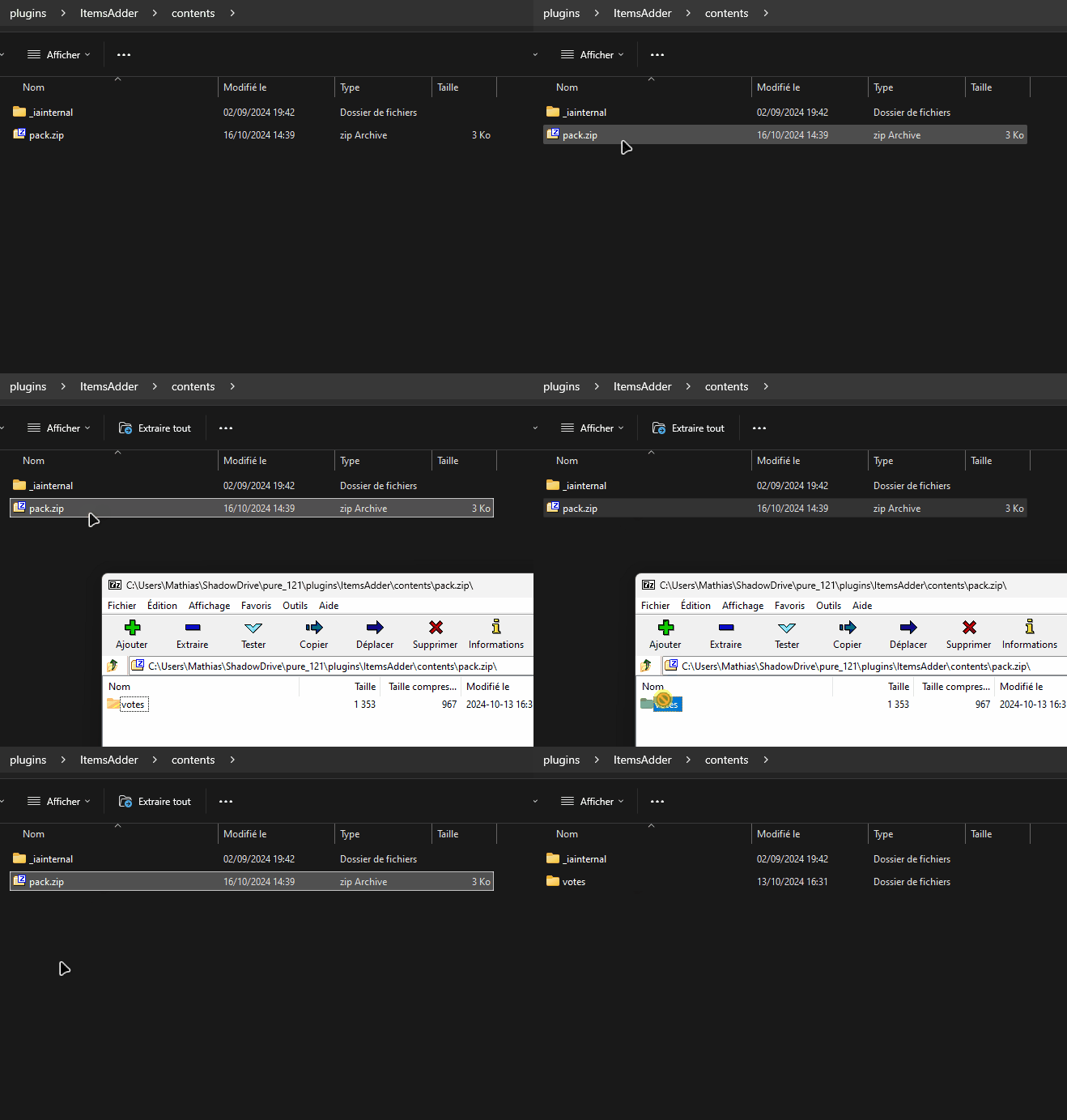
Votes Update will automaticlly detect the pack and make necessary changes.
VortexFallingStars
# VortexFallingStars
FallingStars is a premium falling star events and rewards plugin built for modern Minecraft servers. It lets you create stunning celestial events where meteors streak across the sky with beautiful particle trails, landing in your world for players to discover and claim rewards.
It’s designed to be flexible enough for large servers, but easy to manage even if you don’t want to deal with complex setups.
_(More preview images can be found on the [Wiki](https://wiki.vortexdevelopment.net/projects/fallingstars) page, contact support on our [Discord](https://dc.vortexdevelopment.net/) server)_
***
### **What can you do with it?**
You can create falling star events that:
1. Display stunning particle trails as they fall (LINEAR, SPIRAL, or RANDOM animations)
2. Play custom impact sounds and spawn ground effects when they land
3. Reward players with weighted loot pools, commands, and economy hooks
4. Track player collection statistics with global leaderboards
*Everything is handled through clean config files or an in-game GUI.*
### **Spawn Methods that fit your server**
Stars don’t have to spawn the same way every time.
You can configure spawning based on:
* Random chance as players move around the world
* Timed intervals for individual players or all online players
* Scheduled server-wide meteor shower events
* Area-based spawning within WorldGuard regions
* Manual admin commands for special occasions
*If a player is AFK, they won’t receive random stars, configurable movement and look detection ensures only active players are rewarded.*
### **Powerful Event System**
Create memorable server events with full control.
Events support:
* Center-based spawning around a specific location
* Player-targeted spawning with chance rolls per player
* Random player selection for exclusive rewards
* Customizable spawn windows and intervals
* Per-player cooldowns, daily limits, and max triggers
* Boss bar announcements with rolling multi-bar support
*Events can be started via commands, and stars can be automatically removed when the event ends.*
### **Full Integration Support**
FallingStars works seamlessly with your existing setup.
* WorldGuard integration for region-based spawn control
* PlaceholderAPI support for leaderboards and statistics
* Full command-based reward execution
### **Compatibility & Performance**
Designed exclusively for the latest Minecraft API to deliver maximum performance and future-proof stability.
**Zero NMS** (Net Minecraft Server) Usage
Since the plugin uses no NMS, updates are smooth and consistent, your server can usually update versions without needing a plugin update.
### **Database Support**
Fully supports **MySQL** and **MariaDB** (recommended for best performance).
Local **H2** database works out of the box but is not advised for large servers due to limited scalability.
### **Configuration & Documentation**
Every configuration file is meticulously documented to ensure a smooth setup experience, even for beginners, or you can use the in-game GUI to configure the plugin without touching any files!
Whether you’re customizing star appearances, tuning spawn chances, designing event schedules, or configuring reward pools, you’ll find clear explanations for every option.
For more info check out our wiki page.
*Stop fighting your plugins. Start running your server.*
Voltrox Manhunt
**Voltrox Manhunt** is a fully-featured, highly customizable Manhunt plugin built for competitive and casual servers. Featuring real-time tracking, GUI control, PlaceholderAPI support, and deep configuration — everything you need for the ultimate Minecraft Manhunt experience.
Gallery
# ✨ CORE FEATURES
Classic Speedrunner vs Hunters gameplay
Real-time tracking with Action Bar coordinates + Compass pointing
Ingame GUI for manhunts with `/vm`
Fully customizable Config.yml (messages, sounds, settings)
# ✨ GAME MECHANICS
Headstart system by freezing hunters in place with a countdown
Hunter respawn kits (configurable items)
Tracking Compass system
Raise the stakes with a Hardcore Mode (Remove hunters on death)
# ✨ VISUAL & AUDIO
Custom Title announcements (Win, Loss, Dragon Kill)
Fully customizable Sound effects
Live Action Bar runner tracking
Player Head GUI for visual player selection
# ✨ External Plugins
PlaceholderAPI Support
Permissions for other plugins like LuckPerms. (default true)
# ⚙️ FULLY CONFIGURABLE
Messages, titles, sounds
Headstart duration
Respawn kits
Compass cooldown
Hunter removal on death
Dimension broadcasts
Compass display name
Placeholders (Requires PlaceholderAPI)
Replace X with a number! Ex: %voltroxmanhunt_runner1% returns the first runner.
%voltroxmanhunt_runner% – Name of first runner
%voltroxmanhunt_runner_count% – Number of runners
%voltroxmanhunt_runner_list% – Comma-separated list of all runner names
%voltroxmanhunt_runnerX% – Name of runner at position X
%voltroxmanhunt_runner_uuid% – UUID of first runner
%voltroxmanhunt_runner_health% – Health of first runner
%voltroxmanhunt_runner_health_percent% – Health percentage of first runner
%voltroxmanhunt_runner_hunger% – Hunger level of first runner
%voltroxmanhunt_runner_world% – World name of first runner
%voltroxmanhunt_runner_dimension% – Dimension name of first runner
%voltroxmanhunt_runner_x% – X coordinate of first runner
%voltroxmanhunt_runner_y% – Y coordinate of first runner
%voltroxmanhunt_runner_z% – Z coordinate of first runner
%voltroxmanhunt_runner_names% – All runner names
%voltroxmanhunt_runnerX_name% – Name of runner X
%voltroxmanhunt_runnerX_uuid% – UUID of runner X
%voltroxmanhunt_runnerX_health% – Health of runner X
%voltroxmanhunt_runnerX_health_percent% – Health percentage of runner X
%voltroxmanhunt_runnerX_hunger% – Hunger level of runner X
%voltroxmanhunt_runnerX_world% – World name of runner X
%voltroxmanhunt_runnerX_dimension% – Dimension name of runner X
%voltroxmanhunt_runnerX_x% – X coordinate of runner X
%voltroxmanhunt_runnerX_y% – Y coordinate of runner X
%voltroxmanhunt_runnerX_z% – Z coordinate of runner X
%voltroxmanhunt_runnerX_ping% – Ping of runner X
%voltroxmanhunt_runnerX_gamemode% – GameMode of runner X
%voltroxmanhunt_runnerX_is_online% – “Yes” if runner X is online
%voltroxmanhunt_runnerX_is_dead% – “Yes” if runner X is dead
%voltroxmanhunt_hunter_count% – Number of hunters
%voltroxmanhunt_hunters_list% – Comma-separated list of all hunter names
%voltroxmanhunt_is_runner% – “Yes” if player is runner
%voltroxmanhunt_is_hunter% – “Yes” if player is hunter
%voltroxmanhunt_game_active% – “Yes” if game is active
%voltroxmanhunt_headstart_active% – “Yes” if headstart is active
%voltroxmanhunt_distance% – Distance to hunter’s current target
%voltroxmanhunt_distance_formatted% – Distance with units (km or blocks)
%voltroxmanhunt_direction% – Cardinal direction to target
%voltroxmanhunt_tracking_target% – Name of hunter’s current target
%voltroxmanhunt_compass_cooldown% – Remaining compass cooldown in seconds
%voltroxmanhunt_spectator_count% – Number of spectators
%voltroxmanhunt_is_spectator% – “Yes” if player is spectator
%voltroxmanhunt_spectators_list% – Comma-separated list of spectator names
%voltroxmanhunt_status% – Player’s status: Runner, Hunter, Spectator, Headstart, or Inactive
%voltroxmanhunt_multi_runner_enabled% – “Yes” if multi-runner is enabled
%voltroxmanhunt_max_runners% – Maximum number of runners allowed
**✔ Fully recoded with really flexible configurations!**
# ❗ REQUIREMENTS
**Minecraft**: 1.16.5+
**Java**: 16+
**Optional Dependency**: PlaceholderAPI
**Need Support?**
Contact me for help on the [discord.](https://discord.gg/jMFHKhqxM3)
⚠ The Modrinth page (this) and the [Spigot page](https://www.spigotmc.org/resources/voltrox-manhunt.108959/) is the only official source! Do NOT download it from any external site.
VolleyBall UPDATE
# VolleyBall UPDATE
> _1.21.x support | No Dependencies_
Updating the “VolleyBall” plugin. This simple plugin is designed specifically for private servers. It allows you to create a ball and interact with it in the open world of minecraft.

# ⭐ Key Features ⭐
## Full Customixzable Physics
– 360 degree rotation
– Realistic bounces with adjustable energy loss
– Unique block interactions (ice,slime, honey blocks)
– Fine-tune gravity and speed
## Your Own Ball Skins
– Use any Minecraft head textures
– Easy setup via skins.yml (supports Minecraft-Heads format)
## Permission-Based Skins
– Create exclusive skins with permission locks
– Create your own permission
– Custom deny messages
## Unique Crafting System
– Interactive crafting: Right-click pufferfish + 8 leathers
– Visual effects when creating balls
## No Dependencies!
– Works standalone – no extra libraries needed
– Minimal server performance impact
– The old version required library compilation
# ✨ Usage ✨
To create a ball, right-click on a live pufferfish while holding 8 pieces of leather in your hand.
Throw the ball: Left-click (LMB).
Throw the ball harder: Left-click (LMB) while running or jumping.
Throw power slider: Hold SHIFT.
Pick up the ball: Press SHIFT near the ball.
# ⚡ Commands ⚡
/ballskin – Open skin selection menu
/ballsreload: Reload configs(volleyball.reload required)
/ballsummon: Spawn a ball (volleyball.summon required)
# ⚙️ Configs ⚙️
config.yml
“`# All speed is measured in BPS – blocks per second
# Config VolleyBall Plugin Update
ENABLE_BALL_CRAFTING: true
IPT: 20 # Number of physics processing iterations per tick. Not recommended to change
GRAVITY: -0.05 # Gravity
DEFAULT_BOUNCE_ENERGY_LOSS: 2 # Default energy loss on bounce. Energy / DEFAULT_BOUNCE_ENERGY_LOSS
MAX_SPEED: 40 # Maximum ball speed
MAX_ROT_SPEED: 100 # Maximum ball rotation speed
ROT_BREAKING_SPEED: 1000 # Maximum rotation braking speed
ROT_SPEED_PROPORTION: 1000 # Rotation acceleration proportion based on speed. Applied when the ball bounces
THROW_CHECKING_SPEED: 0.06 # Throw power slider speed
MAX_THROW_POWER: 19 # Maximum throw power (in BPS)
MIN_THROW_POWER: 8 # Minimum throw power (in BPS)
DESPAWN_TIME: 10000 # Time (in ticks) after which a stationary ball will despawn
DEFAULT_SKULLSKIN: ball # Default ball skin
# Block settings
BLOCKS_ENERGY_LOSSES: # Custom energy losses for specific blocks
WATER: 5
SLIME_BLOCK: 1
MOSS_BLOCK: 3
HAY_BLOCK: 5
HONEY_BLOCK: 100
ICE: 1.2
PACKED_ICE: 1.1
BLUE_ICE: 0.9
TRANSPARENT_BLOCKS: # Blocks that the ball can pass through && Most transparent blocks are automatically enabled
– PINK_PETALS
TEXT:
SKIN_MENU_TITLE: “>> Skin Selection <<"
SKIN_ALREADY_SELECTED: "The skin has already been selected"
CLICK_TO_SELECT: "Click to select this skin"
SOUND:
SOUND_ID: "BLOCK_BAMBOO_BREAK"
VOLUME: 6.0
PITCH: 1.0
```
skins.yml
“`
# skin:
# name:
# url: example: http://textures.minecraft.net/texture/93c2f1c5d2c8f0e33730c14dca1c1d1e1abd8596b0839d6738d18f46432b6fa6 – insert only the hash at the end
# perm: You can create your own *Optional
# lock_msg: *Optional
# Config VolleyBall Plugin Update
# Use “§” for the default colors.
ball:
name: §fBall
url: 93c2f1c5d2c8f0e33730c14dca1c1d1e1abd8596b0839d6738d18f46432b6fa6
premium_ball:
name: §dPremium Ball
url: a794284953646833c49db0bae137cc93a774cb6ec8c53d1bcef6cd124a5a71ca
perm: volleyball.premiumball
lock_msg: “§cYou can’t use this ball!”
“`
# ⛏️ New Ball Skin ⛏️
Spoiler
The plugin uses the official Minecraft API, so you need to use official Minecraft heads. For example, you can use a site like Minecraft-Heads. In the “url” field, you need to insert the set of characters at the end of the link. For example, for the link:
“`
http://textures.minecraft.net/textu…0c14dca1c1d1e1abd8596b0839d6738d18f46432b6fa6
“`
in the “url” field, insert:
“`
93c2f1c5d2c8f0e33730c14dca1c1d1e1abd8596b0839d6738d18f46432b6fa6
“`
You can also set a permission requirement for using a specific ball skin. To do this, use the optional parameters perm and lock_msg. In perm, specify any permission, and in lock_msg, write the message that will be displayed if a player does not have access to this skin.