Zyvera TicTacToe
# ⚔ Zyvera-TicTacToe
### Classic TicTacToe as a fully GUI-based Lobby Minigame.





**by Thomas U. & Zyvera-Systems**
—
## Overview
Zyvera-TicTacToe adds a complete TicTacToe minigame to your Minecraft server — fully inventory-based, with automatic matchmaking, direct challenges, persistent ranked stats, and crafting table binding. No dependencies, no setup hassle. Just drop and play.
—
## Features
### 🎮 Game Modes
– **Queue (Ranked)** — Join the matchmaking queue and get paired automatically. Wins, losses, draws, streaks — everything is tracked.
– **Challenge (Unranked)** — Challenge any online player directly. No stats, just fun.
– **Workbench Binding** — Bind TicTacToe to crafting tables in your world. Right-click toggles the queue (1s cooldown).
### 🖥️ GUI System
– **Compact 3×3 Board** — Clean layout in a 36-slot inventory
– **Real Player Heads** — Actual Minecraft skins displayed via SkullMeta
– **Win Highlight** — Winning line turns green at the end
– **Main Menu** — Queue, stats, and leaderboard in one place
– **Stats GUI** — Wins, losses, draws, winrate, total moves, streaks
– **Top 10 Leaderboard** — Gold, silver, bronze for the best players
### ⏱️ Timeout System
– **No moves placed + 120s idle** → Game gets cancelled (no stats affected)
– **Ranked + moves placed + 120s idle** → Inactive player loses automatically
– **Challenge (Unranked)** → Timeout has no effect
### 🔮 Holograms
Bound crafting tables display a floating hologram above them:
> **TicTacToe**
> [Click Me]
—
## Commands
| Command | Description | Permission |
|———|————-|————|
| `/ttt` | Open main menu | `zyvera.ttt.use` |
| `/ttt play` | Join the queue | `zyvera.ttt.use` |
| `/ttt leave` | Leave the queue | `zyvera.ttt.use` |
| `/ttt challenge ` | Challenge a player | `zyvera.ttt.use` |
| `/ttt accept` | Accept a challenge | `zyvera.ttt.use` |
| `/ttt deny` | Deny a challenge | `zyvera.ttt.use` |
| `/ttt stats [name]` | View stats (GUI) | `zyvera.ttt.use` |
| `/ttt top` | Top players (GUI) | `zyvera.ttt.use` |
| `/ttt quit` | Leave active game | `zyvera.ttt.use` |
| `/ttt bind` | Bind a crafting table | `zyvera.ttt.bind` |
| `/ttt unbind` | Unbind a crafting table | `zyvera.ttt.bind` |
| `/ttt reload` | Reload config | `zyvera.ttt.admin` |
**Alias:** `/tictactoe`
—
## Permissions
| Permission | Description | Default |
|———–|————-|———|
| `zyvera.ttt.use` | Basic TicTacToe access | everyone |
| `zyvera.ttt.bind` | Bind/unbind workbenches | OP |
| `zyvera.ttt.stats.others` | View other players’ stats | everyone |
| `zyvera.ttt.admin` | Admin commands (reload) | OP |
—
## Compatibility
| Platform | Supported |
|———-|———–|
| Bukkit | ✅ 1.13+ |
| Spigot | ✅ 1.13+ |
| Paper | ✅ 1.13+ |
| Purpur | ✅ 1.13+ |
| Folia | ✅ Regionized Scheduler |
– **Java:** 8+
– **Dependencies:** None
– Material fallbacks ensure compatibility across all versions (e.g. `RED_CONCRETE` → `STAINED_CLAY` on legacy)
– Folia support is fully reflection-based — no compile-time dependency
—
## Configuration
Everything is customizable — messages, colors, materials, timeouts, and hologram text.
“`yaml
prefix: “&8[&6&lTTT&8] ”
game:
turn-timeout: 120
challenge-timeout: 60
workbench-cooldown: 1000
gui:
symbol-x-material: RED_CONCRETE
symbol-o-material: BLUE_CONCRETE
hologram:
line1: “&6&lTicTacToe”
line2: “&8[&aKlick Mich&8]”
offset-y: 1.5
“`
—
## Installation
1. Drop the JAR into your `plugins/` folder
2. Start or restart the server
3. Config generates automatically
4. Done — `/ttt` and play!
—
**Made with ❤️ by Thomas U. & Zyvera-Systems**
⭐ *Enjoying TicTacToe? Leave a review!*
ZyloLotto
# ZyloLotto – GUI-Based Lottery System for Minecraft 1.21
**Note:** This version supports **multiple languages**. Currently, **German (`de_DE`)** and **English (`en_US`)** are available.
Set your preferred language in `config.yml`. Additional languages will be added in future updates.
ZyloLotto brings a complete, easy-to-use lottery system to your server.
Players can buy tickets, watch live drawings, and enjoy massive winnings.
Everything is fully GUI-based – no complicated commands required.
—
## Features
### Ticket System
– Players buy tickets directly through a GUI – each ticket is a randomly generated 5-digit code.
– All tickets are saved automatically and increase the jackpot.
### Jackpot & Economy System
– Fully Vault-compatible, including automatic payout handling.
– The jackpot grows with every ticket purchased or via optional autofill.
### Animated Drawing
– Winning numbers are displayed through a multi-stage animation with sound effects.
### Intelligent Winner Detection
– Automatically detects 2 to 5 correct numbers in the correct positions.
– Winnings are distributed based on configurable percentage values.
### Drawing & Winner History
– Clean GUIs show past draws, winners, dates, and payout amounts.
– All data is stored permanently.
### Player Ticket Overview
– Players can browse their tickets in a paginated GUI.
– Admins can view or delete tickets directly.
### Admin Menu
– Complete lottery management through a dedicated admin menu.
– Change jackpot, ticket price, delete winners or draws, modify autofill, enable/disable rollback, and more.
### Automatic Drawing
– Optional auto-draw that starts a drawing at regular intervals.
– Interval can be set live via chat.
### Test Drawing
– Admins can run a test draw with any 5-digit number.
– Perfect for testing or events.
### SQLite Database
– No setup required – `lotto.db` is created automatically.
– The plugin handles saving tickets, drawings, winners, and jackpot values on its own.
—
## Commands
| Command | Description |
|——————|———————————————-|
| `/lotto` | Opens the main lottery GUI |
| `/lottodraw` | Starts a regular lottery drawing |
| `/lottotest <12345>` | Starts a test drawing with fixed numbers |
—
## LuckPerms Permissions
| Permission | Description | Default |
|———————|—————————————————————|———|
| `zylolotto.admin` | Access to the full admin menu and all admin functions | `op` |
| `zylolotto.draw` | Allows executing the official lottery draw (`/lottodraw`) | `op` |
| `zylolotto.test` | Allows executing test drawings (`/lottotest`) | `op` |
| *(no permission)* | Opens the lottery menu via `/lotto` | `everyone` |
—
## Required Plugins
– **Vault (1.7.3)** – For economy integration
*(SpigotMC: Vault Plugin)*
– **LuckPerms** – For permissions management
*(Modrinth: LuckPerms)*
AzTrain
# 🎮 Aᴢᴛʀᴀɪɴ – ᴘᴠᴘ ᴍᴏʙ ᴛʀᴀɪɴᴇʀ
> 📌 ᴀ ɢᴜɪ-ʙᴀꜱᴇᴅ ᴘᴠᴘ ᴍᴏʙ ᴛʀᴀɪɴᴇʀ ꜱʏꜱᴛᴇᴍ ꜰᴏʀ ᴍɪɴᴇᴄʀᴀꜰᴛ ꜱᴇʀᴠᴇʀꜱ
## 🎯 ꜰᴇᴀᴛᴜʀᴇꜱ
– 📋 ᴄᴜꜱᴛᴏᴍɪᴢᴀʙʟᴇ ᴍᴏʙ ᴘʀᴇꜱᴇᴛꜱ
– 🎨 ɪɴᴛᴜɪᴛɪᴠᴇ ɢᴜɪ ꜱʏꜱᴛᴇᴍ
– ⚔️ ᴘᴠᴘ ᴛʀᴀɪɴɪɴɢ
– 🛡️ ᴄᴜꜱᴛᴏᴍ ᴇQᴜɪᴘᴍᴇɴᴛ
– 🎭 ᴘʟᴀᴄᴇʜᴏʟᴅᴇʀᴀᴘɪ ꜱᴜᴘᴘᴏʀᴛ
## 📜 ᴄᴏᴍᴍᴀɴᴅꜱ
### 🎮 ᴘʟᴀʏᴇʀ ᴄᴏᴍᴍᴀɴᴅꜱ
“`minecraft
/train – ᴏᴘᴇɴꜱ ᴛʜᴇ ᴛʀᴀɪɴɪɴɢ ɢᴜɪ
“`
### ⚡ ᴀᴅᴍɪɴ ᴄᴏᴍᴍᴀɴᴅꜱ
“`minecraft
/aztrain gui – ᴏᴘᴇɴ ᴀᴅᴍɪɴ ᴍᴇɴᴜ
/aztrain edit – ᴍᴏᴅɪꜰʏ ᴍᴏʙ ꜱᴛᴀᴛꜱ
/aztrain spawn – ᴍᴀɴᴜᴀʟʟʏ ꜱᴘᴀᴡɴ ᴍᴏʙ
/aztrain reload – ʀᴇʟᴏᴀᴅ ᴄᴏɴꜰɪɢꜱ
“`
## 🔒 ᴘᴇʀᴍɪꜱꜱɪᴏɴꜱ
“`yaml
aztrain.use: ᴀᴄᴄᴇꜱꜱ ᴛᴏ /ᴛʀᴀɪɴ (ᴅᴇꜰᴀᴜʟᴛ: ᴛʀᴜᴇ)
aztrain.admin: ᴀʟʟ ᴀᴅᴍɪɴ ꜰᴇᴀᴛᴜʀᴇꜱ (ᴅᴇꜰᴀᴜʟᴛ: ᴏᴘ)
aztrain.spawn: ᴍᴀɴᴜᴀʟ ᴍᴏʙ ꜱᴘᴀᴡɴɪɴɢ (ᴅᴇꜰᴀᴜʟᴛ: ᴏᴘ)
aztrain.edit: ᴇᴅɪᴛ ᴍᴏʙ ᴘʀᴇꜱᴇᴛꜱ (ᴅᴇꜰᴀᴜʟᴛ: ᴏᴘ)
aztrain.reload: ʀᴇʟᴏᴀᴅ ᴄᴏɴꜰɪɢꜱ (ᴅᴇꜰᴀᴜʟᴛ: ᴏᴘ)
“`
## 🎨 ᴄᴏʟᴏʀ ᴄᴏᴅᴇꜱ
“`minecraft
&0 ʙʟᴀᴄᴋ &8 ᴅᴀʀᴋ ɢʀᴀʏ
&1 ᴅᴀʀᴋ ʙʟᴜᴇ &9 ʙʟᴜᴇ
&2 ᴅᴀʀᴋ ɢʀᴇᴇɴ &a ɢʀᴇᴇɴ
&3 ᴅᴀʀᴋ ᴀQᴜᴀ &b ᴀQᴜᴀ
&4 ᴅᴀʀᴋ ʀᴇᴅ &c ʀᴇᴅ
&5 ᴅᴀʀᴋ ᴘᴜʀᴘʟᴇ &d ʟɪɢʜᴛ ᴘᴜʀᴘʟᴇ
&6 ɢᴏʟᴅ &e ʏᴇʟʟᴏᴡ
&7 ɢʀᴀʏ &f ᴡʜɪᴛᴇ
&l ʙᴏʟᴅ
&n ᴜɴᴅᴇʀʟɪɴᴇ
&o ɪᴛᴀʟɪᴄ
&k ᴏʙꜰᴜꜱᴄᴀᴛᴇᴅ
&m ꜱᴛʀɪᴋᴇᴛʜʀᴏᴜɢʜ
&r ʀᴇꜱᴇᴛ
“`
## 📦 ᴠᴇʀꜱɪᴏɴ
ᴠ1.0 ꜰᴏʀ ᴍɪɴᴇᴄʀᴀꜰᴛ 1.19+
zTokenSMP
# 🧱 zTokenSMP – Mob Token Economy Plugin
> ᴀ ᴛᴏᴋᴇɴ-ʙᴀsᴇᴅ ᴇᴄᴏɴᴏᴍʏ ᴀɴᴅ ᴀʙɪʟɪᴛɪᴇs ᴘʟᴜɢɪɴ ғᴏʀ ᴍɪɴᴇᴄʀᴀғᴛ sᴍᴘ
Transform your SMP server with a unique token-based economy system featuring **20 unique mob tokens**, each with their own special abilities and powers!
—
## ✨ Features
🎯 **Token Economy System** – Earn tokens through mining and mob kills
⚡ **20 Unique Mob Tokens** – Each token grants special abilities with cooldowns
🎮 **Interactive GUI** – Beautiful layered token management interface
🎬 **Join Animations** – Stunning scroll animations for new players
🛡️ **Permission System** – Granular control over token access
📊 **Admin Commands** – Complete token management for operators
🎨 **Resource Pack** – Custom textures and Unicode icons included
—
## 🎮 Commands & Permissions
📋 Click to expand Commands Table
| Command | Description | Permission | Aliases |
|———|————-|————|———|
| `/token [subcommand]` | Manage your tokens | `ztokensmp.use` | `/bal`, `/balance` |
| `/ability [subcommand]` | Manage your abilities | `ztokensmp.use` | `/abilities`, `/skill` |
| `/tokens` | Open tokens GUI | `ztokensmp.use` | `/tokengui`, `/mobTokens` |
| `/tokensadmin [subcommand]` | Admin token commands | `ztokensmp.admin` | `/tokenadmin`, `/tadmin` |
🔐 Click to expand Permissions Table
| Permission | Description | Default |
|————|————-|———|
| `ztokensmp.*` | All plugin permissions | OP |
| `ztokensmp.use` | Basic plugin usage | Everyone |
| `ztokensmp.admin` | Administrative commands | OP |
| `ztokensmp.token.give` | Give tokens to players | OP |
| `ztokensmp.token.take` | Take tokens from players | OP |
| `ztokensmp.token.[mob]` | Access to specific mob token | Everyone |
—
## 🧊 Token Types & Abilities
🟢 Layer 1: Common Tokens
• **Zombie Token** – Basic undead powers
• **Skeleton Token** – Archery enhancements
• **Spider Token** – Wall climbing abilities
• **Pig Token** – Speed and agility boost
• **Creeper Token** – Explosive resistance
🔵 Layer 2: Rare Tokens
• **Blaze Token** – Fire immunity and flame powers
• **Guardian Token** – Water breathing and aquatic speed
• **Snow Golem Token** – Ice-based abilities
• **Wither Skeleton Token** – Wither immunity and dark powers
• **Bat Token** – Night vision and flight boost
🟣 Layer 3: Epic Tokens
• **Wolf Token** – Pack hunting abilities
• **Squid Token** – Underwater mastery
• **Enderman Token** – Teleportation powers
• **Bee Token** – Pollination and speed
• **Horse Token** – Enhanced movement speed
🟠 Layer 4: Legendary Tokens
• **Chicken Token** – Feather falling and glide
• **Ravager Token** – Brute strength and charging
• **Warden Token** – Sonic boom and vibration detection
• **Witch Token** – Potion brewing mastery
• **Ender Dragon Token** – Ultimate flight and power
—
## ⚙️ Configuration
“`yaml
# zTokenSMP Configuration
starting-tokens: 100
mining-reward-tokens: 1
mining-reward-chance: 0.1
kill-reward-tokens: 2
death-penalty-tokens: 10
abilities:
max-active: 3
deactivate-on-death: true
save-interval: 300
debug-mode: false
messages:
prefix: “&6[zTokenSMP]&r ”
no-permission: “&cYou don’t have permission to use this command.”
insufficient-tokens: “&cYou don’t have enough tokens.”
“`
—
## 📋 Requirements
– **Minecraft Version:** 1.20.1+
– **Java Version:** 17+
– **Server Software:** Spigot/Paper
– **Dependencies:** None required
—
## 📦 Installation
1. Download the latest `zTokenSMP-1.0.0.jar` from releases
2. Place the JAR file in your server’s `plugins` folder
3. Restart your server
4. ᴄᴏɴғɪɢᴜʀᴇ ᴛʜᴇ ᴘʟᴜɢɪɴ ɪɴ `config.yml`
5. Apply the included resource pack to your server (optional)
—
## 🎨 Resource Pack Features
– 🖼️ **Custom Token Textures** – Unique designs for all 20 tokens
– 🔤 **Unicode Font Support** – Special characters for animations
– 🎭 **GUI Enhancements** – Beautiful interface elements
—
## 💬 In-Game Messages
All messages support Minecraft color codes:
– `&6[zTokenSMP]&r ` – Plugin prefix
– `&aToken activated successfully!` – Success messages
– `&cInsufficient tokens!` – Error messages
– `&eYou received a new token!` – Reward notifications
—
## 📄 License
This project is licensed under the **MIT License** – see the LICENSE file for details.
—
## 👨💻 Author
**Made with ❤️ by GamingHuzai**
*ᴇɴᴊᴏʏ ʏᴏᴜʀ ᴛᴏᴋᴇɴ ᴀᴅᴠᴇɴᴛᴜʀᴇ!*
—
*⚡ Enhance your Minecraft SMP experience with zTokenSMP!*
ZPvPToggle
# ZPvPToggle
A lightweight Minecraft plugin that allows players to toggle their PvP status on and off. Players can only engage in PvP when both parties have PvP enabled.



## Features
– **Toggle PvP**: Players can enable or disable their PvP status
– **Visual Indicators**: Customizable particle rings show which players have PvP enabled
– **Cooldowns:** Configurable cooldown for toggling PvP after a player enters PvP combat.
– **Custom Indicators:** Players can choose their own indicators. Access to indicators is permission-based.
– **Admin Controls**: Staff can toggle PvP for other players
– **Fully Customizable**: All messages and particle effects can be configured
– **Folia Support**: Works with Folia server software
– **Permissions-Based**: Granular permission system for different commands
## Commands
| Command | Description | Permission |
|———|————-|————|
| `/pvp` | Toggle your PvP status | zpvptoggle.user |
| `/pvp toggle` | Toggle your PvP status | zpvptoggle.user |
| `/pvp on` | Enable your PvP status | zpvptoggle.user |
| `/pvp off` | Disable your PvP status | zpvptoggle.user |
| `/pvp hide` | Hide PvP particle indicators | zpvptoggle.user |
| `/pvp show` | Show PvP particle indicators | zpvptoggle.user |
| `/pvp indicator ` | Change your PvP indicator | zpvptoggle.indicator. |
| `/pvp help` | Display the help message | zpvptoggle.user |
| `/pvp reload` | Reload plugin configuration | zpvptoggle.admin |
| `/pvp ` | Toggle PvP for another player | zpvptoggle.admin |
| `/pvp bypass ` | Toggle PvP Bypass status for you or another player | zpvptoggle.admin |
## Permissions
| Permission | Description | Default |
|————|————-|———|
| `zpvptoggle.user` | Allows players to toggle their own PvP status | true |
| `zpvptoggle.indicator.` | Give access to specific indicators. | multiple |
| `zpvptoggle.admin` | Allows staff to toggle PvP status for other players | op |
## Configuration
### config.yml
“`yaml
# Whether to disable PvP when a player dies
disable-pvp-on-death: true
# Whether to show a warning message when a player first toggles PvP
warning-message-enabled: true
# Whether to apply pvp-toggle protections to pets of players too
protect-pets: true
# Duration of the cooldown for players toggling pvp or since their last pvp interaction
pvp-cooldown: 10.0
particle-indicator:
# Interval in ticks to show the ring of particles. 20 ticks = 1 second.
interval-ticks: 60
# Maximum distance (in blocks) at which players can see PvP indicators.
max-view-distance: 32
# The default indicator to use (must match one of the keys in the indicators section)
default-indicator: default
# Define multiple particle ring indicators
indicators:
# Default ring – red circle around feet
default:
type: REDSTONE
points: 32
random-particle-positions: false
radius: 0.8
y-offset: 0.1
interval: 5
random-offset-vertical: 0.0
random-offset-horizontal: 0.0
speed: 0.01
color: RED
dust-size: 1.0
“`
## Compatibility
– Paper 1.21+
– Folia-compatible
– Java 21+
## Dependencies
– [MCKotlin](https://modrinth.com/plugin/mckotlin)
## Installation
1. Download the latest version of ZPvPToggle from [Modrinth](https://modrinth.com/plugin/zpvptoggle/versions).
2. Download MCKotlin from [Modrinth](https://modrinth.com/plugin/mckotlin)
3. Place the downloaded `.jar` files into your server’s `plugins/` folder.
4. Restart your server.
5. Configure the plugin to your liking by editing the `.yml` files in the `plugins/ZPvPtoggle/` folder.
ZonePractice Pro Duels
# ZonePractice Pro The Ultimate Minecraft PvP Duels Plugin
Elevate your Minecraft server with ZonePractice Pro, the most advanced practice / duels and matchmaking plugin available. Designed for high performance and total customizability, ZonePractice Pro delivers a next generation PvP experience. Players can unlock custom armor trims, shield patterns, and unique death effects. Navigate lobbies in style using wind charges, tridents, elytras, or spears.
## Key Features of ZonePractice Pro
### ⚔️ Modern PvP Ladder Types
+ TnT Sumo, MLGRush, Crystals, Cart, BedWars, Bridges, SkyWars, Fireball Fight, BattleRush
+ Sumo, Boxing, PearlFight, Spleef, Build, Basic
### ⚡ Asynchronous Arena System
+ High performance asynchronous arena copying for build modes
+ Highly configurable basic and build type arenas
+ Player hiding functionality for non build arenas
+ Unlimited concurrent matches in non build arenas
### 🛡️ Custom Player Kit System
+ Create custom kits inspired by popular PvP servers
+ Up to 4 personalized kits per player with extra items
+ Intuitive GUI for players to create and manage loadouts
### 🏆 Automated Server Events
+ Host engaging events easily including Brackets, Juggernaut, LMS, OITC, Splegg, Sumo, and TNT Tag
### ⚖️ Advanced Matchmaking and Queues
+ Unranked queues based on player divisions
+ Ranked queues powered by accurate ELO matchmaking
+ Clean two category page queue selector GUI
### 📊 Player Statistics and Divisions
+ Track Experience points, Wins, Kills, Deaths, and Streaks
+ Set minimum division requirements for ranked play
+ Beautiful GUI and Hologram leaderboards
### 👥 FFA and Party System
+ Dedicated FFA arenas featuring multiple ladders and independent stats
+ Robust Party System offering 6 distinct settings
+ Support for FFA, Split party games, and Party versus Party matches
### ⚙️ Premium Match Features
+ Fully customizable sidebar and below name health bars for every ladder
+ Exp bar cooldowns for Ender pearls, Arrows, and Golden Apples
+ Built in staff mode and advanced spectator mode
+ Duel rematch items, Nametag systems, and Round selectors
### 🚀 Unmatched Performance and Customizability
+ Incredible server performance with simple installation
+ Complete customizability utilizing version controlled config files
+ Comprehensive setup GUI for server administrators
+ Developer API included for custom integrations
+ MiniMessage chat formatting and PlaceholderAPI support
+ Custom death messages and sound effects
+ Seamless multiple world support to run alongside other minigames
+ Custom inventory items for a unique feel
## Important Installation Requirement
To guarantee high performance packet handling, ZonePractice Pro requires the PacketEvents API. Please ensure you install the latest release on your server before starting.
[Download PacketEvents Here](https://github.com/retrooper/packetevents/releases)
## Community and Support
[Join our Discord Community](https://discord.gg/xZy34zbnxe)
## Plugin Screenshots
Zone PVP
# ZonePvP
ZonePvP adds contained PvP arenas directly into your Minecraft world.
PvP is ONLY active inside defined zones — your survival gameplay outside stays completely vanilla.
Enter a zone, receive a kit, fight nonstop, build your streak, and become the bounty.
Leave or die and your original inventory is instantly restored.
## Features
– PvP Zones – PvP only inside selected areas
– Instant Kits – Safe inventory saving & restoring
– Kill Streaks – Action-bar counter + progression upgrades
– Gear Upgrades
– Armor upgrades every 5 kills
– Netherite armor at 100 streak
– Netherite sword at 150 streak
– +16 arrows + golden apple per kill
– Streak Aura – Visual power effects at 25 / 50 / 100 kills
– Bounty System
– 10+ streak marks players as WANTED
– Announced only to players inside the zone
– Anti-Camp System – Combat-tagged players are pushed back into zones if they hug the border
– Death Handling
– Respawn inside the zone near the center
– Streak reset, kit reapplied
– Gear Protection
– Armor can’t break inside zones
– Fully repaired after each kill
(most of theses can be configured directly in the plugins config file)
## Safe & Isolated
No effects outside zones
No PvP outside zones
Survival worlds remain untouched
## Requires
**Spigot / Paper 1.21.1+
No client mods needed.**
## Why ZonePvP?
1. Competitive PvP without inventory loss
1. No escape or camping cheese
1. Clean progression & visual feedback
1. Zero impact on survival gameplay
– Created by [DarkFox](https://www.youtube.com/@DarkFoxStudiosOF)
ZombieSMP
**ZombieSMP** brings your server to life by unleashing a genuine zombie apocalypse. Designed for creative server owners and unique SMP adventures, this plugin transforms nighttime into a high-stakes survival challenge with deep community interaction.
**_Features:_**
– Quadruple zombie spawns at night for real danger and chaos.
– Beds explode if players try to sleep, just like in the Nether.
– If a player is attacked by a zombie at night or by an infected player, they become a zombie for 10 minutes with permanent, fully configurable slowness.
– Deep LuckPerms integration: when infected, a player’s current permission group is saved and replaced with a new “zombie” group. After the effect ends (or is cleared by staff), the previous group is restored automatically.
– Track how many times each player has become a zombie with the %zombies% placeholder, usable in scoreboard, tab, or hologram.
– Infected players **cannot attack or be attacked by other zombies or infected players**. Zombie-on-zombie combat is fully blocked to encourage cooperation between the infected.
– Infection and transformation are fully customizable: **choose how many zombie/player hits before a transformation** happens using a config option, perfect for events or balancing SMP difficulty.
– When a player is infected, a **fully customizable “ding” sound and title display** (like BedWars-style “ZOMBIEE”) for unmistakable feedback. Both the text and subtitle can be changed in config.yml.
– **Infected players burn in direct sunlight**, just like real zombies, taking half a heart of damage per second. Wearing any helmet prevents burning.
– **Infection reward system**: when an infected player infects a human, the server can execute a configurable command (e.g., give the infector a diamond). Fully customizable and can be toggled on/off.
– Staff can infect any player manually with /zombies add player, or cure them at any time with /zombies clear player.
– All messages, durations, multipliers, slowness level, infection titles, rewards, and commands are fully configurable in config.yml.
– Optionally, you can choose if the infection timer runs while the player is offline.
– Permanent slowness applied to infected players cannot be removed by drinking milk or other means (except plugin cure).
– Infection counter and state are saved to disk, so data persists through restarts.
**_To set up:_**
1. Dependencies required: LuckPerms for group management (absolutely necessary), PlaceholderAPI if you want to show %zombies% in scoreboard, tab, or holograms, and PaperMC 1.21.x.
2. To create the zombie group, use the following LuckPerms commands in your console:
`/lp creategroup zombie`
3. Optionally, set a prefix so infected players stand out:
`/lp group zombie meta setprefix “&2[Zombie] “`
4. You can also adjust the group’s permissions if you want to give infected players special limitations or abilities.
5. Edit the config.yml file in the ZombieSMP folder to fully customize infection times, multipliers, messages, commands, slowness level, hit requirements, infection titles, sun damage, and reward system.
6. When infected, a player is moved to the zombie group and receives permanent slowness (as configured). After the timer runs out or when cured using /zombies clear, their old group and permissions are restored.
7. Use %zombies% in any PlaceholderAPI-compatible plugin (scoreboard, tab, hologram, chat) to show each player’s infection count.
ZombieSMP is made for servers that want to create real tension and unique zombie infection gameplay, perfect for special events, new SMP challenges, or creative game modes.
Zombies Guns

[](https://modrinth.com/datapack/gun-core)
*Zombies Guns requires [Gun Core](https://modrinth.com/datapack/gun-core)!*
Ever wondered how good the pistol would be in a normal setting? How would a bastion of Piglins hold up against a Zombie Zapper?
Zombies Guns is an addon for Gamingbarn’s Guns that adds the guns from the Hypixel Zombies minigame to vanilla Minecraft!
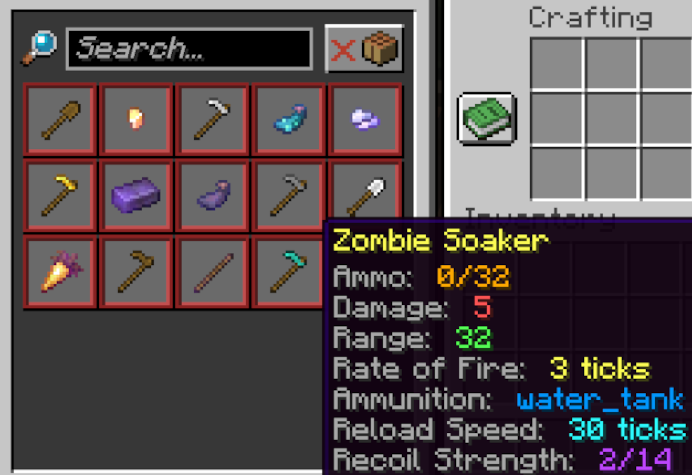|Zombies Guns adds the guns from the Hypixel Zombies minigame to vanilla Minecraft! All of the guns added by this pack are craftable! Find the recipes in the vanilla crafting table!
—|—
Alternatively, you can always give yourself *any* of the items added by this pack by running the command:
“`
/function give:zombies/
“`
> [](https://billing.sparkedhost.com/aff.php?aff=2775)
> Want a Minecraft server? Consider SparkedHost! Use code GAMINGBARN for 25% off!
> []([https://discord.gg/dKMxTjchsg](https://discord.gg/dKMxTjchsg))
>
***https://discord.gg/dKMxTjchsg***
> Need help with my datapacks? Found a bug? Want to share some feedback? Join my Discord server! There, I can offer personal help towards any problem you may be having!
ZombieRool
***
# 🧟♂️ ZombieRool – The Ultimate Zombies Experience
> **🚨 NETWORK & DOWNLOADER NOTICE:**
> This mod includes an optional in-game Map & TacZ Pack downloader.
> * No data is collected silently. No downloads occur without the user’s explicit action.
> * On the first launch, an Opt-In screen will prompt the user to allow or deny external HTTP requests (to GitHub and our Render API for redeem codes). You have full control.
**ZombieRool** completely transforms your Minecraft **1.20.1 (Forge)** world into a fully-fledged, round-based Zombies survival experience. Survive endless hordes of the undead, rack up points, buy weapons off the walls, unlock new areas, and upgrade your arsenal to face increasingly difficult waves!
Whether you are a player looking to survive to Round 50 with your friends, or a Map Maker wanting to design the perfect custom zombies map, **ZombieRool has absolutely everything you need built right in.**

### 🩸 Core Gameplay & Survival
* **Dynamic Wave System:** Zombies get faster, stronger, and more numerous as the rounds progress. Beware of the special Hellhound rounds!
* **Points & Economy:** Earn points by damaging and killing the undead. Get bonus points for precise headshots and melee knife kills. Use your points to open doors and survive.
* **”Last Stand” Revive System:** If you go down, it’s not over. You will crawl on the ground with a pistol while your teammates have a limited time to revive you.
* **Gore & Dismemberment:** Extremely satisfying visual feedback. Headshots cause skull explosions, and explosives will blow off zombies’ legs, turning them into Crawlers!
### 🔫 Arsenal, Mystery Box & Pack-A-Punch
* **Wonder Weapons:** Turn the tide with devastating weapons like the *Ray Gun*, *Ray Gun Mark II*, *Wunderwaffe DG-2*, and the *Thundergun*!
* **The Mystery Box:** Spend 950 points to roll for a random weapon. But be careful—if you pull the Teddy Bear, the box will relocate to another area!
* **Pack-A-Punch Machine:** Upgrade your weapons for 5000 points. Upgraded weapons deal more damage, hold more ammo, gain unique animated camos, and can even shoot explosive or incendiary rounds.
* **Wall Weapons:** Buy guns and refill ammo directly from chalk outlines on the walls.

### 🏆 Career, Progression & Cosmetics
ZombieRool features a fully custom out-of-match progression system:
* **Level Up:** Earn XP by playing and level up your profile to Level 50. Reach the top and enter **Prestige** mode!
* **ZRF Currency:** Complete daily challenges and matches to earn ZRF.
* **The Shop & Arsenal:** Use your ZRF to unlock custom Weapon Skins and Camos in the Career menu.
* **Mastery Camos:** Grind weapon-specific kill and headshot challenges to unlock ultimate camos like *Gold, Black Ice, Damascus,* and *Dark Matter*.
### 🥤 Perks-a-Cola & Power-Ups
Drink to survive! Find the classic perk machines around the map, or gamble at the **Der Wunderfizz** machine for a random perk.
* **Juggernog:** Drastically increases your maximum health.
* **Speed Cola:** Cut your reload time in half and repair barricades faster.
* **Double Tap:** Increases your weapon’s fire rate.
* **Quick Revive:** Revive teammates incredibly fast (or get an auto-revive when playing Solo!).
* **Mule Kick:** Carry a third weapon in your inventory.
* **PhD Flopper:** Take zero explosive/fall damage, and trigger a massive explosion when diving from a height!
* **Electric Cherry:** Creates a stunning electric shockwave around you whenever you reload.
* **Plus:** Vulture Aid, Blood Rage, Royal Beer, and more!
**Power-Ups (Drops):** Slaying zombies can spawn classic drops like *Max Ammo, Insta-Kill, Double Points, Nuke, Carpenter, Zombie Blood, Fire Sale, and On the House!*

### 🛠️ Ultimate Tools for Map Makers
ZombieRool is a Map Maker’s dream come true. You don’t need external command blocks; it’s all in the mod:
* **Universal Spawners:** Easily set up zone-based spawning. Tie spawners to specific “Channels” so zombies only spawn in rooms the players have unlocked.
* **Barricades & Debris:** Place windows for players to repair for points, and block paths with debris/doors that cost points to clear.
* **Integrated Lua Scripting:** Comes with a built-in Lua engine (`zr_scripts`). Write your own scripts to trigger custom Easter Eggs, boss fights, dialogues, and events!
* **Meteorite Easter Eggs:** Hide meteorites around your map. When players find them all, it triggers a Secret Song!
* **Environment Control:** Customize the map’s fog (color, density), set the music tracks (including the classic “Damned” theme), and control the weather directly via the config menu!
***
### ⚙️ Mod Compatibility (TacZ)
ZombieRool is a complete, standalone experience with its own weapons and camo progression system. However, if you prefer modern firearms, the mod is fully **compatible with Timeless and Classics Guns (TacZ)**! TacZ weapons will automatically adapt to the zombies’ gameplay (balanced damage, working Pack-A-Punch, wall-buys, etc.).
### 🚀 What’s New
* **Safe Play Testing:** You can now create a temporary copy of your world directly from the main menu. It will automatically delete itself when you leave, keeping your original map intact!
* **Localization:** The mod is now fully supported in 6 languages (English, French, German, Spanish, Portuguese-Brazil, Russian).
* **Bug Fixes:** Numerous minor bug fixes, network optimization, and overall stability improvements.
### 🔗 Links & Community
* 💬 **Join our Discord:** [Click here to join!](https://discord.gg/HGv2r44hXM)
* 🐞 **Source Code & Issue Tracker:** [GitHub Repository](https://github.com/Cryo60/ZombieRool)
### Credits to Resprune for making the Mod’s thumbnail


