Incremental Shaders improves various visual aspects of the game through small, progressive enhancements; delivering cleaner lighting, richer colors, and better overall clarity while preserving the original look and feel.
-Shadows with distortion to reduce aliasing
-Day/night cycle with proper darkening and blue-shifted night vision
-Distance fog that gets thicker at night
-Waving grass, flowers, and leaves (fades out at distance)
-ACES tone mapping with a cool blue tint
-Rain and thunderstorm effects (darker, desaturated, foggier)
-Torch flicker
-Vignette
I Like Vanilla
I’m currently looking for a job, if your company is looking for experienced programmers then please let me know!
Shaders typically fall into one of two camps: completely overhauling minecraft’s style or completely copying it. This shader aims to overhaul the graphics while making it feel like nothing has changed. It’s the same style as vanilla minecraft but built for my own preferences, which are:
– Beautiful and Pleasant
– Unobtrusive
– Sharp AA
– Gameplay-Oriented
– Interesting and Exciting
– Performant
### Supports [Voxy](https://modrinth.com/mod/voxy), [Distant Horizons](https://modrinth.com/mod/distanthorizons), [Colorwheel](https://modrinth.com/mod/colorwheel), and more!
### Note: Optifine is only partially supported. If you think it should be more supported, you can always let me know
## How to install:
– 1: Install either [Fabulously Optimized](https://modrinth.com/modpack/fabulously-optimized) (full modpack, preferred) or [Iris](https://modrinth.com/mod/iris)/[Occulus](https://modrinth.com/mod/oculus) (single mod, can be added anywhere)
– 2: Download the latest version of this shader
– (If you want to see the values used by each style, you can download a style-specific version)
– 3: Launch minecraft, go to the shaderpacks menu, and click the ‘Open Shader Packs Folder’ button
– 4: Put the downloaded shader zip into the shaderpacks folder
– 5: Select the shader within the shaderpacks menu
## Performance Comparisons:
I’m not sure how trustworthy these results are, but it should give you a rough idea of the performance between shaders. Also, you can compare your graphics card to mine [here](https://www.techpowerup.com/gpu-specs/geforce-gtx-1070.c2840). Tests:
### License Overview:
**This is not exact or binding in any way.**
#### You can (with restrictions):
– Use this for gameplay, screenshots, videos, etc
– Use this in modpacks
– Create public and/or private modifications
– Reuse shader code
#### You cannot (without any exceptions):
– Redistribute this shader with little to no modifications
– Create shortened / indirect links to this shader
#### You can read the full license [Here](https://github.com/What42Pizza/I-Like-Vanilla/blob/main/LICENSE).
Note: this shader has very limited testing and is very likely to break in niche cases, but I’m very open to fixing any and all bugs that are reported
Please visit your local church
Hysteria Shaders
[](https://lunapixel.studio/discord)

[](https://ko-fi.com/elocindev)
A stylized, atmospheric horror-themed Iris shaderpack with high customizability and performance.
Successor of [Insanity Shader](http://www.curseforge.com/minecraft/shaders/insanity-shader).
Based on Photon, Hysteria provides a similar feel to Insanity, but with modern features such as volumetric clouds and fog, colored lighting, distant horizons support, and more!

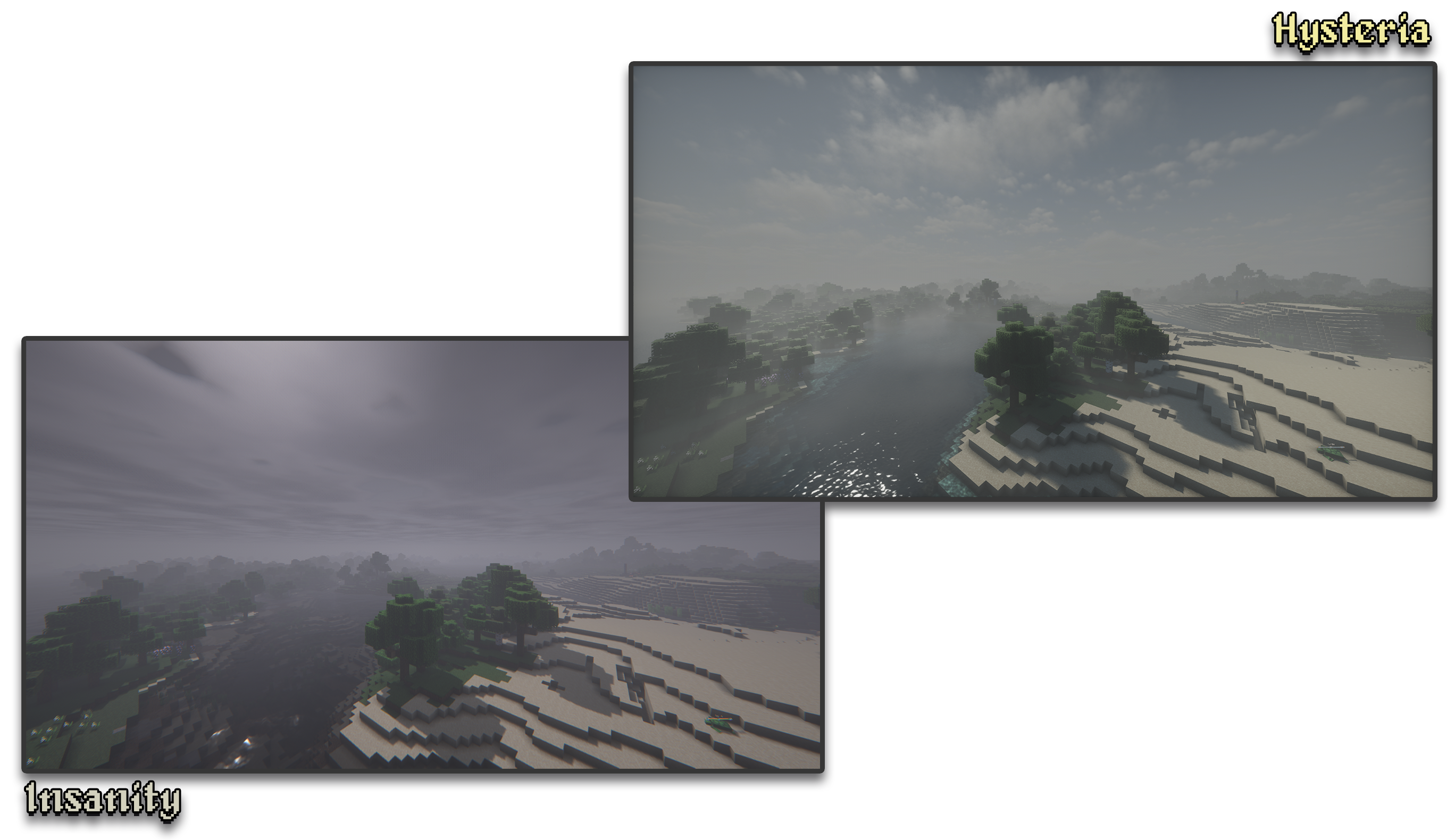
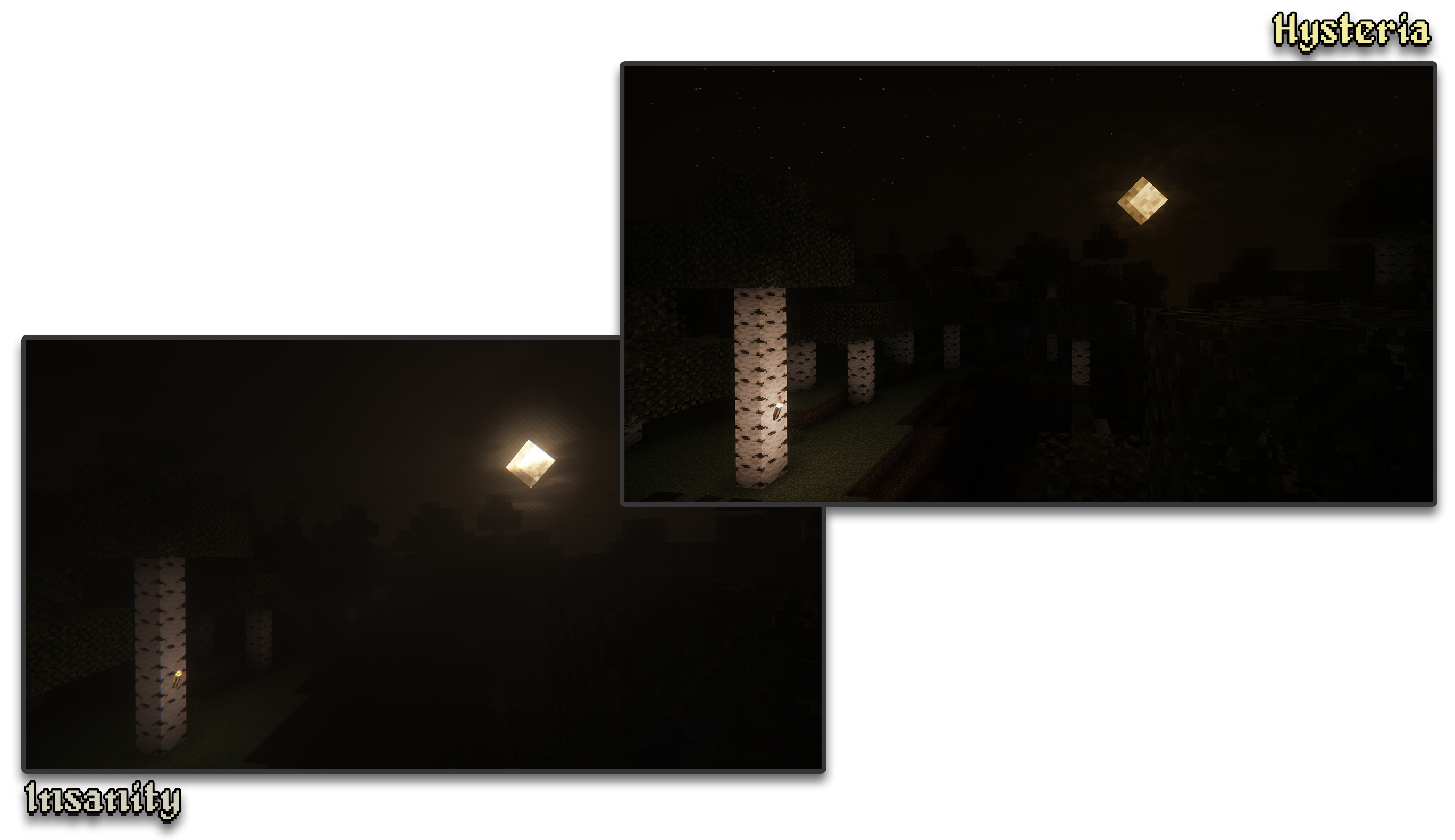
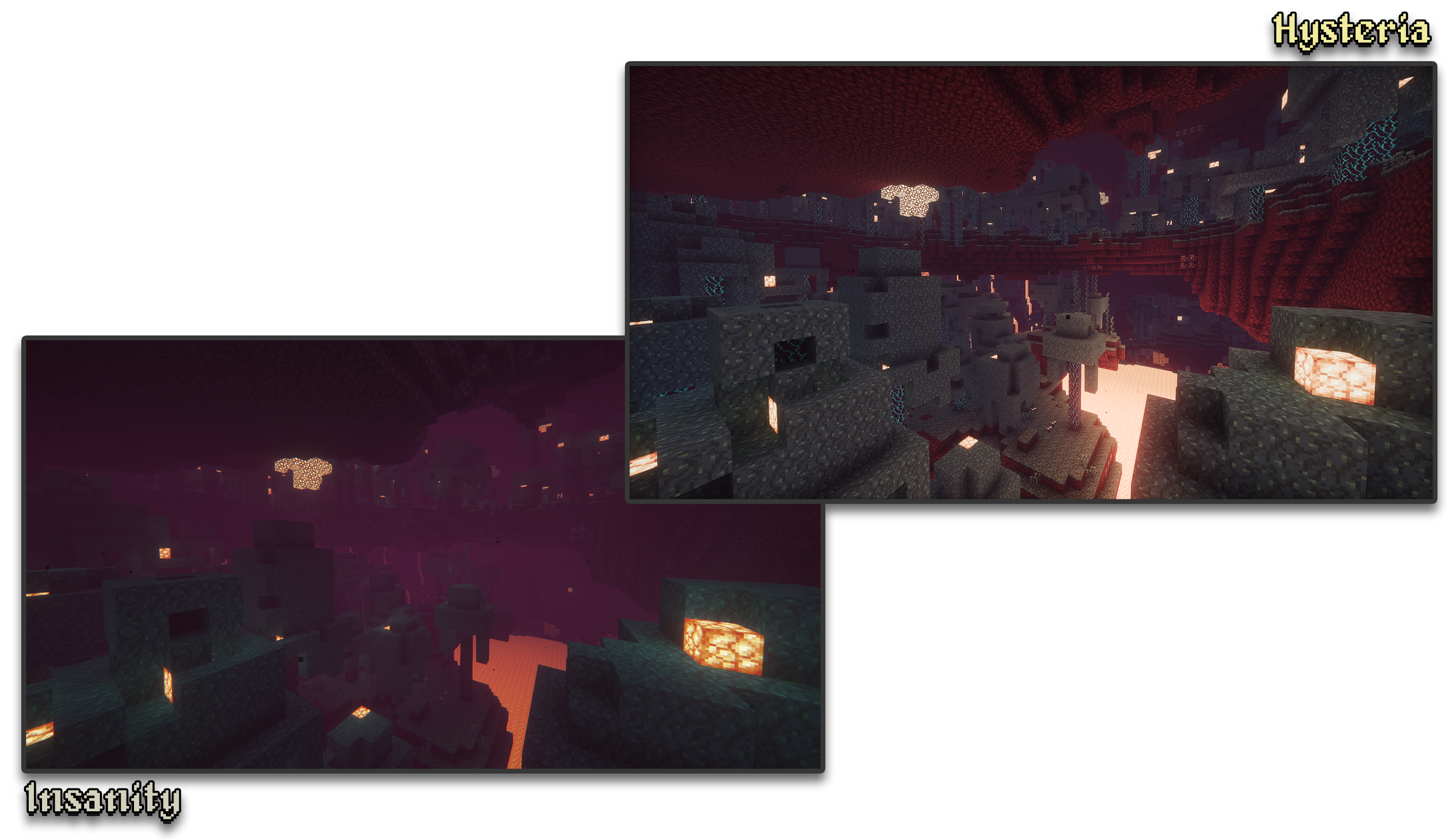
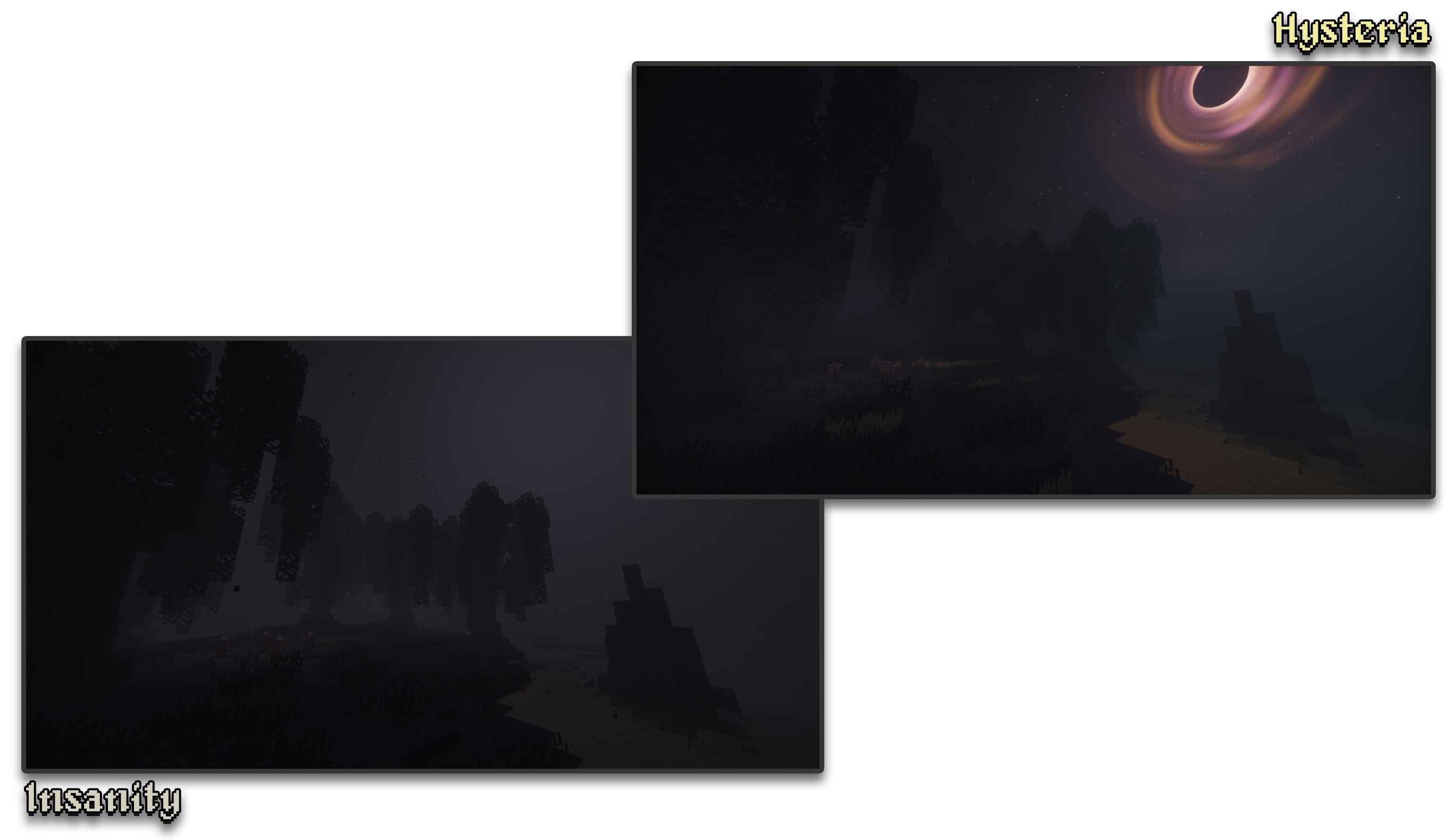
– 🧟 **Atmospheric Scary Look.** Perfect for horror & zombie modpacks!
– 📓 **Highly customizable shader configuration.** Expanded from Photon’s limits.
– ⛈️ **Immersive & Dynamic Weather.** Every day is a different day, with different clouds and colors.
– 🌫️ **Volumetric Fog & Clouds.** With ground-level and distant fog, changing volumetric clouds, and more!
– 🌎 **Distant Horizons Support.** Experimental!
– 📝 **User-friendly menu.** Including a quick options menu with easy to configure settings.
– 💻 **Runs on most modern PCs.** Optimized even for lower-end GPUs. Even better than Insanity!
– 🔦 **Always bring some torches.** Not only the night is dark, the Nether and End are even worse!
– 🌎 **Wide compatibility across versions.** Supports all newer MC versions from 1.7.10 upwards.
– ☀️ **Built-in Colored Lighting.** With support for labPBR resource packs.
– **Sixthsurge**
– For making Photon, the shaderpack that Hysteria is based on
– **Capt Tatsu**
– For making BSL, helping me start out Insanity. Without Insanity, Hysteria wouldn’t exist!
Haze Shader is a lightweight shader pack that enhances Minecraft’s visuals without losing its iconic blocky style.
🧱 Stylized blocky shadows that stay true to the game’s design
🌊 Clean reflections on water, ice, and other shiny blocks
💡 Soft, refined emissive lighting for naturally glowing elements
⚡ Optimized for performance – ideal for all systems, even low-end PCs
Haze Shader focuses on subtle, smart upgrades that make your world feel more alive—without ever stepping away from what makes Minecraft, Minecraft.
**✨ I REALLY HATE SHADOWS…** **i hate shadows** is a lightweight Minecraft shader that does one thing — and does it perfectly:
it _removes every single shadow_. 🌞
No dark corners, no spooky vibes — just pure, bright daylight everywhere you look.
Perfect for players who love minimal visuals, boosted performance, and a world that never hides in the dark.

### 🌟 Features
* ❌ No shadows at all
* ⚡ FPS-friendly, super lightweight
* 🌞 Always bright, clean visuals
* 🎮 Works great on low-end systems
Pushing the boundaries of accessible intelligence. Whether you need lightweight efficiency or industrial-grade reasoning, the **Next Series** delivers.
**Why build with Lamapi?**
– ⚡ **High Efficiency:** From compact 1B models to powerful 70B reasoning engines.
– 🌍 **Multilingual Mastery:** Optimized for superior performance in English & Turkish.
– 🛠️ **Ready to Deploy:** State-of-the-art open weights available immediately.
Looking for a host that takes your gaming experience as seriously as you do? We provide robust infrastructure ensuring smooth gameplay and enterprise-grade uptime.
**Why switch to us?**
– 💎 **7-Day Free Trial:** Experience the quality risk-free (No commitment).
– 🛡️ **99.9% Uptime SLA:** Your server stays online, guaranteed.
– ⏰ **24/7 Support:** Expert help whenever you need it.
🔥 Experience the difference with 25% off your first month,
GlacierShaders is a shader pack for Minecraft Java Edition, carefully crafted for low-end device users who want to enjoy warm and appealing visuals without sacrificing FPS. It delivers a clean, stylized look with blue-toned water, a calm vanilla-inspired sky — all while avoiding performance-heavy features like waving leaves or ultra-realistic lighting.
GlacierShaders offers blue-toned water, a clean vanilla-style sky with soft glowing clouds, and disables heavy effects like waving leaves and foliage to ensure maximum FPS. These choices are made to support low-end devices, keeping visuals smooth and enjoyable without performance drops.
**How to report BUGS!!**
Our GlacierDevelopment Discord server is Live you can report bugs and Chat with other GlacierShaders users, report bugs, get help with issues, and join exciting giveaways — all in one place!
# FSR+
A Minecraft shaderpack that uses AMD FidelityFX Super Resolution (FSR) to upscale the game from a lower internal resolution to your display resolution. This allows Minecraft to render fewer pixels while maintaining a clear image, potentially improving performance on supported hardware.
Unlike traditional shaders that focus on visual effects, this shaderpack focuses on performance-oriented rendering using modern upscaling techniques.
## Features
– FSR Upscaling: Uses AMD FidelityFX Super Resolution to upscale a lower-resolution render to your screen resolution.
– Hardware Compatible: Works on AMD, NVIDIA, and Intel GPUs because FSR runs entirely in shaders and does not require special hardware.
– Adjustable Render Resolution: Configure the internal render resolution and output resolution to balance image quality and performance.
– RCAS Sharpening: Includes FidelityFX Robust Contrast Adaptive Sharpening to improve clarity after upscaling.
– Vanilla Visual Style: Does not change Minecraft’s lighting or art style, the goal is performance, not visual effects.
## Why use this shaderpack?
Many shaderpacks add heavy graphical effects that reduce FPS.
This shaderpack instead attempts to increase performance by rendering the game at a lower resolution and upscaling it back to your display resolution using FSR.
## Current Status
### ⚠️ Alpha Version
This shaderpack is currently in early development.
**At the moment it may:**
– Reduce performance instead of improving it
– Have visual artifacts
– Lack optimization
## Compatibility
– Designed for Iris shader loader
### GPU Compatibility
Because FSR runs entirely in shaders, it works on a wide range of GPUs.
However, older hardware may not perform well or may experience issues.
Tested and expected to work on:
– **AMD GPUs:** Radeon RX 400 series and newer, including most AMD integrated graphics
– **NVIDIA GPUs:** GeForce GTX 10 series and newer
– **Intel GPUs:** Intel Arc GPUs and most Intel integrated graphics from 7th generation onward
# Disclaimer
Performance and compatibility may vary depending on your GPU and driver version.
Forget-Me-Not Shaders
Important! This, along with the GitHub page for this project, is the only official place to find Forget-me-not. Any other site you find this project, including unethical mod rehosting sites like 9minecraft, are untrusted sources. Never download files from untrusted sites.
# Forget-me-not Shaders
**Forget-me-not** is a semi-realistic pipeline shader for the [Canvas](https://modrinth.com/mod/canvas) mod. It’s designed to give the most authentic and immersive experience while sticking to “traditional” rendering methods to keep up good performance.
**Canvas** is a client-side renderer mod that uses shaders for advanced rendering with the goal of having a modern and very flexible design for high performance and better readability. The shader system is entirely different from Optifine and Iris & Sodium and as such, Forget-me-not won’t work with any of these mods! See the `how to use` section for installation instructions.
## notice
If you’re a developer or mod hoster, Forget-me-not is licensed under the [LGPL v3.0](https://www.gnu.org/licenses/lgpl-3.0.en.html), so please make sure to read over the terms of the LGPL if you use any of Forget-me-not’s original code or distribute it.
## how to use third-party shaders with canvas
1. Be sure you’re on 1.19.4 or above. Support is not guaranteed for versions that Canvas doesn’t actively support.
3. Get Canvas Renderer mod through [Modrinth](https://modrinth.com/mod/canvas). **Keep in mind that Canvas does not work with Sodium, Iris, OptiFine, or OptiFabric.**
4. Download your preferred pipeline shaderpack. If you’re looking for alternatives to Forget-me-not, try out [Lumi Lights](https://github.com/spiralhalo/LumiLights/releases), [Lomo (not for gameplay as of this writing)](https://github.com/fewizz/lomo/releases), or [Aerie (vanilla-plus, wip)](https://modrinth.com/shader/aerie-shaders).
5. Launch your game, put your downloaded `.zip` file into your `resourcepacks` folder and activate the resource pack. (Don’t extract it!)
6. Navigate to `Options / Video Settings / Canvas / Pipeline Options / Pipelines` and select the pipeline that you want to play with.
## troubleshooting
– Experiencing bad shadow outcomes? In `Options / Video Settings / Canvas / Debug`, set `Shadow Priming Strategy` to `TIERED` and `Disable Shadow Self-Occlusion` to true.
– Does Canvas say in chat that some shaders are broken? Please grab your log in `.minecraft/logs/latest.log` and all contents of the `.minecraft/canvas_shader_debug/` folder and either make an issue on GitHub or let me know about it on Discord.
– Does every Canvas pipeline break other than Canvas Basic? If so, your device is probably incompatible with Fabulous graphics, which most Canvas pipelines use. Unfortunately, there’s no fix for this.
## feature highlights
– seasons! be immersed in your world as the seasons change over time
– HDR, bloom, and tone mapping
– dramatic skies with atmospheric scattering and custom realistic clouds
– water waves and reflections
– support for PBR, with hundreds of built-in default materials
– contact-hardening variable penumbra shadows
– advanced anti-aliasing (TAA)
## credits
Forget-me-not wouldn’t be nearly as polished as it is if it weren’t for the help of people like fewizz, spiralhalo, Grondag, and many others from the Canvas community for contributing and testing. Many thanks to:
– The [shaderLABS discord channel #snippets](https://discord.com/channels/237199950235041794/525510804494221312/959153316401655849) for many useful code snippets
– [Lumi Lights](https://github.com/spiralhalo/LumiLights) by spiralhalo for lots of different inspiration & help, and also references for a working TAA implementation
– [lomo](https://github.com/fewizz/lomo/releases) by fewizz for inspiration for many different things, as well as the raytracer and lots of invaluable contributions
Focal shader
### Let me quickly list the features
Experience realistic graphics, reflections, and PBR textures with Focal Shader — optimized for both high-end and low-end devices.
### Key Settings
High Graphics Quality – Brings your Minecraft world to life with stunning visuals.
Realistic Reflections – Adds lifelike water and surface reflections for immersive gameplay.
PBR Support – Fully compatible with Physically Based Rendering (PBR) texture packs.
Low-End Device Friendly – Optimized settings ensure smooth performance even on weaker systems.
Balanced Performance – Offers a mix of beauty and efficiency, perfect for casual or competitive players.
## Supported Versions
Minecraft 1.19.2
Minecraft 1.19.1
Minecraft 1.21.4
### Why Choose Focal Shader?
Focal Shader combines realistic lighting, reflections, and textures while still being accessible for players with lower-end PCs or laptops. Whether you’re building, exploring, or just enjoying survival mode, this shader will make your game look cinematic and vibrant.
I created this Focal shader using expressions from @bobcao3
FeathC2
### Details
Feath Shader is a lightweight yet visually powerful shader pack designed to enhance your Minecraft experience with balanced realism and high performance. Whether you’re exploring vast landscapes or building detailed structures, Feath Shader adds an immersive layer of beauty without compromising on FPS.
✨ Features:
Realistic Reflections → Smooth and accurate reflections on water, glass, and reflective blocks.
Rain Puddles → Dynamic wet surfaces that bring rainy weather to life with puddles forming naturally.
Lighting Enhancements → Soft, natural light with realistic shadows, bloom, and improved torchlight effects.
Atmosphere & Sky → Improved atmosphere rendering with more depth, fog, and vibrant skies.
Color Adjustments & Grading → Balanced tones and cinematic color grading for a polished, professional look.
Feath Shader is made to be lightweight, stable, and visually consistent, perfect for players who want beautiful graphics without sacrificing smooth gameplay.