XLeaderBoard
🌍 English Description
⚡ **X-LeaderBoard**
Ultimate dynamic leaderboards for Minecraft!
X-LeaderBoard is a next-generation ranking system that brings real-time competition to your server using modern Text Display technology. No more bulky armor stands—just clean, lag-free holographic rankings!
🚀** Key Features**
Performance First: Built with Text Display entities to ensure zero lag on your server.
Full PAPI Support: Rank anything! Money, Kills, Level, Votes, and more via PlaceholderAPI.
Fully Customizable: Change titles, colors, and update intervals in the config.
Database Options: Support for both SQLite and MySQL.
🛠️ **Commands**
/xlb create – Create a new leaderboard.
/xlb delete – Remove a leaderboard.
/xlb reload – Reload the configuration.
📦 **Quick Start**
Place the plugin in your plugins folder.
Install PlaceholderAPI (Required).
Restart your server.
Configure your categories in config.yml and use /xlb create!
———————————————————————————————-
🇹🇷 **Türkçe Açıklama**
⚡ X-LeaderBoard
Minecraft için yeni nesil dinamik sıralama tabloları!
X-LeaderBoard, sunucunuza modern Text Display teknolojisini kullanarak anlık rekabet getiren bir sıralama sistemidir. Hantal zırh askıları (armor stand) yerine, sunucunuzu yormayan tertemiz holografik tablolar kullanın!
🚀 **Öne Çıkan Özellikler**
Önce Performans: Sunucuda gecikme yapmayan Text Display varlıkları ile kodlanmıştır.
Tam PAPI Desteği: PlaceholderAPI sayesinde Para, Öldürme, Seviye, Oy ve her şeyi sıralayın!
Tamamen Özelleştirilebilir: Başlıkları, renkleri ve güncelleme sürelerini config’den ayarlayın.
Veritabanı Seçenekleri: Hem SQLite hem de MySQL desteği mevcuttur.
🛠️ **Komutlar**
/xlb create – Yeni bir sıralama tablosu oluşturur.
/xlb delete – Mevcut bir tabloyu siler.
/xlb reload – Ayarları yeniler.
📦 **Hızlı Kurulum**
Eklentiyi plugins klasörüne atın.
PlaceholderAPI eklentisini yükleyin (Gereklidir).
Sunucuyu yeniden başlatın.
config.yml dosyasından kategorileri ayarlayıp /xlb create ile tabloları dikin!
XItemsRemover
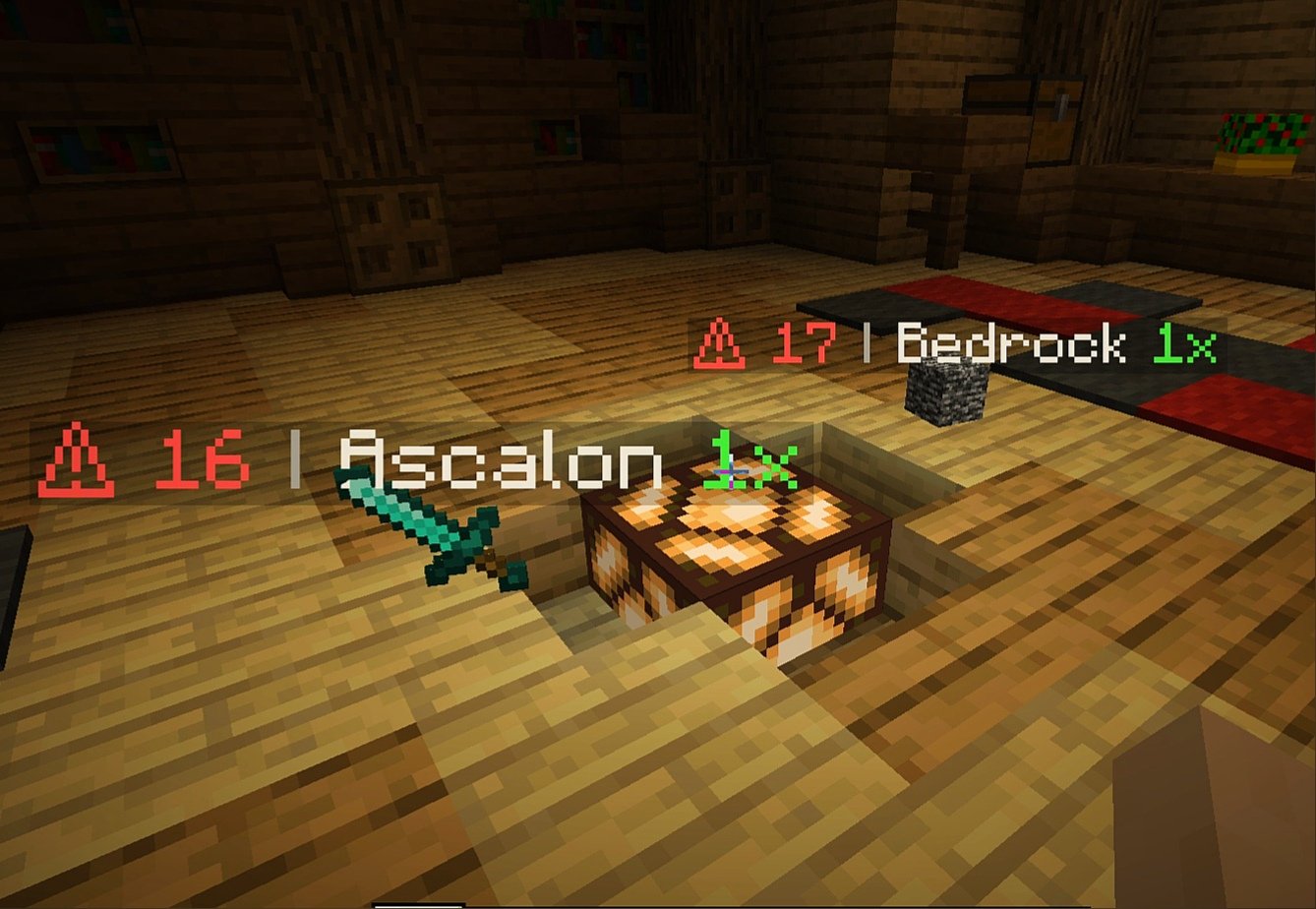
XItemsRemover – is a small plugin that automatically removes dropped items with a timer displayed on these items until they are removed. The time until deletion is configured in the plugin configuration.
IMPORTANT
If you have items with displayed name ‘AIR‘ – specify ‘api-version’ in plugin.yml with version of your server!
For example, if your server version is 1.16.5, add the following line to plugin.yml of XItemsRemover:
api-version: 1.16
### Configuration
“`
Items:
# Format:
# ‘‘: “”
# Available placeholders:
# {time} – time remaining before remove (in seconds)
# {display_name} – display name of itemstack (if empty – used localized material name}
# {amount} – itemstack amount
Display-name-formats:
‘1’: “§c⚠ {time} §7| §f{display_name} §a{amount}x”
’10’: “§c{time}”
Remove-timer:
# Timer for removing an item in seconds
Default: 30
After-player-death: 180
Async: true
# Section for specifying a unique timer or display name
# for certain materials
# Format:
# :
# : 15
# :
# :
#: false
# If you only need to edit one parameter
# (name or time) you can just delete the line with the second.
# If you need the plugin not to track a certain type of materials, then set ‘tracked: false’
Custom-materials:
COBBLESTONE:
Timer: 15
Display-name-formats:
’15’: “Cobblestone :D”
STONE:
Timer: 10
GRASS:
Display-name-formats:
’30’: “Grazz”
SAND:
Tracked: false
# Worlds in which plugin does not work
Restricted-worlds:
– “restricted_world”
“`
### Commands and permissions
Command | Permission
————- | ————-
‘**/itemsremover**’ [Alias: ‘**/ir**’] – prints all plugin commands. | items.remover.commands.help
‘**/itemsremover help**’ – prints all plugin commands. | items.remover.commands.help
‘**/itemsremover reload**’ – reloads plugin configurations. | items.remover.commands.reload
XinXinBotApi
## 兼容核心
插件只在下列核心进行测试,正常使用,其它服务端核心未知,请自行测试。
1.8.8版本:Paper、Spigot
1.12.2版本:CatServer、spigot
1.16.5版本:CatServer、spigot
1.19.2版本:paper、Spigot
1.20.2版本:mohist、arclight
## 插件简介
此插件可以通过WebSocket对接 OneBot 以及 Mirai 机器人框架
对接 Mirai 机器人请自行安装 mirai-api-http 插件
推荐使用 Mirai 机器人框架,若实在不会搭建可以使用 OneBot标准 的机器人
此插件因只作为一个前置Api使用所以只有一个绑定功能且默认关闭
为什么是对接而不是把机器人直接写入插件?
如果是直接将机器人写入插件可能会导致多服服主或多端服主头疼
因为这样你可能需要准备更多的QQ号
但如果是直接接入框架本身的话
首先你也能正常使用框架本身的插件并且还能对接服务器
## 插件功能
此插件使用 WebSocket 进行QQ消息操作
所以必须通过指令连接一次 WebSocket 才能正常使用
在配置文件中可以开启自动连接,但需要提前开启 OneBot 或 Mirai 机器人
绑定信息支持 MySQL 储存,若不开启则为本地文件储存
此插件作为单独使用的话只有一个绑定玩家功能
而这个绑定功能也没有任何实质性作用
但是可以通过其他附属插件达到想要的作用
## 指令权限&介绍
管理员指令介绍(所需权限:`XinxinBotApi.admin`)
`/xbot bind <玩家ID>` —— 手动绑定一个QQ
`/xbot unbind ` —— 删除一个QQ的绑定账号
`/xbot connect` —— 连接WebSocket
`/xbot close` —— 断开WebSocket
`/xbot reload` —— 重载插件
## 图片展示
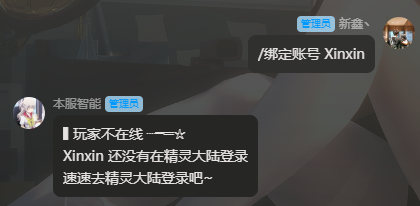
Api自带绑定功能(需要在配置文件手动开启SetBind项)
## 开发文档 & 安装教程
若将此插件作为开发前置即可让MC充满各种可能性
或许在这之前你开发群服互联插件会去找各种Api
现在你只需要把本插件添加为你的依赖
使用本插件作为前置开发请在 `Plugin.yml` 里加入 `depend: XinxinBotApi`
从而让本插件在你插件之前加载

## 附属插件
绑定礼包 | 查询信息 | 进服验证 | 图片信息 | 群服注册 | 互联指令 | 我的精灵
(一个一个改链接太麻烦了,在新鑫论坛搜索XinxinBot则可以浏览所有附属)
! 附属插件统计可能并不完全,更多附属插件自行开发或找他人定制
## 版权声明
本插件所用所有代码均为原创,不存在借用/抄袭等行为
本插件为非盈利性插件,免费发布,严禁销售和转卖
若需要开发任何与此插件相关的附属插件可以联系作者
### 转载声明
转载至https://bbs.mcxin.cn/archives/216
已得到原作者授权

欢迎加入新鑫咕咕交流群:1124109145

XinghaiMC-Report
# XinghaiMC-Report
## Introduction
A simple and clear reporting plugin.
## Command
/report Player Reason
– Report Player
/handle
– View list of reported players
/handle ID
– Report processing complete.
## Permissions
xinghaimc.report
– Permissions used for reports
xinghaimc.report.handle
– Permissions used to handle reports
## Download
Github Releases (recommended)
Github Actions
MineBBS
Xiaoklunar Auction House
# Auction
A clean, GUI-first Auction House plugin for **Paper 1.21+** using **Vault** for economy.
Designed to be lightweight, permission-minimal, and easy for both players and developers.
—
## Requirements
– **Paper**: 1.21+
– **Vault** (plugin)
– **A Vault-compatible economy plugin** (e.g., EssentialsX)
> Vault does **not** store balances. You must install an economy provider.
—
## Commands
### `/ah`
Opens the global Auction House GUI.
### `/ah sell `
Lists the item currently in the player’s hand for sale.
– Item must not be `AIR`
– Item must not be blocked by config
– Price must be within configured limits
– Listing limit enforced (normal vs premium)
### `/ah storage`
Opens **Auction Storage**, showing:
– Active listings (click to cancel)
– Cancelled / expired returns (click to claim)
– Delivery overflow items (when inventory was full on purchase)
### `/ah resell`
Relists eligible stored items (premium feature + cooldown).
### `/ah `
Opens a view showing **only listings by that exact seller name**.
– Case-sensitive matching
– Does not validate whether the name belongs to a real player
– If no listings exist, GUI opens empty
### `/ah search [maxPrice]`
Searches auction listings by keyword.
– No `minecraft:` namespace required
– Matches:
– Material key/name (e.g., `iron_ingot`)
– Display name (custom items like “Bulldozer” / “Drill”)
Examples:
– `/ah search iron`
– `/ah search net`
– `/ah search note block 500` *(premium price filter)*
—
## Premium Features
Permission:
– `auctionhouse.premium`
Premium unlocks:
– Increased listing limit (default: 20 vs 10)
– `/ah resell` and “Relist All” button
– Advanced search price filter (max price argument)
– Cooldown on relist (default: 60s)
Relist spam protection:
– “Wait X seconds” message is throttled to **max once per second** per player.
—
## GUI Overview
### Auction House GUI
– Paginated
– Edge glass border
– Buttons:
– **Refresh** (nether star)
– **Storage** (chest)
– **Prev/Next page** arrows (hidden when not usable)
Listing lore formatting:
– Seller name: **Yellow**
– Price: **Green**
– Expires in: **Red**
– Lore is **non-italic**
### Confirm Purchase GUI
– Click listing → confirm screen:
– Green: Buy
– Red: Cancel (returns to `/ah`)
Purchase logic:
– Checks balance **before** opening confirmation
– On successful buy:
– Money is withdrawn
– Item delivered to inventory
– If inventory full → moved to storage as delivery overflow
### Auction Storage GUI
– Title: **Auction Storage**
– Shows:
– Active listings (cancelable)
– Cancelled returns
– Expired returns
– Overflow deliveries
– Back arrow returns to main `/ah`
Status display:
– Cancelled: red
– Expired: red
– Delivery: yellow
—
## Sounds
– Successful listing: “ding” sound
– Listing denied (limit reached / not allowed): villager “no”
– Successful purchase: villager “yes”
– Seller receives notification + sound on successful sale
—
## Configuration
Key config options include:
– Listing limits for normal/premium
– Maximum sell price
– Premium relist cooldown
– Blocked item list
– GUI sound toggles (if present in your build)
*(Exact keys depend on your current shipped config.yml.)*
—
## Installation
1. Drop into `plugins/`:
– Vault
– Economy plugin (e.g., EssentialsX)
– Xiaoklunar Auction
2. Start server
3. Configure `config.yml`
4. Assign premium permission (optional)
– Example (LuckPerms):
“`
/lp group premium permission set auctionhouse.premium true
“`
—
## Troubleshooting
### Vault installed but economy not working
Vault needs an economy provider (EssentialsX, etc.). Check console for economy registration logs.
### “Invalid plugin.yml”
YAML must use spaces (no tabs) and usage strings should be quoted.
Have fun
XGamemode

### “*You’re not switching modes, you’re switching dimensions.*”
~~*2000 Downloads?! Thanks!*~~
# 1 Feature
## 1.1 Offline Player
You can change the gamemode of a player, **even he (or she) was offline**.
## 1.2 Permissions
Allow permission group plugins (_like Luckperms_) to manage **which gamemodes can be switched to** and **which gamemodes cannot be switched to**.
_e.g. Allow to switch to survival mode but not to any other mode._
## 1.3 Alias
**/gamemode** is simplified to **/gm** and **/g**.
_(of course you can still use /gamemode)_
## 1.4 Cross-Server Storage
Support **MySQL** and **SQLite** storage backends. Player gamemodes are saved and synchronized across multiple servers in a network.
## 1.5 Folia Support
**Fully compatible with Folia servers** — using region-based scheduling for optimal performance.
## 1.6 Lightweight
The Plugin size is only **~25 KB** and has **almost no impact** on server performance!
# 2 Caution
## 2.1 Shortcut Keys
If you need to use shortcut keys such as **F3+F4**, please install another plugin **F3NPerm**.
## 2.2 Versions
**1.8.X +**
**All Bukkit based server** (Paper, Spigot, Purpur, Folia, etc.)
# 3 Commands
“`markdown
– /xgamemode
– /xgamemode reload
– /gm
– /gm
– /gm -all
– /gm -online
– /gm -offline
/g = /gm = /gamemode
/xg = /xgm = /xgamemode
“`
# 4 Permission Node
“`markdown
– xgamemode.survival
– xgamemode.creative
– xgamemode.adventure
– xgamemode.spectator
– xgamemode.others.survival
– xgamemode.others.creative
– xgamemode.others.adventure
– xgamemode.others.spectator
– xgamemode.reload
– xgamemode.admin
“`
# 5 Custom Config
## 5.1 Basic Settings
“`yaml
lang: en-US
“`
**Language** setting
“`yaml
default_gamemode: survival
“`
If a **new player joined your server**, **which gamemode should he (she) be**?
**survival**, **creative**, **adventure**, **spectator**
“`yaml
show_logo: true
“`
Show logo or not when plugin enabled.
**true**, **false**
“`yaml
debug: false
“`
Enable debug logging for troubleshooting.
**true**, **false**
## 5.2 Storage Configuration
“`yaml
storage:
type: yaml
“`
**Storage backend type**: **yaml**, **sqlite**, **mysql**
### SQLite Example
“`yaml
storage:
type: sqlite
# No additional config needed — data.db will be created automatically
“`
### MySQL Example
“`yaml
storage:
type: mysql
mysql:
host: localhost
port: 3306
database: minecraft
username: root
password: your_password
“`
## 5.3 Custom Messages
“`yaml
messages:
en-US: # Original en-US Language by Wind_Blood
reloaded: “&aXGamemode Reloaded!”
# ……
custom_lang: # Add Your Custom Language!
reloaded: “Thank you for using XGamemode!”
# ……
“`
**Customizable Messages**. You can add **your own new language** here!
## 5.4 An Example config.yml
“`yaml
lang: msgForMyServer
default_gamemode: survival
show_logo: false
debug: false
storage:
type: yaml
messages:
msgForMyServer:
reloaded: “很明显作者是中国人 会说中文很正常 然后我也不知道为什么我要在一堆英文里写一段中文 挺好笑的 哈哈哈 对了 看到我就是缘分 XGamemode 官方 QQ 反馈交流群:点击链接加入群聊【XGamemode 反馈群】:https://qm.qq.com/q/rpTk5LK7w4 欢迎加”
usage: “&cUsage: /gm [player/-all/-online/-offline]”
console_usage: “&cUsage: /gm ”
invalid_gamemode: “&cInvalid Gamemode!”
invalid_player: “&cInvalid Player!”
gamemode_self: “&aYour Gamemode Changed to {mode}!”
gamemode_all: “&aChanged All Player’s Gamemode to {mode}!”
gamemode_online: “&aAll Online Player’s Gamemode Changed to {mode}!”
gamemode_offline: “&aAll Offline Player’s Gamemode Changed to {mode}!”
no_permission: “&cYOU ARE NOT ALLOWED TO DO THAT!”
gamemode_other: “&a{player}’s Gamemode Changed to {mode}!”
gamemode_other_offline: “&a{player} (Offline)’s Gamemode Changed to {mode}!”
“`
# 6 Developer API (Async)
## Get Instance
“`java
Main plugin = Main.getInstance();
“`
## Get Player Gamemode
“`java
plugin.getPlayerMode(playerUUID).thenAccept(mode -> {
if (mode != null) {
// mode is GameMode.SURVIVAL, CREATIVE, ADVENTURE, or SPECTATOR
// Player is online or has saved data
} else {
// Player not found or no saved gamemode yet
}
});
“`
## Set Player Gamemode
“`java
plugin.setPlayerMode(playerUUID, GameMode.SURVIVAL).thenAccept(success -> {
if (success) {
// Gamemode changed and saved successfully
// Works for both online and offline players
} else {
// Failed to save (database error, etc.)
}
});
“`
## Listen to Gamemode Changes
“`java
@EventHandler
public void onGamemodeChange(GamemodeChangeEvent event) {
Player player = event.getPlayer(); // Online player only
GameMode oldMode = event.getOldMode();
GameMode newMode = event.getNewMode();
}
“`
> **Note:** All APIs are **fully async** and thread-safe. The `GamemodeChangeEvent` is only fired for **online players** when their mode is actually changed. The `getPlayerMode()` method returns `null` if the player has no saved gamemode data.
# 7 Reprint Post
www.minebbs.com/resources/xgamemode.11041
hangar.papermc.io/Wind_Blood/XGamemode
modrinth.com/plugin/xgamemode
# 8 Feedback
Just e-mail me with **[email protected]**. Thanks!
XG7Lobby
# I’ll record it again…
# This plugin depends on a core! Download it below:
https://modrinth.com/plugin/xg7plugins
—
# XG7Lobby – Complete Lobby/Hub System
## 📖 What is XG7Lobby?
**XG7Lobby** is a powerful lobby/hub management plugin designed to revolutionize the server join experience. With a wide range of configurable options, the plugin offers **more than 20 customizable features**, including: **Global PVP**, **interactive menus**, **animated scoreboard/tablist**, **custom forms for Geyser**, and much more!
—
## ⚡ Main Features
### 🏰 Multi-Lobby System
Configure **as many lobbies as you want**, including cross-server locations with SQL database support! Players can easily teleport using the `/lobby` command, with a configurable cooldown system and the option to teleport to a specific lobby ID.
### 🎨 Advanced Menu System
Improve your lobby experience with XG7Lobby’s menu system. You can use custom Geyser forms, personalized GUIs, and configurable hotbars — all adjustable to your liking!
### 📊 Scoreboard, Tablist, Bossbar & More
Bring your server to life with **fully animated** scoreboards, tablists, and bossbars. Display useful information such as player statistics, server status, or events in a visually appealing and dynamic way.
### 🎉 Join, Quit & First Join Events
Customize what happens when players join or leave the server, and make a great first impression on new players with a special welcome. Add messages, sounds, effects, or even rewards to make joining and leaving more memorable.
### ⚔️ Global PVP System
Does the lobby sometimes feel boring? With the global PVP system, that won’t be a problem anymore! Let players fight each other in the lobby with the powerful system provided by XG7Lobby, including full statistics for kills, deaths, and KDR.
### 🦘 Multi-Jump System
Go beyond the classic double jump! Configure triple jumps, infinite jumps, or unique jump effects to add fun mechanics to your server.
### 🚀 LaunchPad
Add excitement with customizable launchpads that throw players into the air. Perfect for hubs, lobbies, or minigame arenas with a fun and interactive touch.
### 🛡️ Complete Moderation System
Keep your server safe with robust moderation tools, including warning systems, mute, kick, ban, IP-ban, and automatic punishments based on configurable infraction levels.
### 💬 Advanced Chat Protection
A complete protection system including anti-swearing, anti-spam, and blocking unwanted commands. Keep your chat clean and organized automatically.
### 🔧 Build System
Control who can build in the lobby using the `/build` command, with full protection against block breaking and placing.
### 👻 Vanish System
Allows staff members to become invisible to other players using the `/vanish` command.
### ⚙️ Custom Commands
Add your own commands to fit your server’s style. Customize shortcuts, actions, and utilities without needing extra plugins.
### 👤 NPC & Hologram System
Create user interaction by taking advantage of the new NPC and hologram creation features!

—
## 📋 Full Feature List
* Fully configurable
* Multiple lobbies
* Global PVP system
* Custom menus (GUI, forms, and hotbar)
* Animated scoreboard, tablist, and bossbar
* Multi-jump system
* Launchpad
* Moderation system
* World-based lobby
* Join and quit events
* First join events
* Repeating events
* Auto broadcast
* Customizable MOTD
* Build system
* Custom commands
* Vanish system
* Anti-swearing
* Anti-spam
* NPCs and holograms
* Action queue system
* Preferences menu
* Hide chat
XFPoolManager

# 🎣 XFPoolManager (XFPM)
**XFPoolManager** is a **custom loot pool manager**.
It is designed primarily for **CosmicSMP** and servers with **advanced fishing systems**, but it can also be used as a general-purpose loot pool manager.
## 💡 Soft Dependencies:
– **NBT API**
– **Vault**
– **PlaceholderAPI**
> These plugins are **optional**. XFPM will integrate with them if present, but will function normally without them.
## 📜 General Description
XFPM allows you to define **main pools**, with **mini pools** inside them, and finally **items** inside those mini pools.
It also introduces **custom fishing enchantments** (stored as lore on fishing rods, not real enchantments) that affect loot behavior when rolling with `/xfpm loot`.
✅ If no fishing rod with the required lore is present → normal loot rules apply.
✅ If a fishing rod contains specific enchantments in its lore → the plugin modifies loot generation accordingly.
✅ Enchantments marked with `[X]` in the list below are **ignored** by XFPM.
## ✨ Features
– 🎲 **Configurable loot pools** with:
– Main pools → mini pools → items.
– Item rarities: `common, uncommon, rare, epic, mythic, legendary` (and anything rarer).
– Drop chances per item.
– Fixed or ranged amounts with optional **weighted probability**.
– Full **NBT tag** support (complex JSON supported).
– Custom messages (`%nl%` = line break).
– Console commands executed per reward.
– 🪝 **Custom Fishing Enchantments (for CosmicSMP)**:
– Work only if the player holds a fishing rod with the correct lore.
– Levels are expressed in Roman numerals (`I–VI` or `MAX`).
– No need for additional enchantment plugins.
– Modify loot roll logic dynamically:
– Rarer fish.
– More treasure.
– Increased amounts of fish or trash.
– Bonus XP.
– 🔄 Reload config on the fly: `/xfpm reload`.
– 📦 Works out-of-the-box with **CosmicSMP setups** and similar systems.
—
## 🧩 Custom Enchantments
### 🎲 Chance Boosts
– **Rare Catch** → Boosts chance of catching rarer items.
– **Treasure Finder** → Unlocks or increases chance for rolls in the `treasure` mini pool.
– **Bountiful Haul** → Increases amount of fish (+20% per level). Not compatible with *Wasteful Haul*.
– **Wasteful Haul** → Increases amount of trash (+15% per level). Not compatible with *Bountiful Haul*.
– **Angler’s Fortune** → Grants extra XP per successful catch.
### ⚡ Utility & Other (ignored by XFPM)
– Gambler’s Worth [X]
– Swift Bite [X]
– Endless Line [X]
📌 If the enchantment is **not present in lore** → no effect.
📌 If it is **present but marked [X]** → ignored safely.
—
## ⚙️ Commands
| Command | Description |
|———|————-|
| `/xfpm loot ` | Rolls loot for a player, applying enchantment modifiers if their fishing rod lore qualifies. |
| `/xfpm reload` / `/xfpmreload` | Reloads the plugin configuration without restarting the server. |
—
## 🛠️ Example `config.yml`
“`yaml
pool_main:
fish:
salmon_common:
item: salmon
rarity: common
nbt:
– ‘custom_name=[{“text”:”Common Salmon”,”italic”:false,”color”:”white”}]’
message: “You caught a common salmon!”
amount: “1-2”
amount_weighted: false
chance: 0.5
commands:
– “say %player% caught a salmon!”
treasure:
golden_pearl:
item: ender_pearl
rarity: legendary
nbt:
– ‘custom_name=[{“text”:”Golden Pearl”,”italic”:false,”color”:”gold”}]’
message: “§6You fished up a Golden Pearl!%nl%§7Unbelievable luck!”
amount: “1”
amount_weighted: false
chance: 0.05
commands:
– “give %player% diamond 1”
Xfilter
**Xfilter** is a powerful Minecraft plugin designed to maintain clean and safe communication within your server by filtering out unwanted words from player messages. Server administrators can easily manage the list of filtered words using commands, and the plugin supports an unlimited number of filtered words. When a player attempts to send a message containing any filtered word, the message is blocked, and a notification is sent to the player. Xfilter provides full flexibility to customize and update the filtered word list in real-time, ensuring smooth moderation without disrupting gameplay.
## Key Features:
Unlimited filtered words.
Real-time filtering of chat messages.
Easy-to-use commands for managing filtered words.
Only operators (OPs) can add or remove words from the filtered list.
# How to Use Xfilter:
– 1. Adding a Filtered Word:
Command: /xfilterword add or /xfw add
Example: /xfw add badword
This adds the specified word to the filtered word list. If the word is already filtered, you will receive a message saying it’s already in the list.
– 2. Removing a Filtered Word:
Command: /xfilterword remove or /xfw remove
Example: /xfw remove badword
This removes the word from the filtered list. If the word is not found, you will be notified.
– 3. What Happens When a Player Uses a Filtered Word:
If a player sends a message containing a filtered word, the message will not be sent, and the player will receive a message: “Sorry, you can’t send this message because you used a filtered word.”
# Permissions:
Only OPs can use the commands to add or remove words from the filtered list.
Filtered words are stored in filteredwords.yml, and the plugin allows you to add unlimited words for filtering.
Xenon
## Xenon
Xenon is a lightweight, open-source network core plugin designed for small to mid-sized Minecraft networks. It provides essential backend systems to help you manage players, permissions, and moderation across multiple servers.
## Features
* **Grant System** – Flexible permission grants with support for temporary and permanent ranks
* **Rank System** – Fully manageable rank hierarchy for structured permission control
* **Punishment System** – Bans, mutes, warnings, and other moderation tools
* **Gift Card System** – Redeemable codes for ranks, perks, or rewards
* **Alt Detection System** – Identify and manage alternate accounts
* **Advanced Chat Filter** – Blocks most variations of profanity
* **Server Manager** – Execute and broadcast commands across connected servers
* **Many More..** – There is more..
> **Note:** Xenon is not intended for production environments or large-scale networks. If you’re running a larger or more demanding network, consider using heather instead.
## Authors:
– All credits go to matheus.