is a simple but powerful add-on for the XPSync plugin. It was built to fix a major gameplay issue where players could abuse the XP synchronization system to farm experience unfairly. With this plugin installed:
XP is no longer dropped when a player dies
Any attempt to farm XP through repeated kills is stopped
It works directly alongside the XPSync plugin
It maintains fairness in setups where XP or levels affect game mechanics (like world borders)
The plugin is lightweight and requires no configuration
It automatically disables itself if XPSync is not found
German
**XPSyncAddon:**
ist ein einfaches, aber wirkungsvolles Add-on für das XPSync-Plugin. Es behebt ein zentrales Problem, bei dem Spieler durch das Synchronisieren von XP einen unfairen Vorteil erlangen konnten. Mit diesem Plugin:
Droppen Spieler keine XP mehr beim Tod
Wird XP-Farming durch wiederholtes Töten verhindert
Funktioniert das Add-on nahtlos mit dem XPSync-Plugin
Bleibt das Gameplay fair, besonders bei Mechaniken wie „Level = Weltgrenze“
Ist das Plugin leichtgewichtig und benötigt keine Konfiguration
Deaktiviert sich automatisch, falls XPSync nicht installiert ist
XPSync
Englisch
**Englisch:**
Synchronize XP and level of all players on your server!
XPSync is a simple but powerful plugin for Minecraft servers that automatically synchronizes the XP bar and level of all players. It always shows the progress of the player with the most XP, so everyone sees the same XP fill and the same level – perfect for fair competitions or cooperative adventures.
Features Synchronized XP and level of all players to the current top player
Avoids spam by sending only one message per synchronization
Synchronization happens directly after XP changes, on player death and when joining
Commands /xpsync top (shows player with the most XP) and /xpsync reload (reloads the plugin)
Minimal resource usage, easy installation
Why XPSync? Whether you run a PvP server, minigames or a cooperative world – with XPSync all players see exactly the same XP status of the strongest player. This creates fairness and a unified player experience!
——————————————————————–
**See my other Projects** Modrinth
**This Plugin is working fine**
——————————————————————-
German
**German:**
Synchronisiere XP und Level aller Spieler in deinem Server!
XPSync ist ein einfaches, aber mächtiges Plugin für Minecraft-Server, das automatisch die XP-Leiste und das Level aller Spieler synchronisiert. Es zeigt stets den Fortschritt des Spielers mit den meisten XP an, sodass alle die gleiche XP-Füllung und das gleiche Level sehen — perfekt für faire Wettbewerbe oder kooperative Abenteuer.
Features
Synchronisiert XP und Level aller Spieler auf den aktuellen Spitzenreiter
Vermeidet Spam durch nur eine Nachricht pro Synchronisation
Synchronisation erfolgt direkt nach XP-Änderungen, bei Spieler-Tod und beim Joinen
Befehle /xpsync top (zeigt Spieler mit den meisten XP) und /xpsync reload (lädt das Plugin neu)
Warum XPSync?
Ob Du einen PvP-Server, Minigames oder eine kooperative Welt betreibst — mit XPSync sehen alle Spieler genau den gleichen XP-Stand des stärksten Spielers. Das schafft Fairness und ein einheitliches Spielerlebnis!
——————————————————————–
**See my other Projects** Modrinth
**This Plugin is working fine**
——————————————————————-
xPsMenu
🛡️ xPsMenu – Premium ProtectionStones GUI
The most advanced, interactive, and fully customizable GUI menu for ProtectionStones.
## ✨ Features
**xPsMenu** takes the classic ProtectionStones experience and transforms it into a modern, visual, and premium system for your players.
* 🎨 **100% Customizable:** Every single menu, item, lore, and message is fully editable (`gui.yml`, `flags.yml`, `selector.yml`, `config.yml`).
* 🌈 **Hex Colors & MiniMessage:** Full support for modern Hex color codes (`&#FFFFFF`) to make your menus pop out.
* 📋 **Dynamic Region Selector:** A live, auto-updating GUI showing all player regions with an interactive filter (View ALL, OWNERS, or MEMBERS).
* 👤 **Advanced Player Management:** View members and owners using real Player Heads! Kick players directly via Shift + Right-Click.
* ✨ **0-Lag Particle System:** When a protection block is hidden, only the owner will see beautiful magical particles indicating its location (highly optimized, 0 server lag).
* 🚀 **OP / VIP Bypass:** Instantly teleport to your region without the 3-second cooldown using a permission node.
* 🛠️ **Admin Tools:** Nuke all regions from the server database with a single safety-confirmed command.
* 🔌 **Developer API:** Easily hook into the plugin to open menus from other custom plugins or NPCs.
Do you want to acquire the best ES/EN configuration?
– ¡Enter the discord!
– It helps us a lot.
—
## 📥 Installation
1. Stop your server.
2. Download the `xPsMenu-v1.0.0.jar` and place it in your `/plugins/` folder.
3. Ensure you have the required dependencies:
* **ProtectionStones** (2.10+)
* **WorldGuard** & **WorldEdit**
* **PlaceholderAPI** (Optional, but highly recommended)
4. Start the server.
5. Customize the configuration files inside `/plugins/xPsMenu/` and type `/psmenu reload`.
—
## ⌨️ Commands & Permissions
### Player Commands
* `Shift + Right Click` (on a protection block) – Opens the main management GUI for that specific region.
* `/psmenu` – Opens the dynamic Region Selector (Shows all your active regions).
* `/psmenu help` – Shows the help menu.
### Admin Commands
* `/psmenu reload` – Reloads all configuration files seamlessly.
* **Permission:** `psmenu.admin`
* `/psmenu clearall confirm` – ⚠️ *DANGER!* Wipes every single ProtectionStones region from the server database.
* **Permission:** `psmenu.admin`
### Extra Permissions
* `psmenu.bypass` – Bypasses the 3-second teleportation delay. Instant teleport!
—
## 📊 Placeholders
### Internal Menu Variables
Use these exclusively inside your `gui.yml` and `flags.yml` to display dynamic data:
* `%region%` – Displays the ID of the region currently being edited.
* `%hidden_status%` – Displays the current state of the block (e.g., Hidden ✘ or Visible ✔ – editable in config).
* *Note: You can also use any global PlaceholderAPI variable inside the menus (like `%player_name%`).*
### PlaceholderAPI Variables (Global)
You can use these variables anywhere on your server (Scoreboards, Holograms, Chat, etc.):
* `%xpsmenu_version%` – Displays the current plugin version.
* `%xpsmenu_player%` – Displays the player’s name.
—
## 💻 Developer API
Building a custom core or an NPC script? You can easily hook into **xPsMenu** to open interfaces for your players using our static API.
### Add to your build.gradle:
“`gradle
dependencies {
compileOnly fileTree(dir: ‘libs’, include: ‘xPsMenu-v1.0.0.jar’)
}
Example Usage:
Java
import jn.willfrydev.xPsMenuAPI;
import org.bukkit.entity.Player;
public class MyCustomPlugin {
public void openMenuForPlayer(Player player, String regionId) {
// Opens the main Editor GUI for a specific region
xPsMenuAPI.openMainMenu(player, “ps10x64y5z”);
}
public void openListForPlayer(Player player) {
// Opens the Dynamic Region Selector GUI for the player
xPsMenuAPI.openSelector(player);
}
}
“`
Developed with ❤️ by xPlugins
xpose custom ip
## Website Fixed
# 🌐 Xpose – Make Your Local Minecraft Server Public With Custom Static Ip
> Transform your local Minecraft server into a public server with a beautiful custom domain! No port forwarding needed.
# TUTORIAL
## ✨ Features
– 🌐 **Public Access**: Make your local Minecraft server accessible to players worldwide
– 🎯 **Custom Domain**: Get your own static subdomain (e.g., `myserver.quizyy.fun` or `myserver.mysmp.fun`)
– 🔒 **Secure Tunneling**: Uses ngrok’s secure tunneling service to bypass firewalls
– 🌍 **Global Performance**: Multiple region support for optimal player experience
– ⚡ **Easy Setup**: Simple configuration, no port forwarding needed
– 🎮 **Player-Friendly**: Share your server address easily with a memorable domain
– 🔄 **Auto-Reconnect**: Automatically maintains your custom domain
## 🚀 Quick Start
1. Download and install the plugin
2. Get your ngrok token from ngrok.com
3. Get your Xpose token from xpose.quizyy.fun
4. Configure your `config.yml`:
“`yaml
# Ngrok configuration
ngrok:
auth_token: “your-ngrok-token”
region: “US” # Choose: US, EU, AP, AU, SA, JP, IN
server_port: 25565 # Your server port
# Xpose configuration
xpose:
auth_token: “your-xpose-auth-token”
subdomain: “myserver” # Your chosen subdomain
domain: “mysmp.fun” # or quizyy.fun
“`
5. Start your server and share your custom domain! 🎉
## 📝 Commands
– `/xpose status` – Check your tunnel status
– `/xpose reload` – Reload configuration
– `/xpose help` – Show help menu (available to all players)
## 🌟 Why Xpose?
– **No Port Forwarding**: Works even behind NAT/firewalls
– **Static Custom Domain**: Give your server a professional, memorable address
– **Global Performance**: Choose from 7 regions worldwide for best player experience
– **Always Online**: Auto-reconnect if connection drops
– **Simple Sharing**: Easy to remember domain names for your players
## 🌍 Supported Regions
| Region | Code | Location |
|——–|——|———-|
| 🇺🇸 United States | US | North America |
| 🇪🇺 Europe | EU | Europe |
| 🇦🇺 Australia | AU | Oceania |
| 🇯🇵 Japan | JP | East Asia |
| 🇮🇳 India | IN | South Asia |
| 🇸🇬 Singapore | AP | Asia Pacific |
| 🇧🇷 Brazil | SA | South America |
## 🛠️ Requirements
– Java 8 or higher
– Minecraft server 1.16+
– ngrok authentication token
– Xpose authentication token
## 🤝 Support
Need help? We’ve got you covered!
– 📚 Documentation
– 💬 Discord Support
– 🌐 Website
## 🎮 Example Usage
1. **Setup your domain**:
“`yaml
xpose:
subdomain: “myserver”
domain: “mysmp.fun”
“`
Your server will be accessible at: `myserver.mysmp.fun`
2. **Change region for better performance**:
“`yaml
ngrok:
region: “JP” # For better performance in Asia
“`
## 📜 Permissions
– `xpose.admin` – Access to status and reload commands
– Help command is available to everyone!
## 🚨 Common Issues
– **Domain Already Taken**: Choose a different subdomain name
– **Connection Failed**: Check your ngrok token
– **API Error**: Verify your Xpose token
## 🎯 Coming Soon
– 🌈 Multiple tunnel support
– 🔔 Discord notifications
– 📊 Server status page
– 🎨 Custom domain themes
## 💖 Support the Project
Love Xpose? Show your support:
– ⭐ Star us on Modrinth
– 🤝 Join our Discord
– 🐛 Report bugs and suggest features
—
Made with ❤️ by Quizy solutions
XPMerge
# ✨ XpMerge
> **Less orbs. More frames. Same XP.**
> Automatically merges nearby experience orbs into one — silently, safely, and without ever duping a drop.
—
## 📖 Overview
**XpMerge** is a lean, Folia-native XP orb merging plugin built for servers that care about performance. Every configured interval, it sweeps all loaded chunks, finds clusters of experience orbs in close proximity, and collapses them into a single orb — no XP lost, no exploits, no drama.
Massive mob farms, XP grinders, and enchanting setups can spawn hundreds of orbs in seconds. XpMerge kills that lag at the source by reducing entity count without touching collection logic. Players never notice it’s running — they just notice the server feels smoother.
—
## ✨ Features
– 🔁 **Interval-based sweeping** — merges fire on a configurable tick schedule, not every frame
– 📐 **Radius-based clustering** — orbs within a set block radius collapse into one, preserving total XP
– 🧵 **Folia-native threading** — uses `RegionScheduler` per 8×8 chunk region, meaning all entity reads and writes happen on the correct regional thread with zero unsafe cross-region access
– 🔒 **Dupe-safe design** — re-validates orbs immediately before removal to handle race conditions from collection events mid-sweep
– 🌍 **Multi-world support** — sweeps every loaded world simultaneously
– 🛠️ **Live reload** — update config without restarting via `/xpmerge reload`
– 📊 **Status command** — inspect current settings and lifetime merge count at a glance
– 🐛 **Debug mode** — optional per-merge console logging for diagnostics, off by default
—
## 🔒 Dupe Safety & Bottled XP Compatibility
XpMerge was rigorously tested against plugins that bottle, extract, or otherwise manipulate XP orb entities — a category of plugins that are particularly vulnerable to dupe exploits when combined with orb merging.
The key safeguard: **XpMerge re-validates every orb immediately before removal.** If a player or plugin has already collected an orb between the sweep scan and the merge execution, that orb is skipped entirely. XP is never double-counted or awarded twice.
Tested and confirmed dupe-free with:
| Plugin | Repository |
|—|—|
| **Experience Manager (XPM)** by FruitLoopin | github.com/jwkerr/XPManager |
| **BottleEXP** by Mooshlol304 | github.com/Mooshlol304/BottleEXP-1.21.5 |
| **XP Bottling** by HoneyBerries | github.com/HoneyBerries/XPBottling |
> XP values are accumulated as a `long` internally before being written back as an `int`, preventing overflow edge cases on large orb clusters. The final value is clamped to `Integer.MAX_VALUE` as a hard ceiling.
> ⚠️ Spigot/Bukkit are **not** supported. Paper or Folia is required.
> Folia support is first-class — the sweep architecture was designed around `RegionScheduler` from the ground up, not bolted on after.
—
## 🔧 Commands & Permissions
| Command | Description | Permission |
|—|—|—|
| `/xpmerge status` | Shows current interval, radius, debug state, and total orbs merged | `xpmerge.admin` |
| `/xpmerge reload` | Hot-reloads config and restarts the merge task | `xpmerge.admin` |
> `xpmerge.admin` defaults to **OP only**.
—
## ⚙️ Configuration
The config file is located at:
“`
plugins/XpMerge/config.yml
“`
Below is the full default configuration:
“`yaml
# How many ticks between each merge sweep. 20 ticks = 1 second.
# Lower = more aggressive merging, slightly more CPU. Minimum: 1.
merge-interval: 5
# Block radius within which orbs are merged together.
# All orbs within this distance of each other collapse into one.
merge-radius: 20.00
# Print a line to console every time orbs are merged. Turn off in production.
debug: false
“`
### Config Breakdown
– **`merge-interval`** — How often the sweep fires, in ticks. `5` = every quarter second. Lower values merge more aggressively at the cost of slightly more CPU overhead. Hard minimum of `1`.
– **`merge-radius`** — The block radius used to cluster nearby orbs. `20.0` casts a wide net, ideal for large farms and high-density XP setups.
– **`debug`** — When enabled, logs every individual merge to console including location, orb count, and total XP. Useful for testing — leave it off in production.
—
## 📦 Installation
1. Download the latest `.jar` from the releases section
2. Drop it into your `/plugins` folder
3. Restart your server *(not `/reload`)*
4. Edit `plugins/XpMerge/config.yml` to your liking
5. Use `/xpmerge reload` to apply config changes live
—
## 📜 License
XpMerge is open-source and distributed under the **MIT License**.
Contributions, issues, and pull requests are welcome on the project repository.
—
*Built for servers that don’t want to choose between XP farms and good performance.*
en_us:
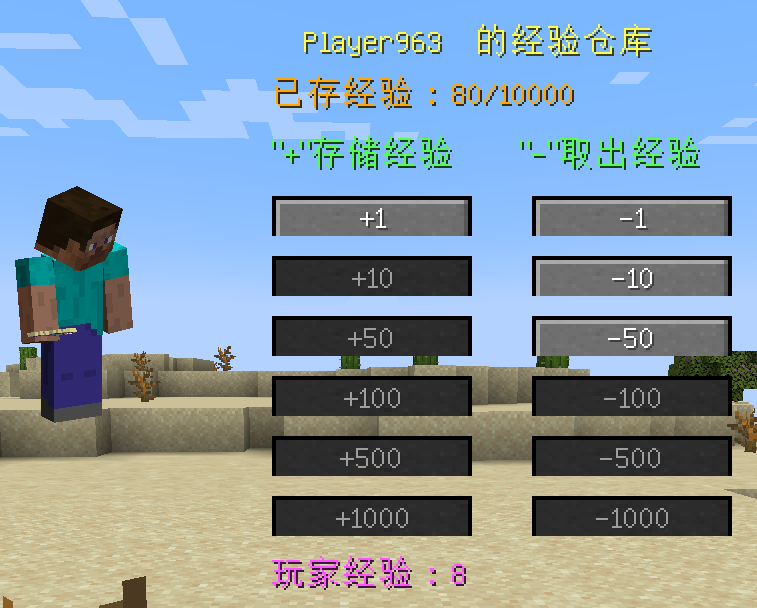
Open the Player Inventory and click the “Experience Bottle” button next to the character to open the screen for storing experiences.
Click “+” or “-” to store the player’s experience.
Experience in the warehouse can be saved even if the player dies.
The Modpack DangerousWorld.
XpGet
# XpGet
A plugin that allows you to convert your experience into experience bottles when you have empty glass bottles.
Supports both fixed amounts and automatic maximum calculation.
Features a GUI interface for more convenient conversion.
| Command | Description |
|——————————|———————————————————————–|
| `/xpget` | Open GUI menu for experience conversion |
| `/xpget [amount | max]` | Converts the specified amount of experience or the maximum possible |
| `/xpget reload` | Reloads the configuration |
### Examples:
– `/xpget 10` — create 10 experience bottles (if enough experience and bottles)
– `/xpget max` — create the maximum possible number of bottles
## 🧾 Permissions
| Permission | Default | Description |
|—————-|—————|—————————————————–|
| `xpget.use` | ✅ true | Allows usage of the `/xpget` command |
| `xpget.reload` | op | Allows usage of the `/xpget reload` command |
## ⚙️ Configuration
“`yaml
# XPGet Configuration
exp-per-bottle: 7 # How much experience is needed to fill one bottle
# You can add your own items, available actions: [close], [cmd]
gui:
size: 27
title: “Experience Conversion”
max:
slot: 15
material: “ENCHANTED_BOOK”
amount: 1
name: “Maximum”
lore:
– “Click to convert”
– “to the maximum possible number of bottles”
– “”
– “Will be spent:”
– “• {exp} experience”
– “• {max_bottles} empty bottles”
messages:
player-only: “This command is for players only!”
no-permission: “You don’t have permission to use this command!”
usage: | Usage: /xpget [amount|max] Examples: /xpget 10 – convert experience into 10 bottles /xpget max – convert the maximum possible amount Note: You can convert any number of bottles
invalid-amount: “Invalid amount! Use a number or ‘max'”
not-enough-exp: “Not enough experience! Needed: {required} experience, you have: {current}”
not-enough-empty: “Not enough empty bottles! Needed: {needed}, you have: {current}”
not-enough-space: “Not enough inventory space! Space available for: {available} bottles”
no-empty-bottles: “You have no empty bottles!”
not-enough-exp-for-one: “You don’t have enough experience to create even one bottle!”
not-enough-space-even: “Not enough inventory space even considering bottle replacement!”
1. Download the **latest release**
2. Place it in the /plugins folder
3. Restart the server
4. Configure `config.yml` if needed and use `/xpget reload`
5. You’re ready to use it: use `/xpget` in-game
Xp-Warps
—
**XP-Warps Plugin Documentation**
*Developed by MineFlow Studios*
—
**Overview**
XP-Warps enables players to create, manage, and teleport to custom warps using XP or levels. Supports public/private warps, teleport cooldowns, and player blocking.
—
**Installation**
1. **Download** the `XP-Warps.jar` file.
2. **Place** the JAR in your server’s `plugins` folder.
3. **Start** your Minecraft server. Configuration files (`warps.yml` and `settings.yml`) will be generated automatically.
**Setting Permissions Example (LuckPerms):**
“`
lp group admin permission set warp.admin true
“`
—
**Enjoy using XP-Warps on your Minecraft server!**
—
XP Stacker
🎉 **XPStacker: Let Your Server Breathe!** 🎉
Is your server slowing down because of all the scattered XP orbs? 🐢 XPStacker offers a sleek and effective solution to this problem. This lightweight plugin automatically merges nearby XP orbs into a single one, significantly reducing server load while providing a smoother experience for players.
✨ **Key Features:**
– **Lag Reduction:** 💨 Drastically reduces server lag by merging hundreds of scattered XP orbs into a single orb.
– **Automatic Merging:** 🤝 New XP orbs automatically merge with nearby ones. No player action is required.
– **Configurable Radius:** ⚙️ Easily adjust the merge radius of XP orbs in the config.yml file.
– **Lightweight and Stable:** 🔋 Operates with minimal resource usage and does not affect your server’s other features.
Add XPStacker to your server now and let your players collect XP without any lag! 💎
✨ **Check Out Our Other Plugins!** ✨
If you enjoy the **XPStacker** plugin, don’t forget to check out our other high-quality plugins for your server!
**XPTransfer** is a lightweight and powerful Minecraft plugin for Paper/Spigot that allows players to transfer their experience points to others seamlessly.
## Features
– **Easy XP Sharing**: Send your XP points to any online player with a simple command.
– **Precise Calculation**: Unlike many other plugins, XPTransfer uses a custom calculation logic to ensure XP levels and bars are updated accurately without vanilla glitches.
– **Multi-language Support**: Fully customizable messages. Comes with English (`en_us`) and Japanese (`ja_jp`) pre-configured.
– **Customizable Permissions**: Define which players or groups can use the transfer feature via `config.yml`.
– **User Friendly**: Includes Tab-Completion for player names to make sending XP faster and error-free.
– **Color Support**: Visual feedback with vibrant colors in chat messages.
## Commands
– `/sendxp ` – Sends the specified amount of XP points to the target player.
– `/sendxp reload` – Reloads the configuration files (Requires OP).
## Permissions
– Default Command: `group.default` (Configurable in `config.yml`)
– Reload Command: Requires OP permissions.
## Configuration
The plugin generates a `config.yml` and a `message/` folder. You can easily switch languages or change the required permission there.