X-Socials


# X-Socials
### *The ultimate premium bridge between your server and your community*
**Minecraft: 1.8 – 26.1 | Folia Ready | PlaceholderAPI Support**
—
### 🌟 Comprehensive Social Management
X-Socials is a professional and highly optimized solution for managing your server’s social networks. From 1.8 to 1.26.1, provide your players with a **Premium GUI Editor**, **Interactive Links**, **Automatic Rewards**, **Custom Cooldowns**, **Statistics**, and **Rich Text Formatting**. Runs natively on **Folia**, **Paper**, **Purpur**, and **Spigot**.
—
### 🚀 Premium Features
– **🪄 Auto-Config Updater** — Configs stay up-to-date automatically with every new version.
– **🖥️ Professional GUI Editor** — Create, edit and delete social networks from an intuitive in-game interface.
– **💬 Interactive Links** — Clickable URLs with hover tooltips via Bungee Chat API.
– **🎁 Reward System** — Console commands executed on first visit (UUID-based, one-time).
– **⏱️ Custom Cooldowns** — Per-social network cooldown configuration.
– **🔊 Custom Sounds** — Play different sounds for each social network.
– **📺 Custom Titles** — Show titles when players use social commands.
– **📊 Statistics System** — Track total and per-social network usage with placeholders.
– **🎨 Rich Text** — RGB colors, gradients, MiniMessage support.
– **🌍 Universal Compatibility** — Native support for Folia, Paper, Purpur, Spigot, and Bukkit.
– **🌐 Multi-Language** — Bundled support for ES, EN, PT, JA, RU.
– **📡 Broadcast System** — Automatic multi-line announcements.
– **🧩 PlaceholderAPI** — Native expansion with multiple placeholders.
—
### 💻 Commands
| Command | Description | Permission |
| :— | :— | :— |
| `/xs -gui` | Open the premium GUI editor | `xsocials.gui` |
| `/xs reload` | Reload configurations | `xsocials.admin` |
| `/xs list` | List all social networks | `xsocials.use` |
| `/xs update` | Check for updates | `xsocials.admin` |
| `/xs version` | Show plugin version | `xsocials.use` |
**Dynamic Social Commands** — `/discord`, `/youtube`, `/[your-network]`…
—
### 🔐 Permissions
| Permission | Description | Default |
|———–|————-|———|
| `xsocials.*` | Full wildcard access | ❌ |
| `xsocials.admin` | Editor, reload, gui, update | ❌ (OP) |
| `xsocials.gui` | GUI editor access | ❌ (OP) |
| `xsocials.use` | Basic player access | ✅ All players |
—
### 🧩 Placeholders
| Placeholder | Description |
| :— | :— |
| `%xsocials_total_uses%` | Total uses |
| `%xsocials__uses%` | Uses for specific network |
| `%xsocials__enabled%` | Enabled status |
| `%xsocials__link%` | Network link |
| `%xsocials__command%` | Network command |
—
**Join our Discord for Support & Updates**
Xander’s Sodium Options: Continued
# Xander’s Sodium Options: Continued
**A community continuation of Xander’s Sodium Options**, replacing the Sodium options GUI with a Vanilla-style alternative powered by YetAnotherConfigLib.
> Originally created by isXander. This version supports Minecraft 1.21.6+. Looking for older versions? Check the original mod page.
It has a wide range of support for various mods which integrate with Sodium, such as:
– Iris
– Sodium Extra
– More Culling
– Cull Less Leaves
– EntityViewDistance
Any other mods which integrate with Sodium’s GUI will *likely work* as well. If you encounter any issues, please report them here
### Keyboard Controls
– `Ctrl+Tab` / `Ctrl+Shift+Tab`: Switch between category tabs.
– `Tab` / `Shift+Tab`: Move focus between controls and action buttons.
– Arrow keys: Navigate through option rows and category tabs when those widgets are focused.
– `Enter` or `Space`: Activate the focused control, including the `Reset` button.
– `Esc`: Return to the previous screen.
### Screenshots


Thank you to Zakku0w0 for the Ko-fi icon art.
Xshards
# Xshards Plugin
Xshards is a comprehensive Minecraft plugin designed to manage a shard-based economy system with player transfers, leaderboards, daily rewards, streaks, and multiple earning methods with a customizable shop interface. All data is reliably persisted to the database using batch operations and transaction management.
## Key Features:
– **Shard Economy System**: Players can earn shards through various activities, with configurable earning rates and integration with PlaceholderAPI. Database storage support (SQLite or MySQL) with fixed persistence.
– **Reliable Data Storage**: NEW! Fixed critical shop persistence bug – all shop items, player shards, and streak data now properly save with batch operations and transaction management.
– **Per-Message Control**: Every message in the plugin can now be enabled or disabled, giving server owners full control over chat clutter.
– **Admin Controls**: Robust shard management including give and remove commands.
– **Fully Customizable Shop System**: Supports custom items with lore and model data, adjustable shop sizes, and a price editing system with a purchase confirmation interface. NEW! Customize shop GUI title via config, and per-item display names/lore via `/store editname` and `/store editlore` commands – all stored in database.
– **Shard Transfer System**: Enable true player-to-player economy with GUI confirmation dialogs.
– **Leaderboard GUI & Holograms**: View top players with ranking system, player heads display, and pagination. Full PlaceholderAPI support for hologram leaderboards (e.g., %xshards_top_name_1%).
– **Daily Rewards & Streaks**: Automatic daily bonuses with configurable streak multiplier (Easy/Mid/Hard modes).
– **Advanced AFK System**:
– 5-second countdown with movement detection
– Free movement while in AFK mode
– Persistent location storage
– Automatic return to previous location
– Protection from damage while AFK
– Dedicated world support (recommended)
– Safe teleportation system
– Configurable earning rates
– Seamless server restart handling
## Earning Methods:
– **Playtime Rewards**: Earn shards by staying online.
– **PvP Rewards**: Gain shards from player kills with a cooldown system.
– **AFK Rewards**: Accumulate shards while in AFK mode with countdown system, movement detection, and dedicated world support.
## Commands:
Includes general commands for checking shard balance, opening the shop, and entering/exiting AFK mode, as well as admin commands for managing the shop, player shards (give/remove), and plugin configuration.
## Permissions:
Configurable permissions for basic and admin commands, ensuring a tailored experience for players and server administrators.
## Installation:
Simply download the plugin JAR file, place it in the server’s `plugins` folder, and configure it as needed.
## Database Storage:
XShards now supports both SQLite (default) and MySQL database storage, providing improved data persistence and reliability. The plugin automatically creates the necessary database tables and handles all data operations seamlessly.
For support and further details, please refer to the project’s GitHub repository.
X-SetWarps


# X-SetWarps
*Efficient and simple warp management for your Minecraft server*
—
## 📋 Description
**X-SetWarps** is a lightweight and efficient warp plugin designed for simplicity and ease of use. Create, manage, and teleport to warps with minimal configuration. It features **PlaceholderAPI** integration and a **Dual-Color engine** supporting both MiniMessage and Legacy codes.
—
## ⚡ Commands
### Administration
– **`/xsetwarp reload`** – Reloads configuration and language files.
– **`/xsetwarp update`** – Checks for plugin updates.
– **`/xsetwarp version`** – Shows the current version.
### Warping
– **`/setwarp [description]`** – Creates a warp with optional description.
– **`/warp `** – Teleports you to a warp (supports delay/cooldown).
– **`/delwarp `** – Deletes an existing warp.
– **`/warps`** – Lists all available warps.
– **`/warpinfo `** – Shows technical details about a warp.
—
## 🔐 Permissions
| Permission | Description | Default |
|————|————-|———|
| `xsetwarps.admin` | Access to `/xsetwarp` commands | OP |
| `xsetwarps.setwarp` | Access to `/setwarp` | OP |
| `xsetwarps.delwarp` | Access to `/delwarp` | OP |
| `xsetwarps.warp` | Access to `/warp` | true |
| `xsetwarps.warps` | Access to `/warps` list | true |
| `xsetwarps.warpinfo` | Access to `/warpinfo` | true |
| `xsetwarps.warp.` | Per-warp permission (if enabled) | OP |
—
## ✨ PlaceholderAPI
| Placeholder | Description |
|————-|————-|
| `%xsetwarps_total%` | Total amount of warps created |
| `%xsetwarps_last_warp%` | Last warp name used by the player |
| `%xsetwarps_cooldown_%` | Time left for specific warp cooldown |
| `%xsetwarps_warp_desc_%` | Specific warp description |
| `%xsetwarps_warp_world_%` | World name of a specific warp |
—
## 🌍 Multi-Language
Built-in support for:
🇺🇸 **English** | 🇪🇸 **Spanish** | 🇵🇹 **Portuguese** | 🇯🇵 **Japanese** | 🇷🇺 **Russian** | ✏️ **Custom**
—
## 💎 Features
– ✅ **Dual-Color Engine** – Supports MiniMessage (``) and Legacy (`&`).
– ✅ **Secure Teleport** – Delay system with move cancelation and cooldowns.
– ✅ **Folia Support** – Optimized for modern multi-threaded servers.
– ✅ **Universal Compatibility** – Supports 1.8.8 up to the latest versions.
—
**Made with ❤️ by Fabian**
X-SetSpawn
  
# **X-SetSpawn**
### *Manage your server’s spawn point professionally*
### 📝 **Description**
X-SetSpawn is a lightweight, feature-rich plugin designed to manage spawn points on your server. From simple global spawns to premium visual effects, economy integration, and proxy network support — all packed into one plugin. Compatible with Minecraft 1.8.8 to 26.1+.
### ✨ **Features**
– **Fireworks on arrival:** Launch a firework when a player teleports to spawn. Color and power configurable.
– **Combat & Falling checks:** Block `/spawn` while in combat or falling. Supports CombatLogX, PvPManager, DeluxeCombat.
– **Multi-database storage:** Save spawns to YAML (local), MySQL, MariaDB, H2 or MongoDB for cross-server sync.
– **Custom command aliases:** Define `/hub`, `/lobby` or any alias directly from `config.yml` — no need to edit `plugin.yml`.
– **Economy Integration (Vault):** Charge players to use `/spawn`. Money only deducted if the teleport completes.
– **First-Join Spawn:** Set a unique spawn point for newly joining players with `/setspawn firstjoin`.
– **Smart Respawn:** On death, respects the player’s Bed or Respawn Anchor before falling back to spawn.
– **Void-Teleport:** Automatically teleport players who fall below a configurable Y-level.
– **Post-Teleport Protection:** Temporary invulnerability after teleporting while chunks load.
– **Advanced Proxy Sync:** Dedicated lightweight plugins for Velocity and BungeeCord. Use `/setlobby` to sync your lobby server automatically.
– **Intelligent Proxy Teleport:** Automatically detects if a player is already on the target server and performs a local teleport.
– **Visual Countdown:** ActionBar, BossBar, Titles and particle effects during the delay — each individually toggleable.
– **Countdown sounds:** “Tic-Tac” click sounds each second during the teleport delay.
– **PlaceholderAPI:** Full PAPI support. Exposes `%xsetspawn_cooldown%`, `%xsetspawn_delay%`, `%xsetspawn_is_pending%`, `%xsetspawn_spawn_set%`.
– **Config auto-updater:** Detects outdated configs, creates a backup and rebuilds automatically.
– **100% Customizable:** 6 language files (EN, ES, JA, PT, RU, CUSTOM), per-world spawns, and full config control.
### 🖥️ **Compatibility**
| Software | Supported |
|—|—|
| Bukkit / Spigot / Paper / Purpur | ✅ |
| Folia | ✅ |
| BungeeCord / Velocity | ✅ |
| Minecraft | 1.8.8 → 26.1+ |
### 🛠️ **Main Commands**
**`/spawn`**
Teleports the player to the established spawn point.
**`/setspawn [x y z] [world] [yaw pitch]`**
Sets the spawn point. Use without arguments for your location, or specify coordinates (supports `~`). Console compatible.
**`/delspawn `**
Deletes a specific named spawn point if named spawns are enabled.
**`/back`**
Teleports the player back to their last location before using a spawn command.
**`/setlobby`**
Sets the lobby coordinates for the proxy network and syncs the configuration with BungeeCord/Velocity.
**`/xss [subcommand]`**
– **`help`** – Shows the help menu.
– **`reload`** – Reloads the plugin configuration.
– **`version`** – Shows the current version info.
– **`update`** – Manually check for updates.
– **`setspawn`** – Sets the spawn point (alias for /setspawn).
– **`delspawn`** – Deletes a spawn (alias for /delspawn).
### 🛡️ **Permissions**
– **`xsetspawn.spawn`** – Use `/spawn`. *(default: everyone)*
– **`xsetspawn.setspawn`** – Use `/setspawn`. *(default: op)*
– **`xsetspawn.admin`** – Admin commands and update notifications. *(default: op)*
– **`xsetspawn.reload`** – Reload the configuration. *(default: op)*
– **`xsetspawn.update`** – Check for updates. *(default: op)*
– **`xsetspawn.bypass.cooldown`** – Skip the teleport cooldown. *(default: op)*
– **`xsetspawn.bypass.delay`** – Skip the teleport delay. *(default: op)*
– **`xsetspawn.bypass.economy`** – Teleport for free. *(default: op)*
> **Tip:** Explicitly denying a node (`-xsetspawn.spawn`) will block the player even if they are OP.
Need help? Join our Discord or report issues in the discussion section.
Xrtp
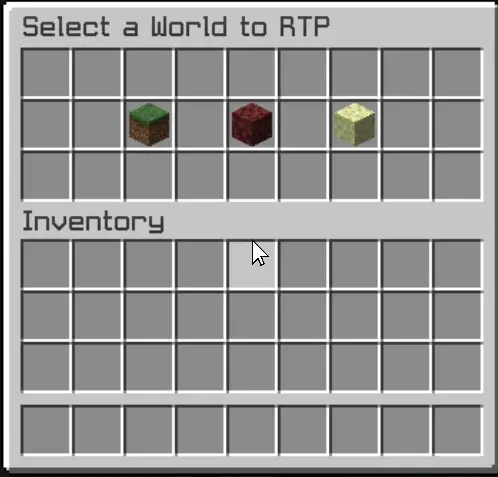
– The Xrtp plugin enhances Minecraft gameplay by providing a robust random teleportation (RTP) feature. Players can teleport to safe locations in the Overworld, Nether, and The End, ensuring a seamless adventure experience.
– The plugin includes a user-friendly graphical interface (GUI) that allows players to initiate teleportation effortlessly. A countdown timer adds an exciting element of anticipation, while the teleportation process cancels if the player moves, preventing unintended outcomes. This combination of safety and convenience makes Xrtp an essential tool for players seeking exploration without the risk of falling into danger.
– Additionally, the config.yml file offers extensive customization options for server administrators. This configuration file allows for the adjustment of teleportation settings, including cooldown periods, maximum teleportation distances, and specific world restrictions. Administrators can fine-tune these parameters to align with their server’s gameplay style, ensuring that the RTP feature enhances rather than disrupts the overall experience.
– The GUI is designed to be intuitive, providing clear options and feedback, ensuring that players can navigate the teleportation process with ease.
XrayDetector
# XrayDetector
**A Minecraft X-ray Detection Plugin**
XrayDetector is a comprehensive detection system for identifying potential X-ray usage on Minecraft servers. This plugin monitors ore mining patterns and alerts staff members when suspicious activity is detected.
**Author:** nevmind
**Version:** 1.0.0
**All Rights Reserved**
—
## Features
### Core Detection System
– **Pattern-Based Detection**: Monitors ore mining frequency and speed to identify suspicious patterns
– **Four-Tier Severity System**: Classifies alerts as Low, Medium, High, or Very High based on mining behavior
– **Points Tracking**: Maintains cumulative X-ray suspicion scores for each player
– **Real-Time Alerts**: Notifies staff members instantly when detection thresholds are met
### Comprehensive Commands
– `/xray toggle` – Enable or disable the detection system
– `/xray set ores ` – Configure ore threshold for alerts
– `/xray set time ` – Set the time window for detection
– `/xray tp ` – Teleport to suspected player in spectator mode (invisible)
– `/xray chances list` – View top 10 players with highest X-ray suspicion points
– `/xray reload` – Reload configuration without restarting
### Advanced Configuration
– **Customizable Thresholds**: Adjust ore counts and time windows
– **Severity Levels**: Configure point values for each severity tier
– **Alert Colors**: Customize message colors using Minecraft color codes
– **Toggle System**: Enable/disable detection without removing the plugin
### Permission System
– `xray.admin` – Access to all plugin commands (default: op)
– `xray.alerts` – Receive X-ray detection alerts (default: op)
—
## Installation
1. Download `XrayDetector-1.0.0.jar` from the releases
2. Place the JAR file in your server’s `plugins` folder
3. Restart your server or use a plugin manager to load it
4. Configure the plugin in `plugins/XrayDetector/config.yml`
—
## Compatibility
### Supported Platforms
– **Paper** (Recommended)
– **Spigot**
– **Bukkit**
– **PurPur**
– **Pufferfish**
### Minecraft Versions
– **1.21.x** (Latest)
– **1.20.x**
– **1.19.x**
– **1.18.x**
– **1.17.x**
– **1.16.x**
– **1.15.x**
– **1.14.x**
– **1.13+** (Minimum)
The plugin uses the Bukkit API 1.13+ for maximum compatibility across versions.
—
## Configuration
The plugin creates a `config.yml` file in `plugins/XrayDetector/` with the following options:
### Basic Settings
“`yaml
# Enable or disable detection system
enabled: true
# Number of ores to trigger alert
ores_threshold: 10
# Time window in seconds
time_window: 60
“`
### Severity Levels
Each severity level can be configured with minimum/maximum ore counts and point values:
– **Low**: 5-10 ores (5 points)
– **Medium**: 11-20 ores (15 points)
– **High**: 21-35 ores (30 points)
– **Very High**: 36+ ores (50 points)
### Alert Colors
Customize alert message colors using Minecraft color codes:
– `&b` = Aqua (Light Blue)
– `&f` = White
– `&e` = Yellow
– `&6` = Gold
– `&c` = Red
– `&4` = Dark Red
—
## How It Works
### Detection Logic
1. **Monitoring**: The plugin tracks when players mine ore blocks
2. **Pattern Analysis**: Calculates mining speed (ores per second) within the time window
3. **Severity Assessment**: Determines alert level based on ore count and mining speed
4. **Point Assignment**: Adds points to the player’s X-ray suspicion score
5. **Staff Notification**: Sends formatted alerts to all staff with `xray.alerts` permission
### Tracked Ores
The plugin monitors all ore types including:
– Coal, Iron, Gold, Diamond, Emerald
– Lapis Lazuli, Redstone, Copper
– Nether Gold, Nether Quartz
– Ancient Debris
– Deepslate variants of all ores
### Alert Format
“`
[XrayDetector] PlayerName mined 15 ores in 30.0 seconds [MEDIUM] (+15 points, Total: 45)
“`
—
## Commands & Permissions
| Command | Permission | Description |
|———|———–|————-|
| `/xray toggle` | `xray.admin` | Toggle detection on/off |
| `/xray set ores ` | `xray.admin` | Set ore threshold |
| `/xray set time ` | `xray.admin` | Set time window |
| `/xray tp ` | `xray.admin` | Teleport to player (spectator) |
| `/xray chances list` | `xray.admin` | Show top suspects |
| `/xray reload` | `xray.admin` | Reload configuration |
**Aliases:** `/xr`, `/xraydetector`
—
## FAQ
**Q: Does this plugin prevent X-ray?**
A: No, this plugin only detects potential X-ray usage. It cannot prevent players from using X-ray texture packs or mods.
**Q: Will this catch all X-ray users?**
A: The plugin detects suspicious mining patterns that may indicate X-ray usage. However, it’s not 100% accurate and should be used as one tool among many for server moderation.
**Q: Can players see the alerts?**
A: Only players with the `xray.alerts` permission (typically staff) receive alerts.
**Q: What happens when a player is detected?**
A: The plugin only sends alerts and tracks points. Staff must manually review and take appropriate action.
**Q: Does this work on older versions?**
A: The plugin requires Minecraft 1.13 or newer due to API compatibility.
—
## Support & Updates
For bug reports, feature requests, or support:
– Open an issue on the project repository
– Contact the server administrator
—
## License
**XrayDetector** by **nevmind**
**All Rights Reserved**
This software is proprietary and confidential. Unauthorized copying, distribution, or modification is strictly prohibited without explicit permission from the author.
—
## Credits
**Developer:** nevmind
**Plugin Version:** 1.0.0
**Last Updated:** 2025
Thank you for using XrayDetector!
XRayAlerts
# XRayAlerts
**XRayAlerts** is a plugin for Paper/Spigot servers that can alert staff members (or any player with the appropriate permission) whenever a player finds specific ores or items. It supports customizable alerts, configurable monitoring modes, and permission-based access control. The plugin is compatible with both Paper and Spigot servers running Minecraft 1.21+. Earlier versions have not been tested.
## Features
– **Configurable Alerts**: Customize the messages sent to staff when a player finds a monitored item or ore. Messages support color and formatting codes.
– **Vein Detection Mode**: Choose between two modes:
– **Block Mode**: Sends an alert for each block mined, indicating the number of items dropped.
– **Vein Mode**: Sends one alert for the entire vein when the first block in the vein is mined.
– **Permission Control**: Permissions to toggle alerts, receive alerts, and ignore alerts.
## Commands
### `/xrayalerts toggle`
Toggles the x-ray alerts on or off for the player who runs the command.
**Permission**: `xrayalerts.toggle`
**Usage**: `/xrayalerts toggle`
## Permissions
– **`xrayalerts.ignore`**: Prevents x-ray alerts from being triggered by the player.
– **`xrayalerts.receive`**: Allows the player to receive x-ray alerts.
– **`xrayalerts.toggle`**: Allows the player to toggle x-ray alerts on or off.
## Configuration
### `config.yml`
“`yaml
alert-message: “&c&lX-Ray&r &7%player% found &6x%count% %item%.”
mode: “block” # Options: “block”, “vein”
monitored-blocks:
– ANCIENT_DEBRIS
– DEEPSLATE_DIAMOND_ORE
– DEEPSLATE_EMERALD_ORE
– DEEPSLATE_GOLD_ORE
– DIAMOND_ORE
– EMERALD_ORE
– GOLD_ORE
“`
Xray Snitch
Are you running a server and want to spend less time trying to detect or prevent Xray? Including this mod in your modpack makes that possible.
—
### What this mod does
– This mod is registering an empty argument, making it required on clients if your server has it installed. Players who try to remove it from their modpack can’t join your server.
– When players join your server, the client checks for Xray **texture packs** and sends a message to the server if one is present (`/config/xray_snitch/`).
### What this mod doesn’t do
– Automatically ban people based on Xray texturepacks
– Provide an easy way to find xraying users in-game
—
### Limitations
– **Detection is limited to texture packs** and isn’t perfect. Most results are true positives, but there can and will be false positives. Never take no detection from this mod as a proof for not using Xray.
– Dedicated troublemakers with knowledge of Java can decompile this mod and create an evil twin, suppressing the results.
XRaySentinel
# XRaySentinel
Detects suspicious ore mining patterns and alerts staff.
## Features
– Tracks ore vs stone ratios over a rolling window.
– Alerts staff on suspicious mining patterns.
– Configurable thresholds and cooldowns.
– Lightweight memory-only tracking.
## Command
– `/xraysentinel stats | reset | reload`
## Permissions
– `xraysentinel.alert`
– `xraysentinel.admin`
## Config (snippet)
“`yml
window-minutes: 10
alert-ratio: 0.20
min-valuable: 3
“`
## Compatibility
– Server: Paper, Spigot, Purpur
– Minecraft: 1.16.5 – 1.21.4
## Credits
– Modrinth profile: https://modrinth.com/user/yuutaxd