XyPlayTimeRewards
# XyPlayTimeRewards
A modern playtime progression plugin designed for survival servers and long-term player retention.
Players accumulate playtime while online and unlock milestone rewards as they progress. The plugin includes a clean GUI interface, daily rewards system, and playtime leaderboard to encourage consistent player activity.
—
## Features
### Milestone Rewards
Players unlock rewards automatically as they accumulate playtime.
### Daily Rewards
Encourages players to return regularly and stay engaged.
### Playtime Leaderboard
Displays the most active players on the server.
### Clean GUI System
Modern inventory-based interface for viewing and claiming rewards.
### Flexible Rewards
Supports economy rewards, coins and custom commands.
### Lightweight & Optimized
Designed to have minimal performance impact even on busy servers.
—
## Commands
`/playtimerewards`
Opens the rewards menu.
`/playtimerewards top`
Displays the playtime leaderboard.
### Admin Commands
`/playtimerewardsadmin reload`
Reload plugin configuration.
`/playtimerewardsadmin reset `
Reset a player’s reward progress.
`/playtimerewardsadmin settime `
Manually adjust recorded playtime.
—
## Permission
`xyplaytimerewards.admin`
Required to use administrative commands.
—
## Configuration
The plugin includes several configuration files allowing full customization.
config.yml
rewards.yml
data.yml
Server owners can easily adjust reward tiers, GUI messages, and reward commands to match their server’s progression style.
—
## Compatibility
Tested on **Minecraft 1.21**
Works with:
– Paper
– Spigot
– Bukkit
– Purpur
xWhitelist

# xWhitelist 📋
**xWhitelist** is a high-performance, hybrid whitelist plugin for Minecraft servers. Designed for flexibility and security, it allows server administrators to manage player access through a local whitelist file, a MySQL database, or a staff-only maintenance whitelist.
### Key Features 💫
– **Hybrid Whitelist Support** – Operates in offline/local mode or online MySQL mode.
– **Maintenance Whitelist** – Restrict server access to staff members during maintenance periods.
– **Customizable Messaging** – Multi-line kick messages, configurable prefixes, and command feedback.
– **Permissions Integration** – Fine-grained control over plugin and whitelist commands.
– **Placeholder Support** – Compatible with PlaceholderAPI for dynamic in-game information.
– **User-Friendly** – Simple configuration and intuitive commands for efficient management.
– **Free and Open Source** – Fully available for download and modification under a permissive license.
### Useful Links 🔗
– GitHub Repository – Access the source code, fast releases, and submit **Issues** for bug reports, feature requests, or questions.
– Wiki Documentation – Detailed guides, configuration examples, and instructions for using xWhitelist.
### Support ❓
For technical issues, unexpected behavior, or enhancement suggestions, please submit an **Issue** on the GitHub repository. This ensures your feedback is tracked and addressed efficiently.
—
xWhitelist is engineered to provide a **robust, reliable, and professional whitelist solution**, ensuring secure and efficient player management for your Minecraft server.
xTree

TreeFeller is a Paper plugin for Minecraft 1.21.x that makes tree cutting feel more natural and visually satisfying.
Instead of instantly removing the whole tree, the tree falls over with an animation, lands in the direction it actually falls, drops its loot near the impact point, and leaves behind a few scattered leaves for a nicer result.
The plugin is designed to feel immersive without turning tree cutting into an overpowered instant-break feature.
## Features
– Animated tree falling
– Trees fall away from the player
– Drops appear near the actual impact point
– Sounds and particles play on the correct side
– A few leaves are placed on the ground after impact
– Saplings, sticks and apples can drop naturally
– Sneaking lets players bypass the system and break blocks normally
– Axe-only support
– Improved detection to reduce false positives on player-built wooden structures
– Better separation of connected leaves between nearby trees
– Simple language/message system
## Supported server software
– Paper 1.21.x
Tested on:
– Paper 1.21.11
## Supported tree types
– Oak
– Birch
– Spruce
– Jungle
– Acacia
– Dark Oak
– Cherry
– Mangrove
## How it works
When a player breaks a log with an axe, TreeFeller checks whether the structure looks like a natural tree.
If it is detected as a valid tree:
– the tree is collected
– the blocks are replaced with animated displays
– the tree falls over
– sounds, particles and drops are spawned on the same side as the visual fall
– logs and natural loot are dropped near the landing point
– a few leaves are left on the ground for a more natural look
Sneaking while breaking a log bypasses the plugin and keeps normal block breaking behavior.
## Tree detection
TreeFeller includes extra checks to avoid treating random wooden builds as natural trees.
It also tries to separate leaves from nearby trees more carefully, so if two tree crowns touch, the plugin does not simply take every connected leaf block.
No automatic tree detection is perfect in every edge case, but the current system is built to be much safer than a simple “connected logs and leaves” approach.
## Installation
1. Download the latest release
2. Put the jar into your server’s `plugins` folder
3. Start or restart the server
## Requirements
– Java 21
– Paper 1.21.x
## Configuration
### `config.yml`
“`yaml
language: en
xTranslate
# xTranslate
—————————————————————————————————-
### What is xTranslate ?
_xTranslate is a Minecraft Translation Plugin that translates In-game Chat messages in real time_
### How do i change my language ?
_You can change your language simply by typing /lauguage _
### How many languages are supported ?
_I dont even know the exact count but over 100+ languages are supported_
###
Spoiler
private static final Map SUPPORTED_LANGUAGES = Map.ofEntries(
Map.entry(“af”, “Afrikaans”), Map.entry(“sq”, “Albanian”), Map.entry(“am”, “Amharic”),
Map.entry(“ar”, “Arabic”), Map.entry(“hy”, “Armenian”), Map.entry(“az”, “Azerbaijani”),
Map.entry(“eu”, “Basque”), Map.entry(“be”, “Belarusian”), Map.entry(“bn”, “Bengali”),
Map.entry(“bs”, “Bosnian”), Map.entry(“bg”, “Bulgarian”), Map.entry(“ca”, “Catalan”),
Map.entry(“ceb”, “Cebuano”), Map.entry(“zh”, “Chinese”), Map.entry(“co”, “Corsican”),
Map.entry(“hr”, “Croatian”), Map.entry(“cs”, “Czech”), Map.entry(“da”, “Danish”),
Map.entry(“nl”, “Dutch”), Map.entry(“en”, “English”), Map.entry(“eo”, “Esperanto”),
Map.entry(“et”, “Estonian”), Map.entry(“fi”, “Finnish”), Map.entry(“fr”, “French”),
Map.entry(“fy”, “Frisian”), Map.entry(“gl”, “Galician”), Map.entry(“ka”, “Georgian”),
Map.entry(“de”, “German”), Map.entry(“el”, “Greek”), Map.entry(“gu”, “Gujarati”),
Map.entry(“ht”, “Haitian Creole”), Map.entry(“ha”, “Hausa”), Map.entry(“haw”, “Hawaiian”),
Map.entry(“he”, “Hebrew”), Map.entry(“hi”, “Hindi”), Map.entry(“hmn”, “Hmong”),
Map.entry(“hu”, “Hungarian”), Map.entry(“is”, “Icelandic”), Map.entry(“ig”, “Igbo”),
Map.entry(“id”, “Indonesian”), Map.entry(“ga”, “Irish”), Map.entry(“it”, “Italian”),
Map.entry(“ja”, “Japanese”), Map.entry(“jv”, “Javanese”), Map.entry(“kn”, “Kannada”),
Map.entry(“kk”, “Kazakh”), Map.entry(“km”, “Khmer”), Map.entry(“rw”, “Kinyarwanda”),
Map.entry(“ko”, “Korean”), Map.entry(“ku”, “Kurdish”), Map.entry(“ky”, “Kyrgyz”),
Map.entry(“lo”, “Lao”), Map.entry(“la”, “Latin”), Map.entry(“lv”, “Latvian”),
Map.entry(“lt”, “Lithuanian”), Map.entry(“lb”, “Luxembourgish”), Map.entry(“mk”, “Macedonian”),
Map.entry(“mg”, “Malagasy”), Map.entry(“ms”, “Malay”), Map.entry(“ml”, “Malayalam”),
Map.entry(“mt”, “Maltese”), Map.entry(“mi”, “Maori”), Map.entry(“mr”, “Marathi”),
Map.entry(“mn”, “Mongolian”), Map.entry(“my”, “Myanmar”), Map.entry(“ne”, “Nepali”),
Map.entry(“no”, “Norwegian”), Map.entry(“ny”, “Nyanja”), Map.entry(“or”, “Odia”),
Map.entry(“ps”, “Pashto”), Map.entry(“fa”, “Persian”), Map.entry(“pl”, “Polish”),
Map.entry(“pt”, “Portuguese”), Map.entry(“pa”, “Punjabi”), Map.entry(“ro”, “Romanian”),
Map.entry(“ru”, “Russian”), Map.entry(“sm”, “Samoan”), Map.entry(“gd”, “Scots Gaelic”),
Map.entry(“sr”, “Serbian”), Map.entry(“st”, “Sesotho”), Map.entry(“sn”, “Shona”),
Map.entry(“sd”, “Sindhi”), Map.entry(“si”, “Sinhala”), Map.entry(“sk”, “Slovak”),
Map.entry(“sl”, “Slovenian”), Map.entry(“so”, “Somali”), Map.entry(“es”, “Spanish”),
Map.entry(“su”, “Sundanese”), Map.entry(“sw”, “Swahili”), Map.entry(“sv”, “Swedish”),
Map.entry(“tl”, “Tagalog”), Map.entry(“tg”, “Tajik”), Map.entry(“ta”, “Tamil”),
Map.entry(“tt”, “Tatar”), Map.entry(“te”, “Telugu”), Map.entry(“th”, “Thai”),
Map.entry(“tr”, “Turkish”), Map.entry(“tk”, “Turkmen”), Map.entry(“uk”, “Ukrainian”),
Map.entry(“ur”, “Urdu”), Map.entry(“ug”, “Uyghur”), Map.entry(“uz”, “Uzbek”),
Map.entry(“vi”, “Vietnamese”), Map.entry(“cy”, “Welsh”), Map.entry(“xh”, “Xhosa”),
Map.entry(“yi”, “Yiddish”), Map.entry(“yo”, “Yoruba”), Map.entry(“zu”, “Zulu”)
);
### How does it work and is it free ?
_xTranslate is 100% and uses the offical `GOOGLE TRANSLATOR API`_
XTransfer
# XTransfer
## Features
– Developer API
– Whitelist of Player UUID’s
– Token Whitelist via Paper’s Cookie System.
– Customizable and developer-friendly
## Commands
– `/xtransfer` (or your custom Option) – Permission: `transferpacket.command.`
## Permissions
– `xtransfer.command..transfer`
– `xtransfer.command..whitelist`
– `xtransfer.command..whitelist.list`
– `xtransfer.command..whitelist.player`
– `xtransfer.command..whitelist.player.add`
– `xtransfer.command..whitelist.player.remove`
– `xtransfer.command..whitelist.token`
– `xtransfer.command..whitelist.token.add`
– `xtransfer.command..whitelist.token.remove`
## Developer API
**Use our repo to Download the API**
– https://repo.jespersen.zip/#/releases/dev/xyzjesper/xtransfer
### Project Setup
To access the API use the `XTransferAPI` Menthods and interact with the plugin.
__Note: Please add the Plugin TransferPacket as depend! And check the enabled status.__
“`kts
repositories {
mavenCentral()
maven(“https://repo.jespersen.zip/releases”)
}
dependencies {
compileOnly(“zip.jespersen:xtransfer:“)
}
“`
Xtpa
Xtpa is an innovative teleportation plugin for Minecraft designed to enhance player interaction and navigation. With Xtpa, players can easily send and accept teleport requests, creating a more connected gameplay experience.
One of the standout features of Xtpa is the TPA GUI. When a player receives a teleport request, they can click on a simple button to open the GUI, which provides a clear and intuitive interface. This GUI includes:
– Accept Button:
A green wool block that allows players to accept the teleport request effortlessly.
– Warning Message:
A paper item labeled “!!warning maybe a tp trap!!”, alerting players to the risks associated with teleportation.
– Cancel Button:
A red wool block that enables players to cancel the teleport request if they choose not to accept it.
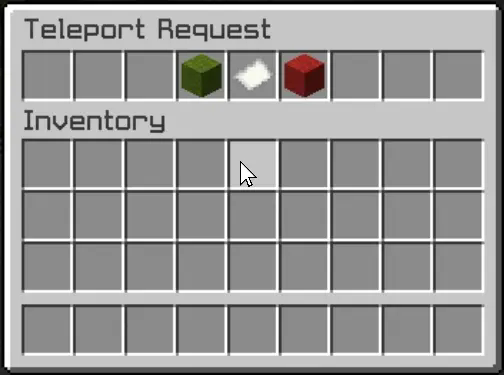
This user-friendly design not only makes the process of accepting or rejecting requests straightforward but also adds an engaging visual element to the experience. Players can quickly make decisions without cluttering their chat with commands, making teleportation seamless and efficient.
Xtpa integrates seamlessly with LuckPerms, allowing server owners to manage permissions easily. The following commands and permissions are included:
– Commands and Permissions
/tpa [playername]
Permission: xtpa.tpa
Description: Send a teleport request to another player.
/tpahere [playername]
Permission: xtpa.tpahere
Description: Request another player to teleport to your location.
/tpaccept [playername]
Permission: xtpa.tpaccept
Description: Accept a teleport request from another player.
/tpcancel [playername]
Permission: xtpa.tpcancel
Description: Cancel a teleport request.
/tpatoggle [on/off]
Permission: xtpa.tpatoggle
Description: Toggle TPA requests on or off for yourself.
/tpagui [requester]
Permission: xtpa.tpagui
Description: Open the TPA request GUI for accepting or canceling requests.
– Conclusion
Overall, Xtpa aims to enrich the Minecraft community by providing a smooth and enjoyable teleportation system that players will love to use. With its intuitive GUI and robust permission management through LuckPerms, Xtpa is the ideal solution for any Minecraft server looking to enhance player connectivity.
XTransfer

# 0 What the heck is this?
A new plugin designed to **transfer players’ data between names or UUIDs**. I didn’t find any other plugin can handle this problem before, so I made my own one and uploaded it to here to help anyone who needs this feature for his/her server.
# 1 Features
## 1.1 Smart UUID Detection
Automatically detects UUIDs from:
– Online players
– usercache.json (for premium players)
– Offline-mode UUID generation
## 1.2 Complete Data Transfer
Transfers all vanilla player data:
– Player inventory and Ender Chest (`playerdata/`)
– Statistics (`stats/`)
– Advancements (`advancements/`) for 1.13+
## 1.3 Safe & Reliable
– Creates automatic backups before overwriting
– Kicks online players to prevent data overwrite (configurable)
– Asynchronous file operations – no server lag!
# 2 Commands and Permission Nodes
## 2.1 Commands
“`markdown
– /xtransfer – Show version info
– /xtransfer transfer – Transfer by player names
– /xtransfer transferuuid – Transfer by UUIDs
– /xtransfer list – List all player data files
– /xtransfer list – Show files for specific player
– /xtransfer reload – Reload configuration
– /xtransfer help – Show the help message
/xtf = /transfer = /xtransfer
“`
## 2.2 Permission Nodes
“`markdown
– xtransfer.manage – Allows using all XTransfer commands (default: op)
“`
# 3 Config
“`yaml
# Show logo when plugin enabled
show_logo: true
# World settings
world:
# Manual world name (only used if auto-detect is false)
name: “world”
# Automatically detect world name from server
auto-detect: true
# Transfer settings
transfer:
# Transfer statistics files
stats: true
# Transfer advancements files (1.13+)
advancements: true
# Backup settings
backup:
# Create backup of existing files before overwriting
create: true
# Suffix for backup files
suffix: “.old”
# Online player handling
# If true, kick online players before transfer
# If false, show warning but continue
kick-online-player: true
# Language settings
language: “en”
# Debug mode (enable only for troubleshooting)
debug: false
# Messages – You can customize all messages here
messages:
# English messages
en:
no-permission: “&cYou don’t have permission!”
usage-header: “&9&lX&f&lTransfer &f&lHelp”
usage-transfer: “&7/xtransfer transfer &f ”
usage-transferuuid: “&7/xtransfer transferuuid &f ”
usage-list: “&7/xtransfer list &f[player]”
usage-reload: “&7/xtransfer reload”
usage-help: “&7/xtransfer help”
reload-success: “&a✓ Configuration reloaded!”
transfer-start: “&eStarting async transfer…”
looking-up: “&eLooking up UUIDs for &f{old} &eand &f{new}&e…”
uuid-not-found: “&cCould not find UUID for: &f{name}”
try-uuid: “&7Try using /xtransfer transferuuid with direct UUIDs”
invalid-uuid: “&cInvalid UUID format! Use: /xtransfer transferuuid ”
uuid-example: “&7Example: 12345678-1234-1234-1234-123456789012”
source-data-missing: “&cSource player {name} ({uuid}) has no data file!”
transfer-from: “&7From: &f{name} &7({uuid})”
transfer-to: “&7To: &f{name} &7({uuid})”
transfer-file: “&7File: &f{file}”
backup-created: “&7Backed up existing file to: &f{file}”
transfer-success: “&a✓ Successfully transferred player data!”
transfer-stats: “&7✓ Transferred stats file”
transfer-advancements: “&7✓ Transferred advancements file”
transfer-error: “&cError during transfer: {error}”
folder-not-found: “&cPlayer data folder not found: {path}”
source-not-found: “&cSource file not found: {file}”
source-location: “&7Looked in: {path}”
player-online-warning: “&e⚠ Warning: Player {player} is online! Data may be overwritten when they log out.”
player-kicked: “&e✓ Player {player} has been kicked for data transfer.”
kick-message: “&cYour data is being transferred. Please rejoin in a few seconds.”
no-files: “&eNo player data files found”
list-header: “&6=== Player Data Files ({count}) ===”
list-more: “&7… and {count} more”
list-entry: “&7{name} &8- {uuid}”
list-unknown: “&8{uuid} &7(unknown)”
files-header: “&6=== Files for {player} ===”
file-playerdata: “&7Player Data: {status}{size}”
file-stats: “&7Stats: {status}”
file-advancements: “&7Advancements: {status}”
# Other language…
“`
xTeams
# xTeams 👥
**xTeams** is a powerful and flexible team management plugin for Minecraft servers. It allows server administrators to create, manage, and organize teams with advanced features and full PlaceholderAPI support.
### Key Features 💫
– **Team Management** – Create, delete, join, leave, and customize teams.
– **Priority System** – Organize teams with priority levels.
– **Display Names** – Customize team names shown to players.
– **Information Commands** – Quickly view team or player info.
– **Permissions Integration** – Fine-grained control over all plugin commands.
– **Placeholder Support** – Compatible with PlaceholderAPI for dynamic in-game information.
– **User-Friendly** – Intuitive commands and configuration for efficient management.
– **Free and Open Source** – Fully available for download and modification under a permissive license.
### Useful Links 🔗
– GitHub Repository – Access the source code, fast releases, and submit **Issues** for bug reports, feature requests, or questions.
– Wiki Documentation – Detailed guides, commands, permissions, placeholders, and API usage.
### Support ❓
For technical issues, unexpected behavior, or enhancement suggestions, please submit an **Issue** on the GitHub repository. This ensures your feedback is tracked and addressed efficiently.
—
xTeams is engineered to provide a **robust, reliable, and professional team management solution**, ensuring efficient and organized team administration for your Minecraft server.
Xtabay’s Villager Creator
This datapack will help you create custom villagers very easily. Meant for server administrators or map creators. Trades are infinite and unblockable.
**Get the Villager Creator Kit**
/function vg.xtabay:give/villager_creator_kit
USE.
**Villager Creator Stick**
Put all the items you want your villager to trade in a chest in this order, from left to right: 1st buy item, 2nd buy item, sell item. This means every 3 slots are used for a single trade row, up to a maximum of 9 trades per chest. Every trade must have this structure: [Required Item] [Required Item](optional) [Offered Item], if they don’t have this structure, the items will be ignored and the trade won’t be added.
Once you’re done filling a chest with this structure, right click it with a Villager Creator Stick and the villager will be created.
All villagers created by Villager Creator have 40 heart containers, are leatherworkers and snow villagers by default. They’re also riding a block display so they can’t move or be moved.
**Add Trade Stick**
Put a chest next to a villager created with the Villager Creator datapack and repeat the same process as with the Villager Creator Stick but using the Add Trade Stick this time. Once done, all the trades in the chest will be added to the nearest villager and the chest will be deleted.
**Villager’s Properties Stick**
This stick allows you to fully customize your villagers.
These are the values you can modify:
– Profession
– Type
– Name (custom name, styling, color, visibility)
– Invulnerability
– Health
– Silent
**Villager Eraser Stick**
Kill any villager created by the Villager Creator datapack by right clicking it.
xSpawn
# xSpawn 📍
**xSpawn** is a flexible and powerful system designed to give Minecraft server administrators full control over player spawn points. Whether it’s individual spawns, team-based spawns, or the first spawn for new players, xSpawn makes managing spawn locations efficient and straightforward.
### Key Features 💫
* **Player Spawns** – Set specific spawn points for individual players.
* **Team Spawns** – Configure spawns for teams and manage their positions dynamically.
* **First Spawn** – Define an initial spawn for new players joining the server.
* **Full API** – Interact with spawns programmatically using easy-to-use static methods.
* **Quick Management** – Simple commands to add, remove, and list spawns in real-time.
* **Event Compatibility** – Easily integrates with minigames and custom server systems.
### Useful Links 🔗
* GitHub Repository – Access the source code, latest releases, and submit **Issues** or feature requests.
* Wiki Documentation – Guides for commands, configuration, API usage, and examples.
### Support ❓
For technical issues, unexpected behavior, or enhancement suggestions, please submit an **Issue** on the GitHub repository. This ensures your feedback is tracked and addressed efficiently.
—
xSpawn is designed to provide a robust, flexible, and professional spawn management solution, allowing Minecraft server owners to enhance gameplay by controlling player spawns efficiently and dynamically.