Weedie’s Industrial Fantasy
A Tech/Magic/RPG pack about exploration, crafting, and skill progression.
The tech mods:Create, Applied Energistics 2, Modern Industrialization, EnderIO
Magic in this pack revolves around Iron’s Spells and Scriptor Magicae.
RPG mechanics and content are provided by Project MMO, Advent of Ascension 3, Chococraft, and Divine RPG.
Performance Mods include Sodium and with the addition of Iris for shader compatibility as well as Noisium and FerriteCore.
Productive Bees and Trees will provide fun ways to get materials as well as creating hybrid trees.
Structure gen is provided by Explorify, Structory, and Structory: Towers.
Biomes and world gen have been overhauled using Larion with William Wythers Overhauled Overworld and Oh The Biomes We’ve Gone
Other Mods of note include Evilcraft, Ice And Fire Community Edition, Macaws Mods, Computercraft Retweaked, Luminous, Aether, and Necessities.
More images coming to gallery soon!
SERVER WARNING: DON’T INCLUDE anything Sodium or Iris Related in your server mods folder as these mods will crash a dedicated server! ToadLib and SmithingTemplateViewer are in this list as well as Entity Texture Features and Entity Model Features.
Weathering Totems
# 🌦️ Weathering Totems
**Weathering Totems** introduces **three craftable totems**, that when used get consumed to change the weather accordingly.
⚠️ Base totem texture from ConcernedApe’s Stardew Valley ⚠️
## ⚙️ Installation
Download the .zip file, put it in your world’s data pack folder and copy it into your resource pack folder as well.
Ingame use _/datapack_ to make sure it is enabled.
## 📁 Items
The data pack adds a **Rain Totem** , a **Storm Totem** , and a **Sun Totem** , which summon rainy, stormy or clear weather respectively.
## 🛠️ Recipes
### 🌧️ Rain Totem
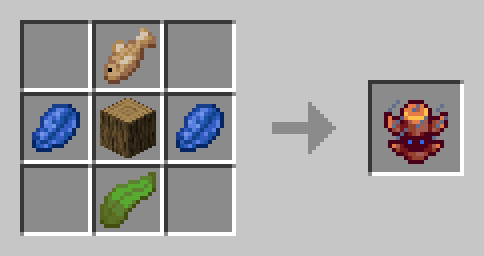
Materials required to craft a **Rain Totem**:
– 1 Log (of any type)
– 2 Lapis Lazuli
– 1 Raw Fish (of any type)
– 1 Kelp
The recipe unlocks automatically after acquiring either a raw fish, kelp, or any other weather totem.
### ⛈️ Storm Totem
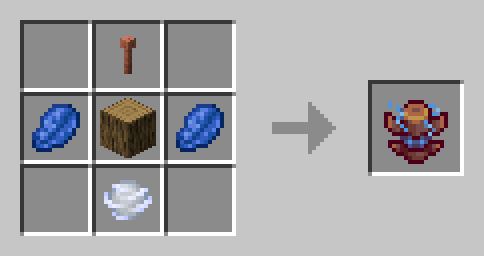
Materials required to craft a **Storm Totem**:
– 1 Log (of any type)
– 2 Lapis Lazuli
– 1 Lightning Rod (of any type)
– 1 Wind Charge
The recipe unlocks automatically after acquiring either a lightning rod, a wind charge, or any other weather totem.
### ☀️ Sun Totem
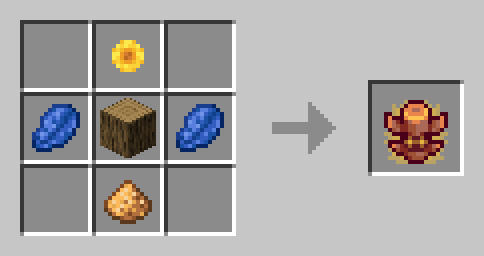
Materials required to craft a **Sun Totem**:
– 1 Log (of any type)
– 2 Lapis Lazuli
– 1 Sunflower
– 1 Glowstone Dust
The recipe unlocks automatically after acquiring either a sunflower, glowstone dust, or any other weather totem.
## 🔧 Configuration
By typing
“`
/function weto:config
“`
you can change the duration a totem changes the weather for between preset alternatives. Options are [undefined], [1 min], [3 min], [5 min], [10 min] and [20 min].
[undefined] omits any duration from the /weather command, which means minecraft will change the weather at its own pace again.
[5 min] is the default setting.
## ⚠️ Troubleshooting
If you encounter any missing textures, make sure you **have copied the same .zip file into your resource pack folder and activated it**.
Weather Unhinged
Embark on a thrilling journey with the “Weather Unhinged” data pack, an immersive addition to your Minecraft experience that introduces extreme weather conditions to the blocky world. Brace yourself as the environment transforms dynamically, presenting new challenges and opportunities for survival.
Key Features includes:
-
Earthquakes: Experience the ground shaking beneath your feet as earthquakes add a seismic element to your world. Structures may tremble, and the landscape can change as the earth shifts. If no players are near (175 blocks away), earthquakes won’t cause damage to the world.
-
Meter Showers: Witness breathtaking meteor showers as celestial debris streaks across the night sky. Enjoy the visual spectacle, but beware, during these showers, the chance of a meteor impact on the ground increases to a hundred! If no players are near the meteor strikes (100 blocks away), meteors won’t cause damage to the world.
NOTE: This data pack CAN be laggy and destructive at times, do NOT install it if you do not wish to put in danger any builds you want to preserve in your world.
Weather Power
=====================================
WEATHERPOWERS PLUGIN – COMPLETE INFO
=====================================
Author: XITER
Version: 1.0.0
Platform: Minecraft (Bukkit/Spigot/Paper)
OVERVIEW
========
WeatherPowers is a Minecraft plugin that grants players elemental weather affinities,
allowing them to harness the power of Sun, Rain, Storm, and Snow. Each affinity
provides 3 unique abilities with special effects and targeting capabilities.
WEATHER AFFINITIES
==================
Players are automatically assigned one of four weather affinities:
☀️ SUN AFFINITY
– Theme: Fire, Heat, Light
– Color: Gold/Yellow
– Strengths: Damage over time, area denial, blindness
🌧️ RAIN AFFINITY
– Theme: Water, Healing, Force
– Color: Aqua/Blue
– Strengths: Healing, knockback, temporary weapons
⚡ STORM AFFINITY
– Theme: Lightning, Wind, Chaos
– Color: Purple/Dark Blue
– Strengths: Direct damage, multiple strikes, launching
❄️ SNOW AFFINITY
– Theme: Ice, Cold, Control
– Color: White/Light Blue
– Strengths: Crowd control, freezing, area effects
ABILITIES BREAKDOWN
===================
☀️ SUN POWERS:
————–
1. SOLAR FLARE (20s cooldown)
– Blinds all enemies within 7 blocks for 5 seconds
– Creates explosion particle effect and thunder sound
– Message: “Solar Flare activated! Blinded X enemies.”
2. HEATWAVE (20s cooldown)
– Evaporates water blocks in 5-block radius
– Sets nearby entities on fire for 2 seconds
– Creates flame particles and fire extinguish sound
– Message: “Heatwave activated! Affected X entities.”
3. LAVA SUMMON (20s cooldown)
– Summons lava at targeted block location for 3 seconds
– Creates lava particles and lava pop sound
– Message: “Lava Summoned at target location!”
🌧️ RAIN POWERS:
—————
1. RAIN BLESSING (20s cooldown)
– Heals all players within 8 blocks by 2 hearts
– Creates water drop particles and rain sound
– Message: “Rain Blessing activated! Healed X players.”
2. TIDAL WAVE (20s cooldown)
– Pushes all entities away within 6 blocks
– Creates water bubble particles and bucket empty sound
– Message: “Tidal Wave activated! Pushed X entities.”
3. RAIN SWORD (20s cooldown)
– Grants “Rain Blade” iron sword with Sharpness 5 & Unbreaking 10
– Sword lasts 10 seconds then disappears automatically
– Creates water drop particles and trident riptide sound
– Message: “Rain Blade manifested! (10 seconds)”
⚡ STORM POWERS:
—————
1. THUNDER CALL (20s cooldown)
– Strikes lightning at targeted block (up to 50 blocks away)
– Direct lightning strike with full damage
– Message: “Thunder called from the heavens!”
2. TORNADO (20s cooldown)
– Launches all entities within 6 blocks straight up (2.5 blocks high)
– Creates cloud particles and dragon flap sound
– Message: “Tornado summoned! Launched X entities skyward.”
3. THUNDER BARRAGE (20s cooldown)
– Unleashes 10 lightning strikes over 1 second on target area
– Each strike has slight random offset for coverage
– Message: “Thunder Barrage unleashed!”
❄️ SNOW POWERS:
—————
1. ICE PRISON (20s cooldown)
– Freezes water blocks to ice in 4-block radius
– Applies Slowness II to nearby entities for 5 seconds
– Creates snow particles and glass break sound
– Message: “Ice Prison activated! Trapped X entities.”
2. BLIZZARD (20s cooldown)
– Blinds all entities within 6 blocks for 3 seconds
– Creates heavy snow particles and rain sound
– Message: “Blizzard unleashed! Blinded X entities.”
3. ICE ENTOMB (20s cooldown)
– Places ice block at target location for 5 seconds
– Applies Slowness V and prevents jumping to nearby entities
– Creates snow particles and glass place sound
– Message: “Ice Entomb activated! Target frozen in ice!”
TARGETING ABILITIES (Right-Click on Enemies)
============================================
All affinities have special targeting abilities with 20-second shared cooldown:
☀️ SUN TARGETING – Lava Summon
– Right-click enemy to summon lava under them for 3 seconds
– Deals 2 hearts damage and sets on fire for 3 seconds
– Creates lava particles and lava pop sound
🌧️ RAIN TARGETING – Water Blast
– Right-click enemy for massive knockback with upward force
– Knockback strength: 5.0, Upward force: 1.5
– Creates water splash particles and splash sound
⚡ STORM TARGETING – Lightning Strike
– Right-click enemy to strike them with lightning
– Direct lightning hit with full damage
– Instant strike effect
❄️ SNOW TARGETING – Ice Bind
– Right-click enemy to freeze them for 5 seconds
– Applies Slowness V, Slow Digging, and prevents jumping
– Creates snow particles and glass break sound
COMMANDS
========
PLAYER COMMANDS:
/myaffinity
– Shows your current weather affinity and abilities
– Displays all 3 abilities with names and cooldowns
– Usage: /myaffinity
/ability <1|2|3>
– Switches to specified ability number
– Confirms switch with ability name
– Usage: /ability 2
/switchability
– Cycles to next ability (1→2→3→1)
– Shows confirmation message with new ability
– Usage: /switchability
ADMIN COMMANDS:
/setaffinity
– Sets a player’s weather affinity
– Requires weatherpowers.admin permission
– Usage: /setaffinity PlayerName sun
/weatherpowers reload
– Reloads plugin configuration
– Requires weatherpowers.admin permission
– Usage: /weatherpowers reload
CONTROLS
========
ABILITY ACTIVATION:
– Left-Click: Use selected ability
– Ctrl + Right-Click: Cycle through abilities (1→2→3→1)
TARGETING:
– Right-Click on Enemy: Use targeting ability (requires line of sight)
– Works on all living entities including players (if enabled in config)
ACTION BAR DISPLAY:
– Shows all 3 abilities with status: [1. Solar ✓] | [2. Heat (15s)] | [3. Lava ✓]
– Green checkmark (✓) = Ready to use
– Red timer (Xs) = On cooldown
– Selected ability has arrow indicator (▶)
CRAFTING RECIPES
================
All power crystals use a 3×3 grid pattern filling the entire crafting table:
☀️ SUN POWER CRYSTAL
Materials: 8 Gold Blocks + 1 Diamond Block
Pattern:
[GOLD] [GOLD] [GOLD]
[GOLD] [DIAM] [GOLD]
[GOLD] [GOLD] [GOLD]
🌧️ RAIN POWER CRYSTAL
Materials: 8 Emerald Blocks + 1 Diamond Block
Pattern:
[EMER] [EMER] [EMER]
[EMER] [DIAM] [EMER]
[EMER] [EMER] [EMER]
⚡ STORM POWER CRYSTAL
Materials: 8 Netherite Blocks + 1 Diamond Block
Pattern:
[NETH] [NETH] [NETH]
[NETH] [DIAM] [NETH]
[NETH] [NETH] [NETH]
❄️ SNOW POWER CRYSTAL
Materials: 8 Quartz Blocks + 1 Diamond Block
Pattern:
[QRTZ] [QRTZ] [QRTZ]
[QRTZ] [DIAM] [QRTZ]
[QRTZ] [QRTZ] [QRTZ]
RECIPE SUMMARY:
– Each crystal requires 9 total items
– 8 block materials + 1 diamond block center
– Very expensive materials for game balance
– Recipes automatically registered on plugin enable
PERMISSIONS
===========
PLAYER PERMISSIONS:
weatherpowers.use – Use basic plugin features (default: true)
weatherpowers.ability – Use weather abilities (default: true)
weatherpowers.craft – Craft power crystals (default: true)
ADMIN PERMISSIONS:
weatherpowers.admin – All admin commands (default: op)
weatherpowers.setaffinity – Set player affinities (default: op)
weatherpowers.reload – Reload plugin config (default: op)
CONFIGURATION
=============
Key config.yml settings:
GENERAL:
– auto_assign_affinity: true (assign random affinity to new players)
– auto_give_power_items: true (give power crystal automatically)
– debug_mode: false (console debug messages)
COOLDOWNS:
– All abilities: 20 seconds (uniform for balance)
– Targeting abilities: 20 seconds (shared cooldown)
EFFECTS:
– Ability ranges, damage values, and durations
– Targeting ability configurations
– Particle and sound effect settings
UI SETTINGS:
– Action bar display duration and update frequency
– Symbol customization for ready/cooldown states
GAMEPLAY FEATURES
=================
BALANCED MECHANICS:
– Uniform 20-second cooldowns for all abilities
– Expensive crafting recipes requiring rare blocks
– Line-of-sight requirements for targeted abilities
– Shared cooldown for targeting abilities
VISUAL FEEDBACK:
– Action bar shows all 3 abilities with real-time cooldown timers
– Particle effects for all abilities with unique themes
– Sound effects matching each affinity’s element
– Color-coded messages for each affinity
PLAYER PROGRESSION:
– Automatic affinity assignment for new players
– Access to power crystal crafting recipes
– Three distinct abilities per affinity for variety
– Optional PvP targeting if enabled by admins
INSTALLATION
============
1. Download WeatherPowers.jar from builds
2. Place in server’s plugins folder
3. Start/restart server
4. Plugin will generate config.yml automatically
5. Grant players weatherpowers.use permission
6. Players will receive random affinities on first join
TROUBLESHOOTING
===============
COMMON ISSUES:
– Abilities not working: Check permissions and cooldowns
– Recipes not showing: Verify crafting.enable_recipes: true in config
– Action bar not displaying: Check UI settings in config
– Targeting not working: Ensure allow_player_targeting setting
SUPPORT:
– Check console for error messages
– Use /weatherpowers reload after config changes
– Verify all dependencies are installed
– Contact XITER for additional support
VERSION HISTORY
===============
v1.0.0 – Initial Release
– Four weather affinities with 3 abilities each
– Targeting system with right-click enemies
– Block-based expensive crafting recipes
– Uniform 20-second cooldowns
– Complete action bar UI system
– Comprehensive command system
Survival Weather Control
### DESCRIPTION
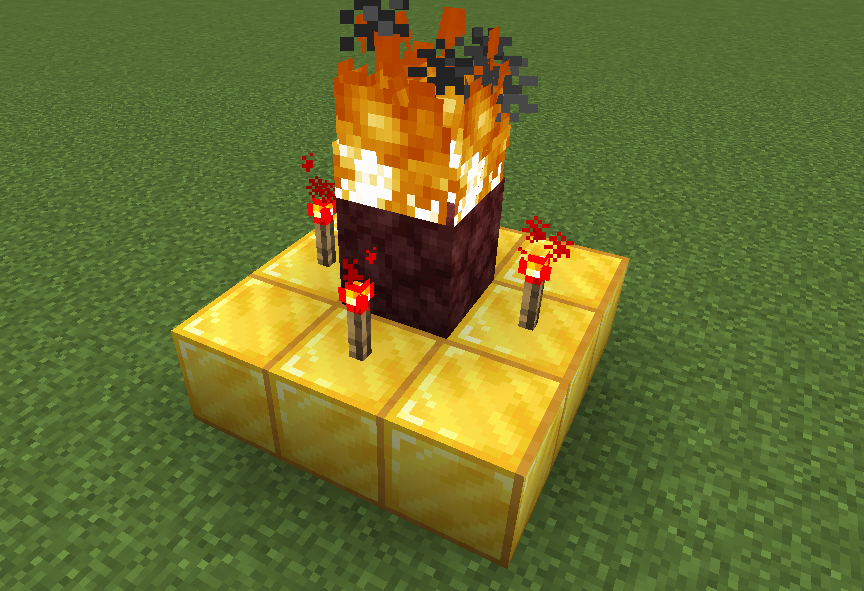
This data pack allows you to summon a thunderstorm using the classic altar used to summon herobrine! To do it, simply build the altar (place 9 gold blocks in a 3×3 arrangement with a lit netherrack block in the center surrounded by 4 redstone torches) and walk in the fire to “sacrifice” your health.
### INSTALLATION GUIDE
– go to your saves folder located here on Windows:
“`
C:Users(your name)AppDataRoaming.minecraftsaves
“`
put the zipped file in the data packs folder, and either restart your world or execute /reload
### OTHER THINGS TO NOTE
– gold blocks will turn into copper blocks upon usage
– for feedback, bug reports, or other help, join the [discord server](https://discord.gg/kk3j3ct6xk) from the links section of this page!
Weather and Tornadoes Remastered
**I highly recommend using [Sodium](https://modrinth.com/mod/sodium/versions) with this mod. It improves performance greatly. [Lithium](https://modrinth.com/mod/lithium) is also great.**
*For a more comprehensive overview of this mod, please see the CurseForge page: [CurseForge](https://www.curseforge.com/minecraft/mc-mods/weather-and-tornadoes-remastered)
# Weather & Tornadoes Remastered
Weather & Tornadoes Remastered is a semi-official remaster of the original Weather and Tornadoes (Weather1) mod by Corosus. Weather1 was discontinued after version 1.6.4, as it was replaced by his newer Weather2 mod, which features localized weather. This project has been endorsed by Corosus.


Weapons++
🧭 Weapons++: Solo Adventurer Edition 🛠️
Performance, QoL, and Deep Gear Progression for Solo Play.
Weapons++: Solo Adventurer is the definitive single-player modpack. It provides zero-lag performance (Sodium/Lithium) and essential QoL (JourneyMap) while fundamentally expanding progression.
This pack adds a huge arsenal of custom weapons, tools, and armor to master. Explore dynamic new biomes and dungeons filled with challenging mobs and rare resources to power your gear.
The ultimate stable and content-rich solo survival challenge.
WeaponMaster
# WeaponMaster
**WeaponMaster** is a Minecraft server plugin that adds weapons, armor, tools, and gameplay mechanics to the game.
It runs on any Spigot (or Paper and its forks, which are required for some additional features) server running Minecraft 1.21+.
## Features
– As of v1.12.0, **77** unique weapons, armor, and tools.
– The **WeaponMaster Dragon**, an upgraded dragon fight with special loot and rewards.
– The **Wither Challenge**, where you have to kill the wither without armor to get special loot.
– And some overpowered admin commands for fun.
– Performant, taking less than 0.2% of your tick (that’s 0.1 ms) in most cases.
[Click here for more information about the items.](https://github.com/greatericontop/weaponmaster/blob/main/WEAPONS.md)
[Click here for more information about the other features, including the WeaponMaster Dragon, Dragon’s Descent rewards tree, Wither Challenge, and admin commands.](https://github.com/greatericontop/weaponmaster/blob/main/FEATURES.md)
[Want to see an overview of the game progression? Check out the player’s guide!](https://github.com/greatericontop/weaponmaster/blob/main/PLAYERSGUIDE.md)
## Installation
Simply put the `jar` file in the `plugins` folder of your server and start it!
For better aesthetics, you can also install the [WeaponMaster overlay pack](https://github.com/Gerseneck/weaponmasterresources).
## Issues & Support
Note that this is my fun personal project, so it may contain bugs! Please report them on the [GitHub issues page](https://github.com/greatericontop/weaponmaster/issues)!
You can also go there for support. And I always welcome feature requests, no matter how crazy they are!
weapons-plus
Custom Weapons Datapack
This datapack adds a range of new weapons to Minecraft, each with its own unique ability and playstyle.
Crafting recipes can be found in the Gallery. **Make sure to download the resource pack** as well so the custom textures display correctly.
To craft the Doom Blade, the strongest weapon in the datapack, check the Gallery for full details.
For version 1.1 and above, run the command _/function allowed_weapons:settings_ to open a list of all available weapons. You can disable any weapon by unticking the checkbox next to it.
Update 1.0
Inferno’s Edge
Spoiler
Damages mobs that attack you
Grants an extra 5 hearts
Applies Fire Aspect II on hit
Deals 20 damage
Bedrock Breaker
Spoiler
Causes an explosion on hit
Deals 20 damage
Cannot be destroyed by explosions
Whirlwind Katana
Spoiler
Grants +0.1 movement speed
Grants +10,000 safe fall distance
Deals 10 damage
Staff of Glowing
Spoiler
Right-click to apply Glowing to mobs within a radius
Drains 1 XP level per second while active
Warp Dagger
Spoiler
Right-click a block to create an End Gateway
When two gateways exist, they become linked
Creating a third gateway destroys the oldest one
Shadow Dagger
Spoiler
Grants Invisibility while held
Reduces maximum health by 1 heart
Grants +3 attack speed
Deals 10 damage
Item is invisible in third-person view
Right-click consumes 50 XP levels and switches you to Spectator Mode for 15 seconds
Doom Blade
Spoiler
Runs /kill on target
When right-clicked, fires a doom beam that kills all things in its path and destroys blocks
**Update 1.1 Boss Update**
All boss drops have a 2 percent chance of dropping from their boss.
When you wear the full set of boss armour, you gain an extra 10 hearts.
All boss pieces are unbreakable.
Ender Dragon
Spoiler
Dragon Axe gives you telekinesis. Press right-click on a mob to use it, then right-click again to throw the mob away.
Dragon Chestplate functions like an elytra, but provides more protection than a netherite chestplate.
Wither
Spoiler
Wither Mace explodes on impact, makes you immune to fall damage, and gives a passive wither effect to all nearby mobs.
Wither Boots give a very strong passive wither effect to nearby mobs when sneaking, and also grant immunity to the wither effect and explosions.
Warden
Spoiler
When right-clicked, the Warden Sword unleashes a sonic boom and also gives you an extra 5 hearts while holding it.
Warden Leggings give Glowing to all mobs in a large radius and make you deal twice as much damage on sculk.
Elder Guardian
Spoiler
Elder Trident has chain lightning when thrown.
Guardian Boots give a passive effect to nearby mobs and grant immunity to wither.
Weapon Master
——————————————————————————
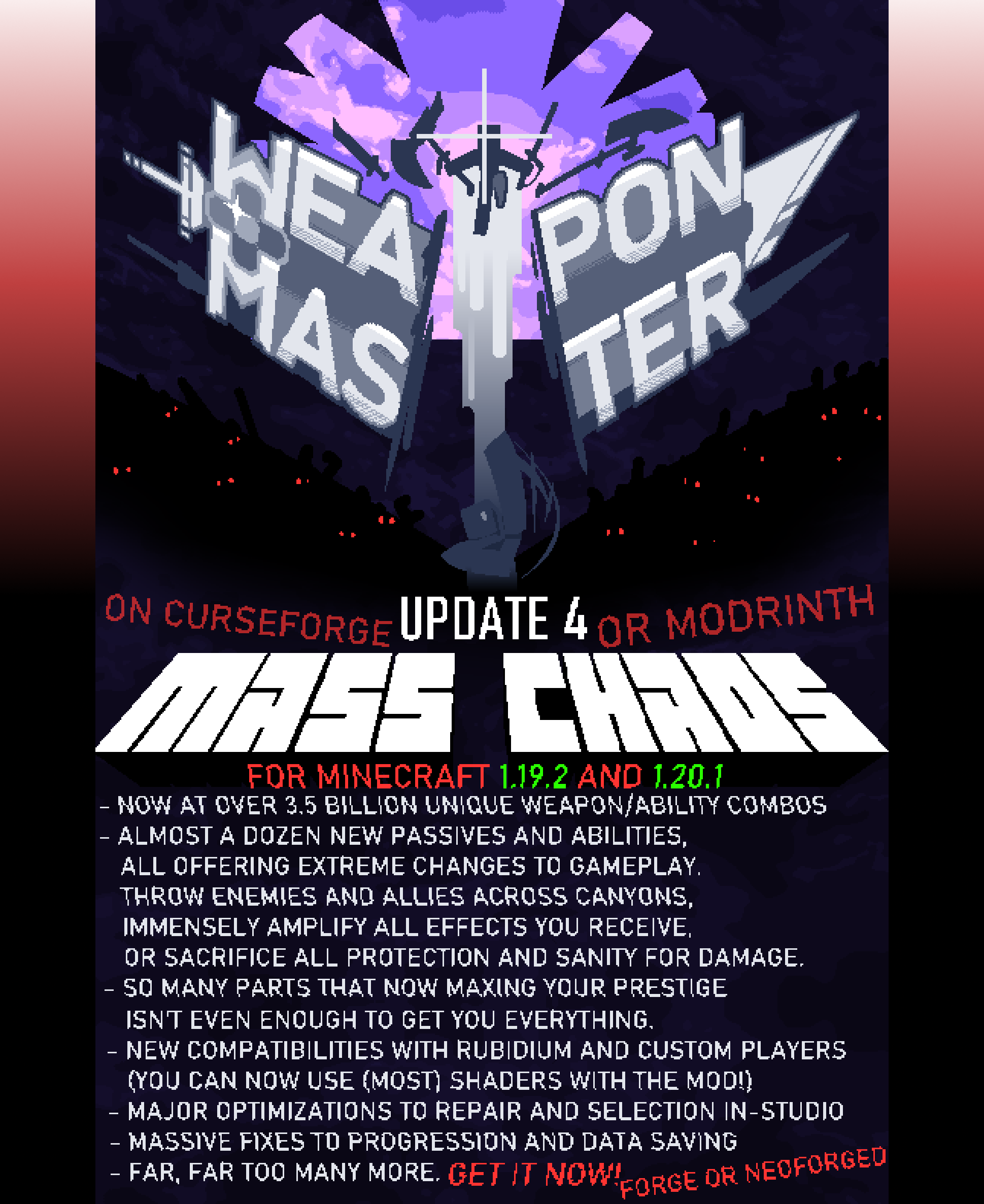
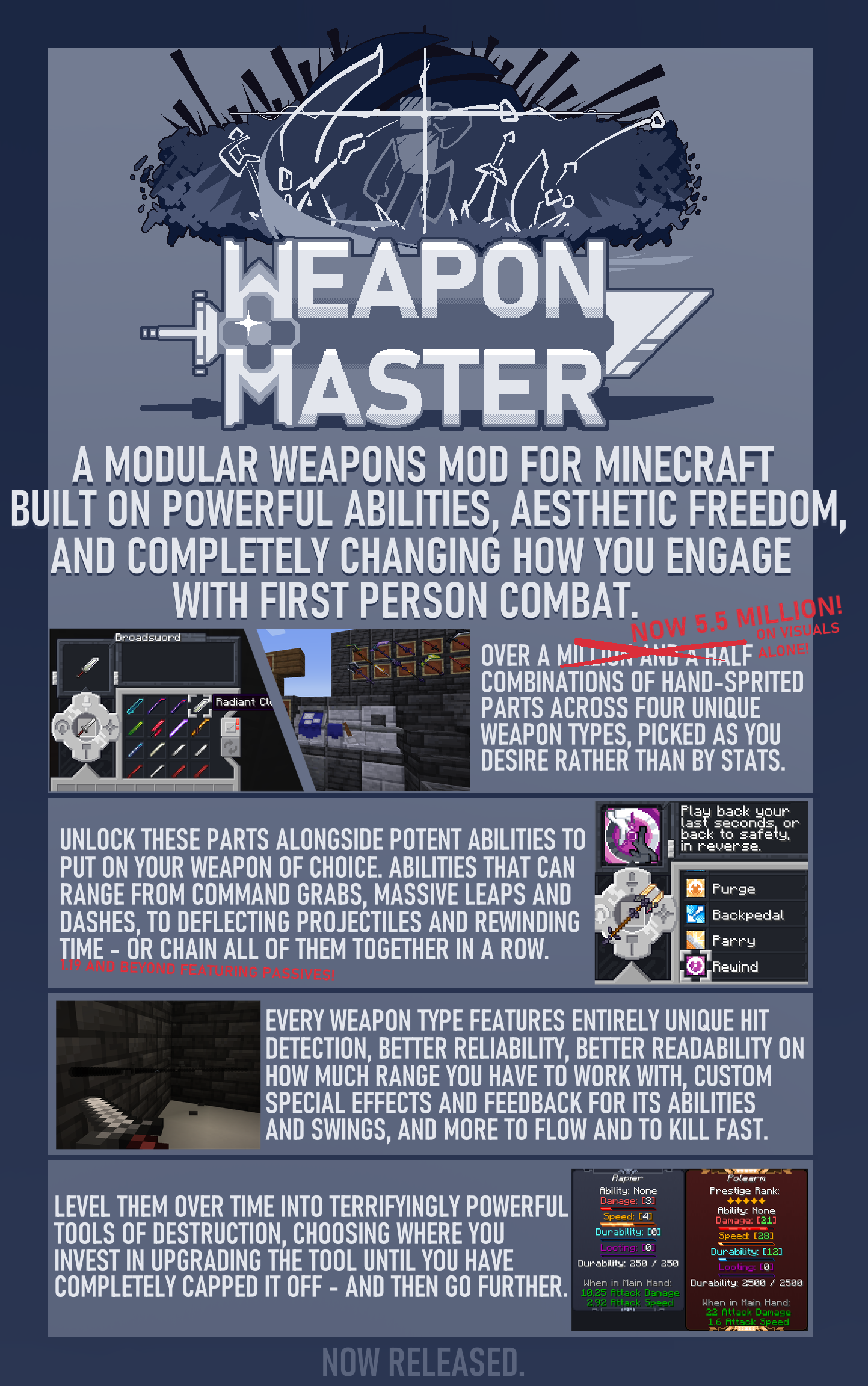
Weapon Master is built from the ground up creating modular weapons with full aesthetic freedom, and completely reinventing how you interact with melee combat. With four different types of weapons to fit each style preference, level-based progression, and unlocking hand-sprited cosmetic parts alongside its powerful abilities and passives, eventually you will become a dealer of death capable of wiping out hoards in style. All-new hit-detection methods, full-damage sweeps and piercing, and full configuration on damage, speed, durability, and XP scaling (and even retaining your weapon on death! (unless you configure that too)), crank the difficulty of your next playthrough up to 11 and be amazed what you can do and how good you’ll look.
——————————————————————————

Progress in Weapon Master is entirely streamlined to making use of your weapon. No additional materials are needed besides your base kit and studio – In fact, the mod only features 8 items in total, despite 3.5 billion combinations of parts and abilities. You’ll spawn with an in-game tutorial in the Blueprint Binder, which is only a handful of pages and can run you through how everything works.
——————————————————————————

Though Weapon Master is under the All Rights Reserved license, you are fully free to utilize it in modrinth modpacks without requesting ahead of time, or feature it in videos – So long as they do not modify the file, pay-wall or rehost the download, or claim ownership of any of it. Feel free to contact us (further down this page) should you need to do any of these things or otherwise and want to ask permission.
If you are attempting to create an addon for this mod for whatever reason, just contact us directly and we will work alongside you to create any internal code necessary to facilitate it. Currently, it only natively has support for a few small options.
– Last Updated 2/18/2024
——————————————————————————

Here’s some issues we know the mod has, and are still looking into. Some of these may never be patched, and others have workarounds. This mod is a bit of a mess, so do tell us if one comes up that’s not on here.
Itself:
– Third person animation can break if multiple players are in third person but one is not holding a weapon in Multiplayer. This will be fixed in the next expansion… hopefully.
Optifine:
– Some shaders are still OK. Optifine is the only incompatible one. If a shader is breaking the rendering on your Studio, try a different one.
Better Combat / Epic Fight:
– Hit detection breaks and makes the weapons unusable due to mixin issues. You can add ” *|weaponmaster ” or the individual weapon IDs to the internal blacklist/fallback file for Better Combat to make both mods able to run with each other. Epic Fight does NOT have a fallback option available and they are completely incompatible because of this. There will not be cross-compatability on Weapon Master weapons between other animation/hitdetection overhaul mods, as they both are trying to compete for the same territory with wildly different goals.
YDM’s Weapon Master
– We accidentally used the same mod ID, and now can’t really commit to changing it without obliterating backwards-compat. Oops! There really isn’t much we can do here, both options lose quite badly.
——————————————————————————

Q: Can you port this to [X] old version?
A: No. You gotta understand how difficult this actually is to do.
Q: …Can you Update to [X] version?
A: We’ll always eventually get to putting it on modern versions, yes. Just be patient, we’re 2 people.
Q: Can I distribute this elsewhere even with credit?
A: No, Curseforge and Modrinth are our official distributions exclusively. If you’re sending a zip of a modpack or something to a friend I don’t really care, but no pages for other sites or direct hosts as it is in the guidelines for these sites to not do that anyway, capiche? Ask for permission if you’re planning on using it in a public pack outside of Curseforge’s environment or etc and we can sort something out.
Q: Can I create a translation / resource pack / addon for the mod?
A: Usually. So long as you are following the above (not re-hosting the mod itself, stuff like that) you can create resource packs, mod addons, or etc, just fine. Just never upload the mod itself somewhere else alongside it and you’re fine. If it’s on a different website, link back to here for people to get the download. And as before, if you’re making an addon, please contact us so we can make the tools for it to work, lol
Q: Can you add [X] to the mod?
A: Probably not, we have an internal list of things we’ll be adding over time, and we’re pretty busy elsewhere. See below.
——————————————————————————

Weapon Master was made by ForsetCabiri and DesianSkies in our free time between working on our own game. It even represents many of the same modular systems we look up to, and games and other mods we enjoy. So, it might be second in priority, but it will be supported and still get updates for quite a long time.
All Contact related to Weapon Master should be done through this author (ForsetCabiri) if possible. I handle all the communication and pages for this as of co-owner request, so bring it to me if there is an issue, inquiry, or you just wanna say something about the mod with us. The best methods are through Email, or Discord.
You can contact ForsetCabiri through email at ([email protected]) or on Tumblr (https://www.tumblr.com/forsetcabiri). ForsetCabiri is also on Discord under the same ID. We enjoy hearing about your experiences with the mod, so feel free to reach out when something is created.
Have fun!