White Rabbit
This Fabric/Quilt mod adds a food and a drink that change the size of the player that consumes it.
Drinking Pishsalver will make you smaller (half your size each time you drink it by default) and eating Upelkuchen will make you larger (double your size each time you eat it by default).
The items can also be put in a Dispenser which will resize any entity in front of it when activated.
Recipes can be unlocked in the vanilla recipe book once you pick up Sweet Berries.
Several settings are configurable, including the duration of the resizing effect, the resizing multiplier for each item, the minimum and maximum scale, and the time it takes for your size to change.
Whisperwoods

Whisperwoods was created for [MMD Spookyjam 2019](https://github.com/MinecraftModDevelopment/minecraftmoddevelopment.github.io/blob/master/docs/events/spooky_jam_2019.md)
Whisperwoods is a spooky forest themed mod adding multiple creatures designed to make your gameplay experience not only spookier but more interesting overall.
Whisperwoods is available for both Forge and Fabric, thanks to Architectury.
## Content
Content
**Moths**
Moths are harmless and rather stupid flying insects. They spawn at night, especially in forests. They are attracted to light sources, even harmful ones like fire. However, they can clutter up torches and break them.
**Hidebehind**
The Hidebehind is a fearsome critter believed to be responsible for the disappearances of woodsmen and other forest travelers. It stalks its prey silently, and will duck behind trees and seem to melt into them if spotted, but gradually move towards its quarry. However, its vibrant eyes can give it away, and its eyes are sensitive to light and it will try to avoid bright lights. If it manages to reach its prey, it will consume them in a few violent bites, leaving no remains…
**Wisps**
Wisps are strange gaseous spirits found in forests and swamps. They often flit around aimlessly, and tend to vanish if approached. However, a few Wisps can rip the soul from a person, and try to burn it up as fuel for its fire. If this happens, it can only mean certain death, unless the Wisp is killed in time and releases the soul. When a Wisp is killed, it may drop a Ghost Light, which can be placed as a light source.
**Ghost Lights**
Ghost Lights are wisp-like lighting that can be placed anywhere, producing a colorful flame and a moderate amount of light.
**Wisp Lanterns**
Wisp lanterns are crafted by putting iron nuggets around a ghost light.
**Hirschgeist**
The Hirschgeist is a mini-boss spirit of the forest with powerful flame attacks that can summon wisps to fight for it.
**Hirschgeist Skull**
An item dropped upon the death of a Hirschgeist. It wards off dangerous spirits. It can also be placed down as decoration.
**Hand of Fate**
An occult artifact used to summon spectral beings from the Otherworld. It can be lit with ghost lights or blaze powder as part of the wisp recipe (press SHIFT while viewing its tooltip to get recipe information)
**Zotzpyre**
A vampiric beast found in caves and at night in the jungle.
## Frequently Asked Questions
Below is a collection of frequently asked questions.
Spoiler
**How does the Hand of Fate work? I put in the first item, but it just shows another and nothing is summoned?**
The item that appears in the Hand is the next item needed to be added. Add that then the next one(s) it shows, then when all are added, the mob is summoned.
**Can I use this mod in a pack?**
Yes, so long as it is hosted on CurseForge or private. If you wish to publicly host a pack on another platform (like Technic), please ask or consider using CurseForge as it supports developers.
**Where can I find the configs?**
**Spawning/Server:** saves/(world)/serverconfigs/whisperwoods-server.(toml/json5)
**Dedicated Server:** /world/serverconfigs/whisperwoods-server.(toml/json5)
**Client:** (minecraft folder)/configs/whisperwoods-client.(toml/json5)
**How do I craft (insert item)**
Use the mod “Just Enough Items” to view recipes in game. They will not be documented here.
**Is this mod compatible with (Insert biomes mod here)?**
Yes, so long as the mod uses the Biome Dictionary provided by Forge. This includes Biomes O Plenty and Traverse, as well as many other biome mods.
**How do I disable/modify the spawning of (insert entity here)?**
Use the configs, you can see where to find them in “Where can I find the configs?” above. Switch “spawn_naturally” (formerly “do_spawning”) to false in order to disable spawning. You can also adjust weight and what biomes they spawn in.
**How can I set a default / automatically place a server configuration because new worlds don’t have my configuration?**
Placing whisperwoods-server.(toml/json5) in the defaultconfigs folder will make it automatically be copied into new saves.
**1.12 backport?**
No.
**Why isn’t the Hidebehind doing anything or moving?**
The Hidebehind doesn’t wander about, it stalks its prey. However, it won’t stalk prey that are in the light, and it won’t stalk prey during the day unless it’s in a dark place. This isn’t a bug, it’s intentional. They aren’t creatures that typically exist outside of stalking prey.
**Can I tame Zotzpyres or anything?**
No. This is a mod meant to add horrors to the forest, not to add cute pets and animals friends
**Will you make Zotzpyres or anything tameable?**
No. See above. If a mob is not tameable, there is a good reason for it. Also, if any mob is not tameable upon release, it will not be made tameable later.
**Is there a Fabric version?**
Yes!
**What mod loader is this mod for?**
The mod is built for Forge and Fabric, using Architectury.
## Additional Information
Join our Discord for announcements, info, discussion, and suggestions: https://discord.gg/qjhznSF
Note the linked discord is the Better Animals Plus discord, but has a section for two other mods (Better Animal Models and Whisperwoods)
### Credits
**cybercat5555 – Artist**
Art, Modeling, Texturing, Design
**its_meow – Programmer**
Programming, AI, Functionality
The assets (textures, models) in Whisperwoods are reserved to Cybercat5555, and cannot be reused or recreated without permission, unless within fair use. The source and binaries (jars) are licensed under the CC BY-SA-NC 4.0 IPL (see “License” above).
Whispers of adventure

## Presentation :
**Whispers of adventure** is a modpack somewhere between Vanilla+ and modded, suitable for both experienced players and beginners.
It focuses on exploration, atmosphere and aesthetics, transforming the basic game into an RPG without inserting complicated mechanics.
The modpack is available in 4 versions :
– **Whispers of adventure – Full version :** Full version.
– If you keep the “Distant Horizons” mod activated, it is extremely recommend to set the memory allocation of your instance to 4096 MB or more.
– **Whispers of adventure – Medium version :** Lighter version, suitable for less powerful computers.
– **Whispers of adventure – Essential version :** Extremely light version containing only the mods needed to join a server containing this modpack. Not recommended if you want a full experience.
– **Whispers of adventure – Server version :** Dedicated server version.
– To install it on a Minecraft server, you need to install it into a Modrinth instance, and then transfer the necessary files and folders on the server.
**⚠️ Please always download the latest version for the best experience ! ⚠️**
**ℹ️ See the Q&A section below for instructions on how to update the modpack. ℹ️**
Important mods include :
– A map RPG-style terrain generation mod
– 10 large structures mods
– A skill mod
– A terrain generation mod and a structure mod for the End
– 2 new dimensions:
– The Heaven
– The Afterdark
– A few mods adding new enchantments
– 2 teleportation mods
**The base config of the modpack may give very powerful abilities to the player very quickly.** If you prefer a slower progression, you are free to change the mods configurations. This config is designed to allow casual players to level up quickly, but it can be too easy for advanced players. If you want to make the modpack more progressive, you can adjust the totem spawn probability of the Everlasting Abilities mod, and disable the BeyondEnchant mod.
## Q&A :
How to choose which version of the modpack to install ?
The easiest way to determine the most suitable version of the modpack for your computer, is to start with the largest version, and switch to the next lighter version if it is not playable.
Please keep in mind that the performances can be very different whether you are playing solo or on a server. You generally need a less powerful computer to play on a server, as the server runs some processes for you.
Here is the order with which you can try :
– Whispers of adventure – Full version
– Whispers of adventure – Medium version
– Whispers of adventure – Essential version
Can I modify and redistribute the modpack ?
You can modify and redistribute the modpack, but you CANNOT redistribute it under the same name and without mentioning the author’s pseudo.
Remember that all credits must be given to the creators of the mods, datapack and resource packs.
Can I add mods/datapacks/resource packs to this modpack ?
You can do whatever you like. If you’re on a server, follow the server’s rules.
How to update the modpack to a newer version without losing my own config (keybinds, mod configs, etc) ?
If you want to update to a newer version, but don’t want to lose your own congif (for example if you want to keep your own keybinds, mod configs, etc), you can do the following :
– Install the latest version of the modpack (without deleting the old one !).
– Open the instance folders of the old and the new modpack version :
– Open the old modpack instance.
– Click on “…”.
– Click on “Open folder”.
– Do the same for the new modpack instance.
– Copy the following files or folders from the old version’s folder to the new version’s folder (replace them if they already exist) :
– Distant_Horizons_server_data
– saves
– xaero
– XaeroWaypoints_BACKUP…
– command_history.txt
– options.txt
– servers.dat
– Optionally, if you prefer some mod configs of your old instance, you can also copy them. Be aware that it can potentially overwrite some configs that have been modified in the new version (for example for bug-fixing purposes).
– Launch the game to check that it works.
– If the game works and you don’t see any missing data, you can delete the old version of the modpack.
I’m having major performance problems. What can I do ?
If you’re playing with the “Distant Horizons” mod, check that you have at least 4096 MB of memory allocated to the instance (if you have enough RAM, of course).
If you don’t have enough RAM, disable the “Distant Horizons” mod.
If you still have performance problems, use the next lighter version of the modpack.
There are errors in the console when using the modpack. Is this normal ?
Yes, some mods give minor errors. If I’ve kept the mods causing the error, that means they should normally work correctly.
## Notes :
Please do not contact me for mod-related bugs. I am not responsible for the development of the mods contained in this modpack.
Feel free to join my Discord server if you have any questions about this modpack.
## Mods :
Terrain generation
– **Enderscape :** Total overhaul of the End dimension, featuring new world generation, four new biomes, revamped End Cities, and many other additions that enrich the End and all that lies beyond.
– **Larion World Generation :** Terrain generation mod that overhauls the style and layout of world generation in a modern-vanilla-like “epic fantasy” style.
Structures :
– **Dungeons and Taverns :** Adds vanilla like structures that are supposed to blend in with the rest of the game and feel like they belong there.
– **Katters Structures :** Adds 30+ brand-new vanilla-like structures to the game.
– **Sparse Structures :** Allows to make all structures more spread out.
– **Tidal Towns :** Adds ocean villages.
– **YUNG’s Better Desert Temples :** Redesigns Minecraft’s desert temples.
– **YUNG’s Better Dungeons :** Redesigns Minecraft’s dungeons.
– **YUNG’s Better End Island :** Overhauls the main End Island.
– **YUNG’s Better Jungle Temples :** Redesigns Minecraft’s jungle temples.
– **YUNG’s Better Mineshafts :** Overhauls the abandoned mineshaft.
– **YUNG’s Better Nether Fortresses :** Redesigns Minecraft’s Nether fortresses.
– **YUNG’s Better Ocean Monuments :** Redesigns Minecraft’s ocean monuments.
– **YUNG’s Better Strongholds :** Redesigns Minecraft’s strongholds.
Atmosphere and visuals :
– **3D Skin Layers :** Replaces the usually flat second layer of player skins with a 3d modeled version.
– **AmbientSounds :** Adds a rich ambience to the minecraft world.
– **Astrocraft :** Adds a realistic night sky with real life stars, planets and other things.
– **Chunks fade in :** Adds smooth fade-in and motion animations for chunk loading.
– **Distant Horizons :** Add simplified terrain past Minecraft’s default view distance to improve performance and allow for longer draw distances.
– **Iris Shaders :** Allows to use shaders.
– **LambDynamicLights :** Adds dynamic lighting.
– **Particle Rain :** Replaces the default weather with prettier particle effects.
– **Reactive Music :** Trades Minecraft’s default music for something dynamic, reactive, and ever-changing.
– Modified to deactivate the boss’s music.
– **Sound Physics Remastered :** Provides realistic sound attenuation, reverberation, and absorption through blocks.
Magic :
– **BeyondEnchant :** Allows you to break the traditional limits of enchantments.
– **Enchants Plus :** Add new enchantments that feel vanilla and spice up the game.
– **Grind Enchantments :** Allows to disenchant and transfer enchantments using a grindstone.
– **Neo Enchant+ :** Add new enchantments to the game.
Abilities :
– **Everlasting Abilities :** Adds persistent abilities that can be impactful on the gameplay.
Dimensions :
– **Heaven Dimension :** Add a Heaven dimension far above the ground.
– Modified to increase the height for the teleportation in the Heaven dimension.
– **The Afterdark :** Adds a new dimension accessed from a structure near a Ancient City.
Transportation :
– **Telepass :** Adds a way to players to teleport to each other.
– **Waystones :** Adds waystone blocks that the player can return to once they’ve been activated.
Improved GUIs :
– **Better Advancements :** Improves the UI and UX for the advancements system.
– **Better Statistics Screen :** Replaces the Vanilla statistics screen with an new and improved statistics screen that is easier to use and that has more helpful features.
– **BetterF3 :** Replaces Minecraft’s original debug HUD with a highly customizable, more human-readable HUD.
– **FPS – Display :** Displays the current FPS on screen.
Performances :
– **Chunky :** [Optional] Allows to pre-generates chunks, quickly, efficiently, and safely.
– **Dynamic FPS :** Reduce resource usage while Minecraft is in the background, idle, or on battery.
– **FerriteCore :** Reduces the memory usage of Minecraft in a few different ways.
– **Lithium :** Modern, general-purpose optimization mod for Minecraft which works to improve a number of systems (game physics, mob AI, block ticking, etc) with the goal of not changing any vanilla mechanics.
– **Noisium :** Optimises worldgen performance for a better gameplay experience.
– **Sodium :** Powerful optimization mod for the Minecraft client, which greatly improves frame rates and micro-stutter, while fixing many graphical issues in Minecraft.
– **Sodium Extra :** Brings most of OptiFine’s eye-candy options to Sodium, in addition to providing some features such as visual bug fixes and other performance options that are not yet available on Sodium.
Difficulty :
– **Progressive Ender Eyes :** Changes the recipe for Ender Eyes.
– **True Ending: Ender Dragon Overhaul :** Overhauls the vanilla Ender Dragon to improve and make more difficult the fight against it.
Utilities :
– **Bottle Your Xp :** Allows the creation of experience bottles from your own gathered xp.
– **Durability Tooltip :** Shows the durability of items.
– **Easy Anvils :** Makes working with anvils much more enjoyable.
– **Easy Magic :** Enables enchanting tables to retain their inventory contents even after closing the interface.
– **Easy Shulker Boxes :** Brings some extremely useful changes to shulker boxes, making them usable from directly within your inventory.
– **FallingTree :** Allows to break trees instantly.
– **Lootr :** Creates a unique inventory for each player who opens a container that has a loot table.
– **Monsters in the Closet :** Highlights the mobs that prevent the player from sleeping.
– **Nemo’s Inventory Sorting :** Adds buttons to inventories for sorting items.
– **Passive Shield :** Disable the rendering of the shield when not used.
– **Resource Backpack’s :** Adds backpacks.
– **Roughly Enough Items (REI) :** Allows to view all items and their recipe(s).
– **Simple Voice Chat :** Adds proximity voice chat.
– **Trade Cycling :** Adds a trade cycling functionality.
– **Universal Graves :** Adds graves to temporarily store the items of the players when they die.
– **Xaero’s World Map :** Adds a world-map.
– **Zoomify :** Adds a zoom.
Others :
– **AudioPlayer :** Allows you to put your own audio files on music discs.
– **Disable Accessibility Screen :** Skips the Accessibility Screen menu when launching into a new Minecraft instance.
– **Disable Custom Worlds Advice :** Disables the annoying “Experimental Features” advice that appears every time you create or load a world with custom dimensions or world settings.
– **Disable Insecure Chat Toast :** Deletes warning toast about connecting to a server without enforce secure chat.
– **Disable Portals :** [Server only] Allows for the disabling of nether portals and end portals.
– **Drippy Loading Screen :** Addon for FancyMenu for fully customizing Minecraft’s loading screen.
– **FancyMenu :** Allows personalised game GUIs.
– **Mod Menu :** Allows to view the installed mods and, if supported by the mod, enables quick and easy access to the mod’s config screens.
– **Ore Creeper :** Adds creepers based on the Ores that the game includes.
– **Reese’s Sodium Options** : Replaces Sodium’s Options Screen with intention of improving UX.
– **Spitting Image :** Allows the player to spit.
Dependencies or libraries required :
– **[EMF] Entity Model Features**
– **[ETF] Entity Texture Features**
– **Architectury API**
– **Balm**
– **Cloth Config API**
– **Collective**
– **Continuity**
– **CreativeCore**
– **Cyclops Core**
– **Fabric API**
– **Forge Config API Port**
– **Konkrete**
– **Melody**
– **Polymer**
– **Puzzles Lib**
– **Resource Config API**
– **Resource Library**
– **SuperMartijn642’s Config Lib**
– **TCDCommons API**
– **Text Placeholder API**
– **YetAnotherConfigLib (YACL)**
– **YUNG’s API**
## Ressource packs :
Improved GUIs :
– **Colourful containers Dark Mode GUI :** Adds a container GUI replacement mod that matches the menu to every one of Minecraft’s colourful interactable blocks.
– **Colourful containers GUI** : Adds a container GUI replacement mod that hopes to match the menu to every one of Minecraft’s colourful interactable blocks.
– **Default Dark Mode :** Gives the Minecraft GUI a darker look while maintaining the vanilla textures.
– **Default Dark Mode: Expansion :** Add-on towards the “Default Dark Mode” Resource Pack which adds, improves and updates textures for over 80-90 Minecraft mods.
Atmosphere and visuals :
– **Fresh Animations :** Gives an animation overhaul to the creatures in the default look of Minecraft.
– **Fresh Moves :** Overhauls the idle, walking and swimming animation and gives some othe details to the player.
– **New Glowing Ores :** Makes all the ores glow.
– **ReactiveMusic_SongPack :** Default songpack of the Reactive Music mod, but modified to remove the boss songs.
## Included shaders :
– **Complementary Shaders – Unbound**
## Issues :
– The Universal Graves mod does not recognize the backpack slot. If you die with a backpack in this slot, the backpack will drop as an item.
– The Particle Rain mod isn’t fully compatible with shaders. Since it was primarily added to the modpack for use without shaders, you can disable them if you experience any issues.
## Credits :
All credits go entirely to the creators of the mods, datapacks and resource packs contained in this modpack.
Whispers
## 🌒 Whispers – A Journey Beyond the Silence
In a world where tools never break and silence hides forgotten truths, **Whispers** invites you to explore ruins, unravel mysteries, and awaken powers long buried.
### 🔮 Features
– **Immersive Exploration** – Discover ancient structures, hidden dimensions, and mystical dungeons.
– **Mystic Power** – Wield magic with spells, artifacts, and rituals. Become more than just a player.
– **Herobrine Returns** – Face a myth reborn. Will you summon him… or fall victim to his curse?
– **No Durability** – Your tools are eternal. But power comes at a price…
– **Customized Origins** – Choose who you are, and shape how your story unfolds.
### 🕯️ A World of Whispers
Seasons shift. Shadows linger. Voices echo through the trees.
This is a realm of legends—waiting to be remembered.
—
⛓️ *Follow the whispers. Awaken your story.*
Whisper Doors
# 🚪 Whisper Doors
**Whisper Doors** adds magical teleporting doors to your Minecraft server. Create linked doorways that transport players instantly when they interact with named doors on the same “whisper channel.”
## ✨ Features
### 🔗 Door Linking System
– **Named Connections**: Place named doors to automatically create whisper channels between them
– **Smart Pairing**: Doors with the same channel name connect automatically across your world
– **Cross-World Travel**: Configure whether doors can connect across different worlds
– **Automatic Detection**: System automatically finds the nearest connected door on the same channel
### 🎯 Teleport Mechanics
– **Direction Facing**: Players exit facing the correct direction from the destination door
– **Cooldown System**: Prevents spam with configurable cooldown between uses
– **Visual Feedback**: Portal particles and sounds enhance the magical experience
### 🛡️ Server Management
– **Fully Configurable**: Adjust search distance, cooldowns, cross-world travel, and more
– **Persistence**: Door connections save automatically
– **Smart Cleanup**: Broken doors are automatically removed from the system
– **Flexible Naming**: Option to ignore color formatting in door names for easier matching
### 🎨 Visual & Audio
– **Particle Effects**: Portal particles at both departure and arrival doors
– **Custom Sounds**: Magical teleportation sounds using enderman and door sounds
– **Configurable FX**: Toggle particles and sounds independently
## 🎮 How It Works
1. **Place a door** with a custom name in an anvil
2. **The door automatically binds** to a “whisper channel” based on its name
3. **Place another door** with the same name elsewhere
4. **Right-click either door** to teleport to the other connected door
## 🔧 Configuration
Easily customize everything in config.yml:
“`yaml
# Maximum search distance in blocks. Set to -1 or 0 for unlimited.
max-search-distance: 0
# Allow teleporting across different worlds if a matching channel exists.
cross-world: false
# If true, colors and formatting are stripped
ignore-formatting: true
# Require the placed door item to have a custom display name to become a whisper door.
require-named-door: true
# Teleport cooldown per player, in seconds.
cooldown-seconds: 3.0
# Open the destination door as you arrive.
open-on-teleport: true
# Spawn particles and play sounds on teleport.
particles: true
sounds: true
messages:
bound: “&aDoor bound to whisper channel ‘&e{channel}&a’.”
no-target: “&eThis door whispers into silence. No partner found.”
cooldown: “&cThe door is catching its breath. Wait &e{time}s&c.”
teleport: “&bYou whisper through the door…”
Whimsy Brews

Enter the land of whimsy, where adventure and coziness go hand in hand! Prepare to embark on a peaceful journey in a world powered by **YUNG’s Better** exploration mods, **Let’s Do** series and the unparalleled creativity of the **Create** mod.
Pick and choose from a variety of **Race Origins** that completely alter the gameplay you will experience. From the tinniest Dwarf race to an enormous Troll with ravenous appetite.
Overworld now has some soothing **ambient sounds and particles**, vanilla friendly **biome redesigns** and variety of **new mobs and structures**. If you’re looking for a more deadly experience, you can hop through the portals and even visit a unique **Sleepy Hollows** biome with mysterious bosses.
Perfect for playing with friends!

> **Other Mods:** Amendments, MrCrayfish’s Furniture, Ribbits, Lootr, HT’s Tree Chop, Carry On, Corpse, 3D Skin Layers, Visual Workbench, Jade, JEI, Traveler’s Titles, etc..
> **Resource packs:** 3D Crops Revamped, Fresh Animations, Colourful Containers GUI, Enchant Icons, **[Mizuno 16 Craft](https://resourcepack.net/mizunos-16-craft-resource-pack/#gsc.tab=0)**
> **Shaders:** Complementary Shaders – Unbound

This Modpack was made for my Community Minecraft server that makes the most out of the Discord Integration mod and includes special Journals to enhance its RPG feel. You will also encounter monthly challenges, community boss fights and other fun events.
You will have to add **[Twilight Forest](https://www.curseforge.com/minecraft/mc-mods/the-twilight-forest)** and **[Sit & Chill](https://www.curseforge.com/minecraft/mc-mods/sit-chill)** mods manually to play on the server.
Join the **[Herbal Brews Discord](https://discord.gg/yhzK7S5nAQ)** for more information.
Where Echoes Lie (WEL)

Where Echoes Lie (WEL)
By Luchito
Do you hear it? A whisper in the steam… an echo from the stone.
The world you remember is but a faint memory, a ghost of a simpler time. A new age has begun.
Welcome to Where Echoes Lie (WEL), a world built upon the bones of a forgotten age. The silence of eons is shattering, and as ancient powers awaken, you are here to witness their return. This is not a ‘vanilla-plus’ experience. It is a fundamental reimagining of Minecraft’s core gameplay loops, designed to reward the bold, the creative, and the ingenious.
THIS IS NOT FROM THE BOOK
The world has been reborn with vast, breathtaking landscapes from Biomes O’ Plenty. Beneath the surface, the earth groans with the weight of forgotten structures, from the colossal, puzzle-filled labyrinths of When Dungeons Arise to the completely reimagined strongholds and mineshafts from the full YUNG’s Better Series.
Your adventure will take you far beyond the Overworld. Ascend to the divine islands of The Aether, descend into the prehistoric chasms of Alex’s Caves, and confront the horrifying, pulsing depths of the Deeper and Darker. Each realm is populated by a menagerie of new life and legendary threats from Alex’s Mobs and **Mowzie’s Mobs**, while the atmospheric horrors of the **Whisperwoods** and **The Graveyard** stalk the nights.
To survive, you cannot rely on simple diamond tools. You must become a master of three distinct disciplines:
- The **Tinker**, forging custom weapons and tools from a massive variety of alloys in the **Tinkers’ Construct** smeltery.
- The **Engineer**, building intricate, kinetic machinery and sprawling train networks with **Create**.
- The **Archmage**, weaving custom spells in **Ars Nouveau** or delving into the high-tech industry of **Mekanism**.
This is a world of hostile beauty, of ancient mysteries and cutting-edge technology. It does not hold your hand. Your goals are your own. Can you conquer the horizons? Can you build a factory that tames the wilds? Can you master the arcane arts?
An Epic Experience Forged from Legendary Mods
This modpack is a carefully constructed love letter to the modding community, designed to create a single, cohesive, and deeply engaging experience.
Click to view the core features of your adventure…
⚔️ A World of Deep and Challenging Combat
- Legendary Foes: Confront the terrifying, multi-staged boss encounters of Mowzie’s Mobs, from the sun-chief Barakoa to the nigh-invulnerable Ferrous Wroughtnaut. Discover and hunt over 85 new creatures with Alex’s Mobs, from the sky-whale Seo Teras to the cavern-dwelling Tremorsaurus.
- A Custom Arsenal: Leave vanilla tools in the past. Master **Tinkers’ Construct** to design and modify your own unique weapons and tools from a massive variety of materials. Expand your options further with the tactical variety of **Spartan Weaponry** and the modern firearms of **Scorched Guns**.
- The Path of the Mage: Obliterate your foes with custom-crafted spells from **Ars Nouveau**. Combine glyphs of fire, lightning, and gravity to create screen-shattering magical attacks, or summon powerful magical allies to fight by your side.
🌍 An Age of Uncharted Exploration
- Dungeons That Touch the Sky: Plunder hundreds of colossal, procedurally generated structures with When Dungeons Arise, including floating galleons, infested asylums, volcanic forge-shrines, and massive desert tombs.
- Vanilla Reimagined: Experience vanilla structures as you’ve never seen them before with the complete **YUNG’s Better Series**, overhauling Dungeons, Mineshafts, Strongholds, Ocean Monuments, Nether Fortresses, and more.
- Realms Beyond: Your adventure will transcend the Overworld. Ascend to the divine islands of **The Aether**. Delve into the five massive, prehistoric biomes of **Alex’s Caves**. Face the chilling abyss of the **Deeper and Darker**. Every realm offers unique challenges and bosses.
⚙️ The Dawn of an Industrial Revolution
- Master the Machine: Engineer solutions to any problem with **Create**. Build kinetic contraptions powered by wind and steam, design sprawling factories with automated crafting, and construct intricate train networks to transport your goods.
- The Ultimate Endgame: Advance beyond Create into the high-tech world of **Mekanism**. Pursue the sciences of fission and fusion, build digital miners, teleportation networks, and craft the near-invincible MekaSuit.
- Digital Dominance: Conquer the chaos of a 190+ mod inventory with **Refined Storage**. Digitize millions of items into a searchable, craftable, computer-based network, making resource management a project in itself.
The Complete Mod List
This pack contains approximately 190 mods, including all required libraries and dependencies.
Click to view the full alphabetical mod list…
Technical Details & Requirements
- Minecraft Version: `1.20.1`
- Mod Loader: `Forge`
- Required Forge Version: `47.4.3`
- Java Version: `Java 17` is required to play.
- Recommended RAM Allocation: **8GB** is highly recommended for a smooth experience, especially with shaders. 6GB is the absolute minimum. You can adjust this in your launcher’s settings.
- Shader Compatibility: This pack includes **Oculus**, allowing for the use of shaders. Shaders are optional but highly recommended on powerful PCs for the full atmospheric experience.
Wheel of Wacky
# Wheel of Wacky
[](https://modfest.net/carnival)
A mod that adds a carnival prize wheel that – when spun – has the chance to either fabulously reward or horrifically punish the player that spun the wheel in a hilarious fashion!
**You do not need Sinytra Connector and Forgified Fabric API if you are playing on Fabric.**
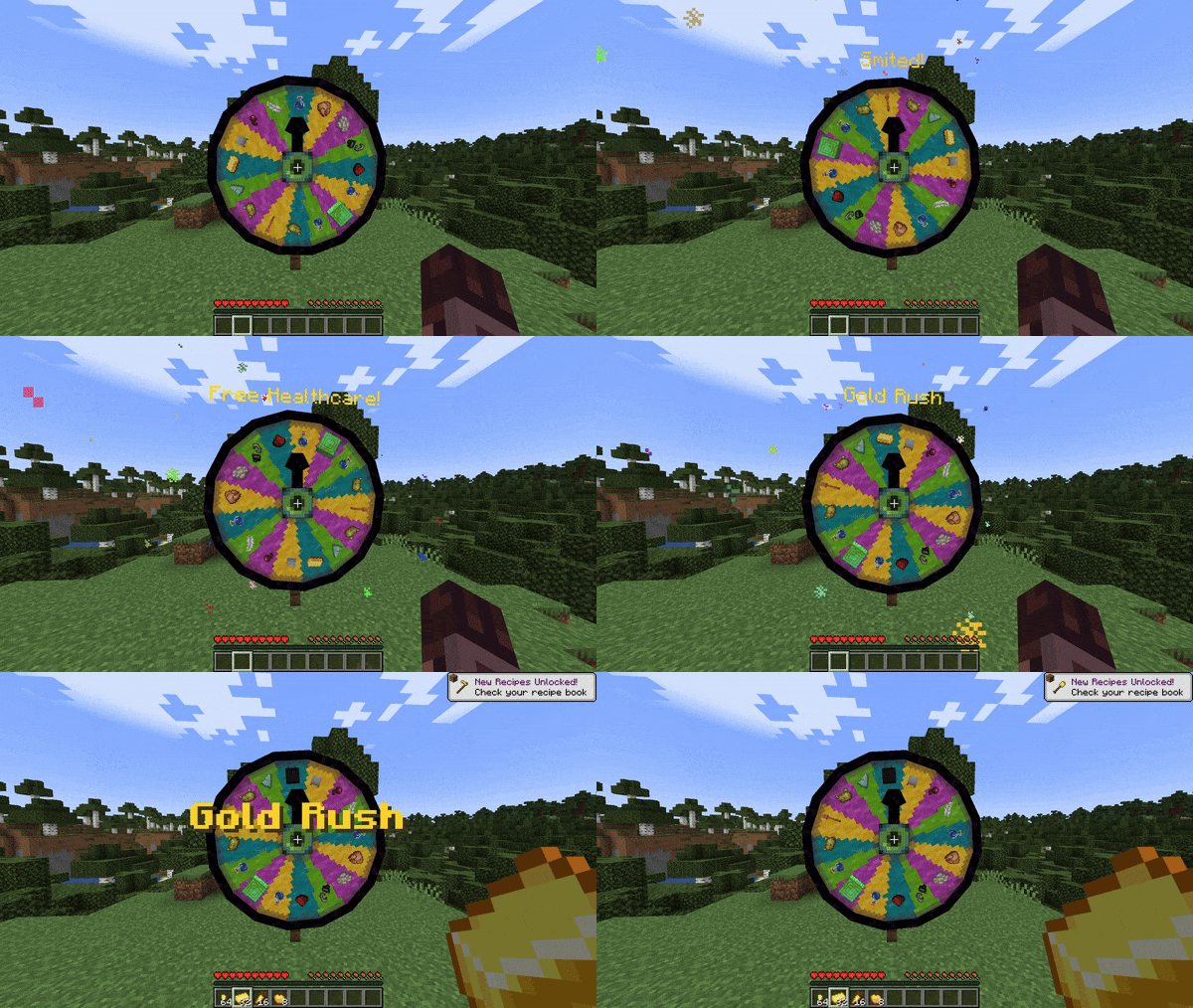
## Obtaining a Wheel of Wacky
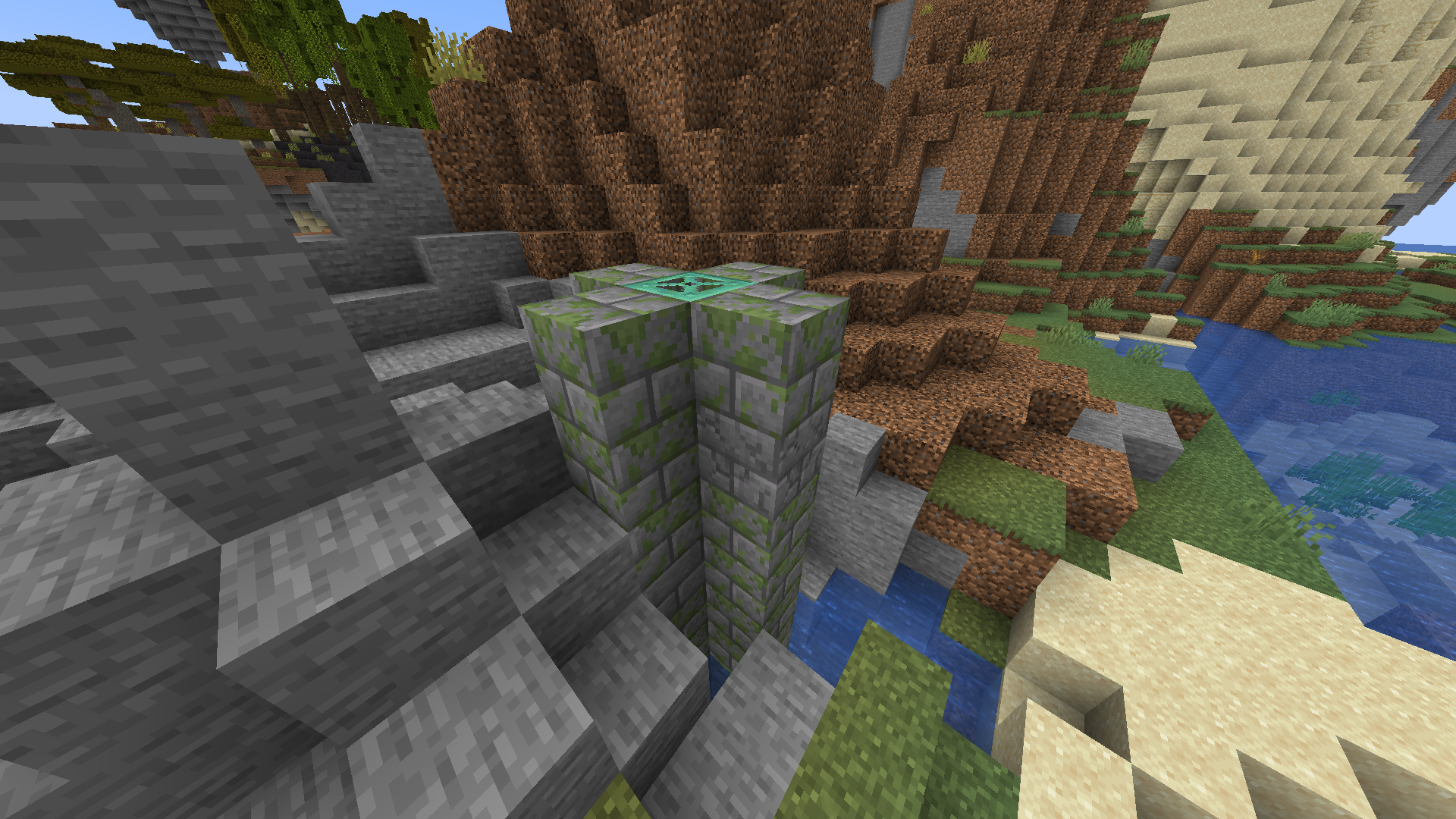
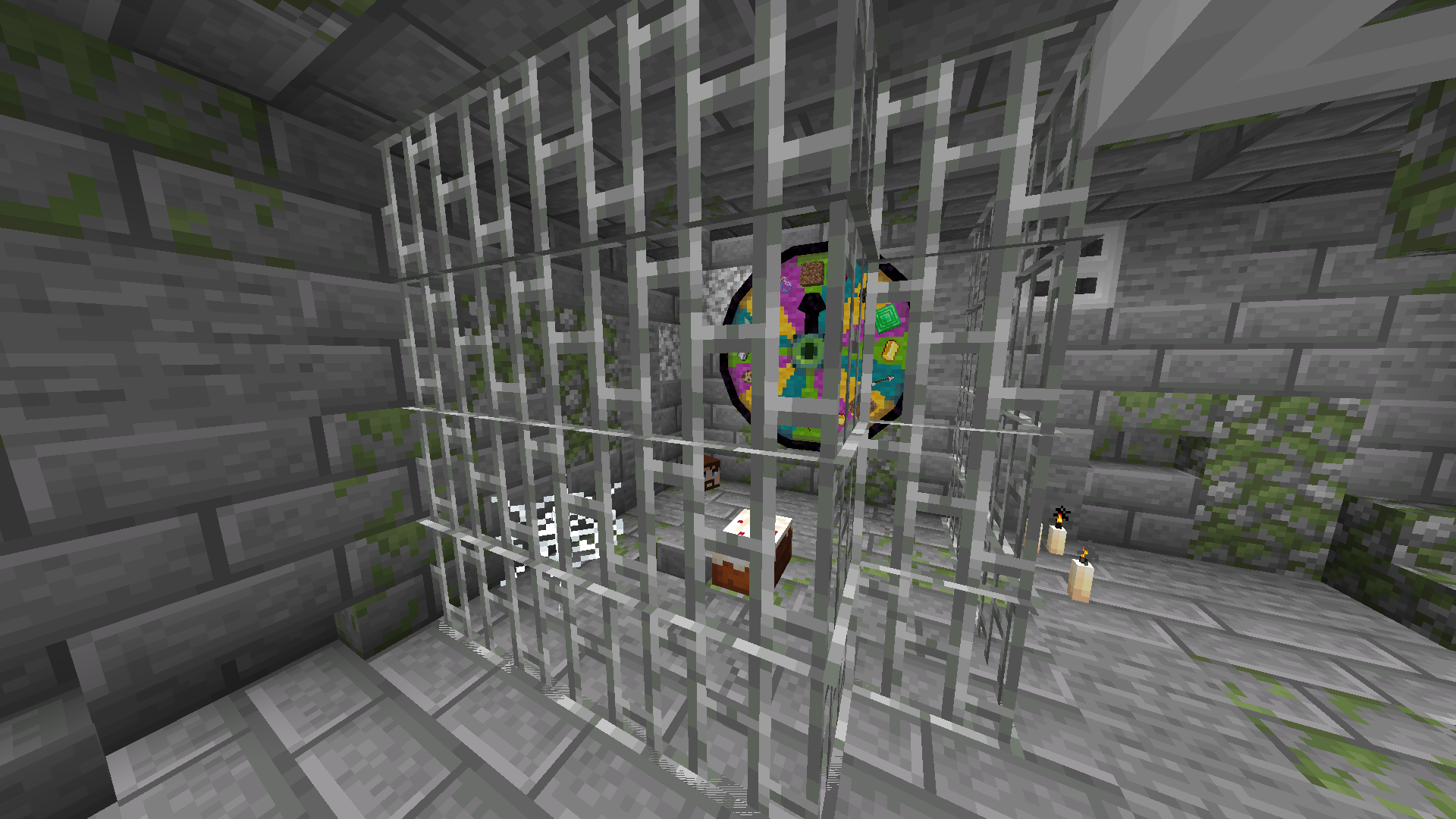
In order to get a Wheel of Wacky for yourself, you’ll have to find a “basement” structure in your world. Inside Wheel Boy’s dungeon prison the basement you’ll find a Wheel of Wacky that you can break and collect using a diamond or better pickaxe.
## Creating spells
To start creating your own custom spells, you’ll first have to create a data pack folder. If you don’t know how to make a data pack, here is a link to a tutorial to help you get started: [Creating a data pack](https://minecraft.wiki/w/Tutorials/Creating_a_data_pack).
If you haven’t already, you’ll want to create a `data` folder in your data pack folder. Then you’ll want to a create a folder named `wacky_wheel` within your `data` folder. After which you will have to create a folder called `spell_type` in the `wacky_wheel` folder.
Your file path should look like this: `/data/wacky_wheel/spell_type`.
Now you’ll want to create a JSON file in `/data/wacky_wheel/spell_type`. For the purpose of this example, we’ll call it `free_diamond.json`.
The first thing we’ll want to do is give a spell a name that will be displayed to the player when they roll that spell on the wheel.
“`
{
“name”: “Free Diamond!”,
}
“`
We can also optionally set a specific color for the name text and add some flavor text to be displayed underneath it:
“`
{
“name”: “Free Diamond!”,
“titleColor”: “#ADD8E6”,
“flavorText”: “Enjoy your free diamond :)”,
}
“`
Next, we have to provide our spell with an item id that corresponds to an in-game item. This item will be used to represent the spell on wheel slices.
“`
{
“name”: “Free Diamond!”,
“titleColor”: “#ADD8E6”,
“flavorText”: “Enjoy your free diamond :)”,
“itemID”: “minecraft:diamond”,
}
“`
The next field we have to define is `castingTime`, which represents the amount of time (in ticks) that it will take to cast the spell after the wheel lands on it:
“`
{
“name”: “Free Diamond!”,
“titleColor”: “#ADD8E6”,
“flavorText”: “Enjoy your free diamond :)”,
“itemID”: “minecraft:diamond”,
“castingTime”: 60,
}
“`
The last step is the provide the name of .mcfunction file that will be used to provide the actual spell effect.
“`
{
“name”: “Free Diamond!”,
“titleColor”: “#ADD8E6”,
“flavorText”: “Enjoy your free diamond :)”,
“itemID”: “minecraft:diamond”,
“castingTime”: 60,
“onCastFunction”: “give_diamond”
}
“`
Of course, we’ll actually have a create a .mcfunction file named `give_diamond.mcfunction` in `/data/wacky_wheel/functions`.
“`
give @s diamond
“`
Keep in mind that the `onCastFunction` by default will target the player who initially spun the wheel.
To test our new command, enter the /wheel free_diamond command into chat and receive your free diamond.
### Spell JSON Properties
`name`: The name of the spell.
`titleColor` (Optional) : Color of the name text/title.
`flavorText` (Optional): Additional information that appears underneath the spell’s name.
`flavorTextColor` (Optional): Color of the flavor text subtitle.
`itemID`: ID of the item used to represent the spell on the wacky wheel.
`castingTime`: Time in ticks that it takes to cast the spell.
`onCastFunction`: Name of the .mcfunction file that executes to create the spell effect.
`executeOnCastFunctionAtPlayer` (Optional): Set to true to execute onCastFunction AT player instead of AS player.
`duration` (Optional): Time in ticks that the spell lasts.
`onTickFunction` (Optional): Name of the .mcfunction that executes every tick that the spell lasts.
`executeOnTickFunctionAtPlayer` (Optional): Set to true to execute onTickFunction AT player instead of as player.
`onEndFunction` (Optional) : Name of the .mcfunction file that executes when the spell ends.
`executeOnEndFunctionAtPlayer` (Optional): Set to true to execute onEndFunction AT player instead of AS player.
## Credits
[https://github.com/HyperPigeon](https://github.com/HyperPigeon)
[https://github.com/lumiscosity](https://github.com/lumiscosity)
[https://lumiscosity.neocities.org/](https://lumiscosity.neocities.org/)
Wetland Whimsy
### About
Wetland Whimsy is a mod which completely overhauls Minecraft’s swamps! It includes a whole new subbiome, several new plants and blocksets, and ancient ruins that dot the landscape of these overhauled wetlands. While these ruins contain plenty of treasure, be warned – some of them may not be as abandoned as they first seem!
Features:
– **Overhauled Swamps** with completely redone visuals!
– **The Marsh**, an all-new biome that spawns between Swamps and the ocean!
– **New Flora** in the form of Pennywort, Cordgrass, and unique mushrooms!
– **New Fauna**, such as the friendly Cranes and not-so-friendly Infested Spiders!
– **New Building Blocks** including Lemonstone and the all-new Bald Cypress woodset!
– **Wetland Ruins**, ancient structures built from lemonstone with plenty of loot for those who look.
– **The Swamp Dungeon**, a mysterious, mazelike structure built for an unknown purpose. **Ancient Pots** with **strange symbols** may be found down there… their loot may not be that great, but maybe there’s a way to improve it?
### Compatibility
Wetland Whimsy uses biome modifiers to modify the vanilla Swamp, meaning it should be compatible with most other mods that redo the Swamp biome as well! This is true for both the 1.21.1 and the 1.20.1 releases, so you don’t need to worry about adding this mod to any of your modpacks.
Currently, Wetland Whimsy has explicit support for **YUNGs Better Witch Huts**, **YUNGs Extras**, and **Supplementaries**. Additionally, it has been tested with **Nature’s Spirit**, **Swampier Swamps**, and **Extra Compat**, all with no isssues. If you are unsure if a mod will be compatible, try it out! The worst that could happen is that they aren’t.
### Version Support
Wetland Whimsy currently supports **Neoforge 1.21.1**. 1.20.1 is deprecated – it may recieve bugfixes, but most likely will not get any new content.
Unfortunately, this mod will not have official Fabric support. Maintaining one modloader is already difficult and time-consuming, two would be too much for me to handle. However, this mod is **free and open-source**, so if you know how to port it and would like to, go ahead!
### Credits
Spoiler
– Music Disc: Quizzly
– OST: Skyllaremon
WetFarmlandForever
# WetFarmlandForever
Required Plugin: https://modrinth.com/plugin/kotlinplugins
– This plugin keeps farmland wet forever + prevents trampling on the farmland.
– The purpose of this plugin is to speed up the experience of growing crops without the water!
– Check out other plugins: https://modrinth.com/user/Winlyps