Wynncraft Cakedition

*Yet Another wynncraft client modpack 欸對,又是一個wynncraft的模組包。*
**Forge Version still WIP**
**NOTIFICATION: THIS MODPACK IS CURRENTLY OUTDATED**
## What does it have
– Performance
> Wynncraft Cakedition provides you decent performance boost , thanks to great mods like [Sodium](https://modrinth.com/mod/sodium)(1.19.4) , [Betterfps](https://legacy.curseforge.com/minecraft/mc-mods/betterfps)(1.12.2) and many more!
– QoL
> Mainly [Wynntils(Mirrored)](https://github.com/HarrytheCake/Artemis) and a few more but don’t affect performance like [Invhud](https://www.curseforge.com/minecraft/mc-mods/inventory-hud-forge) and others!
– Minimum unnecessary graphic
> This pack don’t came up with too much graphic enhancement so it can reduce the impact to performance by some. But still , shader support mod is install in 1.19.4 [Iris](https://modrinth.com/mod/iris) and come with a great shader pack [complementary-reimagined](https://modrinth.com/shader/complementary-reimagined)!
For 1.12.2 you’ll need to manually install [Optifine](https://www.optifine.net/downloads) by yourself due to the license issue.
How to install it.
1. Click Optifine.
2. Find for Minecraft 1.12.2 version and download it.
3. Run the installer and click “Extract” and put it where you can find it easy.
4. Drag Optifine mod into your .minecraft/mods folder .
5. Enjoy!
– Minor Chinese Support 些微的中文支持 (1.12.2 only)
> The 1.12.2 version start with Chinese having WCT-R providing minor translations on item stats and others on default.
預設下,WCT-R(詞條翻譯)是開啟的狀態。
How to turn on translation from wynntils 如何打開wynntils翻譯功能!
1. Esc and click Wynntils menu. Esc 並單擊 Wynntils 菜單。
2. Click configuration. 單擊 configuration。
3. Click search bar for and type “translation” , and scroll down to click the translation button on left side
then click to enable translation and select target language to “zh” . and click apply .
點擊搜索欄並輸入 “翻譯”,然後向下滾動,點擊左側的translation條例。
然後點擊啟用traslation並將language選擇為 “zh”,然後點左下的apply。
Useful Links
—
Contact me on [Wynntils Discord](https://discord.gg/SZuNem8) server or [Unofficial Wynncraft qq group](http://qm.qq.com/cgi-bin/qm/qr?_wv=1027&k=yOW6WgbWonnlILBfh3jXhbKmd04sImlE&authKey=erIjzFoyFndhYr77b2maCchytKkZxUZQ4EBF0IccnoTfAzBNsFQ1PFMAZBDtaL8z&noverify=0&group_code=211320297) for issues and suggestions.
[Github](https://github.com/HarrytheCake/WynncraftCakediton)Page(WIP)
Mod List
—–
You can find the mods list from [version](https://modrinth.com/modpack/wynncake/versions) (scroll down a bit) , underneath is for mods aren’t in modrinth.
Modlist for 1.12.2!
– [Better HUD](https://www.curseforge.com/minecraft/mc-mods/better-hud)
– [Blur](https://www.curseforge.com/minecraft/mc-mods/blur)
– [CleanView](https://www.curseforge.com/minecraft/mc-mods/cleanview)
– [Custom Loading Screen](https://www.curseforge.com/minecraft/mc-mods/better-loading-screen)
– [Custom Main Menu (Customized Version that added images and change default options inside .jar)](https://www.curseforge.com/minecraft/mc-mods/custom-main-menu)
– [noautojump](https://www.curseforge.com/minecraft/mc-mods/no-auto-jump/files)
– [Wynncraft Inventory Manager](https://www.curseforge.com/minecraft/mc-mods/wynncraft-inventory-management)
– Wynncraft Chinese Translate (Chinese version only)
Credits
—
Thanks [gensokyo-reimagined-qol](https://modrinth.com/modpack/gensokyo-reimagined-qol) for configurations of many mods.
Thanks [WukiBaka](https://github.com/LittleStoryPlus) for mirrored wynntils.
Thanks Moe_Block for language support.
Thanks Moe_Muyo for texture support.
Thanks NotAFish for wynncraft assets permission consult.
### Disclamer
This modpack is not affiliated with Wynntils or any other mod included or Wynncraft. *Do not* report any modpack related bugs or issues to them. Report them directly to me instead.
Wyncraft Perfected
# Wyncraft Perfected
**Wyncraft Perfected** is a quality-of-life focused enhancement pack designed to refine the Wynncraft experience without altering its core identity. Every feature is carefully selected and tuned to reduce friction, improve clarity, and make gameplay feel smoother, faster, and more immersive.
From cleaner visuals and smarter UI tweaks to performance optimizations and subtle gameplay improvements, Wyncraft Perfected focuses on what actually matters during real play sessions: readability in combat, convenience while exploring, and less time spent fighting menus or settings.
This pack is made for players who love Wynncraft as it is — but want it polished to its best possible form.
## Key Highlights
– Streamlined UI and improved visual clarity
– Thoughtful quality-of-life tweaks for exploration and combat
– Performance-friendly configurations for stable gameplay
– No intrusive changes — just refinement and consistency
## Philosophy
Wyncraft Perfected does not aim to replace or reinvent Wynncraft.
It exists to **refine**, **polish**, and **perfect** the experience you already enjoy.
**Wyncraft, perfected — not replaced.**
—
## Included Projects
### Wynncraft-Specific Mods & Packs
– [Wynntils](https://modrinth.com/mod/wynntils)
– [Wynnventory](https://modrinth.com/mod/wynnventory)
– [WynnLimbo](https://modrinth.com/mod/wynnlimbo)
– [WynnVista](https://modrinth.com/mod/wynnvista)
– [WynnLantern](https://modrinth.com/mod/wynnlantern)
– [WynnBubbles](https://modrinth.com/mod/wynnbubbles)
– [WynnEdits – Dark Theme](https://modrinth.com/resourcepack/wynnedits-dark-theme)
– [Wynncraft Tooltips](https://modrinth.com/resourcepack/wynncraft-tooltips)
– [Wynncraft Spell Caster](https://modrinth.com/mod/wynncraft-spell-caster)
– [Wynncraft Dynamic Weather](https://modrinth.com/mod/wynncraft-dynamic-weather)
– [Voices of Wynn](https://modrinth.com/mod/vow)
– [wynnmod](https://modrinth.com/mod/wynnmod)
### Resource Packs & Visual Enhancements
– [Wynncraft: Fables & Legends](https://modrinth.com/resourcepack/wynncraft-fables-legends)
– [Wynnic Fables & Legends -2-](https://modrinth.com/resourcepack/wynn-fl2)
– [Visuality](https://modrinth.com/mod/visuality)
– [Animatica](https://modrinth.com/mod/animatica)
– [[ETF] Entity Texture Features](https://modrinth.com/mod/entitytexturefeatures)
– [[EMF] Entity Model Features](https://modrinth.com/mod/entity-model-features)
– [Variants-CIT](https://modrinth.com/mod/variants-cit)
– [Continuity](https://modrinth.com/mod/continuity)
– [3D Skin Layers](https://modrinth.com/mod/3dskinlayers)
– [Not Enough Animations](https://modrinth.com/mod/not-enough-animations)
– [playerAnimator](https://modrinth.com/mod/playeranimator)
### Performance & Optimization
– [Sodium](https://modrinth.com/mod/sodium)
– [Sodium Extra](https://modrinth.com/mod/sodium-extra)
– [Reese’s Sodium Options](https://modrinth.com/mod/reeses-sodium-options)
– [Lithium](https://modrinth.com/mod/lithium)
– [Krypton](https://modrinth.com/mod/krypton)
– [ModernFix](https://modrinth.com/mod/modernfix)
– [More Culling](https://modrinth.com/mod/moreculling)
– [Bobby](https://modrinth.com/mod/bobby)
– [Distant Horizons](https://modrinth.com/mod/distanthorizons)
– [ResourcePackCached](https://modrinth.com/mod/resourcepackcached)
### UI, Controls & Quality of Life
– [AppleSkin](https://modrinth.com/mod/appleskin)
– [Mouse Tweaks](https://modrinth.com/mod/mouse-tweaks)
– [Controlling](https://modrinth.com/mod/controlling)
– [Searchables](https://modrinth.com/mod/searchables)
– [Chat Heads](https://modrinth.com/mod/chat-heads)
– [Chat Animation (Smooth Chat)](https://modrinth.com/mod/chatanimation)
– [Smooth Swapping](https://modrinth.com/mod/smooth-swapping)
– [Keybind Fix Plus](https://modrinth.com/mod/keybind-fix-plus)
– [Keybind Fix Updated](https://modrinth.com/mod/keybind-fix-updated)
– [Mod Menu](https://modrinth.com/mod/modmenu)
– [Dark Loading Screen](https://modrinth.com/mod/dark-loading-screen)
### Networking, Stability & Fixes
– [Debugify](https://modrinth.com/mod/debugify)
– [Packet Fixer](https://modrinth.com/mod/packet-fixer)
– [Fast IP Ping](https://modrinth.com/mod/fast-ip-ping)
– [Server Pinger Fixer](https://modrinth.com/mod/serverpingerfixer)
– [FIX MY PINGGGGG](https://modrinth.com/mod/pingfix)
– [Not Enough Crashes](https://modrinth.com/mod/notenoughcrashes)
### Libraries & Dependencies
– [Fabric API](https://modrinth.com/mod/fabric-api)
– [Fabric Language Kotlin](https://modrinth.com/mod/fabric-language-kotlin)
– [Cloth Config API](https://modrinth.com/mod/cloth-config)
– [YetAnotherConfigLib (YACL)](https://modrinth.com/mod/yacl)
– [MidnightLib](https://modrinth.com/mod/midnightlib)
– [Text Placeholder API](https://modrinth.com/mod/placeholder-api)
– [Anvian’s Lib](https://modrinth.com/mod/anvians-lib)
– [EpheroLib](https://modrinth.com/mod/epherolib)
– [Balm](https://modrinth.com/mod/balm)
### Extras
– [Iris Shaders](https://modrinth.com/mod/iris)
– [LambDynamicLights](https://modrinth.com/mod/lambdynamiclights)
– [Simple Voice Chat](https://modrinth.com/mod/simple-voice-chat)
– [Server Country Flags](https://modrinth.com/mod/server-country-flags)
– [Puzzle](https://modrinth.com/mod/puzzle)
Wulfhunter’s Civilizations
With over 200 mods, rule your own world with magic, technology, and maybe even darkness. Use Minecolonies to create a colony of your liking, massive spraling cities or small quaint villages. Automate resources using Create, Ars Neuveau, and Occultism. Become a mage via Iron’s Spells and Spellbooks and Ars Nouveau. Cook extravagant meals and gain benefits from Farmers delight. Anything you can imagine is yours in this pack.
Includes mods from both Modrinth and CurseForge.
Wukong Abilities
Wukong Abilities
Unleash the full power of the Monkey King — mythical staff powers, clones, transformations and sky mobility in Minecraft.
For YT Support:
https://youtube.com/@mine_twice?si=67b_mn6T7Nw8Oj4G
—
**⭐ Features**
🌀 Multiple Wukong abilities inspired by mythology
🦊 Clone Summoning & Monkey Army
🪄 Ruyi Jingu Bang Staff with extend, smash & cinematic spin
☁️ Flying Nimbus Cloud you can ride
🔥 Ultimate Transformation Mode
⚡ Fast mobility: dash, trail, cloud burst
📊 Fully configurable cooldowns, damage, animations
🖥️ Built-in GUI for ability editing
🧩 Lightweight & optimized for survival servers
—
**🔐 Permissions**
To use Wukong features, the player must:
• Be an operator, or
• Have proper permissions set via a permissions plugin
All commands and abilities are permission-based and configurable.
—
**WUKONG LEGENDS COMMANDS — Full Control Over Every Monkey King Power**
● ○ ● ○ ● ○ ● ○ ● ○ ● ○ ● ○ ● ○ ● ○ ●
**/wukong**
➤ Gives the legendary Ruyi Jingu Bang
➤ Unlocks all Wukong abilities
➤ Reloads player ability data
➤ Admin-only (configurable)
—
**/wukong help**
➤ Shows full command list
➤ Explains every ability
➤ Clean info menu with icons
—
**/wukong info**
Displays player stats:
• Unlocked abilities
• Cooldowns
• Active animations
• Current mode (Normal / Golden / Ultimate)
—
**/wukong abilities**
➤ Opens the Wukong GUI
➤ Enable/disable abilities
➤ Balanced for servers
—
**/wukong staff**
➤ Gives a new staff
➤ Choose mode: Normal, Giant, Mini
—
**/wukong forms**
Switch between Monkey King forms:
• Normal Mode
• Golden Armor Mode
• Ultimate Transform Mode
➤ Includes cinematic animations
—
**/wukong summon **
Summon Wukong mobs:
• clone
• monkey
• monkey_army
• training_dummy
—
**/wukong nimbus**
➤ Summon or dismiss the Flying Nimbus
➤ Instantly mount the cloud
—
**/wukong config reload**
➤ Reload configs live
➤ Updates cooldowns, effects, animations
—
**/wukong reset **
➤ Reset player progress
➤ Clear cooldowns
➤ Remove transformations
—
**/wukong setmode **
Force-set a player mode:
• normal
• golden
• ultimate
—
**/wukong animate **
Play any animation manually:
• staff_spin
• sunbeam_charge
• ultimate_transform
• dash_trail
• cloud_shield
—
Full Control, Full Power
Admins, creators, and players get complete access to the full Monkey King experience with immersive animations, configurable abilities, and cinematic transformations.
WTHIT: PotionCraft
A simple WTHIT/WAILA plugin to display PotionCraft cauldron properties.
## Features
Displays fluid contents and effects, with icons, effect names, and durations.
## Acknowlegements
Icon: Cauldron by Sabda Vinsmoke from Noun Project (CC BY 3.0)
Icon: Magnifying Glass by Liberus from Noun Project (CC BY 3.0)
Magnifying Glass by Liberus from Noun Project (CC BY 3.0)
Way to Grave
Keep your items safe after death in a Grave.
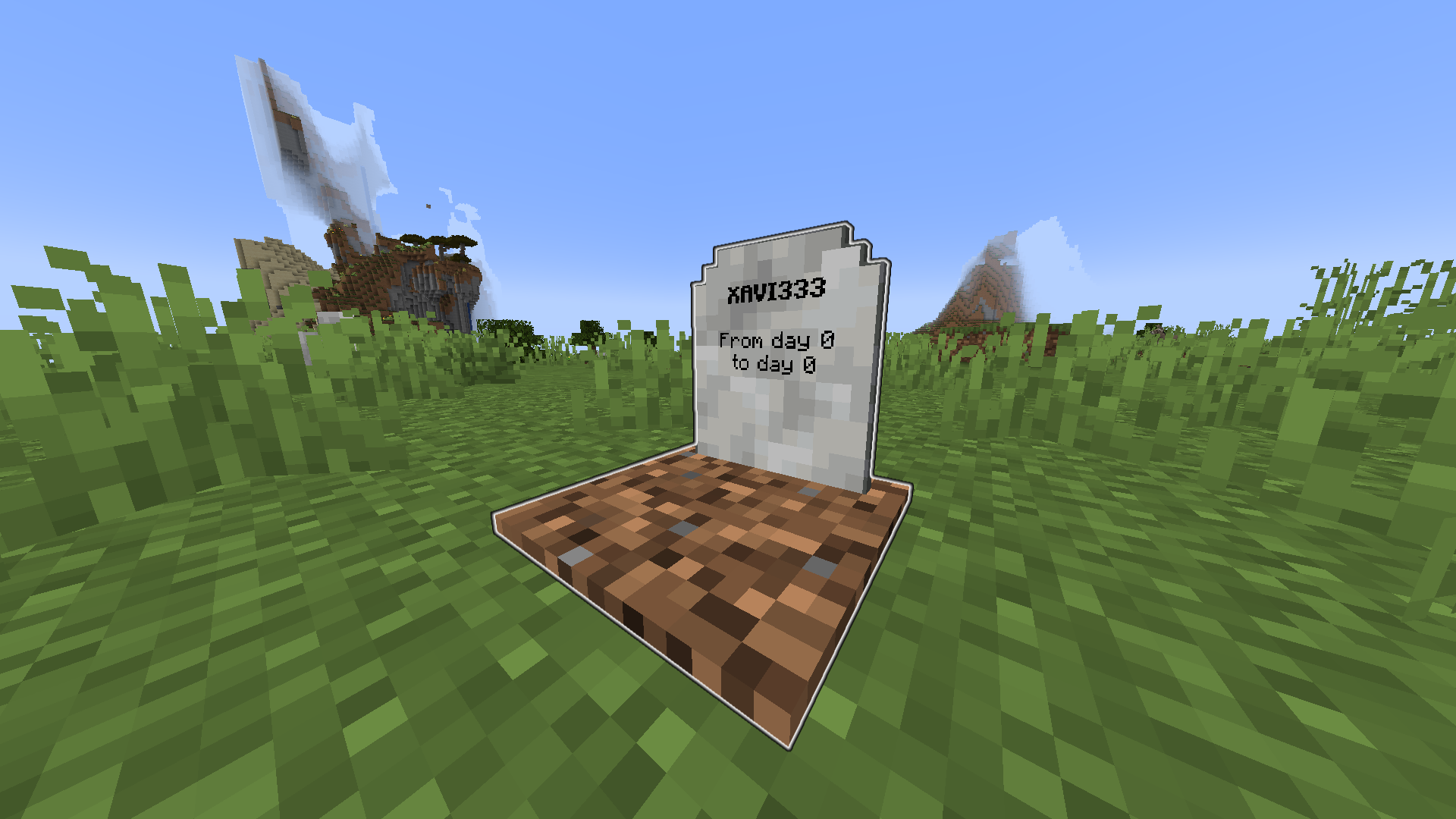
When you die, a grave containing all your items will spawn at your death location.
You then will spawn with a Recovery Compass so you can find your Grave an recover your items.
—
# Configuration:
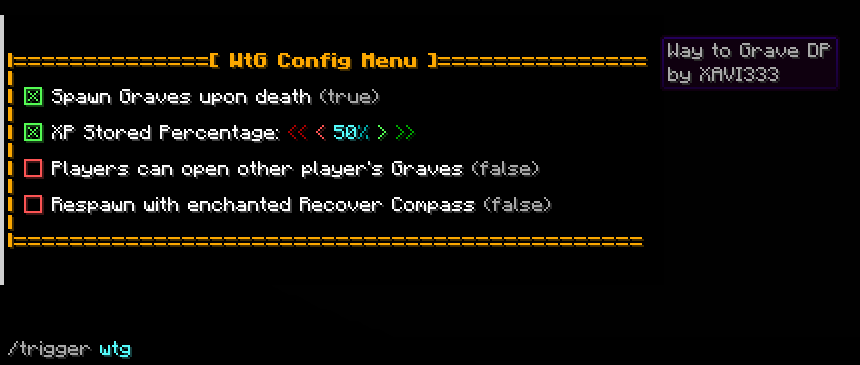
Use “/trigger wtg“ to access the config menu.
– A percentage of your XP will be store (50% as default, configurable).
– You can choose to get the Recovery Compass enchanted allowing you to teleport to your Grave.
– Only you can open your own Grave (configurable).
# Admin option:
By adding the tag _wtg_admin_ with the command “/tag add wtg_admin“. A new option will show in the config menu to allow only admins to edit the config.
Wow Thats Alot Of Mods
WTAOM is a modpack brimming with tech, magic, and adventure. Grow wings and fly with the couds using Icarus, Cast spells with Ars Nouveau, Fight bosses with Cataclysm, Make crazy mechanisms with Create, and many more. This modpack is made to test your limits and see how much you can make in your world or server, Have Fun! _WTAOM_ _Wuh-Tay-Uhm_
Written in the Stars
A simple modpack designed to keep everyone happy!

Includes Create, the RPG series, and Farmer’s Delight at its core, with many smaller mods to help bring the world to life. From new structures and world generation to new flowing water mechanics, rediscover a familiar yet different Minecraft.
Unlike many content modpacks, rather than focusing on new biomes (except a few in the End…) this pack aims to make the vanilla world even better.
Written in the Stars also includes many optimization mods to keep the experience smooth.
Wow!Heroes!
Wow!Heroes! is a data pack for 1.20.1 inspired by series’ such as My Hero Academia and Invincible.
The pack itself allows you to customize your ability (Or superpower) with a variety of options including custom body effects, changing the particle effects of your mutation and much more.
The level up system works by taking 2 actual levels and investing them into any on of your stats you pick.
Be sure to also enable the resource pack provided with the data pack.
!!! Currently the pack includes W.I.P. spawning mobs called the Criminal and the Nomu.
Both are optional to kill however you’re able to inherit the abilities of a Nomu through using a Nomu serum (See the recipe in images).
!!!! This pack is still a heavy W.I.P. I just wanted to upload what I have so far to gauge interest since I haven’t seen anything like this done before.
WOT Magic
WOT Magic is a minecraft magic datapack heavily inspired by the series The Wheel of Time. The datapack adds nearly 50 unique spells, but since they can be made smaller or larger and can even be combined the possibilities are endless. The datapack is also compatible with survival gameplay.
**Some of the features included are:**
-Strength system that prevents unlimited magic usage
-Randomized strengths when first joining
-Spells made from 5 elements
-Ability to combine strengths
-Objects that makes you more powerful
-Chat and visual feedback to let you know what others are up to
**The spells include:**
-Spells that cause damage and destruction
-Ways to disable other player’s magic
-Spells that can annoy entities
-Spells that give yourself advantages
-Teleportation
[Basic guide](https://lucasv-github.github.io/Magic_website/)
Keep in mind that this is my interpretation and implementation of a magic system, your views might differ substantially.
For any questions please reach out to me on discord @lprogrammer