ZTools
# ZTools
This datapack includes a bunch of miscellaneous items and tools for Minecraft, including weapons, tools and more. This is my first datapack so if there is anything wrong, feel free to tell me in the comments.
All custom crafting recipes in this pack are always instantly unlocked and show in the recipe book.
This pack includes:
## Items
### Haste Talisman
When held in mainhand or offhand, gives the player +50% mining speed. For example, a diamond pickaxe with this in offhand can instantly mine netherrack.
### Speed Talisman
When held in offhand, gives the player 30% more speed and 37.5% in mainhand.
### Extendable Arm
When held in offhand, gives the player +1.5 reach and +1.75 in mainhand.
### Fireball Dusts
– Fireball Dust: When used, summons a fireball (With an explosion power of 2) and is consumed with a cooldown of 0.7 seconds.
– Greater Fireball Dust: When used, summons a fireball (With an explosion power of 4) and is consumed with a cooldown of 1.4 seconds.
– _Note: You must hit the fireballs summoned in the direction of choice after summoning them._
### Radar Compass
When held, gives the player -65% movement speed and reveals all entities in a 10 block radius.
### Lumberjack Axe
Cuts down entire trees at once, or any connected logs.
### Compressed Wind Charge
Explodes with 4 times the power of a wind charge.
### Warp Stone
Consumable. Teleports you 8 blocks forward.
## Weapons
### Scythe
Attack stats same as a Sharpness II, Sweeping Edge X Diamond Sword, and it summons a damaging cloud when attacking players.
### Ender Blade
When right clicked, teleports the player 2.5 blocks ahead.
### The Lootmaster
Looting X, Fortune X, Sharpness VII diamond pickaxe.
## Recipes
### Gunpowder
Gunpowder can be crafted with 1 flint to yield 3 gunpowder.
### Machine Gun
Crossbow with Quick Charge V for instant reloading.
### Smelting Lapis
Lapis smelts into a stick twice as fast in a furnace or blast furnace yielding a lot of xp.
### Gluing and Singularity Enchanted Books
### Nutrition-Enhanced Berries
Sweet berries cook faster than regular items in furnace and result in a food that can be eathen faster than most foods with 6 nutrition and 12.7 saturation.
## Enchantments
### Explosive
For crossbows and bows, but an anvil must be used to enchant crossbows. Makes arrows explode when hitting blocks. (Not entities)
### Knowledge
For pickaxes, increases mining XP up to 9x at level V, but is very very expensive, where a level 30 enchantment table can enchant to a maximum of Knowledge III. For higher levels, enchantments must be combined or villagers must be used.
### Gluing
For weapons, glues mobs (not players) in place for 2 seconds when you hit them.
### Singularity
For maces, deals double damage at level 1 and triple at level 2.
ZTab
# ztab
`ztab` is a Paper plugin that improves the TAB list experience with animated header and footer text, custom player list formatting, and built-in placeholders that work without PlaceholderAPI.
It is designed for server owners who want a cleaner and more dynamic player list without adding a large dependency stack. You can configure how players appear in the TAB list, add rank-based prefixes and suffixes, and show useful live information such as player name, world, online count, max slots, ping, TPS, and coordinates.
The plugin includes built-in placeholders like `%player%`, `%world%`, `%online%`, `%max%`, `%ping%`, `%tps%`, `%x%`, `%y%`, `%z%`, `%prefix%`, and `%suffix%`, which makes it easy to build styled TAB layouts directly from config. This keeps setup simpler for servers that want a customizable TAB system but do not want to rely on PlaceholderAPI for basic formatting features.
`ztab` also supports animated header and footer frames, so the TAB list can feel more active and polished instead of static. It is intended to be lightweight, practical, and easy to configure for modern Paper servers.
If needed, `ztab` can optionally work alongside [zSupportExtender](https://modrinth.com/plugin/zsupportextender) for broader compatibility workflows. This is optional, and the plugin can still run on its own normally.
This project is built for Paper `1.19+` and focuses on simple setup, useful placeholders, and better TAB presentation for real servers.
zSupportExtender
## 🚀 zSupportExtender
**zSupportExtender** is a lightweight compatibility layer designed for Paper servers, enabling plugins to run smoothly across multiple Minecraft versions without requiring updates or modifications.
—
### 🛒 Buy Here
**zSupportExtender+++** https://discord.gg/4xZB53Bwd4
—
### ✨ What it does
zSupportExtender helps bridge differences between Minecraft versions by providing a stable runtime environment for plugins. It reduces version-related issues and improves compatibility from **Paper 1.19 up to 26.1.2**.
—
### ⚙️ Features
* Cross-version compatibility support (1.19 → 1.21.1)
* No external dependencies required
* Lightweight and optimized for performance
* Safe fallback handling for API differences
* Clean startup with no warnings or unnecessary logs
—
### 📦 Supported Platforms
* ✔ Paper 1.19
* ✔ Paper 1.20 / 1.20.x
* ✔ Paper 1.21 / 1.21.1
* ✔ Paper 26.1.2
—
### 🛠 Use Case
This plugin is ideal for server owners who want to:
* Run older plugins on newer versions
* Maintain compatibility without constant updates
* Reduce breakage caused by API changes
—
### ⚠️ Important Notes
* This plugin does not modify other plugins directly
* Compatibility depends on how plugins are built ( some may still break (well it?) )
* Designed to improve compatibility, not guarantee it in all cases
—
### 📄 Installation
1. Download the latest version
2. Place the `.jar` file into your `/plugins` folder
3. Restart your server
—
### 👨💻 Developer Info
* Built using stable Paper APIs
* Designed with forward compatibility in mind
* No configuration required (plug & play)
—
**zSupportExtender** focuses on simplicity, performance, and practical compatibility for modern Paper servers.
ZPvPToggle
# ZPvPToggle
A lightweight Minecraft plugin that allows players to toggle their PvP status on and off. Players can only engage in PvP when both parties have PvP enabled.



## Features
– **Toggle PvP**: Players can enable or disable their PvP status
– **Visual Indicators**: Customizable particle rings show which players have PvP enabled
– **Cooldowns:** Configurable cooldown for toggling PvP after a player enters PvP combat.
– **Custom Indicators:** Players can choose their own indicators. Access to indicators is permission-based.
– **Admin Controls**: Staff can toggle PvP for other players
– **Fully Customizable**: All messages and particle effects can be configured
– **Folia Support**: Works with Folia server software
– **Permissions-Based**: Granular permission system for different commands
## Commands
| Command | Description | Permission |
|———|————-|————|
| `/pvp` | Toggle your PvP status | zpvptoggle.user |
| `/pvp toggle` | Toggle your PvP status | zpvptoggle.user |
| `/pvp on` | Enable your PvP status | zpvptoggle.user |
| `/pvp off` | Disable your PvP status | zpvptoggle.user |
| `/pvp hide` | Hide PvP particle indicators | zpvptoggle.user |
| `/pvp show` | Show PvP particle indicators | zpvptoggle.user |
| `/pvp indicator ` | Change your PvP indicator | zpvptoggle.indicator. |
| `/pvp help` | Display the help message | zpvptoggle.user |
| `/pvp reload` | Reload plugin configuration | zpvptoggle.admin |
| `/pvp ` | Toggle PvP for another player | zpvptoggle.admin |
| `/pvp bypass ` | Toggle PvP Bypass status for you or another player | zpvptoggle.admin |
## Permissions
| Permission | Description | Default |
|————|————-|———|
| `zpvptoggle.user` | Allows players to toggle their own PvP status | true |
| `zpvptoggle.indicator.` | Give access to specific indicators. | multiple |
| `zpvptoggle.admin` | Allows staff to toggle PvP status for other players | op |
## Configuration
### config.yml
“`yaml
# Whether to disable PvP when a player dies
disable-pvp-on-death: true
# Whether to show a warning message when a player first toggles PvP
warning-message-enabled: true
# Whether to apply pvp-toggle protections to pets of players too
protect-pets: true
# Duration of the cooldown for players toggling pvp or since their last pvp interaction
pvp-cooldown: 10.0
particle-indicator:
# Interval in ticks to show the ring of particles. 20 ticks = 1 second.
interval-ticks: 60
# Maximum distance (in blocks) at which players can see PvP indicators.
max-view-distance: 32
# The default indicator to use (must match one of the keys in the indicators section)
default-indicator: default
# Define multiple particle ring indicators
indicators:
# Default ring – red circle around feet
default:
type: REDSTONE
points: 32
random-particle-positions: false
radius: 0.8
y-offset: 0.1
interval: 5
random-offset-vertical: 0.0
random-offset-horizontal: 0.0
speed: 0.01
color: RED
dust-size: 1.0
“`
## Compatibility
– Paper 1.21+
– Folia-compatible
– Java 21+
## Dependencies
– [MCKotlin](https://modrinth.com/plugin/mckotlin)
## Installation
1. Download the latest version of ZPvPToggle from [Modrinth](https://modrinth.com/plugin/zpvptoggle/versions).
2. Download MCKotlin from [Modrinth](https://modrinth.com/plugin/mckotlin)
3. Place the downloaded `.jar` files into your server’s `plugins/` folder.
4. Restart your server.
5. Configure the plugin to your liking by editing the `.yml` files in the `plugins/ZPvPtoggle/` folder.
Zoni’s Apotheosis Curios
Simply adds random affixes from Apotheosis to your curios!
If you are having issues with older versions of Iron’s Spells ‘n Spellbooks try using the version 1.1 of this datapack.
Requirements
You need [Apothic Curios](https://www.curseforge.com/minecraft/mc-mods/apothic-curios) and Zoni’s Apotheosis Curios Lang for it to work properly.
If you want to get updates on the pack development, report bugs or suggest new stuff or just contact me join my discord server:
https://discord.com/invite/KWGakdBVwG
ZonePractice Pro Duels
# ZonePractice Pro The Ultimate Minecraft PvP Duels Plugin
Elevate your Minecraft server with ZonePractice Pro, the most advanced practice / duels and matchmaking plugin available. Designed for high performance and total customizability, ZonePractice Pro delivers a next generation PvP experience. Players can unlock custom armor trims, shield patterns, and unique death effects. Navigate lobbies in style using wind charges, tridents, elytras, or spears.
## Key Features of ZonePractice Pro
### ⚔️ Modern PvP Ladder Types
+ TnT Sumo, MLGRush, Crystals, Cart, BedWars, Bridges, SkyWars, Fireball Fight, BattleRush
+ Sumo, Boxing, PearlFight, Spleef, Build, Basic
### ⚡ Asynchronous Arena System
+ High performance asynchronous arena copying for build modes
+ Highly configurable basic and build type arenas
+ Player hiding functionality for non build arenas
+ Unlimited concurrent matches in non build arenas
### 🛡️ Custom Player Kit System
+ Create custom kits inspired by popular PvP servers
+ Up to 4 personalized kits per player with extra items
+ Intuitive GUI for players to create and manage loadouts
### 🏆 Automated Server Events
+ Host engaging events easily including Brackets, Juggernaut, LMS, OITC, Splegg, Sumo, and TNT Tag
### ⚖️ Advanced Matchmaking and Queues
+ Unranked queues based on player divisions
+ Ranked queues powered by accurate ELO matchmaking
+ Clean two category page queue selector GUI
### 📊 Player Statistics and Divisions
+ Track Experience points, Wins, Kills, Deaths, and Streaks
+ Set minimum division requirements for ranked play
+ Beautiful GUI and Hologram leaderboards
### 👥 FFA and Party System
+ Dedicated FFA arenas featuring multiple ladders and independent stats
+ Robust Party System offering 6 distinct settings
+ Support for FFA, Split party games, and Party versus Party matches
### ⚙️ Premium Match Features
+ Fully customizable sidebar and below name health bars for every ladder
+ Exp bar cooldowns for Ender pearls, Arrows, and Golden Apples
+ Built in staff mode and advanced spectator mode
+ Duel rematch items, Nametag systems, and Round selectors
### 🚀 Unmatched Performance and Customizability
+ Incredible server performance with simple installation
+ Complete customizability utilizing version controlled config files
+ Comprehensive setup GUI for server administrators
+ Developer API included for custom integrations
+ MiniMessage chat formatting and PlaceholderAPI support
+ Custom death messages and sound effects
+ Seamless multiple world support to run alongside other minigames
+ Custom inventory items for a unique feel
## Important Installation Requirement
To guarantee high performance packet handling, ZonePractice Pro requires the PacketEvents API. Please ensure you install the latest release on your server before starting.
[Download PacketEvents Here](https://github.com/retrooper/packetevents/releases)
## Community and Support
[Join our Discord Community](https://discord.gg/xZy34zbnxe)
## Plugin Screenshots
Zombification
This mod contains 1 new potion that changes mobs into their zombie counterparts. These are the conversions that are currently possible.
Villager -> Zombie Villager
Horse -> Zombie Horse
Piglin -> Zombified Piglin
Hoglin -> Zoglin
This potion can be brewed by using a rotten flesh and potion of Poison.
Zombies Powerups
Call of Duty Zombies powerups in Minecraft!
# MC I Zombies Powerups

Powerups provide benefits to the players that have various effects on them and the mobs. These benefits range from healing the durability of every single item in player’s inventories to killing most hostile mobs.
– Carpenter
Heals every durable item to be full durability in a player’s inventory
– Nuke
Burns and heavily weakens mobs and kills them when 5 seconds has passed
– Max Ammo
Set the count of every item to be the highest the limit for the item allows for in a player’s inventory
– Max Armour
Heals only items in a player’s armour slot to be full durability
– Instakill
Makes mobs 1-hit that last for 60 seconds
Zombies More
[](https://discord.gg/Fm6x2NA3) [](https://modrinth.com/mod/geckolib) [](https://www.curseforge.com/minecraft/mc-mods/zombie-more)

❗ Note:
There will be no ports of this mod for Fabric.
📚 About:
Spoiler
New Zombies:
Crawler Zombie: A legless zombie that compensates for its lack of legs with speed and agility. It moves faster than regular zombies and can climb walls, making it a formidable foe.
Tank Zombie: A massive, heavily-armored zombie with limited vision. It only attacks when close but hits hard with tremendous strength. Each time it takes damage, its strength temporarily increases, making it even more dangerous as the fight progresses.
Cursed Zombie: Bound by a heavy mask, this eerie zombie can no longer fly, but don’t be fooled—when killed, it transforms into a flying head that continues to attack from the air, turning the battlefield into chaos.
Explosive Zombie: A ranged threat, this zombie throws dynamite from a distance, making it an unpredictable danger capable of causing explosions from afar.
Boomer Zombie: Attacks like a normal zombie, but when it dies, it releases a poisonous mist, turning the surrounding area into a toxic hazard that endangers anyone nearby.
Zombie Drops:
Guts: Dropped by the Crawler Zombie.
Brain: A rare drop from the Tank Zombie.
Cursed Heart: Dropped by the Cursed Zombie.
Flammable Bone: Dropped by the Explosive Zombie.
Acid Compound: A common drop from all zombie types.
Potions:
Brute Force: Grants increased strength but at the cost of reducing your speed, perfect for when you need raw power in combat.
Cursed Essence: Bestows invisibility, slow falling, weakness, and mining fatigue, ideal for stealthy but dangerous missions.
Agile Instinct: Increases speed, but at the cost of hunger and mining fatigue—use wisely when you need a burst of quickness.
Intoxication: A deadly potion that will kill the user after 1 minute. Handle with caution!
Weapons:
Dynamite: A throwable TNT with a smaller explosion radius than regular TNT, great for targeted attacks.
Toxic Bomb: A more powerful variant of dynamite that explodes and leaves behind a toxic cloud, dealing damage over time to anything caught within it.
Fire Sword: A blazing sword that sets enemies on fire with each strike, perfect for dealing ongoing damage.
Blocks:
Brain Jar: A decorative jar containing a brain, perfect for your spooky or science-themed builds.
Radar: A functional block that, when right-clicked, detects and tracks entities within a certain radius, helping you keep tabs on nearby threats.

🔧 Recommendations:
– [JEI](https://modrinth.com/mod/jei)
❓ FAQ
Spoiler
Q. Can I include Zombies More in my modpack?
A. Absolutely! Feel free to include Zombies More in your modpack and customize it as needed. Just make sure to:
Credit the mod properly, and avoid claiming it as your own creation.
Stay up-to-date with updates, as changes may affect your modpack’s compatibility.
Q. Why focus on zombies when other mods also include zombie-related content?
A. Zombies are one of Minecraft’s most iconic mobs, and I wanted to expand their lore, mechanics, and gameplay potential in a way that aligns with my own creative vision.
Zombies More stands out by introducing:
Unique zombie types with custom abilities, designs, and behaviors.
New challenges, such as specialized hordes and environmental effects.
Powerful rewards, including loot and new crafting options.
This mod aims to deliver a fresh and thrilling zombie experience, while staying true to the essence of Minecraft.
Q. Which Minecraft versions are supported by Zombies More?
A. Zombies More is currently supported on Minecraft 1.20.1. Future updates will extend support to newer versions as they are released.
Q. Will there be updates with new zombies or features?
A. Yes! Zombies More is an ongoing project. Future updates will add new zombie types, items, and mechanics to keep the gameplay exciting and challenging. Check changelogs and announcements for details on upcoming additions.
Q. Can Zombies More be played alongside other zombie mods?
A. Yes! Zombies More is designed to work well with other mods. Each mod adds its own unique flavor, and combining them can create a richer and more diverse zombie experience. Just make sure to check for potential compatibility issues and use a reliable mod manager.
Q. Will you backport Zombies More to older Minecraft versions?
A. No, backporting to older versions is not planned. Zombies More relies on features exclusive to newer versions, making it difficult to adapt for outdated codebases.
Please avoid requesting backports, as the focus is on improving and updating the current version.
Q. Will you add other undead creatures besides zombies?
A. Zombies More focuses exclusively on zombies and their mechanics. The goal is to enhance the zombie experience with depth and variety, rather than blending it with other types of undead.
Zombie To Player Head
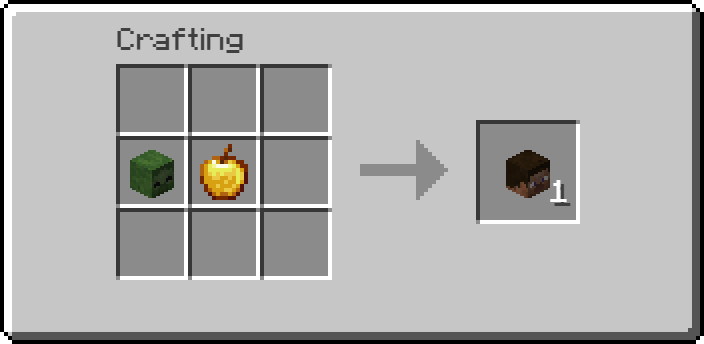
This datapack introduces a custom crafting recipe that lets players **obtain a player head** by combining **one golden apple** with **one zombie head**. Simply place both items in a crafting table to craft a player head, offering a unique and **creative way** to access **decorative heads** in **survival gameplay**.
## Recipe: