Grey Wobbly World
By Ritz Creator
“Everything looks familiar… and yet, somehow wrong. The sky is clear, the land is quiet — but the world itself feels like it’s breathing, shifting, uncertain.”
🧩 Overview
Grey Wobbly World is an atmospheric Minecraft mod that alters both the visual and sensory experience of the game. Rather than adding new mobs or dimensions, this mod transforms the very fabric of the existing world — turning it into a surreal, distorted version of reality.
It’s not horror in the traditional sense — there are no monsters lurking in the shadows — but instead a more existential, creeping unease. A Minecraft world that feels… off.
🌍 Key Features
🌀 World Wobble Simulation
Your perspective subtly shifts as the land beneath you undulates. It’s not violent — it’s dreamlike. As if you’re walking through a memory, or a world rendered unstable by forgotten forces.
🌑 Desaturated Biomes
All natural colors have been leeched out. Grass, leaves, and most flora are now in cold greys and browns. Only rare, scattered flowers retain faint hints of color — a visual whisper of what the world once was.
🪵 Silent Lands
Paired with ambient silence or minimalistic background audio (optional), the mod enhances solitude. It creates the perfect backdrop for psychological storytelling, survival challenges, or creative exploration.
🧱 Vanilla-Compatible and Lightweight
No new blocks, entities, or recipes. Just a fundamental shift in perception and tone — making it ideal for roleplaying, mapmaking, or simply reshaping your gameplay mood.
📖 Lore-Friendly Context (Optional Roleplay)
In the forgotten times, an unknown event washed over the land — draining its essence, bending its terrain, and leaving behind a faint echo of its former self. Players are not just survivors here… they are witnesses to a world unraveling. Every step forward is a step deeper into the unraveling edges of space and memory.
🛠️ Technical Notes
📦 Iris Compatible
🌗 Future versions may introduce subtle shaders, eerie ambient sounds, and post-processing enhancements
💡 Works with most terrain generation mods (non-conflicting)
🎮 Ideal Use Cases
Psychological horror or surreal adventure maps
Custom modpacks focused on immersion or altered perception
Content creators seeking a quiet, uncanny visual mood
Builders who want to create dreamlike, grayscale environments
🔚 Final Thought
Grey Wobbly World doesn’t tell you what’s wrong with the world.
It lets you feel it.
I would be happy if you made a YouTube video about this pack!
Gray&Black Shader
**English version:**
**Gray&Black Shader**
This shader turns your Minecraft world into stylish grayscale! Compatible with versions 1.7.2 to 1.21.5.
If you have any questions, join our Discord or follow for updates so you don’t miss anything!
Also check out my other mods! 😎✨
Enjoy the cinematic atmosphere!
**How to install:**
1. Install OptiFine or Iris for your Minecraft version.
2. Download the Gray&Black Shader zip file.
3. Put the zip file in your `shaderpacks` folder (found in your Minecraft directory).
4. Launch Minecraft, go to Options → Video Settings → Shaders, and select “Gray&Black Shader”.
5. Enjoy the black & white world!
**Русская версия:**
**Gray&Black Shader**
Этот шейдер превращает ваш мир Minecraft в стильное чёрно-белое кино! Работает с версиями от 1.7.2 до 1.21.5.
Если возникли вопросы — заходите в наш Discord или подпишитесь на обновления, чтобы ничего не пропустить!
Также посмотрите другие мои моды! 😎✨
Наслаждайтесь кинематографичной атмосферой!
**Как установить:**
1. Установите OptiFine или Iris для вашей версии Minecraft.
2. Скачайте архив Gray&Black Shader (zip-файл).
3. Поместите zip-файл в папку `shaderpacks` (в вашей директории Minecraft).
4. Запустите Minecraft, зайдите в Настройки → Графика → Шейдеры, выберите “Gray&Black Shader”.
5. Наслаждайтесь чёрно-белым миром!
Glimmer
[](https://ko-fi.com/jbritain)
[](https://discord.gg/b9SHNcvs6c)
Shader development is hard and takes a lot of time. If you enjoy my shaders, please consider supporting my work!
# Glimmer

Glimmer is a Minecraft shaderpack designed to be simple and performant whilst maintaining a physically based and natural look.
## Features
– ‘Potato’, ‘Toaster’, ‘Integrated Graphics’ and ‘Dedicated Graphics’ presets, designed to run on anything from your fridge to a NASA supercomputer.
– Colored block lighting!
– Distant Horizons & Voxy support!
– Colorwheel support
– ‘Infinite Ocean’, adding water stretching out of render distance.
– Complete LabPBR 1.3 compliance.
– Shadows, using either the shadow map or approximated from the lightmap.
– Screen space reflections and refractions.
– Procedural 2D clouds.
– Temporal filtering to reduce noise at low sample counts.
– Bloom
## Compatibility
– OpenGL 4.3+ – macOS is *not* supported, nor is the Raspberry Pi. Most modern GPUs (integrated or dedicated) should work fine.
– Iris 1.6+, OptiFine is *not* supported.
## Acknowledgements
– Andrew Hilmer, for his [Shadertoy implementation](https://www.shadertoy.com/view/slSXRW) of Sébastien Hillaire’s [‘A Scalable and Production Ready Sky and Atmosphere Rendering Technique’](https://github.com/sebh/UnrealEngineSkyAtmosphere)
– [Belmu](https://github.com/BelmuTM) – Reference code for SSR
– [Emin](https://github.com/EminGT) – Shadow bias calculation from [Complementary](https://github.com/ComplementaryDevelopment/ComplementaryReimagined)
– [NinjaMike](https://github.com/NinjaMike) – Directional lightmapping method
– [sixthsurge](https://github.com/sixthsurge) – A decent amount of code reference from [Photon](https://github.com/sixthsurge/photon)
– [Null](https://github.com/Null-MC/) – Help porting in the atmospheric scattering code
– As always, the members of the ShaderLABS Discord server who have helped me get this far learning how to do all this
– Many other people, there are links scattered throughout the code
## Get in touch
If you have an issue with Glimmer or just want to chat, you can [join my Discord server](https://discord.gg/b9SHNcvs6c) or find me in `#jbritains-shaderpacks` in the [shaderLABS Discord server](https://discord.gg/RpzWN9S).
Glacier Shaders
[](https://fastclient.net/gamesofdev)
**ABOUT**
GlacierShaders is a shader pack for Minecraft Java Edition, carefully crafted for low-end device users who want to enjoy warm and appealing visuals without sacrificing FPS. It delivers a clean, stylized look with blue-toned water, a calm vanilla-inspired sky — all while avoiding performance-heavy features like waving leaves or ultra-realistic lighting.
[](https://www.youtube.com/@GlacierServicesMC)
**Features**
GlacierShaders offers blue-toned water, a clean vanilla-style sky with soft glowing clouds, and disables heavy effects like waving leaves and foliage to ensure maximum FPS. These choices are made to support low-end devices, keeping visuals smooth and enjoyable without performance drops.
**How to report BUGS!!**
Our GlacierDevelopment Discord server is Live you can report bugs and Chat with other GlacierShaders users, report bugs, get help with issues, and join exciting giveaways — all in one place!
[](https://discord.gg/TpsGTtTnSm)
**OFFER!!**

[](https://modrinth.com/shader/glaciershaders)
FSR+ Shader
# FSR+
A Minecraft shaderpack that uses AMD FidelityFX Super Resolution (FSR) to upscale the game from a lower internal resolution to your display resolution. This allows Minecraft to render fewer pixels while maintaining a clear image, potentially improving performance on supported hardware.
Unlike traditional shaders that focus on visual effects, this shaderpack focuses on performance-oriented rendering using modern upscaling techniques.
## Features
– FSR Upscaling: Uses AMD FidelityFX Super Resolution to upscale a lower-resolution render to your screen resolution.
– Hardware Compatible: Works on AMD, NVIDIA, and Intel GPUs because FSR runs entirely in shaders and does not require special hardware.
– Adjustable Render Resolution: Configure the internal render resolution and output resolution to balance image quality and performance.
– RCAS Sharpening: Includes FidelityFX Robust Contrast Adaptive Sharpening to improve clarity after upscaling.
– Vanilla Visual Style: Does not change Minecraft’s lighting or art style, the goal is performance, not visual effects.
## Why use this shaderpack?
Many shaderpacks add heavy graphical effects that reduce FPS.
This shaderpack instead attempts to increase performance by rendering the game at a lower resolution and upscaling it back to your display resolution using FSR.
## Current Status
### ⚠️ Alpha Version
This shaderpack is currently in early development.
**At the moment it may:**
– Reduce performance instead of improving it
– Have visual artifacts
– Lack optimization
**Future versions will focus on:**
– Performance improvements
– Better FSR implementation
– Additional configuration options
## Compatibility
– Designed for Iris shader loader
### GPU Compatibility
Because FSR runs entirely in shaders, it works on a wide range of GPUs.
However, older hardware may not perform well or may experience issues.
Tested and expected to work on:
– **AMD GPUs:** Radeon RX 400 series and newer, including most AMD integrated graphics
– **NVIDIA GPUs:** GeForce GTX 10 series and newer
– **Intel GPUs:** Intel Arc GPUs and most Intel integrated graphics from 7th generation onward
# Disclaimer
Performance and compatibility may vary depending on your GPU and driver version.
Found Footage
[](https://discord.gg/XgH4EpyPD2)
**Found Footage** turns Minecraft into something it was never meant to be.
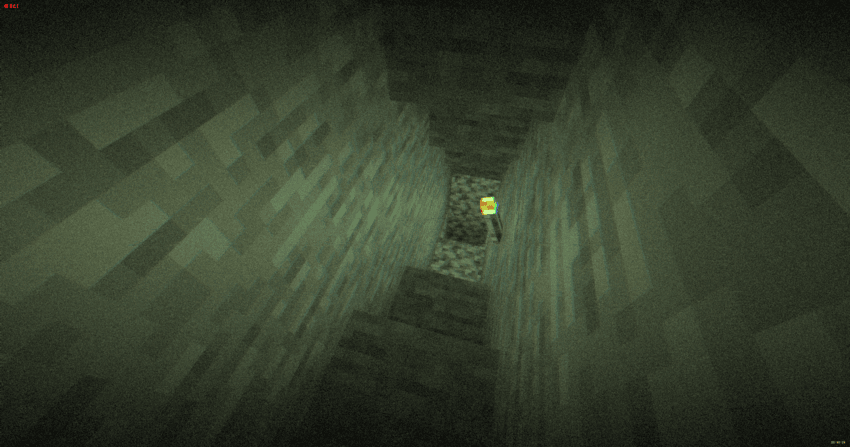
Inspired by old VHS tapes and analog horror, this shader adds subtle film grain, light distortion, soft camera shake and atmospheric noise that reacts to darkness. Nights feel heavier. Caves feel deeper. Empty spaces feel… wrong.
It doesn’t change the gameplay.
It changes how it *feels*.
Torches flicker through the grain. Distant terrain fades into haze. The world looks like it was recorded on a damaged tape you weren’t supposed to find.
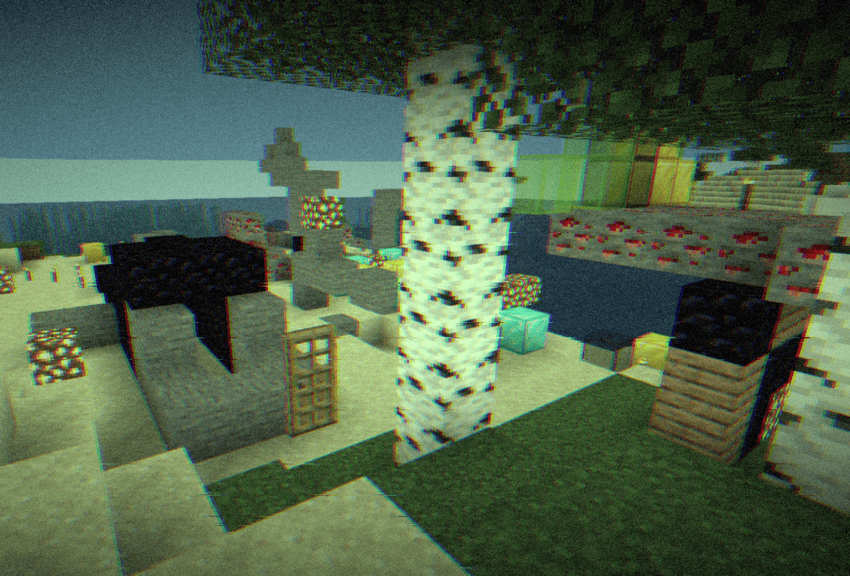
Perfect for horror maps, survival playthroughs, liminal builds or anyone who wants a more immersive, uneasy atmosphere — without destroying performance.
– **Press record. You probably shouldn’t.**
Forget-Me-Not Shaders
Important! This, along with the GitHub page for this project, is the only official place to find Forget-me-not. Any other site you find this project, including unethical mod rehosting sites like 9minecraft, are untrusted sources. Never download files from untrusted sites.
# Forget-me-not Shaders
**Forget-me-not** is a semi-realistic pipeline shader for the [Canvas](https://modrinth.com/mod/canvas) mod. It’s designed to give the most authentic and immersive experience while sticking to “traditional” rendering methods to keep up good performance.
**Canvas** is a client-side renderer mod that uses shaders for advanced rendering with the goal of having a modern and very flexible design for high performance and better readability. The shader system is entirely different from Optifine and Iris & Sodium and as such, Forget-me-not won’t work with any of these mods! See the `how to use` section for installation instructions.
## notice
If you’re a developer or mod hoster, Forget-me-not is licensed under the [LGPL v3.0](https://www.gnu.org/licenses/lgpl-3.0.en.html), so please make sure to read over the terms of the LGPL if you use any of Forget-me-not’s original code or distribute it.
## how to use third-party shaders with canvas
1. Be sure you’re on 1.19.4 or above. Support is not guaranteed for versions that Canvas doesn’t actively support.
2. Install [Fabric](https://fabricmc.net/wiki/install).
3. Get Canvas Renderer mod through [Modrinth](https://modrinth.com/mod/canvas). **Keep in mind that Canvas does not work with Sodium, Iris, OptiFine, or OptiFabric.**
4. Download your preferred pipeline shaderpack. If you’re looking for alternatives to Forget-me-not, try out [Lumi Lights](https://github.com/spiralhalo/LumiLights/releases), [Lomo (not for gameplay as of this writing)](https://github.com/fewizz/lomo/releases), or [Aerie (vanilla-plus, wip)](https://modrinth.com/shader/aerie-shaders).
5. Launch your game, put your downloaded `.zip` file into your `resourcepacks` folder and activate the resource pack. (Don’t extract it!)
6. Navigate to `Options / Video Settings / Canvas / Pipeline Options / Pipelines` and select the pipeline that you want to play with.
## troubleshooting
– Experiencing bad shadow outcomes? In `Options / Video Settings / Canvas / Debug`, set `Shadow Priming Strategy` to `TIERED` and `Disable Shadow Self-Occlusion` to true.
– Does Canvas say in chat that some shaders are broken? Please grab your log in `.minecraft/logs/latest.log` and all contents of the `.minecraft/canvas_shader_debug/` folder and either make an issue on GitHub or let me know about it on Discord.
– Does every Canvas pipeline break other than Canvas Basic? If so, your device is probably incompatible with Fabulous graphics, which most Canvas pipelines use. Unfortunately, there’s no fix for this.
## feature highlights
– seasons! be immersed in your world as the seasons change over time
– HDR, bloom, and tone mapping
– dramatic skies with atmospheric scattering and custom realistic clouds
– water waves and reflections
– support for PBR, with hundreds of built-in default materials
– contact-hardening variable penumbra shadows
– advanced anti-aliasing (TAA)
## credits
Forget-me-not wouldn’t be nearly as polished as it is if it weren’t for the help of people like fewizz, spiralhalo, Grondag, and many others from the Canvas community for contributing and testing. Many thanks to:
– The [shaderLABS discord channel #snippets](https://discord.com/channels/237199950235041794/525510804494221312/959153316401655849) for many useful code snippets
– [Lumi Lights](https://github.com/spiralhalo/LumiLights) by spiralhalo for lots of different inspiration & help, and also references for a working TAA implementation
– [lomo](https://github.com/fewizz/lomo/releases) by fewizz for inspiration for many different things, as well as the raytracer and lots of invaluable contributions
FlowestShaders
This shader is very good. It can make Minecraft look much more beautiful than before. The sky will be brighter and more realistic, the water will look clearer and nicer, and the lighting in the game will become softer and more natural. You can really feel the difference when you walk around in your world.
This shader works with both OptiFine and Iris, so no matter which mod loader you use, you can install it easily. It runs well on almost any computer, even if your device is not very powerful. You don’t have to worry about lag or slow performance while using it.
If you are tired of the normal Minecraft graphics and want to make your game look better, this shader is perfect for you. It is simple, clean, and works great for survival, building, or just exploring. Try it and you will see how good your Minecraft can look with this shader.
FeathC2
### Details
Feath Shader is a lightweight yet visually powerful shader pack designed to enhance your Minecraft experience with balanced realism and high performance. Whether you’re exploring vast landscapes or building detailed structures, Feath Shader adds an immersive layer of beauty without compromising on FPS.
✨ Features:
Realistic Reflections → Smooth and accurate reflections on water, glass, and reflective blocks.
Rain Puddles → Dynamic wet surfaces that bring rainy weather to life with puddles forming naturally.
Lighting Enhancements → Soft, natural light with realistic shadows, bloom, and improved torchlight effects.
Atmosphere & Sky → Improved atmosphere rendering with more depth, fog, and vibrant skies.
Color Adjustments & Grading → Balanced tones and cinematic color grading for a polished, professional look.
Feath Shader is made to be lightweight, stable, and visually consistent, perfect for players who want beautiful graphics without sacrificing smooth gameplay.
FastPBR
## **What is the FastPBR Shader?**
This is a fast shaderpack that still offers high-quality visuals and uses PBR atmospherics, hence its name.
**PBR does not mean specular support, so do not confuse these terms despite this being a common misconception in the shaderpacks community.**
## **Where can I download it?**
Either here or via my website (link below).
## **What features does it offer?**
* Dynamic soft shadows
* Optional screen-space indirect lighting using HBIL
* Temporal Anti-Aliasing and Upscaling (TAAU)
* Procedural realistic skybox including volumetric clouds
* Volumetric fog
* Various optional lens effects such as depth of field, lens flares and vignette
* **Compatibility with Distant Horizons since v2.0**
## **Any Requirements?**
* **Iris 1.6.0 or newer**
* **OptiFine is NOT supported and will not be unless it catches up with Iris’ more advanced featureset**
* A graphics card that supports OpenGL 4.3 or newer
* Windows/Linux
## **External Links:**
* My Website: [Link](https://rre36.com)
* My Discord Server: [Link](https://discord.gg/y5xzQ6H)
[](https://www.patreon.com/bePatron?u=19790203)