Zayko Shaders
⚠️Zayko has been put on pause while we work on different projects.⚠️
━━━━━━━━━━☆━━━━━━━━━━☆━━━━━━━━☆━━━━━━━━━━☆━━━━━━━━━━
### **_7.0 IS OUT! AND ITS OUR BEST YET! ✨🌊_**

[](https://www.curseforge.com/minecraft/shaders/zayko-lite)
### Short About
**Zayko is a shader pack for Minecraft Java Edition, designed with an emphasis on detail, excellent quality and optimization. It offers PBR effects, emissive textures for mobs, blocks and items, as well as a wide range of settings: from Low to Ultra. provides a stable frame rate, while allowing you to adjust the settings to suit any requirements.**

━━━━━━━━━━☆━━━━━━━━━━☆━SPONSORS━☆━━━━━━━━━━☆━━━━━━━━━━
[](https://www.voicemod.net/?refn=skynexushd&tracking_id=999d68a19a244ef5af11d60f1ef6384d&utm_campaign=6023bf347e9fb&utm_source=WHuVawz6)
━━━━━━━━━━☆━━━━━━━━━━☆━SPONSORS━☆━━━━━━━━━━☆━━━━━━━━━━

Zayko Shaders is a shader pack for Minecraft Java Edition with amazing attention to detail, great quality, and the best possible optimisation. Offering a range of amazing quality visuals and ajustable effects, instead of just giving you presets we also give you great ajustability with our shaders, including emmissive textures for mobs and blocks even certain items including PBR thanks to compatablity with [Optifine](https://optifine.net/home) and [Iris](https://www.irisshaders.dev/),and for those who just want a simple click and play without ajusting there are profiles ranging from Very Low to Ultra and it’s build for Keeping a stable framerate with amazing shaders.
### Want to know more?
Keep scrolling or go to Trusted wikis [FiveNova](https://fivenova.net) or [Minecraft France](https://www-minecraft–france-fr.translate.goog/zayko-shaders/?_x_tr_sl=fr&_x_tr_tl=en&_x_tr_hl=en&_x_tr_pto=sc)
Untrusted wikis (Could be Harmful!)
[Note](https://note.com/quick_squid5246/n/na88bd2b8a706), [Minecraft Mods.Pro](https://minecraft–mods-pro.translate.goog/mods/zayko-shaders?_x_tr_sl=ru&_x_tr_tl=en&_x_tr_hl=en&_x_tr_pto=sc), [Minecraft Imba](https://minecraft-imba.ru/308-zayko.html) or [MinecraftStorage](https://minecraftstorage.com/shaders/zayko), [9Minecraft.net](https://www.9minecraft.net/zayko-shaders)
Harmful wiki detections!!
Do Not download from [Mineload](https://mineload-ru.translate.goog/shaders/low-pc/low-pc-1-16-5/?_x_tr_sl=ru&_x_tr_tl=en&_x_tr_hl=en&_x_tr_pto=sc), [mods-minecraft.ru](https://mods-minecraft.ru/shaders/7577-zayko.html), [Xenolith.ru](https://xenolith.ru/shaders/2758-zayko-12110-1206-1194-1182-1171-1165.html)
━━━━━━━━━━☆━━━━━━━━━━☆━━━━━━━━☆━━━━━━━━━━☆━━━━━━━━━━
**Why Do we take wikis so seriously? simple because if you go to the wrong one and get a virus we could be blamed without our shaders having any malware. we also dont want people to get viruses and let the scammers succeed so please never download from Harmful sites. we only include them so you know they are harmful if you ever download a mod or shader from them.** (the way we check is we look through the sites and if it links to modrinth for the download it automaticlly goes to trusted if it downloads from their site thats auto untrusted because we cannot tell if they added something to the file and untrusted is if the file size is smaller then our offical shaders which mejority are or if they get a harmful detection from VirusTotal.)

if your new or don’t know how to download shaders then were here to help!
### Modrith Launcher
Click Install **–>** Pick an Instence or Create one **–>** Wait for it to do its magic **–>** Launch and Enjoy the Shaders!
### Natrual Launcher
Download File **–>** Launch Game with [Optifine](https://optifine.net/home) or [Iris](https://www.irisshaders.dev/) **–>** Options **–>** shaders **–>** Open shaderpack folder **–>** drag and drop the file into the folder **–>** close folder and click on the shaders in game and enjoy!
# Showcase Videos
Even videos where they show off shaders takes time to create which can take away from their personal lives. Originally this only showed our offical showcase but we wanted to support the community. ([email protected] if you want a video added or removed.)
━━━━━━━━━━☆━━━━━━━━━━☆━━━━━━━━☆━━━━━━━━━━☆━━━━━━━━━━
[**Gamomnia**](https://www.youtube.com/@gamomnia) – Shows Zayko at **4:02**
━━━━━━━━━━☆━━━━━━━━━━☆━━━━━━━━☆━━━━━━━━━━☆━━━━━━━━━━
[**FiveNova**](https://www.youtube.com/@FiveNova) – Shows Zayko for **full video**
━━━━━━━━━━☆━━━━━━━━━━☆━━━━━━━━☆━━━━━━━━━━☆━━━━━━━━━━
YoFPS

YoFPS is a Chocapic13’s Shaders edit that focuses on quality and performance.
It has a similar performance to Skylec, and it supports Iris.
It was being first developed by MLGImposter, while now it’s being continued by NoComment.
Wispy Shader
# Wispy Shaders V1.4
A performance-optimized shader pack initially based on Mellow Shaders and outperforms many other so claimed ‘potato’ shaders. Works on all major versions
## Credits
* **Original Shader**: [Mellow Shaders](https://www.curseforge.com/minecraft/shaders/mellow) by [TheCMK](https://www.curseforge.com/members/thecmk/)
* **Performance Optimizations**: [l_aggy](https://www.curseforge.com/members/l_aggy/projects)
## Features
(All information and statistics is based on V1.3)
* **Ultra-optimized** for integrated graphics (iGPUs)
* **40%+** improvement on Balanced compared to MakeUp-Ultrafast with all effects off
* **Color grading** and biome‑specific lighting for all dimensions.
* **Cinematic post‑processing**: bloom, sharpening, tonemapping, TAA, motion blur, film grain, vignette.
## To-do
1. More benchmarking
2. Adding features (Can’t really optimize more)
3. Bugfix some features
## Performance Profiles
* iGPU (8 Chunks) tested on i5-4570 (HD4600) on CachyOS
* dGPU (24 Chunks) tested on R9 8940HX (5060 Laptop=4060 desktop) on Windows 11
* Choose a profile in shader settings that matches your hardware:
| Profile |FPS (iGPU) |FPS (dGPU) |Description |
| —————– |———- |———- |—————————- |
| ULTRA_PERFORMANCE |190+ |440+ |Maximum FPS, minimal effects |
| PERFORMANCE |190+ |?? |Good balance for iGPU |
| BALANCED |180+ |?? |A mix of features |
| QUALITY |120+ |?? |More effects |
| ULTRA_QUALITY |120+ |380+ |Lowest FPS, All features |
## Installation
1. Install [Iris Shaders](https://irisshaders.dev/) or OptiFine
2. Download Wispy Shaders
3. Place the ZIP file in `.minecraft/shaderpacks/`
4. Select Wispy in Video Settings → Shaders
5. Choose a performance profile
## Optimizations
* ~~Disabled~~ Deleted expensive composite passes by default
* Fast gamma correction
* Simplified post-processing
* Optimized every composite pass and fog,lighting,sky,water,taa,bloom e.t.c
* Reduced shader complexity
* Too many to count now mainly faster math less calls,lookups and samples check [source](https://github.com/Epxlsol/Wispy-Shader) for more
[](https://ko-fi.com/M4M01S7TSM)
## Links
– Original Mellow: https://modrinth.com/shader/mellow
– Report Issues: https://github.com/epxlsol/wispy-shader/issues
—
**Note**: This is a performance-focused fork. For the original experience with all features, use [Mellow Shaders](https://modrinth.com/shader/mellow).
Wisp Shaders
# **Wisp Shaders**

Primitive shaders with **no fancy effects or PBR**, meant to make the game look good while sticking to the vanilla style.
# Features:
– Directional lighting, lightmap based
– More vibrant environment colors
– Custom clouds
– Adjustable fog
– Waving leaves
– Water foam effect
– Cloud reflections in water
– Rain puddles
# Compatibility
The shaders were developed and are intended for minecraft version **1.21.1 and up**, and Iris version **1.7 and up**, but **may** work on lower versions.
If tag support is present, the tag _**minecraft:leaves**_ will be used for waving leaves, otherwise leaves from **vanilla** and **Biomes O’ Plenty** are used.
white sharp shader
# **Important**
The shader is at an **early stage** of development and I plan to update it, **Watch for updates**.
# **Description**
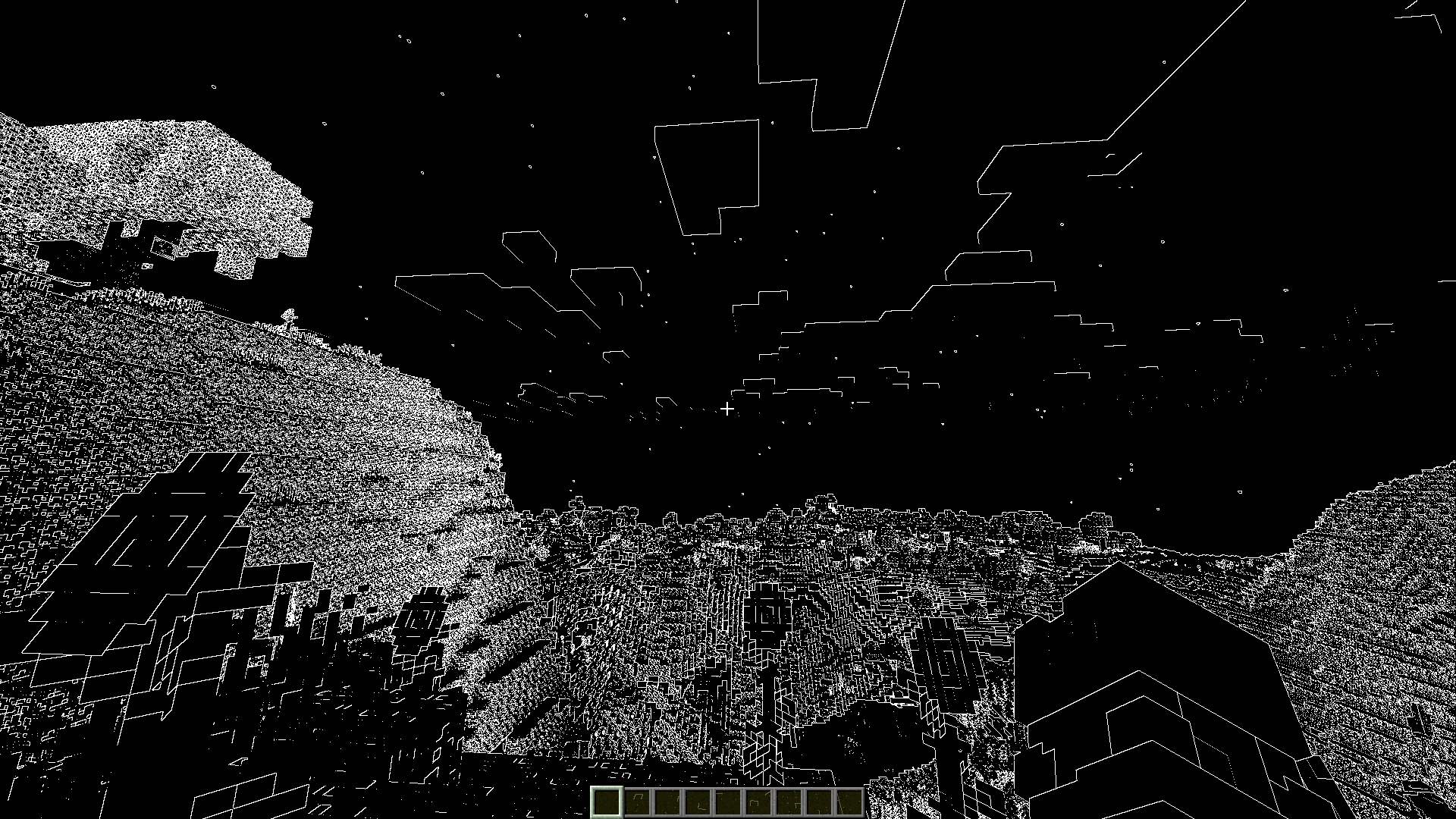
performance shaders for minecraft. which will turn the whole world into black with white lines.
You can also use this shader to create masks in photo editor.
# **Image**
## Rainbow update!

## Black white
WEM – White Entities Mask
Turns all entities completely white, allowing for overlaying screenshots later and easily masking out entities.
Wavy World
this is a wacky very customizeable shader that allows you to make a ton of diffrent waves it is insanely reccomended to open up the settings and play around in there
SETTINGS:
There are 3 subcategories Out X,Out Y and Out Z each one is a direction and each one decides where will the block move there are 8 Options in each one:
Enabled: Enable/Disable this subcategorie
Speed: Speed of the wave
Dead Zone: calm zone around the player
Falloff: The higher the number the lower the waves
Scale: the farther away the wave the longer it is
Bumps Or Divots: Whether to show bumps, divots, or both
Offset: Offset the cycle of the waves
Length: Only works when scale is off Makes it that everywhere has the same length wave
Y: Make waves go in Y/Y- Direction
X: Make waves go in X/X- Direction
Z: Make waves go in X/X- Direction
Warped Memory
– ## 🎞️ Warped Memory
> **Warped Memory** – is a shader that gives the game a dark, distorted atmosphere with the effect of an old VHS tape. It is inspired by the style of “_Bendy and the Dark Revival_” and is great for creating creepy screenshots or just playing with a horror-effect.
– ## ✨ What does a shader do?
> – 📼 Gives the picture the effect of an old VHS tape with noise, interference and distortion;
> – 🎨 Makes colors dull and slightly faded, like old film;
> – 🖼️ Adds split image and glitches as if the recording is corrupted;
> – 🧩 Makes the image slightly blurred and “shaky” as if it were a recording from a damaged film.
– ### ℹ️ How was the shader created?
> I partially used AI to generate the code, but then rewrote it manually to achieve the desired effect 🫠.
– ## 🛠️ Do you have any ideas or have you found a bug?
> Then – welcome to my **[Discord server](https://discord.gg/MTrpNxymZe)**.
Vividness
# Vividness
Transform your Minecraft world with enhanced, vibrant colors!
## ✨ What is Vividness?
Vividness is a lightweight color grading shaderpack that makes your Minecraft world more lively and colorful without heavy performance impact. It enhances the vanilla experience with brighter skies, more vibrant grass, and deeper water colors.
## 🎨 Features
– **+8% Brightness** – Clearer visibility
– **+25% Saturation** – More vibrant colors
– **+12% Contrast** – Sharper visuals
– **Enhanced Blue Tones** – Brighter skies and deeper oceans
– **Enhanced Green Tones** – Livelier grass and foliage
– **Warm Color Temperature** – Natural, comfortable look
## 🚀 Performance
– **Extremely lightweight** – Only color grading, no heavy effects
– **No impact on FPS** – Runs smoothly on most systems
– **Compatible with most resource packs**
## 📦 Requirements
– Minecraft Java Edition 1.16+
– **OptiFine** or **Iris Shaders**
## 🔧 Installation
1. Download the shaderpack
2. Place the `.zip` file in `.minecraft/shaderpacks/`
3. Select “Vividness” in Video Settings > Shaders
## ⚙️ Customization
You can adjust the color grading values by editing `shaders/composite.fsh`:
– Brightness: `adjustBrightness(color, 1.08)`
– Saturation: `adjustSaturation(color, 1.25)`
– Contrast: `adjustContrast(color, 1.12)`
## 📄 License
MIT License – Free to use and modify
—
Enjoy your more vibrant Minecraft experience! 🎮✨
Visual Vibrance
# ⚠️ THIS PACK IS NO LONGER ACTIVELY DEVELOPED ⚠️
Any bugs you find will not be fixed, sorry!
[](https://ko-fi.com/jbritain)
[](https://discord.gg/b9SHNcvs6c)
Shader development is hard and takes a lot of time. If you enjoy my shaders, please consider supporting my work!
# Visual Vibrance
Visual Vibrance is an attempt at recreating the upcoming “Vibrant Visuals” feature which is currently only available on the Bedrock edition of Minecraft.
Visual Vibrance is *an alpha* and since it was forked from my other pack, [Glimmer](https://modrinth.com/shader/glimmer-shaders) in a relatively short period of time, there may be bugs. You can report these to me in [my Discord server](https://discord.gg/4U3nPxTznF) or `#jbritains-shaderpacks` in [the shaderLABS Discord Server](https://discord.gg/RpzWN9S).
## Compatibility
– OpenGL 4.3+ – macOS is *not* supported, nor is the Raspberry Pi. Most modern GPUs (integrated or dedicated) should work fine.
– Iris 1.7+, OptiFine is *not* supported.
## Mod Compatibility
The following are mods that are known to cause issues.
– **Chunks Fade In** causes the shader not to compile, this is a problem with the mod and the assumptions it makes about shaders.
The source code for this pack is available [on GitHub](https://github.com/jbritain/visual-vibrance). If you are interested in contributing or assisting in the development of this shaderpack, don’t hesitate to make a pull request, as I have only some interest in maintaining this pack, and it was mainly made just to see if I could recreate the look.