Vulkanize
# Vulkanize
## What is Vulkanize?
Vulkanize is a modpack focused around [VulkanMod](https://modrinth.com/mod/vulkanmod) and other general purpose optimization mods that aims to **improve your FPS and general performance** by using VulkanMod to replace the **outdated** rendering engine OpenGL with the **newer**, and **far superior**, Vulkan rendering engine.
### What is VulkanMod?
VulkanMod is a mod that allows you to replace the OpenGL renderer of Minecraft with Vulkan, which is far more **modern and superior** in terms of **performance and stability**.
## Why choose Vulkanize?
Via both in-house and third party tests, Vulkanize has **been proven to improve FPS by around 2x-10x**, yet our competitors, _Sodium Plus, Simply Optimized, and Fabulously Optimized_, **all failed** to increase it by even 2x.
### What does that mean?
Vulkanize is clearly **the winner** when it comes to providing **raw performance and FPS gains** in comparison to our competitors.
## Performance test results
### Intel i7-7700 CPU & NVIDIA GTX 1050 TI GPU
“`
WITHOUT Vulkanize:
100-150 average FPS
WITH Vulkanize:
450-950 average FPS
“`
### Intel i7-7700 CPU & Intel HD 630 iGPU
“`
WITHOUT Vulkanize:
30-60 average FPS
WITH Vulkanize:
60-150 average FPS
“`
## Compatibility
[See this discussions page relating to VulkanMod.](https://github.com/xCollateral/VulkanMod/discussions/226)
## Update policy
We aim to target the first **minor update** of every **major update**.
### Why not update to every new version?
This policy is in place in an attempt to **allow our dependencies to remain the same across updates** and to **ensure you have a consistent experience**.
### What is a minor update?
A **minor update** is usually released by Mojang to address bugs introduced by, or discovered after, the release of a **major update**.
For example, the first minor update of **1.20** was **1.20.1**.
*There are many miscellaneous factors which may influence which version we choose to release an update for, such as popular request, or which version(s) VulkanMod’s developers decide to target, therefore, this policy is not set in stone*.
### Can I play on newer version servers with Vulkanize?
It depends, a **large majority** of servers **understand** that users **may** sometimes have **outdated** clients, either **accidentally or purposefully** due to **modpacks**, **mods**, or **other** various factors.
As a result, those servers usually **will allow all clients to join** as long as the **major version** matches.
## Requirements
A **GPU** (or **iGPU**) that **supports Vulkan**
## Credits
Shoutout to the developers of our **dependencies**.
A **special thanks** goes out to [xCollateral](https://modrinth.com/user/xCollateral) for creating VulkanMod and allowing this pack to exist!
Vulkanix



Vulkanix 🚀 – your gateway to high FPS and unlimited performance in Minecraft!
Tired of lag and low frames? With this modpack, you’ll forget about stuttering and enjoy smooth gameplay. Vulkanix replaces the standard OpenGL renderer with Vulkan, delivering a significant FPS boost even on weaker PCs. It’s a fully vanilla modpack containing only the essential mods for optimization and resource pack functionality.
🔥 Main Features of Vulkanix:
⚡ Lightning-fast performance: Vulkan fully unleashes the potential of your graphics card.
💻 Reduced RAM usage: free up resources for other tasks.
💡 Shader support: enjoy vibrant visuals without sacrificing FPS.
🌐 Optimized network stack: play on servers with minimal lag and delays.
🔎 Renders only what you see: invisible blocks and entities won’t strain your system.
🤖 Smart physics and AI optimization: mobs and blocks require fewer resources.
🌍 Instant language switching: no long loading times when changing languages.
😴 Lower resource usage in background: when minimized, Minecraft automatically reduces its load.
🏆 FPS Tests:
Vulkanix

Vanilla



Q: What if something isn’t working, or I have a suggestion?
A: Let us know on Discord — we’re always open to new ideas!
Q: Is this a client modpack?
A: Yes! Just install it and enjoy boosted FPS.
Vulkanium
# Vulkanium
Optimizing modpack for fabric, based on [**VulkanMod**](https://modrinth.com/mod/vulkanmod ), trying to replicate the ecosystem of [**Sodium**](https://modrinth.com/mod/sodium), without Sodium. Especially useful on a potato PC
✅ Сompletely replaces
⚠️ Partially replaces
❌ No replaces
## Replacement progress
✅ [**Sodium**](https://modrinth.com/mod/sodium) —> [**VulkanMod**](https://modrinth.com/mod/vulkanmod)
✅ [**Sodium Extra**](https://modrinth.com/mod/sodium-extra) —> [**VulkanMod Extra**](https://modrinth.com/mod/vulkanmod-extra) / [**Not Enough Vulkan**](https://modrinth.com/mod/iuZL1bXB)
⚠️ [**Iris Shaders**](https://modrinth.com/mod/iris) —> [**Beryl**](https://modrinth.com/mod/beryl)
✅ [**Bobby**](https://modrinth.com/mod/M08ruV16) —> [**VulkanBobby**](https://modrinth.com/mod/i9PLM1kH) & [**Bobby**](https://modrinth.com/mod/M08ruV16)
❌ [**voxy**](https://modrinth.com/mod/voxy)
❌ [**Distant Horizons**](https://modrinth.com/mod/distanthorizons)
It also has mods like “Vanilla+”: 3d-Skin-Layers, BetterF3, More Chat History, Mouse Tweaks, Mouse Wheelie, etc
Mods
– [3d-Skin-Layers](https://modrinth.com/mod/zV5r3pPn)
– [BadOptimizations](https://modrinth.com/mod/g96Z4WVZ)
– [Beryl](https://modrinth.com/mod/beryl)
– [Better Advancements](https://modrinth.com/mod/Q2OqKxDG)
– [BetterF3](https://modrinth.com/mod/8shC1gFX)
– [Bobby](https://modrinth.com/mod/M08ruV16)
– [Chat Heads](https://modrinth.com/mod/Wb5oqrBJ)
– [Chunky](https://modrinth.com/mod/fALzjamp)
– [Cloth Config v20](https://modrinth.com/mod/9s6osm5g)
– [Concurrent Chunk Management Engine](https://modrinth.com/mod/VSNURh3q)
– [Continuity](https://modrinth.com/mod/1IjD5062)
– [Debugify](https://modrinth.com/mod/QwxR6Gcd)
– [EntityCulling](https://modrinth.com/mod/NNAgCjsB)
– [Fabric API](https://modrinth.com/mod/P7dR8mSH)
– [Fast IP Ping](https://modrinth.com/mod/9mtu0sUO)
– [FastQuit](https://modrinth.com/mod/x1hIzbuY)
– [FerriteCore](https://modrinth.com/mod/uXXizFIs)
– [Forge Config API Port](https://modrinth.com/mod/ohNO6lps)
– [ImmediatelyFast](https://modrinth.com/mod/5ZwdcRci)
– [Ixeris](https://modrinth.com/mod/p8RJPJIC)
– [Krypton](https://modrinth.com/mod/fQEb0iXm)
– [Language Reload](https://modrinth.com/mod/uLbm7CG6)
– [Lithium](https://modrinth.com/mod/gvQqBUqZ)
– [Mod Menu](https://modrinth.com/mod/mOgUt4GM)
– [ModernFix](https://modrinth.com/mod/TjSm1wrD)
– [More Chat History](https://modrinth.com/mod/8qkXwOnk)
– [More Culling](https://modrinth.com/mod/51shyZVL)
– [Mouse Tweaks](https://modrinth.com/mod/aC3cM3Vq)
– [No Chat Reports](https://modrinth.com/mod/qQyHxfxd)
– [Ok Zoomer](https://modrinth.com/mod/aXf2OSFU)
– [Packet Fixer](https://modrinth.com/mod/c7m1mi73)
– [Placeholder API](https://modrinth.com/mod/eXts2L7r)
– [Remove Reloading Screen](https://modrinth.com/mod/ZP7xHXtw)
– [ServerCore](https://modrinth.com/mod/4WWQxlQP)
– [Smooth Scroll](https://modrinth.com/mod/CllP7wW0)
– [Very Many Players](https://modrinth.com/mod/wnEe9KBa)
– [ViaFabricPlus](https://modrinth.com/mod/rIC2XJV4)
– [VulkanBobby](https://modrinth.com/mod/i9PLM1kH)
– [VulkanMod](https://modrinth.com/mod/JYQhtZtO)
– [VulkanMod Extra](https://modrinth.com/mod/vulkanmod-extra) / [Not Enough Vulkan](https://modrinth.com/mod/iuZL1bXB)
– [YetAnotherConfigLib](https://modrinth.com/mod/1eAoo2KR)
– [kennytv’s epic force close loading screen mod for Fabric](https://modrinth.com/mod/blWBX5n1)
Vulkanium optimise
# Vulkanium optimise
uses the Vulkan engine instead of openGL, which results in significantly higher performance compared to familiar render optimizations such as Sodium/iris or optifine.
Features:
– Vulkan engine
– zoom
– Display FPS
**Shaders are not supported.**
Vulkanite Continued
### ~~Continuation of Vulkanite until they come back to it.~~ **THEY ARE BACK UPDATING IT**
### Original: https://modrinth.com/modpack/vulkanite
### Original Desc
# Vulkanite
Vulkanite is a modpack based on the excellent mod Vulkan Renderer.
The goal is to give the most performance and to have the best experience in Minecraft while staying close to Vanilla.
# How does the modpack work?
Using the Vulkan Renderer mod changes the rendering from OpenGL 3.3+ to Vulkan 1.3. This allows the average Minecraft player to play with a very high framerate while taking advantage of their own hardware.
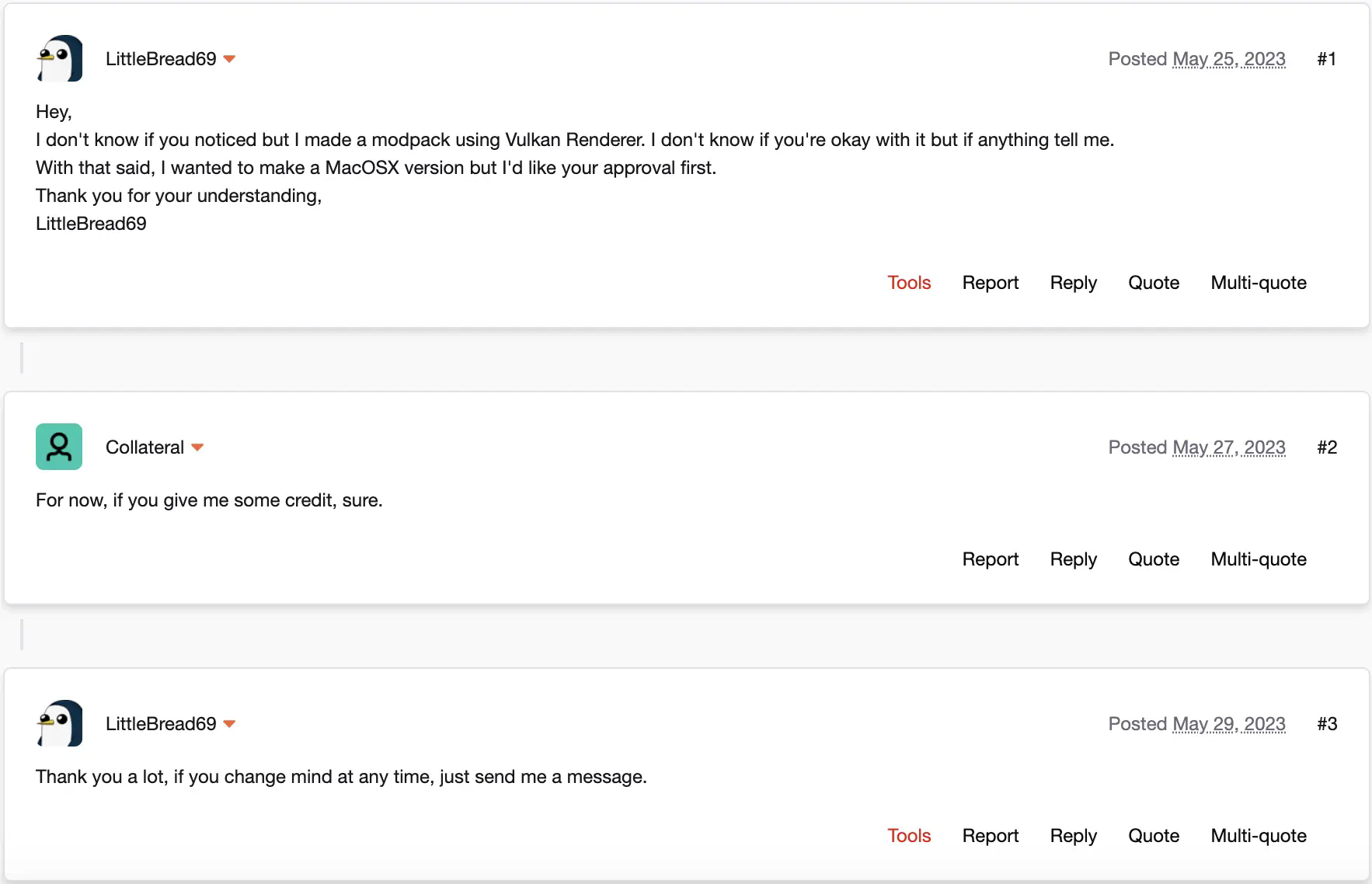
This modpack is approved by xCollateral, the developer of the mod at its core : Vulkan Renderer.
This modpack should run on Windows without any problems and run on Linux pretty much equally good. This modpack doesn’t work on Mac OS X.
Vulkanite
# Vulkanite
Vulkanite is a modpack based on the excellent mod [VulkanMod](https://modrinth.com/mod/vulkanmod). (From 20.1.0, Vulkanite now also provides Beryl, so it’s technically Vulkanite/Berylite.)
## Major Modpack Update following versions 20.1.0 and up
After the announcement that Minecraft is switching to native Vulkan, the goal of the modpack has changed. It keeps its role of giving an easy-to-install, fully fledged, vanilla+, performance-enhancing modpack, but now it works with [Beryl](https://modrinth.com/mod/beryl) in order to bring “Vibrant Visuals”-like shaders to Minecraft Java. You can always turn off the shader aesthetic in the Video Settings.
## How does the modpack work?
Using the [VulkanMod](https://modrinth.com/mod/vulkanmod) changes the rendering from OpenGL 3.2 to Vulkan 1.2+. This allows the average Minecraft player to play at a very high framerate while making the most of their hardware.
With that, Vulkanite also includes libraries that help with the user interface, like [Jade 🔍](https://modrinth.com/mod/jade) and adds support for custom textures, models and sounds.
[C²ME](https://modrinth.com/mod/c2me-fabric) is also a core part of the performance optimisation, and it benefits greatly from using Java 22 (until Minecraft 1.21.11 included).
This modpack is approved by [xCollateral](https://modrinth.com/user/xCollateral), the developer of the mod at its core: Vulkan Renderer/VulkanMod.
This modpack should run on Windows without any problems and should run on Linux pretty much equally well. The modpack should work on MacOS too (1.20.6+).
## Requirements
_These requirements were tested on previous versions of Vulkanite, so here be dragons._
### Minimum
– 4-core CPU
– 2 GHz base clock
– iGPU
– 2 GB RAM
– 2 GB VRAM
—-
– Java 21
—-
—-
### Recommended
– 6-core CPU
– 2.8 GHz base clock
– dGPU GTX 970 or better
– 8 GB RAM
– 4 GB VRAM
—-
– Java 22 (C2ME benefits a lot from it)
—-
Modpack approval by xCollateral
Vulkanify
## Vulkanify’s Purpose –
Tired of Minecraft’s aging OpenGL engine holding back your high-end GPU? Frustrated by stutters and low frame rates, even with performance mods? VulkanCraft is the definitive solution.
This isn’t just another performance modpack that tweaks settings. This is a fundamental engine overhaul. Vulkanify replaces Minecraft’s default OpenGL rendering pipeline with a modern, low-overhead Vulkan backend, unlocking unprecedented performance gains, superior stability, and next-generation rendering features.
Say goodbye to CPU bottlenecks and hello to buttery-smooth gameplay, massively extended render distances, and a rock-solid frame rate.
———————————————————————————————–
### Features
Very clean hud design ,very customizable,all i portant information for pvp or survival

Vulkan setting,with more options

———————————————————————————————–
Wildfire’s female gender mod ,with 3D skin layers
– For those ladies out there

———————————————————————————————–
Vulkanified
It changes the in-game graphics api from **OpenGL** (**Open Graphics Library**) to **Vulkan** nearly doubling the performance than Vanilla Minecraft and and almost 1.35x more than sodium and it addons in most cases
Vulkanic Optimizations
# Vulkanic Optimizations
Vulkanic Optimizations is a VulkanMod based performance modpack, carefully crafted together to achieve superior performance compared to others. Effort was not only put into increasing FPS, but providing a smooth and reliable gameplay experience even on low-end systems. It improves various aspects such as, but not limited to, world loading/generation/saving, resource usage and server connectivity.
### Which version to choose?
There are two versions available to download, Recommended and Base. The Base version contains only key performance mods and is useful if you want to make your own Modpack based on this. Recommended includes all the Base mods, but also some quality of life (qol) mods that I like to use and is the one I recommend for the best experience.
Files for **manual installation** are included in the releases itself under the ‘Files’ tab.
### Requirements
To run Vulkanic Optimizations, your GPU needs to support at least Vulkan 1.2, which most already do. If you are unsure or run into issues, check for GPU support in the [Vulkan Database](https://vulkan.gpuinfo.org/) and for driver support by running `vulkaninfo –summary` or `vulkaninfo.exe –summary` in the terminal. Make sure your GPU drivers are up-to-date if the GPU support differs from driver support.
### Compatibility
This Modpack should be compatible with the vast majority of quality of life (qol) mods, but it’s still limited by VulkanMod’s abilities. You can get a good idea by looking at VulkanMod’s [incompatible-mods list](https://github.com/xCollateral/VulkanMod/wiki/Incompatible-mods).
Furthermore, some included configurations might also cause compatibility issues.
## Some Notes
If you see any visual changes from vanilla that you don’t like, it’s probably because of one of these mods:
– FastChest
– Blocky Bubbles
– Fast Items
If you are suddenly having issues with your farms/contraptions, this might be because of one of these mods:
– Alternate Current
– Clumps
– Get It Together, Drops!
– Immersive Optimizations
– Ksyxis
– Lithium
Feel free to remove any of them as needed.
Vulkanic Optimizations also ships with [Resource Fixes](https://modrinth.com/resourcepack/model-optimizations-and-fixes) made by [Minecraft_hyr](https://modrinth.com/user/Minecraft_hyr) to reduce the number of triangles being rendered. If you run into issues loading your Resourcepack, try disabling it.
## Getting more FPS
If you want to increase performance even further, I recommend the following:
– Updating [VulkanMod](https://modrinth.com/mod/vulkanmod) is probably the easiest way to gain FPS, almost every new version has better compatibility and performance.
– Installing [Adoptium (Temurin)](https://adoptium.net/de/temurin/releases/) JVM makes the game run smoother and can increase your FPS.
– [Using Java arguments](https://github.com/brucethemoose/Minecraft-Performance-Flags-Benchmarks) can also increase performance in certain cases, but be mindful about it and benchmark carefully, as they can decrease performance as well.
– Using an external server will reduce CPU load and can increase performance if you are CPU limited.
– Furthermore, a significant performance boost can be seen on Linux by running Minecraft in [gamemode](https://github.com/FeralInteractive/gamemode).
## Credits
The credits go towards all the amazing mod developers making such performance improvements possible.
Special thanks goes to [xCollateral](https://modrinth.com/user/xCollateral) who created [VulkanMod](https://modrinth.com/mod/vulkanmod), it does most of the heavy lifting and is absolutely awesome!
Base Version
– Achievements Optimizer – [bigenergy](https://modrinth.com/user/bigenergy)
– Advancements Screen Optimizer – [JustAlittleWolf](https://modrinth.com/user/JustAlittleWolf)
– Alternate Current – [Space Walker](https://modrinth.com/user/Space%20Walker)
– Audition – [Tasuposed](https://modrinth.com/user/Tasuposed)
– Bad Optimizations – [thosea](https://modrinth.com/user/thosea)
– Blocky Bubbles – [axialeaa](https://modrinth.com/user/axialeaa)
– Client Side Noteblocks – [DaCubeKing](https://modrinth.com/user/DaCubeKing)
– Clumps – [jaredlll08](https://modrinth.com/user/jaredlll08)
– Collision Fix – [LopyMine](https://modrinth.com/user/LopyMine)
– Concurrent Chunk Management Engine – [ishland](https://modrinth.com/user/ishland)
– Enhanced Block Entities – [FoundationGames](https://modrinth.com/user/FoundationGames)
– Entity Culling – [tr7zw](https://modrinth.com/user/tr7zw)
– Fast Chest – [Domi](https://modrinth.com/user/Domi)
– Fast IP Ping – [fallen-breath](https://modrinth.com/user/fallen-breath)
– Fast Items – [Noryea](https://modrinth.com/user/Noryea)
– Fast Paintings – [MehVahdJukaar](https://modrinth.com/user/MehVahdJukaar)
– Fast Quit – [contaria](https://modrinth.com/user/contaria)
– Faster Random – [AnOpenSauceDev](https://modrinth.com/user/AnOpenSauceDev)
– Faster Particle Collisions – [AnOpenSauceDev](https://modrinth.com/user/AnOpenSauceDev)
– FerriteCore – [malte0811](https://modrinth.com/user/malte0811)
– FPS Reducer – [bre2el](https://modrinth.com/user/bre2el)
– Function Compiler – [EpicPix](https://modrinth.com/user/EpicPix)
– Get It Together, Drops! – [bl4ckscor3](https://modrinth.com/user/bl4ckscor3)
– Immersive Optimization – [Luke100000](https://modrinth.com/user/Luke100000)
– Krypton – [astei](https://modrinth.com/user/astei)
– Ksyxis – [VidTu](https://modrinth.com/user/VidTu)
– Language Reload – [Jerozgen](https://modrinth.com/user/Jerozgen)
– Lithium – [jellysquid3](https://modrinth.com/user/jellysquid3)
– Main Menu Credits – [isxander](https://modrinth.com/user/isxander)
– Mod Menu – [Terraformers](https://modrinth.com/organization/terraformers)
– ModernFix – [embeddedt](https://modrinth.com/user/embeddedt)
– More Culling – [FX](https://modrinth.com/user/FX) and [1Foxy2](https://modrinth.com/user/1Foxy2)
– Noisium – [Steveplays](https://modrinth.com/user/Steveplays)
– Rail Optimization – [EasterGhost2](https://modrinth.com/user/EasterGhost2)
– Remove Reloading Screen – [dima_dencep](https://modrinth.com/user/dima_dencep)
– ScalableLux – [ishland](https://modrinth.com/user/ishland)
– StutterFix – [wisecase2](https://modrinth.com/user/wisecase2)
– Tekst – [Tektonikal](https://modrinth.com/user/Tektonikal)
– Your Options Shall Be Respected – [shedaniel](https://modrinth.com/user/shedaniel)
Recommended Version
All Credits as in the Base version, plus:
– Accurate Block Placement Reborn – [Kaddicus](https://modrinth.com/user/Kaddicus)
– AppleSkin – [squeek502](https://modrinth.com/user/squeek502)
– AutoTools – [zelythia](https://modrinth.com/user/zelythia)
– Chat Patches – [OBro1961](https://modrinth.com/user/OBro1961)
– ClickThrough Plus – [Cassian](https://modrinth.com/user/Cassian)
– Controlling – [jaredlll08](https://modrinth.com/user/jaredlll08)
– Creative Inv Extension – [02Alexis](https://modrinth.com/user/02Alexis)
– Equipment Compare – [Grend](https://modrinth.com/user/Grend)
– Freecam – [hashalite](https://modrinth.com/user/hashalite)
– HotbarReplace – [twokilohertz](https://modrinth.com/user/twokilohertz)
– Idwtialsimmoedm – [glisco](https://modrinth.com/user/glisco)
– InvMove – [PieKing1215](https://modrinth.com/user/PieKing1215)
– Just Enough Items – [mezz](https://modrinth.com/user/mezz)
– Mouse Tweaks – [YaLTeR](https://modrinth.com/user/YaLTeR)
– No Telemetry – [kb1000](https://modrinth.com/user/kb1000)
– Overflowing Bars – [Fuzs](https://modrinth.com/user/Fuzs)
– The Open Sauce Toast Killer – [AnOpenSauceDev](https://modrinth.com/user/AnOpenSauceDev)
– Peek – [henkelmax](https://modrinth.com/user/henkelmax)
– Pick Up Notifier – [Fuzs](https://modrinth.com/user/Fuzs)
– Simple HUD Enhanced – [SoRadGaming](https://modrinth.com/user/SoRadGaming)
– Smooth Scrolling – [SmajloSlovakian](https://modrinth.com/user/SmajloSlovakian)
– ToolTipFix – [kyrptonaught](https://modrinth.com/user/kyrptonaught)
– ViaFabricPlus – [FlorianMichael](https://modrinth.com/user/FlorianMichael)
– Zoomify – [isxander](https://modrinth.com/user/isxander)
Vulkan32

**Vulkan32 is a VulkanMod based modpack** using the best optimization mods available to improve not just your frame rate, but your whole game’s performance. Out of the box, it comes configured to be as close to Vanilla as possible, and if you don’t like that, it’ll respect your choices. Updating this modpack won’t override your choices, this modpack is your canvas. It is the perfect base for anyone seeking to use their favorite mods with VulkanMod, and in the case that your favorite mod is incompatible with VulkanMod, rest assured that Vulkan32 kept the highest compatibility possible.
**With Vulkan32 as your canvas, you can play with:** BetterF3, Entity Texture Features, Gamma Utils (Fullbright), Litematica, Macaw’s Furniture, Simple Voice Chat, Tom’s Simple Storage Mod, and more!
⚠️ Vulkan32 1.0 to 2.0 world conversion ⚠️
You might be here because you are an avid changelogs reader or because you upgraded straight from 1.21.5 to 1.21.10 and was wondering where all your progress went. No matter. **You haven’t lost anything.**
Cesium is removed in 2.0 versions of Vulkan32 to **improve compatibility, but your worlds are still in the Cesium format!** To convert your worlds, **reinstall the Vulkan32 version you were on** and follow the process below:


Repeat this process for all worlds you want to transfer to Vulkan32 2.0 versions!
# Features
### Improved Performance
Using [VulkanMod](https://modrinth.com/mod/vulkanmod) by xCollateral, Vulkan32 can get improved performance on devices that don’t support OpenGL well or at all, like MacOS, which only supports up to OpenGL 4.1!
### Lightweight
Vulkan32 includes only what’s needed, performance enhancements, you get to choose your bells and whistles. Your **anonymity** is the one thing Vulkan32 makes an exception for. Every download of Vulkan32 comes with [No Chat Reports](https://modrinth.com/mod/no-chat-reports), this mod lets you pick whether your messages are signed for the chat reporting system, a system, if abused, could result in a ban from multiplayer.
# Recommended Configuration
For the **best experience**, I’d recommend allocating between 4gb and 6gb of ram and using [Eclipse Temurin 25](https://adoptium.net/temurin/releases/?mode=filter) with `-XX:+UseZGC -XX:+UseCompactObjectHeaders` JVM arguments. See [here](https://exa.y2k.diy/garden/jvm-args/) for more detailed information on which JVM arguments to use and what they do!
Some additional tweaks you could make to your instance of Vulkan32 are to the Advanced Chunk Culling and the number of Chunk Builder Threads.
– **Advanced Chunk Culling:** Greater improvements at greater render distances, more aggressive values increase FPS at the risk of **holes appearing within view**. The default in Vulkan32 is `Normal`.
– **Chunk Builder Threads:** Lower values **increase** Frame Time stability at the cost of chunk loading speed.
# Hardware Compatibility
VulkanMod requires a device (GPU) and drivers that support **at minimum Vulkan API 1.2**.
Any device made within the last 5 years should support this, but to be sure, here’s how to check:
– **Partial Method:** Search for your GPU on [Vulkan gpuinfo](https://vulkan.gpuinfo.org/).
– **Full Method (Requires the Vulkan SDK):** Find what version of Vulkan your GPU and drivers support by typing “` vulkaninfo –summary “` into your terminal. If the `conformanceVersion` line found within `Devices:` is at least `1.2.0.0`, your computer can run VulkanMod!
**Disclaimer:** While all these checks may return positive, **it is still possible** for your computer to encounter issues when attempting to run VulkanMod. Additionally, if software rasterizers (e.g., LLVMpipe, SwiftShader) are the only method of using Vulkan on your device, don’t bother; you will not see increased performance using VulkanMod.
# Thanks
This modpack wouldn’t be possible without xCollateral and the contributors to [VulkanMod](https://github.com/xCollateral/VulkanMod), so visit [VulkanMod’s mod page](https://modrinth.com/mod/vulkanmod) and **buy the developer a coffee!**
Attributions
– [ScalableLux](https://github.com/RelativityMC/ScalableLux) under an LGPL-3.0 license by the RelativityMC organization.
Used in versions: 1.20.4-1.0, 1.21-1.0, 1.21-1.1
– [VulkanMod](https://github.com/xCollateral/VulkanMod) under an LGPL-3.0 license by xCollateral.
Used in versions: 1.20.4-1.0, 1.21.1-1.0
– [lithium-fabric](https://github.com/CaffeineMC/lithium-fabric) under an LGPL-3.0 license by the CaffeineMC organization.
Used in versions: 1.21-1.0, 1.21-1.1
– [MoreCulling](https://github.com/FxMorin/MoreCulling) under a GPL-3.0 license by FxMorin.
Used in versions: 1.21-1.0, 1.21-1.1
– [vulkanmod-translations](https://github.com/scully06/vulkanmod-translations) under an LGPL-3.0 license by scully06.
Used in versions: 1.21.1-1.0, 1.21.3-1.0, 1.21.3-1.1, 1.21.4-1.0
– [ModernFix](https://github.com/embeddedt/ModernFix) under an LGPL-3.0 license by embeddedt.
Used in versions: 1.21.3-1.0, 1.21.3-1.1, 1.21.4-1.0, 1.21.5-1.2
– [FastQuit](https://github.com/KingContaria/FastQuit) under an MIT license by KingContaria.
Used in versions: 1.21.4-1.1 ([Fork](https://github.com/megabyte6/FastQuit))