WelcomeX
**WelcomeX** is a lightweight yet powerful Minecraft server plugin designed to give your community a warm, immersive, and professional welcome experience.
From the moment players join, WelcomeX greets them with fully customizable titles, subtitles, and sounds, setting the tone for your server’s personality and theme.
Even non-technical staff can tweak messages, colors, and effects on the fly, no server restarts required. ( **/welcomex reload** )
# __Features at a glance__
– 🎯 Customizable Join Titles & Subtitles, Edit colors and messages directly in config.yml.
– 🔊 Join Sounds & Effects, Trigger any Minecraft sound.
– ⚡ Instant Changes, No need to restart simply update the plugin with **/welcomex reload**
– 🎨 Highly Configurable, From text styles to fade timings, make every detail match your server’s theme.
# __Perfect for__
Community focused SMPs, event servers, themed worlds, and any Minecraft network looking to create a professional first impression that players will remember.
**With WelcomeX, your server doesn’t just say “hi”, it makes players feel like they belong.**
**For any bugs or suggetions please visit [Discord](https://discord.gg/jsThKrDA3d) and create a ticket**.
Web’s Node Library
# Web’s Node Lib
Web’s Node Lib is a lightweight node-based GUI library for Minecraft 1.21.1 (NeoForge).
It provides a visual framework for building logic systems, control panels, or data interfaces directly in-game.
—
## How to Test
You can test the library immediately after installing the mod:
1. Enter any world.
2. Type the command: `/webu node_editor`
3. Press **Shift + A** to open the node creation menu.
4. Drag connections between pins to see the Topological Data Flow in action.
—
## Features
### Infinite Canvas
Smooth zooming (0.1x to 3.0x) and panning. Your node graphs scale and move without losing precision.
### Visual Data Flow
A built-in topological pulse system visualizes data moving through your graph. It automatically calculates the logic chain and sends pulses between nodes.
### Components
Ready-to-use elements for your nodes:
* Sliders, Checkboxes, and Buttons.
* TextFields for data input.
* Image support (PNG/GIF) and 3D Viewports.
### Controls
* Shift + A: Node Search Menu.
* Ctrl + C / V: Copy and paste nodes.
* Middle Click: Pan viewport.
* Delete / X: Remove nodes.
—
## For Developers
Integrating the library is simple:
1. Register node types via NodeRegistry.
2. Define evaluation logic using setEvaluator.
3. Save/Load graphs using WGraphSerializer (NBT supported).
Built by webyep.
Licensed under MIT.
Weather Power
=====================================
WEATHERPOWERS PLUGIN – COMPLETE INFO
=====================================
Author: XITER
Version: 1.0.0
Platform: Minecraft (Bukkit/Spigot/Paper)
OVERVIEW
========
WeatherPowers is a Minecraft plugin that grants players elemental weather affinities,
allowing them to harness the power of Sun, Rain, Storm, and Snow. Each affinity
provides 3 unique abilities with special effects and targeting capabilities.
WEATHER AFFINITIES
==================
Players are automatically assigned one of four weather affinities:
☀️ SUN AFFINITY
– Theme: Fire, Heat, Light
– Color: Gold/Yellow
– Strengths: Damage over time, area denial, blindness
🌧️ RAIN AFFINITY
– Theme: Water, Healing, Force
– Color: Aqua/Blue
– Strengths: Healing, knockback, temporary weapons
⚡ STORM AFFINITY
– Theme: Lightning, Wind, Chaos
– Color: Purple/Dark Blue
– Strengths: Direct damage, multiple strikes, launching
❄️ SNOW AFFINITY
– Theme: Ice, Cold, Control
– Color: White/Light Blue
– Strengths: Crowd control, freezing, area effects
ABILITIES BREAKDOWN
===================
☀️ SUN POWERS:
————–
1. SOLAR FLARE (20s cooldown)
– Blinds all enemies within 7 blocks for 5 seconds
– Creates explosion particle effect and thunder sound
– Message: “Solar Flare activated! Blinded X enemies.”
2. HEATWAVE (20s cooldown)
– Evaporates water blocks in 5-block radius
– Sets nearby entities on fire for 2 seconds
– Creates flame particles and fire extinguish sound
– Message: “Heatwave activated! Affected X entities.”
3. LAVA SUMMON (20s cooldown)
– Summons lava at targeted block location for 3 seconds
– Creates lava particles and lava pop sound
– Message: “Lava Summoned at target location!”
🌧️ RAIN POWERS:
—————
1. RAIN BLESSING (20s cooldown)
– Heals all players within 8 blocks by 2 hearts
– Creates water drop particles and rain sound
– Message: “Rain Blessing activated! Healed X players.”
2. TIDAL WAVE (20s cooldown)
– Pushes all entities away within 6 blocks
– Creates water bubble particles and bucket empty sound
– Message: “Tidal Wave activated! Pushed X entities.”
3. RAIN SWORD (20s cooldown)
– Grants “Rain Blade” iron sword with Sharpness 5 & Unbreaking 10
– Sword lasts 10 seconds then disappears automatically
– Creates water drop particles and trident riptide sound
– Message: “Rain Blade manifested! (10 seconds)”
⚡ STORM POWERS:
—————
1. THUNDER CALL (20s cooldown)
– Strikes lightning at targeted block (up to 50 blocks away)
– Direct lightning strike with full damage
– Message: “Thunder called from the heavens!”
2. TORNADO (20s cooldown)
– Launches all entities within 6 blocks straight up (2.5 blocks high)
– Creates cloud particles and dragon flap sound
– Message: “Tornado summoned! Launched X entities skyward.”
3. THUNDER BARRAGE (20s cooldown)
– Unleashes 10 lightning strikes over 1 second on target area
– Each strike has slight random offset for coverage
– Message: “Thunder Barrage unleashed!”
❄️ SNOW POWERS:
—————
1. ICE PRISON (20s cooldown)
– Freezes water blocks to ice in 4-block radius
– Applies Slowness II to nearby entities for 5 seconds
– Creates snow particles and glass break sound
– Message: “Ice Prison activated! Trapped X entities.”
2. BLIZZARD (20s cooldown)
– Blinds all entities within 6 blocks for 3 seconds
– Creates heavy snow particles and rain sound
– Message: “Blizzard unleashed! Blinded X entities.”
3. ICE ENTOMB (20s cooldown)
– Places ice block at target location for 5 seconds
– Applies Slowness V and prevents jumping to nearby entities
– Creates snow particles and glass place sound
– Message: “Ice Entomb activated! Target frozen in ice!”
TARGETING ABILITIES (Right-Click on Enemies)
============================================
All affinities have special targeting abilities with 20-second shared cooldown:
☀️ SUN TARGETING – Lava Summon
– Right-click enemy to summon lava under them for 3 seconds
– Deals 2 hearts damage and sets on fire for 3 seconds
– Creates lava particles and lava pop sound
🌧️ RAIN TARGETING – Water Blast
– Right-click enemy for massive knockback with upward force
– Knockback strength: 5.0, Upward force: 1.5
– Creates water splash particles and splash sound
⚡ STORM TARGETING – Lightning Strike
– Right-click enemy to strike them with lightning
– Direct lightning hit with full damage
– Instant strike effect
❄️ SNOW TARGETING – Ice Bind
– Right-click enemy to freeze them for 5 seconds
– Applies Slowness V, Slow Digging, and prevents jumping
– Creates snow particles and glass break sound
COMMANDS
========
PLAYER COMMANDS:
/myaffinity
– Shows your current weather affinity and abilities
– Displays all 3 abilities with names and cooldowns
– Usage: /myaffinity
/ability <1|2|3>
– Switches to specified ability number
– Confirms switch with ability name
– Usage: /ability 2
/switchability
– Cycles to next ability (1→2→3→1)
– Shows confirmation message with new ability
– Usage: /switchability
ADMIN COMMANDS:
/setaffinity
– Sets a player’s weather affinity
– Requires weatherpowers.admin permission
– Usage: /setaffinity PlayerName sun
/weatherpowers reload
– Reloads plugin configuration
– Requires weatherpowers.admin permission
– Usage: /weatherpowers reload
CONTROLS
========
ABILITY ACTIVATION:
– Left-Click: Use selected ability
– Ctrl + Right-Click: Cycle through abilities (1→2→3→1)
TARGETING:
– Right-Click on Enemy: Use targeting ability (requires line of sight)
– Works on all living entities including players (if enabled in config)
ACTION BAR DISPLAY:
– Shows all 3 abilities with status: [1. Solar ✓] | [2. Heat (15s)] | [3. Lava ✓]
– Green checkmark (✓) = Ready to use
– Red timer (Xs) = On cooldown
– Selected ability has arrow indicator (▶)
CRAFTING RECIPES
================
All power crystals use a 3×3 grid pattern filling the entire crafting table:
☀️ SUN POWER CRYSTAL
Materials: 8 Gold Blocks + 1 Diamond Block
Pattern:
[GOLD] [GOLD] [GOLD]
[GOLD] [DIAM] [GOLD]
[GOLD] [GOLD] [GOLD]
🌧️ RAIN POWER CRYSTAL
Materials: 8 Emerald Blocks + 1 Diamond Block
Pattern:
[EMER] [EMER] [EMER]
[EMER] [DIAM] [EMER]
[EMER] [EMER] [EMER]
⚡ STORM POWER CRYSTAL
Materials: 8 Netherite Blocks + 1 Diamond Block
Pattern:
[NETH] [NETH] [NETH]
[NETH] [DIAM] [NETH]
[NETH] [NETH] [NETH]
❄️ SNOW POWER CRYSTAL
Materials: 8 Quartz Blocks + 1 Diamond Block
Pattern:
[QRTZ] [QRTZ] [QRTZ]
[QRTZ] [DIAM] [QRTZ]
[QRTZ] [QRTZ] [QRTZ]
RECIPE SUMMARY:
– Each crystal requires 9 total items
– 8 block materials + 1 diamond block center
– Very expensive materials for game balance
– Recipes automatically registered on plugin enable
PERMISSIONS
===========
PLAYER PERMISSIONS:
weatherpowers.use – Use basic plugin features (default: true)
weatherpowers.ability – Use weather abilities (default: true)
weatherpowers.craft – Craft power crystals (default: true)
ADMIN PERMISSIONS:
weatherpowers.admin – All admin commands (default: op)
weatherpowers.setaffinity – Set player affinities (default: op)
weatherpowers.reload – Reload plugin config (default: op)
CONFIGURATION
=============
Key config.yml settings:
GENERAL:
– auto_assign_affinity: true (assign random affinity to new players)
– auto_give_power_items: true (give power crystal automatically)
– debug_mode: false (console debug messages)
COOLDOWNS:
– All abilities: 20 seconds (uniform for balance)
– Targeting abilities: 20 seconds (shared cooldown)
EFFECTS:
– Ability ranges, damage values, and durations
– Targeting ability configurations
– Particle and sound effect settings
UI SETTINGS:
– Action bar display duration and update frequency
– Symbol customization for ready/cooldown states
GAMEPLAY FEATURES
=================
BALANCED MECHANICS:
– Uniform 20-second cooldowns for all abilities
– Expensive crafting recipes requiring rare blocks
– Line-of-sight requirements for targeted abilities
– Shared cooldown for targeting abilities
VISUAL FEEDBACK:
– Action bar shows all 3 abilities with real-time cooldown timers
– Particle effects for all abilities with unique themes
– Sound effects matching each affinity’s element
– Color-coded messages for each affinity
PLAYER PROGRESSION:
– Automatic affinity assignment for new players
– Access to power crystal crafting recipes
– Three distinct abilities per affinity for variety
– Optional PvP targeting if enabled by admins
INSTALLATION
============
1. Download WeatherPowers.jar from builds
2. Place in server’s plugins folder
3. Start/restart server
4. Plugin will generate config.yml automatically
5. Grant players weatherpowers.use permission
6. Players will receive random affinities on first join
TROUBLESHOOTING
===============
COMMON ISSUES:
– Abilities not working: Check permissions and cooldowns
– Recipes not showing: Verify crafting.enable_recipes: true in config
– Action bar not displaying: Check UI settings in config
– Targeting not working: Ensure allow_player_targeting setting
SUPPORT:
– Check console for error messages
– Use /weatherpowers reload after config changes
– Verify all dependencies are installed
– Contact XITER for additional support
VERSION HISTORY
===============
v1.0.0 – Initial Release
– Four weather affinities with 3 abilities each
– Targeting system with right-click enemies
– Block-based expensive crafting recipes
– Uniform 20-second cooldowns
– Complete action bar UI system
– Comprehensive command system
Wayward Attributes
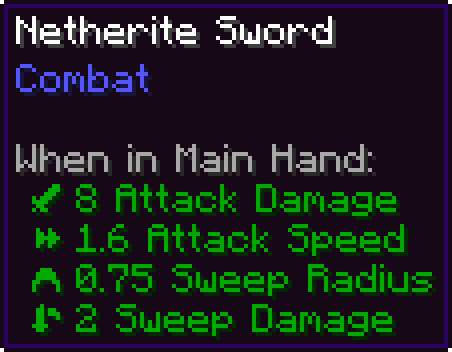
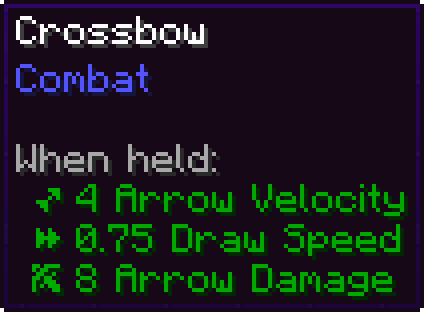
Wayward Attributes is a primarily visual mod that overhauls how attributes are shown in tooltips.
– Attributes are given icons through a data-driven system
– Swords have their sweeping damage properties exposed as Attributes
– Bows and Crossbows now have all of their properties exposed as Attributes
Config update coming soon
Wayfarer

[](https://modrinth.com/mod/wayfarerlib/versions?l=fabric)
[](https://modrinth.com/mod/wayfarerlib/versions?l=neoforge) [](https://modrinth.com/mod/wayfarerlib)
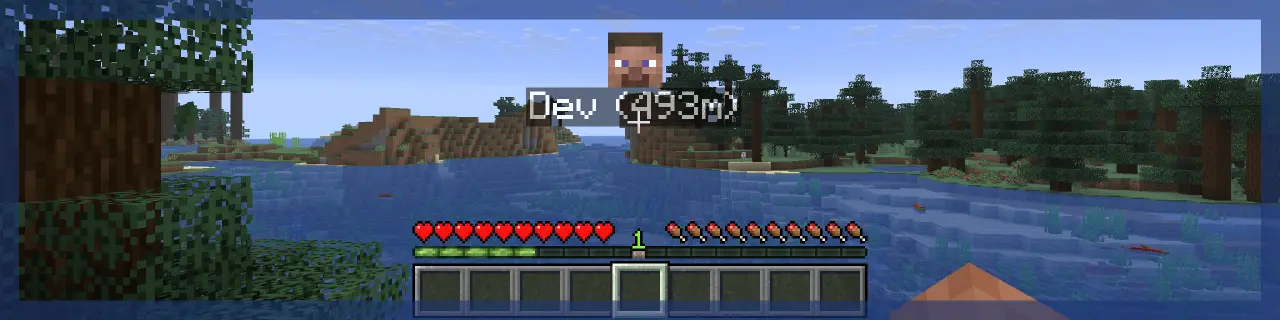
> **Wayfarer** implements a waypoint rendering system and aims to improve the locator bar, all in a way that can be utilized by other developers in their projects!
> **Client-side**, the mod handles waypoint rendering in-world and on the locator bar. There are many customization options to tweak waypoint visuals.
> **Server-side**, the mod handles server-to-client waypoint data and synchronization to tell the client what to render. Not all projects need this, client-side mods can just utilize the waypoint renderer directly!

> That’s alright; Wayfarer **is** still useful on its own! Its standalone features include:
> ## Improved Locator Bar
> – Wayfarer adds a **hold** keybind to manually toggle the locator bar.
> – In survival, locator bar icons render over the experience bar instead of replacing it with the locator bar, so you can still see your experience!
> – Head icons are shown for players on the locator bar.
> – Instead of icons getting smaller as they get far away, they become more translucent.
> ## Try These Mods:
> [](https://modrinth.com/mod/immersive-maps)

You can find an **API Reference** guide and some examples on how to integrate with **Wayfarer** on the [**Wiki**](https://playgroundmods.github.io/projects/wayfarer/).
## Join us. Thrive.
[](https://discord.gg/Fuuxaq6KPh)
way2wayfabric
Since Xaero’s Minimap doesn’t have an official API,
it’s unlikely that the Waystones mod will support
automatic integration; so how do we get automatic
waypoints in Xaero’s Minimap? Via a bridge mod like
this one. There are others for Forge (w2w and
waymaker), but none for Fabric, which is why I threw
this together.
## Usage
No configuration needed! Once the mod is installed, it
will automatically create waypoints in your minimap
for all discovered waystones.
If you accidentally delete one or more auto-generated
waypoints, they will all reappear in the current
waypoint set when you disconnect and reconnect.
For those who use multiple waypoint sets:
– Each newly discovered waystone is added to the
currently active waypoint set.
– If you use multiple waypoint sets, ensure the right
one is active before you activate a waystone.
– These waypoints can be moved to other waypoint sets
after discovery, using the regular waypoint editing
gui.
## Requirements
Required mods:
– [Xaero’s Minimap](https://modrinth.com/mod/xaeros-minimap) (tested with 23.3.2)
or [Xaero’s Minimap fair-play](https://modrinth.com/mod/xaeros-minimap-fair)
– [Fabric Language Kotlin](https://modrinth.com/mod/fabric-language-kotlin)
Supported waystone mods:
– [Waystones](https://modrinth.com/mod/waystones) (tested with 11.3.1)
– [Fabric Waystones](https://modrinth.com/mod/fwaystones) (tested with 3.0.5)
Supports both waystone mods simultaneously (each mod’s
waypoints will have a unique minimap symbol)
—
Inspired by:
– [Waystones2Waypoints (curseforge)](https://www.curseforge.com/minecraft/mc-mods/waystones2waypoints) (Forge 1.16)
– [Waystone Waypoint Maker](https://modrinth.com/mod/waymaker) (Forge 1.17+)
WaveAPI
# WaveAPI is not maintained anymore.
WaveAPI is a modding API which aims to completely abstract the game with the goal of making modding just a tiny bit easier and free from having to port your mod.
## Using quilt?
WaveAPI creates a new folder in your Minecraft folder called WaveAPI folder, it used for caching certain things but if you are using quilt you may want to move WaveAPI mods into waveAPI/mods (the folder does not exist by default so you will need to create it) folder inside of your Minecraft folder.
## Issues?
If you notice Texture from WaveAPI mods not working you may want to go to waveAPI folder and delete modifcache.txt file.
# Want to try making a mod using WaveAPI?
Documentation: https://waveapi.org/documentation/index.html (WIP)
Mods which source code you can look at:
https://github.com/WaveAPI/test-mod
https://github.com/nullTheCoder/Potatoes-and-their-uses
You may also want to ask questions concerning WaveAPI mod development on discord.
## Found a bug?
If you notice any issues to do with WaveAPI please report it either on Github, on Discord or both.
WATERMEDIA: Multimedia Binaries
# WATERMEDIA: Multimedia Binaries
This mod its a dependency for WATERMeDIA, containing the native binaries like VLC and FFMPEG and essential code to extract the files in the watermedia paths.
Avoids users to install any third party software, making watermedia finally pluug and play for Windows, Mac and Linux (android not included)
CRITICAL: this is only intended to work with WATERMeDIA V3
WATERMeDIA: Multimedia API

⚠️ WARNING
WATERMeDIA v3 alpha its going to be released soon, please ensure you’re downloading the right version (2.1.x) before open a github issue about crashes
📕 OVERVIEW
WaterMedia it’s a library with a well designed API, provides multimedia support using native/java decoders and LibVLC as video backend. Used by many minecraft mods like LittleFrames and VideoPlayer and the superseding of FancyVideo-API in Minecraft, integrates support for many platforms such as YouTube, Twitch, Kick, Google Drive, OneDrive, Dropbox, Imgur, Twitter, Streamable, Lightshot and more!
Designed to work on almost all Minecraft Mod Loader (Forge, NeoForge and Fabric) above Minecraft 1.16.5 and outside Minecraft contexts.
🧩 MODS USING WATERMeDIA
– [WaterFrames](https://www.curseforge.com/minecraft/mc-mods/waterframes) (by SrRapero720)
– [WaterVision](https://www.curseforge.com/minecraft/mc-mods/watervision) (by SrRapero720)
– [LittleFrames](https://www.curseforge.com/minecraft/mc-mods/littleframes) (by CreativeMD)
– [WaterFrames: Backported Edition](https://www.curseforge.com/minecraft/mc-mods/waterframesbackported) (by Toshayo)
– [PictureSign](https://www.curseforge.com/minecraft/mc-mods/picturesign) (by Motschen)
– [Prologue](https://www.curseforge.com/minecraft/mc-mods/prologue) (by thunderrock424242)
– [Holographic Renderers](https://www.curseforge.com/minecraft/mc-mods/holographic-renderers) (by Mysticpasta1)
– [Owleaf PlayBack](https://www.curseforge.com/minecraft/mc-mods/owleaf-playback) (by
Owleaf_Studio)
Special mentions
– NightmareCraft: Survival (not available)
– VideoPlayer (not maintained)
🛠️ FEATURES
– Multi platform support (listed in the overview)
– Integrated LibVLC preinstallation for Windows 10/11 (x64)
– Supports all existing modloaders (Forge, NeoForge and Fabric)
– Picture catching for bandwidth reductions
– Simplistic API design
– Minecraft agnostic (runs on almost all Minecraft versions and even outside)
– High performance and multithreated
🎮 SUPPOT US AND GET A 15% DISCOUNT
KineticHosting, our partners in hosting solutions are great to make a server and start sharing multimedia with your friends with all the listed mods above.

📦 INSTALL VIDEOLAN FOR MACOS AND LINUX
Due to OS limitations, MacOS and Linux requires a forced manual installation.
– Download VideoLAN for MacOS [here](https://get.videolan.org/vlc/3.0.21/macosx/vlc-3.0.21-universal.dmg)
– Download VideoLAN for Linux [here](https://www.videolan.org/vlc#content-carousel)
⁉️ FAQ
– **¿Why my server crashes on startup using (Neo)Forge?**
– *WaterMedia can’t run on server-side, you should remove the jar from server-side and keep it just on client-side. Fabric on the other hand still needs to keep the WaterMedia jar on server-side*
– **¿Can I use VLC 4?**
– *No*
– **¿Why game crashes when I have FancyVideo-API?**
– *Because FancyVideo-API and its forks are incompatible with WATERMeDIA, both libraries collides each other on load VLC and both ends in can’t be able to load VLC, this applies for all other multimedia APIs*
– **¿Can I install VLC via Flatpak or Pacman?**
– *No, in fact, any package install solution that uses sandboxed installations can’t be used with WATERMeDIA, Minecraft, VLC and WATERMeDIA must be installed in native ways (like APT-GET)*
⚖️ LICENSE
WaterMedia is under Polyform Strict License v1.0.0
Permitted non-commercial usage (included and not limited to; ModPacks or ServerPacks) Redistribution or derivative versions are not allowed
For commercial purposes or derivative versions, contact us to coordinate a commercial license with [Caprica Software Limited](https://www.capricasoftware.co.uk/) or receive a free license for derivative without commercial purposes under specific conditions (our VLCJ license doesn’t apply for your fork).
⚖️ VLCJ LICENSING
VLCJ and VLCJ-natives are shaded and distributed under the Commercial license for vlcj generously provided and donated by [Caprica Software Limited](https://www.capricasoftware.co.uk/).
⚖️ LIBVLC LICENSING
LibVLC Windows 10 (x64) binaries are wrapped under LGPLv2.1
WarMachineLib
WarMechaniLib is a library dedicated to providing military to creatures (soldiers and vehicles), including basic bullet entities and firing systems, basic templates for soldiers and vehicles, and AI. It also provides a simple command system and a vehicle system for players to operate.
The entity rendering of this module mainly uses obj models, and the obj loader comes from MWFS, which has excellent performance and can smoothly render tens of thousands of models. It has been upgraded to version 1.16.5, although there are still some unresolved issues compared to version 1.12.2, such as lighting and light shadow compatibility. (This module is open sourced according to the same CC-BY-NC-NA protocol)
This module is also linked to the SA special effects module. When installed simultaneously, the effects of weapon firing, bullet explosion, and vehicle entities will be rendered.
The combat units of this module are mainly divided into two categories: Squad and RTS.
Squad type: AI is relatively more comprehensive and has a larger NBT volume, mainly used for small-scale team operations. Players can configure each soldier and vehicle more accurately.
RTS type: AI creatures only have basic mobility and attack capabilities, with fewer NBTs and better optimization, making them more suitable for large-scale battles.
The vehicle system of this module does not pursue hardcore realism, but mainly pursues simplicity, ease of use, and sensory experience. (Key operation mainly refers to BF2)