Worlds
## Worlds – World Management for Paper & Folia
Worlds is a modern, lightweight world management plugin designed for **Paper** and **Folia** servers.
It brings seamless world handling with **customization presets**, eliminating the need for extra plugins just to create
void or custom flat maps. Simply pick a predefined preset, or create your own!
### Why Choose Worlds?
**Vanilla Flat World Preset** – No more extra plugins for void or flat maps
**No Extra Data Files** – Worlds doesn’t store extra files, no more messy file syncing when sharing worlds
**Drag & Drop Import** – Just place the world in the folder & use /world import
**Full World Regeneration** – Reset any world (even the Overworld!) with one command
**Modern & Efficient** – Uses up-to-date server mechanics, not outdated methods
**World Keys** – Worlds are referenced by unique keys, improving compatibility with client mods
**World Linking** – Restore vanilla Nether and End portal behavior for custom worlds
### What’s Next?
**Custom Dimension Creation** – Like datapacks, but usable from commands and API!
[Download now on Modrinth](https://modrinth.com/project/gBIw3Gvy)
[Latest version supporting 1.20.6 (Java 21)](https://github.com/TheNextLvl-net/worlds/releases/tag/v1.2.5)
[Latest version supporting 1.19/1.20.4 (Java 19)](https://github.com/TheNextLvl-net/worlds/releases/tag/v1.1.6)
[Latest version supporting 1.19/1.20.4 (Java 17)](https://github.com/TheNextLvl-net/worlds/releases/tag/v1.1.3)
For further information check out the [Wiki](https://thenextlvl.net/docs/worlds)
[](https://faststats.dev/project/worlds)
WorldGuard

**Protect your server!**
WorldGuard lets you and players guard areas of land against griefers and undesirables as well as tweak and disable various gameplay features of Minecraft.

🛑 Make sure that you are using the Java version of Minecraft.
1. Set up a Bukkit server such as Spigot or Paper (Paper is recommended over Spigot).
2. Download WorldEdit from the WorldEdit page.
3. Download WorldGuard from this page (see the Files tab above for all versions).
4. Put the WorldEdit and WorldGuard plugin files into your plugins folder.
Check YouTube for tutorials, or read the official documentation.


[Join our Discord server](https://discord.gg/enginehub) if you need help with installing or using WorldGuard.
**Make sure to [check the docs](https://worldguard.enginehub.org/en/latest/) first!**

- Create zones in your world that only permit mods or certain players from building within
- Set additional game rules on your server (deny wither block damage, falling damage, etc.)
- Set game rules on specific areas (food regen, health regen, disable PvP, TNT, control mob damage) in your world
- Blacklist certain items and blocks so they can’t be used
- Dump useful statistics and information about your server (/wg report -p)
- CPU profile your server (/wg profile -p)
- Add useful commands like an immediate “STOP ALL FIRE SPREAD” command.
- Works, more or less, with mods (other Bukkit plugins and FTB mods)
- Protects against many types of grief (fire spread, tree growth, TNT cannons, piston machines, crop trampling, paintings and item frames, etc.), and certain interactions can also be allowed (door open, lever usage, etc.)
- Well documented, and one of the oldest Minecraft projects (older than Bukkit!)
- Open source
- Enable only features you want! Everything is off by default. You can just install WorldGuard and configure it later.

**Can anyone use it?**
Only opped users or users with permissions supplied with a permissions plugin can use WorldGuard.
**How do you use WorldGuard?**
To learn how to use WorldGuard, read the docs. Check YouTube for tutorials too!
**I need help!!**
You may visit our documentation or Discord Guild.
**I have some feature requests…**
Visit our issue tracker. However, if you just have a question, please try one of the methods above.
**Can I edit the source code?**
Visit our GitHub repository. WorldGuard is licensed under LGPLv3 and you can compile it with Gradle.
🎉 Support us on GitHub Sponsors!
Need a host? We recommend Apex Hosting

Worldgen Flexiblifier
# Worldgen Flexiblifier
A tool for making various aspects of Minecraft worldgen more flexible. Meant to be used by mod authors or modpack/datapack
developers. Artifacts are available on [CurseForge](https://legacy.curseforge.com/minecraft/mc-mods/worldgen-flexiblifier) and [Modrinth](https://modrinth.com/mod/worldgenflexiblifier), or on my maven: https://maven.lukebemish.dev/releases/dev/lukebemish/worldgenflexiblifier/
## Features
For more documentation on features, see the [wiki](https://github.com/lukebemishprojects/WorldgenFlexiblifier/wiki).
### [Dripstone Generation](https://github.com/lukebemishprojects/WorldgenFlexiblifier/wiki/Dripstone-Generation)
The vanilla dripstone feature types (`dripstone_cluster`, `large_dripstone`, and `pointed_dripstone`) can now be
configured to place blocks other than dripstone.
### [Ore Veins](https://github.com/lukebemishprojects/WorldgenFlexiblifier/wiki/Flexible-Ore-Veins)
A new feature type, `worldgenflexiblifier:ore_vein`, has been added, which re-implements the vanilla “large ore veins”
(which contain a filler stone and some ore blocks) so that custom veins can easily be added.
WorldGameRules
# WorldGameRules
A fabric mod to change all gamerules to be separate per world
## Commands
The vanilla gamerule command has been replaced with a custom command that requires a dimension.
The gamerule command requires `world-gamerules.commands.gamerule` or operator level 2.
– `/gamerule [dimension selector]` – Query the gamerule `` in all specified dimensions
– `/gamerule [dimension selector]` – Set the gamerule `` to `` in all specified dimensions
### Dimension selectors
Dimension selectors allow you to specify what dimensions should be queried / set
– `@all` – Selects all dimensions
– `@namespace ` – Selects dimensions with the specified namespace (eg. namespace `minecraft` selects `minecraft:overworld`, `minecraft:the_nether` and `minecraft:the_end`, but not `custom:dimension`)
– `@regex ` – Selects all dimensions, where the dimension id matches the [regex](https://regex101.com/)
– `` – To select a specific dimension
worldedit terrain

# Terrain Addon for WorldEdit
Adds a single powerful command to WorldEdit that lets you generate realistic noise-based terrain inside any WorldEdit selection.
Usage
//terrain
Noise Types
– ## perlin — Natural, smooth hills
– simplex — Similar to perlin, slightly smoother
– ridge — Sharp mountain ridges
– cellular — Cracked/rocky voronoi look
– flat — Flat fill with no variation
### Parameters
– height — Max height variation in blocks (1-256)
– scale — Feature width, higher = smoother/wider (0.1-500)
– octaves — Detail layers, higher = more complex (1-8)
– roughness — How jagged each octave is (0.1-1.0)
– block — Any WorldEdit block (e.g. grass_block, stone)
–
#### Example
//terrain perlin 40 30 4 0.5 grass_block
Requirements
**WorldEdit (required)
Fabric API (required)**
WorldEdit

**A Minecraft Map Editor… that runs in-game!**
With selections, schematics, copy and paste, brushes, and scripting.
Use it in creative, or use it temporarily in survival.
Java Edition required.
Compatible with NeoForge, Fabric, and Bukkit-based platforms (Spigot and Paper).

🛑 Make sure that you are using the Java version of Minecraft. **WorldEdit does not support Bedrock!**
Mod version:
1. Install NeoForge or Fabric.
2. Download WorldEdit from this page (make sure you grab the mod version, not the plugin).
3. Put the WorldEdit mod file into your mods folder.
Plugin version:
1. Set up a Bukkit server such as [Spigot](https://spigotmc.org) or [Paper](https://papermc.io/) (Paper is [recommended](https://madelin
emiller.dev/blog/paper-vs-spigot/) over Spigot).
2. Download WorldEdit from this page (make sure you grab the plugin version, not the mod).
3. Put the WorldEdit plugin file into your plugins folder.
Check YouTube for tutorials, or read the official [documentation](https://worldedit.enginehub.org/)

**The most complete source of WorldEdit information is [our documentation, check them out here](https://worldedit.enginehub.org/en/latest/)!**
If you need further help than what the documentation can provide, you can join our Discord server.
[](https://discord.gg/enginehub)




**Do I need cheats on?**
If you’re playing on single player: Yes, cheats must be enabled for the world to use WorldEdit, but you can change this in the configuration. If you’re running a server: Only opped users can use WorldEdit, though this can be changed too.
**Can anyone use it?**
On servers, only opped users or users with permissions supplied with a permissions plugin can use WorldEdit. On LAN, anyone can use it if cheats are enabled.
**How do you use WorldEdit?**
To learn how to use WorldEdit, read the docs. Check YouTube for tutorials too!
**I need help!!**
You may visit our documentation or Discord Guild.
**I have some feature requests…**
Visit our issue tracker. However, if you just have a question, please try one of the methods above.
**Can I include WorldEdit in my modpack?**
You are free to include WorldEdit, without having to asking for explicit permission.
A link back to this page or our GitHub Sponsors would be appreciated, however.
**Can I edit the source code?**
Visit our GitHub repository. WorldEdit is licensed under GPLv3 and you can compile it with Gradle.
🎉 Support us on GitHub Sponsors!
Need a host? We recommend Apex Hosting
WorldDynamics Engine

[](https://app.travis-ci.com/thatguycy/WorldDynamics-Engine) [](https://www.gnu.org/licenses/gpl-3.0) 

## Description
More than just a Towny Addon, it’s a **Towny Essential Upgrade**!
WorldDynamics Engine is a sophisticated roleplay plugin designed for geopolitical servers. It allows players to immerse themselves in dynamic political landscapes, manage resources, engage in diplomacy, and shape the world with their decisions.
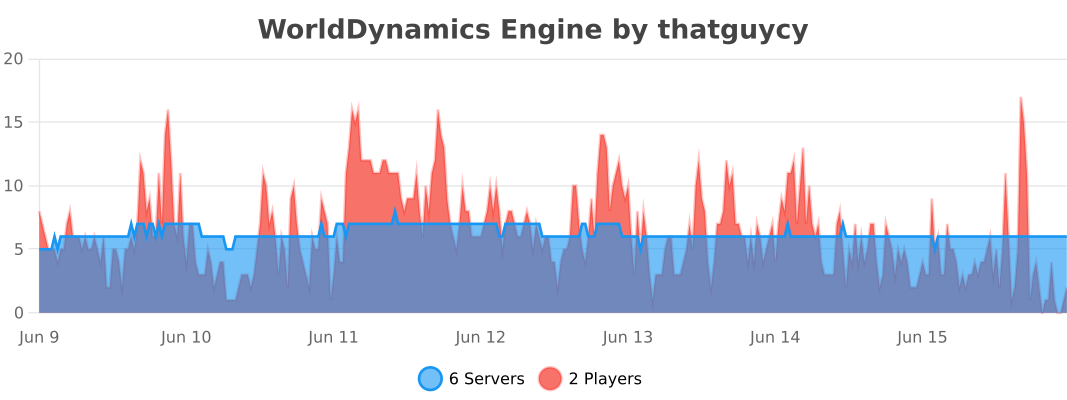
## Usage Statistics
## Current Features
– **Custom Government Structures**: Choose from a variety of government forms to shape the political structure of your nations.
– **Dynamic Organization Management**: Create, manage, and dissolve various types of organizations, including both business entities and governmental bodies.
– **Financial Management for Organizations**: Execute financial transactions within organizations, facilitating deposits and withdrawals to manage funds effectively.
– **Robust Member Management**: Empower organization leaders with the ability to add or remove members, offering significant control over their internal structure.
– **Detailed Information Display**: Access comprehensive information about nations and organizations, enhancing transparency and strategic planning.
– **Flexible Command System**: Engage with an intuitive and adaptable command system, tailored to facilitate user interaction with the plugin’s diverse functionalities.
– **International Organizations**: Participate in global alliances and international bodies, extending influence beyond national borders.
## Future Features
– **Dynamic Political Borders**: Strategically create and adjust nation borders, reflecting the evolving geopolitical landscape.
– **Advanced Resource Management**: Control and trade unique resources, introducing an element of economic strategy and resource conservation.
– **Diplomatic Engagement Systems**: Engage in complex treaties, form alliances, and conduct high-stakes negotiations to influence international relations.
– **Sophisticated Economic System**: Develop and manage a multi-faceted economy, encompassing trade networks, market dynamics, and financial policies.
– **Military Strategy and Defense**: Build formidable armies, strategize defensive tactics, and engage in warfare to protect and expand your nation.
– **Cultural Expansion and Influence**: Spread your nation’s cultural influence, shaping global cultural trends and interactions.
– **Environmental and Technological Dynamics**: Address challenges posed by climate change and technological advancements, adding a layer of environmental strategy.
– **Espionage Mechanics**: Implement espionage and counterintelligence operations, introducing a stealthy aspect of information warfare and intrigue.
– **Global Impact of International Organizations**: Influence world affairs by participating in or establishing international organizations, shaping global policy and diplomacy.
## Installation
Instructions on how to install the WorldDynamics Engine plugin.
– **1)** Place WorldDynamicsEngine-X.X.jar in the “plugins” folder.
– **2)** Install [TownyAdvanced](https://www.spigotmc.org/resources/towny-advanced.72694/) and [Vault](https://www.spigotmc.org/resources/vault.34315/), these are both **essential**.
## License
This project is licensed under the [](https://www.gnu.org/licenses/gpl-3.0) – see the [LICENSE](https://github.com/thatguycy/WorldDynamics-Engine/blob/main/LICENSE) file for details.
WorldManager
# WorldManager
WorldManager is a simple plugin allowing worlds to be automatically reset on demand.
**NOTE:** The plugin is currently in beta, so please check out [here](https://github.com/Zffu/WorldManager) to suggest features you’d like!
## Commands
### /worldmanager
This is the main command of the plugin, allows to have a list of the commands.
### /worlds
This command allows you to have information on worlds handled by WorldManager.
### /loadworld
This command allows you to load a world handled by WorldManager.
### /unloadworld
This command allows you to unload a world handled by WorldManager.
### /createworld
This command allows you to create a world reset option for the specified world.
## Permissions & Messages
WorldManager allows its users to modify the required permissions and messages to whatever they’d like. In order to do so, please head to the config
## API
WorldManager comes with an API allows you to use its features without the plugin.
Woot Revived

**Woot Revived** is a multiblock mod designed to harvest mob drops. You can capture any mob, place it in the factory, and automate its loot production. Without ever needing to spawn the mob! Based on the popular mod [Woot](https://www.curseforge.com/minecraft/mc-mods/woot “Woot”), it includes the same core features. However, all of these features have been completely re-implemented from the ground up.
To begin your journey, you’ll also need to install [GuideME](https://modrinth.com/mod/guideme “GuideME”), which will provides you a fresh new guidebook that teaches you everything you need to know! (Unless your modpack disables it, in which case you’ll need to craft the book yourself if you want it.)
## Addon Implementation
Woot Revived also includes an API that allows you to add your own upgrades to the factory or configure the behavior of mobs from your mods. With it, you can control nearly every aspect of how the factory operates!
More detailed documentation on using the API is available on the [Addon Implementation wiki page](https://github.com/wootrevived/wootrevived/wiki/Addon-Implementation “Addon Implementation wiki page”)!
## KubeJS
You can also add custom recipes, or modify the factory mobs by using KubeJS, more info on the [KubeJS wiki page](https://github.com/wootrevived/wootrevived/wiki/KubeJS)!
Why Not Be One Item
# Why Not Be One Item (wnboi)
A minecraft library mod for adding highly customizable wheel based context menus for forge and fabric. The name comes from the idea that this can be used to make bags or other multi-use items with the goal of reducing inventory clutter.
You can customize the menu by extending the given classes and overriding the methods to get the behavior you want. Most features that I expect people would want to customize are split off into their own methods to make it easier.
This is currently intended mostly for use in my own mods, if you’d like to use it I suggest reading through some of its main classes to get a feel for how it works. If you have any problems feel free to open an issue on the github or find me on one of the big modding discords
Check the GitHub for more information on how to use this library.