xBossBar
# xBossBar 〽️
**xBossBar** is a powerful and customizable bossbar management plugin for Minecraft servers. It allows server administrators to create, manage, and display bossbars with personalized colors, styles, titles, and per-player visibility.
### Key Features 💫
– **BossBar Management** – Create, remove, and edit bossbars with ease.
– **Custom Titles** – Set unique titles for each bossbar.
– **Colors & Styles** – Multiple colors and styles including segmented and solid bars.
– **Per-Player Bars** – Show bossbars to specific players or all players.
– **Progress Control** – Dynamically set bossbar progress in-game.
– **API Support** – Fully featured API to integrate bossbars with other plugins or custom systems.
– **User-Friendly** – Simple and clear commands for fast management.
### Useful Links 🔗
– [GitHub Repository](https://github.com/xDrygo/xBossBar) – Access the source code, latest releases, and submit **Issues** for bug reports, feature requests, or questions.
– [Wiki Documentation](https://wiki.drygo.dev/xbossbar) – Guides for commands, configuration, placeholders, and API usage.
### Support ❓
For technical issues, unexpected behavior, or enhancement suggestions, please submit an **Issue** on the [GitHub repository](https://github.com/xDrygo/xBossBar/issues). This ensures your feedback is tracked and addressed efficiently.
—
xBossBar is designed to provide a **robust, flexible, and professional bossbar management solution**, allowing Minecraft server owners to enhance gameplay with visually engaging and fully customizable bossbars.
X to Xray
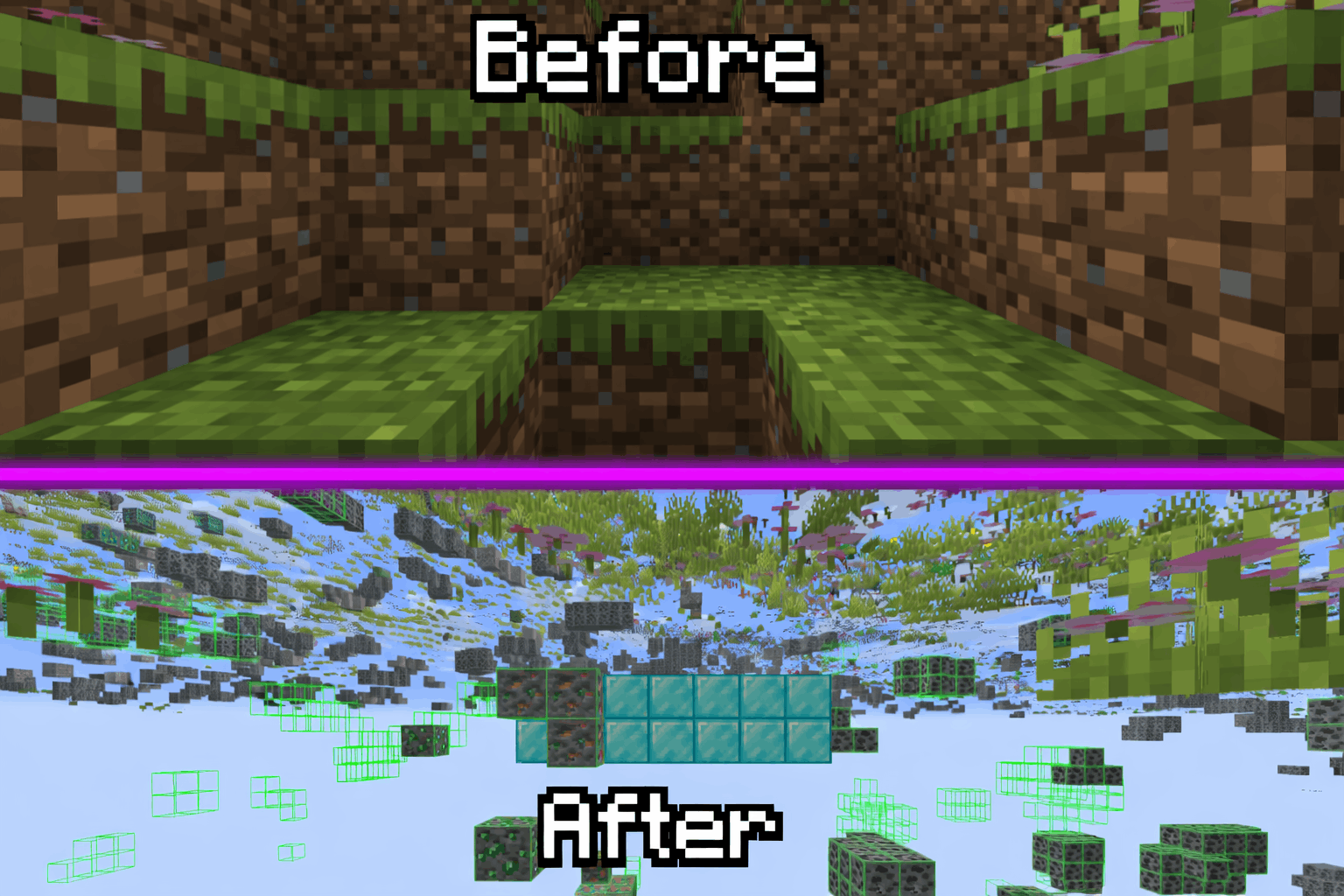
Tired Of Using X-Ray Resourcepacks? Then Try X To Xray!
Why You Should Use X To Xray
1. > Allows You To Have Good Customisation In Ouer Built In Config Menu! Toggling Ores And Other Blocks Has Never Been Easyer!
2. > Use Our Built In VeinMiner To Never Have Spending Much Time Mining!
3. > We Support Many Modloaders: [Fabric](https://modrinth.com/mod/x-to-xray/versions?l=fabric) , [Forge](https://modrinth.com/mod/x-to-xray/versions?l=forge) And [NEO-Forge](https://modrinth.com/mod/x-to-xray/versions?l=neoforge)
## How To Use!
1. > Download The [Mod](https://modrinth.com/mod/x-to-xray/versions) And An Version Of [Fabric API](https://modrinth.com/mod/fabric-api/versions)
2. > Put Both In Your Mods Folder (If You Use Normal Minecraft Launcher!)
3. > Launch Minecraft And Start X-Raying!
4. > Make Sure To Favorite The Mod!
## Screenshots:
> 
### Supportet Versions:
> **26.1** , **26.1.1** And **26.1.2**
**_We Are Trying To Support Other Versions Too!_**
X-PlayerInfo
# X-PlayerInfo
I want to know damage/armor/speed/xp/movement…and any info of me.
So, this mod can do it.
You can press [TAB] when you want to show its.
Options:
mockTest: true/false – True is mock attack player, so maybe error in some mods like using waystone or other interrupable action, but the value will be preciser.
File is config/X-PlayerInfo.json
“`
{
“mockTest”: “true”
}
“`
Maybe no content, you can paste it on file to open it.
X-MOTD-X
# MOTD Plugin – The Ultimate MOTD Experience!
Give your server a modern, eye-catching MOTD!
Simple, fast & fully customizable.
Would you like to have a better server in the list of Minecraft servers that you have traveled to?
Then use the plugin X-MOTD-X
## 🎥 Tutorial Video
[Watch on YouTube](https://www.youtube.com/watch?v=CB-ZNK9rXDg)
## ⚙️ Commands
“`
/xmotdx reload
“`
➡️ Reloads the configuration – no server restart required.
## 🔑 Permissions
“`
xmotdx.reload
“`
➡️ Allows reload only
## 🐞 Found a bug?
Please report any issues directly – thank you!
## ⚠️ Important Notice!
This plugin may **not be redistributed or sold under a different name**.
Please respect the copyright.
WunderLib Neoforge
**WunderLib (Unofficial NeoForge Port)**
This project is an **unofficial port** of WunderLib to **NeoForge**.
It exists to make mods that depend on WunderLib available on NeoForge for modern Minecraft versions.
NeoForge only (not Fabric / not Forge).
**What this project does**
Provides the WunderLib library on NeoForge for Minecraft (a dependency/utility library used by other mods).
The goal is to keep functionality as close to upstream as possible, with only porting/compatibility changes where required.
**Why download it**
Download this only if a mod/modpack requires WunderLib on NeoForge.
WunderLib is a library and typically does not add standalone gameplay content on its own.
Required on: both client and server.
**How this project differs from the original**
– Loader/platform: NeoForge (upstream is Fabric)
– Goal: compatibility for Minecraft on NeoForge
– Scope: upstream-accurate behavior where possible; compatibility fixes when needed
**Credits / Attribution**
All artwork and the majority of the code belong to the developers of the original library: the BetterX Team.
**Original project (upstream)**
WunderLib (Fabric) by the BetterX Team (Modrinth): https://modrinth.com/mod/wunderlib
Upstream source (GitHub): https://github.com/quiqueck/WunderLib
**Support / Issue reports**
This is an **unofficial NeoForge port**. Please **do not report** issues to the official BetterX Team Discord or GitHub, as they do not maintain this port.
For bugs and support related to this NeoForge version, please use this port’s GitHub issue tracker: https://github.com/Reijin2312/WunderLib_neoforge/issues
If any issues caused by this port affect the upstream community, please contact me directly.
BetterX Discord (upstream community): https://discord.com/invite/kYuATbYbKW
WunderLib Forge
**WunderLib (Unofficial Forge Port) — Minecraft 1.20.1**
This project is an **unofficial port** of WunderLib to **Forge for Minecraft 1.20.1**.
It exists to make mods that depend on WunderLib available on Forge for modern Minecraft versions.
Forge only (not Fabriс).
**What this project does**
Provides the WunderLib library on Forge for Minecraft 1.20.1 (a dependency/utility library used by other mods).
The goal is to keep functionality as close to upstream as possible, with only porting/compatibility changes where required.
**Why download it**
Download this only if a mod/modpack requires WunderLib on Forge.
WunderLib is a library and typically does not add standalone gameplay content on its own.
Required on: both client and server.
**How this project differs from the original**
– Loader/platform: Forge (upstream is Fabric)
– Goal: compatibility for Minecraft 1.20.1 on Forge
– Scope: upstream-accurate behavior where possible; compatibility fixes when needed
**Credits / Attribution**
All artwork and the majority of the code belong to the developers of the original library: the BetterX Team.
**Original project (upstream)**
WunderLib (Fabric) by the BetterX Team (Modrinth): https://modrinth.com/mod/wunderlib
Upstream source (GitHub): https://github.com/quiqueck/WunderLib
**Support / Issue reports**
This is an **unofficial Forge port**. Please **do not report** issues to the official BetterX Team Discord or GitHub, as they do not maintain this port.
For bugs and support related to this Forge version, please use this port’s GitHub issue tracker: https://github.com/Reijin2312/WunderLib_Forge/issues
If any issues caused by this port affect the upstream community, please contact me directly.
BetterX Discord (upstream community): https://discord.com/invite/kYuATbYbKW
WTHIT
# What The Hell Is That?
[](https://modrinth.com/mod/fabric-api)
[](https://modrinth.com/mod/badpackets)
> _“I am no longer interested in modding.”_
> – TehNut
Hwyla is 🦀!!1 Now how the hell I can play Minecraft??!!1!
Don’t worry, ladies and gentlemen, I got you covered!
Introducing WTHIT – a fork of [HWYLA](https://minecraft.curseforge.com/projects/hwyla) by [TehNut](https://www.curseforge.com/members/tehnut), which is itself is a fork of [WAILA](https://minecraft.curseforge.com/projects/waila) by [ProfMobius](https://minecraft.curseforge.com/members/ProfMobius)
WTHIT is a mod that adds an ingame tooltip with information about what block (or fluid) the player is looking at.
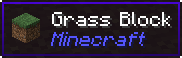
It also has an API for other mod to add more info about their blocks.
### Does WTHIT work with plugin X?
Of course, although make sure to use Fabric Loader 0.11+.
### Does it work with [insert minor version]?
Probably. The thing on brackets for every release is the version WTHIT compiled on.
It should work with any minor version if you want for some reason (like bruh just update)
### it’s A CLiEnt OnlY mod
It’s not. While some simpler feature may work in client only, more advanced stuff requires a server that has it installed. Feature that requires accessing NBT data (eg. inventory content) probably needs wthit on the server.
### Plz rENAmE
No. ~~Now that I think about it, “The hell I’m looking at” would work better :/~~
### Mod compatibility?
Check out [Megane](https://modrinth.com/mod/megane), it adds compatibility for tech mods to WTHIT.
WorldWeaver Neoforge
**WorldWeaver (Unofficial NeoForge Port)**
This project is an **unofficial port** of WorldWeaver to **NeoForge**.
It exists to make mods that depend on WorldWeaver available on NeoForge for modern Minecraft versions.
NeoForge only (not Fabric / not Forge).
**What this project does**
Provides the WorldWeaver library on NeoForge (a dependency/utility library used by other mods).
The goal is to keep functionality as close to upstream as possible, with only porting/compatibility changes where required.
**Why download it**
Download this only if a mod/modpack requires WorldWeaver on NeoForge.
WorldWeaver is a library and typically does not add standalone gameplay content on its own.
Required on: both client and server.
**How this project differs from the original**
– Loader/platform: NeoForge (upstream is Fabric)
– Goal: compatibility for Minecraft on NeoForge
– Scope: upstream-accurate behavior where possible; compatibility fixes when needed
**Credits / Attribution**
All artwork and the majority of the code belong to the developers of the original library: the BetterX Team.
**Original project (upstream)**
WorldWeaver (Fabric) by the BetterX Team (Modrinth): https://modrinth.com/mod/worldweaver
Upstream source (GitHub): https://github.com/quiqueck/WorldWeaver
**Support / Issue reports**
This is an **unofficial NeoForge port**. Please **do not report** issues to the official BetterX Team Discord or GitHub, as they do not maintain this port.
For bugs and support related to this NeoForge version, please use this port’s GitHub issue tracker: https://github.com/Reijin2312/WorldWeaver_Neoforge
If any issues caused by this port affect the upstream community, please contact me directly.
BetterX Discord (upstream community): https://discord.com/invite/kYuATbYbKW
World Weaver

**WorldWeaver**, or *WoVer* for short, is a Fabric utility mod for Minecraft that aims to streamline common modding
tasks, particularly those related to world creation. As a successor to BCLib, WoVer is intended to eventually take its
place. Embracing Minecraft’s data-driven world generation methodology, it aims to increase the value of data elements
(i.e. ResourcePacks, DataPacks, etc.) in modding, and to provide a more flexible and powerful way to create and modify
worlds.
In addition, WoVer is designed to integrate seamlessly with the vanilla game, other mods and world generation data
packs.
**Please note** that this mod is still in early development and is not yet ready for use. This means that:
– The API is not yet stable and may change significantly between versions.
– There may be game breaking bugs that cannot be undone and may destroy worlds.
– Documentation may be missing for some parts, especially those that are still under active development.
We will provide more information in the near future.
WorldTool
# ![[Logo]](https://raw.githubusercontent.com/Ellivers/WorldTool/master/other%20stuff/resources/logo_small.png) WorldTool
WorldTool is a powerful world editing data pack. It supports all versions 1.17 and up, has undo and redo support, and works with all blocks, including modded ones! On the more technical side, everything can be automated with commands, you can use it as a library, and it even supports plugins that can add to/modify WorldTool’s features.
* Easy to use, chat-based UI
* No resource pack required
* Supports all Minecraft versions 1.17 and up
* Has support for multiple languages (currently only English is available)
* Allows for custom WorldTool plugins
* Has undo and redo support
* Works with all blocks, including modded ones
* Complete guides and documentation
## How to Use
When the data pack has been installed, make sure you either have cheats enabled (singleplayer) or are an operator (multiplayer). Then, give yourself the tools by typing `/function worldtool:give`.
For more info, consult the full documentation:
https://ellivers.github.io/worldtool-docs
There is also a [youtube video](https://youtu.be/xXa6GvyabZk) that can help introduce you to WorldTool.
Some plugins to check out:
* [Biome plugin](https://github.com/Ellivers/worldtool-biome-plugin/releases)
* [Example plugin](https://github.com/Ellivers/worldtool-example-plugin/releases)
Report any bugs you find, and get the latest experimental versions from [GitHub](https://github.com/Ellivers/WorldTool) (note that these versions are not documented and may not function correctly).
If you would like to help translating WorldTool, you can do so on [Crowdin](https://crowdin.com/project/worldtool).
If you have any more questions, feel free to join the [Discord server](https://discord.gg/jn8d4zb).