xokz’s Particle Effects
A collection of novel visual effects for datapack creation.
### Lightning Effect
To make a bolt of lightning, execute the function `xze:effects/lightning/spawn` **at** the location the bolt should start, and **as** the entity the bolt should target. For example, the command block in the gif is running:
`execute positioned ~ ~ ~ as @p run function xze:effects/lightning/spawn`
– To change the lightning segment length and angles, you can change the ranges in the `generate_pitch_yaw_len.mcfunction` function.
– To change the chance of a branch being made, change the value in the `lightning_branch_chance.json` predicate.
This effect uses no entities and only @s selectors, resulting in great performance.
### Block Outline Effect
To do the block outline, simply run `function xze:effects/block_outline/spawn` at the block you want. It will automatically snap to the block grid, so don’t worry about positioning it perfectly!
XMyIsland
# XMyIsland
A comprehensive island management plugin that brings robust protection, intuitive GUI management, and economy integration to your Minecraft server.
## 🌟 Key Features
### Island Management
– Create personal islands with customizable sizes
– Visual border particles for easy boundary identification
– Expandable islands with economy integration
– Intuitive GUI-based management system
### Advanced Protection Systems
– Complete grief prevention
– Protection against:
– Explosions
– Liquid flow
– Redstone manipulation
– Piston mechanics
– Tree growth exploitation
– Falling block abuse
– Wither damage
### Trust System
– Detailed permission management
– GUI-based trust controls
– Per-player permission settings
– Multiple permission types:
– Block breaking/placing
– Chest access
– PvP controls
– Entity interaction
– And more!
### Economy Integration
– Expansion costs
– Configurable pricing
– Refund system for island deletion
– Full Vault support
## 🔧 Technical Details
– **Version:** 1.17+
– **Dependencies:** Vault
– **Permissions:** Automatic handling
– **Configuration:** Fully configurable
– **Database:** YAML-based storage
– **Performance:** Optimized for minimal impact
## 💡 Perfect For
– Survival servers
– Economy-focused communities
– PvE servers
– Community-driven servers
– Skyblock-style gameplay
## 🤝 Support & Community
– Active issue tracking
– Regular updates
– Community-driven development
– Comprehensive documentation
Experience the next level of island management with XMyIsland!
XinexLib
# XinexLib
This is a library for meant for mods made by Ultreon Studios and Qubilux/XyperCode.
It’s not recommended to make mods depending on this library unless you use one of the mods by Ultreon.
This is mostly due to possible breaking changes.
Xhomes
### Xhomes – Your Personal Home Management Plugin for Minecraft
**Xhomes** is an essential plugin designed to enhance your Minecraft experience by allowing players to seamlessly set, manage, and teleport to personal homes. With its user-friendly GUI and intuitive functionality, Xhomes simplifies home management and provides an engaging way to navigate the game world.
## Key Features:
– **Set Home**: Easily set your home location using the command `/sethome [homename]`, enabling quick travel back to your favorite spots.
– **Home GUI**: Access a visually appealing GUI to view and select homes, featuring slots filled with blue beds for a straightforward teleportation interface.
– **Teleportation Countdown**: Enjoy a 5-second countdown before teleportation, accompanied by the message: “Teleporting in 5 seconds, don’t move!” to build anticipation.
– **Movement Cancellation**: Teleportation is canceled if the player moves during the countdown, ensuring safe and accurate arrival at the desired location.
– **Delete Home**: Remove homes easily with the command `/delhome [homename]`.
– **Configurable Limits and Tiers**: Server owners can configure the maximum number of homes players can set based on their permission tier:
– **Tier 1 (xhomes.hometier1)**: 2 homes
– **Tier 2 (xhomes.hometier2)**: 4 homes
– **Tier 3 (xhomes.hometier3)**: 6 homes
– **Tier 4 (xhomes.hometier4)**: 8 homes
These limits are fully configurable in the `config.yml` file.
– **Admin-Friendly Management**: Xhomes provides robust tools for server owners to oversee home settings and permissions, offering fine-grained controls for authorized players.
### LuckPerms Permissions:
– `/sethome`: `xhomes.sethome`
– `/delhome`: `xhomes.delhome`
– `/home`: `xhomes.home`
– Tier 1: `xhomes.hometier1` (2 homes)
– Tier 2: `xhomes.hometier2` (4 homes)
– Tier 3: `xhomes.hometier3` (6 homes)
– Tier 4: `xhomes.hometier4` (8 homes)
Elevate your Minecraft gameplay with **Xhomes**—your all-in-one home management solution!
### Source Code
Check out the source code on GitHub: [Xhomes Repository](https://github.com/Akar1881/Xhomes)
XGlow
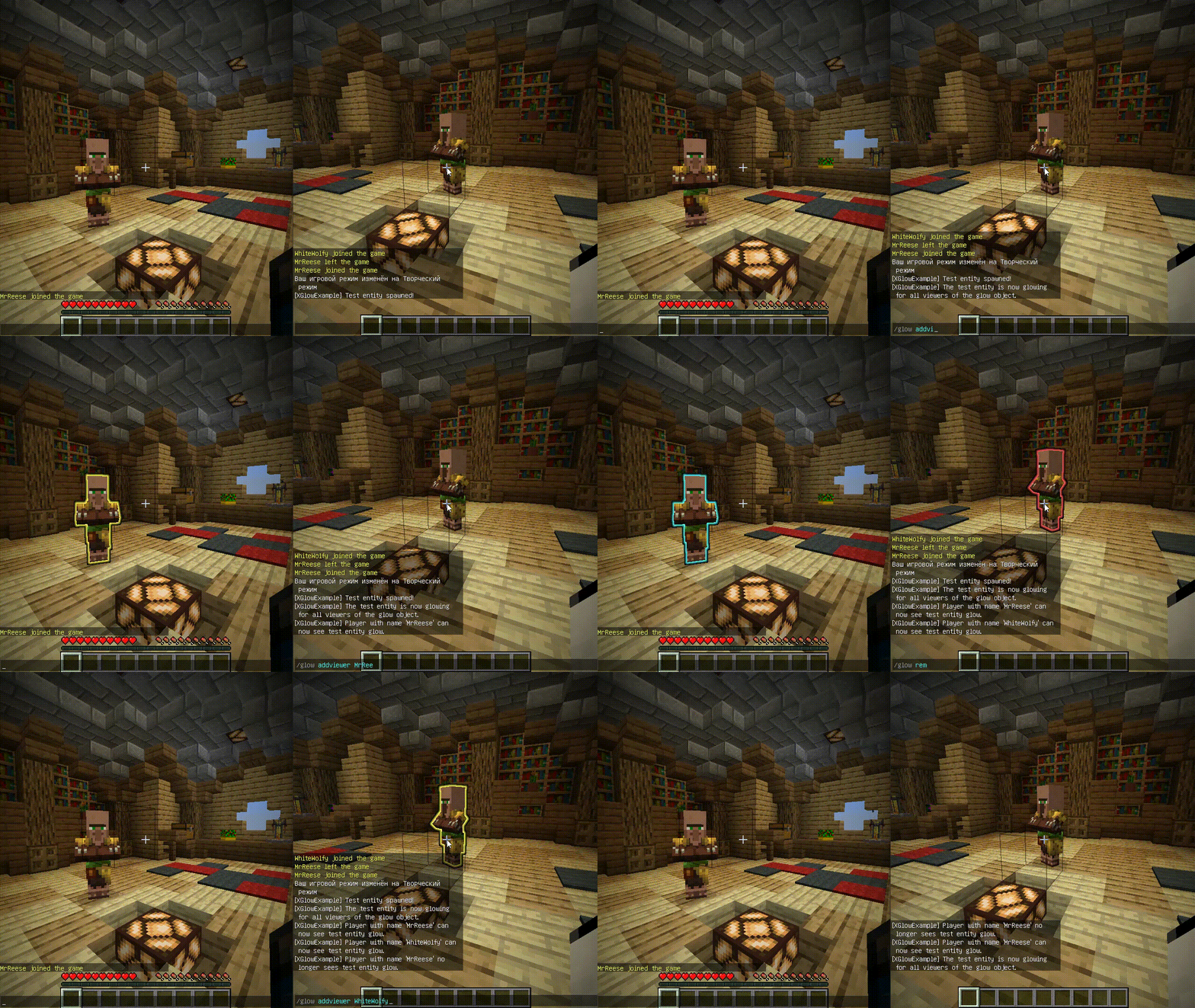
**Works with Java 8 and above.**
(I noticed that the **GlowAPI** from the **inventivetalent** has been abandoned, has not been updated for a long time, has bad reviews and bugs, as well as a rather low-quality code – so I decided to make and publish my own version of the api for the glow)
**XGlow** – is a simple, easy-to-use API to create glow on your entities. The plugin requires [ProtocolLib](https://github.com/dmulloy2/ProtocolLib) to work.
### Usage
First you need to create a Glow object:
(You can use a builder for this)
“`java
Glow glow = Glow.builder()
.сolor(ChatColor.GREEN)
.name(“test”)
.build();
“`
You can add entity to glow object holders,
to make this entity glow with glow object colors.
The glow of the entity will be seen by all viewers
which the glow object contains:
`glow.addHolders(entity);`
To remove the glow of an entity,
you can remove it from the glow object holders.
The entity’s glow will disappear for all viewers of the glow object:
`glow.removeHolders(entity);`
You can add a viewer to the glow object so that he immediately sees the glow of all holders of the glow object:
`glow.display(player);`
When the viewer is removed from the glow object,
all holders of the glow object will
no longer glow for removed viewer:
`glow.hideFrom(player);`
For more features check out XGlow wiki page on github: https://github.com/Xezard/XGlow/wiki
Xfilter
**Xfilter** is a powerful Minecraft plugin designed to maintain clean and safe communication within your server by filtering out unwanted words from player messages. Server administrators can easily manage the list of filtered words using commands, and the plugin supports an unlimited number of filtered words. When a player attempts to send a message containing any filtered word, the message is blocked, and a notification is sent to the player. Xfilter provides full flexibility to customize and update the filtered word list in real-time, ensuring smooth moderation without disrupting gameplay.
## Key Features:
Unlimited filtered words.
Real-time filtering of chat messages.
Easy-to-use commands for managing filtered words.
Only operators (OPs) can add or remove words from the filtered list.
# How to Use Xfilter:
– 1. Adding a Filtered Word:
Command: /xfilterword add or /xfw add
Example: /xfw add badword
This adds the specified word to the filtered word list. If the word is already filtered, you will receive a message saying it’s already in the list.
– 2. Removing a Filtered Word:
Command: /xfilterword remove or /xfw remove
Example: /xfw remove badword
This removes the word from the filtered list. If the word is not found, you will be notified.
– 3. What Happens When a Player Uses a Filtered Word:
If a player sends a message containing a filtered word, the message will not be sent, and the player will receive a message: “Sorry, you can’t send this message because you used a filtered word.”
# Permissions:
Only OPs can use the commands to add or remove words from the filtered list.
Filtered words are stored in filteredwords.yml, and the plugin allows you to add unlimited words for filtering.
XD’s Utils
## Description
XD’s Utils is a plugin and mod that provides a custom web interface that you can monitor the whole server, create backups to restore points of your server with a simple script to restore to a backup, an API to get and modify data of the server and plugin through sending web requests, and more!
## Features
| Feature | Implementation |
|——————-|—————-|
| Invsee | ✅ |
| AFK Detector | ✅ |
| Bounties | ✅ |
| Custom Shops | ✅ |
| Economy | ✅ |
| Chat Muting | ✅ |
| Chat Censoring | ✅ |
| Disabled Commands | ✅ |
| Disabled Items | ✅ |
| Custom Messages | ✅ |
| Backups | ✅ |
| Web Interface | ✅ |
| Commands | ✅ |
> ✅ : Implemented
>
> 🚧 : Work in Progress
>
> ❌ : Not implemented
## Config
Config Example
“`yml
# /$$ /$$ /$$$$$$$ /$$
# | $$ / $$| $$__ $$| $/
# | $$/ $$/| $$ $$|_//$$$$$$$
# $$$$/ | $$ | $$ /$$_____/
# >$$ $$ | $$ | $$ | $$$$$$
# /$$/ $$| $$ | $$ ____ $$
# | $$ $$| $$$$$$$/ /$$$$$$$/
# |__/ |__/|_______/ |_______/
# /$$ /$$ /$$ /$$ /$$
# | $$ | $$ | $$ |__/| $$
# | $$ | $$ /$$$$$$ /$$| $$ /$$$$$$$
# | $$ | $$|_ $$_/ | $$| $$ /$$_____/
# | $$ | $$ | $$ | $$| $$| $$$$$$
# | $$ | $$ | $$ /$$| $$| $$ ____ $$
# | $$$$$$/ | $$$$/| $$| $$ /$$$$$$$/
# ______/ ___/ |__/|__/|_______/
# ============================ #
# WEB #
# ============================ #
# Enabled (true/false)
enable_web: true
# Hosted Port (1000-99999)
port: 8080
# ============================ #
# BACKUPS #
# ============================ #
# Enabled (true/false)
enable_backups: true
# Folders to back up & Backup interval (Folder Names: Minutes)
folders:
– world: 120
– world_nether: 240
– world_the_end: 240
– plugins/XDs-Utils: 300
# Max folder size (MB) (-1/0 for unlimited)
max_size: 1024
# Max backups (Int) (-1/0 for unlimited)
max_backups: 10
# Compression level (0-9)
compression_level: 7
# ============================ #
# MESSAGES #
# ============================ #
# Message to send when a player joins for the first time (true/false)
enable_first_join_message: true
# %player% – Player’s name
# %message% – Message to send
first_join_message: “%yellow%Welcome %gray%%player% %yellow%to the server!”
# Message to send when a player joins (true/false)
enable_custom_join_message: true
# %player% – Player’s name
# %message% – Message to send
join_message: “%green%+ %gray%%player%”
# Message to send when a player leaves (true/false)
enable_custom_leave_message: true
# %player% – Player’s name
# %message% – Message to send
leave_message: “%red%- %gray%%player%”
# Custom player messages (true/false)
enable_custom_message_format: true
# %player% – Player’s name
# %message% – Message to send
custom_message_format: “%gray%%player% %dark_gray%» %gray%%message%”
# ============================ #
# DISABLED ITEMS #
# ============================ #
# Items to disable (Item IDs)
disabled_items:
# – minecraft:item_1
# – minecraft:item_2
# – minecraft:item_3
# Method to disable items
# 1 – Removes Recipe
# 2 – Removes Recipe & Clears Item
disable_method: 1
# ============================ #
# DISABLED COMMANDS #
# ============================ #
disabled_commands:
# – “/command_1”
# – “/command_2”
# – “/command_3”
# ============================ #
# CHAT CENSORING #
# ============================ #
# Words to censor
censored_words:
# – “censored_word1”
# – “censored_word2”
# – “censored_word3”
# Regex patterns to censor
censor_regex_patterns:
# – “censored_regex_pattern1”
# – “censored_regex_pattern2”
# – “censored_regex_pattern3”
# Method to censor words
# 0 – Do nothing (Only logs)
# 1 – Replaces Words with ‘*’
# 2 – Removes Words from message
# 3 – Do not send message
censor_method: 1
# ============================ #
# ECONOMY #
# ============================ #
# Enable the shop (true/false)
enable_shop: true
# Allow anyone to create shops (true/false)
anyone_create_shops: true
# Enable bounties (true/false)
enable_bounties: true
# Bounty you gain when you kill a player (Int/Float/Double)
kill_reward: 100.00
# Amount of money to give to players when join the next day (Int/Float/Double)
daily_balance: 100.00
# Items in the default shop (Item ID: Cost, Amount, Slot)
shop_items:
– minecraft:elytra:
cost: 50000
amount: 1
slot: 0
– minecraft:netherite_ingot:
cost: 25000
amount: 1
slot: 1
– minecraft:diamond:
cost: 2500
amount: 1
slot: 2
– minecraft:emerald:
cost: 2500
amount: 1
slot: 3
– minecraft:gold_ingot:
cost: 50
amount: 1
slot: 4
– minecraft:iron_ingot:
cost: 50
amount: 1
slot: 5
“`
XD’s Library
### XD’s Library
#### XDPXI’s library for numerous tasks.
—
### Features
> Please view the [Documentation](https://xdlib.xdpxi.dev/) for the correct features for your version
—
### Building from Source
#### To build the mod from source follow the steps below:
– Clone the [Git repository](https://github.com/XDPXI/XDLib)
– Run `gradlew build` or `build.ps1` in your terminal in the cloned repository
#### The compiled mod will be in `build/libs`
XDailyVoucher
# XDailyVoucher
A feature-rich daily rewards and voucher system for your Minecraft server!
## 📚 Overview
XDailyVoucher brings an engaging rewards system to your server, encouraging player retention through daily login rewards and a flexible voucher system.
### ✨ Features
**Daily Rewards:**
– Progressive rewards with streak bonuses
– Custom rewards for each day
– Special weekly rewards
– Visual GUI interface
– Persistent streak tracking
**Voucher System:**
– Create custom vouchers
– Multiple rewards per voucher
– Support for both command and item rewards
– Visual GUI for editing voucher contents
– Flexible command execution
– Admin distribution controls
– Player redemption system with limits
## 🎮 Usage
### Player Commands:
– `/xdv daily` – Open daily rewards GUI
– `/xdv redeem ` – Redeem available vouchers
### Admin Commands:
– `/xdv reload` – Reload configuration
– `/xdv voucher ` – Create vouchers
– `/xdv vgui ` – Edit voucher items through GUI
– `/xdv give [amount]` – Distribute vouchers
– `/xdv dailyitem ` – Set rewards
– `/xdv active ` – Enable redemption
– `/xdv deactive ` – Disable redemption
– `/xdv vlist` – List all vouchers
## 📋 Requirements
– Paper 1.17+
– Vault
## ⚙️ Configuration
Easily customize through `config.yml`:
– Base reward amounts
– Streak multipliers
– All messages and notifications
## 🔒 Permissions
– `xdv.admin` – Administrative access
– `xdv.use` – Basic player access (default: true)
## 🔧 Installation
1. Download the plugin
2. Place in plugins folder
3. Restart server
4. Configure settings
## 🤝 Support
Need help? Found a bug? Have a suggestion?
– Create an issue on our [GitHub](https://github.com/Akar1881/xdailyvoucher)
## 📝 License
Released under the GNU License
XConfig
# ⚙️ | XConfig
XConfig is a simple library Free and Open-Source that allows create multiple files rapidly and do some action with that files as the developer want, or simply get values from the files. The library has a good code-quality, you can see the library code and contribute to it.
You can create various configuration files, by the moment the library only has support for YAML files.
Features:
* Support for Bukkit and BungeeCord platforms.
* Make multiple files easy.
* Control about the files.
* Get multiple values from files.
* Write values into the files.
* Reload or save the files.
* Colorize the texts with normal colors and HEX colors.
[](https://jitpack.io/#InitSync/XConfig)
[](https://www.codacy.com/gh/InitSync/XConfig/dashboard?utm_source=github.com&utm_medium=referral&utm_content=InitSync/XConfig&utm_campaign=Badge_Grade)
# 🛠️ | Installation
XTools installation is very easy, you can import the library using a dependency manager such as Maven or Gradle. Or just add the jar to BuildPath of your project.
To get the jar, either download it from [GitHub](https://github.com/InitSync/XConfig/releases) or [Spigot](https://www.spigotmc.org/resources/xconfig.105977/). Or just [Build it locally](https://github.com/InitSync/XConfig#–build)
You can see examples about how to import the library at the [Wiki](https://github.com/InitSync/XConfig/wiki/Installation).
# ➕ | Contribute
Do you want contribute with the library?
* [Make a Pull Request](https://github.com/InitSync/XConfig/compare)
* [Issues](https://github.com/InitSync/XConfig/issues/new)
# ✅ | Build
If you want build the project locally, download it, you must be had Gradle and Java 8+ for this.
Now for build the project
“`
git clone https://github.com/InitSync/XConfig
cd XConfig
./gradlew shadowJar
“`
The files will be at the `XConfig/bin` folder.
# 🎫 | License
This project is licensed under the GNU General Public License v3.0 license, for more details see the file [License](LICENSE)