2. 快速刷神装
3. 配置效果
4. 创建私人世界
/world create 我的世界
/world config gamemode creative
/world config cheats true
/world tp
感谢使用 CoreTweaker127’s-Mod!
让我们一起创造更好的Minecraft体验! 🌈⚔️
CoreTweaker127’s-Mod
A comprehensive Minecraft mod featuring 150 Chinese Hero Achievements, Rainbow Divine Sword, 26 TNT variants, Super Minecarts, Universal Totems, and more!
📖 Mod Introduction
CoreTweaker127’s-Mod is a feature-rich Minecraft Fabric mod that brings revolutionary changes to your gameplay experience! Whether you’re a builder, adventurer, or redstone engineer, this mod provides powerful and fun tools for you.
✨ Core Features
🗡️ Rainbow Divine Sword System – Super weapon with AoE attacks and slam strikes
🏆 150 Chinese Hero Achievements – A unique achievement system paying tribute to Chinese heroes
💣 26 TNT Variants – From tracking TNT to super explosives, everything you need
🚂 Special Minecart System – High-speed minecarts, flying minecarts, teleporting minecarts
🛡️ Universal Totem System – Even stone and wood can serve as Totems of Undying!
🌍 Multi-Dimension System – Create private worlds, skyblock adventures
🎨 Rich Functional Blocks – Auto furnace, infinite water source, teleportation pad, and more
⚙️ Highly Configurable – All features can be customized through config files
🎮 Main Features
⚔️ Rainbow Divine Sword System
Base Attributes
– Damage: 5,000 base damage
– AoE Attack: Hits all entities within 10 blocks
– Slam System: +100 damage for every block of fall height
– Dropping from 100 blocks = 15,000 damage!
– Infinite Durability: Never breaks
– Bedrock Breaking: The only weapon that can break bedrock
– Instant Obsidian Mining: Mines obsidian instantly
Special Abilities
**Auto Totem of Undying**
– Automatically triggers upon receiving lethal damage
– Restores to 1 health point
– Grants Regeneration II, Absorption II, Fire Resistance I
– No cooldown, unlimited triggers
**Divine Gear Drop System**
*Mining Stone Drops (30% chance):*
– 5%: Full Netherite armor set with Level 255 enchantments
– 10%: Totem of Undying (1–3)
– 15%: End Portal Frames, Eyes of Ender, Dragon Eggs, and other rare items
– 70%: Random enchanted gear (Levels 1–15)
*Damage Drops (20% chance):*
– End Portal Frames, Eyes of Ender, Obsidian
– Flight Duration 3 Firework Rockets, Enchanted Golden Apples
– Enchanted gear with no curses (guaranteed no Binding/Vanishing)
– Nether Stars (ultra rare!)
**Mob Last Words**
– 46 unique last words displayed when killing mobs
– Adds fun and immersion to the game
Hotkey Functions
| Key | Function | Description |
|—–|———-|————-|
| C | Effects Config GUI | Customize 8 potion effects, Levels 1–255 |
| F | Creative Mode | 3 seconds of Creative Mode, 60-second cooldown |
| L | Ore Detection | Detects all ores within 50 blocks |
| – | Tracking TNT | Spawns TNT that auto-tracks enemies |
🛡️ Universal Totem System
Trigger Priority:
1. Vanilla Totem of Undying — Highest priority
2. Infinity-Enchanted Totem — Enchant with “Infinity” so the totem is never consumed
3. Substitute Totems — When no totem is available, other items can save your life!
Available Substitutes (by priority):
– Stone
– Deepslate
– Diorite
– Sand
– Sticks
– Various Planks (Oak, Birch, Spruce, etc.)
– Various Logs
Excluded Items: Tools, weapons, minerals, and ore blocks cannot be used as substitutes.
Configuration Options:
“`json
{
“enableUniversalTotem”: true, // Universal Totem
“enableTotemEnchanting”: true // Totem Enchanting
}
“`
💣 26 TNT Variants
Special TNT Types:
– Tracking TNT — Auto-tracks the nearest hostile mob
– Friendly TNT — Only destroys blocks, does not harm entities
– Super TNT — Massive explosion radius
– Mining TNT — Only destroys ores, perfect for mining
– Teleport TNT — Teleports you to a designated location after explosion
– …plus 21 more variants!
TNT Properties:
– Configurable explosion power
– Configurable fuse time
– Configurable special effects
– Instant detonation on hit
🚂 Super Minecart System
Minecart Types:
– High-Speed Minecart — 500% speed boost
– Flying Minecart — Can fly through the air
– Teleport Minecart — Instant teleportation to destination
– Storage Minecart — Extra-large storage capacity
– Combat Minecart — Auto-attacks hostile mobs
Rail Enhancements:
– High-Speed Rail — Increases minecart speed
– Teleport Rail — Direct teleportation
– Auto-Correction Rail — Prevents derailment
– Launch Pad — Launches minecarts into the air
🏆 150 Chinese Hero Achievements
Pay tribute to Chinese historical heroes and learn history through gameplay!
Achievement Categories:
– Ancient Heroes — Yue Fei, Wen Tianxiang, Qi Jiguang…
– Modern-Era Heroes — Lin Zexu, Deng Shichang, Yang Jingyu…
– Contemporary Heroes — Qian Xuesen, Yuan Longping, Tu Youyou…
– Mythological Figures — Hou Yi, Da Yu, Nüwa…
– Literary Heroes — Three Kingdoms characters, Water Margin heroes…
Unlock Methods:
– Complete specific tasks
– Defeat specific mobs
– Collect specific items
– Explore specific areas
🌍 Multi-Dimension / World System
Create a Private World:
– `/world create [world name]` — Create your private world
– `/world tp` — Teleport to your world
– `/world back` — Return to the overworld
– `/world config ` — Configure world parameters
– `/world info` — View world information
Configurable Parameters:
– `seed` — World seed
– `gamemode` — Game mode (survival/creative/adventure/spectator)
– `difficulty` — Difficulty (peaceful/easy/normal/hard)
– `type` — World type (normal/flat/amplified/large_biomes)
– `flat` — Superflat preset
– `cheats` — Allow cheats (true/false)
– `pvp` — PVP toggle (true/false)
Permission Management:
– `/worldpp turn` — Invite a player to visit
– `/worldpp flash` — Revoke access
– `/worldpp visit ` — Visit another player’s world
Skyblock Dimensions:
– Enter various skyblock dimensions via commands
– Normal spawn in the overworld; skyblock requires commands to enter
– Various special terrains await your exploration
🎨 Functional Blocks
Automation Blocks:
– Auto Furnace — Smelts automatically without fuel
– Auto Crafting Table — Automatically crafts items
– Auto Planter — Automatically plants and harvests
– Auto Breeder — Automatically breeds animals
Special Blocks:
– Infinite Water Source — Provides unlimited water
– Infinite Lava Source — Provides unlimited lava
– Teleportation Pad — Set teleport points for quick travel
– Peace Lantern — Prevents mob spawning
– Remote Redstone — Long-range redstone signal transmission
– Elevator Block — Quick vertical movement
Utility Blocks:
– Disassembly Table — Breaks items down into raw materials
– Sorter — Automatically organizes chests
– Jump Pad — Super-high jumps
– Speed Track — Extreme running speed
🛠️ Utility Items
Tool Items:
– Item Destroyer — Quickly destroy unwanted items
– Right-click to open the interface
– Left-click an item
– All identical items in your inventory are destroyed
– Protects important items from accidental deletion
– Sorter — Automatically organizes inventory and chests
– Super Peachwood Sword — A wooden sword with special attributes
– Magic Cocktail — Random potion effects
Special Items:
– Compressed Sticks — Crafted from 9 sticks
– Rainbow Sword — The ultimate weapon
– Totem of Undying — Supports enchanting
⚙️ Configuration System
Main config file: `config/xztx127.json`
“`json
{
“enableUniversalTotem”: true, // Universal Totem
“enableTotemEnchanting”: true, // Totem Enchanting
“enableRainbowSwordParticles”: false, // Rainbow Sword particle effects
“enableSuperRainbowSwordParticles”: true, // Super Rainbow Sword particles
“enableZombieGodGearDrops”: false, // Zombie divine gear drops ⭐
“enableRandomSpeedModification”: false // Random speed modification ⭐
}
“`
New Feature Configuration:
**Zombie Divine Gear Drops (New in v1.3.3)**
– Disabled by default; must be enabled in config
– Zombies have a chance to drop high-tier gear on death
– Customizable drop rates and items
**Random Speed Modification (New in v1.3.3)**
– Disabled by default; must be enabled in config
– Player movement speed changes randomly
– Adds fun and challenge to the game
📥 Installation
Prerequisites:
– Minecraft: 1.20.1
– Fabric Loader: 0.14.21 or higher
– Fabric API: 0.87.0+1.20.1 or higher
– Java: 17 or higher
Installation Steps:
1. **Install Fabric Loader**
– Download the installer from the [Fabric website](https://fabricmc.net/)
– Run the installer and select Minecraft 1.20.1
2. **Download Fabric API**
– Download from [Modrinth](https://modrinth.com/) or [CurseForge](https://curseforge.com/)
– Make sure the version is 0.87.0+1.20.1
3. **Install the Mod**
– Place `coretweaker127-mod-1.3.3.jar` into the `.minecraft/mods` folder
– Also place the Fabric API jar file in the same folder
4. **Launch the Game**
– Start Minecraft 1.20.1 using the Fabric profile
– The config file will be auto-generated on first launch
🎯 Quick Start
**Getting the Rainbow Sword**
Crafting Recipe:
“`
Netherite Block
Diamond Block
Emerald Block
Diamond Block
Stick
“`
Usage Tips:
– **Slam Strike**
Build a tall tower, jump down and attack mobs. The higher you fall, the more damage you deal! Dropping from 100 blocks = 15,000 damage!
– **Quick Divine Gear Farming**
Mine lots of stone (30% drop chance). Let mobs hit you (20% drop chance). Combine both methods for maximum efficiency.
– **Configure Effects**
Hold the sword and press C to open the config GUI. Adjust 8 effect levels (1–255). Changes take effect immediately — no restart needed.
– **Create a Private World**
“`
/world create MyWorld
/world config gamemode creative
/world config cheats true
/world tp
“`
🔧 FAQ
**Q: What if the Totem of Undying doesn’t work?**
A: This was fixed in v1.3.3! Both vanilla and modded totems now work correctly. Make sure `enableUniversalTotem` is set to `true` in the config.
**Q: Are new features enabled by default?**
A: Zombie Divine Gear Drops and Random Speed Modification are disabled by default. You need to manually enable them in `config/xztx127.json`.
**Q: How do I enter the skyblock dimension?**
A: Use the `/world create` command to create a world, or use teleport commands to enter special dimensions. You spawn normally in the overworld.
**Q: Is this mod compatible with other mods?**
A: In most cases, yes. If you encounter conflicts, check the logs and report the issue.
**Q: Config changes aren’t taking effect?**
A: You need to fully close the game and relaunch for changes to take effect.
📊 Technical Information
Mod Architecture:
– Mixins: Non-invasive vanilla code modification
– Networking: Full client-server synchronization
– GUI System: Custom configuration interface
– Entity System: 26 custom TNT entities
– Multithreading: Asynchronous task processing
Code Statistics:
– Java Classes: 100+
– Lines of Code: 10,000+
– Comment Coverage: 80%+
– Config System: JSON format
– Localization: Full Chinese and English support
Performance Optimization:
– Optimized particle effects
– Asynchronous task processing
– Caching system
– Configurable feature toggles
📝 Changelog
**v1.3.3 (2026-02-07) — Major Update**
✅ Mod Renamed: xztx127’s mods → CoreTweaker127’s-Mod
✅ Fixed Totem of Undying Issue: Holding a totem no longer causes instant death
✅ New Config Options: Zombie divine gear drops, random speed modification
Bug Fixes:
– Fixed Totem of Undying priority issue
– Fixed Universal Totem System interfering with vanilla mechanics
– Lowered UniversalTotemMixin priority
– Improved totem trigger logic
New Features:
– Zombie Divine Gear Drop system (disabled by default)
– Random Speed Modification system (disabled by default)
– Improved configuration system
See full changelog: [CHANGELOG-v1.3.3.md](CHANGELOG-v1.3.3.md)
🤝 Contributing
Contributions, bug reports, and suggestions are welcome!
How to Contribute:
1. Fork this repository
2. Create your feature branch (`git checkout -b feature/AmazingFeature`)
3. Commit your changes (`git commit -m ‘Add some AmazingFeature’`)
4. Push to the branch (`git push origin feature/AmazingFeature`)
5. Open a Pull Request
Reporting Issues:
– Provide a detailed description of the problem
– Include your Minecraft version and mod version
– Attach crash logs (if applicable)
– Describe the steps to reproduce
📜 License
This project is licensed under the MIT License — see the [LICENSE](LICENSE) file for details.
👥 Authors
– **CoreTweaker127** — Lead Developer
– **RainbowSword Team** — Development Team
🌟 Special Thanks
– **Fabric Team** — For providing an excellent mod loader
– **Minecraft Community** — For continuous support and feedback
– **All Contributors** — For making this mod even better
📞 Contact
– GitHub: Submit an Issue
– Discord: Join our server
– Email: [email protected]
🎉 Support the Project
If you enjoy this mod:
– ⭐ Give us a star on GitHub
– 📢 Share it with your friends
– 💬 Provide feedback and suggestions
– 🐛 Report bugs to help us improve
Xwarps
## Xwarp – A Complete Teleportation Solution for Minecraft
Xwarp is a feature-rich teleportation plugin for Minecraft that allows players to easily set and teleport to custom warp points within their world. Whether you’re managing a large server with multiple locations or just want to teleport between your favorite spots, Xwarp offers a seamless and immersive experience.
## Key Features:
Custom Warp Points: Set warp points anywhere in the world with ease using the /setwarp [warpname] command. These warp points can be accessed by any player with the appropriate permissions.
Teleport Countdown: When a player selects a warp, a 5-second countdown begins, with a clear message displayed in the center of the screen: “Teleporting in 5 seconds, don’t move!” (colored in yellow). If the player walks or moves during this time, the teleportation is canceled, adding an element of realism and control to the teleportation process.
Movement Cancellation: Prevent players from teleporting if they move while waiting. This encourages players to remain stationary for teleportation to complete successfully, preventing accidental teleports during gameplay.
GUI-Based Warp Selection:
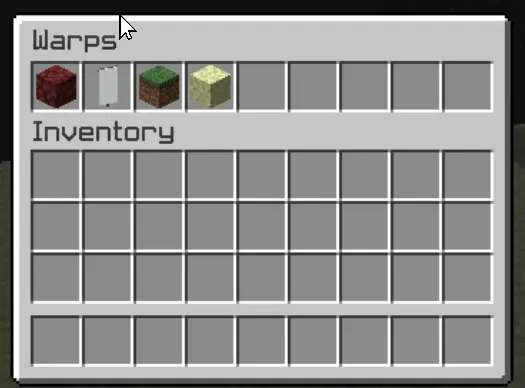
One of Xwarp’s standout features is its Graphical User Interface (GUI) for selecting warps. Instead of relying solely on commands, players can access a sleek warp selection screen where they can visually choose their desired warp point. Here’s what makes the GUI special:
Icon Customization: Each warp point can be represented by a different icon (block/item) in the GUI. Administrators can change the warp icon using the /seticonwarp [warpname] [itemname] command, allowing full customization of the look and feel of the warp menu.
Visual Warp Selection: Players simply open the warp menu and click on the desired warp icon to begin teleporting. The GUI provides an intuitive and engaging way to access teleport points, especially for large servers with multiple destinations.
## Admin-Friendly:
Warp Management: Server administrators can easily add, delete, and manage warp points, and even assign custom icons to each warp point for better organization and clarity.
Permissions Integration: Fine-grained permissions allow you to control which players can set, access, or delete warps. This ensures that only authorized users can manage or use certain warp points.
## How it Works:
1. Setting a Warp: Use /setwarp [warpname] to create a new warp at your current location. The warp is saved along with a default icon.
2. Selecting a Warp: Players can open the warp GUI and click on the icon for their desired destination. A 5-second countdown will start, and if they don’t move, they are teleported to the selected warp.
3. Customizing Warps: Use /seticonwarp [warpname] [itemname] to change the icon representing a warp in the GUI, making it easy for players to distinguish between different warp points.
## Why Xwarp?
Xwarp is designed for flexibility, ease of use, and visual appeal. It’s perfect for large servers that need efficient teleportation management or for small groups of players who want a fast and intuitive way to travel across their world. With its GUI-based approach, teleportation becomes not just a command-line task, but a visually engaging experience that fits right into Minecraft’s world.
Take your server to the next level with Xwarp—your all-in-one teleportation solution!
## LuckPerms
/warp – xwarp.warp
/setwarp – xwarp.setwarp
/delwarp – xwarp.delwarp
/seticonwarp – xwarp.seticonwarp
XunLib
## **Overview**
XunLib is a lightweight yet powerful utility library designed to simplify mod development by handling repetitive tasks and offering robust, reusable systems. From inventory management to spatial tools, it provides flexible APIs to minimize boilerplate.
### **Features**
🔧 **Inventory Utilities**
– Insert/extract items, validate stacks, and check container states.
– Armor slot validation for materials/types.
– Convert grid positions to slot indices.
🎯 **Fuzzy Item Matching**
– Compare items by count, enchantments, or custom properties.
– Configurable ignore rules (e.g., ignore durability or Data components).
🧪 **Smart Effect Application**
– Intelligently extend/upgrade existing effects or apply new ones.
🌈 **Color & Spatial Tools**
– Convert between RGB/HSL/HSV and blend colors dynamically.
– Generate shapes (discs, spheres, hollow cubes) and check spatial bounds.
✨ **Registration System**
– Adding custom items, blocks, and entities in the common module to ease multi-loader development.
Xtpa
Xtpa is an innovative teleportation plugin for Minecraft designed to enhance player interaction and navigation. With Xtpa, players can easily send and accept teleport requests, creating a more connected gameplay experience.
One of the standout features of Xtpa is the TPA GUI. When a player receives a teleport request, they can click on a simple button to open the GUI, which provides a clear and intuitive interface. This GUI includes:
– Accept Button:
A green wool block that allows players to accept the teleport request effortlessly.
– Warning Message:
A paper item labeled “!!warning maybe a tp trap!!”, alerting players to the risks associated with teleportation.
– Cancel Button:
A red wool block that enables players to cancel the teleport request if they choose not to accept it.
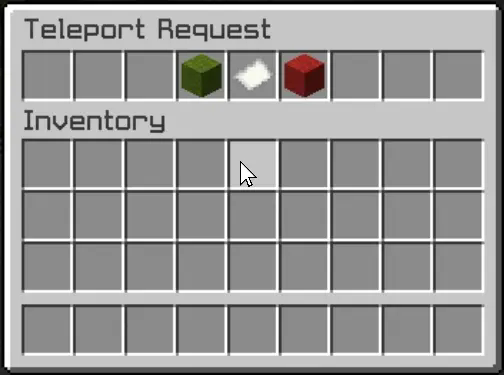
This user-friendly design not only makes the process of accepting or rejecting requests straightforward but also adds an engaging visual element to the experience. Players can quickly make decisions without cluttering their chat with commands, making teleportation seamless and efficient.
Xtpa integrates seamlessly with LuckPerms, allowing server owners to manage permissions easily. The following commands and permissions are included:
– Commands and Permissions
/tpa [playername]
Permission: xtpa.tpa
Description: Send a teleport request to another player.
/tpahere [playername]
Permission: xtpa.tpahere
Description: Request another player to teleport to your location.
/tpaccept [playername]
Permission: xtpa.tpaccept
Description: Accept a teleport request from another player.
/tpcancel [playername]
Permission: xtpa.tpcancel
Description: Cancel a teleport request.
/tpatoggle [on/off]
Permission: xtpa.tpatoggle
Description: Toggle TPA requests on or off for yourself.
/tpagui [requester]
Permission: xtpa.tpagui
Description: Open the TPA request GUI for accepting or canceling requests.
– Conclusion
Overall, Xtpa aims to enrich the Minecraft community by providing a smooth and enjoyable teleportation system that players will love to use. With its intuitive GUI and robust permission management through LuckPerms, Xtpa is the ideal solution for any Minecraft server looking to enhance player connectivity.
Xshards
# Xshards Plugin
Xshards is a comprehensive Minecraft plugin designed to manage a shard-based economy system with player transfers, leaderboards, daily rewards, streaks, and multiple earning methods with a customizable shop interface. All data is reliably persisted to the database using batch operations and transaction management.
## Key Features:
– **Shard Economy System**: Players can earn shards through various activities, with configurable earning rates and integration with PlaceholderAPI. Database storage support (SQLite or MySQL) with fixed persistence.
– **Reliable Data Storage**: NEW! Fixed critical shop persistence bug – all shop items, player shards, and streak data now properly save with batch operations and transaction management.
– **Per-Message Control**: Every message in the plugin can now be enabled or disabled, giving server owners full control over chat clutter.
– **Admin Controls**: Robust shard management including give and remove commands.
– **Fully Customizable Shop System**: Supports custom items with lore and model data, adjustable shop sizes, and a price editing system with a purchase confirmation interface. NEW! Customize shop GUI title via config, and per-item display names/lore via `/store editname` and `/store editlore` commands – all stored in database.
– **Shard Transfer System**: Enable true player-to-player economy with GUI confirmation dialogs.
– **Leaderboard GUI & Holograms**: View top players with ranking system, player heads display, and pagination. Full PlaceholderAPI support for hologram leaderboards (e.g., %xshards_top_name_1%).
– **Daily Rewards & Streaks**: Automatic daily bonuses with configurable streak multiplier (Easy/Mid/Hard modes).
– **Advanced AFK System**:
– 5-second countdown with movement detection
– Free movement while in AFK mode
– Persistent location storage
– Automatic return to previous location
– Protection from damage while AFK
– Dedicated world support (recommended)
– Safe teleportation system
– Configurable earning rates
– Seamless server restart handling
## Earning Methods:
– **Playtime Rewards**: Earn shards by staying online.
– **PvP Rewards**: Gain shards from player kills with a cooldown system.
– **AFK Rewards**: Accumulate shards while in AFK mode with countdown system, movement detection, and dedicated world support.
## Commands:
Includes general commands for checking shard balance, opening the shop, and entering/exiting AFK mode, as well as admin commands for managing the shop, player shards (give/remove), and plugin configuration.
## Permissions:
Configurable permissions for basic and admin commands, ensuring a tailored experience for players and server administrators.
## Installation:
Simply download the plugin JAR file, place it in the server’s `plugins` folder, and configure it as needed.
## Database Storage:
XShards now supports both SQLite (default) and MySQL database storage, providing improved data persistence and reliability. The plugin automatically creates the necessary database tables and handles all data operations seamlessly.
For support and further details, please refer to the project’s GitHub repository.
Xrtp
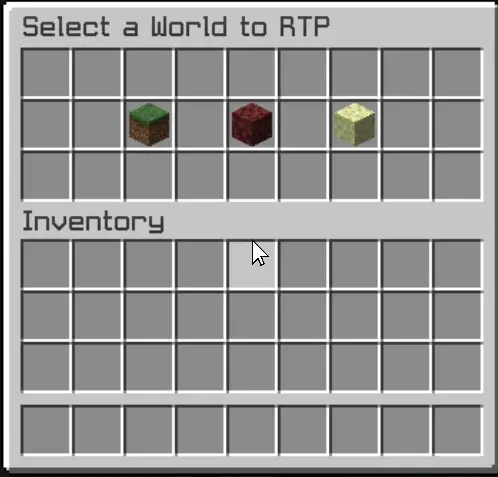
– The Xrtp plugin enhances Minecraft gameplay by providing a robust random teleportation (RTP) feature. Players can teleport to safe locations in the Overworld, Nether, and The End, ensuring a seamless adventure experience.
– The plugin includes a user-friendly graphical interface (GUI) that allows players to initiate teleportation effortlessly. A countdown timer adds an exciting element of anticipation, while the teleportation process cancels if the player moves, preventing unintended outcomes. This combination of safety and convenience makes Xrtp an essential tool for players seeking exploration without the risk of falling into danger.
– Additionally, the config.yml file offers extensive customization options for server administrators. This configuration file allows for the adjustment of teleportation settings, including cooldown periods, maximum teleportation distances, and specific world restrictions. Administrators can fine-tune these parameters to align with their server’s gameplay style, ensuring that the RTP feature enhances rather than disrupts the overall experience.
– The GUI is designed to be intuitive, providing clear options and feedback, ensuring that players can navigate the teleportation process with ease.
XP: Attribute Core
AttributeCore is a library that adds a wide variety of RPG-style attributes to Minecraft.
#
**This library is used by the following mod**
[https://modrinth.com/mod/rpg-class-artifacts](https://modrinth.com/mod/rpg-class-artifacts)

#
**Adds the following RPG attributes:**
attributecore:life_steal
– Life Steal: Steals HP from enemies when you deal damage.
attributecore:healing_received
– Healing Received: Increases all healing you receive.
attributecore:aoe_healing
– AOE Healing: Heals nearby allies (players and tamed pets) every second.
attributecore:golden_guard
– Golden Guard: Grants golden hearts (absorption) outside of combat. After avoiding damage for several seconds, the golden hearts regenerate up to your maximum granted capacity.
attributecore:max_hp_damage
– Max HP Damage: Deals extra damage to targets based on their maximum health.
attributecore:crit_chance
– Crit Chance: Increases chance to perform a critical hit.
attributecore:critical_damage
– Critical Damage: Increases your critical hit damage multiplier.
attributecore:dodge_chance
– Dodge Chance: Chance to completely avoid incoming damage.
attributecore:arrow_damage
– Arrow Damage: Increases damage dealt by arrows.
attributecore:draw_speed
– Draw Speed: Allows faster charging and firing of bows.
attributecore:arrow_percent_bonus
– Arrow Percent Bonus: Provides a percent bonus to all arrow damage.
attributecore:aggro_radius
– Aggro Radius: Changes the distance at which hostile mobs will notice you.
attributecore:extra_jumps
– Extra Jumps: Allows one or more extra jumps while airborne.
attributecore:stealth
– Stealth: Reduces the chance that mobs detect or target you.
attributecore:poison_damage
– Poison Damage: Increases the damage your poison effects deal.
attributecore:pet_damage
– Pet Damage: Increases the damage dealt by your pets.
attributecore:pet_resistance
– Pet Resistance: Reduces damage received by your pets.
attributecore:pet_speed
– Pet Speed: Increases your pets’ movement speed.
#
Problems with the mod? Bugs? Tips, ideas? Join my Discord and share with us
