VillagerUnknown’s Platform
# VillagerUnknown’s Platform
Adds commands and simple features. A core library for VillagerUnknown mods.
**Optional Features:**
* Persistent player profile caching. (Enabled by default.)
* Welcome messages for new and returning players. (Disabled by default.)
* Notice in chat when players can sleep. (Disabled by default.)
* Notice in chat with death coordinates for players. (Disabled by default.)
**Commands:**
* /villagerunknown-platform-help – Reveals Discord Link
* /villagerunknown-platform-reload – Reloads VU Mods
* /villagerunknown-platform-worldspawn – Reveals World Spawn Location and Radius
* /villagerunknown-platform-flushcaches – Empties caches
**Options:**
* Enable Villager Comments
* Enable Commands
* Enable Command Feedback Sounds
* Enable Welcome Message
* Welcome Message New (for New Players)
* Welcome Message Returning (for Returning Players)
* Enable Sleep Notice
* Sleep Notice Message
* Enable Death Coordinate Notice
## Support
* Request features and report bugs at https://github.com/VillagerUnknown/Platform/issues
* View the changelog at https://github.com/VillagerUnknown/Platform/blob/main/CHANGELOG.md
Villagers Beat The Game For You
Minecraft, but Villagers Beat The Game For You
This datapack let you tame villagers, to work for you!
Tame a villager by throwing an emerald on them, then use your sneak to teleport them to your location. When you’re near a tree, shift to have your tamed villagers break it down for you, there is a chance you will get the new wooden chunk item. And don’t forget to check out the crafting table for some new recipes, search for “token”, it will show you all of the new Tokens, that can upgrade the powers of your villagers!
### TOKENS
Portal Hacker: Spawns a stronghold under you!
Recruiter: Spawns tamed villagers!
Warrior: Your villagers get diamond swords!
Mine tokens: Every level bigger the radius of mining!
### CHUNKS
You get them from mining the material they’re made of, with your villagers.
Q: What version of Minecraft is this datapack compatible with?
A: This datapack is compatible with Minecraft version 1.19
Q: Is this datapack compatible with Minecraft Java Edition or Minecraft Bedrock Edition?
A: This datapack is only compatible with Minecraft Java Edition.
Q: How do I activate the datapack in my world?
A: To activate the datapack, enter the command “/reload” when you join the world. This will reload the world and start the datapack.
Do /reload when you join to the world, to start the datapack!
VillagerConfig
[](https://discord.gg/HeZayd6SxF)
# VillagerConfig
VillagerConfig is an advanced fabric mod for customizing villagers. It allows loading custom villager trades using
datapacks, customizing trade behavior, and more…
## Features
### Custom trades
One of VillagerConfig’s most powerful features are the custom trades. Custom trades allows mod-pack creators, server owners
and others to completely customize wandering trader and villager trades! If you want to create your own custom datapack,
make sure to check out the [wiki](https://github.com/DrexHD/VillagerConfig/wiki/Creating-your-own-datapack)!
Or check out the list of known [Datapacks using VillagerConfig](https://github.com/DrexHD/VillagerConfig/wiki/Datapacks-using-VillagerConfig)!

### Online generator
Setting up custom trades can be quite annoying, so a custom online generator has been created to help creating datapack
files with a convenient **graphical user interface** and an **instant preview**!
Check it out [here](https://villagerconfig.vercel.app/villagerconfig/?preset=butcher)!

### Testing
To make testing datapacks easier the mod has two commands, `/vc test villager []` can be used to
open a randomly generated trade gui for the given villager profession. The level that should be unlocked can optionally
be specified. `/vc test wanderingtrader` can be used to open a randomly generated trade gui of wandering traders.
### Discounts
You can configure a *maximum* and *minimum* **discount** a villager can put on their trades.

### Other
There are several other config options available to customize villager behaviour!
#### Trade cycling
Whether villagers trades will change, when their workstation is replaced (and they haven’t been traded with)
#### Conversion chance
The chance for a villager to convert to a villager-zombie
#### Infinite trades
Whether villagers need to restock their trades
Villager API
# Villager API
A simple data-driven framework for making custom villager professions, types, and trades without touching any code. Just drop JSON files in a folder and you’re done.
## What does it do?
This mod lets you create completely custom villagers with your own:
– **Professions** – New jobs with custom workstations and trading lists
– **Types** – Different villager appearances tied to specific biomes
– **Trades** – Full control over what villagers buy and sell at each level
– **Hero Gifts** – Custom loot tables for post-raid rewards
Everything is handled through JSON files in the `villagerpacks` folder. No coding, no complex setup—just make your files and load up the game.
## Quick Example
Want an Alchemist villager who uses a crying obsidian block as their workstation?
1. Create `villagerpacks/my_pack/villagers/poi_types/alchemist.json` and `villagerpacks/my_pack/villagerapi_config.json`
2. Define the workstation block
3. Add the profession file linking to that POI type
4. Set up your trades
5. Drop in textures for the profession overlay
That’s it. The mod handles registration, trade mechanics, and everything else.
## What can you customize?
– **Workstations** – Any block can be a job site
– **Trading pools** – Define exactly what villagers offer at each experience level (Novice through Master)
– **Item components** – Full support for enchantments, custom names, potions, and all the data components Minecraft uses
– **Treasure maps** – Sell maps to modded or vanilla structures with custom markers
– **Biome appearances** – Make villagers look different depending on where they spawn
– **Biome-specific trades** – Same profession, different inventory based on location
## Who and what is this for?
If you’ve ever wanted to add villagers to your modpack or mod without dealing with Java code, this is for you. It’s built for pack makers and modders who want villager content without the headache of getting into learning and writing java code.
Works with both regular resource pack like villager packs and as part of mods by simply putting a villagers folder in your mods main directory. Multiple packs can run at once—later packs override earlier ones where there’s overlap.
## Full Documentation
Check the complete documentation with examples and all available options here:
**[https://github.com/frikinjay/villagerapi/blob/main/DOCUMENTATION.md](https://github.com/frikinjay/villagerapi/blob/main/DOCUMENTATION.md)**
You can generate a pack online here without having to manually create all the files:
**[Villager Pack Generator](https://morevillagers.neoterra.online/villager-pack-gen)**
The docs include the full pack structure, all JSON formats, item component examples, and a complete example pack to get you started.
Villager Job Tools
## Villager Job Tools
Automates villager trade rerolling without repetitive clicking. Select the trades (or librarian enchantments) you want, aim at the job site block, and the mod will reroll until a match is found.
—
### How it works
1. Aim at a villager’s **job site block** (lectern, composter, etc.) with the villager nearby
2. Press **R** (or your bound key) to start
3. The mod will:
– Open the villager’s trades
– Check for matches based on your settings
– Break and replace the job site if no match is found
– Stop automatically when a match appears
4. Press **R** again to stop at any time
—
### Features
**Trades Finder**
– Select trades or enchantments to search for
– Stops rerolling when any selected trade appears
– Supports all villager professions
– Includes search for quick filtering
**Auto Buy**
– Automatically purchases selected trades
– Separate configuration from Trades Finder
– Works during rerolling or manual trading
**Auto Sell**
– Automatically sells items the villager buys
– Configurable items and quantities
– Works while the trade screen is open
**Price & Level Filters**
– Set maximum emerald price per trade
– Uses displayed (discounted) prices
– Optional minimum enchant level
**Chat Logging**
– Optionally prints checked trades to chat
**Timing Controls**
– Adjustable delays for breaking, placing, loading trades, and retry clicks
—
### Controls & Settings (default keybinds)
| Key | Action |
|—–|——–|
| **R** | Start / stop rerolling (look at job site block) |
| **K** | Open the mod menu |
| **U** | Toggle Auto Buy |
| **O** | Toggle Auto Sell |
All keybinds and options can be changed in **Settings**.
—
### Notes
– Client-side only — no server installation required
– Requires the job site block in hotbar or offhand
– Works with discounted prices (reputation, Hero of the Village)
– Supports all villager professions
VillagerGUIApi






Full Transcript
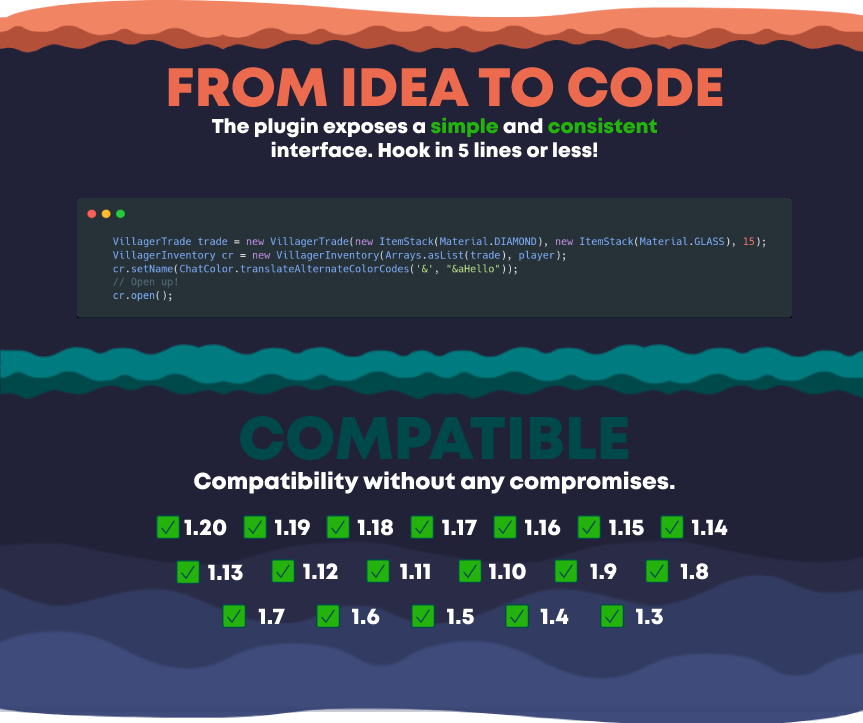
FROM IDEA TO CODE
The plugin exposes a simple and consistent interface. Hook in 5 lines or less!
COMPATIBLE
Compatibility without any compromises.
Supports all versions from 1.3 to 1.19
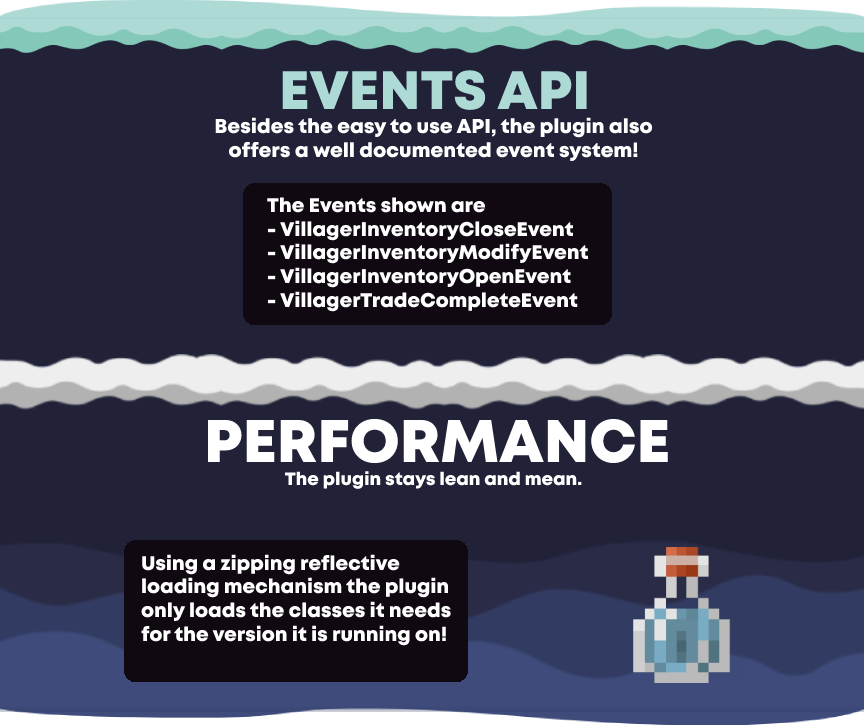
EVENTS API
Besides the easy to use API, the plugin also offers a well documented event system!
The Events shown are
– VillagerInventoryCloseEvent
– VillagerInventoryModifyEvent
– VillagerInventoryOpenEvent
– VillagerTradeCompleteEvent
PERFORMANCE
The plugin stays lean and mean.
Using a zipping reflective loading mechanism the plugin only loads the classes it needs for the version it is running on!

Viewmodel
“`
“`
# About Me
Vanilla Viewmodels is a Datapack Library which adds an “animation controller” for your OBJMC rendered viewmodels ingame. To work with the datapack, you must have:
– An Animated (Generic in Blockbench) Model.
– [objmc](https://github.com/Godlander/objmc) installed locally.
– A Basic Understanding of How Resourcepacks and Datapacks work.
“`
“`
# Utility:
– ## How it works.
Since objmc only exports model+texture, it should be noted that the datapack adopts certain conventions to make sure that it works as intended. OBJMC, by default, will not “prepare you a datapack/resourcepack” like how plugins like AnimatedJava does. Hence, creating a resourcepack that correctly follows this datapack’s convention is CRUCIAL.
### Model in Resourcepack
The optional ‘id’ parameter accepted in the “play-animation” utils command requires a valid item_model component value. Since every objmc animation exports into its own model+texture, you must:
– Create an Item Model JSON that resembles the model. `e.g. ‘first_person:weapons/glock’ at assets/first_person/items/weapons/glock.json`
– Animations for the Model MUST be included in this item_model folder, where the “model with animation” is a model toggled when **STRING CUSTOM-MODEL-DATA value === ANIMATION-NAME**.
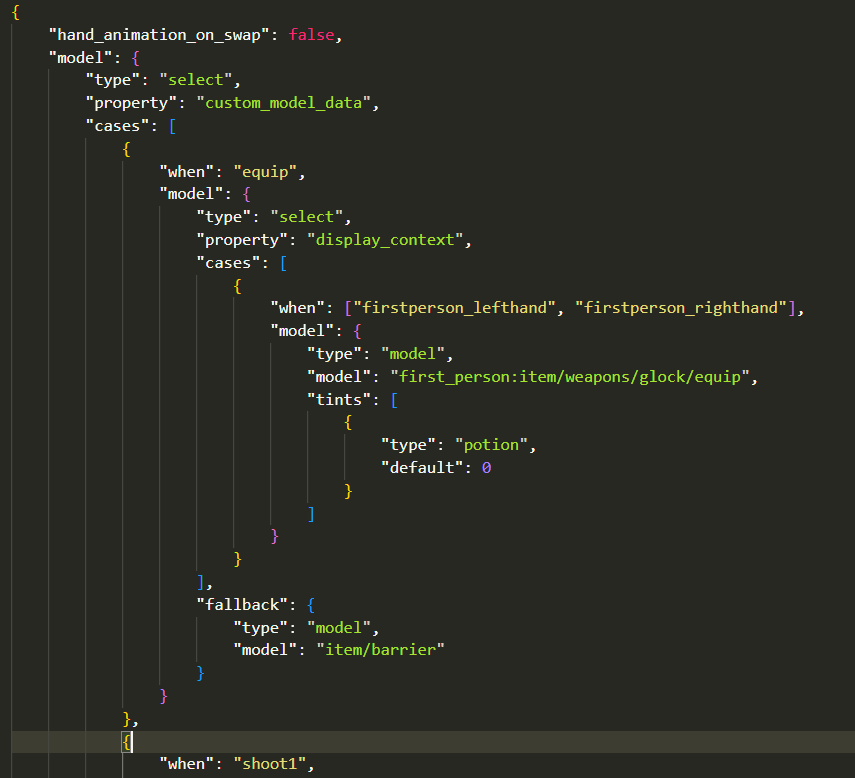
Hence, every animation is a CustomModelData string in the item_model JSON file. Obviously, this implies that adding multiple animations would mean that you’ll have to export every animation into its OBJ sequences => put them through OBJMC.py => take the condensed model and mention it in the item_model component.
### Registering Models in Datapack.
To Register an OBJMC Animated Model in the datapack, open the function file `vm:global/load` and add a registry in the data modify line!

Here’s how a registry entry’s structure looks like:
“`
{
id: “first_person:weapons/glock”, // item_model component
animations: [
{
“name”:”equip”,
“start”: 0,
“end”: 30,
keyframe_functions: [
{ at: 0, function_file: ‘test:equip’ }, // Run a function file @ 0th keyframe.
{ at: 30, function_file: ‘test:end_animation’ },
{ at: 25, function_file: ‘test:gun_sfx’ }
]
},
{
“name”: “shoot1”,
“start”: 0,
“end”: 8,
“keyframe_functions”: [
{ at: 0, function_file: ‘gun:shoot’ }
]
}
]
}
“`
– ## Playing an Animation
to play an Animation, run the command:
“`
function vm:animations/play {args:{}}
“`
the `args:{}` field is used to tweak parameters, namely:
“`
id: it stores/applies the *item_model* component value
animation: it stores the name of the animation.
frame: the frame at which the animation should start.
“`
an example command:
“`
function vm:animations/play {args:{id:”first_person:weapons/glock”, animation: “equip”, frame: 10}}
“`
This command will,
– change the item model of the potion item to first_person_weapons/glock
– set the animation-to-be-played to “equip” (this is handled by setting animation name equal to custom_model_data string that changes the model into one with different animation texture data)
– set the starting frame to 0 (potion color is set to [8388608+10](https://github.com/Godlander/objmc#controlling-animation))
“`
“`
– ## Stopping an Animation
to stop an animation, simply run the command:
“`
function vm:animations/stop
“`
“`
“`
# Credits
– [Godlander](https://github.com/Godlander) [& the contributors on objmc github repository.] —— For Making OBJMC (and thus, viewmodels) in Minecraft possible!
– GhostScoutW (@ghostscout on discord) —— For making a [Guide on how to setup a working viewmodel project with OBJMC](https://www.youtube.com/watch?v=Kmbc9LyhDoA)!
– pinkiuses (creator of [ATMOS: Minecraft Edition](https://modrinth.com/modpack/atmos_roguelike)) —— For coming up with the idea of using OBJMC as viewmodels!
– And you!
ViaFabricPlus
# ViaFabricPlus
Minecraft Fabric mod which allows you to join EVERY Minecraft server version (Classic, Alpha, Beta, Release, April Fools, Bedrock)

**ViaFabricPlus** is a Minecraft mod for [Fabric](https://fabricmc.net/) that builds on
the [ViaVersion plugin](https://github.com/ViaVersion/ViaVersion).
It lets you connect to servers from almost every Minecraft version while fixing issues that the original project
couldn’t.
These fixes make older servers feel much closer to how they originally played, with improvements to movement, block and
entity interactions, graphics, and more. In short, it recreates the classic Minecraft experience on today’s client.
## Important to know
– Works **only with the newest Minecraft client version**
– Runs **only on [Fabric](https://fabricmc.net/)**. (There won’t be a Forge or NeoForge version)
– **Multiplayer only** – it does not affect singleplayer worlds
– **Clientside only** – it does not run on Multiplayer servers
– **No cross-version resource packs** – resource packs from older versions are not supported
– If you want to play using **older Minecraft clients**, you should use the original [ViaFabric](https://viaversion.com/fabric) instead.
For a detailed comparison between the two projects, check out the [ViaFabric vs ViaFabricPlus section](https://github.com/ViaVersion/ViaFabric?tab=readme-ov-file#differences-with-viafabricplus).
## How to use
– [Step-by-step installation and usage guide](https://github.com/ViaVersion/ViaFabricPlus/tree/main/docs/USAGE.md)
– Found a bug? Please report it on the [issue tracker](https://github.com/ViaVersion/ViaFabricPlus/issues)
– Got questions? Join the [ViaVersion Discord](https://discord.gg/viaversion)
### Supported Server versions
– Release (1.0.0 – 26.1.1)
– Beta (b1.0 – b1.8.1)
– Alpha (a1.0.15 – a1.2.6)
– Classic (c0.0.15 – c0.30 including [CPE](https://wiki.vg/Classic_Protocol_Extension))
– April Fools (3D Shareware, 20w14infinite, 25w14craftmine)
– Combat Snapshots (Combat Test 8c)
– Bedrock Edition 1.26.12 ([Some features are missing](https://github.com/RaphiMC/ViaBedrock#features))
## For Developers & Contributors
– [Contribution guide & dev setup](https://github.com/ViaVersion/ViaFabricPlus/tree/main/CONTRIBUTING.md)
– [API docs & integration examples](https://github.com/ViaVersion/ViaFabricPlus/tree/main/docs/DEVELOPER_API.md)
## Credits
Huge thanks to all our [contributors](https://github.com/ViaVersion/ViaFabricPlus/graphs/contributors) who made this
project possible.
## Disclaimer
We cannot guarantee this mod will be allowed on every server.
Some servers may treat it as suspicious and flag it with anti-cheat plugins.
**Use responsibly and at your own risk!**
## Partnership with RocketNode Hosting
RocketNode provides top-tier server hosting worldwide, allowing you to set up your server with just a few clicks! Their intuitive dashboard makes server management a breeze, and you can even schedule automatic restarts without needing any coding knowledge.
Use the code ENZA to get 25% off your first month on any of their gaming servers. Get started here: https://rocketnode.com/enza
ViaAprilFools
# ViaAprilFools
ViaVersion addon to add support for some notable Minecraft snapshots.
**You can override the included version in [ViaFabric](https://modrinth.com/mod/viafabric) or [ViaProxy](https://github.com/ViaVersion/ViaProxy):**
– in **ViaFabric**, put ViaAprilFools into the `mods` folder
– in **ViaProxy**, put ViaAprilFools into the `jars` folder
Requires Java 17. See [here](https://docs.papermc.io/misc/java-install) how to update your installed Java version.
**Requires [ViaVersion](https://hangar.papermc.io/ViaVersion/ViaVersion) and [ViaBackwards](https://hangar.papermc.io/ViaVersion/ViaBackwards) to be installed..**
### Added Server protocols
– 3D Shareware
– 20w14infinite
– Combat Test 8c
### Added Client protocols
– 3D Shareware
– Combat Test 8c
## Contact
If you encounter any issues, please report them on the
[issue tracker](https://github.com/ViaVersion/ViaAprilFools/issues).
If you just want to talk or need help implementing ViaAprilFools feel free to join the ViaVersion
[Discord](https://discord.gg/viaversion).
VexBot – PvP Against Bots
Vex Bot 1.5 – Descrption
PvP Methods ⚔️
– Sword
– Axe
– Sheild
– Crossbow & Bow
– Cobweb (Toggleable)
– Potions
– TnT Minecart PvP (Toggleable)
– Crystal PvP
– Anchor PvP
– Wind Charge Macing
– Elytra mace
– Spear Mace
Techniques 🔨
– Crit Chaining
– Combing
– Sweeping Hit
– W Tapping
Pathfinding & Ai 🎯
– Avoids Obstacles (Lava, Powderd Snow, etc)
– Allways Takes the best route
– Revenge Mode
– Follow Mode
– Priority Targeting (Preffers Low Hp/Eating targets)
– Auto Targeting (Configurable)
Difficulty System ⚖️
– Easy → Medium → Hard → Expert → Perfect
– Changes Reaction Time, Combo Chance, etc
Teams Features 👥
– Team System (Groups bots together)
– Each Team has there own indivdivdual settings
– Per-Team target lists (teams target specific people or multiple people)
Settings & GUI ⚙️
– In-game GUI — configure all bot settings without commands
– Per-team settings GUI with full toggles – Cart mode selector cycling through all 5 modes
– Settings auto-save per world — survive server restarts
Custom Potion 🧪
– Refills the kit that the potion is linked to. (By right Clicking)
Issue Tracker
https://vex-log-keeper.lovable.app
How to use
VexBot — How to Use check the tutorials at
(https://vex-log-keeper.lovable.app/tutorials)
Settings GUI
/vexbot settings — opens the main settings menu where you configure:
Difficulty — Easy / Medium / Hard / Expert / Perfect (controls reaction
speed, crits, combos)
– Auto Target — bot automatically finds and attacks nearby players
– Target Players / Bots / Mobs — what the bot will attack
– Revenge Mode — bot attacks whoever hits it
– Ignore Creative — skip creative mode players
– Use Elytra Mace — enable aerial elytra+mace drop combo
– Use Ender Pearl — bot throws ender pearl to escape when low HP
Kits (Inventory Loadouts)
1. Put the gear you want in your own inventory
2. /vexbot createkit — saves your current inventory as a kit
3. /vexbot givekit — opens GUI to give a kit to a bot
4. /vexbot deletekit — delete a saved kit
5. /vexbot kiticon — set a display icon for a kit in the menu
Teams
1. /vexbot createteam — create a team and assign bots to it via GUI
2. /vexbot teamsettings — set who the team targets (all players,
specific players, etc.)
3. /vexbot teamgivekit — give a kit to every bot in a team at once
Follow Mode
/vexbot follow — bot follows a player without attacking
/vexbot follow stop — stops following
Quick Start (Fighting Bot)
1. /vexbot spawn — spawn a bot
2. Give it gear: /vexbot givekit (or manually give items)
3. /vexbot settings → enable Auto Target + Target Players
4. Set Difficulty to your preference
5. The bot will start fighting automatically