EntityMask shader
RU-Русский
# ✨ Описание
🎯 Этот шейдер упрощает процесс создания **качественного хромакея**, используя рендер с шейдером в качестве маски игрока вместо сложных настроек освещения и фона.
⚡ С его помощью вы сможете быстро отделить персонажа от фона без традиционной работы с зелёным экраном.
—
## 🛠 Как это работает
1️⃣ Установите данный шейдер.
2️⃣ Запишите **два футажа** с помощью любого мода для записи, например
🎥 ReplayMod или 📀 Flashback:
– 🎨 Один — с **активным шейдером** (он будет служить маской игрока).
– 🖤 Второй — **без шейдера** (основная картинка).
3️⃣ В программе для монтажа примените эффект **Ключ маски дорожки** 🖌 к основному футажу, используя запись с шейдером как маску.
4️⃣ Получите аккуратный 🎯 **хромакей персонажа**, готовый к дальнейшему использованию в ваших видео.
—
## 💎 Преимущества
– 🪄 **Простота** — не требуется настраивать освещение или подбирать фон.
– 🎯 **Качество** — ровная маска персонажа без артефактов.
—
## 📋 Требования
– 🔹 Любой загрузчик шейдеров ([Iris]([https://irisshaders.net/](https://modrinth.com/mod/iris)) или OptiFine).
– 🔹 Мод для записи футажей (рекомендовано: ReplayMod или Flashback).
– 🔹 Программа для монтажа с поддержкой эффекта `Ключ маски дорожки`.
—
Так же в помощь мой ролик про шейдеры:
EN-English
# ✨ Description
🎯 This shader simplifies the process of creating a **high-quality chroma key**, using a render with the shader as a player mask instead of complex lighting setups and backgrounds.
⚡ With it, you can quickly separate the player from the background without the traditional hassle of setting up a green screen.
—
## 🛠 How It Works
1️⃣ Install this shader.
2️⃣ Record **two footages** using any recording mod, for example
🎥 ReplayMod or 📀 Flashback:
– 🎨 One — with **the shader enabled** (this will serve as the player mask).
– 🖤 Another — **without the shader** (main video).
3️⃣ In your video editing software, apply the **Track Matte Key** 🖌 effect to the main footage, using the shader render as the mask.
4️⃣ Get a clean 🎯 **player chroma key**, ready to use in your videos.
—
## 💎 Benefits
– 🪄 **Simplicity** — no need to adjust lighting or set up a background.
– 🎯 **Quality** — clean player mask without artifacts.
—
## 📋 Requirements
– 🔹 Any shader loader ([Iris]([https://irisshaders.net/](https://modrinth.com/mod/iris)) or OptiFine).
– 🔹 A recording mod (recommended: ReplayMod or Flashback).
– 🔹 Video editing software with support for `Track Matte Key` (or similar) effects.

Enhanced Vision
#Enhanced Vision Shader

## Features:
1.It shows outlines of mobs and walls around the centre screen, with outline brightness increasing as darkness increases.
2.It adds a shimmering effect above lava and other heat sources to mimic real-life shimmering over fire sources.
3.It blurs objects which are on the side of the screen, with the strength of the blur effect increasing with increasing distance of the object from the centre of the screen.
4.It creates reflections on the surface of the water.
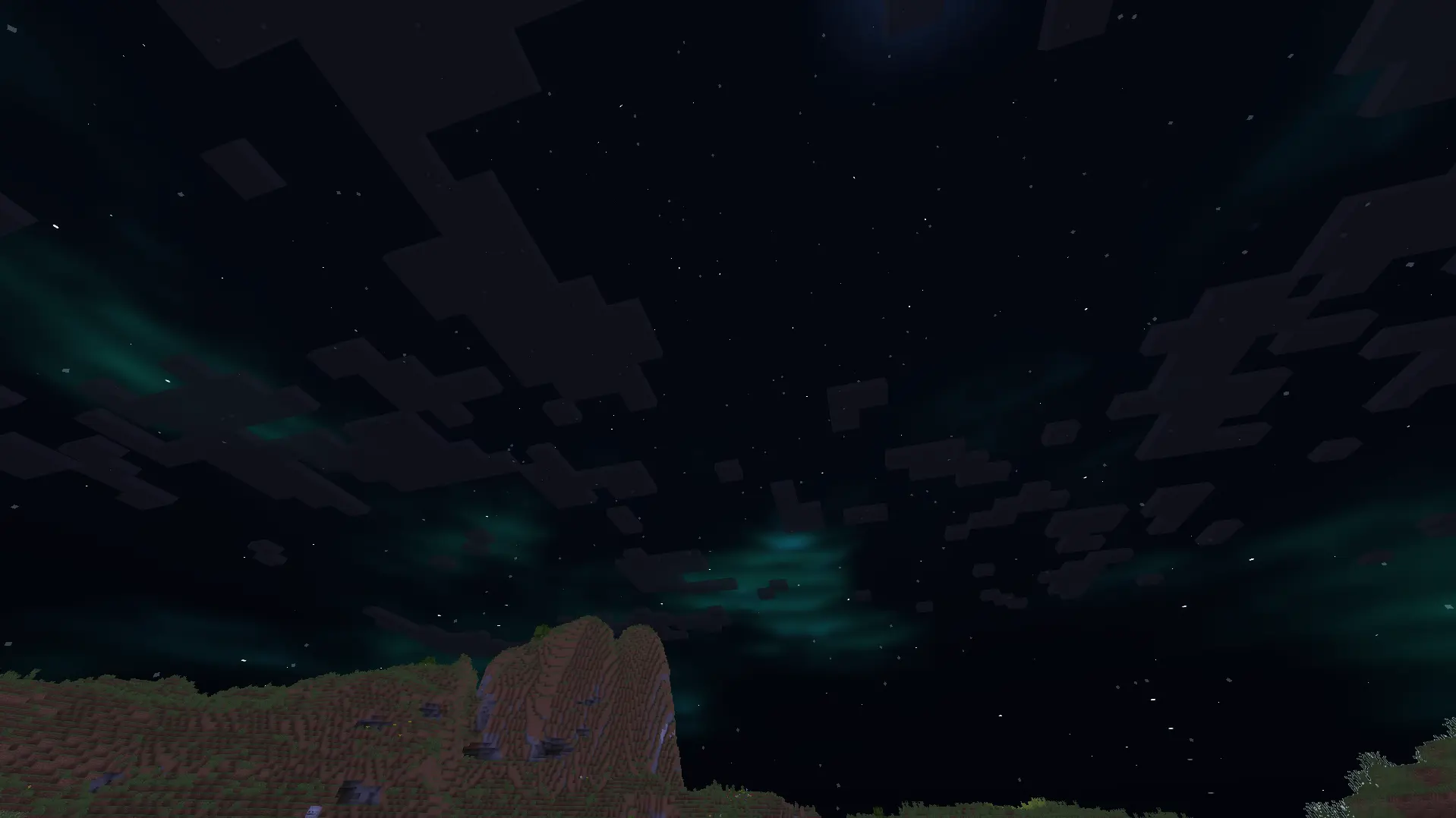
5.It adds auroras and stars to the night sky.
6.It improves the sky colour by making it brighter.
7.It adds basic foliage swaying.
Ember Shader
# Ember Shader
**Ember Shader is still in development!**
In the future it should be a good looking Shader which should run on any computer without great performance impact.
## What does Ember Shader have?
Currently Ember Shader does not have much.
The newest Version has Shadows and Settings for Shadows and overall Brightness.

This is just like a Devlog right now.
Help me develop the Shader by posting Bugs and Performance issues in the Discord Channel “Bugs”
I’m really sorry but it takes longer than expected to make an update.
Sadly I lost the files after corrupting my OS and I’m doing something else right now.
Eerie Craft
This minecraft shader is inspired by horror games like silent hill and this mod has multiple features that accomplishes that feat of making the player feel uncomfortable-
1. The clouds are made dark and realistic unlike vanilla minecraft clouds that don’t seem intimidating. The clouds have movement added to them too.
2. Added a new water texture apart from the vanilla minecraft water texture to make it interesting.
3. Added realistic lighting and shadows along with the light spreading through fog particles.
4. Added fog to the game to make any attack from a mob unpredictable, even normal light sources won’t save you from the atmosphere of this mod because they won’t work.
5. Vegetation movement is in the mod that makes the forest environment dynamic.
6. Sun and moon have their own glow and unique texture apart from vanilla minecraft!
EcoShift Lite
EcoShift Lite is a refined version of EchoShift made to keep the original style while making it cleaner, smoother, and more balanced. It improves the visual experience with better lighting, softer bloom, cleaner water, improved atmosphere, and more controlled colors without pushing the shader too far.
The goal of EcoShift Lite is to enhance EchoShift while keeping its identity. Overworld scenes feel more polished, water looks deeper and cleaner, lava is better controlled, and the Nether and End are adjusted to feel more immersive while still staying familiar.
EcoShift Lite is made for players who want the feel of EchoShift in a more balanced and lightweight form
CurseForge
Eclipse


## Eclipse
Eclipse is a Revamped Version of EclipseLite, in Cooperation with Gamer Ben.
### About
Eclipse is a Shader Pack that gives a Solar Eclipse feel to the skies during the day! It is based on EclipseLite, but has many distinct features that set it apart.
Eclipse aims to give a dark and moody feel to your world, but still keeping it vanilla.
Our shader may looks similar to vanilla, but thats the whole point! We want to keep Eclipse close to standard gameplay, yet with a new vibe.
### Team
Eclipse is a project founded and developed by **GamesOfDev**, but Owned and tweaked by **Gamer Ben**.
EclipseLite

### ABOUT
**Eclipse Lite is a super lightweight Minecraft shader made for the absolute lowest-end PCs, laptops, and toasters that can’t handle even Sildur’s or Mellow shaders. It keeps the classic vanilla Minecraft look but adds subtle improvements — like glowing transparent water and cleaner, whiter clouds — all while running buttery-smooth on any system.**

### Features
**Eclipse Lite is made for ultra-low-end devices. It has no waving effects and avoids all heavy features like bloom, motion blur, and depth of field to ensure high FPS. The water uses the default Minecraft style but is transparent for a cleaner, more aesthetic look. This shader is in BETA, so minor bugs may be present. It’s perfect for players who can’t run shaders like Sildur’s Lite or Mellow but still want a subtle visual boost.
**
### BUGS
**Found a bug? You can report it by creating a ticket under the bug category in our Discord server. Your feedback helps us improve Eclipse Lite and fix issues faster. Every report means a lot to us and truly makes our day better!**

EchoShift
EchoShift is a Minecraft Java shader focused on making the game look more immersive, atmospheric, and detailed while still keeping the Minecraft feel. It improves sunlight, shadows, reflections, glow, foliage movement, clouds, glass, and dimension visuals to create a world that feels richer and more realistic.
In the Overworld, EchoShift adds cleaner lighting, better sharpness, improved reflections, moving grass and plants, and a more natural sky. Water feels smoother and more realistic, glass looks clearer, and ores and special blocks catch light in a more satisfying way.
In the Nether, EchoShift gives lava, fire, and glowing materials a stronger visual presence while keeping the dimension darker and more dramatic. Nether structures and blocks look better under the improved lighting, and reflective materials stand out more without becoming too bright.
In the End, EchoShift replaces the plain look with a deeper star-filled atmosphere that feels more cinematic and mysterious. The result is a cleaner and more memorable final dimension while still fitting Minecraft’s style.
EchoShift is designed for players who want a shader that looks beautiful, feels alive, and makes exploration, building, and screenshots more impressive
### Go to Gallery to see Images
[CurseForge]
(https://www.curseforge.com/minecraft/shaders/echoshift)
Ebin Resurrected


Shader development is hard and takes a lot of time. If you enjoy my shaders, please consider supporting my work!
# Ebin Resurrected
Ebin Resurrected is a vibrant and performant Minecraft shaderpack.
Ebin began with the goal of being fast, beautiful, configurable, feature-rich, and having a base of well-written code. It was developed by BruceKnowsHow from 2016-2020. jbritain resumed development of the shader in 2024 under the name ‘Ebin Resurrected’. This is a fork of Ebin which brings compatibility with modern versions of Minecraft, and significantly improves upon aspects of the shader, such as PBR.
## Community
If you would like to discuss Ebin Resurrected, or other Minecraft shaderpacks, join my Discord server. Alternatively, in the shaderLABS discord, you can head over to `#ebin-resurrected-jbritain`.
## Features
– Multicoloured Blocklight
– Sunlight Shadows / Shading
– PCSS ‘Variable Penumbra’ Shadows with transparency.
– Bloom / Glow
– Procedural 2D/3D Clouds
– Procedural Water Waves
– Deferred Shading Pipeline – Everything is correctly shaded, even behind semi-transparent blocks
– Terrain Deformation – “Animal Crossing” and “Acid” deformations
### LabPBR Compliant
– Rough Screen Space Reflections – accurate specular reflections on all blocks.
– Normal Mapped Lighting.
– Terrain Parallax (POM).
– Material Ambient Occlusion.
– Hardcoded Metal Support.
– Porosity – materials look ‘wet’ in the rain.
## Planned Features
– Distant Horizons support
– End skybox
## Compatibility
### Minecraft
– Optifine and Iris are both supported, however some features only work on Iris. Older Optifine or Iris versions may have issues, as the shader is developed on the latest versions of either.
– Minecraft 1.17.1 is the earliest tested version. The shader may work on older versions but this is not guaranteed.
### Hardware
– OpenGL 4 compatible hardware is required. This boils down to Nvidia GeForce 400, AMD Radeon HD 5000, Intel HD 3rd gen **or later**. Any modern device should work fine.
– The Raspberry Pi is not supported as it does not support OpenGL 4.
– Intel GPUs are untested and you may encounter issues. If you do encounter issues, please report them, as Intel is intended to be supported.
### Operating System
– MacOS is **NOT SUPPORTED**.
## If you run into problems
Having problems? Join my Discord Server and create a thread in `#support`. Alternatively, if you are experiencing a problem with Ebin you consider to be a bug, create a new issue. Please read the issue guidelines before creating one and make sure somebody else hasn’t raised the same issue already. **You are likely to get a faster response on Discord**.
## Team
– jbritain: Maintainer
– BruceKnowsHow: Original Developer (no longer involved in the shader)
## Contributors
– dotModded, DethRaid, zombye
## Thanks
– The shaderLABS Discord members, for answering the many questions I’ve had in my time developing shaders, some of which were even constructive. Particularly:
– Balint
– Jessie
– Null
– TimeTravelBeard
– Quadro
– BuilderB0y
– NinjaMike
– CyanEmber
– Capt Tatsu, whose shader, BSL I ported the multicoloured blocklight and FXAA code from.
– Sonic Ether, creator of SEUS and inspiration for Ebin
– daxnitro, original creator of the Shaders Mod
– karyonix, longtime maintainer of the Shaders Mod
– sp614x, Ebin would not be possible without #include.
– IMS, for maintaining Iris and Sodium, which are really cool mods.
– chocapic13 & Sildur, various code references and help over the years
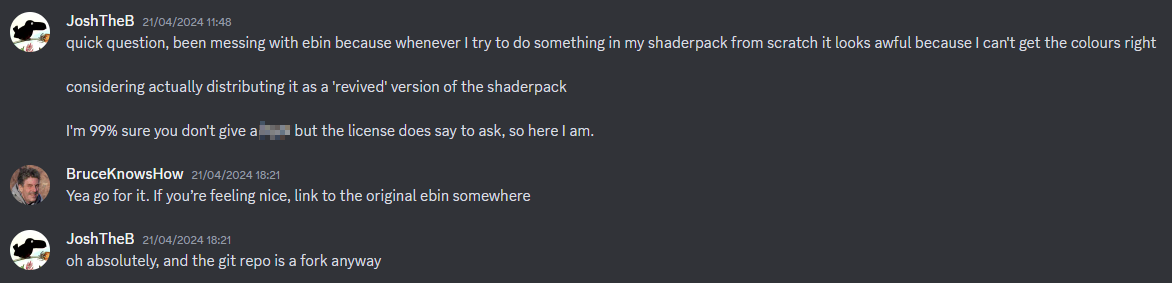
## Evidence of written permission from BruceKnowsHow to distribute this shaderpack
Earth Shaders
### ABOUT
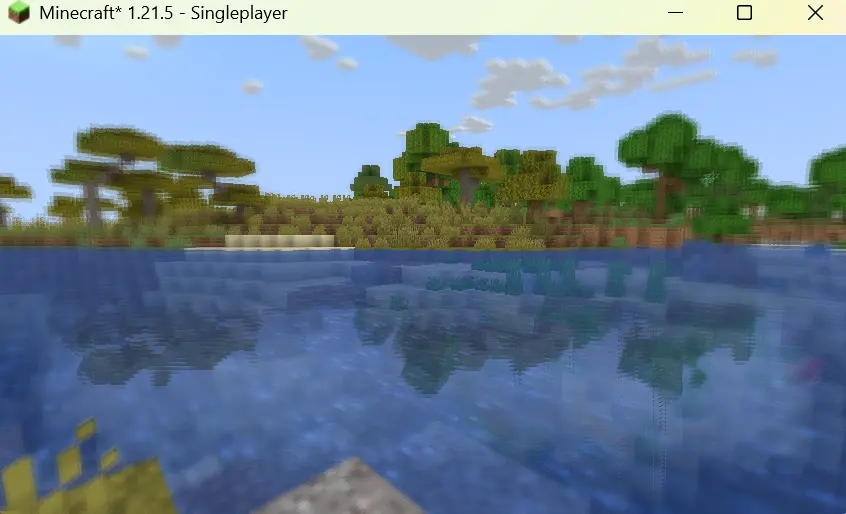
The shader enhances the environment with warm sunlight, subtle bloom around the sun, and gentle fog that adds depth to the mountains. The water looks transparent and reflective, showing detailed underwater terrain. Grass and terrain appear vibrant with improved shading, while the overall lighting feels soft and immersive, creating a peaceful, cinematic look perfect for exploration or content creation.

### Features
Earth Shaders comes with simple yet powerful features designed to give your game a clean, trailer-like look with smooth performance.
– Bloom Effect: Adds a soft glow to lighting for a cinematic feel. You can easily turn it on or off in the shader settings.
– Custom Color Control: Adjust the red, green, and blue levels in settings to fine-tune the overall tone and mood of your game.

### How to report BUGS!!
Our GlacierDevelopment Discord server is Live you can report bugs and Chat with other GlacierShaders users, report bugs, get help with issues, and join exciting giveaways — all in one place!

### OFFER!!
