XPlus Font Pack
## XPlus Font Pack —— Make ingame font smooth and beautiful.
XPlus Font Pack is a Minecraft Font Pack developed by XPlus Team, which is used in XPlus Modpack. XPlus Font Pack transforms in-game fonts to the sleek and elegant Source Han Sans typeface. Say goodbye to bland default fonts and immerse yourself in a world of clarity and style.
With XPlus Font Pack, players can enjoy a seamless gaming experience across multiple languages, as it supports a wide range of language characters. Whether you’re communicating with friends in English, Korean, Russian,Chinese, or any other language, XPlus Font Pack ensures readability and consistency without the need for additional mod downloads.
### Version 1.1.0+ changes the font to HarmonyOS Sans, and requires mod Caxton to be loaded.

## License Info
Source Han Sans is licensed under [SIL Open Font License, Version 1.1](https://github.com/adobe-fonts/source-han-sans?tab=License-1-ov-file#License-1-ov-file)
Dovahkiin is made by Pixel Sagas, which is licensed as [Freeware](https://www.fontspace.com/dovahkiin-font-f17997).
Experience Coins
## Showcase

For more showcase images, head to [the gallery](https://modrinth.com/resourcepack/xpcoins/gallery)
## Description
For the best experience, use version 1.21.4 or above. Below that, the enchantment glint will be present on the xp bottle. This pack was tested on version 1.21.9. This pack is incompatible with shaders.
This is a pack that changes experience points into coins. It retextures the experience bar, experience bottle, the orbs themselves with an animation, it adds new sounds, recolors some text, and uses the language file to change some names of things.
This pack was made for the [One Texture at a Time](https://www.planetminecraft.com/jam/onetextureatatime/) ranked texture pack jam. I chose to retexture the experience orb, which itself is displayed in the experience bar ui and also has a corresponding item texture (the experience bottle). Since it’s impossible to animate entity textures with a texture pack, I had to use core shaders to shrink the uv and snap it to different points in the textures based off the GameTime variable. I also wanted to make the experience bottle into a sack of coins, but it felt off with the forced crashing sound the game makes. I also had to use core shaders to remove the enchantment glint on the bottle, remove the particles from the bottle when it hits the ground, recolor the text in different uis to match the coins, and remove the green tint from the experience orbs.
Thanks to [girlthatbites](https://www.planetminecraft.com/member/girlthatbites/) for creating the textures and the icon, as well as [P4ncake](https://www.planetminecraft.com/member/p4ncake/) for creating the sounds.
## Support
**Join [My Discord](https://discord.gg/gymTft2GbV)**
– Report bugs
– Create suggestions
– Vote on future packs
– Interact with the community
– Ask for help with texture packs
– This is the place to ask if you can use this pack in your own pack
**Check out [The Repository](https://github.com/AlphaLeoli/Texture-Packs)**
– Report bugs
– Create suggestions
– Contribute by creating a pull request
https://www.alphaleo.li/resourcepacks
XP-like HUD for BTA!
# Description
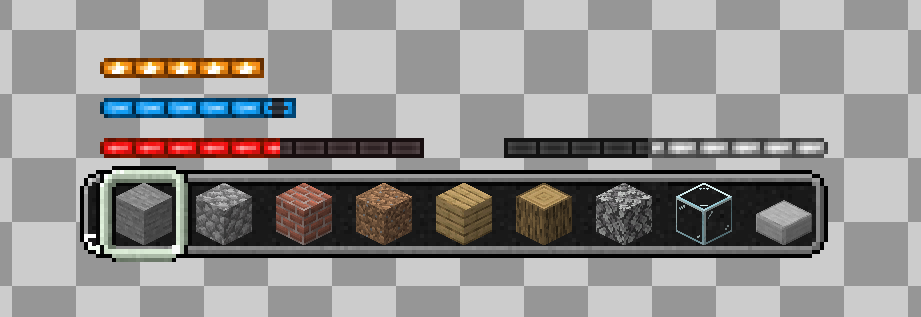
**XP-like HUD for BTA!** changes the HUD to look like an experience bar from vanilla Minecraft. Made for [Better than Adventure!](https://www.betterthanadventure.net/), unofficial fork of Minecraft beta 1.7.3
Originally I published this on Planet Minecraft and Better than Adventure!’s Discord server.
You can download XP-Like HUD for vanilla Minecraft [here](https://modrinth.com/resourcepack/xp-like-hud)!
## Contact
If you want contact me or report a bug, DM me on Discord @wixewsky or Telegram @wixewsky.
XP-like HUD
# **About  XP-like HUD**
**XP-like HUD** (or wixewsky’s XP-like HUD) will change in-game HUD (health, food, armor, etc) to use colored experience-like bars, being very vanilla-friendly.

Originally I made this HUD for Better than Adventure! and published it on Planet Minecraft, but came up porting this to vanilla Minecraft with some improvements and publishing here, on Modrinth.
You can download XP-like HUD for BTA! [here](https://modrinth.com/resourcepack/xp-like-hud-for-bta!)!
## Mod Support
This Resource Pack supports 182 mods in total! ≈143 with custom assets and ≈39 tested out*. Currently supported mods:
Expand to see
– [AppleSkin](https://modrinth.com/mod/appleskin) by squeek502.
– [Amarite](https://modrinth.com/mod/amarite) by AmyMialee.
– [Armor Toughness Bar](https://modrinth.com/mod/armor-toughness-bar) by pbone64.
– [Armor Toughness Bar, Again](https://modrinth.com/mod/armor-toughness-bar,-again) by paypur.
– [Armor Chroma for Fabric](https://modrinth.com/mod/armor-chroma-for-fabric) by A5b84.
– [Armor Chroma](https://www.curseforge.com/minecraft/mc-mods/armor-chroma) by jobicade.
– [Farmer’s Delight](https://modrinth.com/mod/farmers-delight) by vectorwing.
– [Brewin’ And Chewin’](https://modrinth.com/mod/brewin-and-chewin) by Torty.
– [More Heart Types](https://modrinth.com/mod/more-heart-types) by Oth3r.
– [Heartache](https://modrinth.com/mod/heartache) by spzla.
– [Detail Armor Bar](https://modrinth.com/mod/detail-armor-bar) by RedLime.
– [Detail Armor Bar Reconstructed](https://modrinth.com/mod/detail-armor-bar-reconstructed) by Coredex.
– [Pick Your Poison](https://modrinth.com/mod/pick-your-poison) by Ladysnake.
– [Raised](https://modrinth.com/mod/raised) by yurisuika.*
– [Colorful Hearts](https://modrinth.com/mod/colorful-hearts) by Terrails.
– [Nostalgic Tweaks](https://modrinth.com/mod/nostalgic-tweaks) by rjxkenshin.
– [Heart Effects](https://modrinth.com/mod/heart-effects) by Doublea06_.
– [Victus](https://modrinth.com/mod/victus) by glisco.
– [Stamina](https://modrinth.com/mod/insane-stamina) by Insane96.
– [PartialHearts](https://modrinth.com/mod/partialhearts/versions) by DialingSpoon527.*
– [ArmorSkin](https://modrinth.com/mod/armorskin) by IzzyDotExe.
– [Extra Armor Info](https://modrinth.com/mod/extra-armor-info) by mrmelon54.
– [Insane’s Survival Overhaul (aka IguanaTweaks Reborn)](https://www.curseforge.com/minecraft/mc-mods/iguanatweaks-reborn) by Insane96.
– [Thirst Was Taken](https://modrinth.com/mod/thirst-was-taken) by ghen-git and mlus.
– [Thirst Bar](https://modrinth.com/datapack/thirst-bar) by 3geE.
– [It’s Thirst](https://modrinth.com/mod/its-thirst) by capybaro.
– [Tough As Nails](https://modrinth.com/mod/tough-as-nails) by Adubbz and Forstride.
– [Survive](https://modrinth.com/mod/survive) by Stereowalker.
– [Simple Hydration](https://modrinth.com/datapack/simple-hydration) by Boid.
– [uku’s Armor HUD](https://modrinth.com/mod/ukus-armor-hud) by uku.*
– [Auto HUD](https://modrinth.com/mod/autohud) by Crendgrim.*
– [Homeostatic](https://modrinth.com/mod/homeostatic) by wendall911.
– [Energy Bar Indicator](https://modrinth.com/datapack/stamina-bar-indicator) by Diesse.
– [Dehydration](https://modrinth.com/mod/dehydration) by Globox1997.
– [Bewitchment](https://modrinth.com/mod/bewitchment) by MoriyaShiine and cybercat5555.
– [Upgrade Aquatic](https://modrinth.com/mod/upgrade-aquatic) by Team Abnormals.
– [The Aether](https://modrinth.com/mod/aether) by The Aether Team.
– [Njol’s HUD](https://modrinth.com/mod/njols-hud) by Njol.
– [Fancy Health Bar](https://modrinth.com/mod/fancy-health-bar) by efekos.*
– [Armor Hud](https://modrinth.com/mod/armor-hud) by SaolGhra.
– [SpiffyHUD](https://modrinth.com/mod/spiffyhud) by Keksuccino.*
– [Melancholic Hunger & HUD](https://modrinth.com/mod/melancholic_hunger) by antigers.
– [Mediumcore](https://modrinth.com/mod/alexs-mediumcore) by AlexModGuy.
– [NutritionZ](https://modrinth.com/mod/nutritionz) by xR4YM0ND and Globox1997.
– [Health Indicators](https://modrinth.com/mod/health-indicators) by AdyTech99.
– [Dietary Statistics](https://modrinth.com/mod/dietary_statistics) by Rikka-Kitani.
– [Quark](https://modrinth.com/mod/quark) by Vazkii.
– [Water Source 2](https://modrinth.com/mod/watersource2) by Koiro.
– [Mantle](https://modrinth.com/mod/mantle) by KnightMiner.
– [BedrockIfy](https://modrinth.com/mod/bedrockify) by juancarloscp52.*
– [Bedrock Hotbar](https://modrinth.com/mod/bedrock-hotbar) by BizCub.*
– [Malum](https://modrinth.com/mod/malum) by SammySemicolon.
– [Energizer](https://modrinth.com/mod/energizer) by Gauraaaaaaaa.
– [Arthritis](https://modrinth.com/mod/arthritis) by ProstStuff and Bloxedzero.
– [Hydration](https://modrinth.com/mod/hydration) by Exzotic.
– [Hydration](https://modrinth.com/mod/hydration-mod) by BlackVault.
– [Armor Points ++](https://modrinth.com/mod/armorpoints) by Cheos and SopsyHallow.
– [ParCool!](https://modrinth.com/mod/parcool) by alRex_U.
– [Scaling Health](https://modrinth.com/mod/scaling-health) by SilentChaos512.
– [Legacy4J](https://modrinth.com/mod/legacy4j) by Kyubion Studios.
– [Feathers](https://modrinth.com/mod/feathers) by Elenai.
– [Verticality](https://modrinth.com/mod/verticality) by KrLite.*
– [HUDTweaks](https://modrinth.com/mod/hudtweaks) by burgerindividual.*
– [Crim’s Party GUI](https://modrinth.com/mod/crims-party-gui) by Crim and Favouriteless.*
– [Hunger Remover](https://modrinth.com/mod/hunger-remover) by SmushyTaco.*
– [Overflowing Bars](https://modrinth.com/mod/overflowing-bars) by Fuzs.
– [Mindful Eating](https://www.curseforge.com/minecraft/mc-mods/mindful-eating) by camcam_burger.
– [Botania](https://modrinth.com/mod/botania) by Vazkii.
– [Cracker’s Wither Storm Mod](https://modrinth.com/mod/crackers-wither-storm-mod) by nonamecrackers2.
– [Frostbyte’s Improved Inventory](https://modrinth.com/mod/frostbytes-improved-inventory) by FrostbyteGames.
– [Totem Bar](https://modrinth.com/mod/totem-bar) by Yomna.
– [I ❤ TFC (I Heart TFC)](https://modrinth.com/mod/ihearttfc) by alekiponi.
– [Leave My Bars Alone](https://modrinth.com/mod/leave-my-bars-alone) by Fuzs.*
– [Colorful ui](https://modrinth.com/mod/cui) by pustoykishka.*
– [Overloaded Armor Bar](https://modrinth.com/mod/overloaded-armor-bar) by Tfarcenim.*
– [Crumbling Hearts](https://modrinth.com/mod/crumbling-hearts) by KreaDex.*
– [Scorchful](https://modrinth.com/mod/scorchful) by TheDeathlyCow.
– [Frostiful](https://modrinth.com/mod/frostiful) by TheDeathlyCow.
– [Mana Attributes](https://modrinth.com/mod/mana-attributes) by TheRedBrain.
– [Life Fruits](https://modrinth.com/mod/life-fruits) by super_okina.
– [ArmorHUD](https://modrinth.com/mod/armorhud-fabric) by kyh148.
– [Vampirism](https://modrinth.com/mod/vampirism) by maxanier and cheaterpaul.
– [Would you Rather](https://modrinth.com/mod/wyr) by EightSidedSquare.
– [Chococraft](https://modrinth.com/mod/chococraft) by clienthax and Mrbysco.
– [Hudless](https://modrinth.com/mod/hudless) by ZipeStudio.*
– [Withered Hearts](https://modrinth.com/mod/withered-hearts) by Ramixin.*
– [Extended Hotbar](https://modrinth.com/mod/extended-hotbar) by DenWav and unilock.*
– [Double Hotbar](https://modrinth.com/mod/double-hotbar) by sidezbros.*
– [RemoveHUD](https://modrinth.com/mod/removehud) by IzzyDotExe.*
– [Better GUI Scaling](https://modrinth.com/mod/betterguiscaling) by yeahimrose.*
– [Granular Hunger](https://modrinth.com/mod/granular-hunger) by Tetro48.
– [Blue Skies](https://modrinth.com/mod/blue-skies) by Modding Legacy.
– [Extra RPG Attributes](https://modrinth.com/mod/extra-rpg-attributes) by cleannrooster.
– [RunicLib](https://modrinth.com/mod/runiclib) by Yirmiri and BackupCup.
– [Cold Sweat](https://modrinth.com/mod/cold-sweat) by Mikul.
– [Dungeon’s Delight](https://modrinth.com/mod/dungeons_delight) by Yirmiri and Betwixer.
– [Additional Saturation](https://modrinth.com/mod/additional-saturation) by wet_noodles90.
– [Advanced UI Scaling](https://modrinth.com/mod/advanced-ui-scale) by qendolin.*
– [Head-down Display Continuation](https://modrinth.com/mod/hdd-continuation) by The_Computerizer.*
– [Vehicle Hunger Bar](https://modrinth.com/mod/vehicle-hunger-bar) by CrownSheep.*
– [Hexed](https://modrinth.com/mod/hexed) by BackupCup.
– [Better Bubbles](https://modrinth.com/mod/betterbubbles) by IllagerCaptain.
– [Vampire’s Delight](https://modrinth.com/mod/vampires-delight) by GridExpert.
– [Meulti’s Backrooms](https://modrinth.com/mod/meultis-backrooms) by Meulti and hacone.
– [Extended Armor Bars](https://www.curseforge.com/minecraft/mc-mods/extended-armor-bars) by RebelKeithy.
– [Elytra Bar HUD](https://www.curseforge.com/minecraft/mc-mods/elytra-bar-hud) by Fotatata.
– [Advanced Armor Bar](https://modrinth.com/mod/advanced-armor-bar) by Sygikal.
– [Saturative](https://modrinth.com/mod/saturative) by emilahmaboy.*
– [More Offhand Slots](https://modrinth.com/mod/more-offhand-slots) by TkkynaA.*
– [Giacomo’s HUD Overlays Configurator](https://www.curseforge.com/minecraft/mc-mods/giacomos-hud-overlays-configurator) by zacomat.*
– [Cyra](https://modrinth.com/mod/cyra) by Le_Keko.
– [Ametrine](https://modrinth.com/mod/ametrine) by nickfluffingfox and Buff_sheep.
– [LemonSkin](https://modrinth.com/mod/lemonskin) by myxazaur.
– [Haema](https://modrinth.com/mod/haema) by will_bl.
– [Spells & Shields](https://modrinth.com/mod/spells-shields) by CAS_ual_TY.
– [Oreganized](https://modrinth.com/mod/oreganized) by TeamGalena.
– [Fantazia](https://modrinth.com/mod/fantazia) by ArkadiyHimself.
– [Secrets of the Void](https://modrinth.com/mod/secrets-of-the-void) by the_destiny.
– [Horseman](https://modrinth.com/mod/horseman) by mortuusars.*
– [Offhand Hotbar](https://modrinth.com/mod/offhand-hotbar) by ThePotatoArchivist.*
– [Bountiful Fares](https://modrinth.com/mod/bountiful-fares) by Hecco.
– [FireHud](https://modrinth.com/mod/firehud) by LordEnder_Kitty.
– [WinWeapons](https://modrinth.com/mod/winweapons) by Lumineade and TheTrueYak.
– [Etherology](https://modrinth.com/mod/etherology) by Faradey and Feytox.
– [Fright’s Delight](https://modrinth.com/mod/frights-delight) by ChefMooon.
– [Metabolism](https://modrinth.com/mod/metabolism) by lilypuree.
– [Just Another Witchery Remake](https://modrinth.com/mod/just-another-witchery-remake) by mrsterner and anatevka.
– [Toxony](https://modrinth.com/mod/toxony) by MrFrostyDev.
– [SmartHUDReheated](https://modrinth.com/mod/smarthudreheated) by deflatedpickle.*
– [CustomHealthHUD](https://modrinth.com/mod/customhealthhud) by POHH.*
– [Ecological Replenishment Station](https://modrinth.com/mod/ecological-replenishment-station) by niannianan and mlus.
– [Eternal Starlight](https://modrinth.com/mod/eternal-starlight) by LeoMinecraftModding.
– [Eidolon:Repraised](https://modrinth.com/mod/eidolonrepraised) by Alexthw46.
– [Stellarity](https://modrinth.com/mod/stellarity) by kohara.
– [Trailier Tales](https://modrinth.com/mod/trailier-tales) by FrozenBlock.
– [Sweet Calamity](https://modrinth.com/mod/sweet-calamity) by Valent and Valend.
– [Better Flight](https://modrinth.com/mod/betterflight) by ArkVeil and rejahtavi.
– [Illager Revolution](https://modrinth.com/mod/illager-revolution) by SangreBK and AstianBK.
– [Unusual End](https://modrinth.com/mod/unusual_end) by Sweetygamer2 and SashaKYotoz.
– [BITE](https://modrinth.com/mod/bite) by KevReTV.
– [Stamina Attributes](https://modrinth.com/mod/stamina-attributes) by TheRedBrain.
– [ExtendedHotbarRebared](https://modrinth.com/mod/extendedhotbarrebared) by deflatedpickle.*
– [Eleron](https://modrinth.com/mod/eleron) by Sindercube.
– [Aileron](https://modrinth.com/mod/aileron) by Lodestar.
– [Overhauled Damage](https://modrinth.com/mod/overhauled-damage) by TheRedBrain.
– [Combat Roll](https://modrinth.com/mod/combat-roll) by ZsoltMolnarrr.
– [ArmorWeight](https://modrinth.com/mod/armorweight) by ptayur.
– [Goety – The Dark Arts](https://modrinth.com/mod/goety) by Polarice3.
– [Chai’s Better HUD](https://modrinth.com/mod/chais-better-hud) by Chai.*
– [Axiom](https://modrinth.com/mod/axiom) by Moulberry.*
– [Rats](https://modrinth.com/mod/rats) by AlexModGuy and GizmoTheMoonPig.
– [The Undergarden](https://modrinth.com/mod/the-undergarden) by quek and GizmoTheMoonPig.
– [Galosphere](https://modrinth.com/mod/galosphere) by Orcinus, Ninni and lunarbunten.
– [Aylyth](https://modrinth.com/mod/aylyth) by cybercat5555.
– [Burnt](https://modrinth.com/mod/burnt) by pxlbnk.
– [JCRAFT: Eyes of Ender](https://modrinth.com/mod/jojo-eyes-of-ender) by Arna and more.
– [L_Ender’s Cataclysm](https://modrinth.com/mod/l_enders-cataclysm) by mcl_ender.
– [Unusual Prehistory](https://modrinth.com/mod/unusual-prehistory-forge) by peeko322131 and crydigo.
– [WitherUtils](https://modrinth.com/mod/witherutils) by klangzwang.
– [Sanity: Descent Into Madness](https://modrinth.com/mod/sanity-descent-into-madness) by croissantnova.
– [StaminaZ](https://modrinth.com/mod/staminaz) by Globox1997.*
– [Sprint O’ Meter](https://modrinth.com/mod/sprintometer) by PaperScorpio.*
– [Goblins & Dungeons](https://modrinth.com/mod/goblins-dungeons) by superlord9362 and Weastiann.
– [Exotelcraft](https://modrinth.com/mod/exotelcraft) by TKD_Kedis.
– [Euphorics](https://modrinth.com/mod/euphorics) by TalonMinecraft and EightSidedSquare.
– [Enigmatic Legacy](https://modrinth.com/mod/enigmatic-legacy) by Aizistral.
– [Legendary Survival Overhaul](https://www.curseforge.com/minecraft/mc-mods/legendary-survival-overhaul) by krampus_there, armkath and Alex_Hashtag.
– [Hardcore Survival](https://modrinth.com/mod/hardcore-survival) by AFrozenRain.
– [Nycto](https://modrinth.com/mod/nycto) by MoriyaShiine and cybercat5555.
– [TerraFirmaCraft](https://modrinth.com/mod/terrafirmacraft) by eerussianguy, Therighthon, dries007 and alcatrazEscapee.
– [Enlightend](https://modrinth.com/mod/enlightend) by lixir and hhumanoid.
– [Jaden’s Nether Expansion](https://modrinth.com/mod/jadens-nether-expansion) by ThatJadenXgamer.
– [GD656MotionHUD](https://modrinth.com/mod/gd656motionhud) by Minecraft_GD656.*
– [Inventorio](https://modrinth.com/mod/inventorio) by RubixDev and LizardOfOz.
– [Supplementaries](https://modrinth.com/mod/supplementaries) by MehVahdJukaar and Plantkillable.
– [Mutant More](https://modrinth.com/mod/new-mutant-more) by AlexandersFunAndGames.
– [Confluence: Otherworld](https://modrinth.com/mod/confluence) by Magic_Team.Jvav.
– [Embers Rekindled](https://modrinth.com/mod/embers) by RCXcrafter.
– [Obscure API](https://modrinth.com/mod/obscure-api) by Obscuria.
– [Frozify](https://modrinth.com/mod/frozify) by XZX.
– [Defile](https://modrinth.com/mod/defile) by RAT and more.
– [Slotted Armor HUD](https://modrinth.com/mod/slotted-armor-hud) by poqbox.*
| * — _mods that already work but were tested for some issues_.
**This count will grow with updates.** If you want to see your favorite mod in this list, DM me on Discord or Telegram (read Contact). Some mods not included in this list can work without issues, but it is not guaranteed. Forks of included mods must work fine, if textures and texture structuring was not affected by the fork. I recommend use mod versions that were released before XP-like HUD’s update since some mods may add more content in the HUD or change it with updates.
Due to the rounded corners, some mods, like hunger removal or HUD flipping mods, may cause some visual problems. You can download sharp or circular corner variant to fix these compatibility issues. Just download additional (supplementary) file by selecting it on download page, since it is not the main version of this Resource Pack. Also you can find an addon for flipped armor bar inside .zip file.
## Variants and Addons
This Resource Pack comes in three variants:
– **Rounded**: The main variant, rounds only the left or right side of bars, depending on its position.
– **Sharp**: No corners of the bars are rounded.
– **Circular**: Every corner of the bars is rounded.
This Resource Pack includes four optional addons inside .zip file:
– **Pre-hunger Addon**. Flips armor and oxygen bars for better experience with hunger removal mods.
– **Numbered Hotbar Addon**. Adds numbers on hotbar for better accessibility.
– **Alpha and Beta Addon**. Extends XP-like HUD’s support to every single Minecraft version.
– **Armor Chroma Addon**. Adds full compatibility for Armor Chroma and Armor Chroma for Fabric.
Due to some limitations with assets count, some XP-like HUD versions on Minecraft 1.20.3 and below can crash your game because it has too much folders inside assets. Delete useless mods, update your game, use version with less content, or use older Resource Pack versions, there is nothing I can do (except stop adding more and more mod support) (Minecraft 1.20.X and below worked fine on my end while I was testing mods ever since I added “CRASH FIX” and “Vanilla” versions inside main .zip btw).
You can leave a comment on [Planet Minecraft](https://www.planetminecraft.com/texture-pack/xp-like-hud/)!
## Contact
If you want contact me, ask a question, help with development, suggest a mod to support, or report a bug, DM me on Discord **[@wixewsky](https://discord.com/users/372017357222313987)** or Telegram **[@wixewsky](https://t.me/wixewsky)**.
License and Legal
You are **NOT allowed** to:
– Publish this Resource Pack or its modifications on third-party websites and platforms without permission AND original [Modrinth link](https://modrinth.com/resourcepack/xp-like-hud).
– Steal or modify this Resource Pack unless it is for personal use or help with develepment.
– Port and publish this Resource Pack to the Bedrock Edition or BE’s Marketplace.
– Sell this Resource Pack.
– Share this Resource Pack as a file on your media, like Telegram channels.
You are allowed to do anything not included in this list, like including this Resource Pack to your modpacks or use it in your videos or livestreams.
If you are not sure what you are allowed or disallowed to do, feel free to DM me on Discord or Telegram.
This Resource Pack officially published **ONLY** on Modrinth and Planet Minecraft, if you downloaded it from somewhere else, you have been scammed and you shouldn’t use these websites ever again. **They deprive authors of revenue, overtake traffic and adding virues in their reuploads**.
This list can be changed at any moment. LICENSE.txt can be different from this section.
A stable and bug-free experience is not guaranteed, especially with old Minecraft versions or a modded client. **In my experience**, vanilla and modded Minecraft 1.20.1, 1.21.1 and 1.21.8 worked perfectly fine. Modded Minecraft 1.21.8 with a few supported mods worked fine as well.
Enchanted
## What is Enchanted?
Simply put, Enchanted turns your xp bar into enchantment text, also known as the Standard Galactic Alphabet.
This gives it a more magical feel than the vanilla bar, being just a flat line of green.
### What is the Standard Galactic Alphabet?
The Standard Galactic Alphabet (or SGA) is a fictional script that several games including Minecraft use. It can be found in the enchanting table.
### Credits
This pack was made by Sukuro120 on planetminecraft. This pack has been ported to modrinth with their permission with the intent of keeping it updated to the latest version.
Original pack: [xp bar to enchantment text](https://www.planetminecraft.com/texture-pack/exp-bar-to-enchantment-text/)
xMelonekMaX’s Faithful 64x
The last continuing resource pack faithfully following the style of [the first Faithful 64x pack](https://www.minecraftforum.net/forums/mapping-and-modding-java-edition/resource-packs/1242446-faithful-64×64).
For many years I carefully selected and modified textures from various packs. Recently, it turned out that I have the last resource pack for the current version of Minecraft, which looks like [the original Faithful 64x by HiTeeN](https://www.minecraftforum.net/forums/mapping-and-modding-java-edition/resource-packs/1242446-faithful-64×64). I decided to share it.
## Credits
Many of the textures in this pack are not mine. Some have been copied from other resource packs, some are reworked, some are handmade, and some can no longer be found online.
List of resource packs used:
– [Faithful 64×64 pack by HiTeeN](https://www.minecraftforum.net/forums/mapping-and-modding-java-edition/resource-packs/1242446-faithful-64×64) (based on it)
– [Minecraft HD (64x) Fan Updated by mrdhobbs](https://modrinth.com/resourcepack/minecraft-hd(64x)-fan-updated-by-mrdhobbs) (many textures used)
– [Classic Faithful](https://github.com/ClassicFaithful) (many textures rescaled from 32x version)
– [Faithful](https://github.com/Faithful-Resource-Pack) (some textures used)
– [Steven’s Traditional](https://modrinth.com/resourcepack/stevens-traditional) (several files used)
## Contact
If you have any questions, write to me on Discord: xMelonekMaX
xMinio GUI Rework
A resource pack mixing a leather theme, connected slots and golden-brass icons.
Lightly inspired by create.
Features:
– Reworked most in-game GUI’s
– Slight font adjustments
XingLuo AE2 1.21 GUIExpansion
# XingLuo_AE2_1.21_GUIExpansion

## 🔍 Overview
This resource pack ports the Applied Energistics 2 GUI and block/item textures from **Minecraft 1.21.1** to **Minecraft 1.20.1**, optimized for tech-focused modpacks.
—
## 🏗️ Dual-Pack Split (v2.7.9+)
Starting from **v2.7.9**, the resource content is split into two separate resource packs:
| Resource Pack | Scope |
| ————————————- | ———————————————————- |
| **XingLuo_AE2_1.21_GUIExpansion_AE** | AE2 core and AE2 addon GUI/texture resources |
| **XingLuo_AE2_1.21_GUIExpansion_Ext** | Minecraft vanilla and additional mod GUI/texture resources |
### Usage Recommendations
| Scenario | Recommended Configuration |
| ————————————— | ———————————————- |
| Only need AE2 visual updates | Enable `…_AE` only |
| Need vanilla and additional mod support | Enable both `…_AE` + `…_Ext` (recommended) |
| Resource pack priority (high to low) | `…_Ext` → `…_AE` |
> 💡 Both packs can be used independently or combined. When combined, Ext pack should have higher priority than AE pack.
—
## ✨ Main Features
### GUI Remake
– **Pattern Terminal Redesign** – Aligned with AE2 v12.9.4 layout
– **Button and Widget Updates** – 43 GUI elements in unified 1.21.1 style
– **Fluid Terminal Adaptation** – Pixel-perfect port of fluid interaction controls
### Block and Item Textures
– **ME Cable Channel Textures** – 16 color variants with P2P indicators
– **Inscriber Press Texture Adjustment** – Metallic look adapted for 1.20.1 lighting
– **Certus Quartz Animated Texture** – 4-frame cycle animation
—
## 📦 AE Side Supported Mods (from assets)
The following mod IDs have corresponding texture resources in the `assets` directory:
| modid | Name |
| ————————– | —————————————- |
| `advanced_ae` | AdvancedAE |
| `ae2` | Applied Energistics 2 |
| `ae2_mega_things` | AE2: Mega Things |
| `ae2_toggleable_view_cell` | AE2 Toggleable ViewCell |
| `ae2additions` | AE Additions |
| `ae2insertexportcard` | AE2 Import Export Card |
| `ae2omnicells` | AE2 OMNI Cells |
| `ae2peat` | AE2 P.E.A.T. |
| `ae2pw` | AE2 Pattern Workstation |
| `ae2things` | AE2 Things |
| `ae2wtlib` | Applied Energistics 2 Wireless Terminals |
| `aeinfinitybooster` | AEInfinityBooster |
| `appbot` | Applied Botanics |
| `appelem` | AppliedE |
| `appflux` | AppFlux |
| `appliede` | AppliedEnergistics Extend |
| `appliedsorting` | Applied Sorting |
| `appmek` | Applied Mekanistics |
| `arseng` | Ars Énergistique |
| `bigger_ae2` | Bigger AE2 |
| `expandedae` | Expanded AE |
| `expatternprovider` | Extended Pattern Provider |
| `extendedae_plus` | ExtendedAE-Plus |
| `extendedterminal` | Extended Terminal |
| `fulleng` | FullEng |
| `ifsoulsdisks` | IFSouls’ Disks |
| `infinitycells` | Infinity Cells |
| `mae2` | Modern AE2 Additions |
| `mae2a` | MAE2: Addon |
| `makeae2better` | Make AE2 Better |
| `megacells` | MEGA Cells |
> ⚠️ The table above only lists mod IDs present in the `assets` directory. It does not guarantee full texture support for all mods.
—
## 📦 Extension Side Supported Mods (from assets)
The following mod IDs have corresponding texture resources in the `assets` directory:
| modid | Name |
| ————————- | ————————- |
| `accessories` | Accessories |
| `avaritia` | Avaritia |
| `betteradvancements` | Better Advancements |
| `botanicalextramachinery` | Botanical Extra Machinery |
| `buildinggadgets2` | BuildingGadgets2 |
| `classicbar` | ClassicBar |
| `cosmeticarmorreworked` | Cosmetic Armor Reworked |
| `craftingtweaks` | Crafting Tweaks |
| `curios` | Curios API |
| `emi` | EMI |
| `extremesoundmuffler` | Extreme Sound Muffler |
| `gregiceng` | Gregic Energistics |
| `gtceu` | GregTech CEu Modern |
| `gtlcore` | GTLCore |
| `hostilenetworks` | Hostile Neural Networks |
| `invtweaks` | Inventory Tweaks |
| `laserio` | LaserIO |
| `ldlib` | LDLib |
| `merequester` | ME Requester |
| `minecraft` | Minecraft |
| `pipez` | Pipez |
| `polymorph` | Polymorph |
| `projecte` | ProjectE |
| `solarflux` | Solar Flux Reborn |
| `sophisticatedbackpacks` | Sophisticated Backpacks |
| `sophisticatedcore` | Sophisticated Core |
| `sophisticatedstorage` | Sophisticated Storage |
| `titanium` | Titanium |
| `toolbelt` | Tool Belt |
| `trashslot` | TrashSlot |
| `travelanchors` | Travel Anchors |
| `xaerobetterpvp` | Xaero’s Minimap |
| `xaeroworldmap` | Xaero’s World Map |
> ⚠️ The table above only lists mod IDs present in the `assets` directory. It does not guarantee full texture support for all mods.
—
## 👥 Contributors
| Contributor | Link |
| ———– | —————————————————- |
| _leng | [_leng](https://modrinth.com/user/_leng) |
| MHanHanBing | [MHanHanBing](https://modrinth.com/user/MHanHanBing) |
| TedXenon | [TedXenon](https://modrinth.com/user/TedXenon) |
—
## 📜 License
This resource pack is for personal learning and entertainment use only. Commercial use is prohibited.
Better Boss Bar
This is an interesting texture pack, it has changed a lot of boss health bars, and the author is working on adding more boss health bars (part of the update was decided by my vote on domestic social networking sites).
This material pack’s texture is made by me independently. You can’t borrow the texture without my permission,Special thanks to: naku。
Currently completed:
– Twilight Forest(Not all done)
– cataclysm:ignis,ender_guardian(Not loaded)
– vanlia:wither,enderdragon
– alex’s mobs
– mowzie’s mobs
– Fish’s Undead Rising
– whisperwoods
– stalwart-dungeons
– meetyourfight
[Thanks](https://www.curseforge.com/minecraft/texture-packs/enhanced-boss-bars/comments)
This resource pack uses a “wheel” from Enhanced Boss Bars, licensed to me by the author in the gallery.
curseforge:https://www.curseforge.com/minecraft/texture-packs/better-boss-bar
Xeroflame’s tokyo
this is a tokyo ghoul inspired texture pack!
tokyo ghoul is a really popular anime in the community and loved by the watchers!
this pack’s main colors are red,black and white which make a really good contrast for a pvper!
gamemodes that match with the resource pack:
-SMP
-Dia SMP
-Spear Elytra or Spear Mace
-Sword
-Mace