ZonePractice Pro Duels
# ZonePractice Pro The Ultimate Minecraft PvP Duels Plugin
Elevate your Minecraft server with ZonePractice Pro, the most advanced practice / duels and matchmaking plugin available. Designed for high performance and total customizability, ZonePractice Pro delivers a next generation PvP experience. Players can unlock custom armor trims, shield patterns, and unique death effects. Navigate lobbies in style using wind charges, tridents, elytras, or spears.
## Key Features of ZonePractice Pro
### ⚔️ Modern PvP Ladder Types
+ TnT Sumo, MLGRush, Crystals, Cart, BedWars, Bridges, SkyWars, Fireball Fight, BattleRush
+ Sumo, Boxing, PearlFight, Spleef, Build, Basic
### ⚡ Asynchronous Arena System
+ High performance asynchronous arena copying for build modes
+ Highly configurable basic and build type arenas
+ Player hiding functionality for non build arenas
+ Unlimited concurrent matches in non build arenas
### 🛡️ Custom Player Kit System
+ Create custom kits inspired by popular PvP servers
+ Up to 4 personalized kits per player with extra items
+ Intuitive GUI for players to create and manage loadouts
### 🏆 Automated Server Events
+ Host engaging events easily including Brackets, Juggernaut, LMS, OITC, Splegg, Sumo, and TNT Tag
### ⚖️ Advanced Matchmaking and Queues
+ Unranked queues based on player divisions
+ Ranked queues powered by accurate ELO matchmaking
+ Clean two category page queue selector GUI
### 📊 Player Statistics and Divisions
+ Track Experience points, Wins, Kills, Deaths, and Streaks
+ Set minimum division requirements for ranked play
+ Beautiful GUI and Hologram leaderboards
### 👥 FFA and Party System
+ Dedicated FFA arenas featuring multiple ladders and independent stats
+ Robust Party System offering 6 distinct settings
+ Support for FFA, Split party games, and Party versus Party matches
### ⚙️ Premium Match Features
+ Fully customizable sidebar and below name health bars for every ladder
+ Exp bar cooldowns for Ender pearls, Arrows, and Golden Apples
+ Built in staff mode and advanced spectator mode
+ Duel rematch items, Nametag systems, and Round selectors
### 🚀 Unmatched Performance and Customizability
+ Incredible server performance with simple installation
+ Complete customizability utilizing version controlled config files
+ Comprehensive setup GUI for server administrators
+ Developer API included for custom integrations
+ MiniMessage chat formatting and PlaceholderAPI support
+ Custom death messages and sound effects
+ Seamless multiple world support to run alongside other minigames
+ Custom inventory items for a unique feel
## Important Installation Requirement
To guarantee high performance packet handling, ZonePractice Pro requires the PacketEvents API. Please ensure you install the latest release on your server before starting.
[Download PacketEvents Here](https://github.com/retrooper/packetevents/releases)
## Community and Support
[Join our Discord Community](https://discord.gg/xZy34zbnxe)
## Plugin Screenshots
Zone PVP
# ZonePvP
ZonePvP adds contained PvP arenas directly into your Minecraft world.
PvP is ONLY active inside defined zones — your survival gameplay outside stays completely vanilla.
Enter a zone, receive a kit, fight nonstop, build your streak, and become the bounty.
Leave or die and your original inventory is instantly restored.
## Features
– PvP Zones – PvP only inside selected areas
– Instant Kits – Safe inventory saving & restoring
– Kill Streaks – Action-bar counter + progression upgrades
– Gear Upgrades
– Armor upgrades every 5 kills
– Netherite armor at 100 streak
– Netherite sword at 150 streak
– +16 arrows + golden apple per kill
– Streak Aura – Visual power effects at 25 / 50 / 100 kills
– Bounty System
– 10+ streak marks players as WANTED
– Announced only to players inside the zone
– Anti-Camp System – Combat-tagged players are pushed back into zones if they hug the border
– Death Handling
– Respawn inside the zone near the center
– Streak reset, kit reapplied
– Gear Protection
– Armor can’t break inside zones
– Fully repaired after each kill
(most of theses can be configured directly in the plugins config file)
## Safe & Isolated
No effects outside zones
No PvP outside zones
Survival worlds remain untouched
## Requires
**Spigot / Paper 1.21.1+
No client mods needed.**
## Why ZonePvP?
1. Competitive PvP without inventory loss
1. No escape or camping cheese
1. Clean progression & visual feedback
1. Zero impact on survival gameplay
– Created by [DarkFox](https://www.youtube.com/@DarkFoxStudiosOF)
Zone Miner Single Use
## Zone Miner is a NeoForge mod that adds configurable area mining.
Switch between simple mining, 3x3x3, 5x5x5, or a fully custom mining shape, all while keeping vanilla-style durability handling and tool restrictions.
### Features
– Multiple mining modes:
– `1×1`
– `3x3x3`
– `5x5x5`
– `Custom`
– In-game keybinds to switch modes and open the custom area settings
– Mining direction follows the player’s look direction
– Live white block outline preview before breaking
– Only breaks extra blocks when the held tool is appropriate
– Ore vein support
– Vanilla block breaking logic is preserved for drops and interactions
## Two Versions Available
This project is available in two separate versions for NeoForge :
### Zone Miner
The standard version uses `legacy durability`.
Your tool loses durability based on the number of blocks actually broken.
[You’ll find it here!](https://modrinth.com/mod/zone-miner-legacy)
### Zone Miner Single Use
This version keeps the same mining features, but only uses `one durability point` for the whole area break.
_You’re on the right page!_
## Controls
– `Y` : Cycle mining mode
– `U` : Open custom area settings
## Custom Area Settings
The custom mode lets you configure:
– Left
– Right
– Up
– Down
– Depth
**Zone Miner is designed to stay simple and practical**
no enchantment requirement, no complicated setup, just configurable area mining with two durability variants depending on how you want to play.
Zone Miner Legacy
## Zone Miner is a NeoForge mod that adds configurable area mining.
Switch between simple mining, 3x3x3, 5x5x5, or a fully custom mining shape, all while keeping vanilla-style durability handling and tool restrictions.
### Features
– Multiple mining modes:
– `1×1`
– `3x3x3`
– `5x5x5`
– `Custom`
– In-game keybinds to switch modes and open the custom area settings
– Mining direction follows the player’s look direction
– Live white block outline preview before breaking
– Only breaks extra blocks when the held tool is appropriate
– Ore vein support
– Vanilla block breaking logic is preserved for drops and interactions
## Two Versions Available
This project is available in two separate versions for NeoForge :
### Zone Miner
The standard version uses `legacy durability`.
Your tool loses durability based on the number of blocks actually broken.
_You’re on the right page!_
### Zone Miner Single Use
This version keeps the same mining features, but only uses `one durability point` for the whole area break.
[You’ll find it here!](https://modrinth.com/mod/zone-miner-single-use)
## Controls
– `Y` : Cycle mining mode
– `U` : Open custom area settings
## Custom Area Settings
The custom mode lets you configure:
– Left
– Right
– Up
– Down
– Depth
**Zone Miner is designed to stay simple and practical**
no enchantment requirement, no complicated setup, just configurable area mining with two durability variants depending on how you want to play.
zonary123 Cobble WonderTrade
# WonderTrade
I will be creating more plugins/mods for Cobblemon. If you want to know more about them, join our Discord for more information: [Discord](https://discord.gg/fKNc7FnXpa)
**Required CobbleUtils is in discord:** [Discord](https://discord.gg/fKNc7FnXpa)
## Description
WonderTrade is a Minecraft plugin designed for Cobblemon. It introduces a unique trading system that allows players to
exchange their Pokémon for random ones from a pool. This adds an element of surprise and excitement to the game, as you
never know what Pokémon you might receive in return.
## Configuration
The file path is `config/wondertrade`
“`json
{
“lang”: “en”,
“cooldown”: 30,
“cooldownmessage”: 15,
“sizePool”: 2,
“minlvreq”: 5,
“minlv”: 5,
“maxlv”: 36,
“emitcapture”: false,
“allowshiny”: true,
“allowlegendary”: true,
“poolview”: true,
“savepool”: true,
“shinyrate”: 8192,
“legendaryrate”: 16512,
“shinys”: 0,
“legendaries”: 0,
“israndom”: false,
“pokeblacklist”: [
“Magikarp”
],
“poketradeblacklist”: [
“Magikarp”
],
“legends”: [
“Magikarp”
],
“aliases”: [
“wt”,
“wondertrade”
],
“itempreviouspage”: {
“item”: “minecraft:arrow”,
“slot”: 0,
“title”: “&7Previous Page”,
“lore”: [
“&7Click to go to the previous page”
],
“CustomModelData”: 0
},
“itemclose”: {
“item”: “minecraft:barrier”,
“slot”: 0,
“title”: “&cClose”,
“lore”: [
“&7Click to close the menu”
],
“CustomModelData”: 0
},
“itemnextpage”: {
“item”: “minecraft:arrow”,
“slot”: 0,
“title”: “&7Next Page”,
“lore”: [
“&7Click to go to the next page”
],
“CustomModelData”: 0
}
}
“`
## Commands
– `/wt` – Opens the WonderTrade GUI.
– `/wt slot confirm` – Trade the pokemon.
– `/wt other ` – Opens the WonderTrade GUI for other player.
– `/wt pool` – Opens the WonderTrade pool GUI.
– `/wt reload` – Reloads the plugin configuration.
## Dependencies
– [Cobblemon](https://modrinth.com/mod/cobblemon) (v1.5.0)
– [Gooeylibs](https://modrinth.com/mod/gooeylibs) (v3.0.0)
– [Architectury API](https://modrinth.com/mod/architectury-api) (v9.2.14)
zombuild
🧟 ZomBuild: Evolution of the Undead
ZomBuild is a sophisticated AI-overhaul mod that transforms standard zombies from a simple nuisance into a persistent, strategic threat. No longer hindered by walls, pits, or traditional player defenses, these zombies possess the ability to adapt to their environment, build pathways to their prey, and dismantle any obstacle in their path.
🛠 Key Features
🏗 Intelligent Construction
Obstacles that once offered safety are now merely building opportunities for the undead.
Vertical Pillaring: If a target is positioned above, the zombie will jump and place cobblestone blocks beneath itself to ascend.
Bridge Building: Upon detecting a gap or ravine between itself and the player, the zombie will construct a bridge to continue the pursuit.
🔨 Dynamic Destruction
Your fortress is no longer impenetrable.
Breaching Walls: If a direct path is blocked, zombies will methodically mine through blocks to create a breach.
Vertical Mining: If the player is hiding below ground, zombies will dig straight down to reach them.
🚫 Anti-Trap Mechanics (Vehicle Egress)
Zombies have evolved to recognize and nullify common player traps.
Instant Dismount: Zombies will immediately exit boats or minecarts if they are forced into them.
Vehicle Neutralization: Upon exiting a vehicle, the zombie prioritizes attacking and destroying it to ensure it can no longer be used as a restraint.
👁 Enhanced Perception (X-Ray Sense)
Zombies now possess an innate sense of survivor presence. They can track players through any solid material within a 16-block radius, ignoring standard line-of-sight limitations.
🌑 Light Suppression
The undead prefer the dark. When not actively pursuing a player, zombies will seek out and destroy torches and other light sources, systematically plunging your base into darkness before a siege.
⚙️ Technical Overview
Goal Prioritization: The AI utilizes a strict hierarchy of tasks: breaking restraints first, followed by direct combat, and finally construction/destruction.
Performance Optimized: The mod is written with server performance in mind, utilizing asynchronous logic where possible to minimize TPS impact.
Diurnal Adaptation: Zombies under the ZomBuild AI do not burn in sunlight, making them a constant threat regardless of the time of day.
📋 Requirements
Game Version: Minecraft 1.20.1
Mod Loader: Forge , Fabric , NeoForge
ZombPlayer
# Introduction
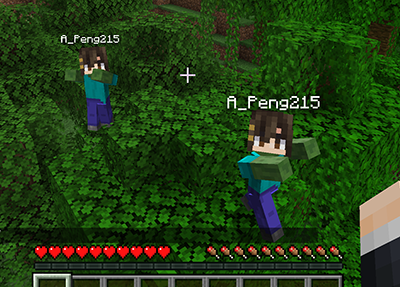
This mod will spawn a zombified player when a player is killed by zombified creature.
## Features
– When a player is killed by zombified creature (including husks, drowneds etc.), a zombie will be spawned in the place.
– The zombie will inherit player’s equipment and inventory. Players need to kill the zombie to retrieve them. _This feature won’t work when the gamerule `keepInventory` is set to true._
– The head of the zombie is same as the player’s, and will drop if killed by a __charged creeper__.
– The zombie will convert to the drowned when drowned like normal zombies.
– The zombie won’t burn in sunlight.
– Type command `/gamerule doPlayerInfected [false/true]` to switch the mod. (Default true)
## Gallery
## Feedback
Anyone can [create an issue](https://github.com/APeng215/ZombPlayer-forge/issues/new) to report bugs, provide suggestions, or share feedback.
ZomBilliard Balls
Remember how creepers drop music discs when killed by skeletons? Have you ever thought “Wouldn’t it be cool if there was more collectibles you could get by making mobs kill each other?” No? Me neither. This datapack came to me in an incredibly strange dream, so I decided, why not make it a reality?
In this datapack, you can get all 15 billiard balls, along with a cue ball, by forcing a skeleton to kill a zombie. They come in slightly varying rarities, with 1-7 and 9-15 being of Rare rarity (Aqua color, higher chance of dropping), and the 8 and cue balls being of Epic rarity (Magenta/Light Purple color, lower chance of dropping).
Zombified Player – Kill Your Inner Zombie
[](https://www.curseforge.com/minecraft/mc-mods/zombified-player) [](https://modrinth.com/mod/zombified-player) [.svg)](https://www.curseforge.com/minecraft/mc-mods/zombified-player) [](https://discord.gg/rSVp3nCpPx) [](https://ko-fi.com/D1D71EVQVC)
# Zombified Player
This Mod **spawns a zombified version of the player after death**.
**Beta Version!** Please report any problems you find under: [issues](https://github.com/MC-Mods-Pete/ZombifiedPlayer/issues)
## Features
– spawns a zombified version of the player after death
– uses the players actuall skin (uses the steve skin as fallback)
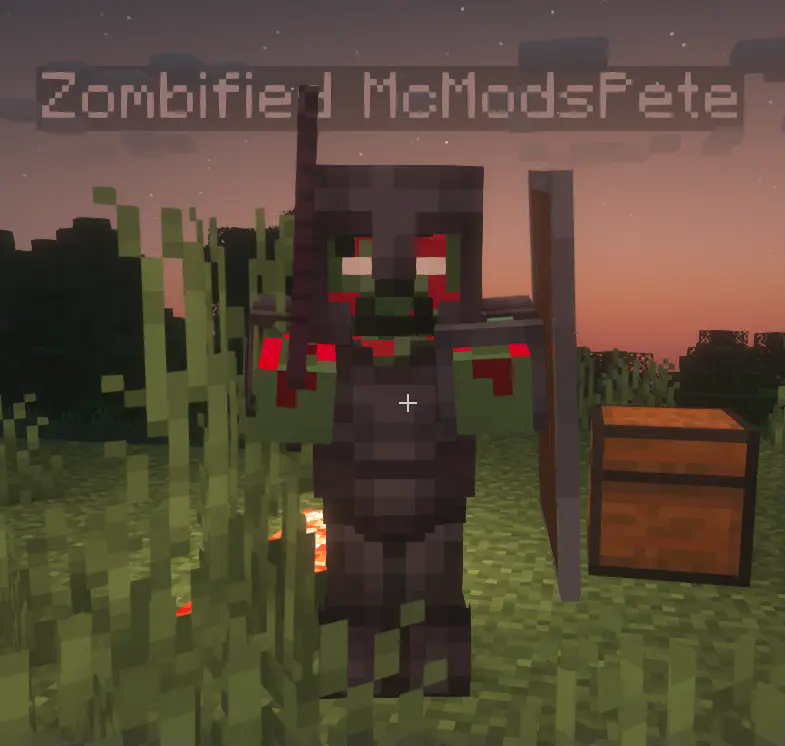
– applies a zombified overlay to the skin
– the dead players inventory can be tranfered to his zombified version
The zombified player mob will use the same skin as the player (with a zombify overlay). Besides that the mob behaves like a regular zombie, but it will not burn in sunlight and it will not despawn.
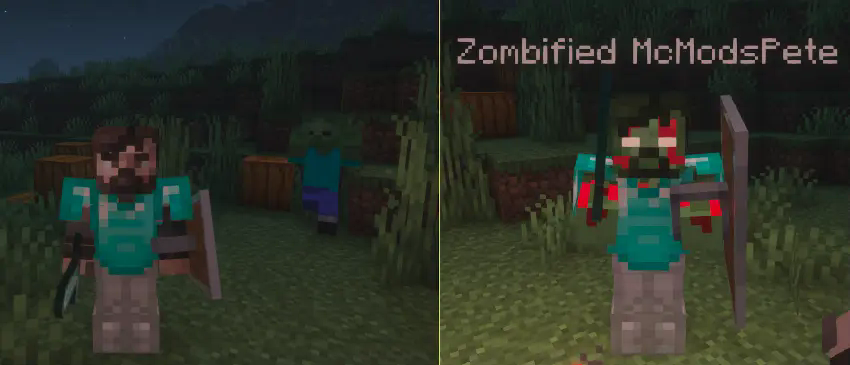
With a config option it is possible to **transfer the players inventory to the zombified player**. The player will have to fight and defeat the zombified version of himself to get back the items he lost after dying.
Needed Mods:
– Fabric API
– Cloth Config
Optional Mods:
– Mod Menu
Zombified piglin’s only drop gold nuggets
I got annoyed trying to make a fast enough filter system for my gold farm so just made this instead.
At the moment it also removes killed by player drops as well as rotten flesh, If I can figure out how to add them back in I will.


