You Received a Crit from the Arrow│你受到了箭矢的暴擊
# Function│功能
Arrows fired by AI mobs with bows or crossbows will now be crit arrows.│現在AI生物透過弓或弩所射出的箭矢都會是暴擊箭矢。
# Function│功能
Arrows fired by AI mobs with bows or crossbows will now be crit arrows.│現在AI生物透過弓或弩所射出的箭矢都會是暴擊箭矢。
-You Need Hydration is a drinking mod centered around visual custom configuration, elevating compatibility with other mods and allowing you to create your own exclusive setup.
-All configurations support datapack import and export, and are fully compatible with global datapack mods,Paxi,and OpenLoader.
-It introduces dirty and clean water mechanics—dirty water bowls and bottles can be purified using a heat source.
Although the mod currently features only a few simple items, it will be gradually expanded in the future with more drinking-related elements.
Mod code is written by AI.
Report Issues • Chat on Discord • CurseForge • Modrinth
You May Rest Now modifies the vanilla ‘You may not rest now, there are monsters nearby’ mechanic to
allow sleeping, assuming that any nearby monsters can not reach you. It it also configurable to
completely disable the mechanic.
## How to Configure
You May Rest Now can be configured via an in-game configuration screen which can be accessed in Mod
Menu (Fabric/Quilt) or the mods screen (Forge/NeoForge).
There are 3 options for the mode:
1. `VANILLA`: use the default vanilla behavior (only able to sleep if no monsters are nearby)
2. `DENY_IF_PATHFINDABLE`: allow sleeping only if nearby monsters cannot reach you.
3. `DISABLE`: always allow sleeping no matter what monsters are nearby.

# You Don’t Have The Right (Recipe)
An overengineered mod to fix the “working as intended”
`doLimitedCrafting` gamerule. Among other things.
# Features
* Furnaces and brewing stands obey `doLimitedCrafting` according to the recipe book of
the last player who changed their contents.
* Data driven potion recipes! This was not outside of the scope of the mod at all.
* Completely rewritten tick logic for furnaces and brewing stands! It should increase
performance (untested) and amount of bugs (untested, too).
* Force `doLimitedCrafting` to `true` on all dimensions, regardless of the underlying
value of the gamerule (configurable).
* Prevent Steve from receiving “divine inspiration” recipes every time he picks up a new item
or touches water (configurable).
* And an amazing API for developers that no one but me will ever use!
# Known uncompatibilities
* **NERB (Not Enough Recipe Book)**, as it disables the
recipe book entirely, which is the underlying mechanism of this entire mod.
* Any mod that modifies the tick logic of furnaces or brewing stands.
* Any mod that adds potions, as these will not work since they have no generated recipes.
Ping me to get your mod’s potion recipes generated and included!
# Best used with…
* **Better Recipe Book**, with “hide locked recipes”
option enabled
* **CraftTweaker** or **KubeJS**
to actually leverage the features of this mod
# License
This mod is licensed under the MIT license.
# Modpacks
Feel free to use this mod in any modpack, where it best shines! If you could let me know that you will use
this mod in your modpack, it would make me very happy.
Whenever you die you lose a heart, if you lose all of them you will be forced to go into spectator mode. This is similar to normal hardcore in Minecraft but somewhat forgiving.
Limit the maximum amount of hearts with /gamerule maxHearts (by default set to 20 hearts) and whether players can even get hearts with /gamerule canRestoreHearts true/false (by default set to true)

You can replenish hearts by eating enchanted golden apples. This gives enchanted golden apples actual use outside of pvp.


# When you touch a `grass_block`, you die!
This Minecraft datapack adds a challenge: if you step on a grass block, you die instantly.
Perfect for hardcore or challenge worlds.
**Don’t worry! When you spawn in your world/server with this datapack, a sand block spawns underneath you!**
## Gallery
The sand block that spawns underneath you once you join:

When you die to the grass block:

Message once you join:

## How to instal a datapack:
This is originally for modpack AnimateCraft: Lankeren. If you like this content, I’m sure you’ll like that modpack, too. Welcome to check it out!
—
You hate villagers? You think they are useless? You want to kick their asses? Alright, I don’t know why you think that way, but now I can let you do it in a cooler way.
Introducing ***You Bandit!***, a derive mod of ***You Thief!***. With this mod, you can choose to be a bandit, hang around with the illagers, and loot the villagers.
After killing two villagers, you will get an unluck debuff, and you become a bandit, really simple.
Being a bandit means you will be hated by villagers and iron golems, the former will rise their trading prices, the latter will not stop chasing you.
But bandits have advantages. You are now much stronger, and the illagers will not attack you anymore!–Not until you betray them.
When you kill one of the illagers (including witch and vex), you will be cursed with a Bad Omen V. Even worse, you cannot use milk bucket to get rid of it or the consequence it brings–continuously spawned vexs around you! Now this is the real bad omen!
Want to make up what you’ve done? Take the Bade Omen V to the village, and win the raid! Then you’ll gain a Hero of the Village V, which can decrease the trader price to the original level (only a bit higher :))
## 版权声明|License
– **作者保留该作品的所有权利。禁止在其他社交平台(包括群聊、网盘等)重新上传或商用,否则后果自负。** This content is All Rights Reserved, meaning that you cannot redistribute/modify & distribute this content, or use it in commercial ways.
– **欢迎您将其收录到整合包中或用其制作视频,请在简介处附上此发布页面的链接和我的bilibili主页,也欢迎在简介艾特我,我很想看你们的视频!**
If you make a video about this content or put this content in your modpack, please give credit and link to this page, and I would love to know! Thank you.
You used to be the hero…
Now you’re the problem.
Villagers see you = instant panic
Iron Golems see you = hands rated E for Everyone
That village you protected? Yeah… they want you gone.
But hey—
you’re not alone anymore.
Zombies don’t attack you
Creepers are your coworkers
Skeletons got your back

The world doesn’t hate you…
it fears you.
If you like this mod, consider following my channel for more updates!
https://www.youtube.com/@mrjolubkom

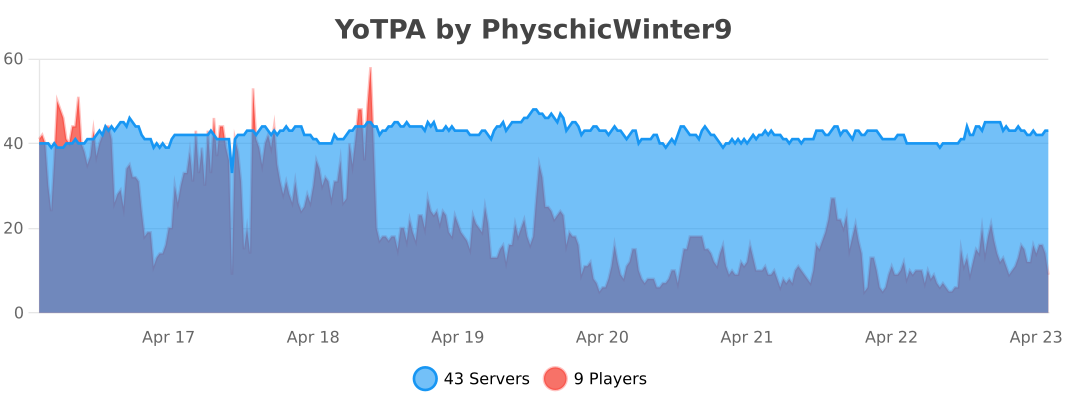
# YoTPA
YoTPA is a lightweight and powerful teleport request plugin with adaptive performance optimization. Simple to use, easy to configure, and built for modern Minecraft servers.
## Features
### Adaptive Performance System
The plugin automatically detects your server’s available RAM and optimizes itself accordingly – zero configuration needed!
**4 Performance Modes:**
– **ULTRA_LIGHT** – For 512 MB – 1 GB RAM (Free/Cheap VPS)
– Best for: 5-10 players, minimal plugins
– **LIGHT** – For 1-2 GB RAM (Low-end servers)
– Best for: 10-15 players, light plugins
– **BALANCED** – For 2-4 GB RAM (Mid-range servers)
– Best for: 15-25 players, moderate plugins
– **HIGH_PERFORMANCE** – For 4+ GB RAM (High-end servers)
– Best for: 25+ players, any plugins
**Performance Benefits:**
– 30-70% less memory usage
– 25-60% less CPU usage
– Up to 83% faster maintenance tasks
– Dynamic optimization based on your server specs
### Core Features
– **Simple TPA System** – Request to teleport to other players or invite them to you
– **Countdown Timer** – Configurable delay before teleporting with visual feedback
– **Title Display** – Clear visual indication of teleport countdown
– **Movement Detection** – Teleport cancels if player moves during countdown
– **Custom Sound Effects** – Fully customizable audio feedback using Minecraft’s sound registry
– **Config Validation** – Prevents server crashes from broken configs with detailed error messages
– **Permission System** – Fine-grained access control
– **Request Management** – Toggle receiving requests, cancel outgoing requests
– **Multi-Threading Support** – Thread-safe for more concurrent players
– **Customizable Messages** – Fully localizable and configurable messages
### Internationalization (NEW in 1.4.0)
Customize all plugin messages in any language with full MiniMessage support:
“`yaml
prefix: “[YoTPA] ”
commands:
tpa:
sent: “Teleport request sent to {target}”
received: “{requester} wants to teleport to you.”
“`
**MiniMessage Features:**
– Rich text formatting (bold, italic, underlined)
– Color gradients: `
– Rainbow effect: `
– Hex colors: `<#FF5733>text`
### Custom Sound Effects
Customize all plugin sounds using Minecraft’s sound IDs:
“`yaml
sounds:
countdown: “block.note_block.pling”
success: “entity.enderman.teleport”
cancel: “entity.villager.no”
request: “entity.experience_orb.pickup”
“`
Test sounds in-game: `/playsound minecraft:block.note_block.pling master @s`
## Configuration
YoTPA’s `config.yml` file allows you to customize various aspects of the plugin:
– Request timeout duration
– Cooldown between requests
– Teleport delay countdown
– Performance mode settings
– Sound effects for different actions
– Feature toggles (statistics, bStats, titles, sounds)
### Configuration File
“`yaml
# YoTPA Configuration v1.3.0-Adaptive
# Smart Auto-Optimization for All Server Sizes
# Request timeout in seconds (how long before a request expires)
# Recommended: 30-120 seconds
request-timeout: 60
# Request cooldown in seconds (how long before sending another request)
# Recommended: 15-60 seconds
request-cooldown: 30
# Teleport delay in seconds (countdown before actual teleport)
# Recommended: 3-10 seconds
teleport-delay: 5
# Performance mode settings
performance:
# Options: AUTO, ULTRA_LIGHT, LIGHT, BALANCED, HIGH_PERFORMANCE
mode: AUTO
# Sound effects (use Minecraft sound names)
sounds:
countdown: “block.note_block.pling”
success: “entity.enderman.teleport”
cancel: “entity.villager.no”
request: “entity.experience_orb.pickup”
# Feature toggles
features:
statistics: true
bstats: true
titles: true
sounds: true
“`
### Messages Configuration (messages.yml)
“`yaml
# Customize your prefix
prefix: “[YoTPA] ”
# All messages are customizable
commands:
tpa:
usage: “Usage: /tpa ”
sent: “Teleport request sent to {target}”
received: “{requester} wants to teleport to you.”
teleport:
countdown:
title: “Teleporting…”
subtitle: “Don’t move!”
message: “Teleporting in {seconds} seconds”
“`
## Customization Examples
### Change Language to Spanish
Edit `messages.yml`:
“`yaml
prefix: “[YoTPA] ”
commands:
tpa:
usage: “Uso: /tpa ”
sent: “Solicitud enviada a {target}”
received: “{requester} quiere teletransportarse a ti.”
“`
Then use `/tpareload` to apply changes!
### Add Beautiful Gradients
“`yaml
prefix: “✦ YoTPA ✦ ”
teleport:
countdown:
title: “Teleporting…”
message: “Teleporting in {seconds} seconds”
“`
### Customize Colors
“`yaml
prefix: “[TPA] ”
commands:
tpa:
sent: “Request sent to {target}”
“`
### Use Hex Colors
“`yaml
prefix: “[YoTPA] ”
teleport:
success: “Teleported to {target} successfully!”
“`
**Placeholders:**
– `{player}` – Player name
– `{target}` – Target player name
– `{requester}` – Requester player name
– `{seconds}` – Number of seconds
– `{cooldown}` – Cooldown duration
### Configuration Sections Explained
**General Settings:**
– `request-timeout` – How long (in seconds) teleport requests remain valid (recommended: 30-120)
– `request-cooldown` – Time (in seconds) before a player can send another request (recommended: 15-60)
– `teleport-delay` – Countdown time (in seconds) before teleportation happens (minimum: 1)
**Performance Settings:**
– `performance.mode` – AUTO (recommended), ULTRA_LIGHT, LIGHT, BALANCED, or HIGH_PERFORMANCE
– AUTO automatically detects your server’s RAM and selects the best mode
**Sound Settings:**
– All sounds use Minecraft’s sound registry format (lowercase with dots)
– The plugin validates sounds on config reload
– Full sound list: https://minecraft.wiki/w/Sounds.json
**Feature Toggles:**
– `statistics` – Enable or disable statistics tracking
– `bstats` – Enable or disable bStats metrics
– `titles` – Enable or disable title animations during countdown
– `sounds` – Enable or disable all sound effects
### Config Validation
When reloading with `/tpareload`, the plugin validates:
– YAML syntax
– All values are in valid ranges
– Sounds exist in Minecraft’s registry
– Shows detailed error messages if invalid
Example validation output:
“`
Configuration validation failed!
✗ teleport-delay must be at least 1 second
✗ Sound ‘countdown’ (invalid.sound) not found in registry
Warnings:
• request-timeout (5) is very low, recommended: 30-120
Config not applied. Fix errors and try again.
Using previous configuration.
“`
## How to Edit and Reload
1. Edit the `plugins/YoTPA/config.yml` file
2. Save your changes
3. Use `/tpareload` in-game to apply changes with validation
## Commands Overview
| Command | Description | Permission |
| :—— | :———- | :——— |
| `/tpa
| `/tpaccept` | Accept a pending teleport request | `yotpa.tpaccept` |
| `/tpadeny` | Deny a pending teleport request | `yotpa.tpadeny` |
| `/tpahere
| `/tpacancel` | Cancel your outgoing teleport request | `yotpa.tpacancel` |
| `/tpatoggle` | Toggle receiving teleport requests | `yotpa.tpatoggle` |
| `/tpareload` | Reload the plugin configuration | `yotpa.reload` |
| `/tpainfo` | View plugin information and statistics | `yotpa.info` |
| `/tpastats` | View teleport statistics | `yotpa.stats` |
**Default:** All permissions are granted to all players by default.
## Detailed Commands
### TPA Command
Send a request to teleport to another player.
“`
/tpa
| Parameter | Type | Description |
| :——– | :— | :———- |
| `player` | `string` | **Required**. The player name you want to teleport to |
**Examples:**
“`
/tpa Steve # Request to teleport to player named Steve
/tpa Alex123 # Request to teleport to player named Alex123
“`

**Notes:**
– You cannot send a request to yourself
– There is a configurable cooldown between sending requests (default: 30 seconds)
– Request will expire after a configurable time (default: 60 seconds)
– Target player will receive a notification with clickable accept/deny buttons
—
### TPAccept Command
Accept a pending teleport request from another player.
“`
/tpaccept
“`
No parameters required – accepts the most recent teleport request.
**Examples:**
“`
/tpaccept # Accept the pending teleport request
“`

**Notes:**
– Only works if you have a pending teleport request
– After accepting, the teleportation will begin with a countdown
– The player must stay still during the countdown or it will be cancelled
– If accepting a `/tpa` request, the requester will teleport to you
– If accepting a `/tpahere` request, you will teleport to the requester
—
### TPADeny Command
Deny a pending teleport request from another player.
“`
/tpadeny
“`
No parameters required – denies the most recent teleport request.
**Examples:**
“`
/tpadeny # Deny the pending teleport request
“`

**Notes:**
– Only works if you have a pending teleport request
– The requester will be notified that their request was denied
– Request is immediately removed from the system
—
### TPAHere Command
Request another player to teleport to your location.
“`
/tpahere
| Parameter | Type | Description |
| :——– | :— | :———- |
| `player` | `string` | **Required**. The player name you want to request to teleport to you |
**Examples:**
“`
/tpahere Steve # Request Steve to teleport to you
/tpahere Alex123 # Request Alex123 to teleport to you
“`

**Notes:**
– You cannot send a request to yourself
– There is a configurable cooldown between sending requests (default: 30 seconds)
– Request will expire after a configurable time (default: 60 seconds)
– The target player must accept with `/tpaccept`
—
### TPACancel Command
Cancel your outgoing teleport request.
“`
/tpacancel
“`
No parameters required – cancels your most recent outgoing request.
**Examples:**
“`
/tpacancel # Cancel your pending request
“`
**Notes:**
– Only works if you have an active outgoing request
– The target player will be notified that the request was cancelled
– Useful if you sent a request by mistake
—
### TPAToggle Command
Toggle whether you want to receive teleport requests.
“`
/tpatoggle
“`
No parameters required – toggles your request reception status.
**Examples:**
“`
/tpatoggle # Toggle receiving teleport requests on/off
“`
**Notes:**
– When toggled off, other players cannot send you teleport requests
– You will receive a message showing your current status
– Your setting persists across server restarts
—
### TPAReload Command
Reload the plugin configuration with validation.
“`
/tpareload
“`
No parameters required – reloads and validates the configuration file.
**Examples:**
“`
/tpareload # Reload the plugin configuration
“`

**Notes:**
– Requires the `yotpa.reload` permission (default: op only)
– Validates YAML syntax and all configuration values
– Checks that all sounds exist in Minecraft’s registry
– Shows detailed errors if config is invalid
– Only applies config if all validation passes
– Useful after making changes to the config.yml file
—
### TPAInfo Command
View plugin information and real-time statistics.
“`
/tpainfo
“`
No parameters required – displays plugin information.
**Examples:**
“`
/tpainfo # View plugin info and stats
“`
**Shows:**
– Current performance mode (auto-detected based on RAM)
– Optimization level and settings
– Active teleport requests
– Ongoing teleports
– Memory usage statistics
– Plugin version
**Notes:**
– Useful for monitoring plugin performance
– Helps diagnose issues
– Shows how the plugin has optimized itself for your server
—
### TPAStats Command
View teleport statistics and usage data.
“`
/tpastats
“`
No parameters required – displays teleport statistics.
**Examples:**
“`
/tpastats # View teleport statistics
“`
**Shows:**
– Total teleport requests sent
– Total teleport requests received
– Success rate
– Most active players
– Other usage metrics
**Notes:**
– Requires `features.statistics: true` in config
– Statistics are tracked per player
– Data persists across server restarts
## Optimization Tips
### For FREE/LOW-SPEC servers (512 MB – 1 GB):
– Keep mode as AUTO or ULTRA_LIGHT
– Limit total plugins to 5-8
– Set view-distance to 4 in server.properties
– Use Paper instead of Spigot
– Limit players to 5-10 concurrent
### For MID-RANGE servers (2-4 GB):
– Use AUTO or BALANCED mode
– Can run 10-15 plugins
– view-distance 6-8
– 15-25 players should be fine
### For HIGH-END servers (4+ GB):
– Use AUTO or HIGH_PERFORMANCE mode
– No significant plugin limitations
– view-distance 10-12
– 25+ players supported
## Performance
YoTPA is built with performance in mind:
– **Lightweight** – Minimal impact on server TPS
– **Thread-Safe** – No lag from concurrent operations
– **Memory Efficient** – Adapts to your server’s resources automatically
– **Async Operations** – Non-blocking task execution
– **Lock-Free** – No race conditions or deadlocks
## Installation
1. Download the latest JAR from the releases
2. Place the JAR in your server’s `plugins` folder
3. Restart your server
4. That’s it! The plugin will auto-configure based on your server’s specs
—
**Note:** This is my first plugin project!.
# 📖 Description
**Yori3o’s Grappling Hooks** is a mod inspired by Toffy’s Hooks that adds a new parkour and movement item to the game: grappling hooks.
## **Features:**
– Hooks made of various materials, varying in length and durability. They can be repaired and enchanted with various enchantments, including three new ones.
– Almost realistic physics: the hook simulates the physics of a rigid rope.
– You can climb up and down the rope, and also jump from it by pressing the keybinds.
– The hook breaks fragile blocks, which can be prevented by the “Gentle Touch” enchantment.
– Hooks are sometimes found in certain structures where they can be very useful.
– Maximum vanilla style and deep integration into the game.
– **Common:** You can configure the climbing speed and the soft rope mode. You can also enable “funnyMode” which will change some settings for fun.
– **Server:** You can adjust hunger consumption and disable breaking fragile blocks with a hook. You can also blacklist some blocks so that the hook cannot latch onto them.
**Important**: some values such as block blacklist are only available in config files.
You can change hook parameters, such as range, in **_mod.jar/yo_hooks/hooks.json_**.


The mod supports add-on creation! You can create any compatibility with any mod for new tool materials: Wiki
**If you found a bug or have any suggestions, please submit an issue on GitHub.**