zzzZombie World
# Zombie World Horde
Zombie World Horde is a small gameplay-focused mod designed to be used alongside a zombie apocalypse–style modpack.
This mod modifies hostile mob behavior in the Overworld to create a more consistent and immersive zombie survival experience.
## Features
– Prevents non-zombie hostile mobs from spawning in the Overworld
– Spawns zombies in organized groups or hordes
– Allows configuration of minimum and maximum horde sizes using the `/zwhorde` command
This mod is intended to support a specific playstyle and enhance the overall experience of survival-based gameplay.
## Important Notes
This mod is still a work in progress. There are known issues that I have not been able to fully resolve yet and plan to address in future updates.
### Known Issues
– ~~In some cases, hostile mobs may appear as “ghost” entities. These entities are removed server-side, but the client may fail to immediately recognize their removal.~~
**Update:** All reported bugs have been fixed.
## Feedback
Feedback and bug reports are always welcome. The mod will continue to be improved over time as issues are identified and resolved.
zzufix
# zzufix
A very simple 1.21+ Minecraft plugin that restores certain behaviors from 1.8 SportPaper and vanilla servers.
## Remove TNT offset
Prevents TNT blocks from moving to the sides a bit when primed (while keeping custom projectiles such as those from PGM functional).
Pair this with
“`yml
fixes:
prevent-tnt-from-moving-in-water: true
“`
in your `root/config/paper-world-defaults.yml` file for maximum PGM TNT action.
## Restore damage and knockback from thrown projectiles
Restores 1.8 behavior for thrown snowballs and eggs (including the new types), which means it makes them deal a bit of damage and give knockback to other players.
## Restore arrow self hits
Restores 1.8 behavior which allowed you to hit yourself with arrows and get knockback. Useful for 2 Player Parkour maps.
# config.yml
“`yml
features:
tnt: true
projectiles: true
arrow-self-hits: true
“`
Zzoyn HCompass



# **Zzoyn HCompass**
### A clean and customizable HUD compass for everyday gameplay
**Zzoyn HCompass** adds a minimalistic compass bar to the top of your screen, showing cardinal directions and degree markers exactly where you need them — without cluttering your interface.
Designed to stay out of the way, yet always useful.
—
## **Features**
– **Minimalistic design** — clean, sharp and unobtrusive
– **Customizable colors** — set any hex color you want
– **Optional features** — toggle background, degree numbers and more
– **Built-in configuration menu** — change settings in-game (default key: **P**)
– **Lightweight and efficient** — no performance impact
– **Always available** — perfect for exploration, building, travelling, roleplay, or simply keeping your sense of direction
—
## **Why use it?**
Unlike large minimaps or heavy UI mods, **Zzoyn HCompass** stays nearly invisible until you need it.
It gives you quick orientation without distractions — ideal when you want a clean screen but still need reliable navigation.
—
## **Perfect for**
– Survival and exploration
– Building large structures
– Adventure maps
– Minimalistic HUD setups
– Any gameplay where a simple, elegant compass makes life easier
—

## **Controls**
– **P** — open the settings panel
– All options update instantly and save automatically
—
A simple, elegant, customizable compass — exactly when you need it and nowhere else.
Zyvera TicTacToe
# ⚔ Zyvera-TicTacToe
### Classic TicTacToe as a fully GUI-based Lobby Minigame.





**by Thomas U. & Zyvera-Systems**
—
## Overview
Zyvera-TicTacToe adds a complete TicTacToe minigame to your Minecraft server — fully inventory-based, with automatic matchmaking, direct challenges, persistent ranked stats, and crafting table binding. No dependencies, no setup hassle. Just drop and play.
—
## Features
### 🎮 Game Modes
– **Queue (Ranked)** — Join the matchmaking queue and get paired automatically. Wins, losses, draws, streaks — everything is tracked.
– **Challenge (Unranked)** — Challenge any online player directly. No stats, just fun.
– **Workbench Binding** — Bind TicTacToe to crafting tables in your world. Right-click toggles the queue (1s cooldown).
### 🖥️ GUI System
– **Compact 3×3 Board** — Clean layout in a 36-slot inventory
– **Real Player Heads** — Actual Minecraft skins displayed via SkullMeta
– **Win Highlight** — Winning line turns green at the end
– **Main Menu** — Queue, stats, and leaderboard in one place
– **Stats GUI** — Wins, losses, draws, winrate, total moves, streaks
– **Top 10 Leaderboard** — Gold, silver, bronze for the best players
### ⏱️ Timeout System
– **No moves placed + 120s idle** → Game gets cancelled (no stats affected)
– **Ranked + moves placed + 120s idle** → Inactive player loses automatically
– **Challenge (Unranked)** → Timeout has no effect
### 🔮 Holograms
Bound crafting tables display a floating hologram above them:
> **TicTacToe**
> [Click Me]
—
## Commands
| Command | Description | Permission |
|———|————-|————|
| `/ttt` | Open main menu | `zyvera.ttt.use` |
| `/ttt play` | Join the queue | `zyvera.ttt.use` |
| `/ttt leave` | Leave the queue | `zyvera.ttt.use` |
| `/ttt challenge ` | Challenge a player | `zyvera.ttt.use` |
| `/ttt accept` | Accept a challenge | `zyvera.ttt.use` |
| `/ttt deny` | Deny a challenge | `zyvera.ttt.use` |
| `/ttt stats [name]` | View stats (GUI) | `zyvera.ttt.use` |
| `/ttt top` | Top players (GUI) | `zyvera.ttt.use` |
| `/ttt quit` | Leave active game | `zyvera.ttt.use` |
| `/ttt bind` | Bind a crafting table | `zyvera.ttt.bind` |
| `/ttt unbind` | Unbind a crafting table | `zyvera.ttt.bind` |
| `/ttt reload` | Reload config | `zyvera.ttt.admin` |
**Alias:** `/tictactoe`
—
## Permissions
| Permission | Description | Default |
|———–|————-|———|
| `zyvera.ttt.use` | Basic TicTacToe access | everyone |
| `zyvera.ttt.bind` | Bind/unbind workbenches | OP |
| `zyvera.ttt.stats.others` | View other players’ stats | everyone |
| `zyvera.ttt.admin` | Admin commands (reload) | OP |
—
## Compatibility
| Platform | Supported |
|———-|———–|
| Bukkit | ✅ 1.13+ |
| Spigot | ✅ 1.13+ |
| Paper | ✅ 1.13+ |
| Purpur | ✅ 1.13+ |
| Folia | ✅ Regionized Scheduler |
– **Java:** 8+
– **Dependencies:** None
– Material fallbacks ensure compatibility across all versions (e.g. `RED_CONCRETE` → `STAINED_CLAY` on legacy)
– Folia support is fully reflection-based — no compile-time dependency
—
## Configuration
Everything is customizable — messages, colors, materials, timeouts, and hologram text.
“`yaml
prefix: “&8[&6&lTTT&8] ”
game:
turn-timeout: 120
challenge-timeout: 60
workbench-cooldown: 1000
gui:
symbol-x-material: RED_CONCRETE
symbol-o-material: BLUE_CONCRETE
hologram:
line1: “&6&lTicTacToe”
line2: “&8[&aKlick Mich&8]”
offset-y: 1.5
“`
—
## Installation
1. Drop the JAR into your `plugins/` folder
2. Start or restart the server
3. Config generates automatically
4. Done — `/ttt` and play!
—
**Made with ❤️ by Thomas U. & Zyvera-Systems**
⭐ *Enjoying TicTacToe? Leave a review!*
Zxygo’s Crystal Util
**Business email: [email protected]** |
**Business discord: zxygomc.mod**
### Open to partnerships/sponsors ^
———————————————————————————————-
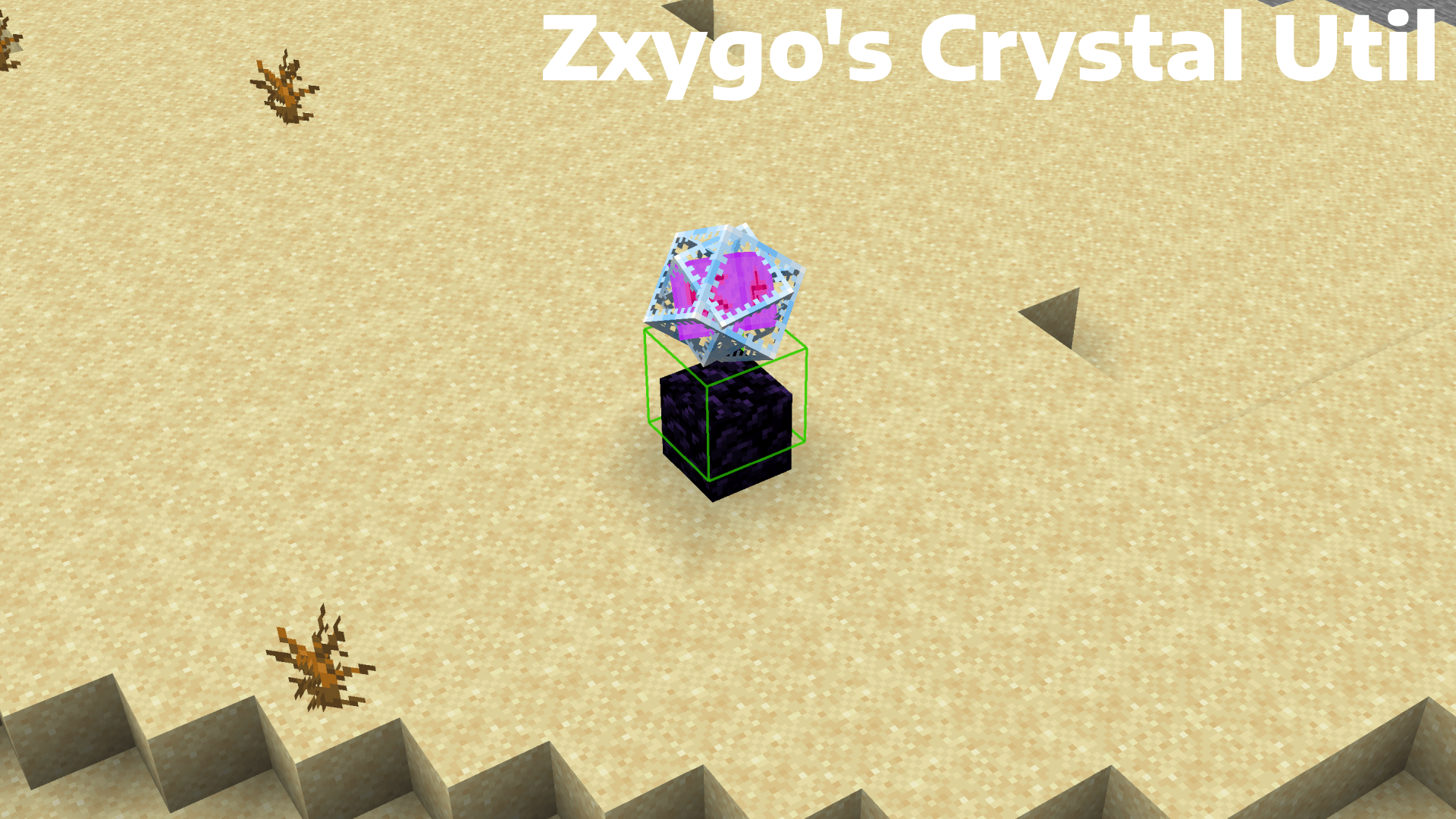
**Zxygo’s Crystal Util is a utility mod that shows people a relative damage indicator of a crystal comapred to the position and distance of a player compared to a crystal. It shows a simple box outline that changes color depending on your relative position and distance, and it allows for many uses.**
———————————————————————————————-
**NOTE: This mod may be seen as cheating on some servers and provides a unfair advantage. This mod is simply to be used as a learning tool for people getting into Crystal PVP. It exists as a tool that players can use, not a cheat. I don’t support hacking or cheating of any kind**
———————————————————————————————-
———————————————————————————————-
### Features
**Color-Coded Danger Levels**
– Red: can be dealt heavy damage and can be popped / killed
– Yellow: will deal some damage, a bit dangerous, take caution
– Green: safe
**Fully Customizable**
– Toggle the indicator on/off anytime
**Clean & Optimized**
– Minimal performance impact
– Works in multiplayer smoothly
**Mod Menu Integration**
– Simple Mod Menu Integration
———————————————————————————————-
### How It Works
Zxygo’s Crystal Util analyzes the vertical position of end crystals relative to your player, along with the distance from the player to the crystal. This allows for a calculation for the indicator and then a color depending on the calculation.
For example, if the crystal is above your head or you are far away from it, it renders green (least damage).
Intermediate positions blend between colors.
———————————————————————————————-
**This is my first ever mod, so apologies if there are some bugs. I hope this helps in someone’s journey in Crystal PVP, as at the very start of your journey, this mod can help you learn the mechanics and how you take damage from a crystal.**
Zxygo’s Anchor Util
**Business email: [email protected]** |
**Business discord: zxygomc.mod**
### Open to partnerships/sponsors ^
———————————————————————————————-
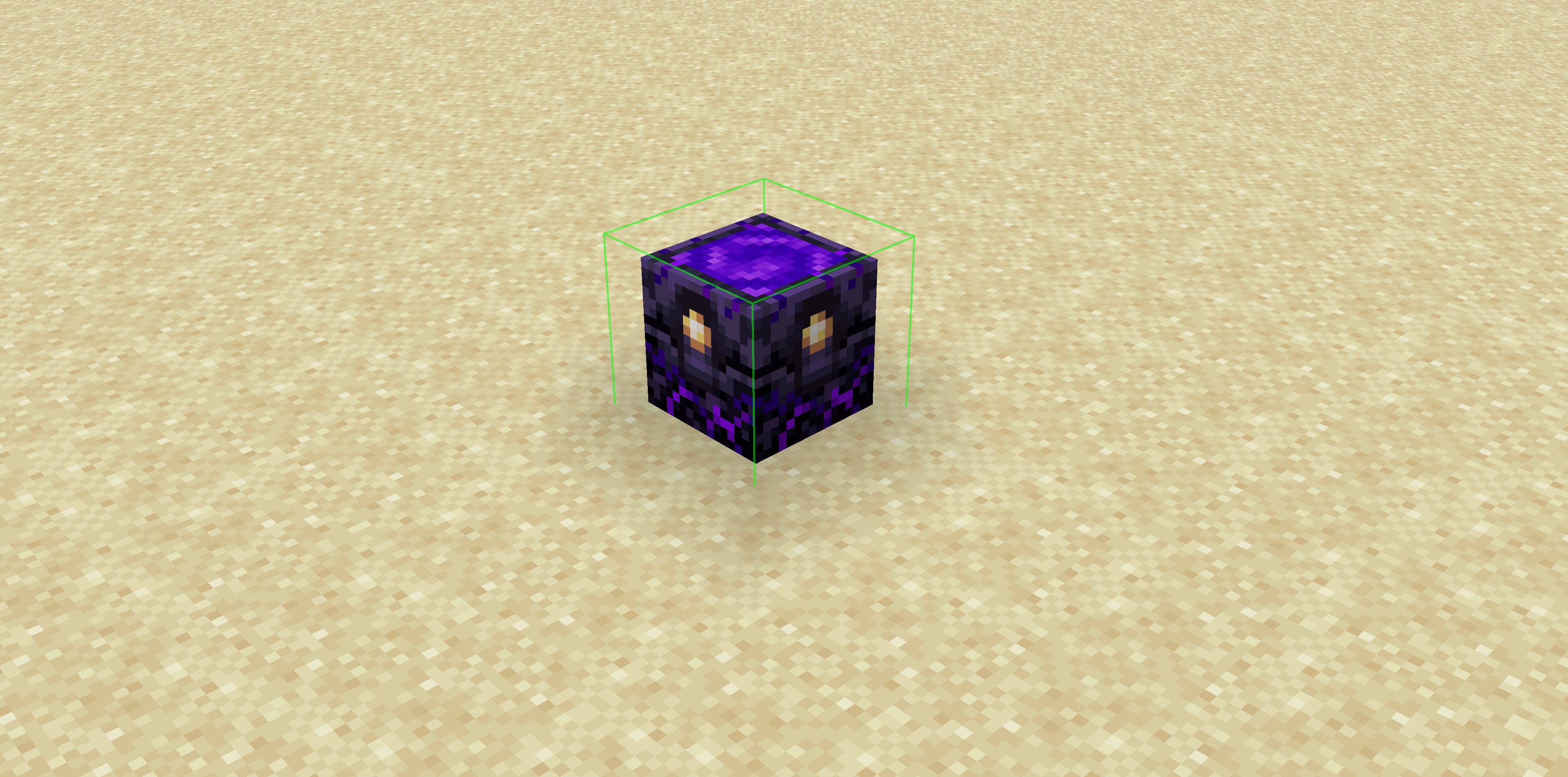
**Zxygo’s Anchor Util is a utility mod that shows people a relative damage indicator of a anchor comapred to the position and distance of a player compared to a anchor, along with taking in factors like the armor and enchantments a player is using. It shows a simple box outline that changes color depending on your relative position and distance, along with armor and enchantments, and it allows for many uses.**
**Check out my other mod: Zxygo’s Crystal Util**
————————————————————————————————
**NOTE: This mod may be seen as cheating on some servers and provides a unfair advantage. This mod is simply to be used as a learning tool for people getting into Crystal PVP. It exists as a tool that players can use, not a cheat. I don’t support hacking or cheating of any kind**
————————————————————————————————
————————————————————————————————
### Features
**Color-Coded Danger Levels**
– Red: (deadly)
– Yellow: (dangerous)
– Green: (safe)
**Fully Customizable**
– Toggle the indicator on/off anytime
**Clean & Optimized**
– Minimal performance impact
– Works seamlessly in multiplayer
**Mod Menu Integration**
– Simple Mod Menu Integration
————————————————————————————————
### How It Works
Zxygo’s Anchor Util analyzes the position and distance of anchors relative to your player, along with the other factors like blocks placed between you and the anchor, armor, and enchantments like protection on the armor. This allows for a calculation for the indicator and then a color depending on the calculation.
For example, if you have a obsidian block in front of the anchor between you, then it will be a green (least damage).
Zusz’s CoffeeCraft2: ReBrewed
# ☕ Zusz’s CoffeeCraft2: ReBrewed
**Brew. Experiment. Energize.**
**Zusz’s CoffeeCraft2: ReBrewed** is a comprehensive and creative coffee mod that brings **variety, customization, and a jolt of caffeine** to your Minecraft world!
## 1.3.2 Update: Out Now!
## 🔥 Features
* ✅ **264 completely unique coffee combinations** — combine ingredients to your liking!
* ⚡ **Original caffeine system** — experience the perks and side-effects of your coffee intake!
* 🧪 **Dynamic brewing mechanics** — your ingredients matter!
* 📚 **JEI Integration** — easily view coffee recipes, ingredients, and results in-game!
* 🚀 **More content coming soon** — new ingredients, and effects are on the way!
## ☕ Why Zusz’s CoffeeCraft2?
* This mod provides an immersive coffee brewing experience, and a unique caffeine system, seen nowhere else!
* This is the **official successor** to the original **Zusz’s CoffeeCraft**, fully reimagined for modern Minecraft versions, with new mechanics, so **if you liked Zusz’s CoffeeCraft, this is the mod for you!**
* Whether you’re a casual sipper or a coffee-crazed alchemist, this mod offers **a flavorful experience full of experimentation** and discovery!
### 🛠️ Supported Modloader and Versions:
* 🧩 **NeoForge**
* 🧪 Supports Minecraft 1.21.0 and **1.21.1**
## ☕ 1.3.2: The Sack Update
From cherry to cup — expand your brewing with new storage, new drinks, and smoother systems.
### ☕ Additions
– Added a new coffee type: **Americano**
– Added **Coffee Cherry & Ground Coffee Sacks**
– Hot Chocolate now requires milk to brew
### 🐛 Fix
– **Fixed Excelsa coffee bushes missing texture**
## Out Now!
## 🔗 Links
**Zusz’s CoffeeCraft2: ReBrewed**
* [Modrinth](https://modrinth.com/mod/zuszs-coffeecraft2-rebrewed)
* [CurseForge](https://www.curseforge.com/minecraft/mc-mods/zuszs-coffeecraft2-rebrewed)
**Original Zusz’s CoffeeCraft**
* [Modrinth](https://modrinth.com/mod/zuszscoffeecraft)
* [CurseForge](https://www.curseforge.com/minecraft/mc-mods/zuszs-coffee-craft)
**Zusz’s Lil Donuts**
* [Modrinth](https://modrinth.com/mod/zuszs-lil-donuts)
* [CurseForge](https://www.curseforge.com/minecraft/mc-mods/zuszs-lil-donuts)
ZTools
# ZTools
This datapack includes a bunch of miscellaneous items and tools for Minecraft, including weapons, tools and more. This is my first datapack so if there is anything wrong, feel free to tell me in the comments.
All custom crafting recipes in this pack are always instantly unlocked and show in the recipe book.
This pack includes:
## Items
### Haste Talisman
When held in mainhand or offhand, gives the player +50% mining speed. For example, a diamond pickaxe with this in offhand can instantly mine netherrack.
### Speed Talisman
When held in offhand, gives the player 30% more speed and 37.5% in mainhand.
### Extendable Arm
When held in offhand, gives the player +1.5 reach and +1.75 in mainhand.
### Fireball Dusts
– Fireball Dust: When used, summons a fireball (With an explosion power of 2) and is consumed with a cooldown of 0.7 seconds.
– Greater Fireball Dust: When used, summons a fireball (With an explosion power of 4) and is consumed with a cooldown of 1.4 seconds.
– _Note: You must hit the fireballs summoned in the direction of choice after summoning them._
### Radar Compass
When held, gives the player -65% movement speed and reveals all entities in a 10 block radius.
### Lumberjack Axe
Cuts down entire trees at once, or any connected logs.
### Compressed Wind Charge
Explodes with 4 times the power of a wind charge.
### Warp Stone
Consumable. Teleports you 8 blocks forward.
## Weapons
### Scythe
Attack stats same as a Sharpness II, Sweeping Edge X Diamond Sword, and it summons a damaging cloud when attacking players.
### Ender Blade
When right clicked, teleports the player 2.5 blocks ahead.
### The Lootmaster
Looting X, Fortune X, Sharpness VII diamond pickaxe.
## Recipes
### Gunpowder
Gunpowder can be crafted with 1 flint to yield 3 gunpowder.
### Machine Gun
Crossbow with Quick Charge V for instant reloading.
### Smelting Lapis
Lapis smelts into a stick twice as fast in a furnace or blast furnace yielding a lot of xp.
### Gluing and Singularity Enchanted Books
### Nutrition-Enhanced Berries
Sweet berries cook faster than regular items in furnace and result in a food that can be eathen faster than most foods with 6 nutrition and 12.7 saturation.
## Enchantments
### Explosive
For crossbows and bows, but an anvil must be used to enchant crossbows. Makes arrows explode when hitting blocks. (Not entities)
### Knowledge
For pickaxes, increases mining XP up to 9x at level V, but is very very expensive, where a level 30 enchantment table can enchant to a maximum of Knowledge III. For higher levels, enchantments must be combined or villagers must be used.
### Gluing
For weapons, glues mobs (not players) in place for 2 seconds when you hit them.
### Singularity
For maces, deals double damage at level 1 and triple at level 2.
zQuests
[](https://minestrator.com/a/GROUPEZ)
**Attention, this is a free version of zQuests, you can use it but you must buy the paid version to get help!**
—
# **Features**
## ✅ 30 quest types
* **[BLOCK_BREAK](https://zquests.groupez.dev/configurations/quests#block_break)**
* **[BLOCK_PLACE](https://zquests.groupez.dev/configurations/quests#block_place)**
* **[ENTITY_KILL](https://zquests.groupez.dev/configurations/quests#entity_kill)**
* **[FARMING](https://zquests.groupez.dev/configurations/quests#farming)**
* **[FISHING](https://zquests.groupez.dev/configurations/quests#fishing)**
* **[TAME](https://zquests.groupez.dev/configurations/quests#tame)**
* **[ENCHANT](https://zquests.groupez.dev/configurations/quests#enchant)**
* **[BREW](https://zquests.groupez.dev/configurations/quests#brew)**
* **[SMELT](https://zquests.groupez.dev/configurations/quests#smelt)**
* **[CRAFT](https://zquests.groupez.dev/configurations/quests#craft)**
* **[VOTE](https://zquests.groupez.dev/configurations/quests#vote)**
* **[SELL](https://zquests.groupez.dev/configurations/quests#sell)** *(requires [zShop](https://www.spigotmc.org/resources/zshop-advanced-shop-plugin.74073/))*
* **[PURCHASE](https://zquests.groupez.dev/configurations/quests#purchase)** *(requires [zShop](https://www.spigotmc.org/resources/zshop-advanced-shop-plugin.74073/))*
* **[ENTITY_DAMAGE](https://zquests.groupez.dev/configurations/quests#entity_damage)**
* **[EXPERIENCE_GAIN](https://zquests.groupez.dev/configurations/quests#experience_gain)**
* **[HATCHING](https://zquests.groupez.dev/configurations/quests#hatching)**
* **[ITEM_CONSUME](https://zquests.groupez.dev/configurations/quests#item_consume)**
* **[ITEM_BREAK](https://zquests.groupez.dev/configurations/quests#item_break)**
* **[ITEM_MENDING](https://zquests.groupez.dev/configurations/quests#item_mending)**
* **[RESURRECT](https://zquests.groupez.dev/configurations/quests#resurrect)**
* **[JOB_LEVEL](https://zquests.groupez.dev/configurations/quests#job_level)** *(requires [zJobs](https://zjobs.groupez.dev/))*
* **[JOB_PRESTIGE](https://zquests.groupez.dev/configurations/quests#job_prestige)** *(requires [zJobs](https://zjobs.groupez.dev/))*
* **[SMITHING](https://zquests.groupez.dev/configurations/quests#smithing)**
* **[ISLAND](https://zquests.groupez.dev/configurations/quests#island)** *(requires [SuperiorSkyBlock](https://www.spigotmc.org/resources/87411/))*
* **[COMMAND](https://zquests.groupez.dev/configurations/quests#command)**
* **[CUBOID](https://zquests.groupez.dev/configurations/quests#cuboid)**
* **[CUSTOM](https://zquests.groupez.dev/configurations/quests#custom)**
* **[INVENTORY_OPEN](https://zquests.groupez.dev/configurations/quests#inventory_open)**
* **[INVENTORY_CONTENT](https://zquests.groupez.dev/configurations/quests#inventory_content)**
* **[SHEAR](https://zquests.groupez.dev/configurations/quests#shear)**
* **[LOOK_AT_BLOCK](https://zquests.groupez.dev/configurations/quests#look_at_block)**
* **[LOOK_AT_ENTITY](https://zquests.groupez.dev/configurations/quests#look_at_entity)**
—
## ✅ Integrations & extras
* **Holograms support** *(via [zEssentials](https://www.spigotmc.org/resources/zessentials-best-essentials-cmi-sunlight-alternative.118014/))*
* **Scoreboard support** *(via zEssentials)*
* **WayPoints support (1.21.8+)** *(via zEssentials)*
* **Toast messages**
* **Endless customization** – every detail is configurable
* **Optimized inventories** powered by [zMenu](https://www.spigotmc.org/resources/zmenu-ultra-complete-menu-plugin.110402/)
* **Texture-pack–friendly inventories**
* **16+ powerful [placeholders](https://zquests.groupez.dev/configurations/placeholders)**
* **Favorites & display options for players**
* **Fully configurable rewards**
* **100% open source**
* **Try before you buy** via our [Discord](http://discord.groupez.dev/)
* **Complete [documentation](https://zquests.groupez.dev/)**
* **Powerful API** to create custom quests
* **Dozens of admin & player [commands](https://zquests.groupez.dev/configurations/commands-and-permissions)**
—
# **How to install zQuests**
## Requirements
* **Java**: 21+
* **Minecraft**: 1.20.4 → 1.21.8+
* **Server software**: Spigot, Paper, Folia (and Paper forks)
* **Required plugin**: [zMenu](https://www.spigotmc.org/resources/zmenu-ultra-complete-menu-plugin.110402/)
* **Optional**: [PlaceholderAPI](https://www.spigotmc.org/resources/placeholderapi.6245/) (Folia-compatible version available)
> ⚠️ Modded server software is **not supported**.
## Installation steps
1. Download **zQuests** and required plugins
2. Place the `.jar` files in the `plugins/` folder
3. Start or restart the server
4. Configure the plugin
5. Restart again – **zQuests is ready!**
—
# **Example**
This showcase demonstrates a full **zQuests** configuration with a custom texture pack.
* First video: the beginning of the **[FairySky](https://www.fairysky.fr/)** tutorial
* Second video: custom inventories powered by **zQuests + zMenu**
FairySky is a **Skyblock 1.21.8** server, fully developed and configured by myself, featuring most of my plugins.
ZPvPToggle
# ZPvPToggle
A lightweight Minecraft plugin that allows players to toggle their PvP status on and off. Players can only engage in PvP when both parties have PvP enabled.



## Features
– **Toggle PvP**: Players can enable or disable their PvP status
– **Visual Indicators**: Customizable particle rings show which players have PvP enabled
– **Cooldowns:** Configurable cooldown for toggling PvP after a player enters PvP combat.
– **Custom Indicators:** Players can choose their own indicators. Access to indicators is permission-based.
– **Admin Controls**: Staff can toggle PvP for other players
– **Fully Customizable**: All messages and particle effects can be configured
– **Folia Support**: Works with Folia server software
– **Permissions-Based**: Granular permission system for different commands
## Commands
| Command | Description | Permission |
|———|————-|————|
| `/pvp` | Toggle your PvP status | zpvptoggle.user |
| `/pvp toggle` | Toggle your PvP status | zpvptoggle.user |
| `/pvp on` | Enable your PvP status | zpvptoggle.user |
| `/pvp off` | Disable your PvP status | zpvptoggle.user |
| `/pvp hide` | Hide PvP particle indicators | zpvptoggle.user |
| `/pvp show` | Show PvP particle indicators | zpvptoggle.user |
| `/pvp indicator ` | Change your PvP indicator | zpvptoggle.indicator. |
| `/pvp help` | Display the help message | zpvptoggle.user |
| `/pvp reload` | Reload plugin configuration | zpvptoggle.admin |
| `/pvp ` | Toggle PvP for another player | zpvptoggle.admin |
| `/pvp bypass ` | Toggle PvP Bypass status for you or another player | zpvptoggle.admin |
## Permissions
| Permission | Description | Default |
|————|————-|———|
| `zpvptoggle.user` | Allows players to toggle their own PvP status | true |
| `zpvptoggle.indicator.` | Give access to specific indicators. | multiple |
| `zpvptoggle.admin` | Allows staff to toggle PvP status for other players | op |
## Configuration
### config.yml
“`yaml
# Whether to disable PvP when a player dies
disable-pvp-on-death: true
# Whether to show a warning message when a player first toggles PvP
warning-message-enabled: true
# Whether to apply pvp-toggle protections to pets of players too
protect-pets: true
# Duration of the cooldown for players toggling pvp or since their last pvp interaction
pvp-cooldown: 10.0
particle-indicator:
# Interval in ticks to show the ring of particles. 20 ticks = 1 second.
interval-ticks: 60
# Maximum distance (in blocks) at which players can see PvP indicators.
max-view-distance: 32
# The default indicator to use (must match one of the keys in the indicators section)
default-indicator: default
# Define multiple particle ring indicators
indicators:
# Default ring – red circle around feet
default:
type: REDSTONE
points: 32
random-particle-positions: false
radius: 0.8
y-offset: 0.1
interval: 5
random-offset-vertical: 0.0
random-offset-horizontal: 0.0
speed: 0.01
color: RED
dust-size: 1.0
“`
## Compatibility
– Paper 1.21+
– Folia-compatible
– Java 21+
## Dependencies
– [MCKotlin](https://modrinth.com/plugin/mckotlin)
## Installation
1. Download the latest version of ZPvPToggle from [Modrinth](https://modrinth.com/plugin/zpvptoggle/versions).
2. Download MCKotlin from [Modrinth](https://modrinth.com/plugin/mckotlin)
3. Place the downloaded `.jar` files into your server’s `plugins/` folder.
4. Restart your server.
5. Configure the plugin to your liking by editing the `.yml` files in the `plugins/ZPvPtoggle/` folder.