Experienced Powers
> This data pack is now discontinued.
> This means that it will no longer receive any more updates.
This data pack gives another use for experience, Magical powers!
You can use this experience points to trade for magical powers (well, effects in other words). For example, You can use 10 experience levels to get fire resistance for 30 seconds, or 7 experience levels to heal yourself.
Yeah I know, it can be a bit overpowered.
To use this data pack, simply use this Command: `/trigger `
Here is a full list of all “powers” and “power_id”:
| Name | Id | Description | XP level required | XP cost
|—————-|—————|—————————————|——|—–|
| Fire resistance | xpower.fire_resistance | Gives 30 seconds of fire resistance. | 25 | 12
| Fire resistance+ | xpower.fire_resistance+ | Gives 2 minutes of fire resistance. | 30 | 18
| Fire resistance++ | xpower.fire_resistance++ | Gives 10 minutes of fire resistance. | 40 | 25
| Slow falling | xpower.slow_falling | Gives 30 seconds of slow falling. | 15 | 5
| Water Breathing | xpower.water_breathing | Gives 1 minutes of water breathing. | 15 | 8
| Water Breathing+ | xpower.water_breathing+ | Gives 5 minutes of water breathing. | 20 | 15
| Water Breathing++ | xpower.water_breathing++ | Gives 20 minutes of water breathing. | 25 | 25
| Heal | xpower.heal | Gives 4 seconds of regeneration V, enough to fill your health bar. | 15 | 5
| Strength+ | xpower.strength+ | Gives 5 minutes of strength I. | 30 | 10
| Strength++ | xpower.strength++ | Gives 10 minutes of strength I. | 35 | 15
| Haste | xpower.haste | Gives 30 seconds of haste I. | 20 | 10
| Haste+ | xpower.haste+ | Gives 2 minutes of haste I. | 30 | 20
| Haste++ | xpower.haste++ | Gives 10 minutes of haste I. | 40 | 25
| Night vision | xpower.night_vision | Gives 2 minutes of night vision | 15 | 4
XP Vial

# 🧪 About
**XP Vial** adds magical glass bottles that allow you to safely store and retrieve your experience points.
This mod is designed to be lightweight and highly configurable in order to enhance any existing gameplay experience of your choosing and to not interfere with any of your other modifications.
For more details, refer to the image gallery, the wiki below, or the following quick summary:
– ‘Xp Vial’ item
– Can store player’s collected xp points
– Three different sizes (500 Xp, 1500 Xp, 3000 Xp)
– ‘Orb Vial’ item
– Special XP Vial item
– Stores player’s collected xp points as experience orbs
– Useful for repairing items with mending
– Items play interactive sounds
– Items have detailed and dynamic texture models (see gallery)
– Highly configurable for individual players and admins through config menus (see below)
– Powered by datapack, configurable through own datapacks
## 🌐 Wiki
If you are looking for a wiki of sorts or just a more detailed walkthrough of the content of this mod, then you can find quick and easy introductions to all the added features of this project below.
If you find no answers to your questions here or want to suggest improvements for the project, then feel free to leave a comment on the CurseForge site (here).
XP Vial
### Description:
XP vials are able to store a limited amount of your collected experience points, preventing you from losing them upon death.
### Usage:
**Right-click** to retrieve stored experience points. Whenever possible, the retrieved amount will match the number of missing experience points needed to reach the next level.
**Shift+Right-click** to store collected experience points. The vial stores the experience points of the player by removing one level at a time.
One can hold down the required buttons for each action to perform the task continuously. Additionally, all vials can be used in both mainhand and offhand.
The fill level of each vial is displayed roughly through the item’s different texture models and denoted exactly in the item’s tooltip.
Small Xp Vial | Medium XP Vial | Large XP Vial
:————————-:|:————————-:|:————————-:
 |  | 
### Recipes:
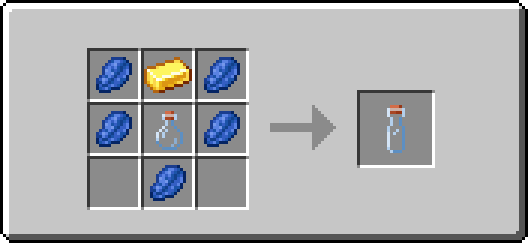

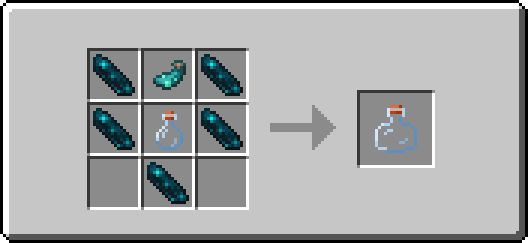
Orb Vial
### Description:
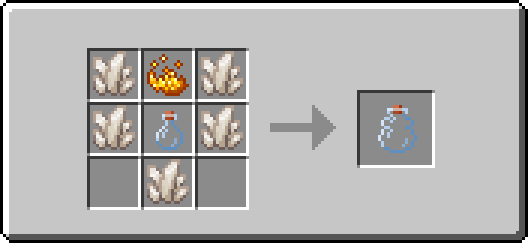
An orb vial is a special variant of an XP vial. It is able to store a limited amount of your collected experience points, preventing you from losing them upon death, and allows you to retrieve experience points in the form of experience orbs.
This enables you to repair items enchanted with mending on the spot and without having to carry large amounts of experience bottles!
### Usage:
**Right-click** to retrieve stored experience points. The retrieved amount will match the minimum of the vial’s remaining fill level and a constant of 100 experience points. The retrieved experience points are then combined into one experience orb that is summoned at the player’s position.
**Shift+Right-click** to store collected experience points. The vial stores the experience points of the player by removing one level at a time.
One can hold down the required buttons for each action to perform the task continuously. Additionally, the vial can be used in both mainhand and offhand.
The fill level of the vial is displayed roughly through the item’s different texture models and denoted exactly in the item’s tooltip.

### Recipe:
## 🔧 Configuration
If you’re looking for a detailed description of the configuration options and how to access them, you’ll find brief introductions to all available menus and their default values, grouped by privilege class, below.
Admin
### Access method:
Run the following command: **/function xp_vial:.menu/admin**
### Features:
– Toggle sound events of all items
– Set the use cooldown of the “XP Vial” item
– Set the use cooldown of the “Orb Vial” item
Player
### Access method:
Run the following command: **/trigger XP_VIAL.CONFIG_MENU**
### Features:
– Toggle sound events of all items
# 📬 Remarks
Please keep in mind that at any given time vast amounts of the mod may be edited or completely overhauled! These changes should not, but may leave existing worlds on older versions corrupted. Creating backups before updating to a new version is advised!
I want to reiterate that this is simply a passion project. It may occur that for longer periods no updates or bug fixes are being developed/released simply because I do not want to.
XP Tools

This mod currently lets you change the XP drops of blocks and entities. It lets you specify lists of operations to perform on the XP drops of either all block/entities or specific ones (by ID or TAG). You can also specify a range for your value if you want a randomized amount. Operations are ordered by their specified priorities.
Note: This is a server-sided mod and the configuration file will be generated per-world inside the serverconfig folder.
Example configuration for block breaking:
_The following sets the XP drops of all blocks to 0. Then it adds 0-10 XP for all blocks tagged `#minecraft:mineable/shovel` and sets the XP of blocks tagged `#forge:ores` to 2-5._
“`
#Settings for block breaking
[block_breaking]
#Available operations: [SET, ADD, SUBTRACT, MULTIPLY, DIVIDE]
#List of global operations. Format: ‘[operation],[min],[max],[priority]’
#Global operations are run before any unique operations.
#Examples:
#’set,0,0,0′ – Sets the xp of all blocks to 0.
blockBreakGlobalOperations = [“set,0,0,0”]
#List of unique operations. Format: ‘[block_id/tag_id],[operation],[min],[max],[priority],[is_last]’
#Examples:
#’minecraft:dirt,set,2,2,0,true’ – Sets the xp drop of the dirt block to 2, takes highest priority and stops any additional operations.
#’#forge:ores,multiply,1,2,1,false’ – Multiplies xp drop of all blocks tagged forge:ores by 1-2, allows additional operations.
blockBreakOperations = [“#minecraft:mineable/shovel,add,0,10,0,false”, “#forge:ores,set,2,5,0,false”]
“`
# FAQ
Can I use this in my modpack?
Yes, go for it! Just make sure to use the appropriate source for your modpack (Modrinth/CurseForge).
Will this be ported to x.x.x version?
Feel free to open up a version port request on my issue tracker and I will see what I can do.
XP Tome
### Functionality
This mod adds a single item – the XP Tome. With the XP Tome you can store and retrieve XP. It can store up to 1395 XP by default (can be configured), which equals to having 30 levels on the XP bar.
### Usage
– Sneak + right-click to store XP
– Right-click to retrieve XP
### Recipe

### Config/Item Components
Note: For item components, “true” means the component is on the item, and “false” means it isn’t.
Note: If you want to change the default item components of the XP Tome you can still use the config file, however that comes with caveats explained therein. Consider creating a Data Pack and override the XP Tome’s recipe with the components set as you wish. Here’s an example recipe. More info about data packs and recipes on the wiki!
– *max_xp* – The maximum amount of XP points that the XP Tome can hold. The default value (1395) represents having 30 levels on the XP bar.
– *retrieval_percentage* – The percentage of XP that the book will give back, as a sort of cost of using it. Example: If this config value is set to 0.75, and an XP Tome has 100 XP stored, attempting to retrieve these 100 XP will give back 75 XP. Note: This will not be 100% accurate, as Minecraft’s XP does not use decimals.
– *retrieve_until_next_level* – Setting this to true will remove only as much XP from the book at a time as is needed for the player to reach their next level.
– *retrieve_xp_orbs* – Setting this to true will remove XP from the book in XP orb form. This is useful if you want to use XP from the book for tools enchanted with Mending.
– *store_until_previous_level* – Setting this to true will store only as much XP from the player’s XP bar until reaching the previous level, meaning only one level at maximum will be added to the book’s storage at a time.
The configuration file for Minecraft versions 1.14.4-1.20.1 can be found in the serverconfig folder of your world.
### Further Info
This mod was created by me, following a request by Shivaxi. It is based off of XP Book and was recreated due to a duplication bug in the original mod, as well as a bug which causes the enchanting table to reset each time the book is used. As this mod uses the same modid and item id as the original, the two mods can not be installed at the same time and switching between them will not lose you any items. I did not take any code or assets from the original mod.
You are allowed to use this mod in any modpack.
XP-Sync
Fixes part of MC-124177, which causes a bug which makes the xp bar reset to zero. The client will think it has no exp. This happens when entering/exiting a dimension with a high Y coordinate. This mod fixes that by adding and then removing 1 xp, forcing the client to sync back up with the server. (Works in singleplayer as well, since it uses an internal server)
Skelun’s XP Reward System

_It’s unfair for players who likes to chill and gather materials to not get any XP while tryharders are building a thousand mob farms getting loads of experience to enchant everything._
_This is why I created this Mod/Datapack_
## ✨ NEW WAYS TO EARN XP


—
## 📝 RULES
* To receive XP by **Mining**, **Cutting**, **Digging** or **Farming** you must be using the appropriate tool;
* You receive less XP for “**Ice Boating**” or for using the “**Rail Bug**”;
* You receive less XP for **Traveling** if you are using something that speeds you up;
* You receive less XP for certain enchantments in specific conditions (e.g.: having *Depth Strider* and walking underwater).
## 🛠️ Mod Support
It supports any _*”Right-Click Harvest”*_ mod or data pack.
It supports any mod or data pack that allows you to break multiple blocks, like _*”vein mine”*_ or _*”timber”*_.
I have not included support for any modded tool, but if you want any, just ask!
## 📖 Settings
As of `version 2.6.1` you can now change some settings in-game.
> You need to be in creative mode (and if in a server, be an OP)
Type this command in chat to give yourself a written book:
“`/function sklps:config“`
It allows you to change some settings once you open it.
—
#### 🔢 *Detailed Information on the numbers I used:* **Google Sheets File**
—
💖 Feel free to give any feedback, trash talk or ask for anything.
**You can contact me on PlanetMinecraft**
**Or create an issue on Github**

Psitadditions – XP Plus
**Experience Plus** is a datapack allowing you to collect, store and manage your experience using new blocks, items and game mechanics. What’s better than being able to securely store your experience!
## **- New Blocks:**
**Added unique blocks and 3d models**
– Experience Crystal –
_Animated block dedicated to storing experience_
– Experience crystal Filler –
_Animated block dedicated to the transfer of the player’s xp to the crystal_
– Experience crystal Drainer –
_Animated block dedicated to the transfer of the crystal xp to the player_
– Experience Player Pad –
_Block allowing you to activate the transfer of experience_
– **Experience Crystal Setup:**
_Use all Xp Plus custom blocks for create the Experience Crystal Setup and transfert your experience_
## **- New enchantments:**
**Compatible with vanilla enchantments**
– Experience Bottler –
_Allows you to bottle experience recovering on entities_
– Experience Sword I-II-III –
_Increases the amount of experience gained from killing mobs_
– Experience Pickaxe I-II-III –
_Increases the amount of experience gained from mining blocks_
_Obtainable with the enchantment table and trade with villagers_
## **- New advancement page**
– Find 6 new achievements and challenges to complete
### **More information**
This datapack is **Multiplayer friendly** !
Minecraft versions supporteds: 1.21.1
**IMPORTANT:** Psitadditions resource pack is required for 3D models and custom items ! ! !

XP From Harvest Reworked
# XP From Harvest
### Get XP from harevsting crops!
.
## Configuration:
In single this mod is configurable via mods config menu. On server it’s configured with config file /config/xpfromharvest.cfg.
## Options:
– Chance: % chance of XP orb spawning.
– Amount: amount of XP given.
– Simple Harvest: – enable SimpleHarvest like functionality (can be toggled dynamically in single).
– Crops List: list of crops that can be processed by the mod with their ages
– (Off by default) Right clicking mature crop will harvest and replant it immediately (just like with SimpleHarvest mod), and of course will give you XP.
– Curiosity: curiosity mode, for debugging purposes, sneak right click on a crop to get a chat message – with info about it. This info can be put directly into config. You can see an example of info I got from XL Food Mod plants below.
⠀
## Examples:
“` “Crops List” = [“Block{minecraft:potatoes}[age=7]”, “Block{minecraft:carrots}[age=7]”, “Block{minecraft:wheat}[age=7]”, “Block{minecraft:beetroots}[age=3]”, “Block{minecraft:nether_wart}[age=3]”, “Block{xlfoodmod:strawberry_plant}[age=7]”, “Block{xlfoodmod:tomato_plant}[age=7]”, “Block{xlfoodmod:lettuce_plant}[age=7]”, “Block{xlfoodmod:cucumber_plant}[age=7]”, “Block{xlfoodmod:corn_plant}[age=7]”, “Block{xlfoodmod:pepper_plant}[age=7]”] “`
## Modpacks:
You’re free to include this mod in any free modpack 😛
## Bonus:
Configs for various mods and MC versions can be found here.
## Credits:
– Forge_User_61020098 for the config for Pam’s Harvest Craft 2.
– RealGecko for the original mod.
XP From Harvest
## Minecraft be like
– Killing? XP!
– Breeding? XP!
– Fishing? XP!
– Smelting? XP!
– Cooking? XP!
– Trading? XP!
– Mining? TONS OF XP!!!
– ~~Crop harvesting? No XP :(~~
There’s a solution!
**MAGIC OF PROGRAMMING**
There you go! Now you can literally harvest XP.
You’re welcome 😀
## Usage
This mod is only required on server, however you can still use it in single.
## Bonus feature (off by default)
Right clicking mature crop will harvest and replant it immediately (just like with SimpleHarvest mod), and of course will give you XP.
## Configuration
In single this mod is configurable via mods config menu. On server it’s configured with config file `/config/xpfromharvest-common.toml`.
**Configuration options include:**
– Chance: % chance of XP orb spawning.
– Amount: amount of XP given.
– Simple Harvest: – enable SimpleHarvest like functionality (can be toggled dynamically in single).
– Crops List: list of crops that can be processed by the mod with their ages
– Curiosity: curiosity mode, for debugging purposes, sneak right click on a crop to get a chat message with info about it. This info can be put directly into config. Here is an example of info I got from XL Food Mod plants.
“`
S:”Crops List” <
minecraft:potatoes[age=7]
minecraft:carrots[age=7]
minecraft:wheat[age=7]
minecraft:beetroots[age=3]
minecraft:nether_wart[age=3]
xlfoodmod:pepper_plant[age=7]
xlfoodmod:cucumber_plant[age=7]
xlfoodmod:rice_plant[age=7]
xlfoodmod:corn_plant[age=7]
xlfoodmod:lettuce_plant[age=7]
xlfoodmod:tomato_plant[age=7]
xlfoodmod:strawberry_plant[age=7]
xlfoodmod:corn_plant[age=7]
>
“`
Beware that for version 1.14.4 and up config format is changed:
“`
“Crops List” = [
“Block{minecraft:potatoes}[age=7]”,
“Block{minecraft:carrots}[age=7]”,
“Block{minecraft:wheat}[age=7]”,
“Block{minecraft:beetroots}[age=3]”,
“Block{minecraft:nether_wart}[age=3]”,
“Block{xlfoodmod:strawberry_plant}[age=7]”,
“Block{xlfoodmod:tomato_plant}[age=7]”,
“Block{xlfoodmod:lettuce_plant}[age=7]”,
“Block{xlfoodmod:cucumber_plant}[age=7]”,
“Block{xlfoodmod:corn_plant}[age=7]”,
“Block{xlfoodmod:pepper_plant}[age=7]”
]
“`
## Installation
Install Forge/NeoForge, put mod inside mods directory… you know…
## MODPACKS
You’re free to include this mod in any modpack if it’s free to use 😛
## BONUS
Configs for various mods and MC versions can be found here:
https://github.com/Real-Gecko/XPFromHarvest-Configs
## Credits
Forge_User_61020098: Config for Pam’s Harvest Craft 2
Xp from Crops
### Unfortunately support for the program I used to create this mod has been terminated, so I will be unable to update/continue working on it.
### If any mod devs would like to take over the project, please contact me on Discord!

#  Xp from Crops
Fully grown crops now drop experience!
Supported Crops
– 1 xp
– Sweet Berries
– Glow Berries
– 1-2 xp
– Beetroot
– Cocoa beans
– 1-3 xp
– Wheat
– Potato
– Carrot
– Pumpkin/Melon stem
– 2-4 xp
– Nether Wart
## Compatibility
I’ve only tested this with a few versions to check compatibility, so if you test it with any version please let me know on discord if it works or breaks! That way I can fix bugs and add more versions. Thank you so much!
## Issues/Requests
