Zaffre’s Mineshafts
Overhauls the existing underground and Badlands mineshafts into a more interesting experience for gameplay, visuals, and rewards while maintaining a vanilla feel.
Loot is neither underwhelming or overpowered and is largely the same save for Fortune and Efficiency enchantment books, TNT ingredients, and haste potions.
As a consequence of using jigsaws and not being hardcoded, these new mineshafts will no longer spawn beneath river or ocean biomes.
**Now includes:**
– TNT and TNT cart mechanics.
– Archaeology! Be sure to bring a brush for a few extra goodies.
– More minecart types! This includes the largely forgotten about spawner minecarts.
– Variety and distinction between individual and especially the kinds of mineshafts themselves.
– Cave spiders replace normal spider spawns in mineshafts.
Zombie Apocalypse Core [ZAC]
# Zombie Apocalypse Core
Necessity for zombie apocalypse modpacks.
Continuation of the Zombie Apocalypse Core mod.
**If you have any feature ideas, open an issue on the GitHub and if its relevant, it may be added**
The Fabric version needs Fabric API as a dependency.
Compatibility
No known incompatible mods found yet, and no mod has been given explicit compatibility either.
If you find incompatible mods, please open a GitHub issue so they can be added here.
Features
'How configurable each feature is' - the measure
☔ if on/off values,
☔☔ if editable lists/numerical values,
and ☔☔☔ if on/off with editable lists/numerical values)

Or simply, more umbrellas more configuration potential
– Zombies can break blocks (☔☔☔)
– Additional zombie drops (☔☔☔)
– Entity multiplier (☔☔☔)
– Entity blocklist (☔☔)
– Daylight resistance (☔☔)
– Heavily armored zombies (☔)
– Day counter (☔)
Config
`this section is excessively verbose, read it only if you are confused with the config`
The config file is present at `your_minecraft_game_dir/config/zac-common.toml` where your_minecraft_game_dir is your minecraft game directory.
**REMEMBER!**
only registry names can be used in lists, for the additionalZombieDrops list you can use registry names of items (`minecraft:item`) and for the entity lists you can use the entity’s registry name (`minecraft:entity`) where item and entity correspond to the item/entity’s registry name.
This should work with entities and items from other mods as well, but has not been yet tested.
You would simply replace the minecraft namespace (`minecraft`) with the mod’s namespace (`mod`) and it would look like `mod:item` or `mod:entity`.
Here is a line-by-line explanation:
“`toml
# integer (1, 2, 3…)
entityMultiplierRate = 1
“`
Pretty self-explanatory
“`toml
# list [“entry1”, “entry2”]
entityMultiplierEntities = []
“`
List of entities which are going to be multipled `entityMultiplierRate` times every time they spawn.
“`toml
# list [“entry1”, “entry2”]
entityBlocklistEntities = []
“`
List of entities which either won’t spawn or will instantly get despawned.
“`toml
# list [“entry1”, “entry2”]
daylightResistantEntities = [“minecraft:zombie”]
“`
List of entities which will not burn in the day.
“`toml
# list [“entry1”, “entry2”]
additionalZombieDrops = [“minecraft:rotten_flesh=0.9”, “minecraft:bone=0.1”, “minecraft:carrot=0.009”, “minecraft:potato=0.0009”, “minecraft:iron_nugget=0.0005”, “minecraft:gold_nugget=0.0001”]
“`
List of additional zombie drops, the default zombie loottable is unchanged, these are merely extra drops with chances.
To get the percentage in decimals (as used here), just divide the percentage number by 100.
“`toml
# bool (true/false)
heavilyArmoredZombiesEnabled = false
“`
Does exactly what it says.
“`toml
# bool (true/false)
dayCounterEnabled = true
“`
Also does exactly what it says.
“`toml
# bool (true/false)
zombiesBreakBlocks = true
“`
Whether zombies should be able to break blocks in between its path to the player or not.
“`toml
# integer (1, 2, 3…)
zombieBlockBreakReach = 3
“`
How far zombies can be from a block and still be able to break it.
“`toml
blockMinimumHardness = 0
“`
Block hardness below which zombies **cannot** break blocks.
Check this out for more information about block hardness: minecraft.wiki
“`toml
blockMaximumHardness = 3
“`
Block hardness below which zombies **can** break blocks.
Z-Life Season 2
# zLife Season Two!
## Welcome to Z-Life!
At the start of the season, you will begin with 1 heart and a randomized timer set to 16, 24, 32, 40, or 48 hours.
Depending on what time you are have, you will have a different life stage!
> 0-7 Hours – Red Stage
>
> 8-15 Hours – Yellow Stage
>
> 16-23 Hours – Lime Stage
>
> 24+ Hours – Dark Green Stage
>
When you are on a lower stage then someone you are allowed to kill them for rewards. When you kill someone that is on a higher stage then you, you will gain 30 minutes and lose one permanent heart.
Everytime you die, you gain 1 heart but lose 1 hour of time.
Once per session, one player is randomly chosen as the Boogeyman.
The Boogeyman’s Role.
If you are the Boogeyman, your goal is to get one kill before the end of the session!
Once you get your kill as the Boogeyman, you will gain 1 hour, and lose one heart. but if you fail you get your kill before the end of the session, you will go down to the next color stage. The person that dies to the boogeyman will lose 2 hour.
If you die on 10 hearts or run out of time, you will be elimanated, and set into spectator mode!
Sugest some ideas on my [strawpage](https://shelleykey.straw.page/)!
Z-13
Sebastian Solace or Z-13 has a body shaped similarly to that of a sea snake, elongated with light blue scales. He has a long tail that is adorned with several pouches that hold the supplies that he uses for survival, At the end of his body is a large tail fin. He has three arms, one of which is attached to his left side and is wrapped in a bloodied bandage. His hands are humanoid, yet only have four fingers and are claw-like. Sebastian’s face retains a humanoid appearance with fish-like features, such as an anglerfish esca on his forehead, fin-like appendages in place of ears, a fish-like mouth, and a third eye on his right side. He has black, short, wavy hair.
Sebastian Solace is originally from a Roblox game from pressure
Go check it out, Its a great game
Yyz’s backpacks Rebackpacked
A small leather and iron backpack you can craft, and many more to find while exploring. You can access your backpacks from your normal inventory, and it’s awesome.
This is a fork of https://modrinth.com/mod/yyzs-backpack
List of changes:
-Renamed all backpacks. (iron –> small backpack, gold –> nether backpack, diamond –> end backpack, netherite –> depths backpack)
-Made it so only the iron backpack is craftable, and the other ones have to be found while exploring.
-Nerfed the capacity of all backpacks. 54 slots is… way way too much
yyz’s backpack
# Inventory Expansion – yyz’s Backpack Mod
**Directly Integrated Backpacks**
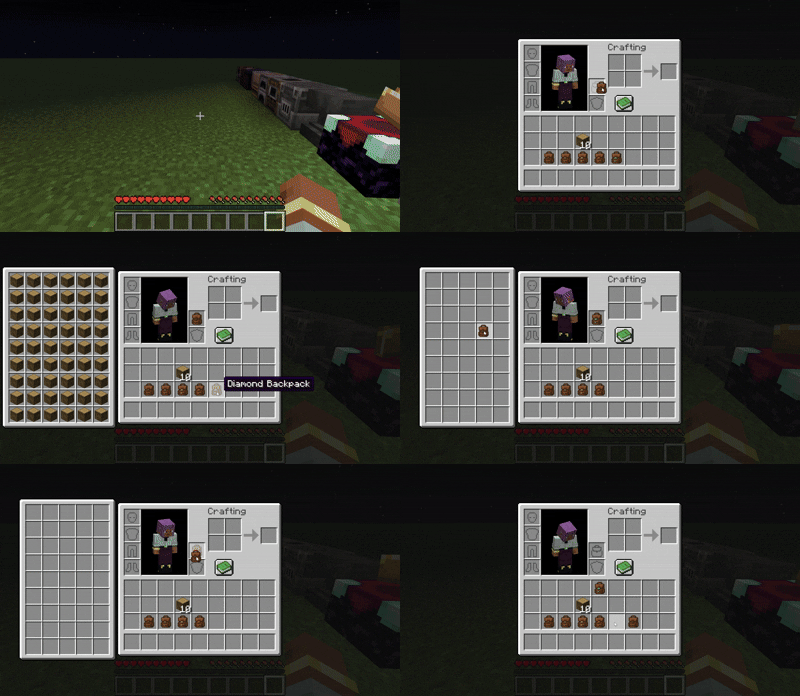
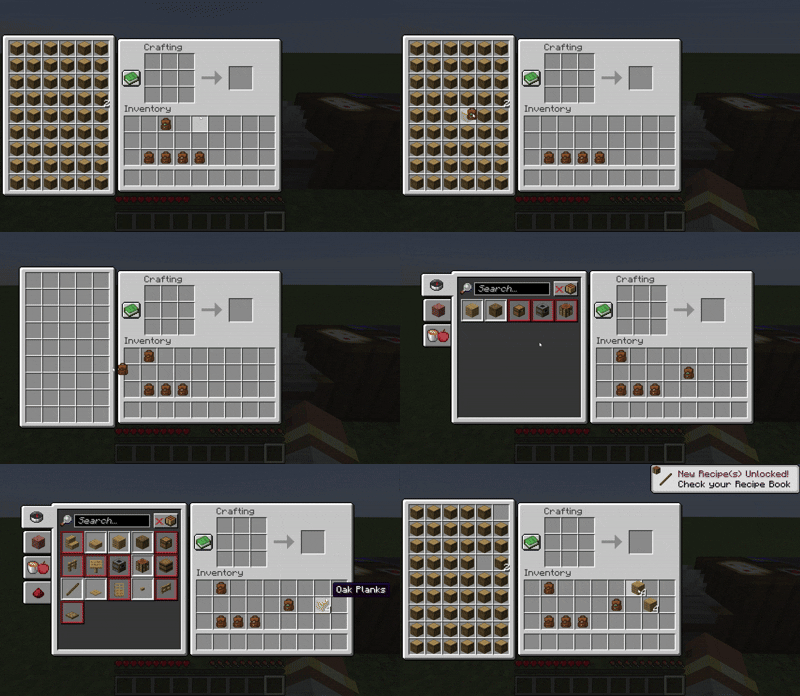
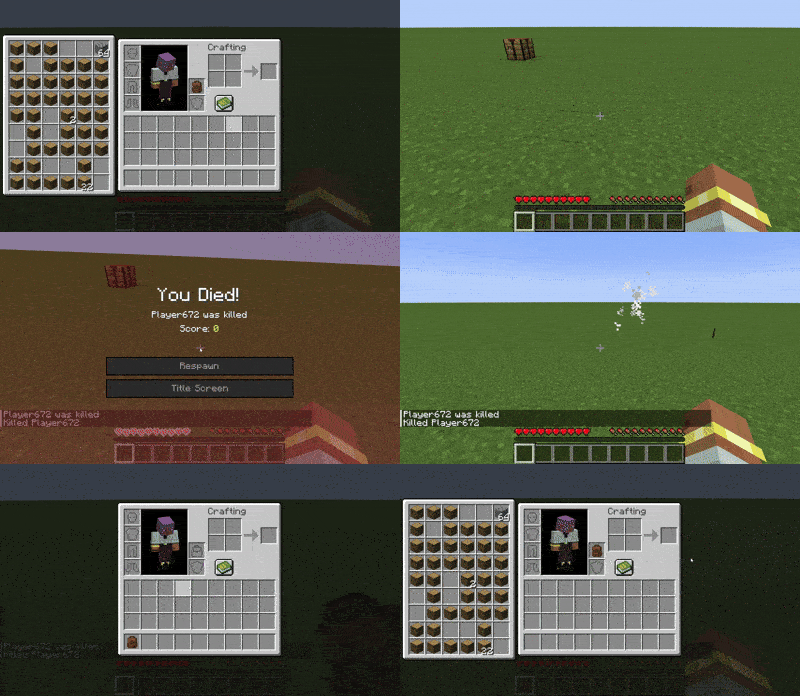
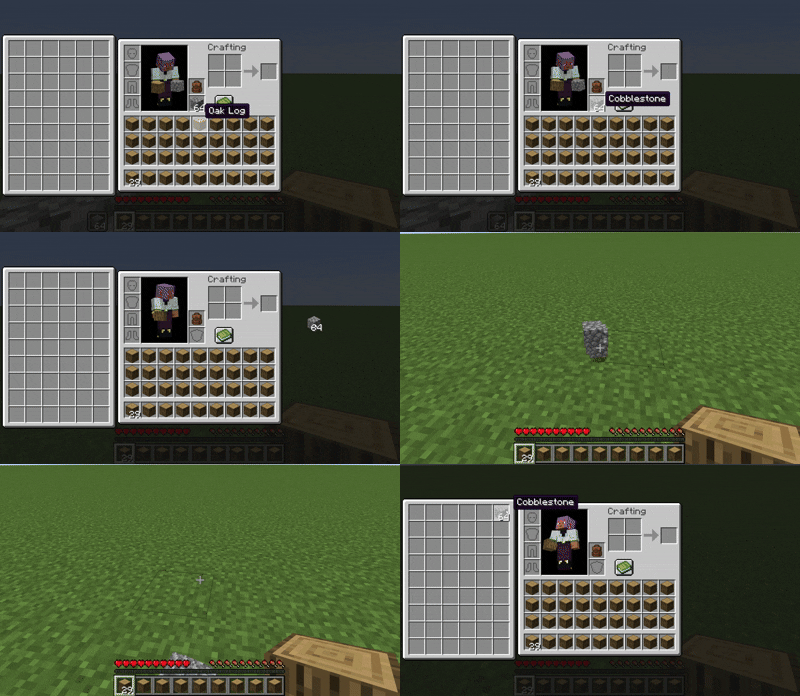
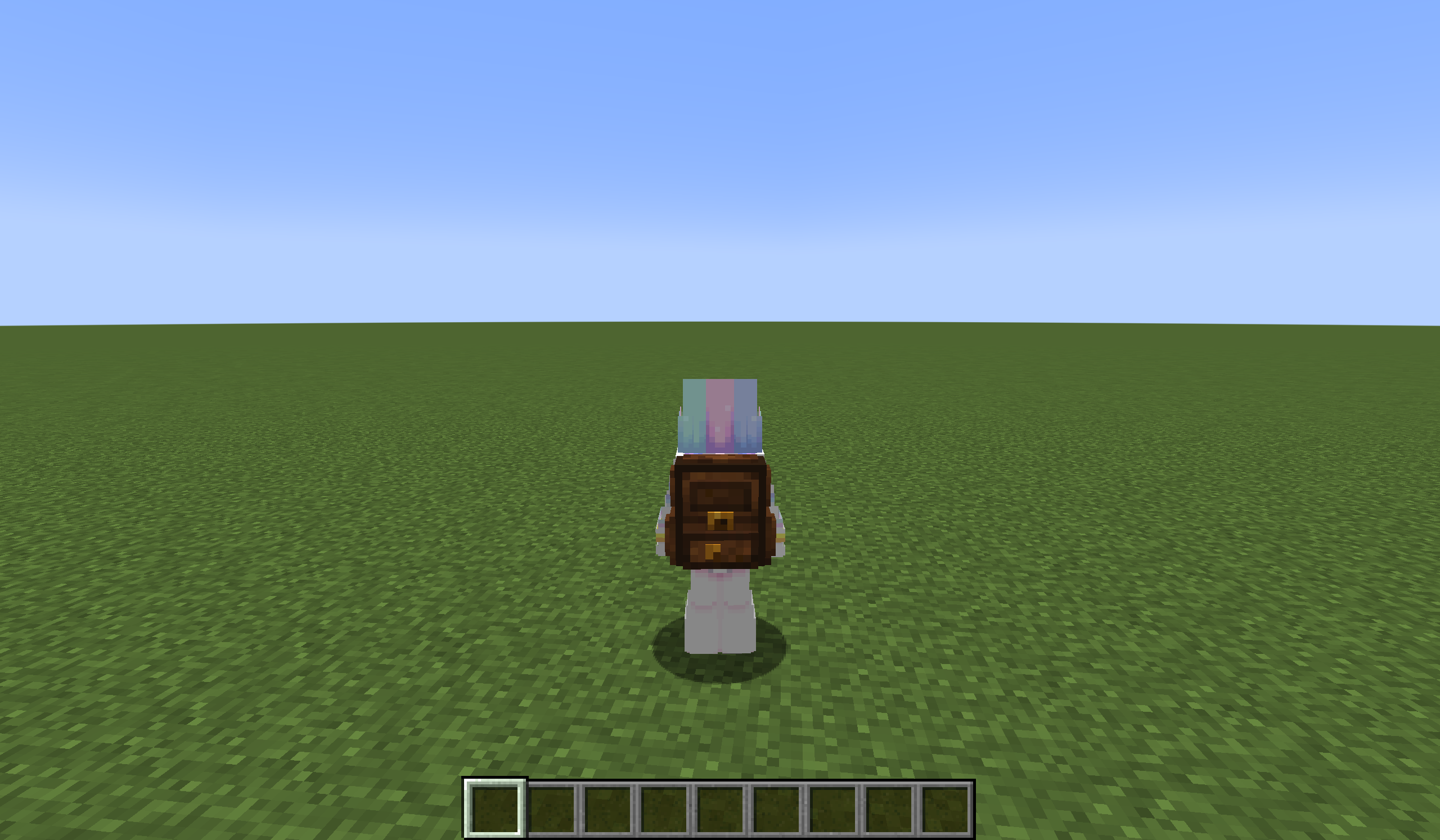
## 🌟 Mod Highlights
### ⚡ Seamless GUI Integration
Backpack slots appear directly in **work GUIs** (inventory/crafting table/chest etc.) without opening extra interfaces.
### 🛠️ Enhanced Features
– 🖱️ **Item Transfer**
`Shift+Left Click` → Transfer to main inventory
`Shift+Right Click` → Transfer to backpack
`Double Click` → Auto sort items
– 📦 **Item Collection**
Automatically stores items in backpack when inventory is full
Backpack drops as single item upon death (contents preserved)
– 🔥 **JEI/REI/EMI Integration**
Supports using backpack items **directly in JEI/REI/EMI crafting**
Real-time backpack content display in recipe interface
– 💍 **Accessory Support**
Backpacks can be placed in **Curios/Trinkets slots**
## 🎒 Backpack Tiers
| Backpack Type | Extra Slots | Special Ability |
|—————-|————-|———————-|
| Iron | +18 | Basic capacity |
| Gold | +36 | Basic capacity |
| Diamond | +54 | Basic capacity |
| **Netherite** | **+54** | **Fire Immunity** |
## ⚙️ Compatibility
### Status Key
– ✅ **Fully Compatible**
– ⚠️ **Partial Support**
– ⌛ **Planned**
– ❌ **Unsupported**
### Feature Support Status
| Feature | 1.21.6 | 1.21.5 | 1.21.4 | 1.21.2-1.21.3 | 1.21.1 | 1.20.5-1.20.6 | 1.20.2-1.20.4 | 1.20.1 | 1.19.4 | 1.19.3 | 1.19-1.19.2 | 1.18-1.18.2 |
|————————-|——–|——–|——–|—————|——–|—————|—————|——–|——–|——–|————-|————-|
| JEI | | ✅ | ✅ | | ✅ | ✅ | ✅ | ✅ | ⌛ | ⌛ | ⌛ | ⌛ |
| Curios | | ✅ | ✅ | | ✅ | ✅ | ✅ | ✅ | ⌛ | ⌛ | ⌛ | ⌛ |
| Trinkets | | | | | ✅ | ✅ | ✅ |✅ | ⌛ | ⌛ | ⌛ | ⌛ |
| Quark | | | | | | | | ⚠️ | | | ⚠️ | ⚠️ |
| Accessories | | | ⚠️ | ⚠️ | ⚠️ | | | ⚠️ | | | | |
| REI | | ⌛ | ✅ | ✅ | ✅ | ✅ | ✅ | ✅ | ⌛ | ⌛ | ⌛ | ⌛ |
| EMI | | | | | ✅ | ✅ | ✅ | ✅ | ⌛ | ⌛ | ⌛ | ⌛ |
| Inventorio | | | | | | | ⚠️ | ⚠️ | ⌛ | ⌛ | ⌛ | ⌛ |
| IPN | ⚠️ | ⚠️ | ⚠️ | ❌ | ⚠️ | ❌ | ❌ | ⚠️ | ❌ | ❌ | ❌ | ❌ |
| Inventory Sorting | ⌛ | ⌛ | ⌛ | ⌛ | ⌛ | ⌛ | ⌛ | ⌛ | ⌛ | ⌛ | ⌛ | ⌛ |
| 3D Models | ⌛ | ⌛ | ⌛ | ⌛ | ⌛ | ⌛ | ⌛ | ⌛ | ⌛ | ⌛ | ⌛ | ⌛ |
| Doggy Talents Next | ⌛ | ⌛ | ⌛ | ⌛ | ⌛ | ⌛ | ⌛ | ⌛ | ⌛ | ⌛ | ⌛ | ⌛ |
| AE2 | ⌛ | ⌛ | ⌛ | ⌛ | ✅ | ⌛ | ⌛ | ✅ | ⌛ | ⌛ | ⌛ | ⌛ |
## ❓ Why This Backpack?
Traditional backpack mods = mobile chests requiring separate GUIs. Our solution:
1. **Seamless experience** – Access backpack items directly in **work GUIs**
2. **Native interaction** – Full support for recipe book/JEI/REI/EMI
3. **Backpack swapping** – Swap when placing backpack in backpack slot/inside
4. **Continuous expansion** – Growing mod compatibility support
## ⚠️ Current Status
### The mod is currently in a very early stage. If you find any bugs, you can report them via GitHub or Discord
❗ Found an issue or have suggestions? Report now!
– [GitHub](https://github.com/yyz729/yyzsbackpack/issues)
– [Discord](https://discord.com/invite/3NPKBgXxVU)
🔧 **In development**:
– More GUI support
– Backpack 3D models
– Expanded mod compatibility
> ✨ **Design Philosophy**: Make backpacks a natural extension of the main inventory
Yuushya Townscape

**Yuushya Townscape NEEDS [Architectury API](https://modrinth.com/mod/architectury-api) to work**
**If installed Sodium, It NEEDS [Indium](https://modrinth.com/mod/indium) to work**
Yuushya Townscape Project was established around April 2020, and went through a number of obstacles and crossroads. Our wish is to shape a townscape within this Minecraft world. To archieve this goal, we draw references from the real world and illustrations. Lifelike towns, cozy houses, they’re all best inspirations to refer to for us.
**Currently, the mod holds 2600+ delicate building materials and decorations with well-designed textures. We also have features including Connected Model, Yuushya Regist API, etc.**
The artwork of Yuushya comes in the style of “Realistic”, yet it doesn’t mean your townscape would look unwelcome when you build a cartoon one. Spark your imagination! With all the building material compatiable for every style in your hand.
Also see our additional mod [Yuushya Modeling](https://modrinth.com/mod/yuushya-modelling).
**You must install with our Resource pack [Yuushya](https://www.curseforge.com/minecraft/texture-packs/yuushya-16x) and a CTM-support mod (like Optifine, CTM or Continuity)** to let everything works correctly.
Yuushya Modelling
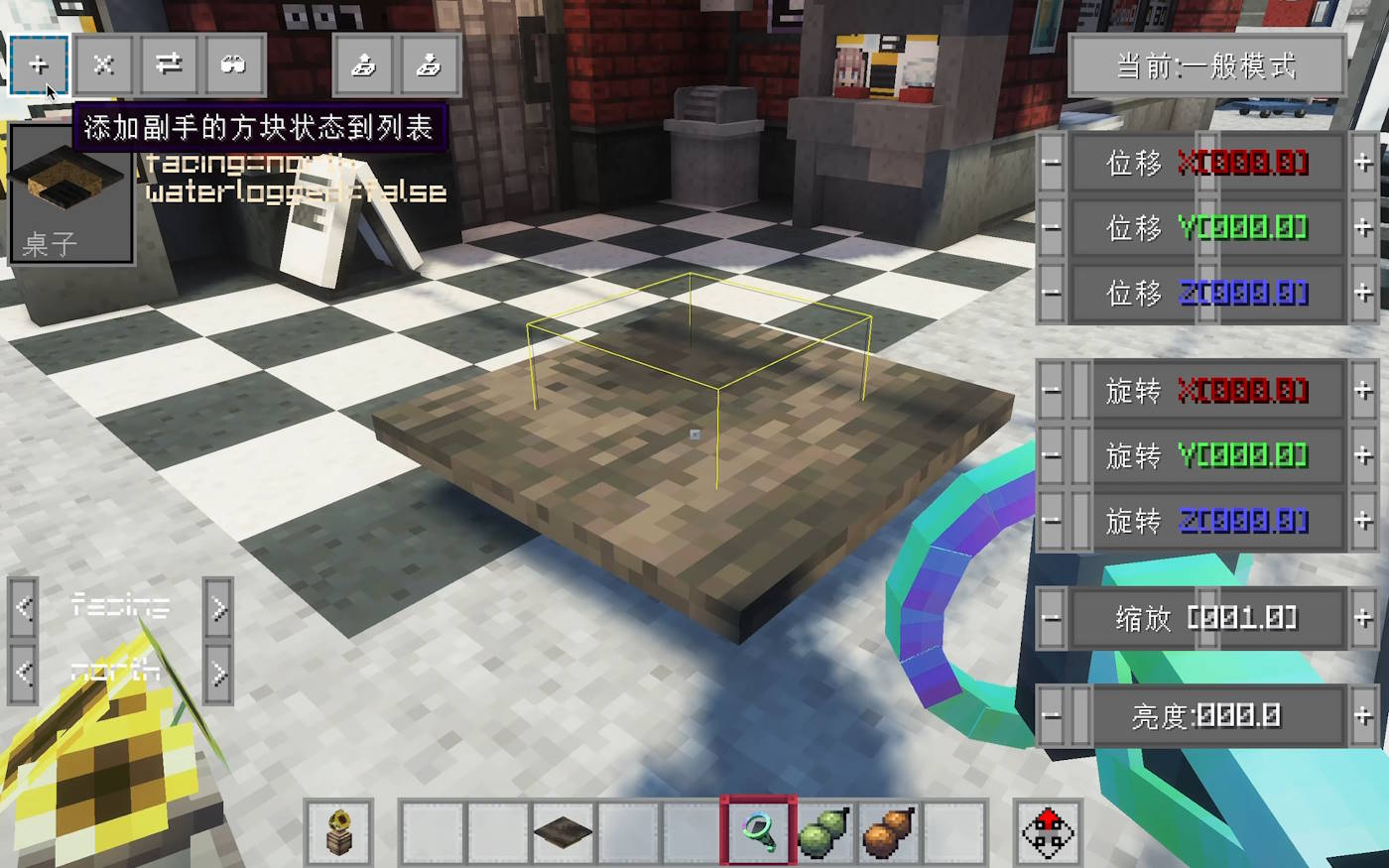
**Yuushya Modelling NEEDS [Architectury API](https://modrinth.com/mod/architectury-api) to work**
**If installed Sodium, It NEEDS [Indium](https://modrinth.com/mod/indium) to work**
**Official Tutorial: [https://www.youtube.com/watch?v=RaoqSZgYpik](https://www.youtube.com/watch?v=RaoqSZgYpik)**
Yuushya Modeling mod makes some awesome refreshes to the concept of building in Minecraft by adding a series of tools **executing move, rotate, resize or even merge FREELY** to blocks, just like what we always do in 3D modeling software. These adjustments can apply to every normal block(decoration, furniture, etc.) in vanilla and other mods.
Check the tooltips of the items to know how to use. And our online guidebook is under final construction.
Yunzhu Transit Extension
# 云竹交通拓展(YTE)
**Yunzhu Transit Extension (YTE)**
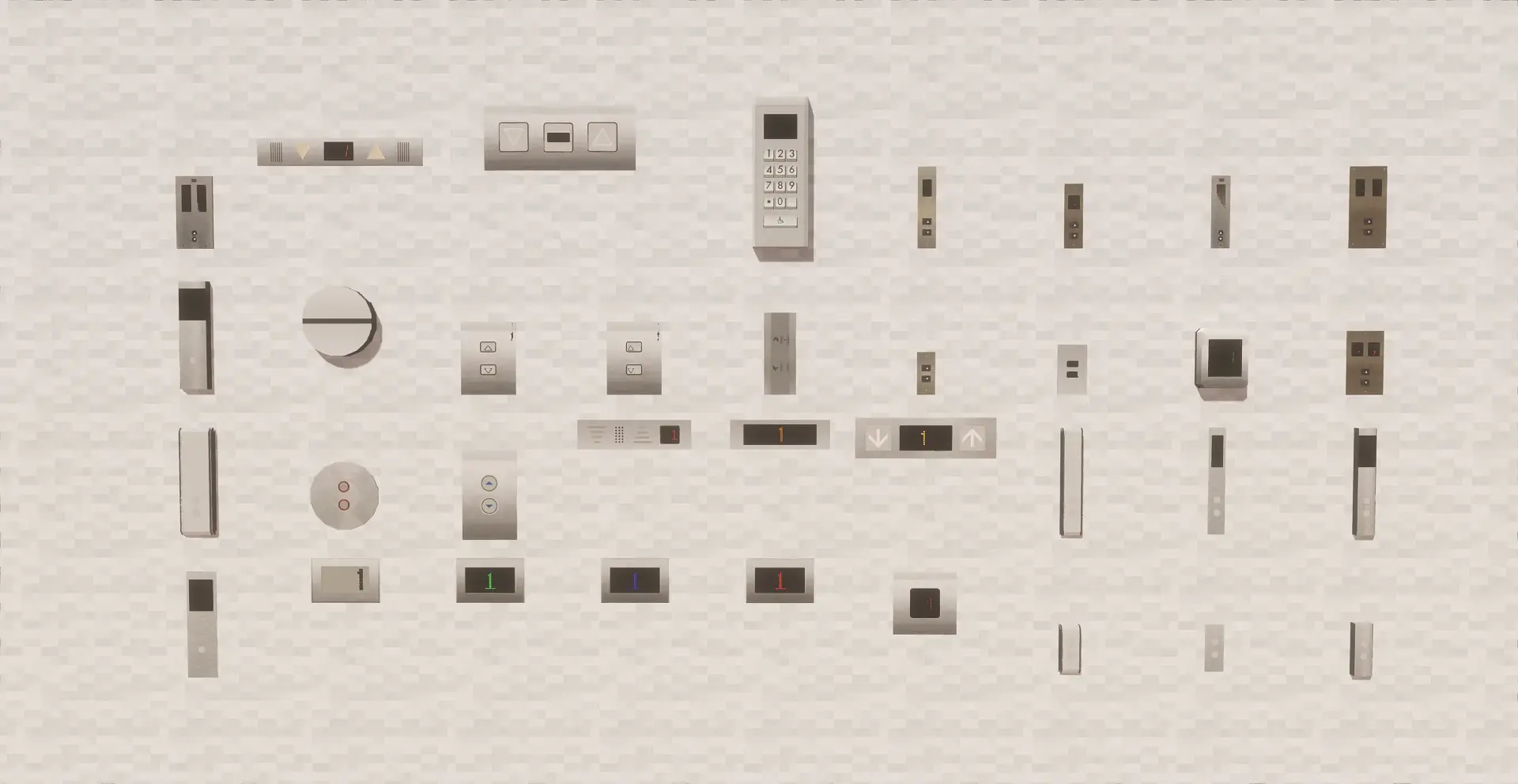
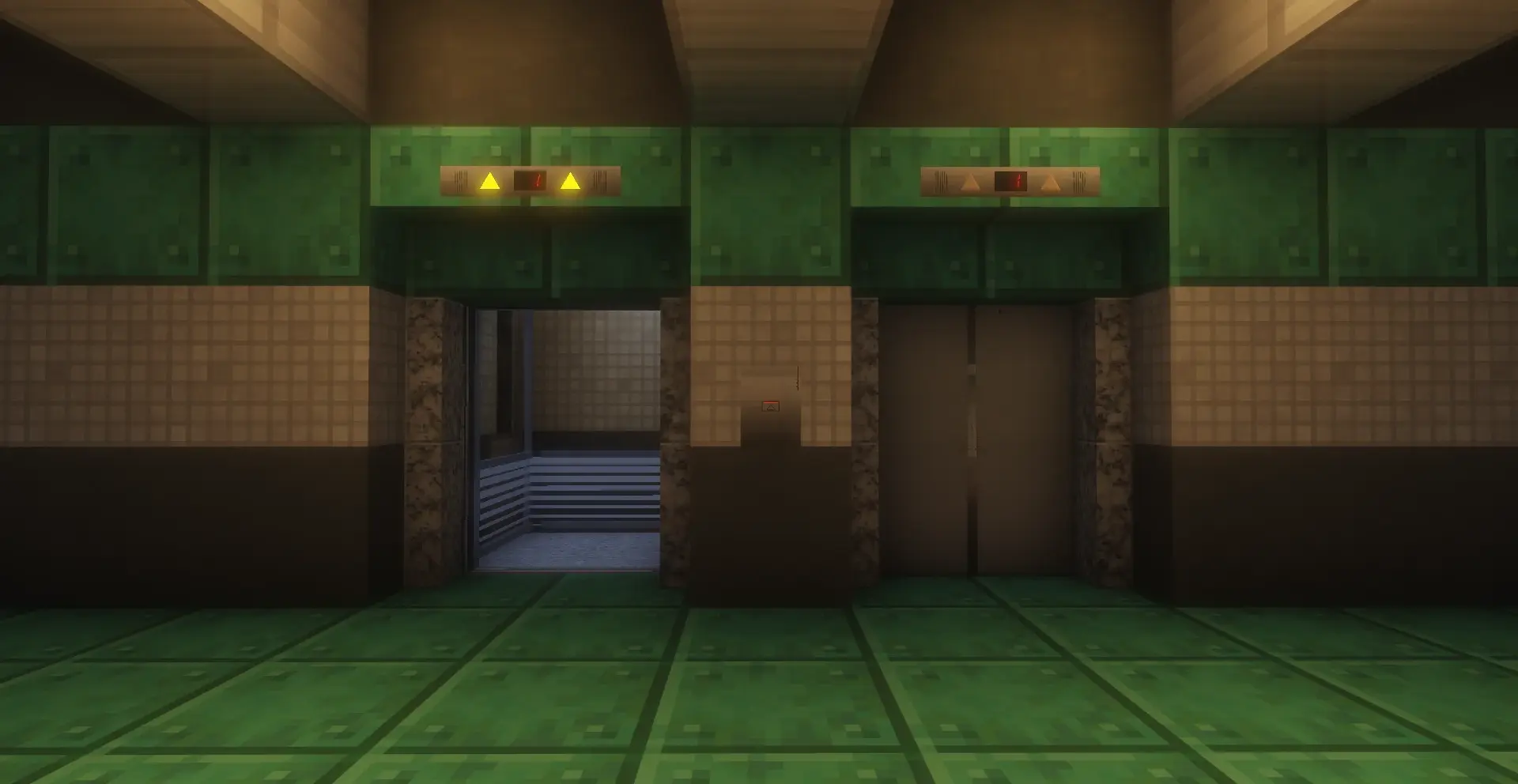
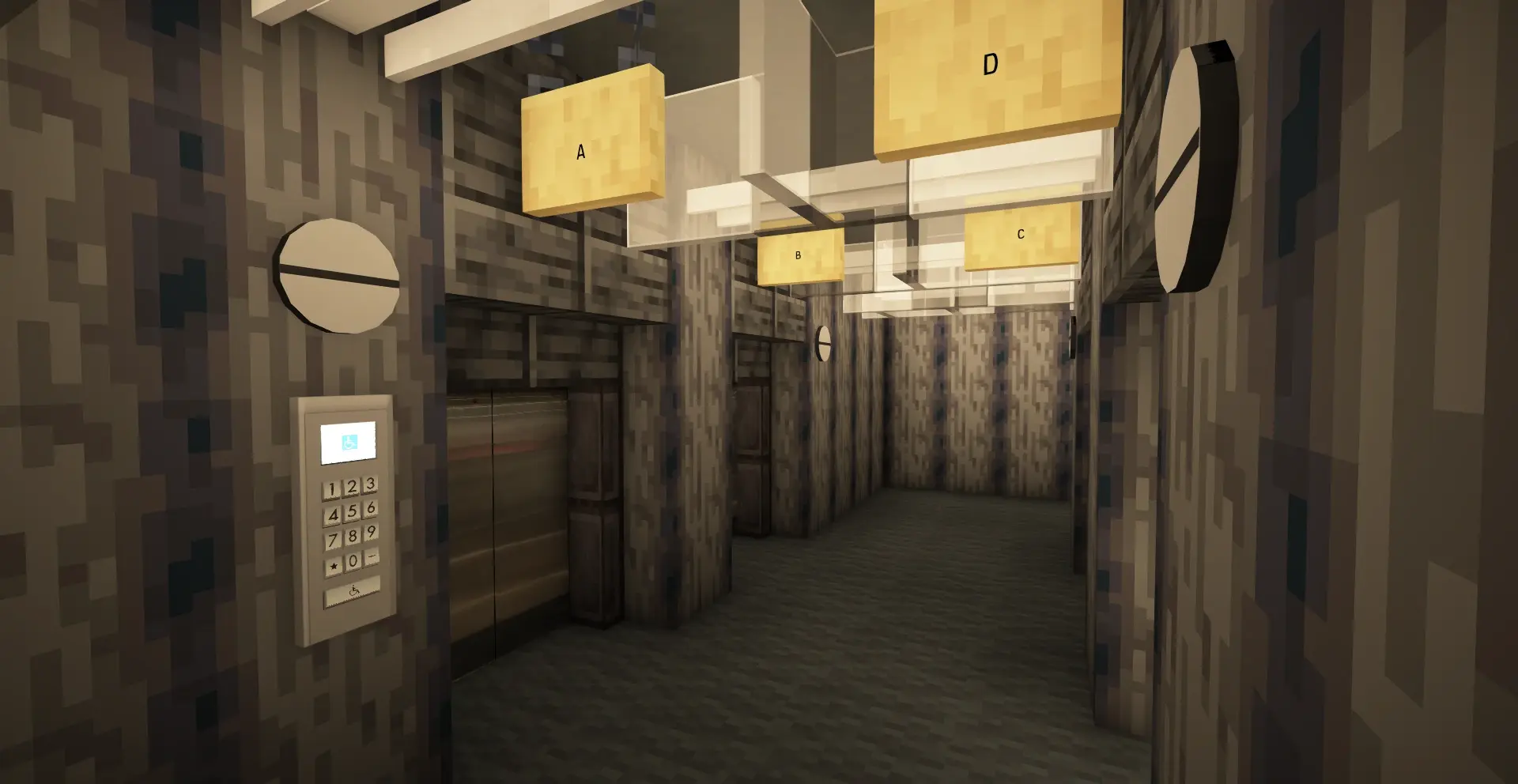
*模组旨在为Minecraft Transit Railway本体提供更多功能扩展,目前添加了电梯批量连接器/移除器、电梯批量楼层设置器、更多电梯部件、更多电梯门及车站装饰。*
*Aims to extend functionalities for Minecraft Transit Railway (MTR). Currently adds elevator batch connectors/removers,elevator batch floor setter, more elevator parts, doors, and station decorations.*
—
### 截图 | Screenshots
—
### 注意事项 | Notes
– *模组处于早期开发测试阶段,使用前请备份您的存档。*
*The mod is in early testing phase. Please backup your save files before use.*
– *如果遇到问题请提交 issues。*
*Report issues via GitHub if encountered.*
– *模组对 MTR 的最低版本要求为 4.0.0*
*Requires MTR version 4.0.0 or later*
– *QQ交流群:1041209145*
—
### 主要功能 | Key Features
– `Lift group connector/remover`
*电梯批量连接器/移除器:批量连接同一部电梯的所有按钮、显示屏*
*Elevator Batch Connector/Remover: Batch linking connects all buttons and display screens of the same elevator.*
– `Lift Floor auto setter`
*电梯楼层自动设置器:批量设置同一部电梯的所有楼层*
*Batch Floor Setter: Batch set all floors of the same elevator.*
– *更多电梯部件与门*
*Additional elevator components & doors*
– *更多车站装饰*
*Enhanced station decorations*
YUNG’s Menu Tweaks





A lightweight client-side mod that makes navigating Minecraft’s menus just a little bit easier.
This mod allows you to:
- Right click cycle buttons to go back to the previous option
- Use the mouse scroll wheel to change slider options
- Change the background of almost every options screen to any texture. No more dirt background!
Note that the custom background option may result in invisible buttons when using certain modded menu layouts, so it is disabled by default.
If you have ideas for other features we could add to this mod, feel free to let me know in the Discord!

YUNG’s Menu Tweaks should be compatible with any menu-changing mod, including ModMenu. Some important notes:
- FancyMenu – Sometimes custom main menu screens made with FancyMenu will not work with the custom background option
- Sodium – The custom Video Settings menu that Sodium adds may not support the new menu navigation features this mod adds
If you have any other compatibility issues, please let me know in the Discord!


