TheRanks
# TheRanks
Add Symbol Ranks to Minecraft for Free
## Features
* Custom Ranks
* Geyser Conpactible
* No need for plugin
## Ranks Table
| Ranks |Symbol |
| ——— |—— |
| Admin | |
| Bot | |
| Builder | |
| Developer | |
| Legendary | |
| Manager | |
| Merchant | |
| Member | |
| Moderator | |
| MVP | |
| MVP + | |
| Official | |
| Owner | |
| Staff | |
| System | |
| Verified | |
| VIP | |
# Credit
– Original by RealGamerz **[Source Code](https://github.com/DeathEnderMan/Nautical-Ranks)**
# Support
– **[Discord](https://discord.gg/3YPTP5Qgyw)**
The Harpy Express: Extended – Russian translate
## EN:
This resource pack is an unofficial Russian translation of the [The Harpy Express: Extended](https://modrinth.com/modpack/the-harpy-express-extended) modpack.
#### Download options
* Rolling release from the [Codeberg repository](https://codeberg.org/Agent19872/thee-rus)
* Stable release from this page in Versions
#### Installation method:
1. Download the Rolling/Stable release
2. Open the directory with the resources and mods of the The Harpy Express: Extended modpack
3. Open the `resourcepacks`
4. Put this resource pack there
5. In Minecraft, select the `Русский язык` and enable the resource pack
## RU:
Этот ресурспак является неофициальным переводом на русский язык сборки [The Harpy Express: Extended](https://modrinth.com/modpack/the-harpy-express-extended).
#### Варианты загрузки
* Roling-релиз с [Codeberg репозитория](https://codeberg.org/Agent19872/thee-rus)
* Стабильный релиз с этой страницы в Versions
#### Способ установки:
1. Загружаете Roling/Stable релиз
2. Заходите в директорию с ресурсами и модами сборки The Harpy Express: Extended
3. Заходите в `resourcepaks`
4. Вставляете туда данный ресурспак
5. В Minecraft выбрать `Русский язык` и включить Ресурспак
The Purple Pack

## Lovely Purple Colors!
### **This pack will require Optifine or CTM+CEM!**
I will only update textures from 1.21.4 and no more than that, in my opinion 1.21.5 wasn’t a good update.
Textures are all made by me and myself only.
“`Things you might like about this Resource Pack:“`
– Greener Grass/Plants.
– Purple Colors.
– (Cross) Bow Timer. (Example: is Holding down right click will turn red to green, red meaning it is not ready to shoot and green meaning it is strong enough to shoot further and do more damage.)
– Purple Golden Apples turn Gold Hearts Purple.
– White Chocolate Sugar Cookies.
– Amethyst Netherite (Netherite Trims are even Amethyst!)
– Purple Diamonds (Diamond Trims are even Purple!)
– Purple Elytras.
– Purple Cherry Wood.
– 25% Transparent Water
– Purple Cake (Jelly inside!)
– Better Purple Beds
– Furry totem
– Shorter Iron Golems
– Silly faced snowman
– What Spyglass
– Cake Hunger bars
– Cute Duckies
– Better (Husk/Villager) Zombies
– Purple sky (+Moon)
– Purple Redstone
– Better Stone
– Better Ores (Glow)
– Purple Creepers!
– Silly “:3” Ghasts
## Thank you for those who Downloaded this Pack, I appreciate the support!
The Legend of Zelda
[[THOUGH I DO NOT CLAIM OWNERSHIP OF THE PROPERTIES REPRESENTED IN THIS RESOURCE PACK, I ASK THAT YOU DO NOT REDISTRIBUTE THIS RESOURCE PACK ON OTHER WEBSITES WITHOUT PERMISSION]]
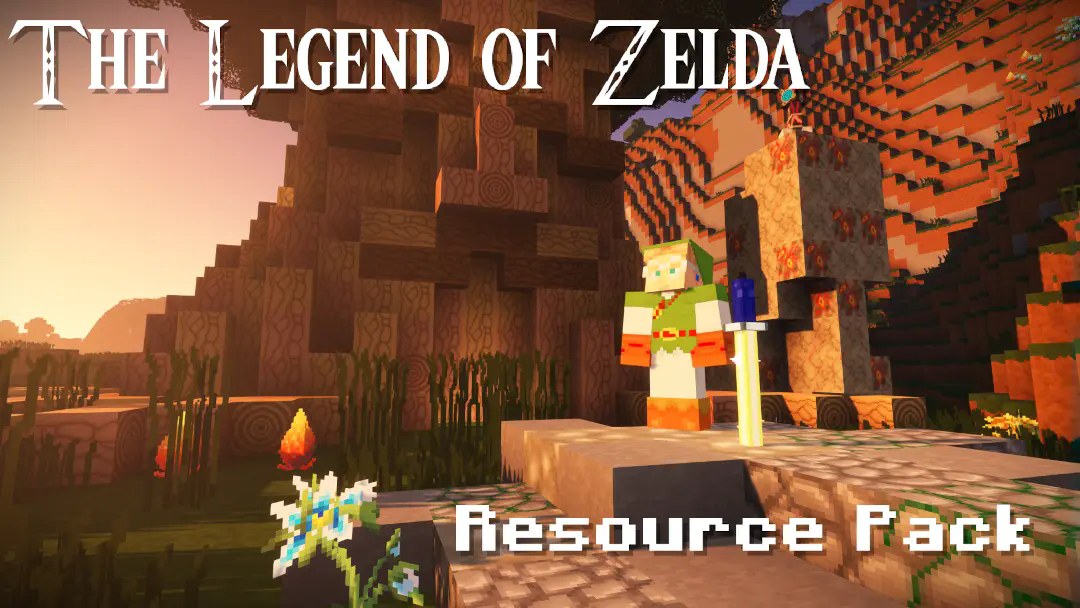
# The Legend of Zelda for _Minecraft_ 1.21.3
The Legend of Zelda is a resource pack by me, Moldomré! It includes tons of retextured items, mobs, blocks, GUI, etc. all based on the legendary Nintendo franchise. There is **_at least one thing from every single main title of the series!_** Trade with the wandering trader Beedle, slay Bokoblins and Stalfos with the Master Sword, use a Hookshot to catch fish, or fight against the dragon Volvagia; this resource pack brings the entire world of the Legend of Zelda to you!
Main titles aren’t the only thing that this pack is based on, other aspects of Zelda media have their own items in the pack! See below for the full list of other Zelda titles:
**Spin-Offs and More:**
– **_Satellaview:_** BS The Legend of Zelda
– **_CDI:_** The Faces of Evil
– **_CDI:_** The Wand of Gamelon
– **_CDI:_** Zelda’s Adventure
– **_DS:_** Freshly-Picked Tingle’s Rosy Rupeeland
– **_Wii:_** Link’s Crossbow Training
– **_Wii U:_** Super Mario Maker (surprising, I know)
– **_Wii U, 3DS, & Switch:_** Hyrule Warriors
– **_Switch:_** Cadence of Hyrule
– **_Switch:_** Hyrule Warriors: Age of Calamity
– **_Switch:_** Super Smash Bros. Ultimate (surprising AGAIN)
– **_TV:_** The Legend of Zelda (TV Series by DIC Entertainment; absolutely SHOCKING)
I’m not the only one who’s worked on this pack; my friend E_WOLFFE made contributions in the form of the original villager textures, tall grass, Iron Golem, the original versions of Zombies, the fire textures, and more.
E_WOLFFE actually has his own Itch IO page, so here’s that if you want to check it out: [wolffius.itch.io](https://wolffius.itch.io/)
Also, Planet Minecraft and Modrinth are the only places that I, the creator, have published this resource pack. Others have redistributed it on more clickbaity sites without my permission. Let it be known, **_only download this pack from here or Planet Minecraft;_** please spread this information around, as one of the top Google results is a certain site with a “9” and “Minecraft” in its title.
Please enjoy, follow, and share!
the copper age title

# English
## Description
The **the copper age title** resource pack is a unique visual modification for Minecraft, meticulously crafted by emad611985. Its primary purpose is to introduce a thematic title screen that resonates with the highly anticipated Copper Update (version 1.21.9). Unlike resource packs that overhaul vast aspects of the game, this pack offers a focused and elegant change, specifically altering the `edition.png` file within the game’s textures to display a custom “MINECRAFT COPPER UPDATE” title.
This pack is ideal for players who:
* Are excited about the Copper Update and wish to see its theme reflected from the moment they launch the game.
* Appreciate subtle yet impactful visual enhancements.
* Seek to personalize their Minecraft experience with thematic consistency.
The `pack.mcmeta` file indicates a `pack_format` of 34, ensuring compatibility with Minecraft versions that support this format, specifically targeting the 1.21.9 update. The description within the pack itself, “§eCopper update title”, uses Minecraft’s internal color codes to display the title in a vibrant yellow, further emphasizing the theme.
### Key Features:
* **Thematic Title Screen:** Replaces the default title screen text with a custom “MINECRAFT COPPER UPDATE” graphic.
* **Subtle Enhancement:** Provides a focused visual change without altering core gameplay textures.
* **Compatibility:** Designed for Minecraft version 1.21.9 and compatible versions supporting `pack_format` 34.
* **Creator Attribution:** Made by emad611985.
### Installation Guide:
1. **Download the Resource Pack:** Obtain the `§a§lcopperupdatetittle.zip` file.
2. **Locate your Minecraft Directory:**
* **Windows:** Press `Win + R`, type `%appdata%.minecraft`, and press Enter.
* **macOS:** Open Finder, click `Go` in the menu bar, hold `Option`, and click `Library`. Then navigate to `Application Support/minecraft`.
* **Linux:** Navigate to `~/.minecraft`.
3. **Open the `resourcepacks` Folder:** Inside your `.minecraft` directory, you will find a folder named `resourcepacks`. Open it.
4. **Place the Zip File:** Drag and drop the downloaded `§a§lcopperupdatetittle.zip` file directly into the `resourcepacks` folder. **Do not unzip the file.**
5. **Activate in Minecraft:**
* Launch Minecraft.
* From the main menu, click `Options…`.
* Click `Resource Packs…`.
* Locate “Copper Update Title” in the list of available resource packs on the left.
* Click the arrow button on the pack icon to move it to the “Selected Resource Packs” list on the right.
* Click `Done`.
Your game’s title screen should now reflect the Copper Update theme!

# العربية
## الوصف
حزمة موارد **عنوان تحديث النحاس (the copper age)** هي تعديل بصري فريد لماينكرافت، تم تصميمه بدقة بواسطة emad611985. هدفها الأساسي هو تقديم شاشة عنوان موضوعية تتوافق مع تحديث النحاس المرتقب بشدة (الإصدار 1.21.9). على عكس حزم الموارد التي تُحدث تغييرات شاملة في جوانب واسعة من اللعبة، تقدم هذه الحزمة تغييرًا مركزًا وأنيقًا، حيث تقوم بتعديل ملف `edition.png` داخل نسيج اللعبة لعرض عنوان مخصص “MINECRAFT COPPER UPDATE”.
هذه الحزمة مثالية للاعبين الذين:
* متحمسون لتحديث النحاس ويرغبون في رؤية سمته منعكسة منذ لحظة إطلاق اللعبة.
* يقدرون التحسينات البصرية الدقيقة ولكنها مؤثرة.
* يسعون لتخصيص تجربتهم في ماينكرافت باتساق موضوعي.
يشير ملف `pack.mcmeta` إلى `pack_format` بقيمة 34، مما يضمن التوافق مع إصدارات ماينكرافت التي تدعم هذا التنسيق، وتستهدف بشكل خاص تحديث 1.21.9. الوصف داخل الحزمة نفسها، “§eCopper update title”، يستخدم أكواد الألوان الداخلية لماينكرافت لعرض العنوان باللون الأصفر الزاهي، مما يزيد من تأكيد السمة.
### الميزات الرئيسية:
* **شاشة عنوان موضوعية:** تستبدل نص شاشة العنوان الافتراضي برسم مخصص “MINECRAFT COPPER UPDATE”.
* **تحسين دقيق:** يوفر تغييرًا بصريًا مركزًا دون تغيير نسيج اللعب الأساسي.
* **التوافق:** مصمم لإصدار ماينكرافت 1.21.9 والإصدارات المتوافقة التي تدعم `pack_format` 34.
* **نسبة للمنشئ:** تم إنشاؤه بواسطة emad611985.
### دليل التثبيت:
1. **تنزيل حزمة الموارد:** احصل على ملف `§a§lcopperupdatetittle.zip`.
2. **تحديد موقع دليل ماينكرافت الخاص بك:**
* **ويندوز:** اضغط `Win + R`، اكتب `%appdata%.minecraft`، ثم اضغط Enter.
* **ماك أو إس:** افتح Finder، انقر على `Go` في شريط القائمة، اضغط باستمرار على `Option`، ثم انقر على `Library`. ثم انتقل إلى `Application Support/minecraft`.
* **لينكس:** انتقل إلى `~/.minecraft`.
3. **افتح مجلد `resourcepacks`:** داخل دليل `.minecraft` الخاص بك، ستجد مجلدًا باسم `resourcepacks`. افتحه.
4. **ضع ملف Zip:** اسحب وأفلت ملف `§a§lcopperupdatetittle.zip` الذي تم تنزيله مباشرة في مجلد `resourcepacks`. **لا تقم بفك ضغط الملف.**
5. **التنشيط في ماينكرافت:**
* شغل ماينكرافت.
* من القائمة الرئيسية، انقر على `Options…`.
* انقر على `Resource Packs…`.
* حدد موقع “Copper Update Title” في قائمة حزم الموارد المتاحة على اليسار.
* انقر على زر السهم الموجود على أيقونة الحزمة لنقلها إلى قائمة “Selected Resource Packs” على اليمين.
* انقر على `Done`.
يجب أن تعكس شاشة عنوان لعبتك الآن سمة تحديث النحاس!
The CK-Pack
Features of the CK-Pack:
DISCLAIMER:
This pack is actually just some random ideas thrown together so don’t expect a harmonic pack at all.
This is the beta-version meaning that there may be unfinished contents/mistakes
Also notice that this pack may not be optimal for players with colour blindess!
Block textures and models
– TALLCAKE is back in 3D! (block modell of the cake)
– Most Chiseled Blocks have a chance to show the Face of very well-known CK’ers/Admins instead (2%) :
– Diamondblock = LogicBugs
– Chiseled Sandstone = MBoose
– Chiseled Netherbricks = Cubehamster
– Chiseled Blackstone = JL2579
– Chiseled Stonebricks = sad_dog
– Red Chiseled Sandstone = LearnRedstone
– Chiseled Deepslate = Weeksly
– Redstone Components that are used in MW are now ‘CK-approved’ (TNT, Slimeblocks, Honeyblocks, (Sticky) Piston, Observer)
– Grass Blocks have a small chance to become a CraftyMasterman
– Sculk Shriekers with a cyan dot in the middle can_summon Wardens
– Waxed Blocks have now a small Indicator in the top right Corner
– Sticky Piston Arm
– Dispensers and Droppers now got Arrows on the side faces telling you in which direction they face (white = dropper, black = dispenser)
– Observers have now arrows on their sides visualizing their direction and whether they are triggered or not
– Lever have now a small red indicator for ON/OFF
– Piston Head Texture now more similar to JL’s Skin-Face
Mobs:
– Enderman → Brownie1111
– Iron Golems → TheCMaxGuy
– Turtles → Lekro
– Clerics → jan-like
– Fletcher → AntOfThy
– TALLPUP → wolf
– Wandering Trader → JohnStar128
– Drowned → TraksAG
– Zombies are Zombie3597
– Husk → SuperCoxylac
– Vex → zorua162
– Vindicator → SoloSwain
– Evoker → DarkKronicle
– Polar Bear → Daluuu
– GlowSquids → GlowSquibs
– Jane is piloting the Enderdragon
Other Features:
– New language “CubeKrowdian Accent” that you can find in the languages menu (replaces hard c’s and k’s with ‘ck’ + some small easter eggs) => might actualy be removed as it is a bit annoying for searching items
– a bunch of splashes (warning: bad jokes/puns)
– Shield has now a CK-ified texture and a fancier frame
– Smoother Sun and Moon
– New Font! (slightly more dense)
– Subtitles now may have symbols infront indicating the source:
– Block-Symbol for most block-sounds/actions
– Mobs have a corresponding symbol
– Player-Icon for Playeractions
– Footsteps-Icon for Stepping-Sounds
– New GUI-textures (dark blue)
– New Menu-Background
– New Menu-Logo (CK-Version) made by Nettakrim
– New Main-Menu-Background (From TacoTown made by TacoSquad)
– Netherite Axes are now Ban-Hammers
– Changed Enchantment Glint
– New Pumpkin Blur (sus)
– Powder Snow is slightly easier to distinguish from normal snow now
– Changed Icons for Menu Buttons
– [req. Optifine] Lightmap that emphasizes the brightness-difference between light level >1 and 0
– [req. Optifine] Custom loading screen with CK-Emblem
This Pack was created by TheMysticalMarv (Minecraft-IGN)
For Suggestions, Criticism and Ideas you can DM me on CubeKrowd’s Discord or message me on the CubeKrowd-Server (IP: play.cubekrowd.net)
Suggestions will be collected for the next version (Gamma)
CapPack – CaptainSparklez Texture Pack
# **CapPack**
[](https://github.com/CapPack/the-captainsparklez-texture-pack/releases)
[](https://github.com/CapPack/the-captainsparklez-texture-pack/releases/tag/v14)
[](https://www.curseforge.com/minecraft/texture-packs/the-captainsparklez-texture-pack/files/all?page=1&pageSize=20)
[](https://www.curseforge.com/minecraft-bedrock/addons/the-captainsparklez-texture-pack/files/all?page=1&pageSize=20)
[](https://modrinth.com/resourcepack/the-captainsparklez-texture-pack/versions)
The Official CaptainSparklez Texture Pack, used by CaptainSparklez himself. Plenty of custom textures, splash texts and fun features you won’t find anywhere else. Oh, and it reduces rain particles without the need for OptiFine :P. Community inspired and made. The perfect texture pack for any CaptainSparklez fan, loved by all.
## **To Enable Custom Item Names:**
**Java:** Make sure you enable the texture pack, open *”Options”*, then *”Language”*, and change the language to *”CaptainSparklez (US)”*.
**Bedrock:** Make sure you enable the texture pack, open *”Settings”*, then *”Language”*, and change the language to *”English (CaptainSparklez)”*.
# **Versions**
## **Supported Minecraft Versions:**
**Java:** 1.6.1 – 1.21.11
**Bedrock:** 1.21.130
## **Current CapPack Version:**
**Java:** v14
**Bedrock:** v14
**If you would like to use an older version of the CapPack, please visit the [GitHub](https://github.com/muddyCookie/the-captainsparklez-texture-pack).**
## **Update Information:**
This Texture Pack will be updated if CaptainSparklez sees something he likes, or if bugs are found. If you have any textures you would like to submit (that are CaptainSparklez related), please mention them to CaptainSparklez through X, Reddit, or Twitch. We are **not** in charge of approving submissions.
# **Textures**
## **Texture Version Compatibility Info:**
[Click here to view which textures are supported in each Minecraft version](https://docs.google.com/spreadsheets/d/12M63b-X2vvFH5Q30r4HpMjPAA-VujbJy3qs6geIuzHA/edit?usp=sharing)
## **This Texture Pack Currently Includes the Following Textures:**
Note: Not all textures are available in every version. Please refer to the above link for details.
An `*` = Requires OptiFine or Entity Model Features
– “Boomer” Creeper `*`
– “How to Kill a Slime” Enchantment Table Book
– “Jerry” Edition
– “Revenge” Creeper
– “You demonetized!” Death Screen (follow instructions listed above)
– Bluephones Diamond Helmet
– CaptainBarklez Dog
– CaptainSparklez Facts Loading Screen for Bedrock Edition
– CaptainSparklez Logo Loading Screen for Java Edition `*`
– Car Boats
– Commander Piglin Brute
– Custom Death Messages (follow instructions listed above)
– Custom Item Names (follow instructions listed above)
– Custom Paintings
– Custom Splash Texts
– Fallen Kingdom Panorama Main Menu
– Fallen Kingdom Pig
– Fallen Kingdom Shield
– Fork Trident
– Frienderman
– Golemnator
– Happy Battle Ghast `*`
– Hoglin Burps
– Hummingshark Parrot
– Ianite Snow Fox
– Jimmy’s Turtle Shell
– Jordan Sun
– Lightning McFeet Raft
– McLaren Minecart
– Pillager Barrel
– Pista Furnace
– QC Diamond Leggings
– QC Leather Gear
– Reduced Rain/Snow Particles
– Sharkinghum Cod
– Totem of Un-unaliving
– Villager Chest
– Wandering Trader Ender Chest
– Witch Hopper
– Zombie Villager Copper Chest
# **Credits**
[Click here for credits](https://docs.google.com/spreadsheets/d/1DReWIyxin2cRof8CvqdOS2Z4mWqXR6JrBBX8K-aZ33s/edit?usp=sharing)
# **Licensing**
You have the right to share and adapt this work, however, you **must** provide the name of the creator (ThermicWaffle), a copyright notice, a license notice, and a link to this work. You must **also** distribute your adaptations under the same license as the original. You **may not** use this work for commercial purposes or make a profit off of it. [(CC BY-NC-SA 4.0)](https://creativecommons.org/licenses/by-nc-sa/4.0/)
ThaiFontFix-Kanit
ThaiFontFix
===========
Introduction
————
For **Minecraft Java Edition** only! (สำหรับ **Minecraft Java Edition**)
### Features (คุณสมบัติ)
* Float correction (แก้สระลอย)
* Make the font easier to read in Thai (ทำให้ฟอนต์ไทยอ่านง่ายขึ้น)
### Font used (ฟอนต์ที่ใช้)
* **[Kanit]([https://www.f0nt.com/release/iannnnnamd/](https://fonts.google.com/specimen/Kanit))**
### Example (ตัวอย่าง)
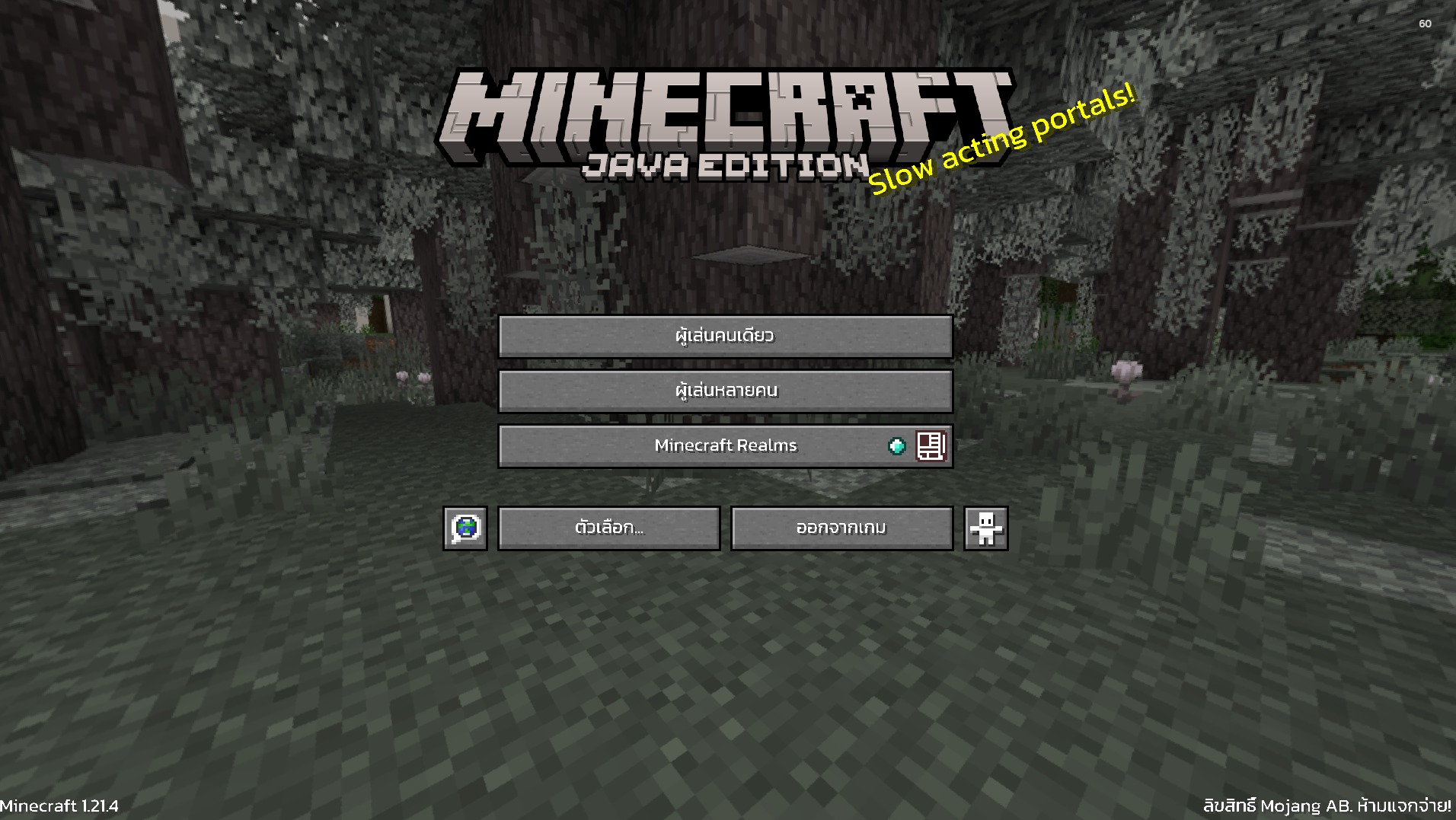 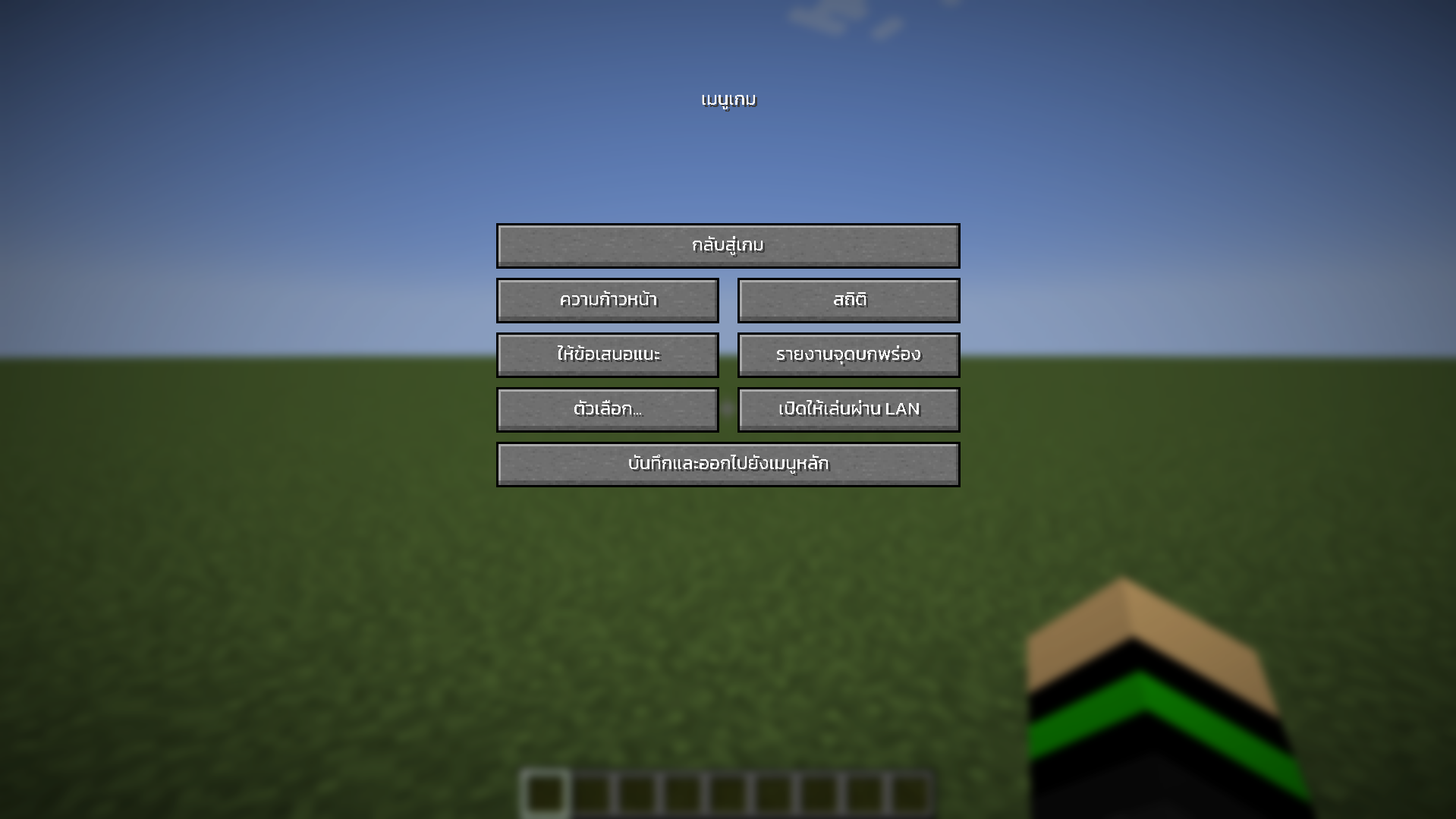 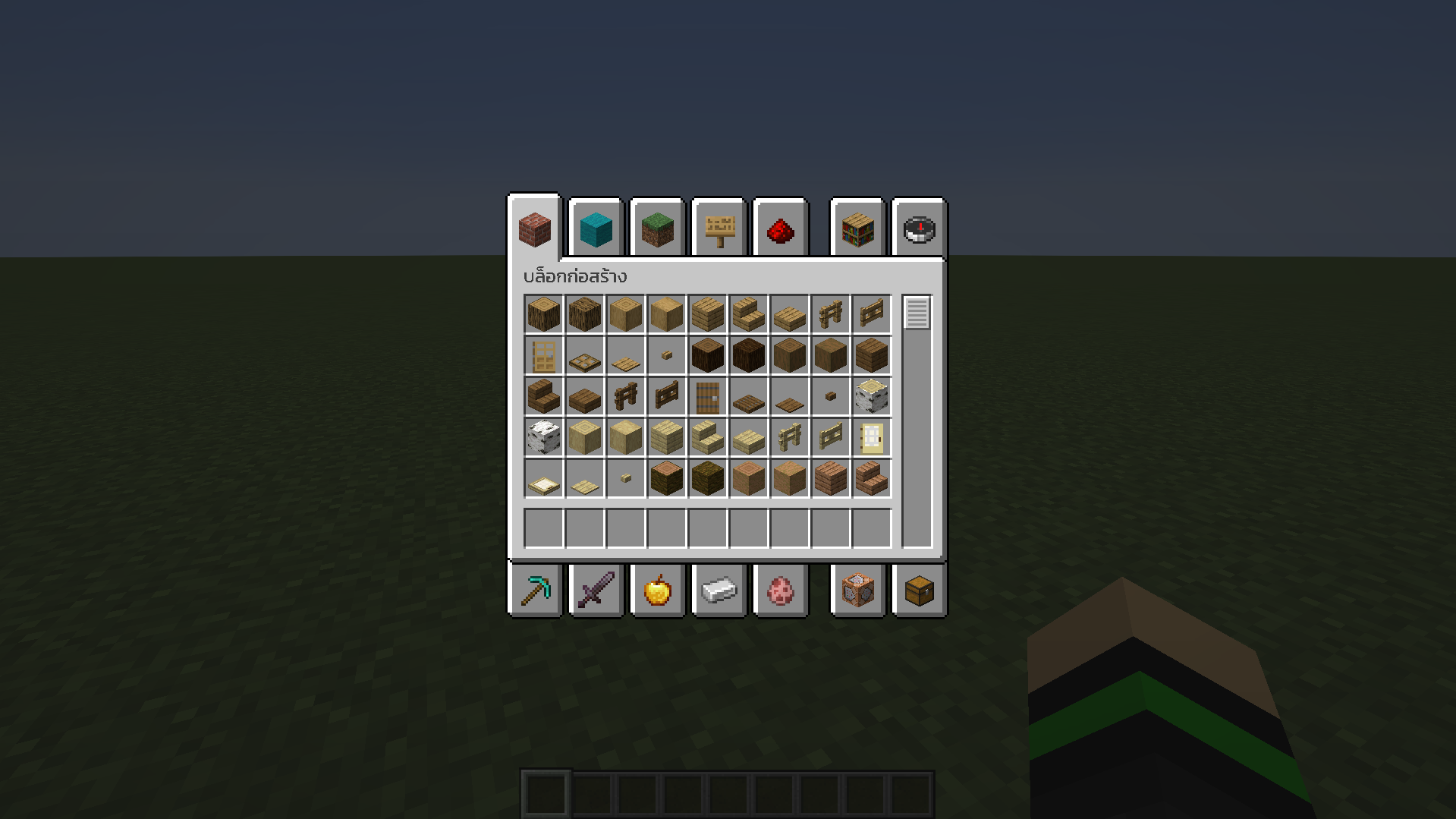 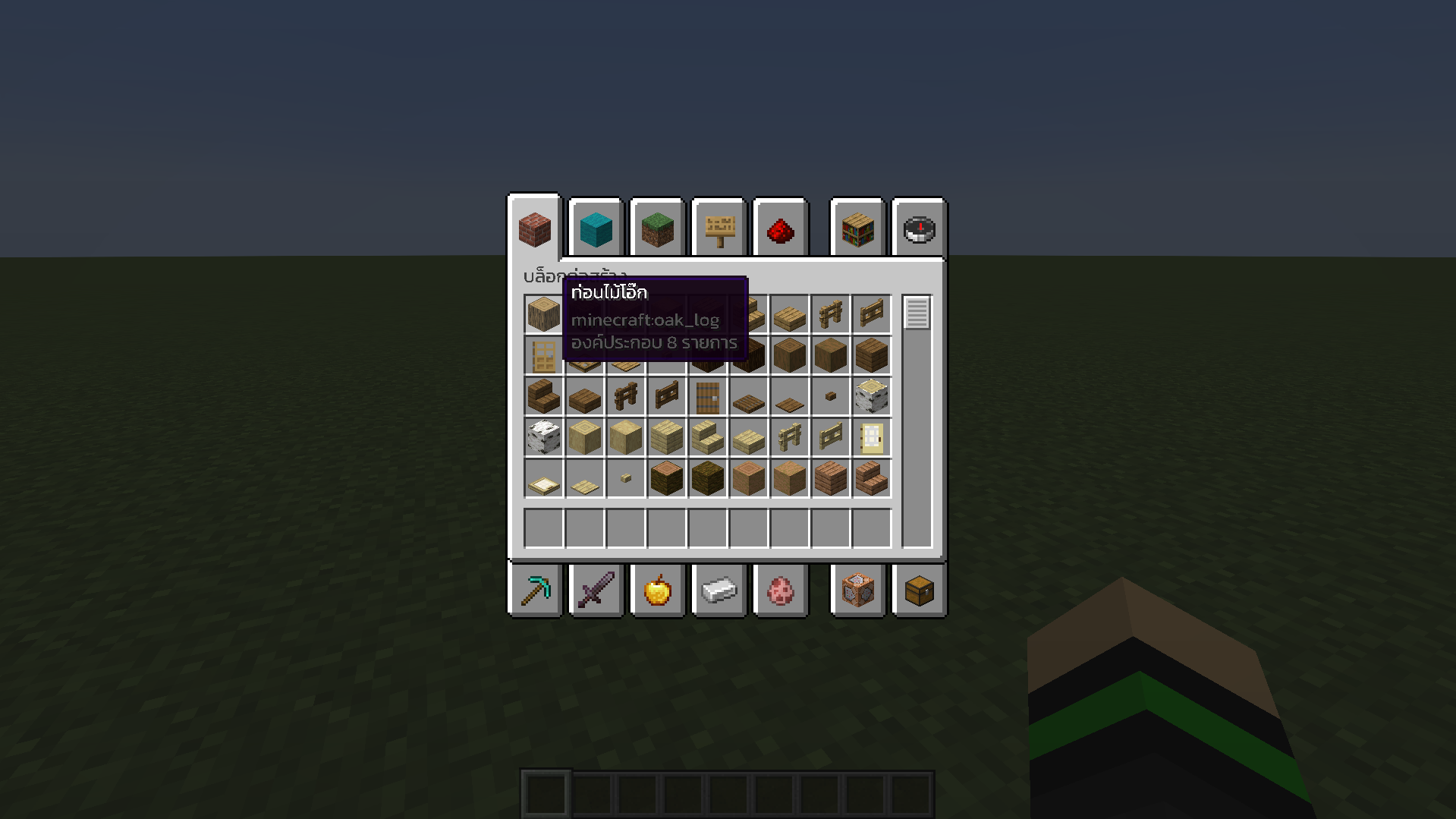
Installation (วิธีการติดตั้ง)
—————————–
1. Download ThaiFontFix-Kanit. (ดาวน์โหลด ThaiFontFix-Kanit)
2. Place the .zip file into the directory where the game is installed, for example: .minecraft\resourcepacks. (นำไฟล์ .zip ไปใส่ในไดเรคทอรี่ที่ติดตั้งเกม เช่น .minecraft\resourcepacks)
3. Enable ThaiFontFix-Kanit in the game. (เปิดใช้งาน ThaiFontFix-Kanit ในตัวเกม)
ThaiFontFix
ThaiFontFix
===========
Introduction
————
For **Minecraft Java Edition** only! (สำหรับ **Minecraft Java Edition**)
### Features (คุณสมบัติ)
* Float correction (แก้สระลอย)
* Make the font easier to read in Thai (ทำให้ฟอนต์ไทยอ่านง่ายขึ้น)
### Font used (ฟอนต์ที่ใช้)
* **[iannnnnAMD (2005)](https://www.f0nt.com/release/iannnnnamd/)**
### Example (ตัวอย่าง)
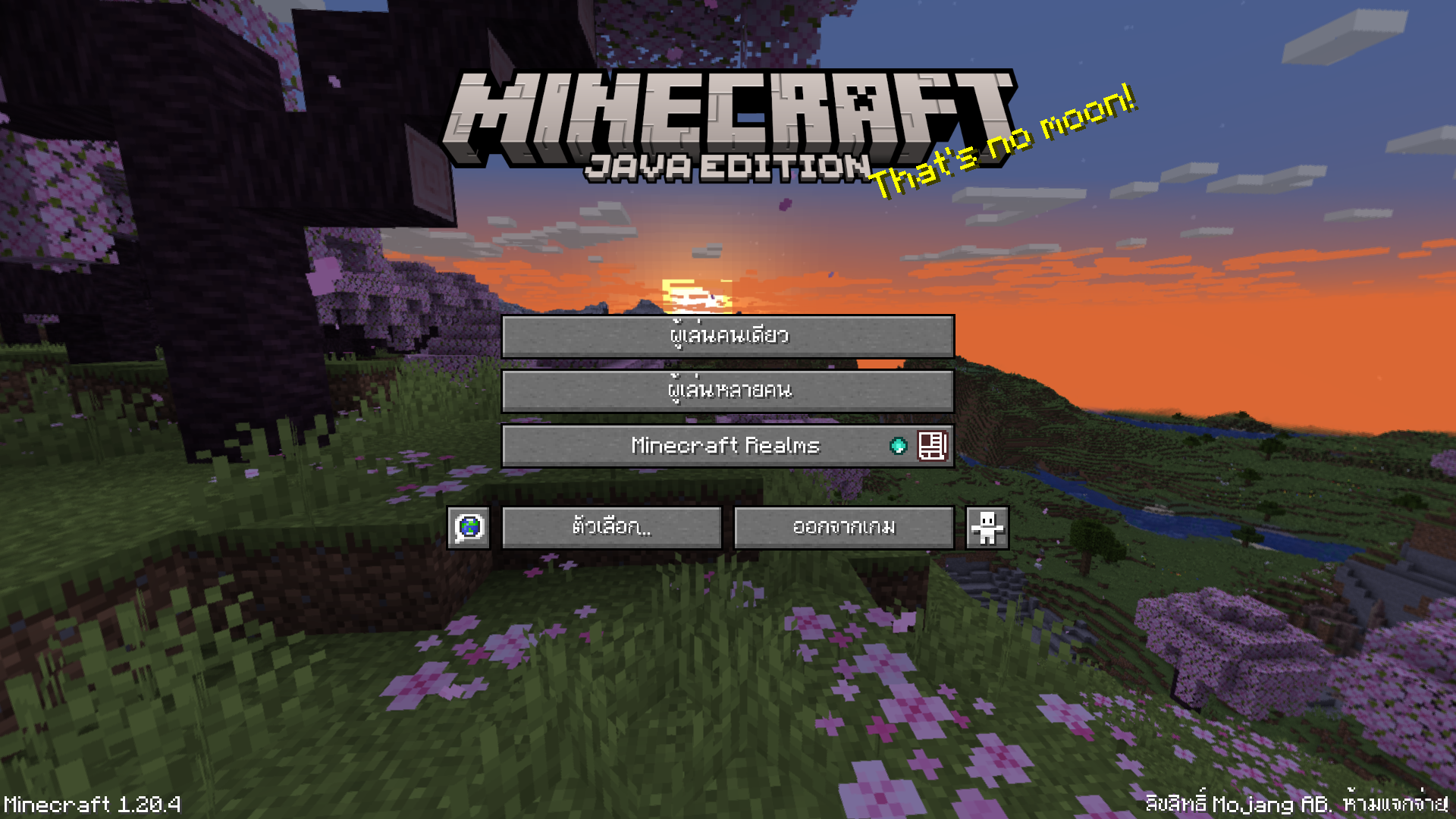 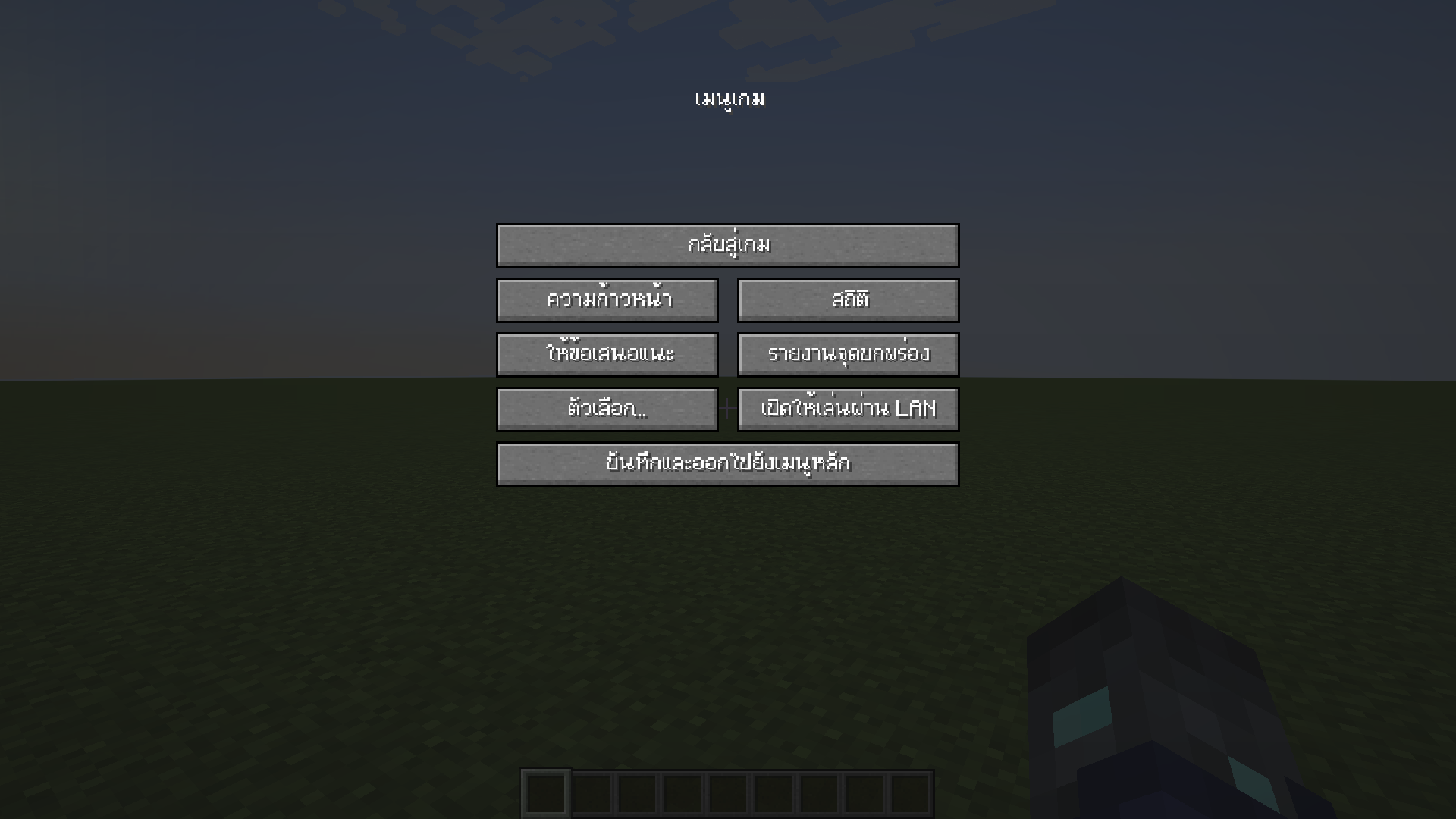 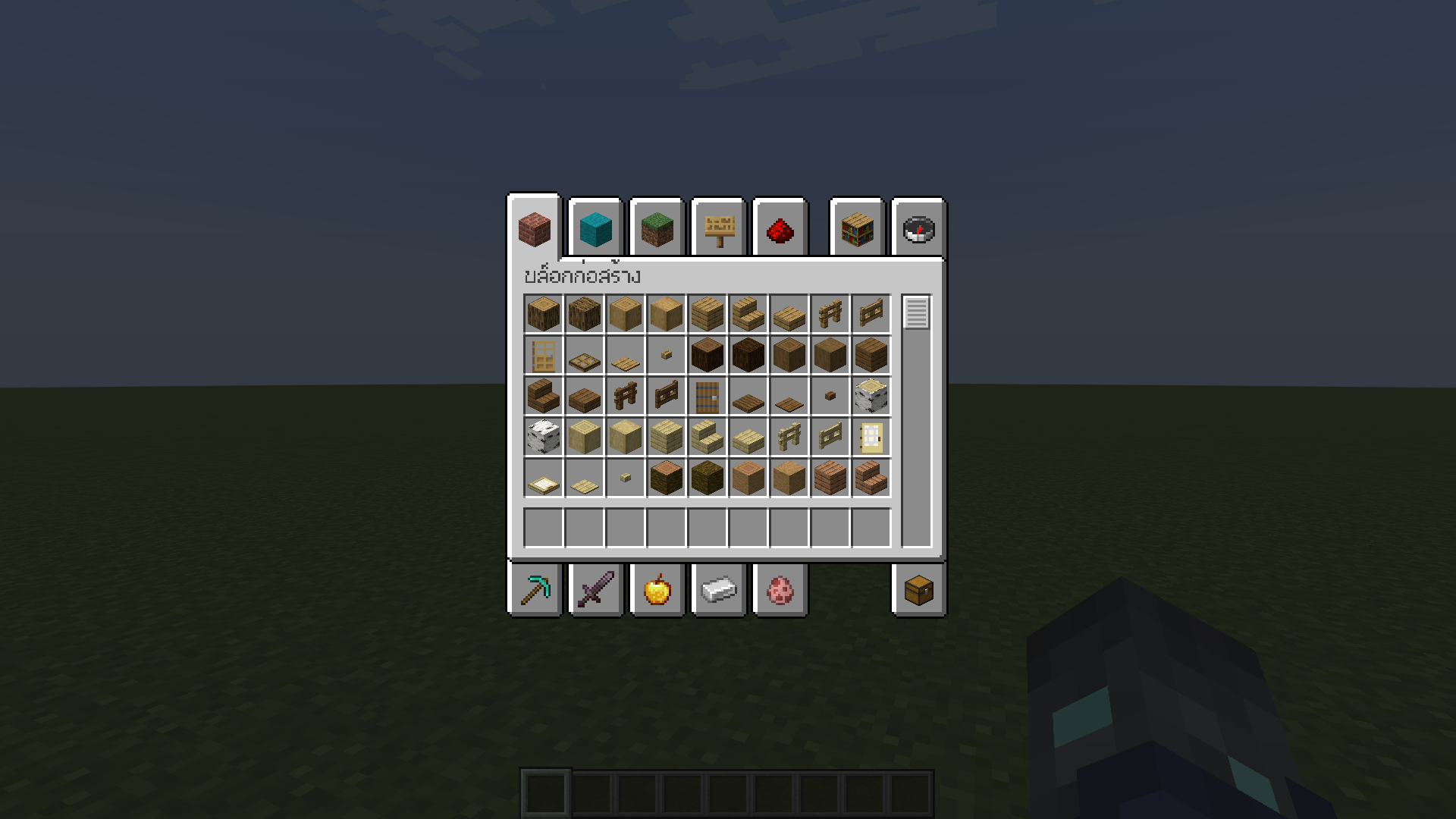 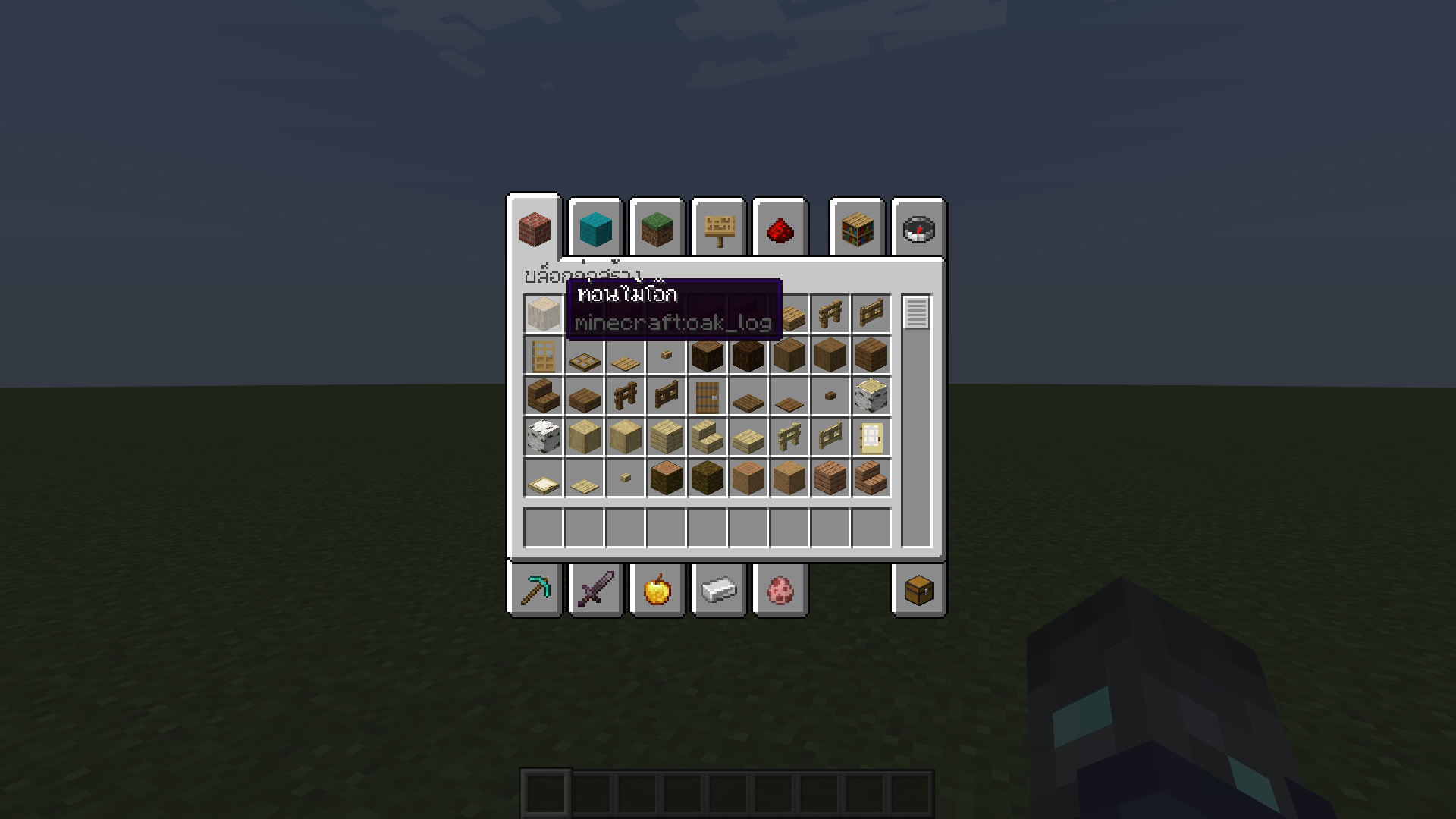
Installation (วิธีการติดตั้ง)
—————————–
1. Download ThaiFontFix. (ดาวน์โหลด ThaiFontFix)
2. Place the .zip file into the directory where the game is installed, for example: .minecraft\resourcepacks. (นำไฟล์ .zip ไปใส่ในไดเรคทอรี่ที่ติดตั้งเกม เช่น .minecraft\resourcepacks)
3. Enable ThaiFontFix in the game. (เปิดใช้งาน ThaiFontFix ในตัวเกม)
TF2 Font
It’s just the font from Team Fortress 2, a game created in 2007 by Valve Industries. This texture pack may cause lag, as the font is high definition. Hoovy approves.