Worlds-Inventories-Folia
# Worlds-Inventories
Worlds-Inventories is an addon for the [Worlds plugin](https://modrinth.com/plugin/worlds-1) that lets you use different player stats per world group. It can separate inventories, health, hunger, experience, potion effects, and gamemode between groups of worlds.
Requires Java 21. See [here](https://docs.papermc.io/misc/java-install) how to update your installed Java version.
## Features
– Per-world (or per-group) player state separation
– Auto-add new worlds to the default group
– Configurable options per group
– Optional debug logging
– Folia compatible
## Requirements
– Java 21
– Paper/Folia 1.21.x
– [Worlds plugin](https://modrinth.com/plugin/worlds-1)
## Installation
1. Build the plugin or download the jar.
2. Place the jar into your server `plugins/` folder.
3. Start the server to generate `plugins/WorldsInventories/config.yml`.
4. Edit the config and restart or use the reload command.
## Default config.yml:
“`yaml
default_group: default
default_group_per_world: true
auto_add_to_default: true
debug: false
groups:
default:
worlds:
– world
– world_nether
– world_the_end
options:
inventory: true
enderchest: true
health: true
hunger: true
experience: true
potion_effects: true
gamemode: true
“`
### Key options
– `default_group`: Group name used for worlds without a mapping.
– `default_group_per_world`: If true, each world under the default group gets its own sub-group.
– `auto_add_to_default`: Auto-adds new worlds into the default group list.
– `debug`: Enables debug logs.
## Commands
– `/worldsinv reload` – Reloads configuration.
– `/worldsinv debug ` – Toggle debug logging at runtime.
– `/worldsinv group ` – Manage groups and world mappings.
## Permissions
– `worldsinventories.admin` – Access to all admin commands (default: op)
– `worldsinventories.reload` – Reload config
– `worldsinventories.debug` – Toggle debug logs
– `worldsinventories.group` – Manage groups
Worlds
## Worlds – World Management for Paper & Folia
Worlds is a modern, lightweight world management plugin designed for **Paper** and **Folia** servers.
It brings seamless world handling with **customization presets**, eliminating the need for extra plugins just to create
void or custom flat maps. Simply pick a predefined preset, or create your own!
### Why Choose Worlds?
**Vanilla Flat World Preset** – No more extra plugins for void or flat maps
**No Extra Data Files** – Worlds doesn’t store extra files, no more messy file syncing when sharing worlds
**Drag & Drop Import** – Just place the world in the folder & use /world import
**Full World Regeneration** – Reset any world (even the Overworld!) with one command
**Modern & Efficient** – Uses up-to-date server mechanics, not outdated methods
**World Keys** – Worlds are referenced by unique keys, improving compatibility with client mods
**World Linking** – Restore vanilla Nether and End portal behavior for custom worlds
### What’s Next?
**Custom Dimension Creation** – Like datapacks, but usable from commands and API!
[Download now on Modrinth](https://modrinth.com/project/gBIw3Gvy)
[Latest version supporting 1.20.6 (Java 21)](https://github.com/TheNextLvl-net/worlds/releases/tag/v1.2.5)
[Latest version supporting 1.19/1.20.4 (Java 19)](https://github.com/TheNextLvl-net/worlds/releases/tag/v1.1.6)
[Latest version supporting 1.19/1.20.4 (Java 17)](https://github.com/TheNextLvl-net/worlds/releases/tag/v1.1.3)
For further information check out the [Wiki](https://thenextlvl.net/docs/worlds)
[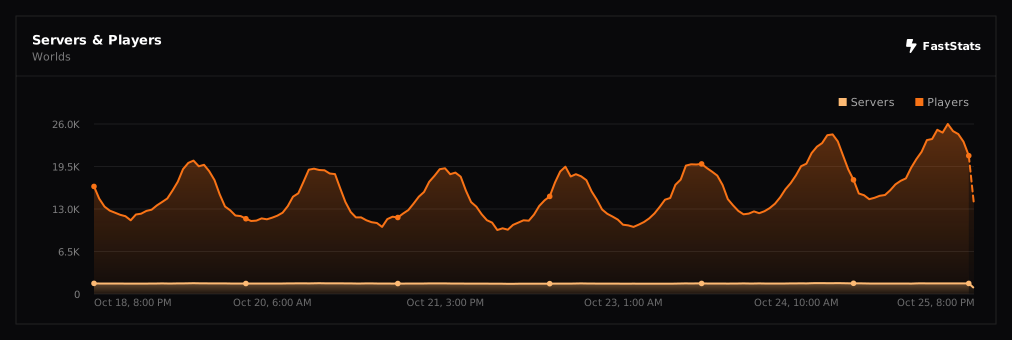](https://faststats.dev/project/worlds)
WorldRulesManage
# WorldRulesManage Plugin Overview
**WorldRulesManage** is a professional plugin for managing world rules. It allows you to freely configure player behavior (e.g., blocking block breaking, block triggering, block interaction, etc.) and world behaviors (e.g., blocking fire spread, liquid flow, etc.) in specific worlds. You can also define radius-based rules using coordinates to restrict player or world actions within a certain area.
**Use cases:** Server lobbies, spawn protection, and controlled world zones.
> English [README.md](https://github.com/MaddyJace/WorldRulesManage/blob/5.0/README.md)
> 中文简体 [CN-README.md](https://github.com/MaddyJace/WorldRulesManage/blob/5.0/CN-README.md)
—
## 📦 Plugin Features
– Supports global and radius-based world rules: prevent fire spread, prevent leaf decay, prevent block ignition (non-player), prevent entity block destruction, and block liquid flow (e.g., lava and water).
– Supports global and radius-based player rules: custom permission control, prevent block ignition, block breaking, block placing, item pickup/drop, bucket usage (e.g., collect water), hunger,
auto-restore hunger to full, prevent player damage, block all portals (overrides Nether/End), block Nether portal, block End portal, block specific item usage (configured by you),
block interaction with specific entities/blocks, block triggering of specific blocks.
– Radius rule shapes (for world and player): 2D Circle (ignores Y), 3D Sphere (includes Y), 2D Square (ignores Y), 3D Cube (includes Y), custom origin and radius values.
– Supports blacklist/whitelist configuration
– Supports multiple worlds
– Supports auto-hot-reload of configuration files
—
# ⚙️ WorldRulesManage Configuration Guide
> [config.yml](https://github.com/MaddyJace/WorldRulesManage/blob/5.0/src/main/resources/config.yml)
> [world.yml](https://github.com/MaddyJace/WorldRulesManage/blob/5.0/src/main/resources/world.yml)
> [radius.yml](https://github.com/MaddyJace/WorldRulesManage/blob/5.0/src/main/resources/radius.yml)
> [message.yml](https://github.com/MaddyJace/WorldRulesManage/blob/5.0/src/main/resources/message.yml)
### ✅ `worldName: ` # Name of the world (e.g., world)
### ✅ `globalRules:` # Rules applied to the world, regardless of player permissions
– `flameSpread: true` # Prevent fire from spreading
– `leavesDecay: true` # Prevent leaf decay
– `blockIgnite: true` # Prevent block ignition
– `entityBlockBreak: true` # Prevent entities from breaking blocks
– `liquidFlow: true` # Prevent liquid flow
### ✅ `playerRules:` # Rules applied to players without permission
– `permission: “wm.world”` # Permission node
– `blockIgnite: true` # Prevent players from igniting blocks
– `blockBreak: true` # Prevent players from breaking blocks
– `blockPlace: true` # Prevent players from placing blocks
– `itemPickup: false` # Prevent players from picking up items
– `itemDrop: false` # Prevent players from dropping items
– `usePail: true` # Prevent players from using buckets (e.g., to collect water)
– `food: true` # Prevent hunger
– `foodSatiety: true` # Restore hunger to full
– `playerDamage: true` # Prevent player damage
– `portalAll: false` # Prevent all portal access (overrides portalNether and portalEnder)
– `portalNether: false` # Prevent Nether portal access
– `portalEnder: false` # Prevent End portal access
######
– `🎯playerUseItem:` # Block item usage
– `type:` `BLACKLIST` / `WHITELIST`
– `list:`
– “EGG” # Egg
– “FLINT_AND_STEEL” # Flint and Steel
######
– `🧍PlayerInteractEntity:` # Block entity interaction
– `type:` `BLACKLIST` / `WHITELIST`
– `list:`
– “ITEM_FRAME” # Item Frame
– “PAINTING” # Painting
– “ARMOR_STAND” # Armor Stand
######
– `🧱PlayerInteractBlock:` # Block block interaction
– `type:` `BLACKLIST` / `WHITELIST`
– `list:`
– “LEVER” # Lever
– “FURNACE” # Furnace
######
– `🎛️PlayerTriggerBlock:` # Block block triggering
– `type:` `BLACKLIST` / `WHITELIST`
– `list:`
– “SOIL” # Farmland
– “TRIPWIRE” # Tripwire
—
### `This option only takes effect in radius.yml`
– `✅settingsRadius:`
– `type:` `2DRange`, `3DRange`, `2DCube`, `3DCube`
– `xyz:` # Starting coordinates (e.g., 0 0 0)
– `radius:` # Radius in blocks
## 📌 Case Sensitivity Warning
> ⚠️ **Important:** All configuration keys are case-sensitive. Misuse of uppercase/lowercase may result in errors or ignored settings.
—
## 🛠 Recommended Practices
– When using TNT near the radius edge, explosions may affect blocks just outside the protected area. To avoid this, expand the radius by 7 blocks for edge safety.
– Remove or comment out unused configuration sections to keep your setup clean and readable.
—
WorldLock

* [**BukkitOfUtils**](https://modrinth.com/plugin/bukkitofutils)

Please join the Streamline Hub Discord in order to get updates and for me to fully assist you with bugs, questions, or suggestions.
Discord: [**click here**](https://dsc.gg/streamline)

Block players from entering or teleporting to specified worlds — All configurable with commands.

This offers a very simple configuration and setup all while remaining very light-weight.

1. Download and install BukkitOfUtils. Found here: [BukkitOfUtils](https://modrinth.com/plugin/bukkitofutils)
2. Download the correct version of this plugin for you server version.
3. Place in your `plugins` folder.
4. Stop server.
5. Start server.
6. Use to your liking.

## How to block a world
1. Install plugin. (Shown above.)
2. `/manageworlds add ` – where `` is replaced with the world you want to block.
## Notes
Players with operator or the `*` permission can access all worlds by default.
To disable these players from bypassing the world block, set their permission for `worldlock.bypass.*` to false.
## Functions
* Block specified worlds from:
* Teleportation.
* Moving to.
* Portal-Warping to.
* List blocked worlds.
* Bypassable with permissions.
* Permission: `worldlock.bypass.`

## Commands
* `/manageworlds`
* `/manageworlds add `
* Adds a world to the blocked worlds.
* `/manageworlds remove `
* Removes a world from the blocked worlds.
* `/manageworlds list`
* Lists all worlds in the blocked worlds list.
WorldListTrashCan
## Allows players to customize their home world’s trash bin.
This cleaning plugin operates within a specific world (the player’s home) and, when cleaning items, gathers them into a trash bin that the player has personally set up in their home. It combines various features, supports Folia, boasts highly configurable settings, and is compatible with multiple languages.
(This plugin is more suitable for pairing a world with a team’s server, such as the Home server (using the PlayerWorldsPro plugin or other Home plugin servers). If you close the World Garbage can, its functions can also completely replace other cleaning plugins)
**Now, here’s a hellish joke for you:**
**Player** : Hey, my quantum solar panels got swept away by the cleaning plugin. Can you compensate me?
**OP** : No way, you can’t prove it, and my cleaning plugin doesn’t keep records.
**Player** : I just bought them!
**OP** : What if you hid them, and I compensate you, essentially doubling them?
**Player** : ***
**OP** : Even if there were public trash bins on the server, someone would snatch up those solar panels.
**OP** : What should I do?
And there you have it, this plugin was born.
When Foila supports multiple worlds, this cleaning plugin will benefit everyone
### Features:
—
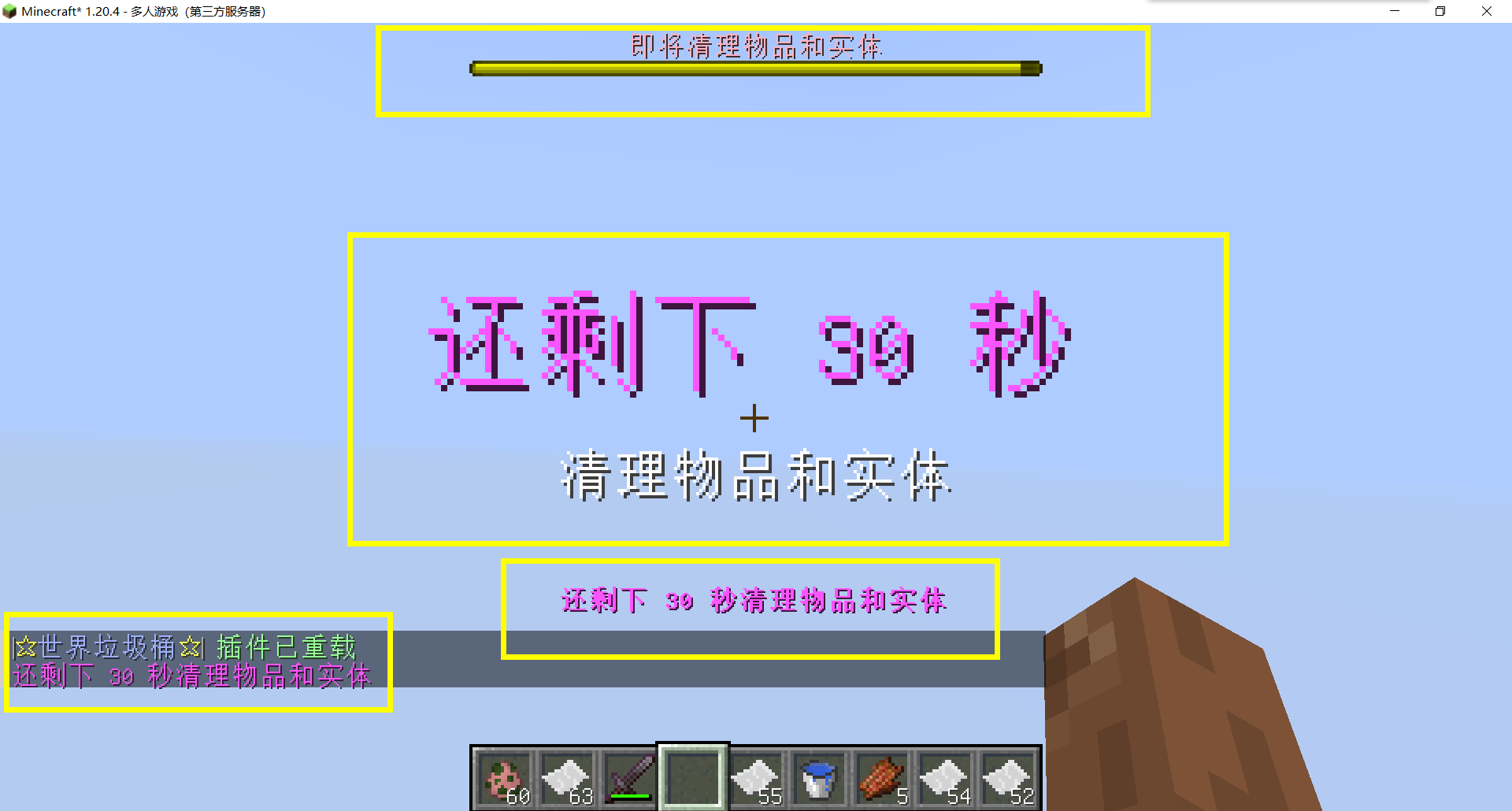
– **Fully customizable tip**
Support multiple prompt messages
You can achieve fully customized prompts
For example, when there are three seconds left, let “bossbar”, “actionbar”, “chat”,and “title” prompt together,
Alternatively, you can have the bossbar change its style every second (solid, non solid, including its color, can be different every second)
After version 5.7.0, it supports switching between different prompt sounds per second, as well as setting different volumes and tones per second
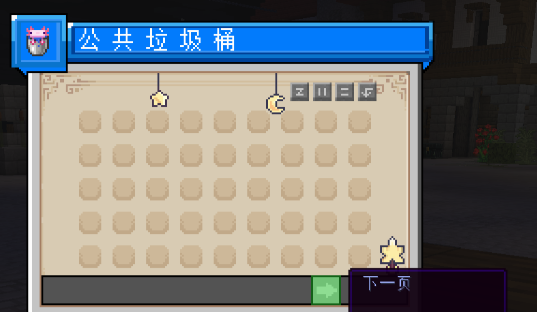
– Thank you to QQ 1664907770 (“笑脸猫”) for providing the material package for the “itemsadder” plugin (applicable to public trash cans) [Click here to download](https://www.hostize.com/zh/v/3TE06XKXx8) (IteamsAdder/WorldTrashCan config and resource)
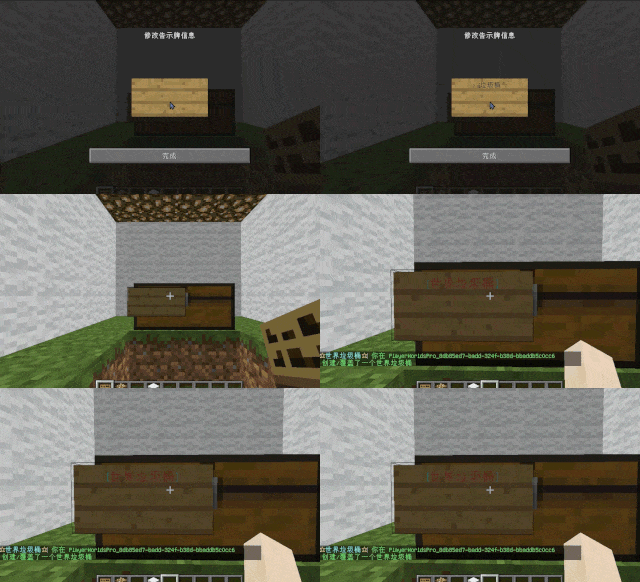
– **Player-Created World Trash Bin:**
Players have the ability to create a trash bin in their world.
Similar to the mechanics of previous sign-locked chests, the font on the sign will undergo a
transformation after creation.
When the cleaning process is initiated, items will be automatically added to the home trash bin.
Configurable settings allow players to specify detection names and transformed names after cleaning.
“To meet the demands of a small number of people, here is a reminder”
How to create a world trash can:
Place the chest on the ground, hold the signboard and right-click on the chest. Enter [世界垃圾桶] in the configuration file (configured in Set. SighCheckName), and once the font is converted, it is created. Every time the garbage is cleaned, it will be placed in the marked chest
In the default configuration file, the names of the three worlds “world, dim-1, dim1” are disabled, creating a “world trash can” (excluding op)
– **Support for Multiple Home Trash Bins:**
Players can use commands to grant special players the ability to place additional home trash bins.
Default quantities for home trash bins are configurable.
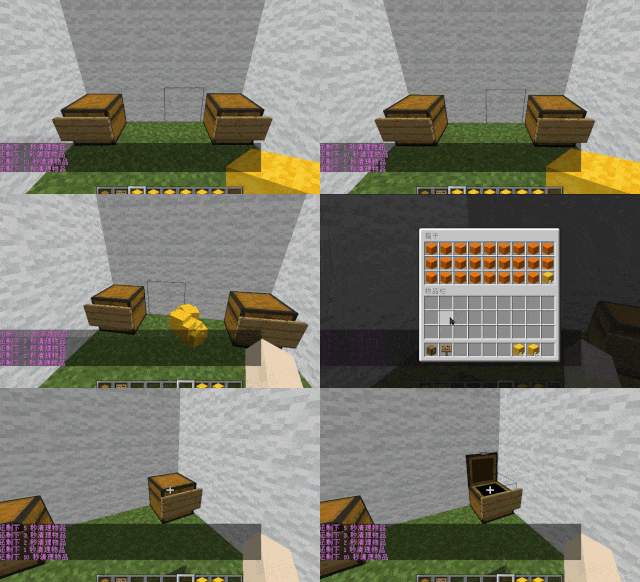
– **Home Trash Bin Overflow to Public Trash Bin:**
Items from home trash bins overflow into the public trash bin.
Public trash bins can have a configurable maximum page count and a blacklist.
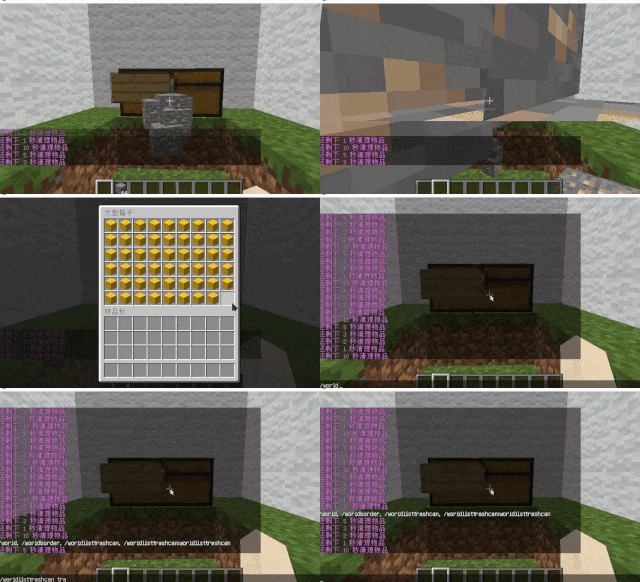
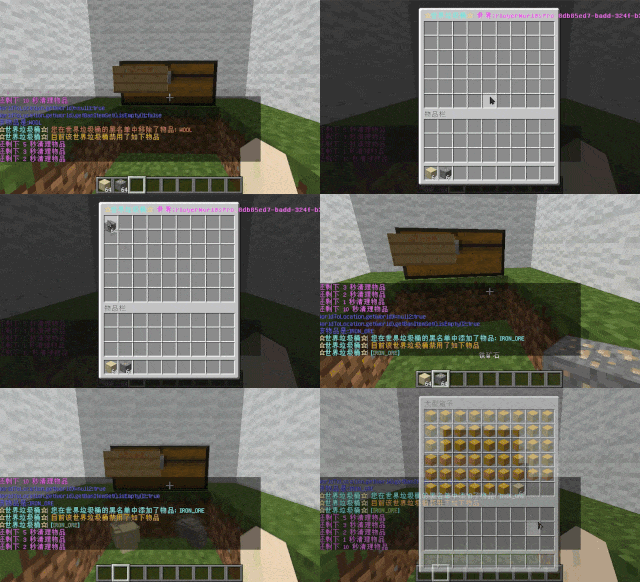
– **Item Exclusion and Public Trash Bin Handling:**
Players can add items to the home trash bin blacklist to prevent their recycling.
Excluded items go directly to the public trash bin.
Configuration includes support for excluding items with special lore (e.g., items from the QS shop with
showLocation).
Public trash bins can either clear new items during each sweep or accumulate all trash without clearing.
– **The public trash can can enable logging:**
Record what items the player took away

– **Entity Cleanup:**
Optional cleanup of all animals/monsters.
Command (/WorldListTrashCan Look) to view entity types and configure entity blacklists/whitelists.
Support for cleaning special entities from mod.
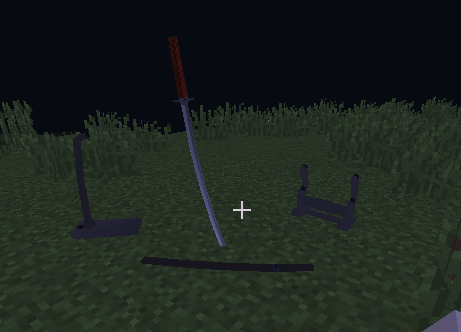
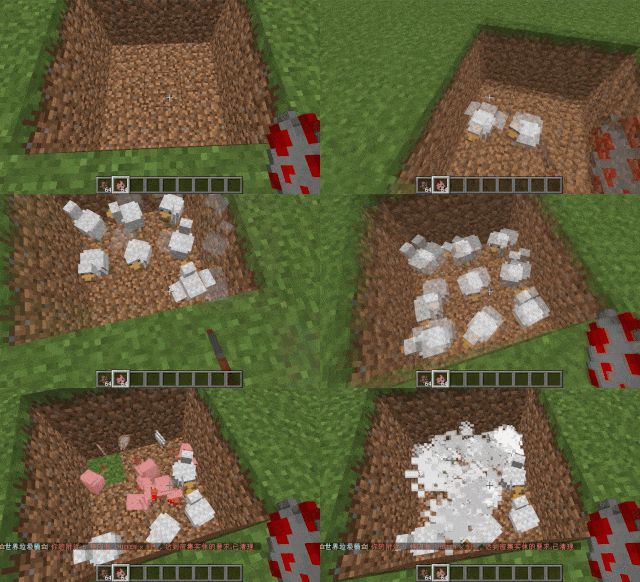
– **Dense Entity Cleanup:**
Configurable radius, target quantity, kill or remove options, and player notifications for dense entity
cleanup.
– **Spam/Command Limitations:**
Configurable chat/command intervals, whitelist commands, and informative messages.
Defense against item dropping.
Players can manually enable or disable the item-drop defense mode.
– **Performance Optimization:**
All optimizations have configurable options in the settings.
1. Quick removal of uncollectible arrows (e.g., arrows from skeletons or bows with infinite
enchantments).
2. Prohibit players from trampling on farmland
### How to Install
—
– **Throw it into the Plugins folder**
### Commands:
—
– **/wtc reload**
Reloads the plugin.
– **/wtc GlobalTrash**
Opens the public trash bin.
– **/wtc help**
Displays help information.
– **/wtc ban**
Opens the local world trash blacklist GUI.
– **/wtc Look**
Right-click to get entity type (useful for adding to the configuration blacklist/whitelist).
– **/wtc GlobalBan**
Opens the global world trash blacklist GUI.
– **/wtc add [WorldName] [Quantity]**
Sets the maximum quantity for the trash bin in the specified world (defaults to the world at your feet if not specified).
– **/wtc DropMode**
Opens or closes drop mode.
### Placeholders
—
– **%WTC_ClearTime%**:
Time until the next cleaning.
### Permission
—
– **WorldListTrashCan.BanGui**:
Permission to open the GUI for adding items to the player’s home trash bin blacklist.
– **WorldListTrashCan.GlobalTrashOpen**:
Permission to open the global trash bin.
– **WorldListTrashCan.help**:
Permission to access command help.
– **WorldListTrashCan.DropMode**:
Permission to open or close drop mode.
***(The above is available by default)***
– **WorldListTrashCan.GlobalBan**:
Permission to open the global trash bin blacklist GUI.
– **WorldListTrashCan.Look**:
Permission to right-click and query the entity type.
***(The above is not available by default)***
WorldGuardRegionProtect
**If you with try first newest, use the latest dev build
Start from version 1.8.0.21 will support Bukkit/Spigot/Folia and other forks of Paper.
Versions after 1.0.3.21 above require JAVA 21+!
If you need plugin support JAVA 17+, so you need just download 1.0.2.17 special version
This is not a WorldGuard. This plugin addon for a WorldGuard!
You don’t know where you can get WG for new released versions?
So you just can check on EngineHub from original authors for dev-builds.**
**Do you want protect from superpickaxe? Or feauters protection for players? Look at premium version.
The free version of the plugin will continue to be updated!
❤️Click here to check out the plus version! ❤️**
Do you speak multiple languages? If so, we always welcome contributions to our [Crowdin project](https://crowdin.com/project/worldguardregionprotect)
If you have a idea for plugin, you can created issue on [github](https://github.com/RSTeamCore/WorldGuardRegionProtect/issues/new/choose)
## Support
When reporting a bug:
Use [the issue tracker](https://github.com/RSTeamCore/WorldGuardRegionProtect/issues)! Don’t report bugs in the reviews and discussions. Please search for duplicates before reporting a new issue!
Provide as much information as possible. Provide your WorldGuardRegionProtect version and Spigot/Paper version.
Provide any stack traces or “errors” using [pastebin](http://pastebin.com/).
## [Join us in the discord!](https://discord.gg/kvqvA3GTVF)
## Opportunities of plugin
By entering the name of the region in the plugin config.yml, you will add protection by plugin. Nobody can interact with the region that is registered in config.yml. Even the operators are not able to do this!
This plugin is for extended protection of an existing region from WorldGuard. For example, possible damage region from the administration. Who has permission access from plugin WorldGuard, or from operators.
## With plugin, you can do advanced protect your region
1. Nobody cannot break or place blocks in region.
2. It is possible to enable/disable the limitation of interaction with the transport.
3. Protecting frame, painting from any damage from arrows, trident, snowball, eggs, enderpearl and player.
4. Protect from any change in the frame (On 1.18 MC glow frame too).
5. Nobody cannot damage armor stand and taking or place armor from it.
6. Cannot use none of the buckets in region.
7. Creeper, Wither, Ghast, Primed TNT, cannot blowing up stuff in the region. Skeleton, Stray and Shulker bullet cannot destroy frame/glow frame and painting.
8. TNT, minecart with TNT, Respawn Anchor and ender crystal can’t damage any blocks/frames in region.
9. Support for banned dangerous commands. Separate commands were added and tested used by FastAsyncWorldEditWorldEdit in the protected region.
10. Nobody cannot remove region or change flags in protected region. Just example using like:
– “/rg rem spawn”,
– “/rg rem -f spawn”,
– “/rg rem -f spawn -w world”,
– “/rg addowner spawn Steve” etc.
11. You can specify a special region inside the protected region in which you can “break and place” or “only break” (specified in config.yml)
## Permissions
1. If you need give access to region for Builder team or any member from your staff, just add permissions on LuckPerms or PermissionsEx: wgrp.regionprotect
2. Who has the permissions star, I mean ‘*’ in LuckPerms or PermissionsEx may will be given access to protected region by WGRP.
3. By default, all who is operators are not allowed access into the region.
## Permissions:
– wgrp.command.wgrpbase – access to /wgrp command.
– wgrp.command.reload – access to /wgrp reload and /wgrp reloadmsg command to reload the configurations file.
– wgrp.command.spy – notifies the administrator about interacting with the protected region (BREAK or PLACE only now).
– wgrp.regionprotect – access to protected regions.
– wgrp.notify.admin – notifies the administrator when an attempt is made to use WGWE(FAWE) commands in a protected region.
– wgrp.command.addregion – access to the command with the ability to add a region to the protected region by admin.
– wgrp.command.removeregion – access to the command with the ability to remove the region from the protection by admin.
## Commands:
– /wgrp help – help on all commands.
– /wgrp about – additional information, useful!
– /wgrp reload – reload config.yml and language files.
– /wgrp addregion [region] [world] – add a region to the configuration for protection.
– /wgrp removeregion [region] [world] – delete a region from the configuration to remove protection.
View the default config you [can here](https://github.com/RSTeamCore/WorldGuardRegionProtect/blob/master/wgrp-common/src/main/resources/config.yml)!
[Bstats](https://bstats.org/signatures/bukkit/WorldGuardRegionProtect.svg)
WorldGuard ExtraFlags Plus
# WorldGuard ExtraFlags Plus
**Release 4.3.13**
An advanced WorldGuard extension that adds over 30+ extra region flags for full control of player behavior, teleportation, and region rules — featuring Folia support, item blocking (Mace, Firework, Wind Charge, Totem, vanilla Spears), throwable-only blocking (`disable-throw` for egg, snowball, pearl, XP bottle), optional PacketEvents/ProtocolLib packet hooks for full `disable-completely` coverage, and fully customizable messages.
> 🧱 **Folia Ready** | ⚙️ **Custom Messages** | 🪓 **Disable Mace, Totem, Trident, Spears & More** | 🥚 **Disable-throw (egg / snowball / pearl / XP bottle)**
> 🎚️ **XP-Based or PlaceholderAPI (integer output) based region entry limits**
—
## ⚠️ Warning DO NOT USE BOTH PLUGINS TOGETHER!
> If you’re upgrading from `WorldGuardExtraFlags` to `WorldGuardExtraFlagsPlus`, make sure to:
> – **Remove** the old `WorldGuardExtraFlags.jar` plugin file
> – **Only keep** `WorldGuardExtraFlagsPlus.jar` on your server
> – Both plugins cannot coexist – they will conflict with each other
—
## Key Features
– ✅ **Folia support** – fully compatible with async region handling
– 🛡️ **New flag:** `disable-completely` – blocks all usage of specified items *(MACE, FIREWORK_ROCKET, WIND_CHARGE, TOTEM_OF_UNDYING, TRIDENT, vanilla spear tiers 1.21.11+, plus **`SPEAR`** for all tiers at once)*
– *Note: `permit-completely` is replaced. Please use `disable-completely` instead.*
– *Spear **Lunge** (packet **STAB**, including **Lunge** enchant) requires **PacketEvents** or **ProtocolLib** on the server for reliable blocking; without either, Lunge may bypass region checks.*
– 🎯 **New flag:** `disable-throw` – blocks **launching** only these throwables: **`EGG`**, **`SNOWBALL`**, **`ENDER_PEARL`**, **`EXPERIENCE_BOTTLE`**. Tridents and wind charges stay on `disable-completely`.
– 🎚️ **New flags:** `entry-min-level` / `entry-max-level` – restrict entry by **XP level** or **PlaceholderAPI values**
– 💬 **Customizable messages** via `messages-wgefp.yml` (disable, recolor, or use placeholders)
– 🔁 **Message cooldown system** to prevent spam (default 3 seconds)
– 🏪 **New flag:** `villager-trade` – control villager trading in regions
– 🚫 **New flag:** `disable-collision` – disable player collision in regions
– *Uses Minecraft’s native scoreboard teams to control collision. TAB plugin is supported with API integration. May conflict with other plugins that use teams. See (public-documents/disable-collision flag documentation.md) for details.*
– 📝 **PlaceholderAPI Chat Integration** – chat prefix/suffix supports PlaceholderAPI placeholders
– 🧱 **New flags:** `allow-block-place` / `deny-block-place` / `allow-block-break` / `deny-block-break` – fine-grained block placement and breaking control
– 📦 **New flags:** `deny-item-drops` / `deny-item-pickup` – restrict specific items from being dropped or picked up (works when WorldGuard allows drops/pickups)
– 🔨 **New flag:** `permit-workbenches` – block workbench usage (anvil, crafting table, ender chest, etc.) and crafting table crafting in regions
– *Note: `permit-workbenches CRAFT` now only blocks crafting table (3×3) crafting, not inventory (2×2) crafting. Use `inventory-craft` flag to block inventory crafting.*
– 🎨 **New flag:** `inventory-craft` – block inventory crafting (2×2 grid) in regions
– 🛡️ **Godmode & Fly Flag Enhancement** – The `godmode` and `fly` flags now also disable EssentialsX godmode/fly when entering regions with these flags disabled (EssentialsX integration)
– 👥 **New flag:** `player-count-limit` – limit maximum number of players in a region
– 🎯 **New flag (experimental):** `chambered-enderpearl` – mitigates chambered ender pearl bypasses (pearls thrown outside denied regions are removed when the shooter enters a region where the flag denies); subject to change.
—
## About
WorldGuard protects land by defining regions.
**WorldGuard ExtraFlags Plus** extends it with even more customization — adding powerful flags that modify gameplay, teleportation, commands, and behavior within regions.
—
## Included Flags (30+)
> Here’s a quick overview — all managed with standard WorldGuard flag commands.
“`
[teleport-on-entry / teleport-on-exit] [command-on-entry / command-on-exit]
[console-command-on-entry / console-command-on-exit] [walk-speed / fly-speed]
[keep-inventory / keep-exp] [chat-prefix / chat-suffix] [godmode]
[blocked-effects] [respawn-location] [worldedit] [give-effects]
[fly] [play-sounds] [frostwalker] [nether-portals] [glide](elytra-blocker)
[chunk-unload] [item-durability] [join-location](not-on-folia)
“`
**New in Plus:**
“`
[disable-completely] [disable-throw]
[entry-min-level / entry-max-level]
[villager-trade] [disable-collision] [deny-item-drops / deny-item-pickup]
[allow-block-place / deny-block-place] [allow-block-break / deny-block-break]
[permit-workbenches] [inventory-craft] [player-count-limit]
[chambered-enderpearl](experimental)
“`
—
## 📖 Flag Usage Guide
For comprehensive usage examples and detailed flag documentation, see:
**[Complete Flag Usage Guide](https://github.com/tins-dev/WorldGuardExtraFlagsPlus/blob/master/.media/flag-usages.md)**
—
## Version Compatibility
| Minecraft | WorldGuard | ExtraFlagsPlus | Support |
| ————— | ———- | ————– | ——— |
| 1.20 – 1.21.11 | 7.0.15+ | 4.3.13+ | ✅ Active |
| 1.7 – 1.19 | Older | ❌ No support | |
The jar declares **`api-version: 1.21`** in `plugin.yml` so Paper **1.21.x** servers (and forks such as Canvas) load it; the project still compiles against the pinned Paper API artifact in the root `pom.xml`.
—
## Message Customization
All plugin messages live in `plugins/WorldGuard/messages-wgefp.yml`.
– Edit freely to match your style
– Use `{required}`, `{current}`, `{item}`, `{workbench}` placeholders (e.g. **`disable-throw-blocked`** uses `{item}`)
– Color codes supported (`&c`, `&7`, etc.)
– Disable messages with `””`
– Reload instantly using `/wgefp reload` or `/wg reload`
—
## Authors
– **ExtraFlags Plus Developer:** [tins](https://github.com/tins-dev)
– **Original ExtraFlags Author:** [isokissa3](https://joniaromaa.fi)
—
## Support & Community
– 📜 **Changelog:** [CHANGELOG.md](https://github.com/tins-dev/WorldGuardExtraFlagsPlus/blob/master/CHANGELOG.md) — release **4.3.13**
– 💬 **Discord:** [Join our Discord server](https://discord.gg/TCJAwsdqum)
—
## Image Section
—
⭐ If you like this project, give it a star on [Github](https://github.com/tins-dev/WorldGuardExtraFlagsPlus)
WorldGuard

**Protect your server!**
WorldGuard lets you and players guard areas of land against griefers and undesirables as well as tweak and disable various gameplay features of Minecraft.

🛑 Make sure that you are using the Java version of Minecraft.
1. Set up a Bukkit server such as Spigot or Paper (Paper is recommended over Spigot).
2. Download WorldEdit from the WorldEdit page.
3. Download WorldGuard from this page (see the Files tab above for all versions).
4. Put the WorldEdit and WorldGuard plugin files into your plugins folder.
Check YouTube for tutorials, or read the official documentation.


[Join our Discord server](https://discord.gg/enginehub) if you need help with installing or using WorldGuard.
**Make sure to [check the docs](https://worldguard.enginehub.org/en/latest/) first!**

- Create zones in your world that only permit mods or certain players from building within
- Set additional game rules on your server (deny wither block damage, falling damage, etc.)
- Set game rules on specific areas (food regen, health regen, disable PvP, TNT, control mob damage) in your world
- Blacklist certain items and blocks so they can’t be used
- Dump useful statistics and information about your server (/wg report -p)
- CPU profile your server (/wg profile -p)
- Add useful commands like an immediate “STOP ALL FIRE SPREAD” command.
- Works, more or less, with mods (other Bukkit plugins and FTB mods)
- Protects against many types of grief (fire spread, tree growth, TNT cannons, piston machines, crop trampling, paintings and item frames, etc.), and certain interactions can also be allowed (door open, lever usage, etc.)
- Well documented, and one of the oldest Minecraft projects (older than Bukkit!)
- Open source
- Enable only features you want! Everything is off by default. You can just install WorldGuard and configure it later.

**Can anyone use it?**
Only opped users or users with permissions supplied with a permissions plugin can use WorldGuard.
**How do you use WorldGuard?**
To learn how to use WorldGuard, read the docs. Check YouTube for tutorials too!
**I need help!!**
You may visit our documentation or Discord Guild.
**I have some feature requests…**
Visit our issue tracker. However, if you just have a question, please try one of the methods above.
**Can I edit the source code?**
Visit our GitHub repository. WorldGuard is licensed under LGPLv3 and you can compile it with Gradle.
🎉 Support us on GitHub Sponsors!
Need a host? We recommend Apex Hosting

WorldEditDisplay
# WorldEditDisplay
[](https://www.minecraft.net/)
[](https://www.oracle.com/java/)
[](LICENSE)
A server-side WorldEdit selection visualization plugin
—
### About
WorldEditDisplay is a server-side plugin for Minecraft that adds visual selection rendering for WorldEdit. It intercepts WorldEdit’s CUI (Client User Interface) protocol packets and renders selections using Display Entities on the server side. This means players can see their WorldEdit selections without installing any client-side mods.
### Features
**Selection Types**
– Cuboid – Box selections with edge lines and grid display
– Polygon – 2D polygon boundaries with vertical columns
– Ellipsoid – Smooth elliptical selections
– Cylinder – Circular selections with adjustable height
– Polyhedron – Complex 3D polyhedral structures
**Visual Rendering**
– Uses Minecraft’s Display Entity (TextDisplay) system
– Customizable hex colors (#RRGGBBAA) for all visual elements
– Adjustable line thickness and grid density
– Translucent face filling for Cuboid, Polygon, and Polyhedron regions
– Grid overlay for easier size calculation
**Multi-language Support**
The interface is available in multiple languages with automatic client language detection:
– Traditional Chinese (zh_tw)
– English (en_us)
**Player Settings**
Players can customize their own rendering preferences:
– Choose preferred hex colors for elements
– Enable or disable face filling
– Adjust line thickness within server limits
– Control grid spacing and density
– Changes apply immediately
**Selection Sharing**
– Share your WorldEdit selection with other players in real-time
– Invite, accept, revoke, and unwatch shares via `/wedisplay share`
– Each shared selection is displayed in a unique auto-generated color
– Share relationships persist across server restarts
**View All Mode** *(op-only by default)*
– Toggle monitoring of all online players’ selections via `/wedisplay view`
– Hide specific players from your view, toggle name labels, and list monitored players
**Configuration System**
– Server-wide defaults in `config.yml`
– Per-player overrides in `player_config/*.yml`
– Hot reload without server restart
### Requirements
– Minecraft 1.20 ~ 1.21.x (Paper / Folia / Spigot)
– Java 21 or higher
– Required plugins:
– [PacketEvents](https://github.com/retrooper/packetevents) 2.11.1+
### Installation
1. Make sure WorldEdit and PacketEvents are installed on your server
2. Download `WorldEditDisplay.jar`
3. Place it in your server’s `plugins` folder
4. Restart the server
5. Edit `plugins/WorldEditDisplay/config.yml` if needed
6. Use `/wedisplayreload` to reload the configuration
### Commands
**Admin Commands**
`/wedisplayreload` – Reload plugin configuration
– Permission: `worldeditdisplay.reload` (default: op)
**Player Commands**
`/wedisplay set ` – Configure personal rendering settings
– Example: `/wedisplay set cuboid edge_color #FFD700FF`
– Permission: `worldeditdisplay.use.settings`
`/wedisplay reset [setting]` – Reset to server defaults
– Example: `/wedisplay reset cuboid` (reset all settings)
– Example: `/wedisplay reset cuboid edge_color` (reset specific setting)
`/wedisplay show [renderer]` – Show current settings
– Example: `/wedisplay show` (show all)
– Example: `/wedisplay show cuboid` (show specific renderer)
`/wedisplay toggle` – Toggle rendering on/off
– Quick command to enable or disable selection visualization
– Works independently for each player
`/wedisplay reloadplayer` – Reload your personal configuration file
`/wedisplay lang ` – Set interface language
– Example: `/wedisplay lang en_us`
– Supported: zh_tw, en_us
`/wedisplay share invite ` – Invite a player to view your selection
– Permission: `worldeditdisplay.use.share.invite`
`/wedisplay share accept ` – Accept a pending share invitation
– Permission: `worldeditdisplay.use.share.accept`
`/wedisplay share revoke ` – Revoke a share you previously granted
– Permission: `worldeditdisplay.use.share.revoke`
`/wedisplay share unwatch ` – Stop watching another player’s selection
– Permission: `worldeditdisplay.use.share.unwatch`
`/wedisplay share list [page]` – List current share relationships
– Permission: `worldeditdisplay.use.share.list`
**View All Sub-commands** *(op-only by default)*
`/wedisplay view` – Toggle view-all mode (see all online players’ selections)
– Permission: `worldeditdisplay.use.view`
`/wedisplay view hide ` – Exclude a player from your view-all mode
– Permission: `worldeditdisplay.use.view.hide`
`/wedisplay view hideall` – Exclude all online players from view-all mode
– Permission: `worldeditdisplay.use.view.hide`
`/wedisplay view unhide ` – Remove exclusion for a player
– Permission: `worldeditdisplay.use.view.hide`
`/wedisplay view label` – Toggle name label display for watched selections
– Permission: `worldeditdisplay.use.view.label`
`/wedisplay view list [page]` – Show view-all monitoring status
– Permission: `worldeditdisplay.use.view.list`
### Configuration
The main configuration file is `config.yml`:
“`yaml
language:
default: “en-us” # Default language
auto_detect: true # Auto-detect player’s client language
allow_player_change: true # Allow players to change language manually
renderer:
cuboid:
edge_color: “#FFD700FF” # Color for edges in #RRGGBBAA
edge_thickness: 0.05 # Line thickness
grid_spacing: 8 # Grid spacing
fill_enabled: true # Enable face filling
fill_color: “#FF000040” # Face fill color
# … more settings
player_limits:
thickness:
min: 0.01 # Minimum thickness
max: 0.5 # Maximum thickness players can set
# … more limits
“`
Each renderer type has its own configuration section:
– **cuboid**

– **polygon**

– **ellipsoid**

– **cylinder**

– **polyhedron**

### How It Works
**Core Components**
– Packet listener intercepts WorldEdit CUI protocol messages
– Render engine creates Display Entities to visualize selections
– Configuration manager handles server-wide and per-player settings
– Language manager provides multi-language support
**Rendering Technology**
The plugin uses Minecraft’s Display Entity system:
– Display entities render the visual elements
– More efficient than particle effects
– Works with vanilla clients (no mods required)
**Performance**
– Only updates when selections change
– Server admins can limit grid density and segment counts
– Each player’s settings are independent
### Permissions
“`yaml
worldeditdisplay.use: # Use visualization features (default: true)
worldeditdisplay.use.settings: # Manage personal rendering settings (default: true)
worldeditdisplay.use.share: # General share feature toggle (default: true)
worldeditdisplay.use.share.invite: # Send share invitations (default: true)
worldeditdisplay.use.share.accept: # Accept share invitations (default: true)
worldeditdisplay.use.share.revoke: # Revoke granted shares (default: true)
worldeditdisplay.use.share.unwatch: # Stop watching a shared selection (default: true)
worldeditdisplay.use.share.list: # List share relationships (default: true)
worldeditdisplay.use.view: # Toggle view-all mode (default: op)
worldeditdisplay.use.view.defaultenable: # Auto-enable view-all on join (default: op)
worldeditdisplay.use.view.hide: # Hide players from view-all (default: op)
worldeditdisplay.use.view.list: # List view-all monitoring status (default: true)
worldeditdisplay.use.view.label: # Toggle name label display (default: true)
worldeditdisplay.use.view.label.defaultenable: # Auto-enable labels on join (default: true)
worldeditdisplay.reload: # Reload configuration (default: op)
worldeditdisplay.render.auto-enable: # Automatically enable rendering on join (default: true)
“`
**About Auto-Enable Permission**
The `worldeditdisplay.render.auto-enable` permission controls whether rendering is automatically enabled when a player joins the server:
– **With permission**: Rendering is enabled by default when logging in
– **Without permission**: Players must manually use `/wedisplay toggle` to enable rendering
This allows server admins to control which player groups have rendering enabled by default.
### Usage
**Basic Usage**
1. Use WorldEdit’s `//wand` command to get the selection tool
2. Left/right click blocks to define your selection
3. The selection is automatically visualized (no extra steps needed)
4. Use `/wedisplay` commands to customize the appearance
**Customization Examples**
“`bash
# Change cuboid edges to solid diamond blue
/wedisplay set cuboid edge_color #55FF55FF
# Make lines thicker
/wedisplay set cuboid edge_thickness 0.08
# Change grid spacing
/wedisplay set cuboid height_grid_division 2
# Enable face filling with half-transparent red
/wedisplay set cuboid fill_enabled true
/wedisplay set cuboid fill_color #FF000080
# Toggle rendering on/off
/wedisplay toggle
# Reset all settings
/wedisplay reset cuboid
“`
### Building
To build the plugin from source:
“`bash
mvn clean package
“`
The compiled jar will be in `target/WorldEditDisplay-version-platform.jar`
**Project Structure**
“`
src/main/java/dev/twme/worldeditdisplay/
├── event/ # CUI event system
├── display/ # Render engine
│ └── renderer/ # Renderer implementations
├── config/ # Configuration management
├── lang/ # Language system
├── command/ # Command handlers
├── listener/ # Packet listeners
└── player/ # Player data management
“`
### Contributing
Issues and pull requests are welcome.
### License
See [LICENSE](LICENSE) file for details.
### Credits
– **TWME-TW** – Developer
### Related Projects
– [WorldEdit](https://github.com/EngineHub/WorldEdit) – The core editing tool
– [WorldEditCUI](https://github.com/EngineHub/WorldEditCUI) – Client-side CUI mod (protocol reference)
– [PacketEvents](https://github.com/retrooper/packetevents) – Packet handling library
– [TextDisplayShapes](https://github.com/TWME-TW/TextDisplayShapes) – Shape rendering library used by the plugin
—
**Made with ❤️ by TWME-TW**
WorldEdit

**A Minecraft Map Editor… that runs in-game!**
With selections, schematics, copy and paste, brushes, and scripting.
Use it in creative, or use it temporarily in survival.
Java Edition required.
Compatible with NeoForge, Fabric, and Bukkit-based platforms (Spigot and Paper).

🛑 Make sure that you are using the Java version of Minecraft. **WorldEdit does not support Bedrock!**
Mod version:
1. Install NeoForge or Fabric.
2. Download WorldEdit from this page (make sure you grab the mod version, not the plugin).
3. Put the WorldEdit mod file into your mods folder.
Plugin version:
1. Set up a Bukkit server such as [Spigot](https://spigotmc.org) or [Paper](https://papermc.io/) (Paper is [recommended](https://madelin
emiller.dev/blog/paper-vs-spigot/) over Spigot).
2. Download WorldEdit from this page (make sure you grab the plugin version, not the mod).
3. Put the WorldEdit plugin file into your plugins folder.
Check YouTube for tutorials, or read the official [documentation](https://worldedit.enginehub.org/)

**The most complete source of WorldEdit information is [our documentation, check them out here](https://worldedit.enginehub.org/en/latest/)!**
If you need further help than what the documentation can provide, you can join our Discord server.
[](https://discord.gg/enginehub)




**Do I need cheats on?**
If you’re playing on single player: Yes, cheats must be enabled for the world to use WorldEdit, but you can change this in the configuration. If you’re running a server: Only opped users can use WorldEdit, though this can be changed too.
**Can anyone use it?**
On servers, only opped users or users with permissions supplied with a permissions plugin can use WorldEdit. On LAN, anyone can use it if cheats are enabled.
**How do you use WorldEdit?**
To learn how to use WorldEdit, read the docs. Check YouTube for tutorials too!
**I need help!!**
You may visit our documentation or Discord Guild.
**I have some feature requests…**
Visit our issue tracker. However, if you just have a question, please try one of the methods above.
**Can I include WorldEdit in my modpack?**
You are free to include WorldEdit, without having to asking for explicit permission.
A link back to this page or our GitHub Sponsors would be appreciated, however.
**Can I edit the source code?**
Visit our GitHub repository. WorldEdit is licensed under GPLv3 and you can compile it with Gradle.
🎉 Support us on GitHub Sponsors!
Need a host? We recommend Apex Hosting