XaeroSupport

Please join my Discord to get
updates and for me to fully assist you with bugs,
questions, or suggestions.
Discord: [**click here**](https://drak.gg/discord)

## XaeroSupport
Adds XaeroMinimap and XaeroWorldMap support to your Minecraft server!
## Definitions
**Xaero Server-Specifics**:
– How filled out your maps are on a specific world. (The loaded/filled in chunks when you open your map for a specific world.)
– Waypoints.
**Backend Server**:
– A Minecraft server behind a Minecraft proxy that is also not a Minecraft proxy.
**Minecraft Proxy**:
– Such as:
– Velocity and forks.
– BungeeCord and forks.
**Server Id**:
– A unique identifier (that is a number) that tells players’ Xaero mods (on the client) that your server is your server.
## FAQ
**Q**: Does this affect performance?
**A** (Simple): No.
**A** (Full): Most plugins won’t affect performance, even if they are bigger plugins. What effects performance is how the plugins do operations with your server. This plugin does no operations, it is all just packets and it only sends packets when a player joins.
**Q**: Is this a `1:1` (`1 to 1`) replacement of the Xaero **mods** (server-side), but as a **plugin**?
**A** (Simple): No, but eventually yes.
**A** (Full): Right now, all this does is add support for `Xaero Server-Specifics` (look in the `Definitions` to define). Eventually, I will add more `1:1` functionality from the Xaero mods.
**Q**: Why would I use this if it is not a `1:1` replacement?
**A** (Full): Well, keep in mind that eventually it will be. But, in the mean time, this is extremely useful for `Minecraft Proxies` because it makes it so each of your `Backend Servers` can have their own `Xaero Server-Specifics` (look in the `Definitions` to define) — this is very helpful due to how Xaero stores these in your game’s files.
**Q**: What would happen if I don’t use this, or something like this and I have players who use Xaero’s mod join my server?
**A** (Full): Xaero used to keep `Xaero Server-Specifics` defined per world/server name. Which is an issue if you have multiple servers you join with the same name (i.e. if you have all your server’s named `Minecraft Server` — which is the default). Xaero recently added functionality to look at the IP that players used to join your server to differentiate the `Xaero Server-Specifics`, but this only works if you have an updated mod and if your server isn’t behind a `Minecraft Proxy`. **If the players’ mod thinks you are on the same server/world *when you are not*, it will overwrite/reset the map data it already has filled out, or even delete or add some way points. This plugin fixes that.**

– No more need for Paper forks!
– Some paper forks (such as `Leaf` and `DivineMC`) add exactly what this plugin does directly into your server software, this plugin adds it as a plugin so you don’t need to rely on `Leaf` or `DivineMC` to be stable.
– Easy set up! (Drag and drop!)
– It automatically generates a `Server Id` for your server.
xTpa
# ⚡ xTpa | The Premium Teleportation Suite

**xTpa** is a professional-grade teleportation plugin for Minecraft servers that prioritizes user experience, visual feedback, and server performance. Say goodbye to boring, text-only teleport requests and welcome a new era of interactive player movement.
—
## 🚀 Why choose xTpa?
Unlike standard teleport plugins that only provide simple chat messages, **xTpa** focuses on **immersive feedback**. With integrated sounds, titles, and action bars, your players will never miss a request again.
### ✨ Key Features at a Glance:
* **🎨 Advanced Visuals:** Uses **Titles**, **Subtitles**, and **ActionBars** to grab the player’s attention immediately when a request arrives.
* **🎵 Audio Feedback:** Every action has a soul! Fully configurable sounds for receiving requests, starting the countdown, and successful arrival.
* **🛡️ Combat-Safe Teleport:** Prevents players from escaping combat or dangerous situations by detecting movement during the teleport countdown.
* **🌈 HEX & Legacy Colors:** Supports the full range of modern HEX colors (`&#RRGGBB`) and legacy formatting codes.
* **⚡ Optimized Performance:** Written with high-concurrency in mind to ensure your server’s TPS stays at a solid 20.
* **🔗 PlaceholderAPI Support:** Fully integrated placeholders like `%xtpa_player%` and `%xtpa_time%` for customized messages.
—
## 🛠️ Detailed Commands & Permissions
| Command | Usage | Description | Permission |
| :— | :— | :— | :— |
| `/tpa` | `/tpa ` | Send a teleportation request to a player. | *None (Default)* |
| `/tpaccept` | `/tpaccept` | Accept the most recent teleport request. | *None (Default)* |
| `/tpdeny` | `/tpdeny` | Decline the current pending request. | *None (Default)* |
| `/xtpa` | `/xtpa reload` | Reload the plugin configuration and messages. | `xtpa.admin` |
### 🔑 Special Permissions
* `xtpa.bypass.cooldown`: Allows the player to send requests without waiting for the cooldown.
* `xtpa.bypass.delay`: Allows instant teleportation without the countdown wait.
—
## ⚙️ Full Configuration Preview
Here is the complete `config.yml` which allows you to customize every single aspect of the plugin to your liking.
“`yaml
# _____
# __ _/__ _ __ __ _
# / / / // ‘_ / _` |
# > < / / | |_) | (_| |
# /_/_\/ | .__/ __,_|
# |_/
# Official Support: https://xplugins.es/discord
# Documentation: https://xplugins.es/plugins/xtpa
# General plugin settings
settings:
tpa-timeout-seconds: 60 # How long a request stays active before expiring
cooldown-seconds: 15 # Time a player must wait between sending requests
teleport-delay-seconds: 3 # Seconds to wait before the teleport happens
teleport-move-cancel: true # If true, teleport cancels if the player moves
center-messages: false # Aesthetic option to center chat messages
# Sound System
# Use standard Spigot sound names (e.g., ENTITY_ENDERMAN_TELEPORT)
sounds:
received-tpa:
enabled: true
sound: "ENTITY_EXPERIENCE_ORB_PICKUP"
volume: 1.0
pitch: 1.0
teleport-start:
enabled: true
sound: "BLOCK_NOTE_BLOCK_HARP"
volume: 0.5
pitch: 1.5
teleport-success:
enabled: true
sound: "ENTITY_ENDERMAN_TELEPORT"
volume: 1.0
pitch: 1.0
# Visual Feedback (Titles & ActionBars)
visuals:
title:
enabled: false
title: "&#FAEDCB ℹ Request Received!"
subtitle: "&f%xtpa_player% wants to teleport to you"
fade-in: 10
stay: 60
fade-out: 10
actionbar:
enabled: true
message: "&fHey! &#FAEDCB&n%xtpa_player%&f has sent you a TPA! Check your chat."
# Message System (Supports HEX Colors)
messages:
prefix: ""
no-permission: "&c ✘ Error! &fYou do not have permission to use this."
player-not-found: "&c ✘ &fThat player is offline or does not exist."
cooldown: "&#FF5252 ✘ Error! &fWait &e%xtpa_time%s &fbefore sending another request."
self-tpa: "&#FF5252 ✘ Error! &fYou cannot teleport to yourself."
tpa-sent: "&#A0FF91 ✔ Success! &fRequest sent to &e%xtpa_player%&f."
tpa-no-pending: "&#FAEDCB ℹ Info! &fYou have no pending requests."
tpa-expired: "&#FAEDCB ℹ Info! &fThe teleport request has expired."
tpa-denied-target: "&#A0FF91 ✔ Success! &fYou denied the request."
tpa-denied-sender: "&#FF5252 ✘ Error! &fPlayer &e%xtpa_player% &fdenied your request."
tpa-accepted-target: "&#A0FF91 ✔ Success! &fRequest accepted."
tpa-accepted-sender: "&#A0FF91 ✔ Success! &e%xtpa_player% &faccepted your request."
teleport-starting-sender: "&#A0FF91 ✔ Success! &fTeleporting you to &e%xtpa_player%&f."
teleport-delay-notice-sender: "&#FAEDCB ℹ Info! &fTeleporting in %xtpa_time% seconds. Do not move!"
teleport-cancelled-moved: "&#FF5252 ✘ Error! &fMovement detected! Teleport cancelled."
teleport-cancelled-quit: "&#FF5252 ✘ Error! &fPlayer disconnected. Teleport cancelled."
teleport-success-sender: "&#A0FF91 ✔ Success! &fYou have arrived safely."
# Interactive Chat Request
received-request:
line1: "&#FAEDCB ℹ Info! &fPlayer &#FAEDCB%xtpa_player% &fwants to teleport to you."
line2-accept: "&fType &a/tpaccept &fTo accept."
line3-deny: "&fType &c/tpdeny &fTo decline."
line4: "&#FAEDCB ℹ Info! &fThe request expires in %xtpa_time% seconds."
hover-accept: "&#A0FF91 Click here to ACCEPT!"
hover-deny: "&c Click here to DENY!"
```
---
## 📥 Installation
1. **Download** the latest `.jar` file from Modrinth.
2. **Drop** the file into your server's `plugins/` folder.
3. **Restart** or **Reload** your server.
4. **Configure** the `config.yml` to your heart's content!
---
## 🌐 Community & Support
Join our growing community of developers and server owners!
[](https://xplugins.es/plugins/xtpa)
[](https://xplugins.es/discord)
---
*Created by the team at xPlugins. Quality matters.*
xSetSpawn
# 🌍 xSetSpawn – The Ultimate Global Spawn Management
—
**xSetSpawn** is a modern, lightweight, and highly customizable solution for managing your Minecraft server’s spawn point. Now more global than ever, v1.0.3 introduces a full multi-language system and advanced stability features to give your players the most immersive experience possible.

—
## 🔥 Why choose xSetSpawn?
Unlike standard essentials plugins, **xSetSpawn** gives you granular control over the *feel* of your server’s hub. It’s designed for server owners who care about presentation, performance, and international reach.
### 🚀 Key Features
* **🌍 Global Multi-Language System:** Ship your server in **English**, **Spanish**, or **Portuguese (BR)** out of the box. Switch languages on the fly with a single config setting.
* **✨ Immersive Visuals:** Greet your players with customizable on-screen Titles, Subtitles, and ActionBars. All visual texts are now fully localizable per language!
* **🎨 Modern HEX Support:** Full support for **HEX Colors** (`&#RRGGBB`) in all messages, prefixes, and titles for that premium server aesthetic.
* **🧪 Advanced Stability:** Built-in startup error handling and a robust internal refactor to ensure your plugin always enables correctly.
* **⏱️ Smart Cooldown System:** Prevent command spam with customizable delays. Includes a bypass permission for VIPs or Staff.
* **🚪 Auto-Routing:** Force players to spawn on join or respawn to maintain your server flow.
—
## 🛠️ How it Works
1. **Position:** Walk to your desired location. Camera angle (pitch/yaw) is saved!
2. **Set:** Type `/setspawn`. The location is instantly recorded in `data/data.yml`.
3. **Localize:** Pick your language in `config.yml` (e.g., `lang: es`).
4. **Reload:** Use `/xspawn reload` to apply changes instantly without a restart.
5. **Play:** Your players are greeted with beautiful visuals and sounds upon arrival!
—
## 📜 Commands & Permissions
| Command | Description | Permission |
| :— | :— | :— |
| `/spawn` | Teleport to the server’s spawn point. | `xspawn.use` |
| `/setspawn` | Define the spawn location at your position. | `xspawn.admin` |
| `/xspawn reload` | Reload config and language files instantly. | `xspawn.admin` |
*(Note: `xspawn.bypass` allows instant teleportation).*
—
## ⚙️ Configuration (v1.0.3 Snippet)
The new configuration is cleaner and focused on logic, while all text moved to the `lang/` folder:
“`yaml
# __ __ _____
# / / / ____|
# / | (___ _ __ __ _ __ __ _ __
# / ___ | ‘_ / _` | / / / | ‘_
# /_/_ ____) | | |_) | | (_| | V V / | | | |
# |_____/ | .__/ __,_| _/_/ |_| |_|
# | |
# |_| By xPlugins
settings:
# Plugin language. Options: en, es, br
lang: en
# Require permissions to use /spawn?
require-permission: true
# Cooldown System
cooldown:
enabled: true
seconds: 5
bypass-permission: “xspawn.bypass”
# Auto-Teleport
teleport-on-join: true
teleport-on-respawn: true
visuals:
sound:
enabled: true
name: “ENTITY_PLAYER_LEVELUP”
particles:
enabled: true
name: “TOTEM”
titles:
enabled: true
fade-in: 10
stay: 40
fade-out: 10
# All messages and titles are now in lang/messages_.yml
“`
> xPlugins 2026
xRtp
**🚀 xRtp – Smart & Secure Random Teleport**

> **xRtp** is a powerful, optimized, and fully configurable Random Teleport plugin designed for modern Minecraft servers. Built for professional performance, absolute safety, and extreme customization.
 
—
> ## ✨ Main Features (v1.0.2 Update)
> ### 🚀 Zero-Lag Search Engine
Our new algorithm checks up to **10 coordinates per tick** only within **pre-generated chunks**. This ensures almost instant teleportation with **zero TPS drops** and zero lag, as it prevents generating new terrain.
> ### 🎛 Menu Engine 2.0 (Full Customization)
Total control over your `menu.yml`. Toggle the **auto-filler** or design your layout slot-by-slot using **slot lists** (e.g., `slots: [0,1,8,9]`) to create unique borders and designs.
> ### ⚡ Interactive Menu Actions
Turn menu items into functional buttons. Supports several action types:
– `CLOSE`: Closes the inventory.
– `MESSAGE`: Sends custom messages to the player.
– `COMMAND`: Executes a player command (e.g., `/spawn`).
– `CONSOLE`: Executes a command from the console on the player’s behalf.
> ### 📊 Enhanced Visuals & BossBars
Includes a fully customizable **BossBar** with dynamic progress titles that show the remaining time (`%time%s`) during the teleport delay.
—
> ## 📂 Included Files
– `config.yml` → General settings, optimization toggles, permissions, safety system.
– `menu.yml` → GUI Engine 2.0 layout and menu customization.
– `lang.yml` → Fully customizable messages, BossBar, and translations.
– `Config ES/` → **Bonus!** Includes a pre-configured Spanish VIP setup.
—
> ## 🔐 Permissions
| Permission | Description |
|————|————-|
| `xrtp.admin` | Reload the configuration using `/rtp reload` |
| `xrtp.bypass` | Bypass teleport cooldown |
| (Optional) | General use permission can be disabled in config |
—
> ## ⚙️ Configuration Highlights
✔ **Use Pre-generated Chunks** (Anti-lag system)
✔ Cancel teleport on movement
✔ Adjustable cooldown duration
✔ Custom slot-by-slot menu filling
✔ Interactive buttons with placeholders
✔ Advanced BossBar with progress titles
✔ Maximum attempts to find a safe location
—

—
> ## 🎯 Perfect For
Survival • SMP • Skyblock • Factions • Lobby • Etc
—
> ### 💻 Developer API
xRtp includes a **powerful and easy-to-use API** so other plugins can interact with it. You can execute RTPs manually, check cooldowns, and hook into events to modify or cancel teleports.
> #### How to use it
First, verify that xRtp is loaded and get the instance:
“`java
if (Bukkit.getPluginManager().getPlugin(“xRtp”) == null) {
// xRtp is not installed
return;
}
XRtpAPI api = XRtpAPI.getInstance();
X-ray Fix

# X-ray Fix
X-ray Fix is a high-performance Minecraft server plugin designed to defeat both visual X-ray mods and seed-based X-ray exploits. It works by decoupling ore generation from the world seed and using advanced packet-level obfuscation to hide underground blocks from clients.
—
## Features
– **Seed-Based X-ray Protection** — Ores are stripped and re-placed using a private server secret. Even if a player knows the world seed, they cannot predict ore locations.
– **Visual X-ray Protection** — Sends fake block data (random ores and stone) to the client for all hidden underground blocks.
– **Multi-Dimension Support** — Custom obfuscation rules and fake material pools for both the Overworld and the Nether.
– **Folia Compatible** — Fully thread-safe and compatible with both Folia and traditional Paper servers.
– **Performance Optimized** — Uses `ChunkSnapshot` for efficient scanning and batched `sendMultiBlockChange` updates, ensuring zero impact on server MSPT.
—
## How It Works
### Ore Stripping & Replacement
When a chunk is generated (or loaded for the first time after installation), X-ray Fix scans it and removes all naturally generated ores. New ore positions are then calculated using a PRNG seeded with the chunk coordinates combined with a private server-side secret — making placement consistent for the server, but completely unpredictable for players.
### Packet Obfuscation
When a chunk is sent to a player, X-ray Fix identifies all blocks that are hidden (not exposed to air or transparent blocks) and replaces them in the outgoing packet with random selections from a configurable pool of fake materials. Players never see the real blocks until they’re actually exposed.
### Dynamic Revealing
When a block is broken, placed, or blown up, X-ray Fix instantly sends high-priority multi-block change packets for all 6 adjacent neighbors — ensuring newly exposed blocks are revealed immediately with no visual glitches.
—
## Requirements
– **Server:** Spigot, Bukkit, Paper, Purpur, Pufferfish, or Folia (1.21.1+)
– **Java:** 21+
– **[ProtocolLib](https://www.spigotmc.org/resources/protocollib.1997/)** (Required)
—
## Installation
1. Download and drop the JAR into your server’s `plugins` folder.
2. Start the server to generate `config.yml`.
3. *(Optional)* Set a custom `secret` in `config.yml`. If left empty, one will be auto-generated.
4. Adjust `max_y` and `fake_materials` to suit your needs.
5. Restart the server and you’re protected.
wruJoin
👀 Click to view plugin preview

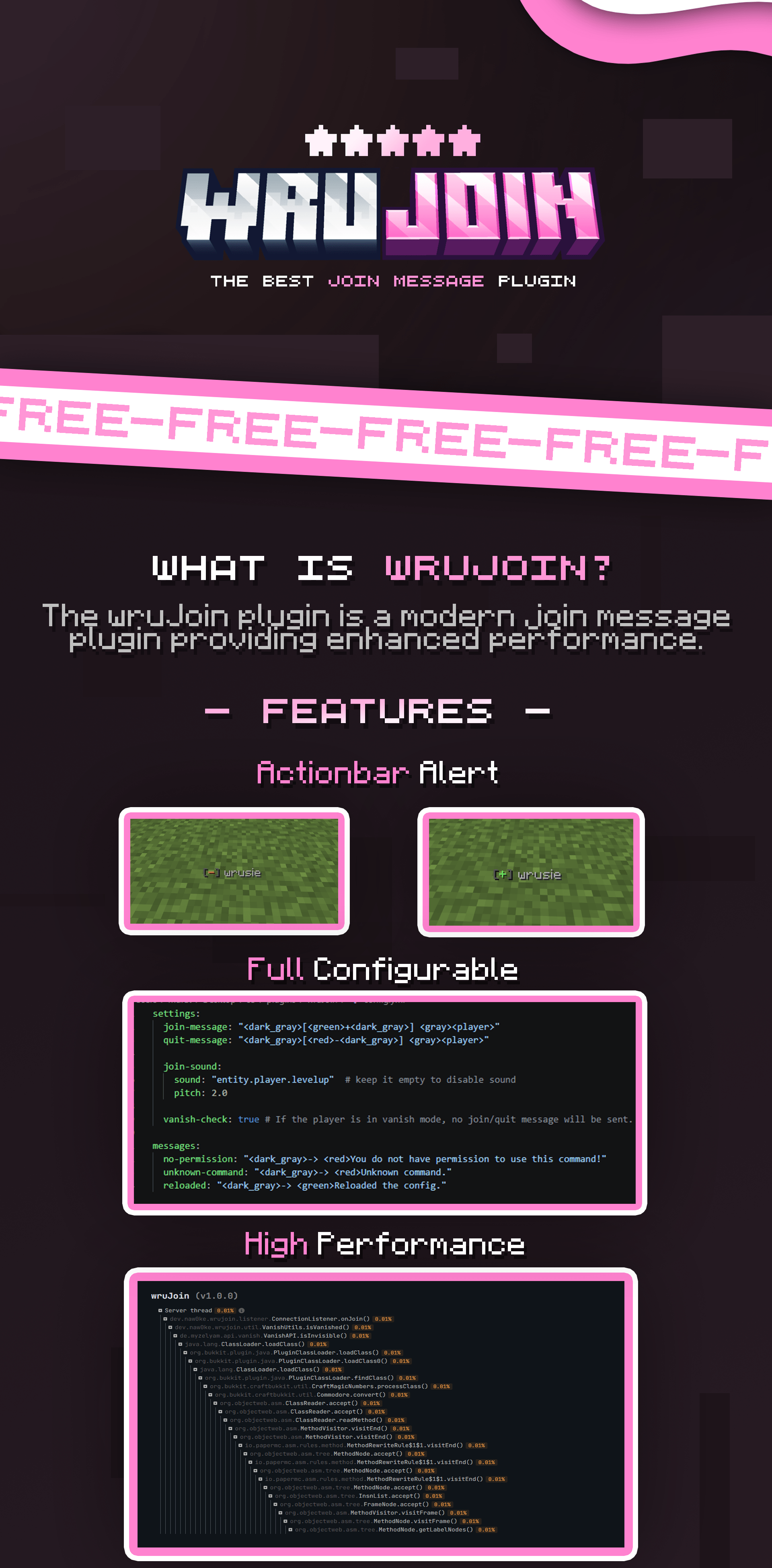
⚙️ Click to view config preview
“`yaml
settings:
join-message:
type: ACTIONBAR # types: ACTIONBAR, CHAT
message: “[+] ”
quit-message:
type: ACTIONBAR
message: “[–] ”
title:
enabled: true
title: “<#D36E97>Welcome, !”
subtitle: “<#FFA8CB> have a good time!”
sound:
enabled: true
sound: “entity.player.levelup”
pitch: 2.0
vanish-check: true # If the player is in vanish mode, no join/quit message will be sent.
messages:
no-permission: “-> You do not have permission to use this command!”
unknown-command: “-> Unknown command.”
reloaded: “-> Reloaded the config.”
“`
# 🎀 wruJoin
**Modern & Powerful Join Message Solution for PaperMC**
`wruJoin` is a high-performance plugin designed for PaperMC and its forks.
It gives server owners complete control over player join and leave notifications with a modern, professional touch.
—
## ✨ Key Features
* 🎨 **Full Customization:** Powered by [MiniMessage](https://docs.advntr.dev/minimessage/format.html) for stunning text formatting.
* 🌈 **Modern Colors:** Native support for **HEX (RGB)** and **Gradients**.
* ⚡ **High Performance:** Optimized to ensure zero impact on your server’s TPS.
* 🔄 **Instant Reload:** Update your configuration on-the-fly without restarting.
* 📺 **Join Titles:** Fully configurable title and subtitle that appears when a player joins.
* 🔊 **Join Sounds:** Fully configurable sound effects that are triggered when a player joins.
* 🕵️ **Vanish Support:** Fully compatible with **SuperVanish** and **PremiumVanish**. Automatically handles fake join/leave messages when administrators vanish or reappear.
—
## 🛠️ Requirements
Ensure your server environment meets the following specifications:
| Requirement | Version |
|:——————–|:—————————————-|
| ☕ **Java** | 21 or higher |
| 🖥️ **Platform** | Paper and other forks (`1.21 – 1.21.x`) |
| 🧩 **Dependencies** | SuperVanish or PremiumVanish (Optional) |
—
## ⌨️ Commands & Permissions
| Command | Description | Permission |
|:——————|:——————————————-|:—————-|
| `/wrujoin` | Displays plugin information and help menu. | `wrujoin.admin` |
| `/wrujoin reload` | Reloads the configuration files. | `wrujoin.admin` |
—
## 🎨 Configuration (MiniMessage)
Stop using outdated `&` color codes! `wruJoin` uses modern formatting for a more professional look.
> **Example:** Use `<#03fcb1>Welcome back, !` for clean Hex colors, or try `Welcome!` for beautiful text transitions.
📖 Check the [MiniMessage Documentation](https://docs.advntr.dev/minimessage/format.html) for more details.
—
## 📦 Installation
1. Download the `.jar` file and place it in your server’s `plugins` folder.
2. Start your server to generate the default configuration.
3. Edit `plugins/wruJoin/config.yml` to your liking.
4. Run `/wrujoin reload` to apply your changes instantly.
—–
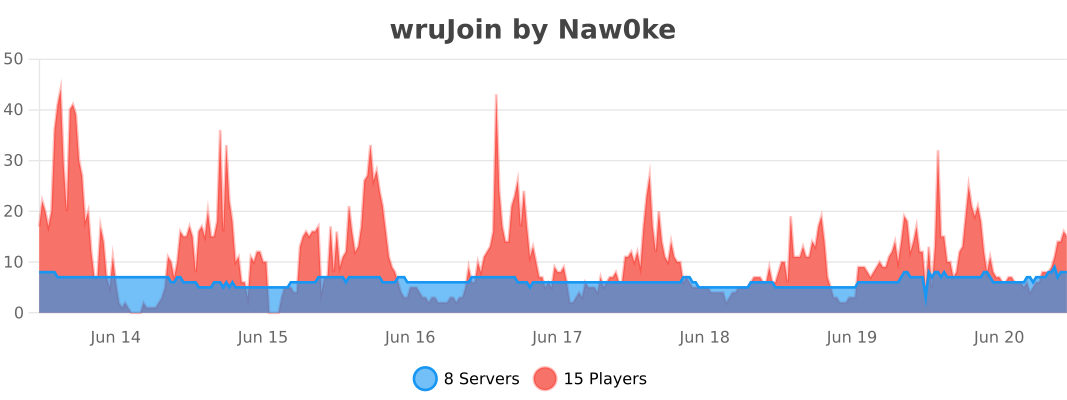
## 📊 Statistics
[](https://bstats.org/plugin/bukkit/wruJoin/27905)
WorldwideChat

### What is WorldwideChat?
WorldwideChat is a plugin that lets you communicate with people who may not speak your language. It utilizes various translation APIs to translate different parts of Minecraft on the fly.
This was made in response to the lack of existing translation plugins, and as a former server owner myself this would have come in handy at times.
_If you want to support my work, please feel free to donate at the link above 🙂 Anything is much appreciated!_
**_(Note that you MUST have at least JDK 11 installed for this plugin to function. Additionally, if you are on 1.13-1.15, please always use WorldwideChat-spigot.jar REGARDLESS of if you are actually using paper or not.)_**
**Feel free to try the plugin for yourself at the following IP address:**
Test Server IP
152.67.252.19 (New and Improved)

Features
– Amazon Translate, Azure Translate, ChatGPT, DeepL Translate, Google Translate, Libre Translate, Ollama, and Systran Translate support.
– Translate chat, signs, entities, items, and written books with an interactive GUI.
– Translation globally, for other players, or just you.
– The plugin itself has been translated into more than 30 languages.
– A cache that stores the most used phrases by players on your server, improving speed and reliability in the event of slow API response times.
– A blacklist to avoid translating certain phrases/words.
– Rate limits so your players don’t fill up a quota too quickly.
– Persistent translation options saved per player across server reboots and reloads.
– Stat tracker to keep track of how your players use this plugin.
– A configuration GUI to easily change config.yml.
– MySQL/MariaDB, PostgreSQL, and MongoDB support.
– Citizens (NPC Dialogue) + DecentHolograms Support.

Github Wiki
https://github.com/dominicfeliton/WorldwideChat/wiki/Commands-&-Permissions

YouTube Tutorial
Please avoid posting bad ratings before asking questions. If you have problems or bugs with the plugin you can either file an issue on Github, or post on the plugin discussion page. Enjoy!
WorldTP
# WorldTP
## The simplest world management plugin.
**Teleport, list, and delete worlds with clean commands — fast, lightweight, and easy to use.**
_Usage:_
> – /wtp tp
> – /wtp tp
> – /wtp list
> – /wtp delete
**No bloat. Just simple world control.**
*Currently only available on versions 1.19-1.21+.* _More version support available if needed (join the discord)_
WorldSlim
# WorldSlim
Reduce Minecraft world file size by automatically cleaning chunks that players barely visit. Three layers of defense catch what vanilla autosave would otherwise commit to disk.
—
## What it does
Modern Minecraft (1.18+) keeps chunks loaded much longer than a player’s view distance, and autosave writes them all to disk regardless of activity. WorldSlim hooks every layer of that pipeline:
1. **ChunkUnloadListener** — when a chunk does unload, intercept the save if `InhabitedTime` is low.
2. **AutosaveShield** *(new in 2.0)* — every 2 seconds, pre-emptively clear the dirty flag on loaded low-`InhabitedTime` chunks so autosave skips them.
3. **ChunkCleaner** — periodically rewrite region files, removing chunks that slipped through the first two layers.
Player activity (placing blocks, attacking mobs, opening containers, picking up / dropping items) marks chunks as “force-save” so they survive cleanup.
—
## Highlights
– **Three-layer architecture** — unload + autosave + region rewrite. Aggressive without being unsafe.
– **File-based ChunkRegistry** — managed/force-save state stored in `plugins/WorldSlim/data/`, survives server restarts and Leaf/Moonrise’s chunk-PDC strip. Crash-safe (lost marks degrade to “leave it alone”).
– **Aggressive mode** *(`cleanup.aggressive: true`)* — restores the pre-1.0.6 cleanup logic, achieves 90%+ cleanup rate on fresh servers. Off by default to protect builds on established worlds.
– **Diagnostics** — `/worldslim diagnose` for runtime counters, `/worldslim scan` for raw-NBT inspection of any region file, `/worldslim chunk` for full decision-tree of the chunk you’re standing in.
– **Daily-rotating file logger** at `plugins/WorldSlim/logs/`, configurable level.
– **Config migration** *(new in 2.0.1)* — new fields auto-injected on upgrade, preserving your edits and comments.
– **Async + bounded** — every disk operation runs off the main thread, with a 5-second timeout that safely skips when the server is busy.
—
## Compatibility
| Server | PDC Persistence | Registry | AutosaveShield |
|——–|—————–|———-|—————-|
| Paper 1.21.x | Yes | Yes | Yes |
| Purpur 1.21.x | Yes | Yes | Yes |
| Folia 1.21.x | Yes | Yes | Partial |
| Leaves 1.21.x | Yes | Yes | Yes |
| Leaf 1.21.x | Stripped | **Load-bearing** | Limited |
Requires Minecraft 1.21.x and Java 21.
—
## Commands
| Command | Description |
|———|————-|
| `/worldslim status` | Show plugin status and active configuration |
| `/worldslim stats` | Total chunks scanned/cleaned and space saved |
| `/worldslim chunk` | Full decision tree for the chunk you’re standing in |
| `/worldslim cleanup` | Run a cleanup pass immediately |
| `/worldslim diagnose [here]` | Runtime diagnostic snapshot. Append `here` for current-chunk details |
| `/worldslim scan` | Parse the current region file’s raw NBT and report what tags survived |
| `/worldslim reload` | Reload `config.yml` (also runs config migration) |
| `/worldslim reset` | Reset cleanup statistics |
Aliased to `/ws`. Permission: `worldslim.admin` for mutating commands; `worldslim.use` for the read-only ones.
—
## Quick start
1. Drop the jar in `plugins/`, restart.
2. Default config is conservative (preserves any chunks that look pre-existing). Works without configuration on most servers.
3. **On a fresh server** — set `cleanup.aggressive: true` for the best cleanup rate.
4. **On an established server with builds** — leave `aggressive: false` (default) and let the registry track new chunks going forward.
—
## Configuration highlights
“`yaml
# Chunk lifetime threshold. Below this, chunks may be cleaned.
# Default 1200 ticks = 60 seconds.
min-inhabited-time: 1200
cleanup:
interval-minutes: 30
run-on-startup: false
# Pre-1.0.6 cleanup behavior. Highly recommended for fresh servers.
aggressive: false
autosave-shield:
enabled: true
interval-ticks: 40 # 2s
logging:
file-enabled: true
level: INFO # DEBUG / INFO / WARN / ERROR
worlds:
enabled: [] # if non-empty, ONLY these worlds are managed
disabled: [] # always-skipped worlds
“`
Full default config (with all comments) is generated on first run.
—
## Reporting issues
Please include:
– `/worldslim diagnose` screenshot
– Latest log from `plugins/WorldSlim/logs/`
– Server type and version
世界存档优化器(自动异步保存)
# WorldSaveOptimizer
## 概述Overview
专为bukkit 1.21+服务器设计的插件,优化世界保存功能。
A plugin designed specifically for Bukkit 1.21 servers, optimizing world-saving functionality.
## 功能特性Features
– 异步自动保存:每5分钟自动保存,减少卡顿
– 可禁用原版自动保存机制
– 手动保存支持
– 灵活配置系统
– 完整命令和权限系统
– Asynchronous auto-save: automatically saves every 5 minutes to reduce lag
– Option to disable the original auto-save mechanism
– Manual save supported
– Flexible configuration system
– Complete command and permission system
## 系统要求System Requirements
– bukkit 1.21+
– Java 21+
– 建议2GB RAM Recommended 2GB RAM
## 安装方法Installation method
1. 将WorldSaveOptimizer.jar放入plugins目录-Place WorldSaveOptimizer.jar into the plugins directory
2. 重启服务器或使用/reload命令-Restart the server or use the /reload command
## 配置文件Configuration File
首次启动后在plugins/WorldSaveOptimizer/config.yml生成配置The configuration will be generated in plugins/WorldSaveOptimizer/config.yml after the first launch:
`yaml
save-interval-minutes: 5
save-message: “&aWorld has been auto-saved”
disable-default-autosave: true
log-saves: true
save-on-stop: true
`
可能出现配置文件不生成、内容空白等错误,这时,你只需到
“`
https://github.com/ABC114514114514114514/WorldSaveOptimizer/blob/main/%E7%A4%BA%E4%BE%8B%E9%85%8D%E7%BD%AE%E6%96%87%E4%BB%B6.yml
“`
_
复制初始配置内容到**config.yml**
Errors such as the configuration file not being generated or appearing empty may occur. In this case, you just need to go to
“`
https://github.com/ABC114514114514114514/WorldSaveOptimizer/blob/main/ExampleConfig.yml
“`
and copy the initial configuration content into **config.yml**
## 命令使用
需要worldsaveoptimizer.admin权限(OP默认拥有)
| 命令 | 说明 |
|——|——|
| /s reload | 重载插件配置 |
| /s save | 手动保存世界 |
| /s status | 查看保存状态 |
| /s info | 查看插件信息 |
## Command Usage
Requires worldsaveoptimizer.admin permission (OPs have it by default)
| Command | Description |
|———|————|
| /s reload | Reload the plugin configuration |
| /s save | Manually save the world |
| /s status | Check the save status |
| /s info | View plugin information |
**注意**:使用前请备份世界数据。
**Note**: Please back up your world data before use.