XLeaderboards

This plugin is designed for users seeking a fast and efficient leaderboard system, supporting time-based rankings such as **daily**, **weekly**, **monthly**, and **permanent** leaderboards. Everything is handled through **placeholders**, eliminating the need for NPCs or menus. Its main strength lies in the ease of setting up time-based leaderboards—an area where few plugins truly excel.
|  |
|  |
|  |
|
| — | — | — |

### Features
– **Fully Reworked Core:** XLeaderBoards has been completely redesigned to support both **SQLite** and **MySQL**, allowing the plugin to scale effortlessly and efficiently with large amounts of data.
– **Improved Performance:** Successfully tested with over 2 million real records, capable of updating them in under one minute.
– **Timed Leaderboards:** Efficient ranking system with full support for **daily**, **weekly**, **monthly**, and **permanent** leaderboards.
– **Easy Setup:** Create and configure leaderboards easily using just placeholders.
– **Unlimited Possibilities:** Thanks to placeholder-based logic, you can create tops for any plugin—even if it lacks native support. XLeaderBoards handles number formatting and comparison automatically.
– **Player Ranking:** Shows each player’s position across all leaderboards (daily, weekly, etc.) with built-in placeholder support.
– **Command Improvements:** New features like **tab-completion** and a **/reload** command have been added for easier management.
– **Optimizations:** Fully configurable write frequency, data limits, and time intervals to suit your server’s capacity and activity.
– **All Versions Supported:** Includes support for **1.21.4** to **1.21.8**. Although XLeaderBoards doesn’t rely on NMS, it includes compatibility logic for version-specific changes.
– **Folia Support:** As Folia is becoming a performance standard in modern Minecraft servers, XLeaderBoards now fully supports it—just like **StellarProtect**.
– **Top rewards:** You can set rewards for the players who are in the daily leaderboards.
– **Need More Features?** Join our [Discord](https://discord.com/invite/4R9teKVcbM) and suggest new features. We’re actively listening to community feedback!

## How to Get Started
1. **Download and install the plugin.**
By default, the plugin supports **SQLite** and **MySQL** out of the box.
2. **Start your server.**
Once the plugin folder is generated, configure your database credentials depending on your chosen engine.
3. **Set up your tops.**
Use the placeholders of your choice to create customized leaderboards.
4. **Integrate with DecentHolograms or your preferred plugin.**
Ensure that your chosen plugin supports PlaceholderAPI, and follow the example configuration provided below.
5. **Refer to the placeholders section.**
All available formats for placeholders are listed in the dedicated section.
DecentHolograms Example Config
“`yaml
location: Spawnb:6.022:33.500:11.943
enabled: true
display-range: 48
update-range: 48
update-interval: 20
facing: 0.0
down-origin: false
pages:
– lines:
– content: ‘#ICON: PLAYER_HEAD (eyJ0ZXh0dXJlcyI6eyJTS0lOIjp7InVybCI6Imh0dHA6Ly90ZXh0dXJlcy5taW5lY3JhZnQubmV0L3RleHR1cmUvZWM2ZTYwNGJkNTNkOTc4ODc1OTVhMDYyYjdjNTEyY2E0ZGJiZmU0OGJiNGFkY2VmNzEyNWQxZGIxMDNhYjdmZiJ9fX0=)’
height: 0.7
– content: ‘#F4F149&lJ#F5F246&lU#F5F242&lG#F6F33F&lA#F7F33B&lD#F8F438&lO#F8F535&lR#F9F531&lE#FAF62E&lS
#FBF727&lM#FBF727&lI#FBF727&lL#FBF727&lL#FBF727&lO#FBF727&lN#FBF727&lA#FBF727&lR#FBF727&lI#FBF727&lO#FBF727&lS’
height: 0.3
– content: ‘&7(La riqueza y ellos son uno)’
height: 0.3
– content: ”
height: 0.3
– content: ‘#FBF727#1. &f%xleaderboard_top_coins;daily;top_name;1% &8- #FBF727%xleaderboard_top_coins;daily;top_value;1%
#FAFF2E⛃’
height: 0.3
– content: ‘#FBF727#2. &f%xleaderboard_top_coins;daily;top_name;2% &8- #FBF727%xleaderboard_top_coins;daily;top_value;2%
#FAFF2E⛃’
height: 0.3
– content: ‘#FBF727#3. &f%xleaderboard_top_coins;daily;top_name;3% &8- #FBF727%xleaderboard_top_coins;daily;top_value;3%
#FAFF2E⛃’
height: 0.3
– content: ‘#FBF727#4. &f%xleaderboard_top_coins;daily;top_name;4% &8- #FBF727%xleaderboard_top_coins;daily;top_value;4%
#FAFF2E⛃’
height: 0.3
– content: ‘#FBF727#5. &f%xleaderboard_top_coins;daily;top_name;5% &8- #FBF727%xleaderboard_top_coins;daily;top_value;5%
#FAFF2E⛃’
height: 0.3
– content: ‘&r’
height: 0.3
– content: ‘&8► &fTu posición: #FBF727#%xleaderboard_ranking_daily_coins% &8- #FBF727%xleaderboard_amount_daily_coins%
#FAFF2E⛃ &8◄’
height: 0.3
– content: ‘&r’
height: 0.3
– content: ‘#F4F149&l[Diario] &7[Semanal] [Mensual] [Permanente]’
height: 0.3
actions:
RIGHT:
– NEXT_PAGE:tops_DINERO
– SOUND:UI_BUTTON_CLICK:0.7:2.7
– lines:
– content: ‘#ICON: PLAYER_HEAD (eyJ0ZXh0dXJlcyI6eyJTS0lOIjp7InVybCI6Imh0dHA6Ly90ZXh0dXJlcy5taW5lY3JhZnQubmV0L3RleHR1cmUvZWM2ZTYwNGJkNTNkOTc4ODc1OTVhMDYyYjdjNTEyY2E0ZGJiZmU0OGJiNGFkY2VmNzEyNWQxZGIxMDNhYjdmZiJ9fX0=)’
height: 0.7
– content: ‘#F4F149&lJ#F5F246&lU#F5F242&lG#F6F33F&lA#F7F33B&lD#F8F438&lO#F8F535&lR#F9F531&lE#FAF62E&lS
#FBF727&lM#FBF727&lI#FBF727&lL#FBF727&lL#FBF727&lO#FBF727&lN#FBF727&lA#FBF727&lR#FBF727&lI#FBF727&lO#FBF727&lS’
height: 0.3
– content: ‘&7(La riqueza y ellos son uno)’
height: 0.3
– content: ”
height: 0.3
– content: ‘#FBF727#1. &f%xleaderboard_top_coins;weekly;top_name;1% &8- #FBF727%xleaderboard_top_coins;weekly;top_value;1%
#FAFF2E⛃’
height: 0.3
– content: ‘#FBF727#2. &f%xleaderboard_top_coins;weekly;top_name;2% &8- #FBF727%xleaderboard_top_coins;weekly;top_value;2%
#FAFF2E⛃’
height: 0.3
– content: ‘#FBF727#3. &f%xleaderboard_top_coins;weekly;top_name;3% &8- #FBF727%xleaderboard_top_coins;weekly;top_value;3%
#FAFF2E⛃’
height: 0.3
– content: ‘#FBF727#4. &f%xleaderboard_top_coins;weekly;top_name;4% &8- #FBF727%xleaderboard_top_coins;weekly;top_value;4%
#FAFF2E⛃’
height: 0.3
– content: ‘#FBF727#5. &f%xleaderboard_top_coins;weekly;top_name;5% &8- #FBF727%xleaderboard_top_coins;weekly;top_value;5%
#FAFF2E⛃’
height: 0.3
– content: ‘&r’
height: 0.3
– content: ‘&8► &fTu posición: #FBF727#%xleaderboard_ranking_weekly_coins% &8- #FBF727%xleaderboard_amount_weekly_coins%
#FAFF2E⛃ &8◄’
height: 0.3
– content: ‘&r’
height: 0.3
– content: ‘&7[Diario] #F4F149&l[Semanal] &7[Mensual] [Permanente]’
height: 0.3
actions:
LEFT:
– PREV_PAGE:tops_DINERO
– SOUND:UI_BUTTON_CLICK:0.7:2.7
RIGHT:
– NEXT_PAGE:tops_DINERO
– SOUND:UI_BUTTON_CLICK:0.7:2.7
– lines:
– content: ‘#ICON: PLAYER_HEAD (eyJ0ZXh0dXJlcyI6eyJTS0lOIjp7InVybCI6Imh0dHA6Ly90ZXh0dXJlcy5taW5lY3JhZnQubmV0L3RleHR1cmUvZWM2ZTYwNGJkNTNkOTc4ODc1OTVhMDYyYjdjNTEyY2E0ZGJiZmU0OGJiNGFkY2VmNzEyNWQxZGIxMDNhYjdmZiJ9fX0=)’
height: 0.7
– content: ‘#F4F149&lJ#F5F246&lU#F5F242&lG#F6F33F&lA#F7F33B&lD#F8F438&lO#F8F535&lR#F9F531&lE#FAF62E&lS
#FBF727&lM#FBF727&lI#FBF727&lL#FBF727&lL#FBF727&lO#FBF727&lN#FBF727&lA#FBF727&lR#FBF727&lI#FBF727&lO#FBF727&lS’
height: 0.3
– content: ‘&7(La riqueza y ellos son uno)’
height: 0.3
– content: ”
height: 0.3
– content: ‘#FBF727#1. &f%xleaderboard_top_coins;monthly;top_name;1% &8- #FBF727%xleaderboard_top_coins;monthly;top_value;1%
#FAFF2E⛃’
height: 0.3
– content: ‘#FBF727#2. &f%xleaderboard_top_coins;monthly;top_name;2% &8- #FBF727%xleaderboard_top_coins;monthly;top_value;2%
#FAFF2E⛃’
height: 0.3
– content: ‘#FBF727#3. &f%xleaderboard_top_coins;monthly;top_name;3% &8- #FBF727%xleaderboard_top_coins;monthly;top_value;3%
#FAFF2E⛃’
height: 0.3
– content: ‘#FBF727#4. &f%xleaderboard_top_coins;monthly;top_name;4% &8- #FBF727%xleaderboard_top_coins;monthly;top_value;4%
#FAFF2E⛃’
height: 0.3
– content: ‘#FBF727#5. &f%xleaderboard_top_coins;monthly;top_name;5% &8- #FBF727%xleaderboard_top_coins;monthly;top_value;5%
#FAFF2E⛃’
height: 0.3
– content: ‘&r’
height: 0.3
– content: ‘&8► &fTu posición: #FBF727#%xleaderboard_ranking_monthly_coins% &8- #FBF727%xleaderboard_amount_monthly_coins%
#FAFF2E⛃ &8◄’
height: 0.3
– content: ‘&r’
height: 0.3
– content: ‘&7[Diario] [Semanal] #F4F149&l[Mensual] &7[Permanente]’
height: 0.3
actions:
LEFT:
– PREV_PAGE:tops_DINERO
– SOUND:UI_BUTTON_CLICK:0.7:2.7
RIGHT:
– NEXT_PAGE:tops_DINERO
– SOUND:UI_BUTTON_CLICK:0.7:2.7
– lines:
– content: ‘#ICON: PLAYER_HEAD (eyJ0ZXh0dXJlcyI6eyJTS0lOIjp7InVybCI6Imh0dHA6Ly90ZXh0dXJlcy5taW5lY3JhZnQubmV0L3RleHR1cmUvZWM2ZTYwNGJkNTNkOTc4ODc1OTVhMDYyYjdjNTEyY2E0ZGJiZmU0OGJiNGFkY2VmNzEyNWQxZGIxMDNhYjdmZiJ9fX0=)’
height: 0.7
– content: ‘#F4F149&lJ#F5F246&lU#F5F242&lG#F6F33F&lA#F7F33B&lD#F8F438&lO#F8F535&lR#F9F531&lE#FAF62E&lS
#FBF727&lM#FBF727&lI#FBF727&lL#FBF727&lL#FBF727&lO#FBF727&lN#FBF727&lA#FBF727&lR#FBF727&lI#FBF727&lO#FBF727&lS’
height: 0.3
– content: ‘&7(La riqueza y ellos son uno)’
height: 0.3
– content: ”
height: 0.3
– content: ‘#FBF727#1. &f%xleaderboard_top_coins;permanent;top_name;1% &8- #FBF727%xleaderboard_top_coins;permanent;top_value;1%
#FAFF2E⛃’
height: 0.3
– content: ‘#FBF727#2. &f%xleaderboard_top_coins;permanent;top_name;2% &8- #FBF727%xleaderboard_top_coins;permanent;top_value;2%
#FAFF2E⛃’
height: 0.3
– content: ‘#FBF727#3. &f%xleaderboard_top_coins;permanent;top_name;3% &8- #FBF727%xleaderboard_top_coins;permanent;top_value;3%
#FAFF2E⛃’
height: 0.3
– content: ‘#FBF727#4. &f%xleaderboard_top_coins;permanent;top_name;4% &8- #FBF727%xleaderboard_top_coins;permanent;top_value;4%
#FAFF2E⛃’
height: 0.3
– content: ‘#FBF727#5. &f%xleaderboard_top_coins;permanent;top_name;5% &8- #FBF727%xleaderboard_top_coins;permanent;top_value;5%
#FAFF2E⛃’
height: 0.3
– content: ‘&r’
height: 0.3
– content: ‘&8► &fTu posición: #FBF727#%xleaderboard_ranking_permanent_coins% &8- #FBF727%xleaderboard_amount_permanent_coins%
#FAFF2E⛃ &8◄’
height: 0.3
– content: ‘&r’
height: 0.3
– content: ‘&7[Diario] [Semanal] [Mensual] #F4F149&l[Permanente]’
height: 0.3
actions:
LEFT:
– PREV_PAGE:tops_DINERO
– SOUND:UI_BUTTON_CLICK:0.7:2.7
“`
config.yml
“`yaml
tops:
kills:
## This placeholder will parse to retrieve the current count of this leaderboard.
placeholder: “%statistic_player_kills%”
name: “Asesinatos”
databaseId: survival_top
debug: false
optimizations:
## Max bulk size for mongodb, if you have a lot of players, you can increase this value,
## but be careful with the memory usage.
max-bulk-size: 1000
## Max cached top entries your server loads on memory.
cached-top-entries: 10
## If you have a lot of players, you can increase this value.
ticks-between-updates: 600
## Max bulk size for resetting temporal values, this have minor size
## you can increase this value, but be careful with the memory usage.
max-reset-bulk-size: 5000
topUpdates:
daily:
minutes: 10
weekly:
minutes: 30
monthly:
hours: 3
permanent:
hours: 6
databases:
mongodb:
host: localhost
port: 27017
database: leaderboards
user: root
password: root
“`
lang.yml
“`yaml
tops:
noPermission: “&cYou don’t have permission to use this command.”
noRanking: “&6Unranked”
noTop: “&6No record”
loading: “&fLoading…”
hologram:
daily: “&6&l[Daily] &7[Weekly] [Monthly] [Permanent]”
weekly: “&7[Daily] &6&l[Weekly] &7[Monthly] [Permanent]”
monthly: “&7[Daily] &7[Weekly] &6&l[Monthly] &7[Permanent]”
permanent: “&7[Daily] &7[Weekly] &7[Monthly] &6&l[Permanent]”
daily: “Daily”
weekly: “Weekly”
monthly: “Monthly”
permanent: “Permanent”
invalidTimeType: “&cThe leaderboard time type is not valid.”
toggleWait: “&cPlease wait a bit before changing the leaderboard time.”
toggleTime: “&fThe leaderboard time is now: &e”
tops: |-
&d &a
&6&l TOPS
&d &f
&d &b
topLine: “&b#<#> &8- &f &8- &e”
“`
rewards.yml
“`yaml
enabled: false
rewards:
kills:
top1:
top: 1
rewards:
– “command: give diamond_sword”
– “message: &7 &a”
– “center_message: &6&lTOP &e# &6&lKILLS &f&l”
– “message: &7 &d”
– “message: &7You have received a diamond sword for staying in top!”
– “message: &7 &a”
top2:
top: 2
rewards:
– “command: give iron_sword”
– “message: &7 &a”
– “center_message: &6&lTOP &e# &6&lKILLS &f&l”
– “message: &7 &d”
– “message: &7You have received a iron sword for staying in top!”
– “message: &7 &a”
top3:
top: 3
rewards:
– “command: give stone_sword”
– “message: &7 &a”
– “center_message: &6&lTOP &e# &6&lKILLS &f&l”
– “message: &7 &d”
– “message: &7You have received a stone sword for staying in top!”
– “message: &7 &a”
“`

**TimeType:** daily/weekly/monthly/permanent
– **/xlb gettop ** » Gets the top of the day, week, month, or permanent.
– **/xlb forceupdate ** » Forces the update of the top.

– **xleaderboards.forceupdate** » Forces the update of the top.
– **xleaderboards.gettop** » Gets the top of the day, week, month, or permanent.

**TopName:**
– **name** – This is established in the `config.yml` key. For example, in `tops.coins`, “coins” is the name of the top.
**TimeType:**
– **daily** – Displays the top player or value for the last 24 hours.
– **weekly** – Displays the top player or value for the last 7 days.
– **monthly** – Displays the top player or value for the last 30 days.
– **permanent** – Displays the top player or value permanently.
**ValueType:**
– **top_name** – Displays the player’s name at this top index position.
– **top_value** – Displays the value at this top index position.
– **top_uuid** – Displays the player’s UUID at this top index position.
**Index:**
– **min** – The minimum index is 1.
– **max** – The maximum index is the one established in the config under `cached-top-entries`.
%xleaderboard_top_;;;%
Examples
“`yaml
%xleaderboard_top_coins;daily;top_name;1%
%xleaderboard_top_coins;weekly;top_name;2%
%xleaderboard_top_coins;monthly;top_name;3%
%xleaderboard_top_coins;permanent;top_name;4%
%xleaderboard_top_coins;daily;top_value;1%
%xleaderboard_top_coins;weekly;top_value;2%
%xleaderboard_top_coins;monthly;top_value;3%
%xleaderboard_top_coins;permanent;top_value;4%
“`
%xleaderboard_ranking__%
Examples
“`yaml
%xleaderboard_ranking_daily_coins%
%xleaderboard_ranking_weekly_coins%
%xleaderboard_ranking_monthly_coins%
%xleaderboard_ranking_permanent_coins%
“`
%xleaderboard_amount__%
Examples
“`yaml
%xleaderboard_amount_daily_coins%
%xleaderboard_amount_weekly_coins%
%xleaderboard_amount_monthly_coins%
%xleaderboard_amount_permanent_coins%
“`
%xleaderboard_update_cooldown_%
Examples
“`yaml
%xleaderboard_update_cooldown_daily%
%xleaderboard_update_cooldown_weekly%
%xleaderboard_update_cooldown_monthly%
%xleaderboard_update_cooldown_permanent%
“`
%xleaderboard_reset_cooldown_%
Examples
“`yaml
%xleaderboard_reset_cooldown_daily%
%xleaderboard_reset_cooldown_weekly%
%xleaderboard_reset_cooldown_monthly%
“`

|  |
|  |
|  |
|
| — | — | — |


More Images


xJumPads

🌌 xJumPads
xJumPads is a powerful and highly customizable plugin that introduces advanced jump pads to your Minecraft server. Whether you’re building immersive parkour courses, interactive lobbies, or creative minigames, xJumPads gives you all the tools you need to design unique gameplay experiences with style and precision.
Jump pads can be configured to launch players in any direction, add particle effects, play sounds, or trigger special actions. Everything is easily managed through a modern GUI system and fully supports HEX colors, PlaceholderAPI, and translations for any language.
✨ Key Features
✅ Supports Minecraft 1.16+ (regularly updated to stay compatible)
🎨 Full HEX color support for vibrant messages, GUIs, and placeholders
🌍 Multi-language support: suitable for global communities
🔧 PlaceholderAPI integration for dynamic customization
📑 Intuitive in-game menu system (/xjp) to create and manage jump pads easily
🎆 Customizable effects: particles, sounds, velocities, and more
🚀 Lightweight & optimized for both small and large networks
🛡️ User-friendly permissions system
🕹️ Common Use Cases
Parkour maps with spectacular jump mechanics
Server hubs and lobbies with interactive movement features
Minigames where jump pads add strategic depth and excitement
Creative builds that benefit from mobility and visual effects
📜 Commands
/xjp menu – Opens the main xJumPads menu (easy GUI setup and management).
/xjp help – Displays the full list of available commands and usage.
/xjp create – Create a new jump pad at your current location.
/xjp remove – Remove an existing jump pad.
/xjp list – View all existing jump pads on your server.
/xjp reload – Reload configuration files without restarting the server.
⚙️ Permissions
xjumpads.admin → Full access to all commands and menus
👉 With xJumPads, you can transform your server into a dynamic playground where movement is part of the fun. From parkour challenges to stylish hub navigation, this plugin gives you complete control over how players interact with your world.
📜 Config
“`yaml
# _____ __ _
## | / / ___ _ __ | |_ _ __ _
# | | / _ | ‘_ | _| |/ _` | Plugin By
# | __/ (_) | | | | | | | (_| | WillfryDev
# ____/___/|_| |_|_| |_|__, |
# __/ | .yml
#
# Particles that will constantly appear above the JumpPad block.
# Particle list: https://jd.papermc.io/paper/1.20/org/bukkit/Particle.html
# __
# ( _/ /_
#__)/(/((-
# /
idle-particles:
enabled: true
type: “ENCHANTMENT_TABLE”
count: 15
# Effects when using a JumpPad.
launch-effects:
sound:
# Sound list: https://hub.spigotmc.org/javapods/spigot/org/bukkit/Sound.html
type: “ENTITY_ENDER_DRAGON_FLAP”
volume: 1.0 # 0.1 – 2.0
pitch: 1.2 # 0.1 – 2.0
particles:
enabled: true
type: “PORTAL”
count: 50
# __♥__♥_____♥__♥___ Want To
# _♥_____♥_♥_____♥__ Work As
# _♥______♥______♥__ A
# __♥___________♥__ Translator?
# ___♥_________♥___ Join Our
# ____♥______♥_____ Discord At
# ______♥_♥_______ https://discord.gg/
# ________♥_________ AH5k9YE78b
“`
👑 Messanges (All editable, if you want configuration in Spanish open a ticket to discord) 🙂
“`yaml
# __ __
# | / |___ ______ __ _ _ _ __ _ ___ ___
# | |/| / -_|_-<_- ”
remove: “%prefix%Usage: &a/jp remove ”
help-menu:
– “&8&m———– &#FFD1DCxJumPads Help &8&m———–”
– “”
– “&#E0E0E0/jp set » &#AEC6CFCreate a JumpPad.”
– “&#E0E0E0/jp remove » &#AEC6CFRemove a JumpPad.”
– “&#E0E0E0/jp list » &#AEC6CFShow the list of JumpPads.”
– “&#E0E0E0/jp menu » &#AEC6CFOpen the JumpPads menu.”
– “&#E0E0E0/jp reload » &#AEC6CFReload the configuration.”
– “”
– “&8&m————————————”
menu:
title: “&#AEC6CF» &#FFD1DCJumpPads &#AEC6CF«”
item-name: “&#B8E986%name%”
item-lore:
– “&#E0E0E0Location:”
– “&#AEC6CF X: %x%, Y: %y%, Z: %z%”
– “”
– “&#FFD1DCClick to teleport!”
no-pads: “&cThere are no JumpPads to display.”
teleport: “%prefix%&aYou have been teleported to JumpPad &#B8E986%name%&a.”
“`
🏃Jumps (Data saver) 😀
“`yaml
# ____.
# | |__ ________ ______
# | | | ____ / ___/ ⋆˙
# /__| | | / |_> >___
# ________|____/| __/____ > ⋆˙⟡
# |__| / .yml
pads:
test:
location:
world: ‘world’
x: 100.0
y: 64.0
z: -250.0
pitch: 0.0
yaw: 0.0
power: 3.0
directionType: FORWARD
angle: 0.0
“`
Show/Hide Api :3
package com.example.soydev;
import jn.willfrydev.xjumpads.xJumPads;
import jn.willfrydev.xjumpads.api.xJumPadsAPI;
import org.bukkit.plugin.java.JavaPlugin;
public class SoyDev extends JavaPlugin {
private xJumPadsAPI jumpPadsAPI;
@Override
public void onEnable() {
// Comprobación de seguridad
if (getServer().getPluginManager().getPlugin(“xJumPads”) == null) {
getLogger().severe(“xJumPads no fue encontrado. El plugin SoyDev se desactivará.”);
getServer().getPluginManager().disablePlugin(this);
return;
}
this.jumpPadsAPI = xJumPads.getApi();
getLogger().info(“¡Conectado exitosamente con la API de xJumPads!”);
}
}
xJobs
# 👷 xJobs | The Ultimate Professional Job System 👷

—
**xJobs** is a high-performance, premium-grade job system designed for modern Minecraft servers. Featuring a stunning **Cyan & Midnight Blue** interface, seamless **Discord integration**, and a robust **database-driven** backend, it provides your players with an immersive and rewarding professional experience.
—
> ## ✨ Premium Features
* **💎 High-End GUI**: A modern, columnar selection menu with custom heads and vibrant accent colors.
* **🌐 100% Internationalized**: Professionally translated into English, with global label management.
* **🤖 Discord Webhooks**: Real-time notifications for level-ups, job changes, and more with fully customizable embeds.
* **📊 Optimized Backend**: Support for H2 and MySQL databases with efficient caching.
* **🎭 Dynamic Lore**: Each job features unique premium descriptions and action hints.
* **🛠️ Developer Friendly**: Full PlaceholderAPI support and a simple yet powerful YML API for creating jobs.
* **⚡ Lightweight**: Built for performance, ensuring zero impact on your server’s TPS.
—
> ## 🚀 How to Create a Custom Job
Adding new professions to your server is incredibly simple. Follow this step-by-step guide:
1. Navigate to the `/plugins/xJobs/jobs/` folder.
2. Create a new file named `your_job_id.yml` (e.g., `alchemist.yml`).
3. Copy and customize the template below:
“`yaml
name: “Alchemist”
permission: “default”
max-level: 200
icon:
material: PLAYER_HEAD
base64: “eyJ0ZXh0dXJlcyI6eyJTS0lOIjp7InVybCI6Imh0dHA6Ly90ZXh0dXJlcy5taW5lY3JhZnQubmV0L3RleHR1cmUv…”
slot: 10
name: “Alchemist”
lore:
– “”
– ” &#A2FF5C✦ &f{info_label}:”
– ” &e⭐ &f{level_label}: &e{level}&f/&e{max_level}”
– ” &a👥 &f{workers_label}: &#D0FFD3{workers}”
– “”
– ” &#A2FF5C✦ &f{blurb_label}:”
– ” &7A master of volatile reactions. Brew concoctions”
– ” &7and elixirs that grant inhuman strength and life.”
– “”
– ” &#A2FF5C✦ &f{actions_label}:”
– ” &8▪ &7Brew magical potions”
– “”
– ” {join_action}”
actions:
block_break: # Logic for breaking blocks
‘WHEAT’:
xp: 5
money: 10.0
kill_mob: # Logic for hunting
‘ZOMBIE’:
xp: 15
money: 20.0
“`
4. Use `/jobs reload` in-game to apply your new profession immediately!
—
> ## 📌 Placeholders & Variables
Enhance your GUIs and chat with our dynamic placeholders:
| Placeholder | Description |
| :— | :— |
| `{player}` | The name of the player |
| `{job}` | The current profession name |
| `{level}` | The player’s current job level |
| `{max_level}` | The maximum level reachable |
| `{xp}` | Current experience points |
| `{xp_needed}` | Experience needed for next level |
| `{progress}` | A visual progress bar (e.g., `|||||…..`) |
| `{workers}` | Total number of players in that job |
—
> ## 🛠️ Commands & Permissions
Manage your professions with these simple commands:
| Command | Description | Permission |
| :— | :— | :— |
| `/jobs` | Open the main professional selection menu | *None* |
| `/jobs stats` | View your personal progress and statistics | *None* |
| `/jobs leave` | Resign from your current job | *None* |
| `/jobs help` | Show the command help menu | *None* |
| `/jobs reload` | Reload all configurations and jobs | `xjobs.admin` |
—
> ## 📦 Requirements
Ensure your server meets these criteria for optimal performance:
| Requirement | Description | Status |
| :— | :— | :— |
| **Vault** | Essential for economy rewards and money management | **Required** |
| **Java 17+** | Modern runtime required for high-performance execution | **Required** |
| **PlaceholderAPI** | Enables dynamic labels and custom variables | *Recommended* |
—
> ## 🛰️ Discord Integration
Keep your community engaged by linking your Discord server.
In `config.yml`, set `webhooks.discord.enabled: true` and paste your URL.
**Features:**
* **Custom Embeds**: Edit colors, footers, and thumbnails per event.
* **Async Processing**: Webhooks never lag your server.
* **Player Avatars**: Automatically fetches the player’s head for the notification.

—
> **Pro Tip**: You can edit the titles of all GUI sections (like “Information” or “Active Workers”) globally in `messages.yml`. Edit once, update everywhere!
> Got some cash? Get a PREMIUM (ES/EN) config on Discord.
XGamemode

### “*You’re not switching modes, you’re switching dimensions.*”
~~*2000 Downloads?! Thanks!*~~
# 1 Feature
## 1.1 Offline Player
You can change the gamemode of a player, **even he (or she) was offline**.
## 1.2 Permissions
Allow permission group plugins (_like Luckperms_) to manage **which gamemodes can be switched to** and **which gamemodes cannot be switched to**.
_e.g. Allow to switch to survival mode but not to any other mode._
## 1.3 Alias
**/gamemode** is simplified to **/gm** and **/g**.
_(of course you can still use /gamemode)_
## 1.4 Cross-Server Storage
Support **MySQL** and **SQLite** storage backends. Player gamemodes are saved and synchronized across multiple servers in a network.
## 1.5 Folia Support
**Fully compatible with Folia servers** — using region-based scheduling for optimal performance.
## 1.6 Lightweight
The Plugin size is only **~25 KB** and has **almost no impact** on server performance!
# 2 Caution
## 2.1 Shortcut Keys
If you need to use shortcut keys such as **F3+F4**, please install another plugin **F3NPerm**.
## 2.2 Versions
**1.8.X +**
**All Bukkit based server** (Paper, Spigot, Purpur, Folia, etc.)
# 3 Commands
“`markdown
– /xgamemode
– /xgamemode reload
– /gm
– /gm
– /gm -all
– /gm -online
– /gm -offline
/g = /gm = /gamemode
/xg = /xgm = /xgamemode
“`
# 4 Permission Node
“`markdown
– xgamemode.survival
– xgamemode.creative
– xgamemode.adventure
– xgamemode.spectator
– xgamemode.others.survival
– xgamemode.others.creative
– xgamemode.others.adventure
– xgamemode.others.spectator
– xgamemode.reload
– xgamemode.admin
“`
# 5 Custom Config
## 5.1 Basic Settings
“`yaml
lang: en-US
“`
**Language** setting
“`yaml
default_gamemode: survival
“`
If a **new player joined your server**, **which gamemode should he (she) be**?
**survival**, **creative**, **adventure**, **spectator**
“`yaml
show_logo: true
“`
Show logo or not when plugin enabled.
**true**, **false**
“`yaml
debug: false
“`
Enable debug logging for troubleshooting.
**true**, **false**
## 5.2 Storage Configuration
“`yaml
storage:
type: yaml
“`
**Storage backend type**: **yaml**, **sqlite**, **mysql**
### SQLite Example
“`yaml
storage:
type: sqlite
# No additional config needed — data.db will be created automatically
“`
### MySQL Example
“`yaml
storage:
type: mysql
mysql:
host: localhost
port: 3306
database: minecraft
username: root
password: your_password
“`
## 5.3 Custom Messages
“`yaml
messages:
en-US: # Original en-US Language by Wind_Blood
reloaded: “&aXGamemode Reloaded!”
# ……
custom_lang: # Add Your Custom Language!
reloaded: “Thank you for using XGamemode!”
# ……
“`
**Customizable Messages**. You can add **your own new language** here!
## 5.4 An Example config.yml
“`yaml
lang: msgForMyServer
default_gamemode: survival
show_logo: false
debug: false
storage:
type: yaml
messages:
msgForMyServer:
reloaded: “很明显作者是中国人 会说中文很正常 然后我也不知道为什么我要在一堆英文里写一段中文 挺好笑的 哈哈哈 对了 看到我就是缘分 XGamemode 官方 QQ 反馈交流群:点击链接加入群聊【XGamemode 反馈群】:https://qm.qq.com/q/rpTk5LK7w4 欢迎加”
usage: “&cUsage: /gm [player/-all/-online/-offline]”
console_usage: “&cUsage: /gm ”
invalid_gamemode: “&cInvalid Gamemode!”
invalid_player: “&cInvalid Player!”
gamemode_self: “&aYour Gamemode Changed to {mode}!”
gamemode_all: “&aChanged All Player’s Gamemode to {mode}!”
gamemode_online: “&aAll Online Player’s Gamemode Changed to {mode}!”
gamemode_offline: “&aAll Offline Player’s Gamemode Changed to {mode}!”
no_permission: “&cYOU ARE NOT ALLOWED TO DO THAT!”
gamemode_other: “&a{player}’s Gamemode Changed to {mode}!”
gamemode_other_offline: “&a{player} (Offline)’s Gamemode Changed to {mode}!”
“`
# 6 Developer API (Async)
## Get Instance
“`java
Main plugin = Main.getInstance();
“`
## Get Player Gamemode
“`java
plugin.getPlayerMode(playerUUID).thenAccept(mode -> {
if (mode != null) {
// mode is GameMode.SURVIVAL, CREATIVE, ADVENTURE, or SPECTATOR
// Player is online or has saved data
} else {
// Player not found or no saved gamemode yet
}
});
“`
## Set Player Gamemode
“`java
plugin.setPlayerMode(playerUUID, GameMode.SURVIVAL).thenAccept(success -> {
if (success) {
// Gamemode changed and saved successfully
// Works for both online and offline players
} else {
// Failed to save (database error, etc.)
}
});
“`
## Listen to Gamemode Changes
“`java
@EventHandler
public void onGamemodeChange(GamemodeChangeEvent event) {
Player player = event.getPlayer(); // Online player only
GameMode oldMode = event.getOldMode();
GameMode newMode = event.getNewMode();
}
“`
> **Note:** All APIs are **fully async** and thread-safe. The `GamemodeChangeEvent` is only fired for **online players** when their mode is actually changed. The `getPlayerMode()` method returns `null` if the player has no saved gamemode data.
# 7 Reprint Post
www.minebbs.com/resources/xgamemode.11041
hangar.papermc.io/Wind_Blood/XGamemode
modrinth.com/plugin/xgamemode
# 8 Feedback
Just e-mail me with **[email protected]**. Thanks!
XD’s Utils
## Description
XD’s Utils is a plugin and mod that provides a custom web interface that you can monitor the whole server, create backups to restore points of your server with a simple script to restore to a backup, an API to get and modify data of the server and plugin through sending web requests, and more!
## Features
| Feature | Implementation |
|——————-|—————-|
| Invsee | ✅ |
| AFK Detector | ✅ |
| Bounties | ✅ |
| Custom Shops | ✅ |
| Economy | ✅ |
| Chat Muting | ✅ |
| Chat Censoring | ✅ |
| Disabled Commands | ✅ |
| Disabled Items | ✅ |
| Custom Messages | ✅ |
| Backups | ✅ |
| Web Interface | ✅ |
| Commands | ✅ |
> ✅ : Implemented
>
> 🚧 : Work in Progress
>
> ❌ : Not implemented
## Config
Config Example
“`yml
# /$$ /$$ /$$$$$$$ /$$
# | $$ / $$| $$__ $$| $/
# | $$/ $$/| $$ $$|_//$$$$$$$
# $$$$/ | $$ | $$ /$$_____/
# >$$ $$ | $$ | $$ | $$$$$$
# /$$/ $$| $$ | $$ ____ $$
# | $$ $$| $$$$$$$/ /$$$$$$$/
# |__/ |__/|_______/ |_______/
# /$$ /$$ /$$ /$$ /$$
# | $$ | $$ | $$ |__/| $$
# | $$ | $$ /$$$$$$ /$$| $$ /$$$$$$$
# | $$ | $$|_ $$_/ | $$| $$ /$$_____/
# | $$ | $$ | $$ | $$| $$| $$$$$$
# | $$ | $$ | $$ /$$| $$| $$ ____ $$
# | $$$$$$/ | $$$$/| $$| $$ /$$$$$$$/
# ______/ ___/ |__/|__/|_______/
# ============================ #
# WEB #
# ============================ #
# Enabled (true/false)
enable_web: true
# Hosted Port (1000-99999)
port: 8080
# ============================ #
# BACKUPS #
# ============================ #
# Enabled (true/false)
enable_backups: true
# Folders to back up & Backup interval (Folder Names: Minutes)
folders:
– world: 120
– world_nether: 240
– world_the_end: 240
– plugins/XDs-Utils: 300
# Max folder size (MB) (-1/0 for unlimited)
max_size: 1024
# Max backups (Int) (-1/0 for unlimited)
max_backups: 10
# Compression level (0-9)
compression_level: 7
# ============================ #
# MESSAGES #
# ============================ #
# Message to send when a player joins for the first time (true/false)
enable_first_join_message: true
# %player% – Player’s name
# %message% – Message to send
first_join_message: “%yellow%Welcome %gray%%player% %yellow%to the server!”
# Message to send when a player joins (true/false)
enable_custom_join_message: true
# %player% – Player’s name
# %message% – Message to send
join_message: “%green%+ %gray%%player%”
# Message to send when a player leaves (true/false)
enable_custom_leave_message: true
# %player% – Player’s name
# %message% – Message to send
leave_message: “%red%- %gray%%player%”
# Custom player messages (true/false)
enable_custom_message_format: true
# %player% – Player’s name
# %message% – Message to send
custom_message_format: “%gray%%player% %dark_gray%» %gray%%message%”
# ============================ #
# DISABLED ITEMS #
# ============================ #
# Items to disable (Item IDs)
disabled_items:
# – minecraft:item_1
# – minecraft:item_2
# – minecraft:item_3
# Method to disable items
# 1 – Removes Recipe
# 2 – Removes Recipe & Clears Item
disable_method: 1
# ============================ #
# DISABLED COMMANDS #
# ============================ #
disabled_commands:
# – “/command_1”
# – “/command_2”
# – “/command_3”
# ============================ #
# CHAT CENSORING #
# ============================ #
# Words to censor
censored_words:
# – “censored_word1”
# – “censored_word2”
# – “censored_word3”
# Regex patterns to censor
censor_regex_patterns:
# – “censored_regex_pattern1”
# – “censored_regex_pattern2”
# – “censored_regex_pattern3”
# Method to censor words
# 0 – Do nothing (Only logs)
# 1 – Replaces Words with ‘*’
# 2 – Removes Words from message
# 3 – Do not send message
censor_method: 1
# ============================ #
# ECONOMY #
# ============================ #
# Enable the shop (true/false)
enable_shop: true
# Allow anyone to create shops (true/false)
anyone_create_shops: true
# Enable bounties (true/false)
enable_bounties: true
# Bounty you gain when you kill a player (Int/Float/Double)
kill_reward: 100.00
# Amount of money to give to players when join the next day (Int/Float/Double)
daily_balance: 100.00
# Items in the default shop (Item ID: Cost, Amount, Slot)
shop_items:
– minecraft:elytra:
cost: 50000
amount: 1
slot: 0
– minecraft:netherite_ingot:
cost: 25000
amount: 1
slot: 1
– minecraft:diamond:
cost: 2500
amount: 1
slot: 2
– minecraft:emerald:
cost: 2500
amount: 1
slot: 3
– minecraft:gold_ingot:
cost: 50
amount: 1
slot: 4
– minecraft:iron_ingot:
cost: 50
amount: 1
slot: 5
“`
XD’s Library
### XD’s Library
#### XDPXI’s library for numerous tasks.
—
### Features
> Please view the [Documentation](https://xdlib.xdpxi.dev/) for the correct features for your version
—
### Building from Source
#### To build the mod from source follow the steps below:
– Clone the [Git repository](https://github.com/XDPXI/XDLib)
– Run `gradlew build` or `build.ps1` in your terminal in the cloned repository
#### The compiled mod will be in `build/libs`
XColor
###### **Update for this plugin incoming!!**
### Features
1. **Customizable Prefixes:**
– Modify the your Name as the owner want with Minimessage Format:
`/cosmetics prefix ` – MiniMessage Support
2. **Reset Options:**
– Reset customizations for name or prefix:
`/cosmetics reset`
### Benefits:
– **Enhanced Personalization:** Express yourself with unique colors, bold styles, and custom statuses.
– **Easy Reset Options:** Quickly return to default settings without hassle.
– **Role-Specific Access (Upcoming):** Admins can control access with a detailed permission system for better server management.
### Commands:
– “/cosmetics prefix “
– “/cosmetics reset“
### Permissions
– “colorstatus.command.cosmetics.reset“
– “colorstatus.command.cosmetics.prefix“
## Placeholder API
– Placeholder
– `%xcolor_cosmetics_prefix_name%`
– `%xcolor_cosmetics_prefix_text%`
### Coming SOON
– ~~Placeholder API~~
– Database for Multi-server support
– More Cosmetics
– More Commands/Commands Options
xCoinFlip
🎲 xCoinFlip
The best modern and immersive betting system for your Minecraft server
—

—
**xCoinFlip** is a highly optimized and fully customizable plugin that adds a “Heads or Tails” (Coinflip) betting system to your server. Designed to offer a fresh and addictive experience, it allows players to wager their money on 1v1 duels with high-quality animations, boosting engagement and improving your network’s economy flow.
—
> ### ✨ Recent Highlights (v1.0.1)
> * **New:** **Cryptographically Secure Randomness** using `SecureRandom` for 100% fair duels.
> * **New:** **Suspenseful Roulette Animation** with realistic friction/slowing effects.
> * **New:** **Trillion (T) Support** in smart amount parsing for large economies.
> * **New:** **Chat-based Creation Prompt** to quickly set bets without long commands.
—
> ### 🔥 Key Features
– 🎰 **Immersive Roulette Animation:** Unlike other basic betting plugins, our GUI features a spectacular “friction” spin effect. The player heads start spinning smoothly and gradually slow down, generating an incredible level of tension and suspense just before the winner is revealed.
– 🔒 **Provably Fair:** The probability engine is entirely unpredictable. Written using secure randomness parameters (`SecureRandom`), it guarantees a purely impartial 50/50 ratio, eliminating any chance of scams or player exploits.
– 💬 **Lightning-Fast Wagers:** Tired of typing long commands? Players can simply open the GUI, click the “Create Game” button, and the plugin will seamlessly capture their next chat message. It even supports amount abbreviations! Drop a `1.5k`, `50m`, `3B`, or even **`2T`** and the plugin handles the rest.
– 💾 **Excellent Performance (H2 Built-in):** Comes with its own asynchronous built-in database manager to store pending games without consuming main-thread resources, meaning you don’t even need to hassle with external MySQL setups.
– 🎨 **100% Customizable:** The power is in your hands. Modify the GUI layouts (slots, titles, items), chat messages, action bars, sounds, win chances, and global broadcasts directly through the `.yml` files.
– 🎆 **Visual Rewards:** Spectacular victory effects including snappy sounds, firework launches, and totem particles to properly celebrate large wins.
– 📡 **Discord Webhook Integration:** Automatically broadcast massive wins and epic duels directly to your Discord community channels via configurable webhooks.
—
> ### ⚙️ Commands & Permissions
**General Commands – `/cf` or `/coinflip`**
* `/cf menu` : Opens the main active games GUI. *(No specific permission required by default)*
* `/cf create ` : Instantly create a new coinflip wager without opening the GUI.
* `/cf help` : View available commands based on player privileges.
**Admin Commands:**
* `/cf reload` : Hot-reload `config.yml`, `gui.yml`, and `animation.yml` without needing to restart your server.
* **Default Admin Permission:** `xcoinflip.admin` (Can be modified in config).
—
> ### 🎢 Example Menu (Custom)
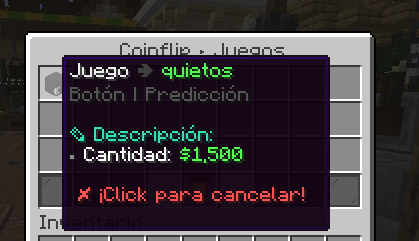
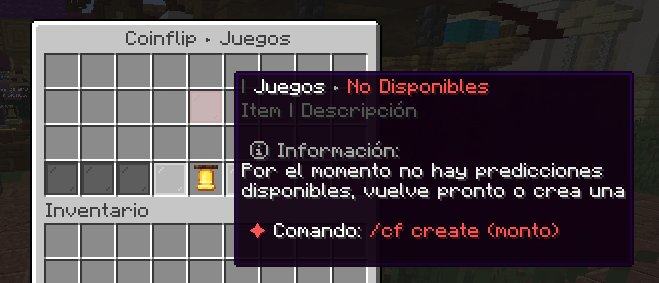
—
> ### 🧩 Dependencies
To ensure xCoinFlip runs smoothly, your server requires the following:
* **[Vault](https://modrinth.com/plugin/vault)** – *(Required)*
* **Any Economy Provider** (EssentialsX, CMI, etc.) – *(Required)*
* **[PlaceholderAPI](https://modrinth.com/plugin/placeholderapi)** – *(Optional but recommended)*
—
> ## 💗 Servers that use our plugin
> * **SolarCraftMc** (Survival Vanilla)
> * **MineFania** (Survival OP)
—
> ### 💬 Support & Community
> Developed and maintained by the **xPlugins** team.
> If you have any questions, suggestions, or need help configuring the plugin, you are more than welcome to join our official [Discord](https://xplugins.es/).
>
> 😊 **Available in: ES / EN / CUSTOM**
X-Clearlag
[](https://www.spigotmc.org/resources/x-clearlag-custom-cleaning-1-8-1-21-11.132713/) [](https://wiki-x-proyects.vercel.app/) [](https://discord.com/invite/Yb6GsfGWmd)
# **X-ClearLag**
*Next-generation entity cleanup with Folia support, proximity protection, and multi-language modular tasks*
—
## 📄 Description
**X-ClearLag** is the ultimate, professional-grade entity management solution for modern servers. Completely rebuilt from the ground up, it offers **native Folia compatibility**, wall-clock precision tasks, and advanced performance optimizations. Protect your players’ experience with the brand-new **Proximity Protection system**, automatically intervene during lag spikes with **TPS-based emergency cleanups**, and monitor your world smoothly using the **Interactive Chunk Inspector**.
All of this without a single annoying console warning. Supports **Spigot, Paper, Purpur, and Folia (1.8.x – 26.1)**.
## ⚡ Main Commands
**`/xcl [subcommand]`** (*Aliases: `/clearlag`, `/xclearlag`*)
– **`help`** – Shows the interactive help menu.
– **`reload`** – Hot-reloads configuration and language files.
– **`clear`** – Manually triggers the main cleanup tasks instantly.
– **`inspect`** – Opens the **Interactive Chunk Inspector** to hunt down entity clusters.
– **`clearchunk `** – Wipes all entities from a targeted chunk.
– **`tpchunk `** – Teleports instantly to a specific chunk coordinate.
– **`update`** – Checks for the latest X-ClearLag updates.
## ⭐ Key Features
– **Folia & Next-Gen Support** — 100% compatible with Folia’s regional threading model. Built for elite performance.
– **Player Proximity Protection** — Smartly ignores dropped items and entities that are right next to your active players.
– **TPS Monitor & Auto-Cleanup** — Server lagging? X-ClearLag detects TPS drops and automatically triggers an emergency surgical cleanup.
– **Batch Processing & Anti-Spike** — Removes thousands of entities in controlled batches over multiple ticks, preventing the classic “clearlag server freeze”.
– **Interactive Chunk Inspector** — View the Top 12 busiest chunks and manage them through interactive chat clicks.
– **Internal Notifications & PAPI** — Use `[TITLE], [ACTIONBAR], [BROADCAST], [SOUND]` directly in config. Full PlaceholderAPI support.
– **BossBar Countdown** — Elegant visual countdown bar for players during the last 60s (Requires 1.9+).
– **Task-Based Architecture** — Create unlimited independent cleanup tasks. Make one run every 5 mins for drops, and another every 30 mins to run `save-all`.
– **Granular Protection** — Secure mobs by name-tag, leash state, type whitelist, or world blacklists.
## 🌐 Multi-Language Support
– **English** — `en`
– **Español** — `es`
– **Português** — `pt`
– **日本語** — `ja`
– **Русский** — `ru`
– **Custom** — `custom`
## 🔑 Permissions
– **`xclearlag.admin.*`** — Grants all admin permissions (Default: OP).
– **`xclearlag.admin.reload`** — Access to `/xcl reload`.
– **`xclearlag.admin.clear`** — Access to `/xcl clear`.
– **`xclearlag.admin.inspect`** — Access to `/xcl inspect`.
– **`xclearlag.admin.clearchunk`** — Access to `/xcl clearchunk`.
– **`xclearlag.admin.tpchunk`** — Access to `/xcl tpchunk`.
– **`xclearlag.admin.update`** — Access to `/xcl update`.
– **`xclearlag.bypass`** — Bypass countdown messages (Default: false).
– **`xclearlag.notify`** — Receive cleanup notifications (Default: true).
## 🧩 Developer API
X-ClearLag provides a lightweight API for other plugins to interact with the cleanup engine. Support for custom events like `XPreClearEvent` (cancellable) and `XPostClearEvent` allows you to prevent cleanups during critical moments or track performance metrics easily. Full **PlaceholderAPI** support included!
## ⚙️ Configuration Example
> [!TIP]
> This is a basic example. For a full explanation of every setting and module, please visit our [Official Wiki](https://wiki-x-proyects.vercel.app/).
“`yaml
prefix: “&8[&bX-ClearLag&8] &7”
language: “en”
tps-check:
enabled: true
threshold: 16.0
interval: 60
task-to-run: [“clearlag”]
bossbar:
enabled: false
color: “RED”
style: “SOLID”
tasks:
clearlag:
enabled: true
interval: 300
min-players: 3
remove-drops: true
protect-named: true
protect-leashed: true
protect-near-player: false
near-player-radius: 16
countdown: [60, 30, 10, 5, 3, 2, 1]
countdown-commands:
60:
– ‘[TITLE] &b&lX-ClearLag’
– ‘[SUBTITLE] &7Cleanup in &c60s’
– ‘[SOUND] NOTE_PLING’
10:
– ‘[ACTIONBAR] &eEntities removed in &c10s&e!’
entities: [ARROW, SNOWBALL, EXPERIENCE_ORB]
protected-entities: [PLAYER, VILLAGER, ARMOR_STAND]
commands: []
optimizations:
batch-size: 100
chunks-per-tick: 40
“`
—
XaeroTracker
# XaeroTracker
XaeroTracker is a paper plugin which simulates everyoneTracksEveryone option in Xaero’s World Map mod.
With this plugin, players who have Xaero’s World Map or Xaero’s Minimap installed can see all other players on their map.
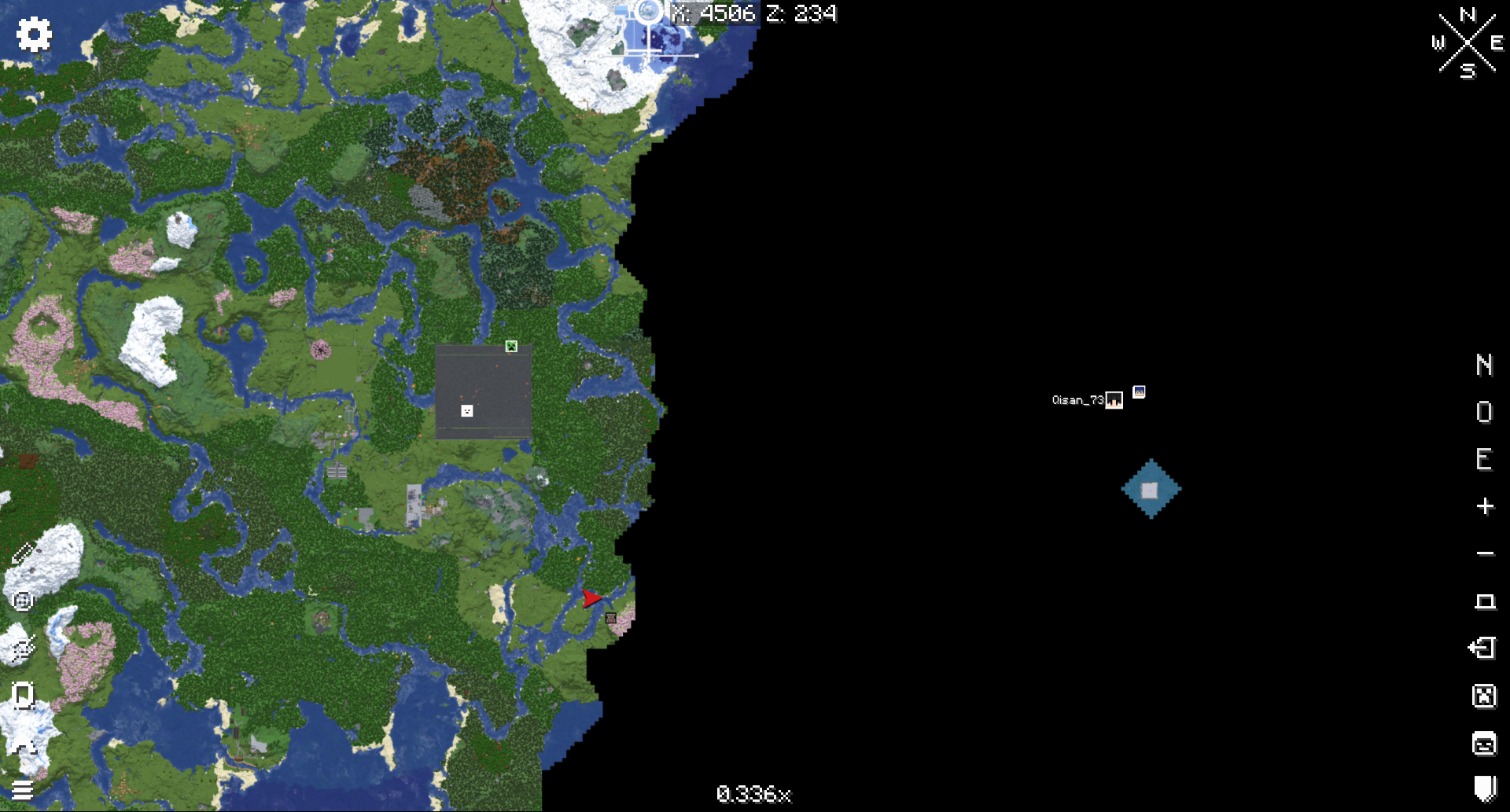
**XaeroTracker is not affiliated or endorsed by xaero96 and is not officially affiliated with Xaero in any way.**
# Tested Version
This plugin has only been tested on 1.20.1 and 1.21.4 .
# Config
“`Yaml
should-send-level-id: true
level-id: -884219291
sync-cooldown: 250
“`
## should-send-level-id
Whether to send level id to client. Only if level id is sent can the plugin funtion.
But if you are using Leaves server and turned XareoProtocol on, you should disable this.
## level-id
It will be randomly generated when the plugin is first loaded.
Client uses it to tell different servers under the same domain.
It’s useful when you are using velocity proxy, every sub server should have different value of it.
## sync-cooldown
How long should a player’s location can’t be synced again. (unit millisecond)
# Command
You need xaerotracker permission to execute any of this.
“`
/xt toggleTracked
/xt toggleTracked
/xt toggleTrackEveryone
/xt toggleTrackEveryone
“`
## /xt toggleTracked
Toggle whether yourself can be tracked.
Require xaerotracker.toggleTracked permission.
## /xt toggleTracked
Toggle whether other player can be tracked.
Require xaerotracker.toggleTracked.others permission.
## /xt toggleTrackEveryone
Toggle whether you can track any other player (bypass any other restriction).
Require xaerotracker.toggleTrackEveryone permission.
## /xt toggleTrackEveryone
Toggle whether a specific player can track any other player (bypass any other restriction).
Require xaerotracker.toggleTrackEveryone.others permission.