SuperMines
SuperMines
A powerful, easy-to-use, and free-to-use mine plugin for Paper servers.
## Features
* MiniPlaceholders/PlaceholdersAPI support
* Folia support
* ItemsAdder/Oraxen/Nexo support
* Rank system
* Allow/Disallow earn xp from mine blocks
* Great I18n for players
* More coming soon…
## Screenshots

## Commands & Permissions
Commands
/sm create [displayName] — Create a mine
/sm help — Show this help message
/sm info — Show info of a mine
/sm list — List all mines
/sm gui — Show gui
/sm treasures — Show help about treasures
/sm ranks — Show help about ranks
/sm addTreasure — Add a treasure to the mine
/sm removeTreasure — Remove a treasure from the mine
/sm setRequiredLevel — Set the required rank level of a mine
/sm addAllowedRank — Add allowed ranks to the mine
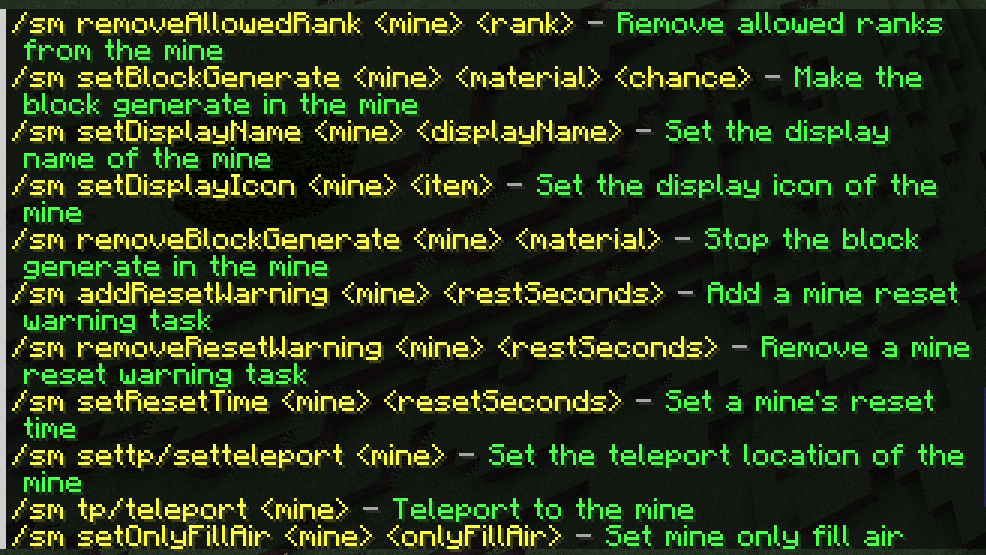
/sm removeAllowedRank — Remove allowed ranks from the mine
/sm setBlockGenerate — Make the block generate in the mine
/sm setDisplayName — Set the display name of the mine
/sm setDisplayIcon - — Set the display icon of the mine
/sm removeBlockGenerate — Stop the block generate in the mine
/sm addResetWarning — Add a mine reset warning task
/sm removeResetWarning — Remove a mine reset warning task
/sm setResetTime — Set a mine’s reset time
/sm settp/setteleport — Set the teleport location of the mine
/sm tp/teleport — Teleport to the mine
/sm setOnlyFillAir — Set mine only fill air when reset
/sm reset — Reset a mine
/sm pos1 [position] — Set the position 1 of an area
/sm pos2 [position] — Set the position 2 of an area
/sm wand — Get a wand
/sm remove — Remove a mine
/sm reload — Reload the plugin
/sm treasures list — List all treasures
/sm treasures create — Add a treasure (the item must be held in hand)
/sm treasures remove — Remove a treasure
/sm treasures setItem — Set the reward item (the item must be held in hand)
/sm treasures setChance — Set the chance of a treasure
/sm treasures setDisplayName — Set the display name
/sm treasures addMatch — Add match block
/sm treasures removeMatch — Remove match block
/sm ranks list — List all ranks
/sm ranks create — Add a rank
/sm ranks remove — Remove a rank
/sm ranks giveRank [notify] — Set a player’s rank (default notify is false)
/sm ranks takeRank [notify] – Take away a player’s rank (default notify is false)
/sm ranks setDisplayName — Set a rank’s display name
/sm ranks setLevel — Set a rank’s level
Permissions
supermines.reload — reload the plugin
supermines.treasures — anything about treasures
supermines.ranks — anything about ranks
supermines.block_generates — set/remove block generation
supermines.create — create a mine
supermines.gui — show the management gui
supermines.list — list the mines
supermines.setpos — set position
supermines.redefine — redefine a mine
supermines.delete — delete a mine
supermines.reset — reset a mine
supermines.reset_warnings — add/remove reset warnings
supermines.set_display_name — set the display name of a mine
supermines.set_display_icon — set the display icon of a mine
supermines.set_only_fill_air — set mine will only fill air when mine reset
supermines.set_required_level — set the required rank level of a mine
supermines.set_reset_time — set the reset time of a mine
supermines.set_teleport — set the location teleport of a mine
supermines.teleport — teleport to a mine
supermines.bypass.rank — bypass mine rank check
## Placeholders
**Note:**
**(argument) = optional argument**
**[argument] = required argument**
### PlaceholdersAPI
1. %supermines_hasrank:RANKID(_PLAYER)% — return whether the player has the rank
2. %supermines_bestrank(_PLAYER)% — return the player’s most valued rank
3. %supermines_biggestranklevel(_PLAYER)% — return the player’s most valued rank’s level
4. %supermines_mine_[MINE]_resettime% — return the remaining reset time of the mine
5. %supermines_mine_[MINE]_blocksbroken% — return the broken blocks amount (will be 0 when reset)
6. %supermines_mine_[MINE]_blockspercent% — return the rercentage of remaining blocks to total number of blocks
7. %supermines_mine_[MINE]_minedpercent% — return the rercentage of broken blocks to total number of blocks
8. %supermines_mine_[MINE]_totalblocks% — return the total blocks of the mine
### MiniPlaceholders
1. — return whether the player has the rank
2. — return the player’s most valued rank
3. — return the player’s most valued rank’s level
4. — return the remaining reset time of the mine
5. — return the broken blocks amount (will be 0 when reset)
6. — return the rercentage of remaining blocks to total number of blocks
7. — return the rercentage of broken blocks to total number of blocks
8. — return the total blocks of the mine
## API
Building…
⚡️ SuperiorSkyblock2 ⚡️ zMenu Addon

### SuperiorSkyblock2 with zMenu Integration
This addon from SuperiorSkyBlock allows you to use zMenu for inventory management!
This is not a plugin but an addon of SuperiorSkyBlock!
#### Why zMenu?
– **Customizability**: zMenu allows for flexible, highly customizable inventories.
– **Performance**: Optimized for performance, zMenu provides a smooth experience even on large servers.
– **User-Friendly**: Its intuitive interface ensures a straightforward experience for both admins and players.
– **Compatibility**: Easily integrates with other plugins, making it ideal for managing a wide range of inventories.
#### Developers Welcome!
If you’re a developer, we encourage you to contribute to this fork. Your help can make this integration even better!
Stay tuned for updates as development progresses!
—
💬 **Join our Discord for support and discussions**: https://discord.groupez.dev/
📖 **Check out the zMenu documentation**: https://docs.zmenu.dev/
🛠️ **Try the zMenu Online Inventory Editor**: https://minecraft-inventory-builder.com/
✅ **Documentation**: https://superiorskyblock.groupez.dev/
Superheroes | Classes, Origins, Races

This plugin gives you, the server owner, the ability to add your very own customized Origins/Classes/Heroes! It does this through a modular design of “skills” which can be mix and matched to create whatever you want! Want a skill that isn’t in the plugin yet? Come and suggest it in our discord or make an issue on our github! I am very open to feedback and try to be as helpful as possible.

Do not fear if you’re not the creative type though! There are 34 pre-made superheroes bundled with the plugin, all with unique abilities. Take a look!


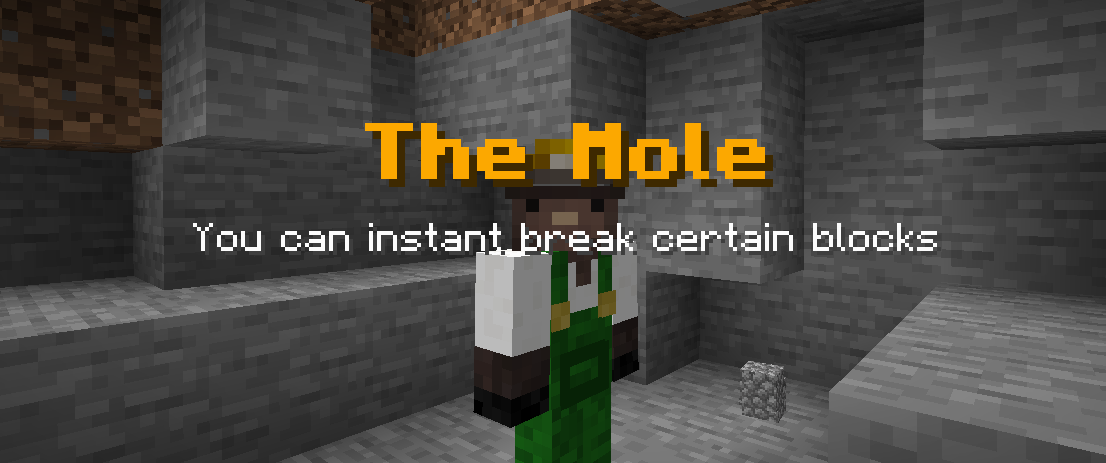

By default, when a new player joins your server, a chest GUI will open allowing them to select a hero of their choice. The icons representing each hero can be customised to be any item of your choice.

Or, you can configure the plugin so
– New players are Powerless
– New players are assigned a random hero from a selection of your choice
– Players can use /hero select with a cooldown (or GUI with a cooldown)
_Changing Heroes_
By default, if players obtain a nether star, they can reroll their hero. This is fully customisable in reroll.yml – change the item used for rerolling, change which heroes they can reroll to etc. You can even have multiple different items that can reroll you into different categories of hero! A nether star for good heroes and a wither skull for evil heroes if you wanted. You can also give players access to the hero gui, select or reroll commands.

_Commands_
– /hero select – Change the hero of a player
– /hero gui – Open the hero changing GUI
– /hero check – Check which hero a player is using
– /hero export – Create a file with a copy of the current data for use with /hero import when changing between databases
– /hero import – Import the data in the exported file into your current database, useful for switching to MySQL
– /hero reroll – Randomly choose a hero out of a group, configured in reroll.yml
– /hero reload – Reloads the plugin
_Permissions_
– superheroes.hero.check – Permission to use /hero check to see your own hero
– superheroes.hero.check.others – Permission to use /hero check to see someone else’s hero
– superheroes.hero.export – Permission to use /hero export
– superheroes.hero.import – Permission to use /hero import
– superheroes.hero.gui – Permission to use /hero gui or open GUI using /hero select
– superheroes.hero – Permission to run any of the commands
– superheroes.hero.select – Permission to run /hero select on yourself
– superheroes.hero.select.others – Permission to run /hero select on any player
– superheroes.hero.select.bypasscooldown – Bypasses the cooldown on /hero select
– superheroes.hero.select. – If eachHeroRequiresPermission is enabled then this is required to give players access to a hero
– superheroes.hero.reload – Reloads the plugin’s configs and heroes
– superheroes.hero.reroll – Permission to use /hero reroll
– superheroes.hero.reroll. – Permission to use /hero reroll for a certain reroll group
– superheroes.notify – Who receives notifications about an update to Superheroes and suggestions to buy SuperheroesPlusUltra on larger servers

By default, Superheroes uses a single YAML file to store all player information (which hero they are, and their cooldown for switching heroes). If you have a large server, I recommend switching to MySQL instead in the database.yml. In order to make switching between formats easier, there is a /hero import and /hero export so you can run /hero export before switching database type and then /hero import after you switch so no data is lost!
“`yaml
#These are the settings which dictate where your players’ heroes are stored
database:
type: YAML
host: this needs filling with your host name if using mysql
port: 3306
name: this needs filling with the database name if using mysql
username: this needs filling with the username of the account being used to connect
to mysql if using mysql
password: this needs filling with the password being used to connect to mysql if
using mysql
“`

Yes, there is! We support PlaceholderAPI, you can learn more about how to install these placeholders [URL=’https://api.extendedclip.com/expansions/superheroes/’]here[/URL]. Feel free to request more placeholders in my [URL=’https://discord.gg/ZhgtYbM8A6′]discord[/URL].
%superheroes_name%
%superheroes_description%

We support WorldGuard through the addition of an allow-heroes flag on worldguard regions. If you set this to deny, then heroes will be disabled in this region.

SuperheroesPlusUltra is an enormous extension to the original Superheroes plugin, it enables full integration of my plugin, SkillsLibrary, into Superheroes. This means you can **write your own abilities**for heroes you design without writing any java. It also comes with three brand new default heroes to provide an example of the abilities you can create using it.
It also allows you to set **skins**for your heroes, and has **basic Skript integration**!
https://www.spigotmc.org/resources/superheroesplusultra.102663/

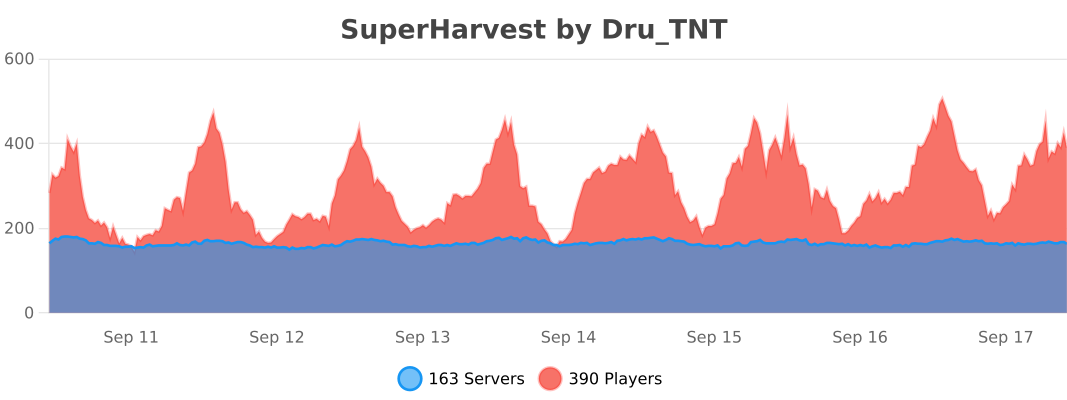
_Want to see how many others are using my plugin, or what superheroes are popular?_
https://bstats.org/plugin/bukkit/Superheroes/8671
SuperHarvest

> With SuperHarvest, resources can be easily gathered.
## Features
When the right tool is used, it breaks the same resources nearby without lagging your server.
## Commands
– /sh toggle – Toggle the SuperHarvest.
– /sh farming – Toggle the fast farming.
– /sh mining – Toggle the fast mining.
– /sh logging – Toggle the fast logging.
– /sh notify – Toggle the status notify.
– /sh language - Set display language.
## Premium Version
If you found this plugin helpful, you can take a look at the permium version here, which introduces a lot of extra convienient features such as fully in-game GUI, placeholders, fast logging depending on leaves, custom chain tool sets.

## Permissions
- superharvest.use - Whether player can use SuperHarvest.
- superharvest.farming - Whether player can use fast farming.
- superharvest.mining - Whether player can use fast mining.
- superharvest.logging - Whether player can use fast logging.
- superharvest.block. - Whether player can fast-break the specified block(s)
- superharvest.tool. - Whether player can fast-break using the specified tool(s).
Block and tool permissions list
Block permissions:
- superharvest.block.oak_log
- superharvest.block.spruce_log
- superharvest.block.birch_log
- superharvest.block.jungle_log
- superharvest.block.acacia_log
- superharvest.block.dark_oak_log
- superharvest.block.mangrove_log
- superharvest.block.oak_log
- superharvest.block.crimson_stem
- superharvest.block.warped_stem
- superharvest.block.coal_ore
- superharvest.block.iron_ore
- superharvest.block.copper_ore
- superharvest.block.gold_ore
- superharvest.block.redstone_ore
- superharvest.block.emerald_ore
- superharvest.block.lapis_ore
- superharvest.block.diamond_ore
- superharvest.block.deepslate_coal_ore
- superharvest.block.deepslate_iron_ore
- superharvest.block.deepslate_copper_ore
- superharvest.block.deepslate_gold_ore
- superharvest.block.deepslate_redstone_ore
- superharvest.block.deepslate_emerald_ore
- superharvest.block.deepslate_lapis_ore
- superharvest.block.deepslate_diamond_ore
- superharvest.block.nether_gold_ore
- superharvest.block.nether_quartz_ore
- superharvest.block.wheat
- superharvest.block.carrots
- superharvest.block.potatoes
- superharvest.block.beetroots
- superharvest.block.nether_wart
Tool permissions:
- superharvest.tool.wooden_pickaxe
- superharvest.tool.stone_pickaxe
- superharvest.tool.iron_pickaxe
- superharvest.tool.diamond_pickaxe
- superharvest.tool.golden_pickaxe
- superharvest.tool.netherite_pickaxe
- superharvest.tool.wooden_axe
- superharvest.tool.stone_axe
- superharvest.tool.iron_axe
- superharvest.tool.diamond_axe
- superharvest.tool.golden_axe
- superharvest.tool.netherite_axe
- superharvest.tool.wooden_hoe
- superharvest.tool.stone_hoe
- superharvest.tool.iron_hoe
- superharvest.tool.diamond_hoe
- superharvest.tool.golden_hoe
- superharvest.tool.netherite_hoe
## Config
Config
- disable-worlds: []
- enable-farming: true
- enable-mining: true
- enable-logging: true
- cpu-mileseconds-limitation: 3
- notify-actionbar: true
- notify-titlebar: false
- deafult-sneaking-mode: false
- default-language: en_us
- auto-locale: true
## Video
### English by GreenArrow68:
### Spanish by GAMEX198:
## Support
You can get support, make suggestions or report a bug through the Discussion tab or on our Discord Server . If you find this plugin helpful, please consider leaving a review.
SuperExpress
# SuperExpress Plugin


Simple plugin for Minecraft Folia servers that changes the speed of minecarts depending on the block beneath the rails.
## Features
– Configure which blocks affect speed.
– Choose the minecart speed for each block.
– Slow minecarts back to vanilla speed when player disembarks.
## Installation
To install SuperExpress, follow these steps:
1. Download the plugin JAR file from Modrinth or the Releases page.
2. Place the JAR file in the plugins folder of your Folia (or Folia fork) server.
3. Start the server and verify that the plugin loaded successfully.
## Configuration
The plugin can be configured via the `config.yml` file located in `plugins/SuperExpress`.
The following configuration options are available:
– `blocks` – List of blocks and their corresponding modified speed.
### Default Config:
“`yml
# List of blocks and their corresponding maximum minecart speeds
# Blocks must be from https://hub.spigotmc.org/javadocs/bukkit/org/bukkit/Material.html
# The default minecart speed is 0.4
blocks:
GRAVEL: 0.8
SOUL_SAND: 0.2
“`
## Usage
The SuperExpress plugin does not *yet* have any commands or permissions. Simply install and configure the plugin on your server to start using it.
When a player enters a minecart on rails above configured blocks, the speed is modified.
SuperEnchants
# SuperEnchants
**SuperEnchants** gives your server a premium enchant progression loop players can grind, collect, reroll, and optimize.
It packs 50+ custom enchants across combat, mining, armor, bows, and utility, then layers combine systems, shop flow, extraction, discovery tracking, and visible gameplay impact on top.
## New in 1.1.0
– Added `/senchant reroll ` for same-rarity enchant book rerolls
– Added `/senchant progress [player]` with rarity + category completion stats
– Discovery Journal now shows stronger completion breakdowns
– Cleaned up command/runtime/build issues and rebuilt the project source cleanly
## Why It Gets Downloads
– 50+ enchants with real impact in PvP, PvE, mining, and movement
– Premium-feel progression through combine, extract, reroll, shop, and journal systems
– Strong replay loop for SMP, RPG, prison, and progression-heavy servers
– Easy-to-understand commands and GUI flow for players
## Core Systems
– Weapon, armor, tool, and bow enchant families
– Combine GUI with success chance + XP cost
– Enchant shop GUI with rarity-based pricing
– Extraction system that turns enchants back into books
– Discovery Journal that tracks what players have found
– Reroll system for fixing bad luck on high-rarity books
– Natural loot + villager trade integration
## Main Commands
– `/senchant combine`
– `/senchant shop`
– `/senchant extract `
– `/senchant reroll `
– `/senchant journal`
– `/senchant progress [player]`
– `/senchant info `
## Best Fit
– Survival SMP
– RPG / adventure servers
– Prison / progression-heavy servers
– Communities that like loot chase and long-term upgrade loops
## Support The Project
If SuperEnchants helps your server grow, support future updates:
– Buy Me a Coffee
SuperEnchants adds the kind of premium enchant economy and item chase that keeps players grinding for the next upgrade.
—
## Searching for a minecraft host? Look down

Direct link:
https://billing.sparkedhost.com/aff.php?aff=3214
Superenchants
# SuperEnchants
A powerful custom enchantments plugin for Paper 1.21+ that adds **103+ unique enchantments** to your server through a fully data-driven YAML system.
## What It Does
SuperEnchants replaces the vanilla enchanting experience with a massive library of custom enchantments spanning weapons, armor, tools, bows, fishing rods, and more. Every enchantment is defined in its own YAML config file, making it easy to tweak values, disable specific enchants, or create your own without touching any code.
## How It Works
* **Enchanting Table** — Players can discover custom enchants naturally through the vanilla enchanting table, with configurable weights, costs, and level ranges.
* **Action System** — Each enchantment is powered by composable actions (damage bonuses, potion effects, explosions, teleports, area breaks, and more) that fire on configurable triggers like attacking, taking damage, mining, fishing, or sneaking.
* **Level Scaling** — Enchantment effects scale with level using linear or fixed scaling functions, so higher levels feel meaningfully stronger.
* **Cooldowns & Chances** — Built-in support for activation chances and cooldown timers to keep powerful enchants balanced.
* **Protection Integration** — All block-modifying enchants respect WorldGuard and other protection plugins out of the box.
## Features
* 103 enchantments across all item types
* 50+ action types (damage, potion effects, lightning, explosions, teleportation, veinmine, timber, and more)
* 18 trigger types: melee, ranged, mining, fishing, sneaking, passive, and more
* Data-driven YAML configs, customize everything without code
* Enchanting table, anvil, and villager trading integration
* Loot table integration for dungeon/chest loot
* Per-enchant permissions for use and application
* Conflict system to prevent incompatible enchant combos
* GUI for browsing and applying enchants
* Enchanted book generation and distribution
## Getting Started
| Command |Description |
| ———————————- |——————————————- |
| /superenchant <enchant> <level> |Apply an enchant to your held item |
| /segui |Open the enchant GUI for your held item |
| /sebooks |Browse all enchants and get enchanted books |
| /segive <player> <enchant> <level> |Give an enchanted book to a player |
| /sereload |Reload all enchant configs |
## Permissions
| Permission |Description |Default |
| ———————— |——————————– |——- |
| superenchants.enchant |Use /superenchant |OP |
| superenchants.gui |Use /segui |OP |
| superenchants.books |Use /sebooks |OP |
| superenchants.give |Use /segive |OP |
| superenchants.reload |Use /sereload |OP |
| superenchants.use.<id> |Use a specific enchant |All |
| superenchants.apply.<id> |Apply a specific enchant via GUI |All |
| superenchants.admin |All admin permissions |OP |
## Configuration
Each enchantment lives in `plugins/SuperEnchants/enchants/.yml`. Drop in new files or edit existing ones, then `/sereload` to apply changes live. For the full list of enchantments, action types, triggers, configuration options, and advanced usage, see the **Wiki**.
Super Stick Sword Plugin
# Super Stick Sword
## Introduction
Super Stick Sword is a Minecraft Bukkit/Spigot/Paper/Folia plugin that adds multiple compressed sticks and a super stick sword to the game. These items have special attributes and powerful features, designed for players on servers.
## Features
– **Multi-level Compressed Sticks**: From level 1 to level 8, each made by crafting 9 sticks of the previous level
– **Super Stick Sword**: Crafted with 2 level-8 compressed sticks and 1 normal stick, with 100 attack damage
– **Fuel Burn Time**: The super stick sword can be used as fuel, lasting 1,000,000 ticks
– **Multi-language Support**: Built-in Simplified Chinese, English, and Classical Chinese language files
– **Compatibility**: Fully supports Folia server
– **Item Protection**: Prevents compressed sticks from being used to craft vanilla tools
## Installation
1. Download the latest version of the Super_Stick_Sword plugin
2. Place the JAR file in your server’s plugins folder
3. Restart the server or load the plugin using a plugin manager
4. Enjoy the new items and features!
## Crafting Recipes
### Compressed Sticks
– **Level 1 Compressed Stick**: 9 normal sticks
– **Level 2 Compressed Stick**: 9 level-1 compressed sticks
– **Level 3 Compressed Stick**: 9 level-2 compressed sticks
– **Level 4 Compressed Stick**: 9 level-3 compressed sticks
– **Level 5 Compressed Stick**: 9 level-4 compressed sticks
– **Level 6 Compressed Stick**: 9 level-5 compressed sticks
– **Level 7 Compressed Stick**: 9 level-6 compressed sticks
– **Level 8 Compressed Stick**: 9 level-7 compressed sticks
### Super Stick Sword
– Recipe: 2 level-8 compressed sticks + 1 normal stick
– Attack damage: 100 points
– Burn time: 1,000,000 ticks
## Language Support
The plugin supports the following languages:
– Simplified Chinese (zh_cn.yml)
– English (en_us.yml)
– Classical Chinese (lzh.yml)
## License
This plugin is licensed under the GPLv3 License.
## Contributions
Bug reports and feature suggestions are welcome!
Super Shop
**_Requires Paper or a Paper-based fork (such as Purpur). This plugin uses Paper-only APIs and will not run on Spigot or Bukkit._**
SuperShop is a decentralized player-driven trading system designed for Minecraft servers. It empowers players to establish and manage their own shops, facilitating the buying and selling of items within the game world.
**Core Functionality:**
* **Player-Owned Shops:** Players can create and operate individual shops to trade goods with others. This system promotes a dynamic, player-driven economy.
* **Item Search Utility:** The `/searchbook` command, also accessible via `/search` or `/finditem`, allows players to locate specific items available for purchase across all active player shops on the server.
* **Multilingual Support:** Users can customize their language preference within the plugin using the `/superlang` command, or its aliases `/slang` and `/lang`.
**Command Reference:**
* **`/shop `**: This is the primary command for all shop management operations.
* `create`: Establish a new shop.
* `remove`: Dismantle an existing shop.
* `list`: View a list of available shops.
* `info`: Retrieve detailed information about a specific shop.
* `give`: Grant a search book to another player (requires appropriate permissions).
* `stats`: Access statistics related to shops (requires appropriate permissions).
* `reload`: Refresh the plugin’s configuration (requires appropriate permissions).
* `help`: Display assistance for shop commands.
* **`/searchbook - `**: Initiates a search for the specified item across all player shops.
* **`/superlang [locale]`**: Sets the preferred language for the plugin. If no locale is provided, it may display the current language or available options.
Super Farming
# Super Farming
[中文文档 (Chinese README)](README_CN.md)
Super Farming is a Minecraft plugin designed for Folia/Paper/Spigot servers that introduces an advanced, automated farming system. It allows players to craft special “Super Hoes” that can be used to create fully automatic farms, handling everything from tilling and planting to fertilizing and harvesting.
## Features
– **Tiered Super Hoes**: Craft different levels of hoes with customizable abilities.
– **Fully Automatic Farms**: Place a Tier 2 Super Hoe on a composter to create a farm that works automatically.
– **Customizable via Anvil**: Use an anvil to upgrade your hoe’s range, mode (fertilizing), and bone meal usage.
– **Configurable**: Server administrators can adjust key parameters like processing speed, farm range, and bone meal limits via `config.yml`.
– **Folia Compatible**: Built with Folia’s multi-threaded environment in mind, ensuring thread-safe operations and server stability.
– **Permissions Support**: Fine-grained control over who can use the plugin’s features.
– **Multi-language Support**: Comes with English and Chinese language files by default.
## How to Get Started
### 1. Craft a Super Hoe (Tier 1)
You can craft a Tier 1 Super Hoe using the following recipe in a crafting table (this recipe can be customized):
– Top Row: Diamond, Netherite Ingot, Diamond
– Middle Row: Diamond, Netherite Hoe, Diamond
– Bottom Row: Air, Netherite Ingot, Air
### 2. Upgrade the Hoe (Optional)
You can customize your Super Hoe on an anvil:
– **Rename**: Give your hoe a custom name.
– **Combine with Echo Shard**: Increases the **Y-axis range** of the hoe’s farming operations.
– **Combine with Bone Meal**: Sets the **maximum amount of bone meal** the automatic farm will use per cycle.
– **Combine with Redstone**: Toggles the **fertilizer mode** on or off.
### 3. Craft a Tier 2 Super Hoe
To create an automatic farm, you need a Tier 2 Super Hoe. Craft it using the following recipe:
– Place a **Tier 1 Super Hoe** in the center of a Smithing Table.
– Add a **Nether Star** to the upgrade slot.
### 4. Create an Automatic Farm
1. Place a **Composter** block on the ground. This will be the center of your farm.
2. Hold the **Tier 2 Super Hoe**.
3. **Sneak and right-click** the Composter.
The hoe will be placed in an invisible armor stand, and the farm will activate, automatically farming the area around the composter.
### 5. Deactivate the Farm
To get your hoe back and stop the farm, simply **break the Composter block**. If you are the owner, the hoe will be returned to your inventory.
## Commands
– `/super_farming reload` – Reloads the plugin’s `config.yml` and language files.
– `/super_farming give ` – Gives a player a specific Super Farming item (e.g., `super_hoe_tier1`).
## Permissions
– `super_farming.reload`: Allows a player to use the `/super_farming reload` command.
– `super_farming.give`: Allows a player to use the `/super_farming give` command.
– `super_farming.admin.bypass`: Allows a player to break or retrieve farms they do not own.
## Configuration (`config.yml`)
The `config.yml` file allows you to customize various aspects of the plugin:
“`yaml
# How often the farm processing task runs (in ticks). 20 ticks = 1 second.
farm-processing-interval: 20
# The maximum Y-level range a farm can search for blocks to farm.
# This can be upgraded on a hoe using an Echo Shard.
max-y-range: 5
# The maximum amount of bone meal an automatic farm can use per cycle.
# This can be set on a hoe by combining it with bone meal in an anvil.
max-bonemeal-amount: 10