Takion

# Takion
Takion is a comprehensive Spigot library designed to streamline the development of text and chat-related plugins for Minecraft servers. It provides a robust set of tools and utilities to manage messaging, logging, placeholder replacement, and more, making it an essential core for enhancing chat interactions within Minecraft.
## Purpose
Takion aims to simplify the creation and management of chat-based functionalities in Minecraft plugins. It serves as a foundational library that developers can leverage to implement advanced text and chat features efficiently.
## Features
### Logging
– **TakionLogger**: Provides advanced logging capabilities with dynamic message formatting, colorization, and integration with external APIs (e.g., Paper and Prismatic).
– Supports both server-level and plugin-specific logs.
### Channel Management
– **ChannelManager**: Manages communication channels, defining and identifying different channels for player interactions.
### Title Management
– **TitleManager**: Configures and displays titles to players, with customizable fade-in, stay, and fade-out durations.
### Placeholder Management
– **PlaceholderManager**: Dynamically replaces tokens in messages with actual values, facilitating personalized and context-aware messaging.
### Character Management
– **CharacterManager**: Handles text alignment and formatting, including support for small capital conversions and custom character lengths.
### Messaging
– **MessageSender**: Sends formatted messages to players, with support for placeholders and advanced text processing.
### Text Processing
– Utilizes **PrismaticAPI**, **StringApplier**, and related utilities for colorization and string modifications, enabling rich text formatting.
## Installation
### Maven
To include Takion in your project, add the following repository and dependency to your `pom.xml`:
“`xml
croabeast-repo
https://croabeast.github.io/repo/
me.croabeast
Takion
1.2
me.croabeast
Takion-shaded
1.2
*
*
“`
### Gradle
To include Takion in your project, add the following to your `build.gradle`:
“`groovy
repositories {
maven {
url ‘https://croabeast.github.io/repo/’
}
}
dependencies {
implementation ‘me.croabeast:Takion:1.2’
// If you want a shaded version with all its dependencies compiled, select this
implementation ‘me.croabeast:Takion-shaded:1.2’
}
“`
## Usage
### Initialization
Initialize TakionLib in your plugin’s `onEnable` method:
“`java
@Override
public void onEnable() {
TakionLib lib = new TakionLib(this);
// Additional initialization code…
}
“`
### Sending Messages
Send a message to a player:
“`java
lib.getLoadedSender().addPlaceholder(“{player}”, player.getName())
.send(“Hello, {player}! Welcome to our server.”);
“`
### Displaying Titles
Format a title and send it to a player:
“`java
lib.getTitleManager().builder(“Welcome”, “Enjoy your stay!”).send(player);
“`
### Character Management
Use the `CharacterManager` to manage text alignment and formatting:
“`java
String alignedText = lib.getCharacterManager().align(“Centered Text”);
player.sendMessage(alignedText);
“`
### CollectionBuilder
Example of using `CollectionBuilder`:
“`java
List list = CollectionBuilder.of(“Item1”, “Item2”, “Item3”).toList();
player.sendMessage(String.join(“, “, list));
“`
## Dependencies
Takion includes several dependencies that are included within the library (compiled in the shaded version), so you don’t need to add them separately. The primary dependencies are:
– **PrismaticAPI**: For colorization and text modifications.
– **CommandFramework**: For handling commands.
– **AdvancementInfo**: For handling advancement information.
– **YAML-API**: For YAML configuration support.
– **InventoryFramework**: For managing and interacting with Minecraft inventories.
> Note: UpdateChecker was originally created by Choco. For more details, see this post.
## Optional Dependencies
While the following dependencies are optional and provided, they are not required for the core functionality of Takion:
– **VaultAPI**: For integrating with external permission and chat APIs.
– **InteractiveChat**: For enhancing chat interactions.
## Contributing
Contributions are welcome! Please fork the repository and submit pull requests with your changes. For major changes, please open an issue first to discuss what you would like to change.
## License
This project is licensed under the GNU General Public License v3.0. See the LICENSE file for details.
TakeTheCursesOff
# TakeTheCursesOff / 卸下诅咒
A bukkit plugin allows equipment that binding curses to be removed with the help of others.
让你的好朋友帮你卸下带有绑定诅咒的装备!
Native Minecraft Version: 1.19.4
Tested Minecraft Version: 1.19.4
Supports Minecraft Version: 1.18-1.19.4 (Java17)
## Usage (使用方法)
You and your friend press `Shift` both, then let your friend right click you.
双方都按 `Shift` 蹲下,然后右键带有绑定诅咒装备的人。
## Permissions (权限)
`takethecursesoff.help_other`:
All players have this permission by default.
默认所有玩家拥有。
## Display language (显示语言)
Chinese Simplified by default, can edit in `config.yml`.
默认简体中文,可于 `config.yml` 修改。
## Bug report (Bug反馈/催更)
Please go to the issues page.
请到 Issues 页面提出。
TabWhitelist
# TabWhitelist! – Command Management
**TabWhitelist** is a powerful and lightweight Minecraft server plugin designed to give administrators total control over player command visibility and execution. It allows you to hide sensitive server information, block unwanted commands, and create custom rank-based access, ensuring a clean and secure experience for your community. By filtering the tab-completion list and overwriting default system messages, you can fully brand your server’s “Unknown Command” response and keep your plugin list private.
Don’t believe it? **TRY THE LATEST RELEASE NOW!**
**⚠️ NOTE:** Java 21 or higher is required!
“`
Now also on proxy! BungeeCord, Waterfall, Velocity.
Looking for a proxy version for Java 11? Find TabWhitelist 1.1-ForProxy (Java 11)
“`
### Features
– **Full Command Control** – Easily toggle between Whitelist and Blacklist modes to decide which commands are accessible.
– **Dynamic Tab-Blocking** – Automatically hides unauthorized commands from the TAB completion menu in real-time.
– **Rank-Based Groups** – Assign specific command sets to different player ranks using custom permissions like tabwhitelist.group.vip.
– **World-Specific Rules** – Define different allowed or blocked commands based on the world the player is currently in.
– **Multi-Sensory Feedback** – Engage players with custom sounds, titles, action bars, and particles whenever a command is blocked.
– **Subcommand & Namespace Protection** – Block specific phrases (e.g., /pl, /ver) and automatically handle hidden command aliases like /minecraft:cmd.
– **Command Cooldowns** – Prevent command spam by setting per-command timers that players must wait out.
– **Admin Notifications** – Alert staff members instantly with customizable messages when a player attempts to use a restricted command.
– **Instant Reload** – Use the /twreload command to update all configurations and TAB menus without needing to restart the server.
### Commands
– /twreload – Refreshes the configuration file and updates player TAB lists instantly.
### Permissions
– tabwhitelist.admin – Access to everything (bypasses all blocks and filters).
– tabwhitelist.reload – Allows use of the /twreload command.
– tabwhitelist.group. – Grants access to a specific command group defined in the config (e.g., tabwhitelist.group.vip).
– tabwhitelist.notify – Allows staff members to receive real-time alerts whenever a player attempts to use a blocked command.
– tabwhitelist.bypass.cooldown – Grants a player the ability to ignore the command cooldown timers set in the configuration.
### How to use
Click to expand
1. Place the .jar file in the server’s plugins folder.
2. Restart the server and check the console for: [TabWhitelist] v1.2 enabled!.
3. Open the plugins/TabWhitelist/config.yml file.
4. Set your unknown-command-message to match your server’s branding.
5. Add your basic player commands to the commands list.
6. (Optional) Create custom groups in the groups section for your Ranks (VIP, MVP, etc.).
7. Assign the corresponding permissions (e.g., tabwhitelist.group.vip) to your ranks using a permission plugin like LuckPerms.
8. Run /twreload to apply changes!
## Bug report and contact
“`
[email protected] – new mail
“`
TabTPS
# TabTPS Folia
**Real-time per-region performance monitoring for Folia servers.**
A fork of TabTPS built specifically for Folia’s regionalized multithreading. Each player sees TPS and MSPT from **their own region** — not a server-wide average.
—
## 🖥️ Display Types
### Tab Menu
Show performance data in the player list header or footer.

### Action Bar
Compact live stats right above the hotbar.

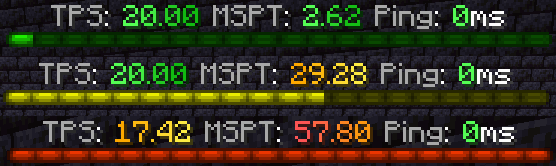
### Boss Bar
Color-coded boss bar that fills based on TPS or MSPT.
—
## 📊 Available Modules
Configure which modules to display in each display type:
| Module | Description |
|—|—|
| `tps` | TPS of the player’s current region |
| `mspt` | MSPT of the player’s current region |
| `lowest_region_tps` | Lowest TPS across all regions |
| `median_region_tps` | Median TPS across all regions |
| `highest_region_tps` | Highest TPS across all regions |
| `ping` | Player latency |
| `cpu` | Server CPU usage |
| `memory` | JVM memory usage |
| `players` | Online player count |
—
## ⌨️ Commands
| Command | Description |
|—|—|
| `/tickinfo` | Region TPS overview (Lowest / Median / Highest) |
| `/ping [player]` | View your or another player’s ping |
| `/pingall` | Summary of all players’ pings |
| `/memory` | JVM memory pool breakdown |
| `/tabtps toggle tab` | Toggle tab display |
| `/tabtps toggle actionbar` | Toggle action bar display |
| `/tabtps toggle bossbar` | Toggle boss bar display |
| `/tabtps reload` | Reload configuration |

—
## ⚙️ Configuration
All configuration files are in `plugins/TabTPS/`:
– **`display-configs/`** — Define which modules to show per permission group
– **`themes/`** — Customize colors for performance thresholds
– **`main.conf`** — Update rates, permission priorities, help colors
—
## 📋 Requirements
– **Folia** 1.20+ (tested on 1.21.11)
– **Java** 21
—
## 🙏 Credits
Based on TabTPS by jpenilla — licensed under MIT.
TAB

TAB is an all-in-one plugin for displaying information in various places, which aims to outperform all similar plugins in terms of features, compatibility and performance.
The compact configuration allows you to get the plugin to work the way you want regardless of how simple or complex you want it to be or how experienced you are.
The default configuration already contains useful values and examples to give you a better understanding and get you started quickly with instant results.
The extensive wiki answers any of your questions.


# Discord?
Official support by me is no longer provided to free users due to limited time and extreme inefficiency (see [provided services]([https://github.com/NEZNAMY/TAB?tab=readme-ov-file#provided-services](https://github.com/NEZNAMY/TAB?tab=readme-ov-file#provided-services)) for more info).
However, you can join this [fresh new community discord]([https://discord.gg/YPqXt63YQj](https://discord.gg/YPqXt63YQj)) made by a nice person who promises to help everyone with all plugins, including TAB.
Before you consider requiring assistance, check out the wiki first. It will answer any questions you may have and is also constantly getting improved.


TAB-Bridge
**This is an addon for my TAB plugin which extends its features when installed on BungeeCord / Velocity.**
# Installation
Install this jar on all backend servers where you want the additional features.
**This is not a BungeeCord / Velocity plugin!**
# Compatibility
## Bukkit
The plugin supports all known minecraft versions and is very likely to support any future versions due to how simple it is and most of the functionality consists of hooking into other plugins.
The supported version(s) information in each version refers to Fabric (see below).
## Fabric
Due to large usage of internals, the risk of breaking on new MC versions is high. As such, the mod strictly defines supported version(s) and will therefore require an update, at least to the supported version list, every time there is a minecraft update.
To find the latest bridge version for your server version, see supported version(s) in each update or simply use the download filter.
# Features
* Forwarding PlaceholderAPI support to the proxy
* Allow detection if player is invisible to make nametag invisible (compensation for 1.8.x client sided bug)
* Allow detection if player is disguised to disable collision to prevent endless push
* Forwarding permission groups of players if no permission plugin is installed on proxy
* Forward vanish status for compatibility with global playerlist / layout features
* Forward player’s world for %world% and per-world settings
* Allow TAB’s placeholderapi expansion with TAB on proxy
* Forward player’s gamemode for spectator fix feature to work
Syncmoney
# Syncmoney






Enterprise-grade cross-server economy synchronization for Minecraft


—
## Overview
Syncmoney is a high-performance Minecraft economy plugin designed for multi-server networks. It synchronizes player balances across all servers in real-time using Redis Pub/Sub, with comprehensive protection against economic exploits and data loss.
**Perfect for**: Survival servers, factions, SMPs, minigame networks, and any multi-server economy ecosystem.
### Key Highlights
– ⚡ **Sub-millisecond reads** — In-memory caching with O(1) balance lookups
– 🔄 **Instant cross-server sync** — Redis Pub/Sub propagation
– 🛡️ **4-layer circuit breaker** — Enterprise-grade economic protection
– 🌐 **Built-in Web Admin** — Vue 3 dashboard with real-time monitoring
– 🔧 **Zero-config Vault** — Works with any Vault-enabled economy plugin
– 📊 **Full audit trail** — Complete transaction history with cursor-based pagination
– 🎮 **Folia compatible** — Region-based scheduling support
– 💾 **Shadow Sync** — Automatic background backup to external databases
– 🔔 **Discord Webhooks** — Real-time security notifications
—
## Features
### Core Synchronization
– **Real-time Cross-Server Sync** — Balance changes instantly propagate to all servers via Redis Pub/Sub
– **Vault Integration** — Full compatibility with any Vault-enabled economy plugin (EssentialsX, CMI, etc.)
– **Atomic Transactions** — 7 Redis Lua scripts prevent money duplication during race conditions
– **Graceful Degradation** — Automatic fallback chain: Memory → Redis → Database → LocalSQLite
– **Bank Support** — Full Vault bank API implementation with Redis-backed storage
– **Version-based Optimistic Locking** — Prevents ABA problems across distributed nodes
### Security & Protection
– **4-Layer Circuit Breaker**
– Single transaction limits
– Rate limiting (transactions per second)
– Sudden balance change detection
– Periodic inflation monitoring
– **Per-Player Protection (L1-L4)**
– L1: Rate limiting per player
– L2: Anomaly detection with warning state
– L3: Auto-lock for suspicious activity
– L4: Global economy lock
– **Event Overflow Protection** — WAL-based graceful fallback for queue saturation
– **Transfer Guard** — Prevents money loss when players teleport during transactions
– **Rollback Protection** — Guards against failed database writes
– **Discord Webhook Alerts** — Real-time security notifications for 11 event types
### Web Admin Dashboard
– **Real-time Monitoring** — Server status, Redis/DB health, circuit breaker state
– **Connection Resiliency** — Intelligent SSE reconnections with Exponential Backoff & Jitter
– **Economy Dashboard** — Total supply, player counts, transaction statistics
– **Audit Log Viewer** — Search, filter, cursor-based pagination for massive datasets
– **Configuration Editor** — Edit server config without file access
– **Internationalization** — Full zh-TW and en-US support
– **Dark/Light Theme** — User preference persistence
– **PWA Support** — Installable as a standalone app
### Migration & Backup
– **CMI Migration Tool** — One-command import from CMI economy
– **Multi-Server Merge** — Combines economy data from multiple CMI servers (LATEST/SUM/MAX strategies)
– **Shadow Sync** — Automatic background backup to external databases
– **Checkpoint Resume** — Large migrations can resume if interrupted
– **Automatic Backup** — Creates JSON/SQL backup before migration
### Leaderboards & Integration
– **Global Baltop** — Redis-powered sorted set leaderboard with smart formatting
– **PlaceholderAPI Expansion** — 10+ dynamic placeholders for scoreboards
– **Folia Support** — Region-based scheduling compatibility
– **Audit Trail** — Cursor-based pagination with millisecond sequence ordering
—
## Requirements
| Component | Version |
|———–|———|
| Server | Paper 1.20+ / Spigot 1.20+ / Folia 1.20+ |
| Java | 21+ |
| Redis | 5.0+ (for multi-server sync) |
| Database | MySQL 8.0+ / MariaDB 10.5+ / PostgreSQL 13+ / SQLite |
| Plugin | Vault (required) |
| Plugin | PlaceholderAPI (optional) |
> **Note:** Redis and a database (MySQL/PostgreSQL) are required for cross-server sync. For single-server use, Syncmoney works with SQLite only (no Redis needed).
—
## Quick Start
### 1. Install
Place `Syncmoney.jar` in your server’s `plugins/` folder.
### 2. Configure
Edit `plugins/Syncmoney/config.yml`:
“`yaml
server-name: “survival-01”
redis:
enabled: true
host: “localhost”
port: 6379
database:
enabled: true
type: “mysql”
host: “localhost”
port: 3306
username: “root”
password: “”
database: “syncmoney”
“`
### 3. Multi-Server Setup
1. Install Syncmoney on **all** servers
2. Connect all servers to the **same Redis instance**
3. Set a unique `server-name` for each server
4. Restart all servers — economy syncs automatically
### 4. PlaceholderAPI (Optional)
For scoreboard placeholders:
1. Download `SyncmoneyExpansion.jar` from Releases
2. Place in `plugins/PlaceholderAPI/expansions/`
3. Restart the server
—
## Configuration
### Economy Modes
| Mode | Description |
|——|————-|
| `auto` | Auto-detect based on Redis/DB availability (recommended) |
| `local` | Single server only, SQLite backup |
| `local_redis` | Multi-server sync via Redis (no MySQL) |
| `sync` | Full cross-server sync with Redis + MySQL |
| `cmi` | Direct CMI database integration |
### Pay Settings
“`yaml
pay:
cooldown-seconds: 30
min-amount: 1
max-amount: 1000000
confirm-threshold: 100000
“`
### Circuit Breaker
“`yaml
circuit-breaker:
enabled: true
max-single-transaction: 100000000
max-transactions-per-second: 10
rapid-inflation-threshold: 0.2
sudden-change-threshold: 100
player-protection:
enabled: true
rate-limit:
max-transactions-per-second: 5
max-transactions-per-minute: 50
max-amount-per-minute: 1000000
“`
### Discord Webhook
“`yaml
discord-webhook:
enabled: false
webhooks:
– name: “admin-alerts”
url: “https://discord.com/api/webhooks/YOUR_WEBHOOK_URL_HERE”
type: “private”
events:
– “player_warning”
– “player_locked”
– “player_unlocked”
– “global_lock”
– “circuit_breaker_trigger”
“`
—
## Web Admin
Syncmoney includes a built-in web administration panel for monitoring economy status and managing transactions.
### Access
By default, the Web Admin is available at `http://localhost:8080` (when running locally).
### Configuration
“`yaml
web-admin:
enabled: true
server:
host: “0.0.0.0”
port: 8080
security:
api-key: “your-secure-api-key-here”
cors-allowed-origins: “*”
rate-limit:
enabled: true
requests-per-minute: 60
“`
### In-Game Management
“`
/syncmoney web download [latest] # Download web frontend from GitHub
/syncmoney web build # Build frontend from source
/syncmoney web open # Open the web admin server
/syncmoney web status # Show web frontend status
/syncmoney web check # Check for available updates
“`
### Production HTTPS Setup
Syncmoney Web Admin does not include built-in SSL support. For production environments, use a reverse proxy:
#### Nginx Configuration
“`nginx
server {
listen 443 ssl;
server_name syncmoney.yourdomain.com;
ssl_certificate /path/to/cert.pem;
ssl_certificate_key /path/to/key.pem;
location / {
proxy_pass http://localhost:8080;
proxy_http_version 1.1;
proxy_set_header Host $host;
proxy_set_header X-Real-IP $remote_addr;
proxy_set_header X-Forwarded-For $proxy_add_x_forwarded_for;
proxy_set_header X-Forwarded-Proto $scheme;
# WebSocket / SSE support
proxy_set_header Upgrade $http_upgrade;
proxy_set_header Connection “upgrade”;
}
}
# HTTP to HTTPS redirect
server {
listen 80;
server_name syncmoney.yourdomain.com;
return 301 https://$server_name$request_uri;
}
“`
#### Caddy Configuration
“`caddy
syncmoney.yourdomain.com {
reverse_proxy localhost:8080
tls /path/to/cert.pem /path/to/key.pem
}
“`
**Note:** When using a reverse proxy, update `config.yml` to bind to localhost only:
“`yaml
web-admin:
server:
host: “127.0.0.1”
port: 8080
“`
—
## Commands
### Players
| Command | Description | Permission |
|———|————-|————|
| `/money` | View your balance | `syncmoney.money` |
| `/money ` | View another player’s balance | `syncmoney.money.others` |
| `/pay ` | Transfer money to player | `syncmoney.pay` |
| `/pay confirm` | Confirm large transfer | — |
| `/baltop [page]` | View global leaderboard | `syncmoney.money` |
| `/baltop me` | View your rank | `syncmoney.money` |
### Administrators
| Command | Description | Permission |
|———|————-|————|
| `/syncmoney admin give ` | Give money to player | `syncmoney.admin.give` |
| `/syncmoney admin take ` | Take money from player | `syncmoney.admin.take` |
| `/syncmoney admin set ` | Set player balance | `syncmoney.admin.set` |
| `/syncmoney admin reset ` | Reset balance to zero | `syncmoney.admin.set` |
| `/syncmoney migrate cmi` | Migrate from CMI | `syncmoney.admin` |
| `/syncmoney migrate local-to-sync` | Migrate from LOCAL to SYNC | `syncmoney.admin` |
| `/syncmoney breaker status` | View protection status | `syncmoney.admin` |
| `/syncmoney breaker unlock ` | Unlock locked player | `syncmoney.admin` |
| `/syncmoney audit ` | View transaction history | `syncmoney.admin.audit` |
| `/syncmoney audit search` | Advanced search | `syncmoney.admin.audit` |
| `/syncmoney econstats` | View economy statistics | `syncmoney.admin` |
| `/syncmoney monitor` | View system monitoring | `syncmoney.admin` |
| `/syncmoney shadow status` | View shadow sync status | `syncmoney.admin` |
| `/syncmoney web status` | View web admin status | `syncmoney.admin` |
| `/syncmoney reload` | Reload configuration | `syncmoney.admin` |
| `/syncmoney test concurrent-pay` | Stress test | `syncmoney.admin.test` |
### Admin Permission Tiers
| Tier | Permission | Daily Give Limit | Daily Take Limit |
|——|———–|—————–|—————–|
| Observe | `syncmoney.admin.observe` | 0 | 0 |
| Reward | `syncmoney.admin.reward` | 100,000 | 0 |
| General | `syncmoney.admin.general` | 1,000,000 | 1,000,000 |
| Full | `syncmoney.admin.full` | Unlimited | Unlimited |
—
## Placeholders
Requires SyncmoneyExpansion + PlaceholderAPI.
| Placeholder | Description |
|————-|————-|
| `%syncmoney_balance%` | Player’s current balance |
| `%syncmoney_balance_formatted%` | Balance with smart formatting |
| `%syncmoney_balance_abbreviated%` | Balance abbreviated (1.5K, 2.3億) |
| `%syncmoney_rank%` | Player’s leaderboard rank |
| `%syncmoney_my_rank%` | Player’s own rank |
| `%syncmoney_total_supply%` | Total money in circulation |
| `%syncmoney_total_players%` | Total players in leaderboard |
| `%syncmoney_online_players%` | Currently online players |
| `%syncmoney_version%` | Plugin version |
| `%syncmoney_top_%` | Balance of player at rank n |
| `%syncmoney_balance_%` | Specific player’s balance by name |
—
## Migration from CMI
“`bash
# Preview migration data
/syncmoney migrate cmi -preview
# Start migration
/syncmoney migrate cmi
# Force migration (skip validation)
/syncmoney migrate cmi -force
# Force migration without backup
/syncmoney migrate cmi -force -no-backup
“`
**Features**:
– PostgreSQL, MySQL, and SQLite support
– Multi-server data merge (LATEST/SUM/MAX strategies)
– Automatic backup before migration
– Checkpoint resume for large datasets
– Auto-disable CMI economy after migration
—
## Performance
Syncmoney is optimized for high-throughput scenarios:
– **Redis connection pooling** (default: 30 connections)
– **Async write queues** — prevents main thread blocking (capacity: 50,000 events)
– **In-memory caching** — O(1) balance reads with ConcurrentHashMap
– **Batch database writes** — efficient audit log persistence (500 records/batch)
– **Lock-free event driven** — single-writer pattern avoids contention
– **Redis Lua atomics** — 7 scripts ensure consistency without locks
– **OverflowLog WAL** — prevents data loss when queues saturate
—
## API for Developers
Syncmoney provides multiple integration points:
### Vault API
“`java
// Get economy via Vault
Economy economy = Bukkit.getServicesManager()
.getRegistration(Economy.class).getProvider();
// Standard operations
economy.getBalance(player);
economy.depositPlayer(player, amount);
economy.withdrawPlayer(player, amount);
“`
### Event System
“`java
// Listen for completed transactions
@EventHandler
public void onTransaction(PostTransactionEvent event) {
String player = event.getPlayerName();
BigDecimal amount = event.getAmount();
// type: DEPOSIT, WITHDRAW, TRANSFER, SET_BALANCE
}
“`
### REST API
Full REST API available when Web Admin is enabled. See [API Reference](docs/API_REFERENCE.md).
“`bash
# Health check (no auth)
curl http://localhost:8080/health
# Economy stats
curl -H “Authorization: Bearer ” http://localhost:8080/api/economy/stats
“`
For complete documentation, see:
– [API Reference](docs/API_REFERENCE.md)
– [Developer Guide](docs/DEVELOPER_GUIDE.md)
– [Changelog](docs/CHANGELOG.md)
—
## Troubleshooting
| Issue | Solution |
|——-|———-|
| “Server name not configured” | Set `server-name` in config.yml |
| Redis connection failed | Verify host/port/password in config |
| Balances not syncing | Ensure all servers use same Redis instance |
| Performance issues | Increase `pool-size` and `queue-capacity` |
| Circuit breaker locked | Use `/syncmoney breaker reset` to unlock |
| Player account locked | Use `/syncmoney breaker unlock ` |
| Web admin not loading | Check `web-admin.enabled: true` and port availability |
Enable `debug: true` in config.yml for detailed logs.
—
## Building from Source
“`bash
# Clone the repository
git clone https://github.com/Misty4119/Syncmoney.git
cd Syncmoney
# Build the plugin (Shadow JAR)
./gradlew shadowJar
# Output: build/libs/Syncmoney-1.1.0.jar
# Build PlaceholderAPI expansion
cd syncmoney-papi-expansion && ../gradlew jar
# Output: build/libs/SyncmoneyExpansion-1.1.0.jar
# Build web frontend
cd syncmoney-web && pnpm install && pnpm build
“`
—
## Support
– **Discord**: Join
– **Issues**: GitHub
—
## License
[Apache License 2.0](LICENSE) — Free to use, modify, and distribute.
—
Built for high-scale Minecraft networks
SyncInventory
# 📦 SyncInventory – Inventory Synchronization Plugin
This plugin enables real-time synchronization of player inventory items, supporting shared inventory contents among players within the same custom group.
Independent player backpacks and shared backpacks, players can automatically restore their backpacks after leaving the synchronized group.
Compatible with Folia, Paper, Bukkit, Purpur, Spigot, and other server cores.
## 📌 Features
– **Multi-player Inventory Sync**
Create sync groups where all members’ inventories stay automatically synchronized
– **Multi-language Support**
Built-in English (`en`) and Chinese (`zh`) language support
—
## 🛠 Commands
All commands use `/syncinv` prefix
| Command | Description | Permission |
|———|————-|————|
| `create ` | Create new sync group | `syncinv.manage` |
| `delete ` | Delete existing group | `syncinv.manage` |
| `join ` | Join a sync group | `syncinv.join` |
| `leave` | Leave current group | `syncinv.leave` |
| `list` | List all groups | `syncinv.use` |
| `members ` | Show group members | `syncinv.use` |
| `reload` | Reload configuration | `syncinv.admin` |
| `language ` | Change display language | `syncinv.admin` |
| `help` | Show command help | `syncinv.use` |
| `confirm` | Confirm sensitive actions | `syncinv.use` |
—
## 🔑 Permissions
| Permission | Description | Default |
|————|————-|———|
| `syncinv.use` | Basic commands | `true` |
| `syncinv.join` | Join groups | `op` |
| `syncinv.leave` | Leave groups | `op` |
| `syncinv.manage` | Manage groups | `op` |
| `syncinv.admin` | Admin access | `op` |
—
## ⚙ Configuration (config.yml)
“`yaml
settings:
# Persistent data auto save interval (minutes)
auto-save-interval: 5
# en / zh
language: en
“`
Synchro
# Synchro
A Minecraft plugin that synchronizes **inventory, armor, potion effects, health, hunger, and experience** between all players in survival mode. Synchronization is instant and covers all possible changes. Includes admin commands and a public Java API for integration with other plugins.
## Features
– **Inventory Synchronization:** All players share the same inventory in real time
– **Armor Synchronization:** All players wear the same armor
– **Potion Effects Synchronization:** All active potion effects are shared between players
– **Health Synchronization:** Players’ health is instantly synchronized
– **Hunger Synchronization:** Players’ hunger and saturation levels are instantly synchronized
– **Experience Synchronization:** All players have the same experience and level at all times
– **Death Synchronization:** If one player dies, all players die together
– **Respawn Handling:** After respawn, all players are automatically resynchronized
– **Admin Commands:** Enable/disable sync, force sync, check status
– **Public Java API:** Other plugins can control and check sync status programmatically
## Requirements
– Minecraft 1.18 – 1.21.x
– Bukkit/Spigot/Paper/Folia server
– Java 17 or higher
## Installation
1. Download the latest version from Modrinth
2. Place the .jar file in your server’s `plugins` folder
3. Restart your server or use a plugin manager to load it
## Usage
The plugin works automatically after installation. No configuration needed!
– All players’ inventories, armor, potion effects, health, hunger, and experience will be instantly synchronized
– When one player dies, all players will die together
– After respawn, all players will be properly synchronized
### Admin Commands
– `/synchro enable` — Enable synchronization
– `/synchro disable` — Disable synchronization
– `/synchro sync` — Force manual synchronization
– `/synchro status` — Show current sync status
### API Usage
Other plugins can use Synchro’s API:
“`java
import org.redstone.SynchroAPI;
if (SynchroAPI.isSyncEnabled()) {
// Do something
}
SynchroAPI.setSyncEnabled(false);
SynchroAPI.manualSync();
“`
Just add Synchro as a dependency in your build system.
## Support
If you encounter any issues or have suggestions, please create an issue on the Modrinth page.
## License
This project is licensed under the MIT License – see the LICENSE file for details.
SyncBoost
—
## ⚡ The Ultimate Performance Solution
**SyncBoost** is not just another “lag clear” plugin; it is a comprehensive, professional-grade performance engine. Re-engineered for maximum efficiency, SyncBoost targets the root causes of server degradation—identifying CPU bottlenecks, memory leaks, and excessive entity overhead—allowing your server to sustain high player counts without compromising gameplay quality.
### Why SyncBoost?
– **✨ Premium Experience:** A stunning, modern GUI that brings visual elegance to server management.
– **🔧 Intelligent Automation:** Dynamic algorithms that sense lag spikes and proactively adjust server load.
– **🗑️ Surgical Optimization:** Reduce AI overhead, optimize redstone, and limit entities with pinpoint accuracy.
– **📊 Deep Monitoring:** Real-time MSPT charts via interactive maps and detailed hardware benchmarks.
– **⚡ Asynchronous Core:** Built to be ultra-lightweight, ensuring the optimization process never burdens your server.
> [!IMPORTANT]
> SyncBoost is optimized for **modern Minecraft infrastructure (1.20.5 – 1.21.x)** but also fully supports **legacy versions (1.17.1 – 1.20.4)**.
> Recommended **Java 21**, minimum **Java 17**.
—
## 📋 Requirements
| Requirement | Version |
| :— | :— |
| **Java** | 17 or newer (**Required**) |
| **Minecraft** | 1.17.1 – 1.21.4+ |
| **Server Software** | Spigot, Paper, Purpur, Pufferfish, Folia, or compatible forks |
—
## 🚀 Key Modules
SyncBoost is modular by design. Enable or disable features as needed via the in-game GUI or `modules/` config files.
| Module | Impact | Description |
| :— | :— | :— |
| **MobAiReducer** | 🔴 Very High | Optimizes creature pathfinding and AI behavior. Essential for farm-heavy survival servers. |
| **EntityLimiter** | 🔴 High | Enforces limits on entity counts. Features **Smart Mob Cap** effectively balancing mob density based on server TPS. |
| **LagShield** | 🔴 High | Active monitoring that triggers safety measures (e.g., pausing spawners) when TPS drops critically. |
| **ExplosionOptimizer** | 🔴 High | Efficiently handles TNT and crystal explosions to prevent physics ticks from stalling the main thread. |
| **ChunkAnalyzer** | 🔴 High | Scans and identifies problematic chunks with high entity/tile entity counts. Features interactive GUI with teleportation. |
| **WorldCleaner** | 🟡 Medium | Periodically removes ground items. Features an “Abyss” system for item recovery via `/abyss`. |
| **RedstoneLimiter** | 🟡 Medium | Detects and suppresses rapid-pulsing redstone clocks that cause TPS drops. |
| **VehicleMotionReducer** | 🟡 Medium | Optimizes boat and minecart collisions, movement logic, and removes mineshaft clutter. |
| **AbilityLimiter** | 🟡 Medium | Limits rapid Trident/Elytra usage to prevent excessive chunk loading. |
| **HopperOptimizer** | 🟡 Medium | Reduces hopper tick rates and optimizes item transfer logic to minimize lag. |
| **InstantLeafDecay** | 🔵 Low | Makes leaves decay instantly when trees are cut, reducing entity processing. |
| **ConsoleFilter** | 🔵 Visual | Regex-based filtering to keep your server console clean and readable. |
—
## 🛠 Commands
All commands use the `/syncboost` (or alias `/sb`) prefix.
| Command | Description |
| :— | :— |
| `/syncboost` | Open the main configuration GUI. |
| `/syncboost menu` | Open the main configuration GUI. |
| `/syncboost help` | Display the full list of available commands. |
| `/syncboost monitor` | View real-time server statistics (TPS, MSPT, RAM, CPU). |
| `/syncboost map` | Get a map item that displays a live performance graph. |
| `/syncboost benchmark` | Run a CPU/RAM stress test to measure server hardware performance. |
| `/syncboost chunks [world]` | Analyze chunks for performance issues. Opens GUI or shows results for a specific world. |
| `/syncboost memory [gc/gui/listeners]` | Analyze memory usage, detect leaks, and view GC metrics. |
| `/syncboost free` | Force run the Java Garbage Collector (GC). |
| `/syncboost clear ` | Manually clear entities: `items`, `creatures`, or `projectiles`. |
| `/syncboost ping [player]` | Check average player latency or a specific player’s ping. |
| `/syncboost smartcap` | Toggle Smart Mob Cap feature on/off. |
| `/syncboost reload` | Reload all configuration files and modules. |
**Default Permission:** `syncboost.admin`
—
## 🔗 Integrations
SyncBoost works seamlessly with popular plugins:
– PlaceholderAPI – Placeholders for TPS, MSPT, CPU usage, and cleaner countdown.
– Spark – Performance profiling compatibility.
– Stacker Plugins: WildStacker, RoseStacker, UltimateStacker
### PlaceholderAPI Placeholders
#### Performance Metrics
| Placeholder | Description |
| :— | :— |
| `%syncboost_tps%` | Current TPS (formatted) |
| `%syncboost_tps_raw%` | Current TPS (raw double) |
| `%syncboost_tps_color%` | TPS with color code (green/yellow/red) |
| `%syncboost_mspt%` | Current MSPT (formatted) |
| `%syncboost_mspt_raw%` | Current MSPT (raw double) |
| `%syncboost_mspt_color%` | MSPT with color code |
| `%syncboost_cpu%` / `%syncboost_cpuprocess%` | Process CPU usage |
| `%syncboost_cpuprocess_raw%` | Process CPU usage (raw) |
| `%syncboost_cpusystem%` | System CPU usage |
| `%syncboost_cpusystem_raw%` | System CPU usage (raw) |
#### Entity Counts
| Placeholder | Description |
| :— | :— |
| `%syncboost_entities%` / `%syncboost_entities_total%` | Total entity count |
| `%syncboost_entities_mobs%` / `%syncboost_mobs%` | Living creature count |
| `%syncboost_entities_items%` / `%syncboost_items%` | Ground item count |
| `%syncboost_entities_projectiles%` / `%syncboost_projectiles%` | Projectile count |
| `%syncboost_entities_vehicles%` / `%syncboost_vehicles%` | Vehicle count |
#### Memory Stats
| Placeholder | Description |
| :— | :— |
| `%syncboost_memory_used%` / `%syncboost_ram_used%` | Used memory (MB) |
| `%syncboost_memory_used_raw%` | Used memory (raw MB) |
| `%syncboost_memory_used_gb%` | Used memory (GB formatted) |
| `%syncboost_memory_max%` / `%syncboost_ram_max%` | Max memory (MB) |
| `%syncboost_memory_max_raw%` | Max memory (raw MB) |
| `%syncboost_memory_max_gb%` | Max memory (GB formatted) |
| `%syncboost_memory_free%` / `%syncboost_ram_free%` | Free memory (MB) |
| `%syncboost_memory_free_raw%` | Free memory (raw MB) |
| `%syncboost_memory_percent%` / `%syncboost_ram_percent%` | Memory usage percent |
| `%syncboost_memory_percent_raw%` | Memory usage percent (raw) |
| `%syncboost_memory_bar%` | Visual memory bar `[■■■■■■■■■■]` |
#### Server Stats
| Placeholder | Description |
| :— | :— |
| `%syncboost_players%` / `%syncboost_online%` | Online player count |
| `%syncboost_players_max%` / `%syncboost_max_players%` | Max player slots |
| `%syncboost_worlds%` | Number of loaded worlds |
| `%syncboost_chunks%` / `%syncboost_loaded_chunks%` | Total loaded chunks |
| `%syncboost_uptime%` | Server uptime (HH:MM:SS) |
| `%syncboost_uptime_hours%` | Uptime in hours |
| `%syncboost_uptime_minutes%` | Uptime in minutes |
| `%syncboost_uptime_seconds%` | Uptime in seconds |
#### WorldCleaner Timer
| Placeholder | Description |
| :— | :— |
| `%syncboost_clearlag_timer%` / `%syncboost_worldcleaner%` | Time until next clear |
| `%syncboost_clearlag_seconds%` | Seconds until next clear |
| `%syncboost_clearlag_formatted%` | Formatted time (MM:SS) |
| `%syncboost_clearlag_interval%` | Clear interval setting |
| `%syncboost_clearlag_enabled%` | Whether cleaner is enabled |
| `%syncboost_clearlag_progress%` | Progress percentage |
| `%syncboost_clearlag_bar%` | Visual progress bar |
—
## 📊 Usage Statistics
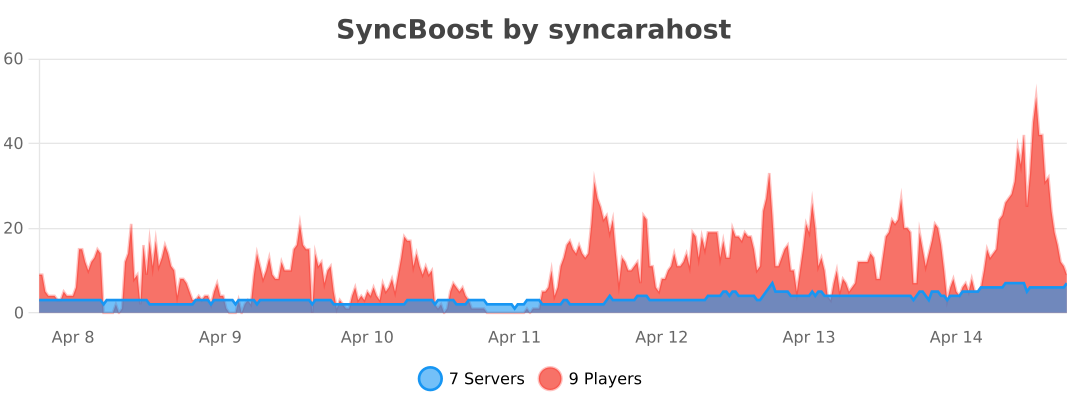
SyncBoost anonymously collects data via **bStats** to help us improve performance.
You can disable this in `plugins/bStats/config.yml`.
—
## ⚙️ Configuration
Configuration is split into:
– `config.yml` – Main plugin settings (prefix, permissions, updater).
– `lang.yml` – All user-facing messages.
– `modules/*.yml` – Individual module settings.
You can edit configurations directly in-game using the GUI:
“`
/syncboost
“`
—
## 📦 Installation
1. **Download** the latest `SyncBoost.jar` from Modrinth.
2. **Stop** your Minecraft server.
3. **Place** the jar into your `plugins/` folder.
4. **Start** the server.
5. **Configure** via `/syncboost` or edit files in `plugins/SyncBoost/`.
—
## 💰 Sponsored: Syncara Host
**Cari host stabil di wilayah Indonesia? Syncara Host jawabannya!~**
Mulai dari **Rp 50.000**, kalian dapat server premium yang:
– ✅ **No Oversell** (Shared performa? Gak jaman).
– ✅ **Aikar Flags Optimized** (Settingan Java tuning terbaik).
– ✅ **Lokasi Indonesia** (Ping rendah, koneksi stabil).
Visit: **https://syncara.host**
—
## ⭐ Credits
SyncBoost is built upon the strong foundation of **LagFixer**.
We explicitly acknowledge and thank **Jenya705** for their original work and contributions to the optimization community.
> SyncBoost is a forked and modernized continuation, designed to support the latest Minecraft infrastructure while respecting the legacy of the original project.
—
## ❓ FAQ
What Java version does SyncBoost require?
SyncBoost requires minimum Java 17 and recommends Java 21 for optimal performance. Java 21 offers significant performance improvements for modern servers.
Which Minecraft versions are supported?
SyncBoost supports Minecraft 1.17.1 – 1.21.4+. Legacy versions (1.17.1 – 1.20.4) are fully supported, and 1.16.5 is available via manual build configuration.
Is SyncBoost compatible with Folia?
Yes! SyncBoost fully supports Folia’s regionized multithreading. All optimization modules are compatible with Folia’s architecture and use proper thread-safe operations.
What server platforms are supported?
SyncBoost works with Spigot, Paper, Purpur, Pufferfish, Folia, and any compatible fork. Paper or higher is recommended for best performance.
Will SyncBoost conflict with other optimization plugins?
SyncBoost is designed to work alongside other plugins. It integrates seamlessly with Spark for profiling and stacker plugins like WildStacker, RoseStacker, and UltimateStacker.
How do I recover accidentally cleared items?
Use the Abyss feature! Items cleared by WorldCleaner are temporarily stored and can be recovered using /abyss command within a configurable time window.
—
Made with <3 by Syncara Host
© 2026 Syncara Host. All rights reserved.