TelentityX
> **⚠️ Important Note**
>
> Please note that this version is a **community-maintained fork** of the original Telentity plugin originally developed by TheMrJezza.
> It has been updated to support modern Minecraft versions (up to **1.21.x**) while we await an official update from the original author.
>
> As with any fork, there may be **bugs or compatibility issues**, and it should be tested thoroughly before use in a production environment.
> Your understanding is greatly appreciated — please feel free to **report any issues** you encounter to help improve the plugin for everyone.
# TelentityX – Entity Teleportation Made Easy!
## Features
### 🐎 Vehicle Teleportation
From horses to minecarts, arrows, boats, and more — if you’re riding it, **it comes with you** when you teleport! No more losing your ride after a `/tp` command.
### 👪 Passenger Teleportation
Got a pig in a boat? A baby zombie on a chicken? No worries — as long as they’re passengers, they’ll travel with you and stay inside the vehicle post-teleport.
### 🔗 Leash Teleportation
If you’re holding a mob on a leash (like a dog or llama), it will automatically teleport with you wherever you go. Stay connected, stay safe!
## Installation & Setup
### Step 1: Install the Plugin
Drop the `TelentityX-XXXX.jar` file into your server’s **plugins/** folder, then restart your server. That’s all for basic setup — it just works out of the box!
> Tip: For a simple “plug-and-play” experience, no further steps are needed.
### Step 2: Configure Permissions (Optional)
If you want fine-grained control over who can teleport which entities, how, and where, follow these steps:
1. Assign specific permissions based on:
– Entity types (`cow`, `boat`, etc.)
– Teleport methods (`vehicle`, `passenger`, `lead`)
## 🔐 Permission Nodes
Here’s a breakdown of available permission nodes:
| Permission | Description |
|———–|————-|
| `telentity.teleport.*` | Teleport any entity type via vehicle, passenger, or lead. |
| `telentity.teleport.` | Teleport a specific entity type via any method. |
| `telentity.vehicle.*` | Teleport any entity as a vehicle. |
| `telentity.vehicle.` | Teleport a specific entity type as a vehicle. |
| `telentity.passenger.*` | Teleport any entity as a passenger inside another vehicle. |
| `telentity.passenger.` | Teleport a specific entity type as a passenger. |
| `telentity.lead.*` | Teleport any entity that is on a lead. |
| `telentity.lead.` | Teleport a specific entity type that is on a lead. |
—
## 🧩 Compatible With
– Vanilla Minecraft entities
– Custom mobs from plugins (if supported)
– All major teleportation commands/plugins like EssentialsX, Multiverse-Core, and more
## ⚠️ Not Compatible With
– **HuskHomes** (due to internal teleportation handling limitations) ❌
If you use HuskHomes, entity teleportation may not work correctly during home or warp teleports.
## What’s New in This Version?
Compared to the original **Telentity** or **HorseTpWithMe**, this version brings several important improvements:
– **Supports newer Minecraft versions up to 1.21.x**
Keep using the plugin on the latest game versions without compatibility issues.
– **Supports Folia/Canvas**
– **Bug fixes and performance improvements**
Resolved known issues such as incorrect passenger detachment and inconsistent teleport behavior.
– **Cleaner console output**
Unlike the original, this version **does NOT spam all available permissions at startup**, keeping your console clean and readable.
> Make teleportation seamless and intuitive with **TelentityX** — never lose your pet, mount, or passenger again!
Teh
# Teh – Floating Damage/Heal/XP Indicator
## Features
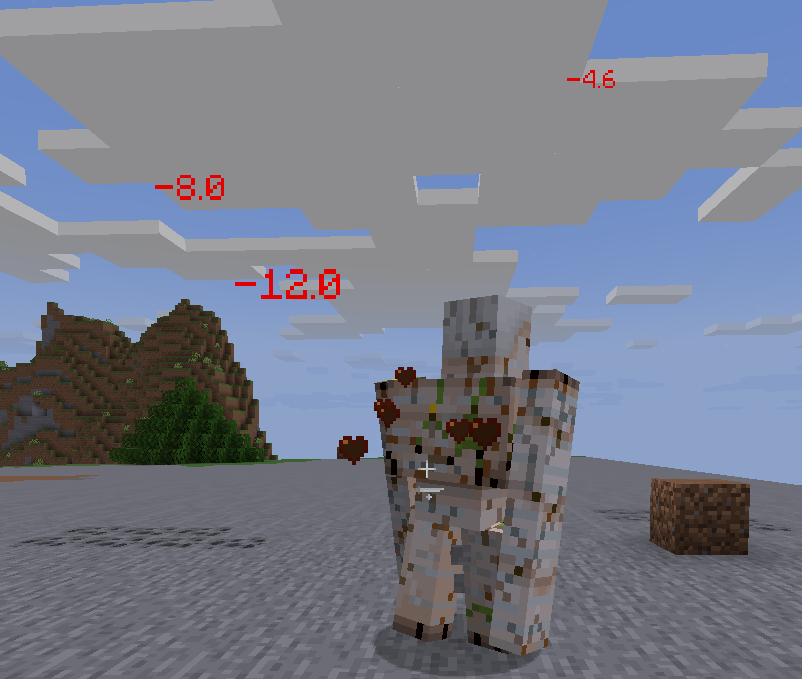
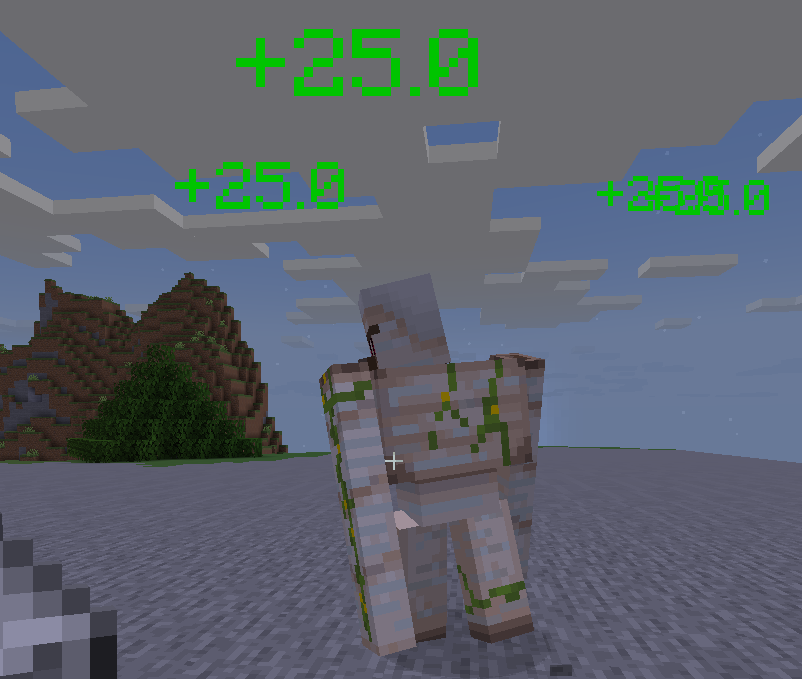
– Animated floating text for damage, healing, XP gain/loss
– Fully customizable colors, icons, and messages via `config.yml`
– MiniMessage support (true color, icons, advanced formatting)
– All display settings (see-through, background, shadow, alignment, billboard) are configurable
– XP loss indicators and separate color for XP loss
– Only shows indicators to players who have them enabled (per-player visibility)
– **PlaceholderAPI support**: `%teh_enabled%` placeholder for player indicator state
## Quick Config Example
“`yaml
indicator-colors:
hp-lost: ‘#FF3B30’
hp-gain: ‘#34C759’
xp-gain: ‘#5EDE3E’
xp-lost: ‘#FFAA00’
messages:
damage:
template: “{icon} -{amount} {type}”
icons:
ENTITY_ATTACK: “🗡”
heal:
template: “✨ +{amount} {type}”
xp-gain:
template: “🟢 +{amount} XP”
xp-lost:
template: “🔴 -{amount} XP”
display-settings:
see-through: true
background-color: ‘#00000080’
shadowed: true
alignment: center
billboard: true
“`
## PlaceholderAPI
If PlaceholderAPI is installed, Teh registers the following placeholder:
| Placeholder | Description |
|———————|———————————————|
| `%teh_enabled%` | Returns `Enabled` or `Disabled` for a player (whether indicators are enabled for them) |
**Usage Example:**
– In chat plugins, scoreboards, etc: `%teh_enabled%`
## Permissions
– `teh.indicator.toggle` — Use `/toggleteh`
– `teh.reload` — Use `/tehreload`
## Commands
– `/toggleteh` — Toggle your indicator visibility
– `/tehreload` — Reload all config at runtime
## Soft Dependencies
– PlaceholderAPI (for placeholders)
**Damage**
**Healing**
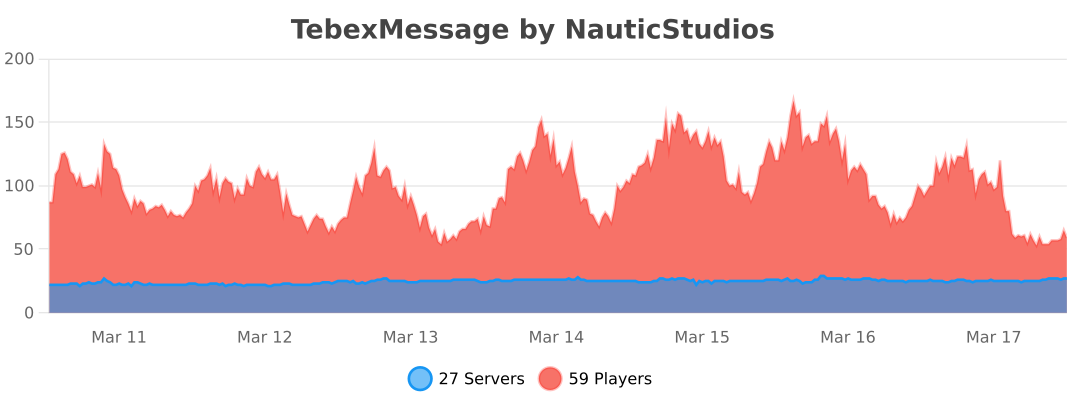
TebexMessage


Transcript
**TebexMessage**
**Custom purchase message system for Minecraft**
TebexMessage is a lightweight and fully configurable plugin that lets servers display purchase messages with **chat, titles, sounds, interactive buttons, and Discord webhooks**.
It supports **custom placeholders** like {player}, {package}, and {price}, and allows global or per-player events.
All settings are editable in config.yml and changes can be applied instantly with **/tebexmessage reload**.
No Tebex API keys, secrets, emails, or admin permissions are required — safe and local integration only.
**Features:**
– Customizable chat messages (centered, RGB, gradients)
– Title & sound events (GLOBAL / PLAYER)
– Interactive buttons and Discord webhook integration
– Hot reload without server restart
– Lightweight, safe, and performance-friendly
**One plugin. Fully customizable purchase messages.**

Tebex
## What Is Tebex?
Tebex is a game monetization engine featuring over 120 payment methods, chargeback protection, fraud protection, and 3-day payouts. Tebex allows you to sell items, subscriptions, and more from an in-game customized shop.
Players browse your store, select and purchase their items, and Tebex automatically delivers the items when the player is next online. View more at https://tebex.io
See an interactive Tebex store using one of our free templates at https://example.tebex.io/
## Features
– **Simple and Powerful.** Create fully customizable themed web stores and start selling in minutes.
– **No Hidden Fees.** Enjoy flat-rate pricing with no surprises.
– **Worldwide Payments Support.** Accept over 120+ payment types with Tebex acting as your merchant of record, including PayPal, Paysafecard, Google Pay, and more.
– **Chargeback and Fraud Protection.** Tebex handles fraud reports and disputes/chargebacks on your behalf while providing 100% insurance.
– **Made for Everyone.** Whether you’re starting or an established network, Tebex offers a comprehensive set of shop management tools to handle every facet of your game’s economy.
## Installation and Setup
1. Create a free webstore at https://tebex.io/
2. Download the latest version of the plugin from Modrinth or any official Tebex listing.
3. Place the downloaded Tebex `.jar` in the `plugins` folder of your relevant platform.
4. Restart your server.
5. Run `/tebex secret your-key-here` as a server admin to connect the server to Tebex.
Your secret key can always be found at: https://creator.tebex.io/game-servers. Click Connect Game Server, and then choose Plugin to view your secret key.
## Usage and Commands
Tebex will automatically fulfill any orders from your webstore every two minutes. These are run as server commands, such as giving items or adding groups, which you can define in your store.
Note: Not all commands are available on all platforms. Proxy servers may have a reduced set of commands. Use `/tebex help` to get the relevant list of commands on any platform.
Below are a list of commands used to manage the plugin:
### Permissions
All commands have a permission node which matches with the exact command name. For example a player must have `tebex.help` as a permission in order to view available
commands.
### User Commands
“`
/tebex help Shows available commands
/tebex secret Sets your store’s secret key
/tebex info Shows store information
/tebex checkout Creates payment link for a package
“`
### Administrator Commands
“`
/tebex sendlink Sends payment link to player
/tebex report Reports a problem to Tebex
/tebex ban Bans a user from the webstore
/tebex lookup Looks up user transaction info
“`
### Debug Commands
“`
/tebex debug Enables debug logging
/tebex forcecheck Force runs all time-based events
/tebex refresh Reloads store and package info
“`
## Resources
Here are some additional resources to help you build your Tebex store.
– ❔ Frequently Asked Questions – Get answers to common questions fast
– 🧠 Tebex Academy – Learn to build a successful Tebex store with video tutorials
– ⚙️ [Technical Support](mailto:[email protected]) – Get assistance as a buyer or seller, email us at [email protected]
– 🖥️ Developer Documentation – Develop custom integrations to suit your needs
– 💬 Feedback Form – Help us build a better product by sharing your feedback
## Our Mission
Founded in 2011, our mission has always been the same: helping creators in the gaming industry create new revenue streams without having to invest the time and effort involved in processing and managing global payments.
Since then, we helped generate over half a billion dollars for our clients, providing them with a full suite of monetization features, handling all taxes, billing, and providing full insurance. Making sure they can focus on what they do best – creating great gaming experiences.
Teams API
**The universal bridge between team plugins and everything else.**
TeamsAPI is a passive, server-side bridge plugin for Paper, Spigot, Purpur, and Folia servers, inspired by Vault. It provides a single, stable interface for team operations, so any plugin that needs team data can work with any compatible team plugin, without either plugin knowing about the other.
Implemented in Factions fork: https://www.spigotmc.org/resources/pvpindex-factions.135055/
Suggest it as suggestion to teams plugins, they can send me a message so I can make a list.
## How it works
“`text
Your Plugin (consumer) -> TeamsAPI (bridge) -> Team Plugin (provider)
“`
– **Providers** — faction, clan, guild, or custom team plugins `implement TeamsService`
and register with TeamsAPI during `onEnable()`.
– **Consumers** — scoreboard plugins, chat formatters, quest plugins, or any plugin that
needs team data call `TeamsAPI.getService()` and use the returned interface.
– **Server owners** — install `TeamsAPI.jar` and one compatible team plugin. Done.
No two plugins need to know about each other. When the team plugin changes, every
consumer plugin keeps working without a recompile.
## Features
– **Provider-agnostic**: works with any team plugin that ships a `TeamsService` implementation.
– **Graceful fallback**: if no provider is present, `TeamsAPI.isAvailable()` returns `false`; consumers can disable their team features cleanly instead of crashing.
– **Read-only snapshots**: `Team` and `TeamMember` are immutable interfaces; providers own the backing data.
– **Role hierarchy**: built-in `OWNER > ADMIN > MEMBER` with `outranks()` and `canManage()` helpers.
– **Optional invite service**: providers can expose `TeamsInviteService` for invitation workflows.
– **Optional warp service**: providers can expose `TeamsWarpService` for named team warps.
– **Optional claim service**: providers can expose `TeamsClaimService` for chunk-claim management.
– **Optional power service**: providers can expose `TeamsPowerService` for player and team power values.
– **Cancellable events**: twelve Bukkit events that providers can fire so other plugins can react to or cancel team operations.
– **Lightweight**: a single shaded JAR with no runtime dependencies beyond the Bukkit API.
– **JitPack-ready**: depend on just the API module at compile time; no transitive dependencies leak into your plugin.
– **Velocity bridge** *(experimental)*: optional `teams-api-velocity` plugin for querying team data from the Velocity proxy. Supports multi-proxy networks via Redis.
– **BungeeCord bridge** *(experimental)*: optional `teams-api-bungeecord` plugin for querying team data from BungeeCord / Waterfall proxies. Supports multi-proxy networks via Redis.
## Requirements
| Requirement | Value |
|————-|——-|
| Server software | Paper / Spigot / Purpur / Folia 1.16+ |
| Java | 17+ (25 recommended) |
| Plugin dependencies | None |
## Installation (server owners)
1. Download `teams-api-plugin-VERSION.jar` from the **Files** tab of this listing or
from GitHub Releases.
2. Drop it into your server’s `plugins/` directory.
3. Install a compatible team plugin that provides a `TeamsService` implementation.
4. Restart the server.
TeamsAPI has no configuration files.
## For developers
Add the API artifact to your project via JitPack:
### Maven
“`xml
jitpack.io
https://jitpack.io
com.github.ez-plugins
teams-api
1.4.0
provided
“`
### Gradle
“`groovy
repositories {
maven { url ‘https://jitpack.io’ }
}
dependencies {
compileOnly ‘com.github.ez-plugins:teams-api:1.4.0’
}
“`
### Consumer quick-start
Declare the dependency in `plugin.yml` (use `softdepend` if team support is optional):
“`yaml
depend:
– TeamsAPI
“`
Then use the API at runtime:
“`java
@Override
public void onEnable() {
if (!TeamsAPI.isAvailable()) {
getLogger().warning(“No team plugin found. Team features disabled.”);
return;
}
getLogger().info(“TeamsAPI found. Team features enabled.”);
}
// In a command or listener:
TeamsService teams = TeamsAPI.getService();
Optional team = teams.getPlayerTeam(player.getUniqueId());
team.ifPresent(t -> player.sendMessage(“Your team: ” + t.getDisplayName()));
“`
### Provider quick-start
Declare a soft-dependency in `plugin.yml`:
“`yaml
softdepend:
– TeamsAPI
“`
Register your implementation when the plugin loads:
“`java
@Override
public void onEnable() {
TeamsAPI.registerProvider(this, new MyTeamsService(this));
}
@Override
public void onDisable() {
TeamsAPI.unregisterProvider(teamsService);
}
“`
## API surface
### Team lifecycle & lookup
| Method | Returns | Description |
|——–|———|————-|
| `createTeam(name, ownerUUID)` | `Optional` | Creates a new team |
| `deleteTeam(teamId)` | `boolean` | Deletes a team by UUID |
| `getTeam(teamId)` | `Optional` | Looks up a team by UUID |
| `getTeamByName(name)` | `Optional` | Looks up a team by name |
| `getPlayerTeam(playerUUID)` | `Optional` | Returns the player’s current team |
| `getAllTeams()` | `Collection` | Returns every registered team |
| `getTeamCount()` | `int` | Total number of teams |
### Membership management
| Method | Returns | Description |
|——–|———|————-|
| `addMember(teamId, playerUUID, role)` | `boolean` | Adds a player with a given role |
| `removeMember(teamId, playerUUID)` | `boolean` | Removes a player from the team |
| `setMemberRole(teamId, playerUUID, role)` | `boolean` | Changes a member’s role |
| `getMemberRole(teamId, playerUUID)` | `Optional` | Returns the member’s current role |
### Invite service (optional)
Register alongside `TeamsService` if your plugin supports invitations:
“`java
TeamsAPI.registerInviteProvider(this, inviteService);
“`
| Method | Returns | Description |
|——–|———|————-|
| `invitePlayer(teamId, inviterUUID, inviteeUUID)` | `boolean` | Sends an invitation |
| `acceptInvite(teamId, playerUUID)` | `Optional` | Accepts the invitation and joins the team |
| `declineInvite(teamId, playerUUID)` | `boolean` | Declines an invitation |
Consumers check availability with `TeamsAPI.isInviteAvailable()` before calling `TeamsAPI.getInviteService()`.
### Warp service (optional)
Register alongside `TeamsService` if your plugin supports team warps:
“`java
TeamsAPI.registerWarpProvider(this, warpService);
“`
| Method | Returns | Description |
|——–|———|————-|
| `setWarp(teamId, name, location, creatorUUID)` | `boolean` | Creates or updates a named warp |
| `removeWarp(teamId, name)` | `boolean` | Deletes a warp by name |
| `getWarp(teamId, name)` | `Optional` | Looks up a warp by name |
| `getWarps(teamId)` | `Collection` | Returns all warps for a team |
Consumers check availability with `TeamsAPI.isWarpAvailable()` before calling `TeamsAPI.getWarpService()`.
### Claim service (optional)
Register alongside `TeamsService` if your plugin supports chunk claims:
“`java
TeamsAPI.registerClaimProvider(this, claimService);
“`
| Method | Returns | Description |
|——–|———|————-|
| `claimChunk(teamId, playerUUID, world, x, z)` | `boolean` | Claims a chunk for the team |
| `unclaimChunk(teamId, playerUUID, world, x, z)` | `boolean` | Removes the claim |
| `unclaimAll(teamId)` | `boolean` | Removes all claims for the team |
| `getClaimAt(world, x, z)` | `Optional` | Returns the claim at a chunk, if any |
| `getTeamClaims(teamId)` | `Collection` | All claims for the team |
| `getClaimCount(teamId)` | `int` | Number of claimed chunks |
| `isClaimed(world, x, z)` | `boolean` | Whether the chunk is claimed by anyone |
| `isClaimedBy(teamId, world, x, z)` | `boolean` | Whether the chunk is claimed by this team |
| `getTeamMaxClaims(teamId)` | `int` | Claim limit (-1 means unlimited) |
Consumers check availability with `TeamsAPI.isClaimAvailable()` before calling `TeamsAPI.getClaimService()`.
### Power service (optional)
Register alongside `TeamsService` if your plugin exposes power values:
“`java
TeamsAPI.registerPowerProvider(this, powerService);
“`
| Method | Returns | Description |
|——–|———|————-|
| `getPlayerPower(playerUUID)` | `double` | Current power of the player |
| `getPlayerMaxPower(playerUUID)` | `double` | Maximum power the player can hold |
| `setPlayerPower(playerUUID, power)` | `boolean` | Sets the player’s power |
| `getTeamPower(teamId)` | `double` | Combined power of all team members |
| `getTeamMaxPower(teamId)` | `double` | Maximum combined power the team can hold |
Consumers check availability with `TeamsAPI.isPowerAvailable()` before calling `TeamsAPI.getPowerService()`.
### Events
All events live in `com.skyblockexp.teamsapi.event`. Providers are encouraged but not required to fire them.
| Event | Cancellable | Fired when |
|——-|————-|————|
| `TeamCreateEvent` | Yes | Before a team is created |
| `TeamDeleteEvent` | Yes | Before a team is deleted |
| `TeamJoinEvent` | Yes | Before a player joins a team |
| `TeamLeaveEvent` | Yes | Before a player leaves a team |
| `TeamRoleChangeEvent` | Yes | Before a member’s role changes |
| `TeamInviteEvent` | Yes | Before an invitation is sent |
| `TeamInviteAcceptEvent` | No | After a player accepts an invitation |
| `TeamInviteDeclineEvent` | No | After a player declines an invitation |
| `TeamWarpSetEvent` | Yes | Before a warp is created or updated |
| `TeamWarpDeleteEvent` | Yes | Before a warp is deleted |
| `TeamClaimEvent` | Yes | Before a chunk is claimed |
| `TeamUnclaimEvent` | Yes | Before a chunk is unclaimed |
### Roles
| Role | Priority | Description |
|——|———-|————-|
| `OWNER` | 100 | Full control; cannot be removed by others |
| `ADMIN` | 50 | Can manage members with a lower priority |
| `MEMBER` | 10 | Regular team member |
## Links
– GitHub — source code & issue tracker
– Developer Guide — full integration walkthrough
– API Reference — complete method tables
– JitPack — Maven / Gradle dependency
—
*MIT License – free to use in any project, open- or closed-source.*
TeamChat
# TeamChat
A plugin that provides a separate chat for the server team.
## Features
– /teamchat command
– MiniMessage
– MiniPlaceholders support for Paper and Velocity
– PlaceholderAPI support for Bukkit and Paper (e. g. ““)
## Requirements
– Java 21+
## Default configuration
“`
# TeamChat plugin v2.3 by BauHD
# Modrinth: https://modrinth.com/project/teamchat
# Discord: https://discord.gg/Gmxwzz2rA9
prefix: “[TeamChat] ”
permission: “teamchat.use”
aliases:
– “tc”
announce-in-console: false
format: “ » ”
no-permission: “You do not have the permission to use this command!”
usage: “Usage: /teamchat ”
team-message: “ – ”
“`
TBPGarden
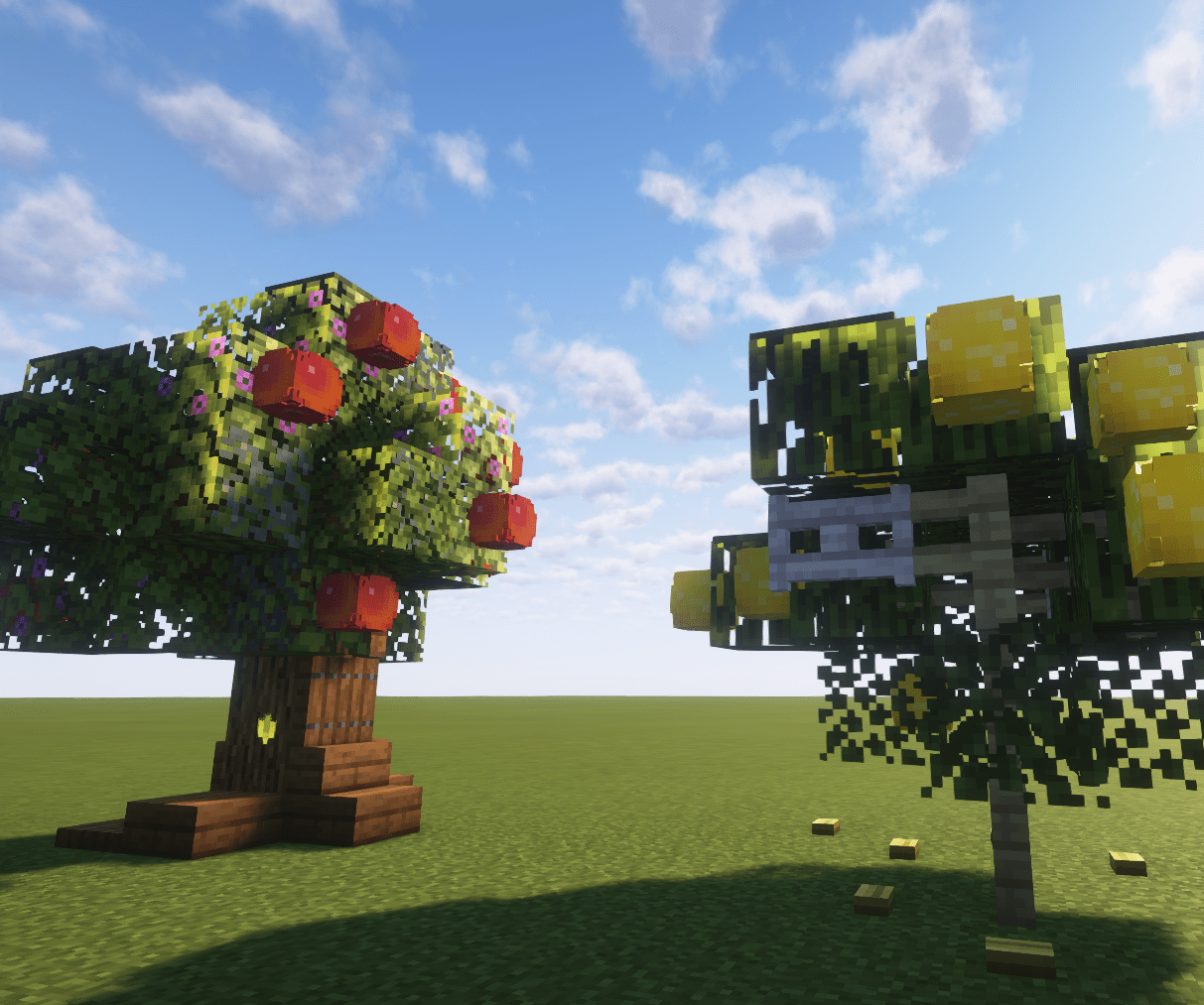
**Garden adds fruit trees and berry bushes to the game!**
Firstly, you need to find some seeds that can be found in short grass or tall grass. To plant a seed, simply place it down on a grass block.
It takes time for plants to grow, you can see the progress of the plant growth as it grows in stages. After a while, the plant will be ready to bear fruits, which you can harvest using shears.
This plugin integrates with BreweryX and TheBrewingProject, and is currently mainly meant as an addition to those plugins, but it can still function on its own.
### BreweryX integration
“`yml
ingredients:
– garden:
“`
### The Brewing Project integration
“`yml
ingredients:
– garden:
“`
### Examples of fruit names
“`
apple
blueberry
cherry
cranberry
grape
lime
orange
peach
raspberry
strawberry
“`
TawnyTeams
# TawnyTeams
**Premium Teams & Tags Plugin — Beautiful, Lightweight, and Fully Configurable In-Game.**
TawnyTeams is a next-generation team management plugin designed for modern Minecraft servers. Built from the ground up to be fully compatible with **Paper** and **Folia**, TawnyTeams offers a complete, lag-free experience where players can form teams, claim colored tags, and stand out—all while remaining incredibly simple for server owners to configure.
### 🌟 Features
– **In-Game Configuration (GUI):** No more digging through files! Customize your team sizes, tag length limits, friendly fire settings, language options, and more directly from a beautiful `/tt admin` GUI menu. Complete with Shift-Click logic for faster value adjustments.
– **Folia & Paper Support:** Built completely asynchronously with proper heavy-operation offloading for flawless performance on modern, multi-threaded server software like Folia, Paper, and Purpur.
– **Multi-Language Support (I18N):** Ships with built-in translations (`en_US`, `zh_CN`, `ru_RU`, etc.), dynamically switching messages based on player preference, which can be enforced via the admin language selector.
– **Customizable Nametags & Colors:** Players get a premium, visual `/tt gui` to manage their team members, pick their team’s RGB/Gradient tag colors, and choose a sleek identity. Features full Hex and Kyori Adventure formatting support!
– **Event-Safe Friendly Fire:** Worried about event sabotage? While players can choose to toggle friendly fire within their team GUI, admins can dictate enforced `friendly-fire-disabled-worlds` and `friendly-fire-enabled-worlds` to perfectly balance PVE events and PVP arenas!
– **Zero Dependencies:** Works right out of the box using SQLite. No complex MySQL database setups required initially (though completely prepared for expansion).
– **PlaceholderAPI Integration:** Seamlessly plug TawnyTeam tags and stats directly into your scoreboards, tab lists, and chat plugins!
### 💻 Commands
– `/tt gui` — Opens the intuitive player dashboard to join, manage, or create teams.
– `/tt info [team]` — Check statistics and members of an active team.
– `/tt admin` — (Requires OP `tawnyteams.admin`) Opens the premium dashboard to change global configuration, manage world rule sets, pick server languages, and disband rule-breaking teams.
– `/tt reload` — Safely reloads configurations and languages memory-efficiently.
### 🛡️ Permissions
– `tawnyteams.use` — Allowed to use basic `/tt` commands (Default: true)
– `tawnyteams.create` — Allowed to create teams (Default: true)
– `tawnyteams.color` — Allowed to use color codes in tags (Default: true)
– `tawnyteams.bypass.taglimit` — Bypass standard tag limits (Default: op)
– `tawnyteams.admin` — Access to `/tt admin` (Default: op)
### ❤️ Open Source & Free
TawnyTeams provides a “Premium-tier” quality experience completely for free. Elevate your community layout, let your players represent their squads, and enjoy easy administration. Download it today!
TaterLib
# TaterLib


A cross API code library that allows developers to write code that works across multiple modding platforms, and across a
wide range of Minecraft versions, all with one JAR file. If TaterLib runs on it, so can your plugin/mod.
Please note, some abstractions may not be fully implemented yet, and some may be missing.
If you’re looking for a specific abstraction/game event, please open an issue, and we’ll get to it as soon as possible,
or feel free to open a PR with an implementation.
Contributions are always welcome!
Let’s cut to the chase, why should you use and/or contribute to TaterLib? Well, let’s say you have a mod/plugin that you
want to port to a different modding API. You could go through the laborious task of implementing all the events,
commands, etc. on each platform and create all your own cool fancy abstractions for each game object, or you could use
TaterLib and save yourself a lot of time. (which is why I started this project in the first place)
There’s two ways to use TaterLib, you can depend on the general API, then implement any missing features yourself on
each platform, or if something’s missing, you can start a PR with either a basic or full implementation, and we can
improve TaterLib and save you a lot of time in the future. (a bit of a win-win)
Link to our support: Discord
## Download


### Adding to your project
“`gradle
repositories {
maven {
name = ‘NeuralNexus’
url = ‘https://maven.neuralnexus.dev/releases’
}
}
dependencies {
compileOnly(‘dev.neuralnexus:taterlib-api:‘)
}
“`
There’s also a snapshot repository available at `https://maven.neuralnexus.dev/repository/snapshots`
### Compatibility Cheatsheet
TaterLib supports: Bukkit, BungeeCord, Fabric, Forge, Sponge, and Velocity
General notes:
– No Fabric on 1.13
– No Fabric/Forge below 1.7.10
| Server type | Versions | Jar Name |
|————-|————-|———————————|
| 1.20.x | 1.20-1.20.4 | `TaterLib-1.20.x-.jar` |
| 1.19.4 | 1.19.4 | `TaterLib-1.19.4-.jar` |
| 1.19.2 | 1.19.2 | `TaterLib-1.19.2-.jar` |
| 1.19 | 1.19 | `TaterLib-1.19-.jar` |
| 1.18.2 | 1.18.2 | `TaterLib-1.18.2-.jar` |
| 1.18 | 1.18 | `TaterLib-1.18-.jar` |
| 1.17 | 1.17-1.17.1 | `TaterLib-1.17-.jar` |
| 1.16 | 1.16-1.16.5 | `TaterLib-1.16-.jar` |
| 1.15 | 1.15-1.15.2 | `TaterLib-1.15-.jar` |
| 1.14 | 1.14-1.14.3 | `TaterLib-1.14-.jar` |
| 1.13 | 1.13-1.13.2 | `TaterLib-1.13-.jar` |
| 1.12 | 1.12-1.12.2 | `TaterLib-1.12-.jar` |
| 1.11 | 1.11-1.11.2 | `TaterLib-1.11-.jar` |
| 1.10 | 1.10-1.10.2 | `TaterLib-1.10-.jar` |
| 1.9 | 1.9-1.9.4 | `TaterLib-1.9-.jar` |
| 1.8 | 1.8-1.8.8 | `TaterLib-1.8-.jar` |
| 1.7 | 1.7-1.7.10 | `TaterLib-1.7.10-.jar` |
| 1.6.4 | 1.6.4 | `TaterLib-1.6.4-.jar` |
| 1.2.5 | 1.2.5 | `TaterLib-1.2.5-.jar` |
| b1.7.3 | b1.7.3 | `TaterLib-b1.7.3-.jar` |
## Dependencies
– Fabric API – Required on Fabric
– Legacy Fabric API – Required on Fabric 1.12.2 and
below
### Optional Dependencies
– LuckPerms – For permissions/prefix/suffix support
## Commands and Permissions
| Command | Permission | Description |
|———————-|—————————–|————————–|
| `/taterlib version` | `taterlib.command.version` | Get the TaterLib version |
| `/taterlib reload` | `taterlib.command.reload` | Reload TaterLib config |
| `/taterlib dump` | `taterlib.command.dump` | Dump TaterLib info |
| `/taterlib fulldump` | `taterlib.command.fulldump` | Dump TaterLib info |
## Projects that use TaterLib
Feel free to open a PR to add your plugin/mod to this list!
– BadSpawns
– BeeNameGenerator
– TaterComms
– TaterUtils
## Metrics
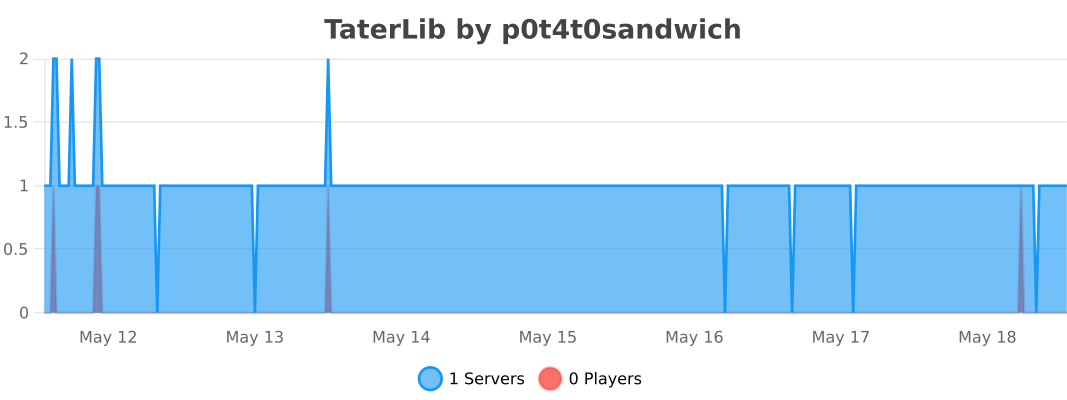
### Bukkit
### BungeeCord
### Sponge
### Velocity
Tartarus Punishments – Simple Ban / Mute / Prison System
TartarusPunishements
Ban with Simplicity.



**Tartarus Punishments is a lightweight, permission-based moderation plugin for Minecraft servers (Bukkit/Paper/Purpur/Spigot).**
Easily manage bans & temporary punishments with predefined or custom reasons — perfect for small to medium-sized servers needing a clean, configurable punishment system.
—
## ✅ Key Features
– **Punish & Forgive** — Apply or remove punishment options (ban, mute, prison, screenshare)
– **Temporary & Permanent Punishments** — Flexible duration support (permanent, timed)
– **Prison System** — Freeze and teleport players to a designated prison location
– **Screenshare Workflow** — Freeze players for screenshare checks with automatic unfreezing
– **Predefined Reasons + Custom Reasons** — Use built-in reason templates or define your own
– **Permission-based Controls** — Fine-grained permission nodes for each punishment type
– **Customizable Messages & Layouts** — Color or legacy codes, configurable message templates per reason
– **Automatic Default Messages** — Smart fallback messages if none provided (avoids server crashes or misconfig)
– **IP Banning** — Automatic IP bans with UUID-based bans
– **Inventory Clearing** — Optional inventory clearing on ban (configurable per reason)
– **Async Database Operations** — Non-blocking punishment checks for optimal server performance
– **Fully Configurable** — All settings exposed in config file; easy to tailor for your server style
– **Easy Setup & Lightweight** — Drop JAR into plugins folder on Bukkit/Spigot/Paper/Purpur; ready to go
– **Active Development & Changelog** — Frequent updates, bug-fixes, and improvements
## 🎯 Performance Features (v0.2.2+)
Tartarus Punishments is designed for optimal server performance:
– **Async Player Lookups**: Player searches run off the main thread
– **Async Database Checks**: Punishment verification doesn’t block the server
– **Async Join Processing**: Player login data loads asynchronously
– **Optimized Tab Completion**: Only searches online players for instant results
Your server will remain responsive even during heavy moderation activity!
—
## ⚙️ Supported Platforms & Versions
– **Loaders:** Bukkit, Spigot, Paper, Purpur
– **Minecraft Versions:** 1.21.x
– Java 21+
Compatible on any Bukkit-based server — from small SMPs to mid-sized communities.
—
### Permissions
– `tartarus.punishments.punish` – Punish a player
– `tartarus.punishments.forgive` – Remove a punishment
– `tartarus.punishments.banlist` – View the ban list
– `tartarus.punishments.prison` – Imprison (freeze) players
– `tartarus.punishments.setprison` – Set the prison location
– `tartarus.punishments.screenshare` – Freeze players for screenshares
– `tartarus.punishments.*` – All punishment permissions
### Commands
– `/punish ` (aliases: `/ban`, `/banplayer`)
– `/forgive ` (aliases: `/unban`, `/pardon`)
– `/banlist` (aliases: `/bans`)
– `/prison `
– `/setprison`
– `/screenshare `
—
## 💡 Why Use Tartarus Punishments?
| ✔️ Benefit | Details |
|———–|———|
| **Simple yet powerful** | Provides comprehensive moderation without bloat or complexity |
| **Customizable & flexible** | Customize reasons, durations, messages — fits any server style |
| **Permission-driven** | Control who can punish who, integrate with permission plugins |
| **Performance optimized** | Async operations prevent server lag during punishment checks |
| **Lightweight & easy** | SQLite database, minimal dependencies, no complex setup |
| **Active & maintained** | Regular updates and bug fixes ensure reliability |
For servers that don’t need heavy all-in-one moderation suites, but want a clean, dependable punishment system — Tartarus Punishments hits the sweet spot.
—
## 🔄 Recent Changelog (since 0.2.0)
### v0.2.2 (Latest)
– **Performance Optimization**: Moved all database operations to async threads for zero main-thread blocking
– **Code Refactoring**: Introduced `TartarusCommand` base class for better code reusability
– **Player Lookup Optimization**: Created `PlayerFinder` utility for efficient async player searches
– **Join Listener Optimization**: Async punishment data loading prevents login freezes
– **Tab Completion Fix**: Commands now properly support tab completion via `TabExecutor`
– **Code Cleanup**: Removed ~53 lines of unnecessary verbose comments for better maintainability
– Added configurable ban message layouts supporting named colours or legacy codes
– Custom ban message lines now support smart defaulting if colours are omitted
– Auto-populate missing `ban-message` config fields on update to avoid breaking configurations
– Metadata and compatibility update for 1.21.x
Full changelog available in “Versions” tab.
—
## 🔧 Installation
1. Download the latest `TartarusPunishments-*.jar` from Releases on Modrinth
2. Place it in your server’s `plugins` folder (Bukkit/Paper/Spigot/Purpur)
3. (Re)start the server
4. Configure `config.yml` as needed — or use defaults
5. Use permissions and commands to manage punishments
—
*Licensed ARR — see project page for details.*