Textures

# Textures
This plugin lets you create pixel images in your Minecraft server and have them render on the client without sending them a resource pack. It works by cutting the image into 8×8 squares, getting texture URLs and signatures from MineSkin, and rendering them on the client.
## How to Use
1. Install PacketEvents
2. Install on your server. **We only support 1.21.9+**, maybe at some point I might extend the functionality to older servers with packets.
3. Place some images in the textures folder. Ideally these images should be small (under 128×128) as larger images will be much longer to get signatures for and much longer to render client side.
4. Run `/textures generate `. If the image is in your textures folder, the file name (e.g. textureslogo.png) will suffice. If it’s a url, the plugin will download the image to that folder.
5. Wait a bit for each tile to generate. A 128×128 image will take around 13 minutes. If you want this to be faster, get a paid Mineskin subscription.
6. Use in your MOTD or placeholders!
## Placeholders
– `` renders the full image. (e.g. ``)
– `` renders one row (0-based) (e.g. `` renders the second row)
Yes, these are not PlaceholderAPI placeholders (though they will probably be added soon™️), these are intercepted between the server and the client and rewritten.
## Support
I am providing this plugin as is. No updates are guaranteed unless I feel like it. It works for me but it might not work perfectly for you. I will help you if I’m available, but free support is not guaranteed.
Texturepack Force
# 🎨 TexturePackForce
**TexturePackForce** is a lightweight Minecraft plugin that allows you to automatically or manually **force server texture packs** for your players.
Ideal for roleplay, minigame, and themed servers that rely on specific visuals.
—
## ✨ Features
– 🧱 Automatically apply texture packs **on player join** or **via command**
– ⚙️ Automatically apply **all .zip files** in the plugin folder
– 💾 Or choose specific texture packs in `config.yml`
– 🔌 Built-in lightweight HTTP server (no external hosting required)
– 🧍 Command supports targeting players or everyone with `@a`
– ⚡ Tab completion for all **packs and players**
– 💨 Fast and dependency-free
– 🧩 Force as many texture packs as you want – no limits!
—
## 📦 Installation
1. Download the `.jar` file from Modrinth.
2. Drop it into your `plugins/` folder.
3. Start the server once to generate the configuration files.
4. Place your `.zip` texture packs **directly inside the plugin folder** (`/plugins/TexturePackForce/packs/`).
5. Edit `config.yml` to your liking.
—
## ⚙️ Configuration
“`yaml
# Automatically force texturepacks on player join
force-on-join: true
# Automatically force all zip files in the plugin folder
automatic-force-all-texturepacks: false
# Texturepacks to use when automatic mode is disabled
texturepacks:
default.zip: true
example.zip: false
extra.zip: true
# Internal webserver port
port: 8080
TerraTrees

A plugin to generate Terra structures as trees.
### This plugin requires Terra to work.
When using the plugin you might notice that when growing normal trees they look lame compared to the Terra ones. Well this plugin fixes that! You can specify any structure in the Terra pack and it will generate as any tree type you want. It even supports nether trees and mushrooms!
Tested on 1.21.4, 1.21.5, 1.21.6 and 1.21.7 – likely to work on other versions too.
Default config:
“`yaml
structures:
oak-tree: # Tree type
enabled: true # If it should spawn a terra structure instead of the vanilla one
structure: “structure-terrascript-loader:oak_tree_procedural” # which structure to spawn
big-oak-tree:
enabled: true
structure: “structure-terrascript-loader:oak_tree_procedural”
birch-tree:
enabled: true
structure: “structure-terrascript-loader:birch_tree_procedural”
acacia-tree:
enabled: true
structure: “structure-terrascript-loader:acacia_tree_procedural”
cherry-tree:
enabled: true
structure: “structure-terrascript-loader:cherry_blossom_tree_procedural”
dark-oak-tree:
enabled: true
structure: “structure-terrascript-loader:large_dark_oak_tree_procedural”
tall-jungle-tree:
enabled: true
structure: “structure-terrascript-loader:large_jungle_tree_procedural”
small-jungle-tree:
enabled: true
structure: “structure-terrascript-loader:medium_jungle_tree_procedural”
mangrove-tree:
enabled: true
structure: “structure-terrascript-loader:mangrove_tree_procedural”
pale-oak-tree:
enabled: true
structure: “structure-terrascript-loader:large_pale_oak_tree_procedural”
spruce-tree:
enabled: true
structure: “structure-terrascript-loader:spruce_tree_procedural”
tall-spruce-tree:
enabled: true
structure: “structure-terrascript-loader:giant_redwood”
brown-mushroom:
enabled: false
structure: “structure-terrascript-loader:large_mixed_mushroom_procedural”
red-mushroom:
enabled: false
structure: “structure-terrascript-loader:large_mixed_mushroom_procedural”
warped-fungus:
enabled: false
structure: “structure-terrascript-loader:huge-warped-fungus”
crimson-fungus:
enabled: false
structure: “structure-terrascript-loader:huge-crimson-fungus”
settings:
debug: false # Shows a list of available structures in the world name specified below during startup. Also has a few more debug messages.
debug-world-name: “world”
“`
Terranite
# Terranite
A world-edit inspired plugin compatible for 1.21.x paper & folia servers.
## What can it do?
Terranite contains many features, but mainly focussed on modifying your world with ease.
## Why not use World edit?
Well, World edit is a very good tool and perfect as first usage, but it is not compatible for +1.21.4 folia. This is a good replacement if you’d be searching for it.
## Commands
Terranite contains many commands, here listed the most important ones:
`/s wand` – Gives the player a wand
`/s break ` – Breaks all blocks in a selection (or all specified blocks)
`/s set ` – Sets all blocks to a specific other block
`/s fill ` – Sets all air blocks to a specific block
`/s wand` – Gives the player a wand
… and many more. Visit source code for all info
## Bugs or suggestions
Found a bug or want to suggest a new feature?
Make a github issue here:
https://github.com/pernio/Terranite/issues
Terra Earth
WHAT THIS PLUGIN DOES (Server-Side): It will access files on your server to create the world folder and save the data, it will only acess folders/files it has created
WHAT THIS PLUGIN DOES (Client-Side): According to where the player the server will download heightmap chunks from the Amazon Workshop terrarium project. Currently the plugin does NOT teleport you to the world file, you will have to do it yourself, you can use the execute in world_earth (just look for any dimension with the words earth in it) run teleport @s 0 10 0, if you want to look at the terrain and not spawn in the middle of the ocean, you can teleport to 100000 15 0!
This plugin is really interesting as (at least to my knowlage) its the only paper plugin that turns the world into earth, updates are coming soon! I plan to have completly finished this mod.
Terra
Terra is a modern world generation modding platform that allows complete customization of world generation with an advanced API, tightly integrated with a powerful configuration system.
Terra provides a set of core addons which implement a “standard” config schema, as well as a default overworld config pack.
# Installation
To install Terra, visit the Getting Started page on our wiki, and choose the installation guide for your platform. Remember to choose the correct version of Terra for your Minecraft version! (see the versions wiki page).
# Platforms
Terra’s platform-agnostic design ensures all world generation happens completely independently of Minecraft, allowing Terra to be easily portable across platforms.
Currently, Terra supports:
* Fabric – Download on Modrinth.
* Forge – Download on Modrinth.
* Quilt – Download on Modrinth.
* Bukkit (Paper servers) – Download on SpigotMC
# Links
* Issues
* Source Code
# Community Packs
Terra provides world generation through configuration packs. Various config packs made by the Terra community are accessible at the Community Packs page. Below is a showcase of the community packs available through the linked page:
**Overworld (Pre-installed)**

**Origen**

**Hydraxia**

**SkyLands**

**Tartarus**

**ReimagEND**

**Substratum**

**Overworld 2 (WIP – In development)**

# Beta
Terra is currently in **BETA**. While Terra is stable and production-ready, and the default Overworld Config provides all Vanilla resources, Terra is not feature-complete. There is a lot to be added!
# Donate
If you like Terra, please consider donating ~~so I can buy more Dr. Pepper~~:
* dfsek’s Patreon
* duplex’s Ko-fi
You can also support us for free by starring our repository on GitHub! GitHub rolls out new beta features first to repositories with more stars, so starring our repo is a great way to support us!
# Sponsor
Thanks to Ember Host for sponsoring Terra! You can support us by clicking the banner bellow to get 10% off your first month, which also gives us a 50% cut of your first purchase!

Template Locker
RU | Данный плагин позволяет вам закрывать шаблоны. В плагине присутствуют команды /lock, /unlock на скринах можно увидить как оно работает.
EN | This plugin allows you to close templates. The plugin contains the /lock and /unlock commands, and you can see how it works in the screenshots.
TellrawCommandDisabler
**TellrawCommandDisabler**
Tired of players or rogue scripts abusing `/tellraw` to spam or fake system messages on your server? TellrawCommandDisabler shuts it down completely — no config, no permissions, no fuss.
Most command-blocking solutions cancel the command event, which can be bypassed or only works for players. This plugin goes further by removing `/tellraw` directly from the server’s CommandMap on startup, making it as if the command never existed.
**Features**
– Blocks `/tellraw` and `/minecraft:tellraw` in all forms including `/tellraw @a`
– Blocked everywhere — players, console, command blocks, and RCON
– Removed from tab-completion so players can’t even see it exists
– Players receive a clear message if they somehow attempt to use it
– No configuration needed — drop it in, restart, done
**Compatibility**
– Folia 1.21.1+
– Paper 1.21.1+
– Purpur 1.21.1+
– Any Paper-based fork
TeleportEffects
**TeleportEffects** is a **Bukkit plugin** that **intercepts every teleport**and **re-schedules it** while **creating** some **particle effects** on the **start** and **destination points**.
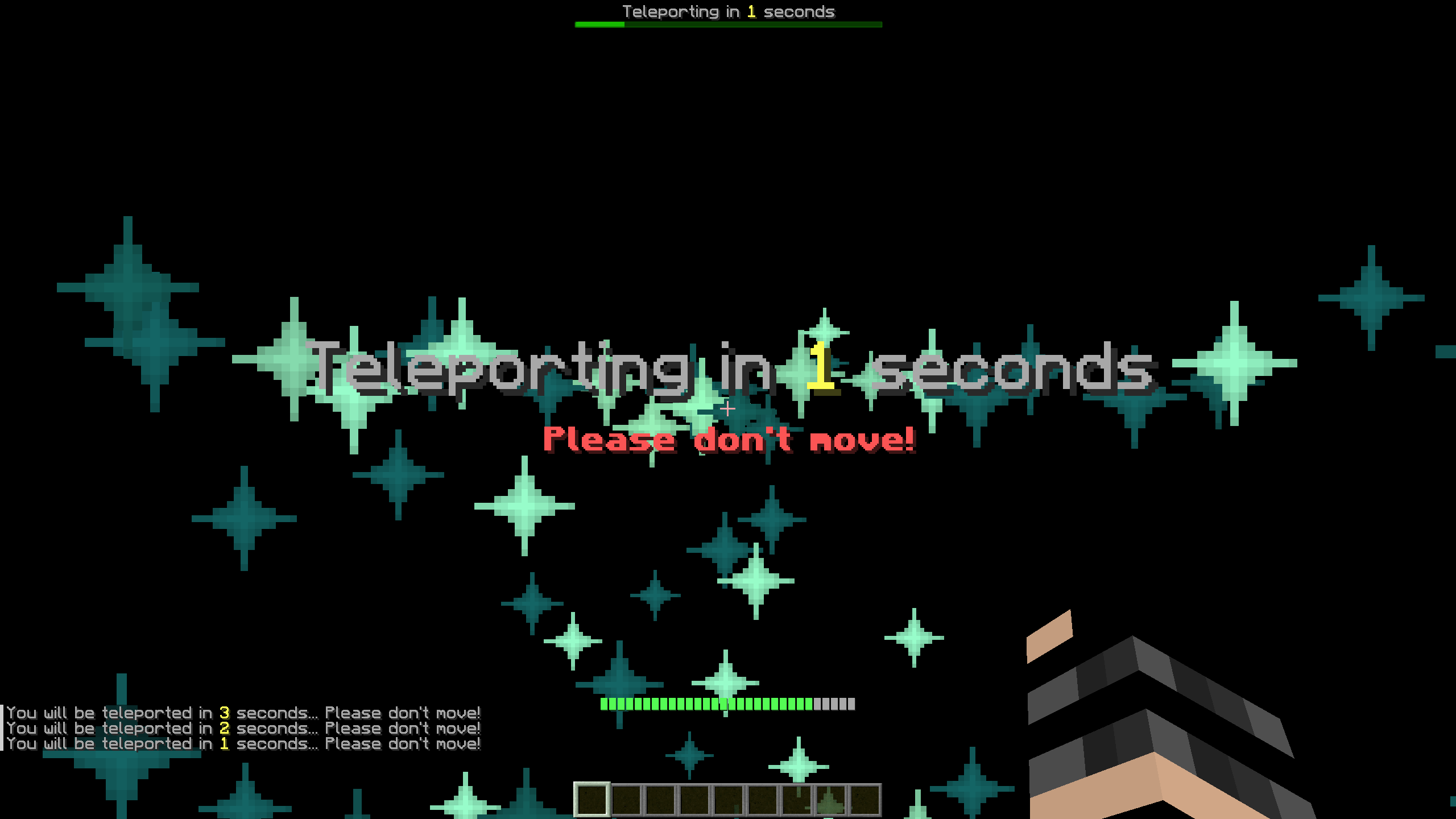
Before continuing, this page is a presentation with **minimal information** of the plugin. If you want a **more complete explanation**, you are encouraged to check out the GitHub Wiki page.
## Commands
The plugin offers only one command: **/toggleteleporteffects**
### /toggleteleporteffects
#### Permission: teleporteffects.toggle
#### Aliases: [toggleteleporte, togglete, tte]
Having tested TeleportEffects on a real server, what most people found annoying (for **visual** or **performance reasons**) were the **effects themselves**. Even though this kind of defeats one of the main features of the plugin, the **ToggleTeleportEffects** command was implemented, and it does exactly that: it **hides every effect** created from the plugin **for the player** that uses it. This option is saved for every user, meaning that it is **not required** to execute the command at **every login**.
## Permissions
**teleporteffects.bypass**: All the users that have this permission will automatically bypass the teleport cooldown. This is advised for admin or staff users.
**teleporteffects.toggle**: The permission required to execute the command /toggleteleporteffects.
## Configuration
Every **teleport** is composed of **four stages** of particles spawning. Each one of them is characterized by some of the parameters of the **config.yml** and changing these, will change the stages themselves.
### Stage1
The **Stage1** is the first stage that appears. This stage lasts for **1/3** of the total **duration**, so, by default, **1 seconds**.
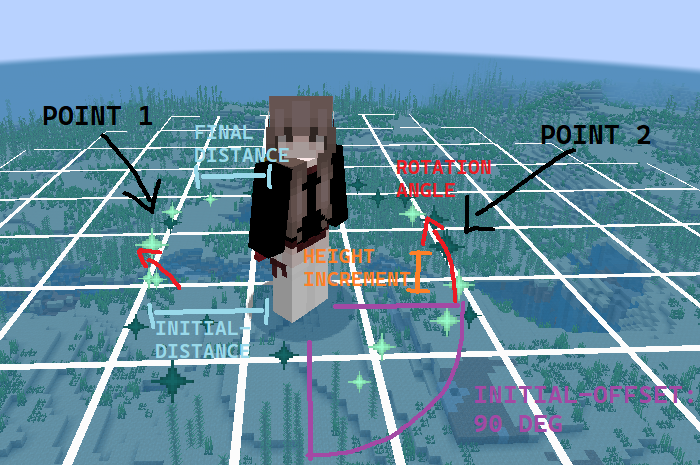
*X points* will be equally divided along a circle that will be translated by **initial-offset** degrees starting from the position of the player eyes and of radius **initial-distance**. Then, every tick (duration between an iteration and another), those particles will be rotated by **rotation-angle**, their height will be +**height-increment** blocks from their previous value, and they will be closer to the player. After 1/3 duration seconds, the particles will have reached **final-distance**, they will stop spawning and **Stage2** will begin.
### Stage2
**Stage2** will be the followup to **Stage1**, starting off right from where the first stage finished. This stage lasts for **2/3** of the **total duration**, so, by default, **2 seconds**.
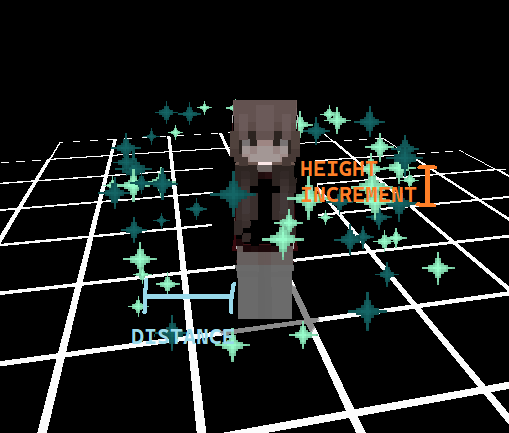
So, this stage takes directly from **Stage1** the **last position** of the particles and from there it starts spawning particles both above and below that level, at **height-increment** blocks of distance from the previous iteration. All the other options are inherited and continued from the first stage, but do note that in this case **final-distance** will actually be the **initial** and **final distance** from the player.
### Stage3
While the previous two stages are **sequential**, **the third stage** happens **simultaneously** as the **Stage2**. This means that it starts **after** **1/3** of the **total duration**, and it has the **same duration** as the **second stage**. However, **Stage3** spawns particles not around the player, as previously seen, but **at the teleport destination**.
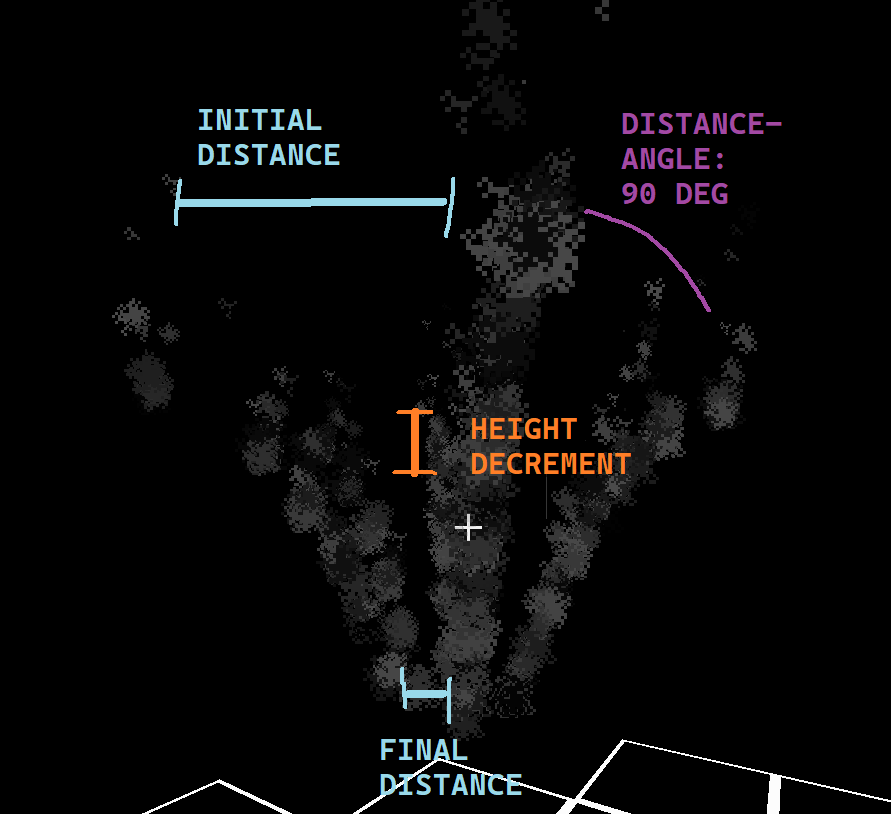
The **Stage3** starts spawning particles **2.5 blocks higher** than the final destination in a circular radius. It will spawn **360° / distance-angle** **points** at a **radius** of **initial-distance** blocks. Then, these particles will **descent** by **height-decrement** blocks every tick (duration between an iteration and another) until they reach the **final-distance** distance in blocks from the destination location. At that point, **Stage4** will commence.
### Stage4
**Stage4** is the **last** and less important stage. It is **directly linked** to **Stage3** ending, but it happens **after the teleport**happened (so past the duration seconds).
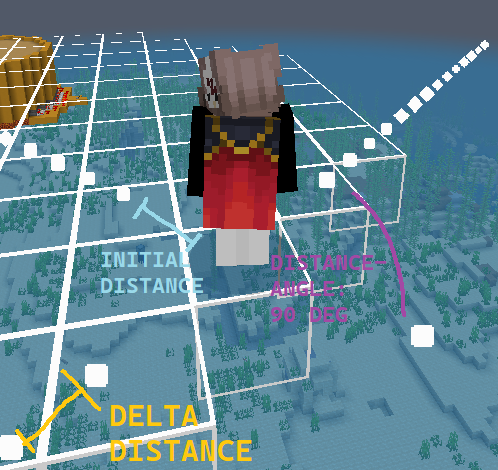
So, **Stage4** particles will be spawned at the **player’s feet** in a circular radius, **similar to Stage3 particles**, using the **same numbers** of **points** as the **previous stage**. They will move in a **straight line** until **stage4-duration seconds** will have passed, then they will be removed.
## API
**TeleportEffects** is a relatively small plugin, and some may want to integrate it in their custom mode core (for example a **FactionCore**) or in their **teleportation plugin**. In any case, achieving this goal is trivial.
To further know how to use **TeleportEffects API** and more information about the plugin, check out the Wiki at the GitHub page.
TeleportBook
# Teleport Book – one-click save & teleport
Mid-game friendly teleportation book for Paper servers.
Right-click once to save your current position into the book; right-click again to teleport back. The book is consumed on use (configurable), charges 5 XP levels by default, and shows a neat charging animation with particles before teleporting.
– ✅ Simple: no commands needed—just right-click
– 🎯 Mid-game recipe: configurable shaped craft (ender pearls, amethyst, etc.)
– 🧭 Exact return: world, X/Y/Z, yaw/pitch stored in the item’s data (PDC)
– 🛡️ Safety checks: avoids suffocation/lava; snaps to nearby safe spot if needed
– ⚔️ Anti-abuse: cooldown, combat-tag, cross-world + per-world blocklists, “require ground”
– 🌐 English & Polish: auto-detects player client language (fallback to server default)
– ✨ Animation: configurable “charge-up” effect with particle ring + TP burst
– ⚙️ Fully configurable: recipe, costs, restrictions, messages, animation, safety
## How it works
Craft the Teleport Book.
Right-click (air or block) with an empty book → saves your current location into that book.
Right-click again with that same book → short charge animation → teleport to the saved point.
On success the book is consumed (or cleared, if you disable consumption) and 5 XP
levels are removed by default.
**If you enjoy what I do, consider supporting me on Ko-fi! Every little bit means the world! https://ko-fi.com/tf88lk**