The Simple Combat Log
# ⚔️ SimpleCombatLog
**The modern, high-performance solution to stop combat loggers.**
SimpleCombatLog is a robust Paper/Spigot plugin designed to ensure fair PvP on modern servers. It utilizes the latest Minecraft 1.21 features (Text Displays, Boss Bars) to provide a premium experience without lag.
> **⚠️ Compatibility Note:**
> * **Minecraft 1.21+:** Use the latest version (**v2.0+**).
> * **Minecraft 1.12 – 1.20:** Please download **Version 1.4** from the “Versions” tab.
—
## ✨ Key Features
### 💀 Punishment & Kill Attribution
* **Instant Kill:** Combat loggers die immediately and drop their loot.
* **True Kill Credit:** The plugin ensures the **attacker** gets credit for the kill.
* *Compatible with:* **Ranked SMP**, **AuraSkills**, **Stats** plugins, and **Economy** kill rewards.
### 📊 Visual Timers (New!)
* **Action Bar:** A clean countdown above the hotbar.
* **Boss Bar:** A highly visible progress bar at the top of the screen.
* **Customizable:** Configure colors, styles, and text. Use one or both!
### 🏰 Safezone Protection (3 Methods)
1. **Native Radius:** Configurable protection radius around the World Spawn (No dependencies required!).
2. **Region List:** Block specific WorldGuard regions via `config.yml`.
3. **Custom Flag:** Use `/rg flag combat-entry deny` to easily mark any region as a safezone.
* *Effect:* Players are physically pushed back if they try to enter these areas while tagged.
### 🛑 Movement & Item Control
* **Elytra Anti-Takeoff:** Tagged players cannot jump-start their Elytra. (Players already flying can land safely).
* **Pearl Limiter:** Restrict how far players can teleport with Ender Pearls (default 32 blocks).
* **Smart Cooldowns:** Apply visual cooldowns to items on combat start (does not reset on every hit).
* **Hard Block:** Totally ban specific items (e.g., Rockets) during combat.
### 🏆 Holographic Leaderboards
* **Public Shaming:** Display a floating **”Top 10 Combat Loggers”** leaderboard in your lobby.
* **Modern Tech:** Uses **Text Displays** (1.20+) for crisp text and zero entity lag.
* **Stats Tracking:** Keep a permanent record of how many times a player has combat logged (`/scl stats `).
—
## 🛠️ Configuration
The `config.yml` is fully commented and easy to edit.
Click to view Default Configuration
“`yaml
# ==========================================
# SimpleCombatLog Configuration
# ==========================================
# — General Settings —
cooldown-seconds: 15
kill-on-quit: true
# — Display Settings —
display:
# Show the timer above the hotbar
action-bar: true
# Show a Boss Bar at the top of the screen
boss-bar:
enabled: true
title: “&cCombat Mode: &e%time%s”
color: RED
style: SOLID
# — Safezone Protection —
denied-regions:
– “spawn”
– “safezone”
spawn-protection:
enabled: true
radius: 16
# — Combat Restrictions —
# 1. Pearl Range Limit
max-pearl-range: 32
# 2. Elytra Control (Block takeoff)
block-elytra-activation: true
# 3. Command Blocking
blocked-commands:
– “/spawn”
– “/tpa”
– “/home”
# 4. Item Blocking (Total Prevention)
blocked-items:
– “ELYTRA”
– “FIREWORK_ROCKET”
# 5. Item Cooldowns (Visual Timer)
# Applies a cooldown when combat starts.
item-combat-cooldowns:
– “ENDER_PEARL:15”
– “CHORUS_FRUIT:10”
– “GOLDEN_APPLE:5”
# — Leaderboard & Stats —
leaderboard-loc: null
leaderboard-uuid: null
# — Sounds —
sounds:
tagged: “ENTITY_EXPERIENCE_ORB_PICKUP”
untagged: “ENTITY_EXPERIENCE_ORB_PICKUP”
# — Messages —
messages:
tagged: “&c&lCOMBAT! &7You are now in combat! Do not log out!”
untagged: “&a&lSAFE! &7You are no longer in combat.”
broadcast-log: “&c%player% combat logged and was killed!”
actionbar: “&cCombat: &e%time%s”
region-denied: “&c&lSTOP! &7You cannot enter this region during combat!”
´´´
—
## 📜 Commands & Permissions
| Command | Permission | Description |
| :— | :— | :— |
| `/scl reload` | `simplecombatlog.admin` | Reloads config and stats. |
| `/scl setleaderboard` | `simplecombatlog.admin` | Spawns the “Top Loggers” hologram at your location. |
| `/scl stats ` | `(none)` | Check how many times a player has combat logged. |
—
## 🚀 Installation
1. Download the `.jar` file.
2. Drop it into your server’s `plugins` folder.
3. **(Optional)** Install **WorldGuard** for advanced region management.
4. Restart your server.
**Requirements:**
* **Java 21**
* **Minecraft 1.21+** (For older versions, use v1.4)
Theosis

## Server test: theosismc.sdlf.fun
# **Theosis — Apotheosis-inspired RPG progression for servers (loot, gems, towers, bosses & variants)**
**Theosis** is a full plugin reinterpretation of the **Apotheosis** mod — built for **servers**.
If you love *Apotheosis* but need a **vanilla-friendly**, **no-mods** experience for your community, **Theosis is the best option**.
It brings the same addictive loop: **better loot → stronger builds → harder encounters → bigger rewards**, with everything **fully configurable** and performance-focused.
—
## ⭐ Why you’ll love Theosis (if you’re an Apotheosis fan)
– **Real rarity-based loot** (balanced progression, not sponge enemies)
– **Sockets + Gems** to create actual builds
– **Towers in all 3 dimensions** (Overworld / Nether / End)
– **Bosses with scaling and unique abilities**
– **Mob variants** that make the world unpredictable
– **Multi-language** + **100% configurable** (names, tiers, weights, limits… everything)
> Works on **Spigot** and **Paper**.
> **Paper is recommended** for the best experience and to avoid edge-case perk behavior.
—
## 🏰 Towers in all dimensions
Exploration finally matters again.
– Towers generate in **Overworld, Nether, and End**
– Each tower has **variable loot**
– Loot can include **socketed gear** and **gems**
– Configurable spawn rules, biomes, chance, and performance limits
—
## 🎁 Reinvented loot progression
Chests and rewards scale with real rarity rules:
– Rarities control **how many perks**, **how many sockets**, and **how often** items appear
– Fully configurable weights and caps
– Designed to feel exciting **without breaking survival balance**
—
## 💎 Sockets + Gems = real builds
Gear can roll with sockets, and gems let players specialize:
– Damage / tank / mobility / utility styles
– Caps for PvE/PvP balance (configurable)
– Yunque system (costs / break chance / limits configurable)
—
## 👹 Mob variants & elites
Normal mobs can spawn as **enhanced variants** with special behaviors and better drops.
– More variety, more danger, more fun
– Rarity scaling for enemies too
– Configurable spawn reasons and limits
—
## 👑 Bosses with progression
Bosses are not “just more HP”.
– Abilities + effects + bossbar
– Scales with server progression
– Can be configured per dimension and rarity rules
– Rewards match the difficulty
—
## 🌍 Fully configurable & multi-language
Theosis is built for admins:
– Enable/disable modules (perks / gems / structures / bosses / tiers / variants)
– Change names of items, perks, bosses, and more
– Tune progression, chances, caps, tier difficulty, and loot rules
– Includes **es_mx** and **en_us** language files
—
## ✅ Compatibility
– **Minecraft 1.21+**
– **Spigot + Paper**
– **Paper recommended** (better performance & fewer edge cases)
—
## 📌 Useful commands
> Command names may vary by config/version.
“`txt
/theosis hub
/theosis reload
/theosis boss spawn [player]
/theosis boss clear [all]
The Smooth Elevator
# [The Smooth Elevator] – Modern Elevator Plugin

## Documentation (English)
### 📋 Overview
**[The Smooth Elevator]** is a lightweight, modern elevator plugin for **Minecraft 1.21+** (Spigot/Paper/Folia).
This project was born to solve the “heavy” or slow feeling of older plugins, focusing on **speed, smoothness, and survival-friendliness**.
### ✨ Key Features
* 🚀 **Fast & Smooth:** Optimized teleportation logic.
* ⏳ **Optional Cooldowns:** Disabled by default for maximum freedom.
* 🎖️ **Rank-based Cooldowns:** Integration with **LuckPerms** permission nodes.
* 🌍 **Instant Language Switching:** Automatically detects the player’s client language.
* 💬 **Clean Feedback:** Optional ActionBar anti-spam system.
* 🏗️ **Multi-Platform:** Native support for Spigot, Paper, and Folia.
### 🛠️ Installation
1. Drop the `.jar` file into your `/plugins/` folder.
2. Start the server to generate configuration files.
3. Edit `config.yml` and your language files in the `/lang/` folder.
4. Run `/elevador reload` to apply changes.
### 🎮 How to Use
Stand on an elevator block and:
* **Jump** → Teleport Up.
* **Sneak** → Teleport Down.
### 💻 Commands & Permissions
| Command | Description | Permission |
| — | — | — |
| `/elevador` | Main command & help menu | `elevador.use` |
| `/elevador reload` | Reload config and lang files | `elevador.admin` |
| `/elevador give` | Give elevator item (Admin) | `elevador.admin` |
> **Note:** Use `elevador.cooldown.bypass` to ignore all teleport delays.
### ⚙️ Configuration Notes
* **Cooldowns:** Controlled via `default_ticks: 0`. They only apply after a successful teleport.
* **Anti-Spam:** ActionBar messages can be limited with `rate_limit_ticks`.
* **LuckPerms Example:**
“`bash
/lp group vip permission set elevador.cooldown.vip true
/lp group member permission set elevador.cooldown.member true
“`
# Config.yml
“`
cooldowns:
by_permission:
elevador.cooldown.vip: 15
elevador.cooldown.vipplus: 10
“`
### 🆘 Support & Donations
* **Bugs:** Report issues on the **Spigot Discussion page** (include version & logs).
* **Support the dev:** Donate via PayPal ❤️
### ⚙️ Elevator Essentials — Advanced Crafting Guide
Spoiler
—
## Crafting Guide
Elevator Essentials now includes a much more powerful and user-friendly **Recipe GUI**, allowing administrators to create custom elevator recipes directly in-game without having to manually build complex config sections.
This system supports simple recipes, multi-step crafting chains, custom parts, final elevators, shaped and shapeless recipes, exact material cost recipes, result item editing, result amount editing, and colored final elevators.
You can now create progression systems like:
* A + B = Part C
* D + E = Part F
* C + F = Elevator
Or much larger crafting trees such as:
* A + B = C
* D + E = F
* C + F = G
* G + A = H
* H + F = Elevator
This makes Elevator Essentials much more flexible for survival servers, RPG progression, technology trees, or modpack-style crafting systems.
—
## Creating Recipes with the GUI
To open the recipe editor, use:
`/elevador recipe`
This opens the new **Recipe Browser GUI**, where administrators can create, edit, and delete recipes in a much more intuitive way.
### From the Recipe Browser you can:
* Create a new recipe
* Open existing recipes
* Delete recipes with shift-click
* Manage both intermediate parts and final elevator recipes
—
## Recipe Editor Features
Inside the editor, administrators can fully configure the recipe through the GUI.
### Supported features:
* **Shaped recipes**
* **Shapeless recipes**
* **Vanilla amount mode**
* **Per-slot exact cost mode**
* **Custom result item selection**
* **Custom result amount**
* **Part result type**
* **Final elevator result type**
* **Final elevator color selection**
* **Custom names for recipe parts and outputs**
—
## Shaped and Shapeless Recipes
Each recipe can be configured as either:
### Shaped
The item layout in the crafting grid matters.
Example:
* Redstone in the center only
is different from
* Redstone in the top-left
### Shapeless
The layout does not matter.
Only the required ingredients matter.
This is useful for simpler recipes where position should not affect the result.
—
## Vanilla Amount Mode vs Exact Cost Mode
Recipes can also use two different ingredient cost systems:
### Vanilla Amount Mode
This behaves like normal Minecraft crafting.
If a slot requires an item, Minecraft only checks that the correct ingredient is present.
The amount in that slot does not matter beyond normal vanilla crafting behavior.
### Exact Cost Mode
This mode allows a recipe to consume the exact saved amount for each slot.
Example:
* If a recipe slot is saved with **4 Redstone Blocks**
* and the player places **64 Redstone Blocks**
* crafting will consume **4**, leaving **60**
This allows administrators to create much more expensive and controlled recipes without needing awkward workarounds.
—
## Result Types
Each recipe can produce one of two result types:
### Part
Creates a custom elevator part that can be used in later recipes.
This is ideal for multi-step progression systems where players must craft components before reaching the final elevator.
### Elevator
Creates the final elevator item itself.
When the result type is set to **Elevator**, administrators can also choose the elevator color directly from the GUI.
—
## Result Item and Result Amount
The editor also allows administrators to:
* Choose the **exact item** used as the recipe result
* Set the **result amount**
* Rename the output item
* Create custom intermediate parts with different materials and names
This means you are not limited to a single generic part style.
You can create multiple unique crafting components for more advanced progression.
—
## Multi-Step Crafting Chains
The system fully supports chained crafting progression.
Example:
* Iron Block + Redstone Block → Part A
* Redstone Torch + Piston → Part B
* Part A + Part B → Elevator
You can keep expanding this as much as you want:
* A + B → C
* C + D → E
* E + F → G
* G + H → Elevator
This makes it possible to build very simple or very advanced crafting trees depending on your server design.
—
## Custom Items Support
Because recipes are now built directly from item stacks in the GUI, this system works naturally with:
* Vanilla items
* Custom items from supported plugins
* Intermediate parts created by Elevator Essentials
This gives administrators far more flexibility when designing unique progression systems.
—
## Recipe Management
Recipes are now much easier to manage.
Admins can:
* Open the recipe browser in-game
* Edit recipes visually
* Delete old recipes
* Create new crafting chains without manually writing recipe sections by hand
This makes the system much more practical for servers that want to expand elevator progression over time.
—
## Reloading Changes
After making recipe changes, use:
`/elevador reload`
This reloads the plugin configuration and registered recipes.
—
## Compatibility
**Minecraft 1.21+**
Fully compatible with:
* **Spigot**
* **Paper**
* **Folia**
The recipe system and elevator logic are designed to remain lightweight, practical, and survival-friendly.
—
## Summary
Elevator Essentials now provides a much more advanced and administrator-friendly crafting system through its new Recipe GUI.
You can now:
* Create recipes in-game
* Build multi-step crafting chains
* Use shaped or shapeless recipes
* Use vanilla or exact per-slot costs
* Create custom parts
* Set custom result items and amounts
* Create final elevators with selectable colors
* Manage everything in a cleaner and faster way
This makes Elevator Essentials far more flexible for survival progression, RPG systems, and custom server economies.
—
—
## Documentación (Español)
### 📋 Resumen
**[The Smooth Elevator]** es un plugin moderno y ligero para **Minecraft 1.21+** (Spigot/Paper/Folia).
Diseñado para ser **lo más rápido y fluido posible**, manteniendo una experiencia puramente *survival* y una configuración sencilla.
### ✨ Características Principales
* 🚀 **Teleport Suave:** Lógica optimizada para evitar tirones.
* ⏳ **Cooldowns Opcionales:** Apagados por defecto.
* 🎖️ **Rangos de Cooldown:** Define tiempos diferentes usando permisos de **LuckPerms**.
* 🌍 **Multi-idioma Instantáneo:** Detecta automáticamente el idioma del Minecraft del jugador.
* 💬 **Feedback Limpio:** Sistema de ActionBar opcional para evitar el spam en el chat.
* 🏗️ **Compatibilidad:** Funciona perfectamente en Spigot, Paper y Folia.
### 🛠️ Instalación
1. Copia el archivo `.jar` en la carpeta `/plugins/`.
2. Inicia el servidor para generar los archivos base.
3. Edita el `config.yml` y los archivos en la carpeta `/lang/` a tu gusto.
4. Usa `/elevador reload` para aplicar los cambios sin reiniciar.
### 🎮 Modo de Uso
Párate sobre un bloque de elevador y:
* **Salta** → Subir.
* **Agáchate** → Bajar.
### 💻 Comandos y Permisos
| Comando | Descripción | Permiso |
| — | — | — |
| `/elevador` | Comando principal y ayuda | `elevador.use` |
| `/elevador reload` | Recarga la configuración | `elevador.admin` |
| `/elevador give` | Entrega el ítem del elevador | `elevador.admin` |
### ⚙️ Notas de Configuración
* **Cooldown:** Se define en *ticks* (`default_ticks: 0`). Solo se activa tras un teleport exitoso.
* **Sincronización de Idioma:** Si está activo, el plugin traduce los mensajes según el cliente del jugador (ej: `es_MX.yml`, `en_US.yml`).
* **Ejemplo LuckPerms:**
“`bash
/lp group vip permission set elevador.cooldown.vip true
/lp group member permission set elevador.cooldown.member true
“`
# Config.yml
“`
cooldowns:
by_permission:
elevador.cooldown.vip: 15
elevador.cooldown.vipplus: 10
“`
### ⚙️ Elevator Essentials — Guía de creación avanzada
Spoiler
## Guía de Crafteo
Elevator Essentials ahora incluye una **nueva GUI de recetas** mucho más potente y amigable, permitiendo a los administradores crear recetas personalizadas directamente dentro del juego sin tener que construir configuraciones complejas a mano.
Este sistema soporta recetas simples, cadenas de crafteo de varios pasos, partes personalizadas, elevadores finales, recetas **shaped** y **shapeless**, recetas con costo exacto por slot, cambio del ítem resultado, cambio de cantidad del resultado y selección del color del elevador final.
Ahora puedes crear progresiones como:
* A + B = Parte C
* D + E = Parte F
* C + F = Elevador
O árboles de crafteo más grandes como:
* A + B = C
* D + E = F
* C + F = G
* G + A = H
* H + F = Elevador
Esto hace que Elevator Essentials sea mucho más flexible para servidores survival, progresión RPG, árboles tecnológicos o sistemas de crafteo estilo modpack.
—
## Crear recetas con la GUI
Para abrir el editor de recetas usa:
`/elevador recipe`
Esto abrirá la nueva **GUI de recetas**, donde los administradores pueden crear, editar y borrar recetas de una forma mucho más intuitiva.
### Desde el navegador de recetas puedes:
* Crear una nueva receta
* Abrir recetas existentes
* Borrar recetas con shift-click
* Administrar tanto partes intermedias como recetas del elevador final
—
## Funciones del editor de recetas
Dentro del editor, los administradores pueden configurar completamente la receta desde la GUI.
### Funciones soportadas:
* Recetas **Shaped**
* Recetas **Shapeless**
* Modo de cantidades **Vanilla**
* Modo de costo exacto por slot
* Selección personalizada del ítem resultado
* Cantidad personalizada del resultado
* Resultado tipo **Parte**
* Resultado tipo **Elevador final**
* Selección del color del elevador final
* Nombres personalizados para partes y resultados
—
## Recetas Shaped y Shapeless
Cada receta puede configurarse como:
### Shaped
La posición de los ítems en la mesa de crafteo importa.
Ejemplo:
* Redstone en el centro
no es lo mismo que
* Redstone en la esquina superior izquierda
### Shapeless
La posición no importa.
Solo importan los ingredientes requeridos.
Esto es útil para recetas más simples donde la forma no debe afectar el resultado.
—
## Modo Vanilla vs Modo de costo exacto
Las recetas también pueden usar dos sistemas distintos de costo de ingredientes.
### Modo Vanilla
Se comporta como el crafteo normal de Minecraft.
Si un slot requiere un ítem, Minecraft solo verifica que el ingrediente correcto esté presente.
La cantidad en ese slot no importa más allá del comportamiento vanilla normal.
### Modo de costo exacto por slot
Este modo permite que la receta consuma exactamente la cantidad guardada en cada slot.
Ejemplo:
* Si una receta guarda **4 bloques de redstone** en un slot
* y el jugador coloca **64 bloques de redstone**
* al craftear se consumirán **4**, dejando **60**
Esto permite crear recetas mucho más caras y controladas sin tener que usar soluciones raras.
—
## Tipos de resultado
Cada receta puede producir uno de dos tipos de resultado:
### Parte
Crea una parte personalizada del elevador que puede usarse en recetas posteriores.
Esto es ideal para sistemas de progresión por pasos, donde los jugadores deben fabricar componentes antes de llegar al elevador final.
### Elevador
Crea directamente el ítem final del elevador.
Cuando el resultado está configurado como **Elevador**, los administradores también pueden elegir su color directamente desde la GUI.
—
## Ítem resultado y cantidad resultado
El editor también permite:
* Elegir el **ítem exacto** que será el resultado
* Configurar la **cantidad del resultado**
* Renombrar el resultado
* Crear partes intermedias personalizadas con distintos materiales y nombres
Esto significa que no estás limitado a una sola parte genérica.
Puedes crear múltiples componentes únicos para una progresión mucho más avanzada.
—
## Cadenas de crafteo de varios pasos
El sistema soporta completamente progresión por cadenas de crafteo.
Ejemplo:
* Bloque de hierro + bloque de redstone → Parte A
* Antorcha de redstone + pistón → Parte B
* Parte A + Parte B → Elevador
Y puedes seguir expandiéndolo tanto como quieras:
* A + B → C
* C + D → E
* E + F → G
* G + H → Elevador
Esto permite construir árboles de crafteo simples o muy avanzados dependiendo del diseño de tu servidor.
—
## Soporte para ítems personalizados
Como las recetas ahora se construyen directamente desde ítems colocados en la GUI, este sistema funciona de forma natural con:
* Ítems vanilla
* Ítems personalizados de plugins compatibles
* Partes intermedias creadas por Elevator Essentials
Esto da mucha más libertad al administrador para diseñar sistemas de progresión únicos.
—
## Administración de recetas
Las recetas ahora son mucho más fáciles de administrar.
Los administradores pueden:
* Abrir el navegador de recetas dentro del juego
* Editar recetas visualmente
* Borrar recetas antiguas
* Crear nuevas cadenas de crafteo sin escribir configuraciones complejas a mano
Esto hace que el sistema sea mucho más práctico para servidores que quieran expandir la progresión de elevadores con el tiempo.
—
## Recargar cambios
Después de hacer cambios en las recetas, usa:
`/elevador reload`
Esto recarga la configuración del plugin y las recetas registradas.
—
## Compatibilidad
**Minecraft 1.21+**
Compatible completamente con:
* **Spigot**
* **Paper**
* **Folia**
El sistema de recetas y el funcionamiento de los elevadores están diseñados para seguir siendo ligeros, prácticos y amigables con survival.
—
## Resumen
Elevator Essentials ahora ofrece un sistema de recetas mucho más avanzado y amigable para administradores gracias a su nueva GUI.
Ahora puedes:
* Crear recetas dentro del juego
* Construir cadenas de crafteo de varios pasos
* Usar recetas shaped o shapeless
* Usar costos vanilla o costos exactos por slot
* Crear partes personalizadas
* Elegir ítems resultado y cantidades
* Crear elevadores finales con color seleccionable
* Administrar todo de una forma mucho más rápida, limpia y cómoda
Esto hace que Elevator Essentials sea mucho más flexible para progresión survival, sistemas RPG y economías personalizadas de servidor.
—
The New Economy (Fork)
## ⚠️ Fork Notice – Community Continuation
This repository is **not the official The New Economy (TNE) project**.
The original TNE project was officially **retired on January 1st, 2026**.
This repository is a **community-maintained fork** created to continue development, maintenance, and support for TNE moving forward.
Our goal with this fork is to **take over active support**, accept fixes and improvements, and ensure long-term usability of TNE for existing and future servers.
All original licensing (AGPLv3) and attributions are preserved.
👉 **Join our Discord for this fork’s support.**
—
# The New Economy – Continued Support
The New Economy (TNE) is the ultimate economy plugin for your Minecraft server, no matter what platform you’re on. While TNE is “feature-packed,” it’s not feature-packed in the normal sense of jamming a bunch of useless features into the core plugin. Instead, it uses modules.

*The economy plugin for server owners that want more out of their economy.*
—
## About TNE
TNE was originally created for hey0’s hMod long before Bukkit/Spigot/Paper existed. Since then, it has taken on many forms, and this is the future form of the plugin. This core is designed to be robust and carry TNE into the future with or without Minecraft by not being platform-dependent.
—
## Requirements
TNE has some minimum requirements that should be followed:
– MySQL 8.0+ (if using MySQL for storage)
– MariaDB 10.7.0+
– Java 17+
—
## Support
To get an actual response, use one of the support methods below — not the reviews.
– Developer API Docs
– Wiki
– Discord
– GitHub Issues
—
# Features
## Menu System
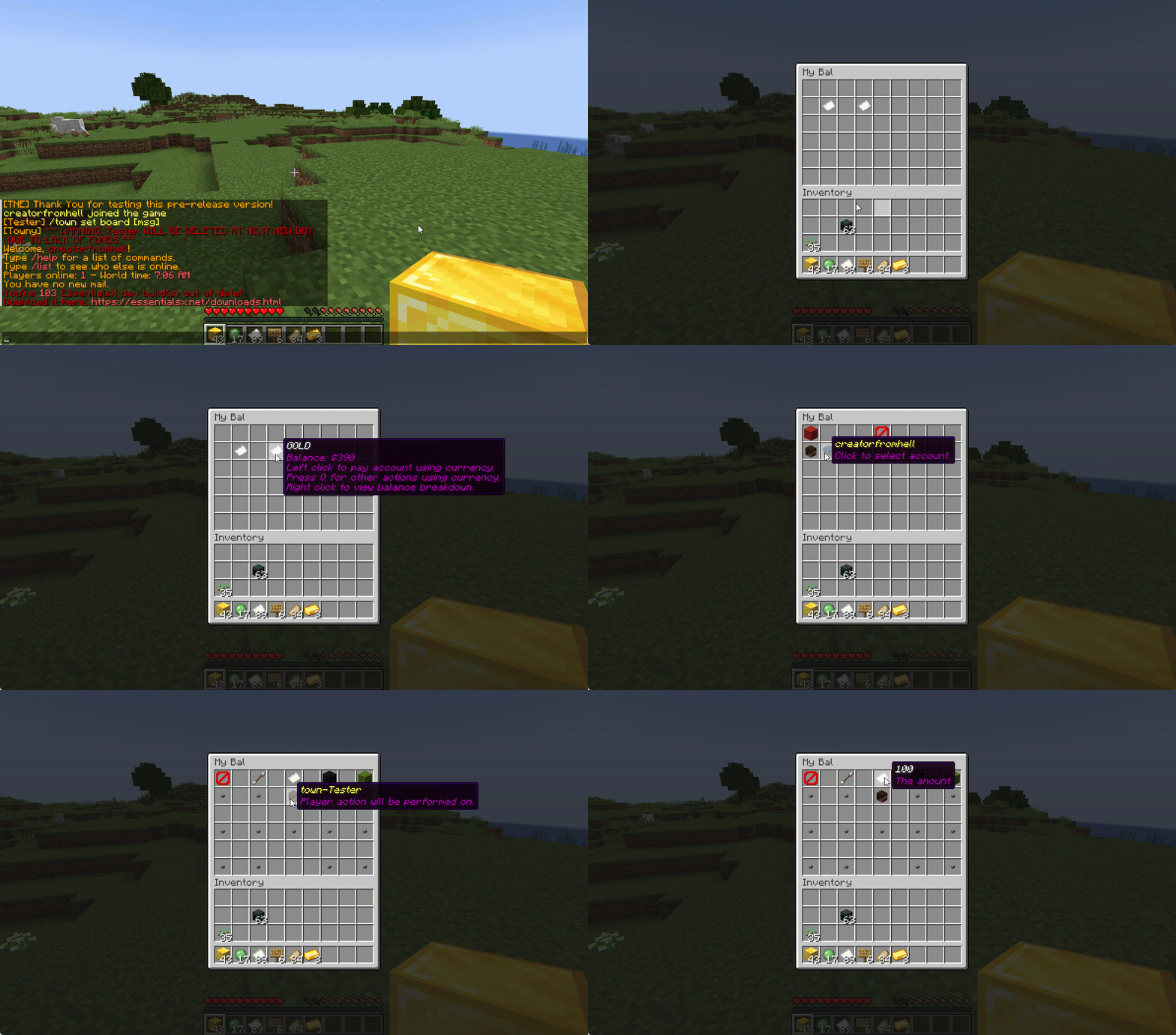
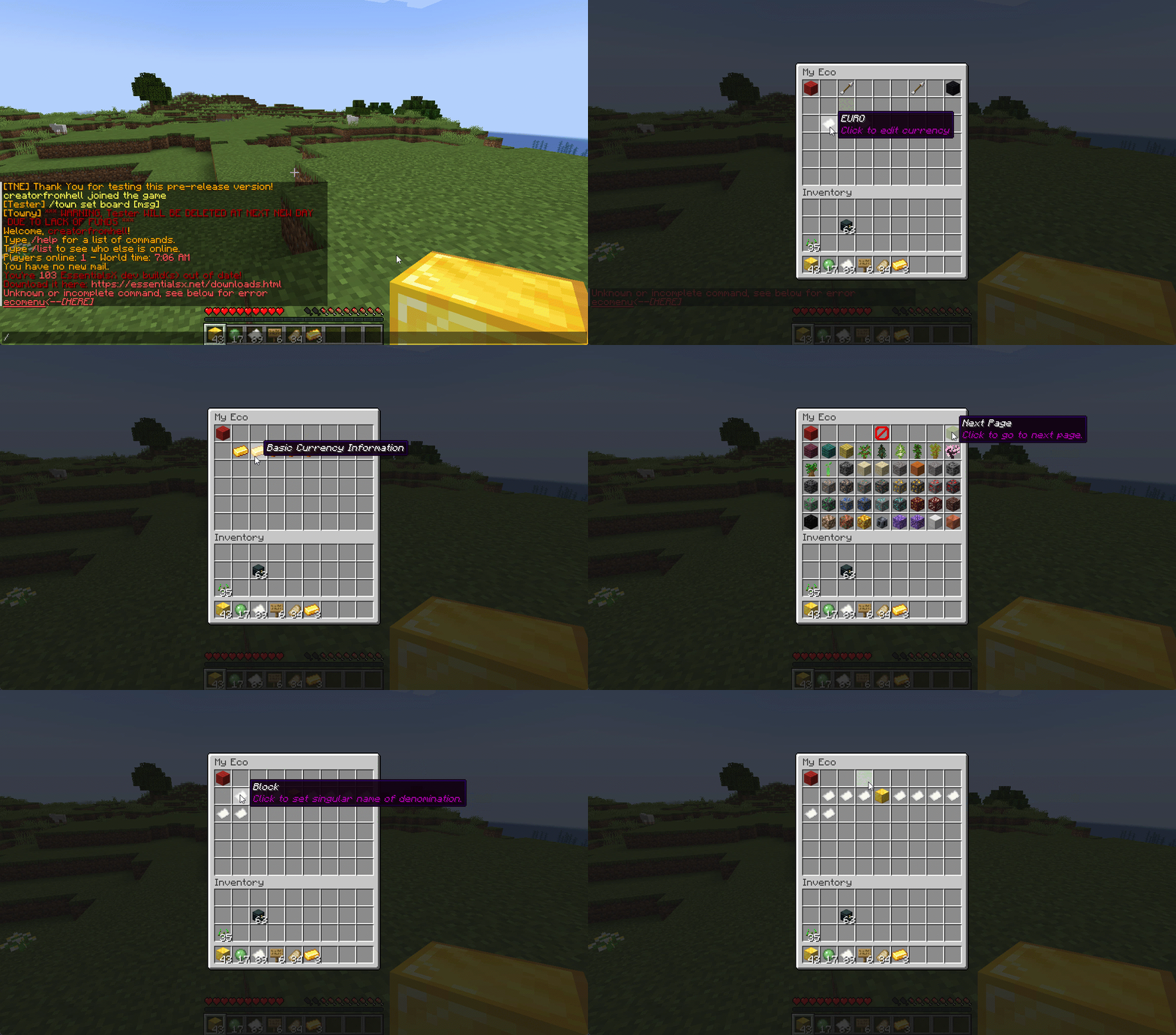
Want to use menus for currency creation and player actions? We got you!
## MyBal for Players
## MyEco for Admins
—
## Support Your Favorite Plugins
We provide support for all your favorite plugins from Towny to Factions. Anything that supports Vault supports TNE!
—
## Updates
We continue to develop updates for TNE for free and fix bugs as they’re reported.
—
## All the Currencies – Unlimited
TNE allows you to create unlimited currencies with ease through the currency creation GUI.
—
## Currency Types
TNE supports different types of currencies:
– **Virtual** — Simple currency that exists in thin air
– **Item** — Use Minecraft items as currency
– Shulker Box Support
– Bundle Support
– **Mixed** — Uses both virtual and item balances, allowing players to switch between them
– **Experience** — Use experience as currency
– **Experience-Level** — Use experience levels as currency
### Money Notes
Convert your virtual currency into a physical money note using the `/money note` command.
—
## Fine Tune Your Currency
Lots of per-currency configuration options:
– Create a custom balance format for each currency
– Set a starting amount for each currency
– Set custom conversion rates for each currency
– Create custom crafting recipes for item currencies
– Block mob drops for each currency
– Set the max balance for each currency
– Set enderchest balance inclusion per currency
– Use MiniMessage inputs for item display names and lores
– Create custom note items (currency vouchers)
– Use model data items as currency
—
## Fine Tune Who Can Access What Currency
TNE allows you to fine tune who can run commands with each currency. You can block players from using `/pay` for certain currencies and even restrict balance checks.
—
## Multi-Platform
Use Sponge? Sure.
Paper? Why not?
Both? Over Velocity? Definitely!
Switch platforms — your TNE data works for you no matter where you run it.
### Supported:
– Paper / Spigot / Purpur
– Sponge 8
### Coming:
– Fabric
– Sponge 7
—
## Discord Server
We have a Discord server available for users who have questions or need support!
—
## Configurability
TNE strives to allow you to configure as much as possible — from messages to starting money to max holdings.
—
## Misc Features
– Adventure Chat support for colorful translations
– Placeholder support (including top 10)
– Easy administration commands
– Transaction logging
– Easy-to-use menu system
– Multiple data types:
– SQL
– YAML
– MariaDB
– Tab completion for commands
– `baltop` command
—
## Open Source
Contribute on GitHub:
https://github.com/BitworksMC/EconomyCore


