Touchdown
SpigotMC | CurseForge | GitHub
NEED ProtocolLib FOR THIS PLUGIN
**Touchdown** provides an interactive spawn region selection for new players, allowing them to choose their starting location upon first join. The plugin features **camera effects**, **safe teleportation**, **spectator mode navigation**, and **optional AuthMe support** for servers that require login authentication.
### Features
– Interactive spawn region selection for new players.
– Smooth camera movement around selectable regions.
– Safe teleportation to the chosen spawn.
– Spectator mode during selection, with flight enabled.
– Configurable visual effects (particles, titles, action bars).
– AuthMe compatibility: players who log in through AuthMe can still select their spawn.
– Changelog notification for admins.
– Fully configurable via config.yml and language files (lang/*.yml).
### Commands
– `/touchdown reload` – Reloads the plugin configuration and language files.
– `/touchdown createregion ` – Creates a new spawn region at the player’s current location. Shorthand: `/td cr`.
### Permissions
`touchdown.admin` – Allows access to admin commands (reload, createregion).
Touch Grass
# About
This Datapack is designed to make your life hard by making it where you have to touch grass or other green stuff to live
Blocks you can walk on
# BLocks You can step on (work in progress update)
– minecraft:air
– minecraft:grass_block
– minecraft:short_grass
– minecraft:tall_grass
– minecraft:fern
– minecraft:large_fern
– minecraft:dead_bush
– minecraft:moss_block
– minecraft:moss_carpet
– minecraft:farmland
– minecraft:water
– minecraft:kelp
– minecraft:kelp_plant
– minecraft:seagrass
– minecraft:tall_seagrass
– minecraft:snow
– minecraft:obsidian
– minecraft:end_gateway
– minecraft:end_portal
– minecraft:end_portal_frame
– minecraft:nether_portal
– minecraft:torch
– minecraft:soul_torch
– minecraft:tripwire
– minecraft:scaffolding
– minecraft:bamboo
– minecraft:sweet_berry_bush
– minecraft:small_dripleaf
– minecraft:big_dripleaf
– minecraft:big_dripleaf_stem
– minecraft:glow_lichen
– minecraft:oak_sapling
– minecraft:spruce_sapling
– minecraft:birch_sapling
– minecraft:jungle_sapling
– minecraft:acacia_sapling
– minecraft:dark_oak_sapling
– minecraft:mangrove_propagule
– minecraft:cherry_sapling
– minecraft:bamboo_sapling
– minecraft:white_carpet
– minecraft:orange_carpet
– minecraft:magenta_carpet
– minecraft:light_blue_carpet
– minecraft:yellow_carpet
– minecraft:lime_carpet
– minecraft:pink_carpet
– minecraft:gray_carpet
– minecraft:light_gray_carpet
– minecraft:cyan_carpet
– minecraft:purple_carpet
– minecraft:blue_carpet
– minecraft:brown_carpet
– minecraft:green_carpet
– minecraft:red_carpet
– minecraft:black_carpet
– minecraft:stone_button
– minecraft:oak_button
– minecraft:spruce_button
– minecraft:birch_button
– minecraft:jungle_button
– minecraft:acacia_button
– minecraft:dark_oak_button
– minecraft:mangrove_button
– minecraft:cherry_button
– minecraft:bamboo_button
– minecraft:crimson_button
– minecraft:warped_button
– minecraft:light_weighted_pressure_plate
– minecraft:heavy_weighted_pressure_plate
– minecraft:stone_pressure_plate
– minecraft:oak_pressure_plate
– minecraft:spruce_pressure_plate
– minecraft:birch_pressure_plate
– minecraft:jungle_pressure_plate
– minecraft:acacia_pressure_plate
– minecraft:dark_oak_pressure_plate
– minecraft:mangrove_pressure_plate
– minecraft:cherry_pressure_plate
– minecraft:bamboo_pressure_plate
– minecraft:crimson_pressure_plate
– minecraft:warped_pressure_plate
– minecraft:rail
– minecraft:powered_rail
– minecraft:detector_rail
– minecraft:activator_rail
– minecraft:redstone_wire
– minecraft:redstone_torch
– minecraft:lever
– minecraft:repeater
– minecraft:comparator
– minecraft:dandelion
– minecraft:poppy
– minecraft:blue_orchid
– minecraft:allium
– minecraft:azure_bluet
– minecraft:red_tulip
– minecraft:orange_tulip
– minecraft:white_tulip
– minecraft:pink_tulip
– minecraft:oxeye_daisy
– minecraft:cornflower
– minecraft:lily_of_the_valley
– minecraft:wither_rose
– minecraft:wheat
– minecraft:carrots
– minecraft:potatoes
– minecraft:beetroots
– minecraft:nether_wart
– minecraft:torchflower_crop
– minecraft:pitcher_crop
TotemGuard
## Overview
TotemGuard is a lightweight anti-cheat plugin designed to detect players using AutoTotem. It operates asynchronously to
minimize server impact and offers extensive configurability, enabling server owners to tailor the plugin to their
specific needs.
### Prerequisites
TotemGuard requires the PacketEvents library to function. Ensure it is
installed on your server.
### Sponsors

## Table of Contents
– [Showcase](#showcase)
– [Supported Platforms & Versions](#supported-platforms–versions)
– [Checks](#checks)
– [Features](#features)
– [Commands](#commands)
– [Permission Nodes](#permission-nodes)
– [Installation](#installation)
– [Credits](#credits)
– [License](#license)
## Showcase

## Supported Platforms & Versions
| Platform | Supported Versions |
|———————————|——————–|
| Paper, Folia, and related forks | 1.20 – 1.21.5 |
## Checks
For a much more detailed explanation of the checks, see the wiki!
### AutoTotem
– **AutoTotemA** – Click time difference
– **AutoTotemB** – Impossible standard deviation
– **AutoTotemC** – Impossible average standard deviation
– **AutoTotemD** – Suspicious re-totem packet sequence
– **AutoTotemE** – Impossible low outliers
– **AutoTotemF** – Invalid interactions during inventory close
### BadPackets
– **BadPacketsA** – Opt-out message in a mod configuration channel
– **BadPacketsB** – Banned client brand
– **BadPacketsC** – Same slot change packet
### ManualTotem
– **ManualTotemA** – Time difference between replacement after totem removal
## Features
– **Performance** – Asynchronous operations ensure minimal impact on server performance.
– **Database Support** – Compatible with both MySQL and SQLite.
– **Folia Integration** – Supports Folia for regionized multithreading.
– **Webhooks** – Send alerts and punishments to a Discord webhook.
– **Highly Configurable** – Adjust nearly every setting during runtime to fit your server’s needs.
– **Update Checker** – Automatically checks for updates on startup.
– **Bypass Permission** – Allows players with `TotemGuard.Bypass` to bypass checks.
– **Cross Server Alerts** – Easily send and retrieve alerts across multiple servers, through either plugin messaging or
Redis.
– **Bedrock Exception** – Automatically ignores Bedrock Edition players to prevent false positives.
## Commands
– `/totemguard` or `/tg` – Main command for TotemGuard.
– `/totemguard reload` – Reload the plugin configuration.
– `/totemguard alerts` – Toggle alerts for the player.
– `/totemguard check ` – Check the player for AutoTotem.
– `/totemguard alerts ` – Toggle alerts for another player.
– `/totemguard profile` – Display the player’s profile.
– `/totemguard stats` – Show plugin statistics.
– `/totemguard clearlogs` – Clear the logs.
– `/totemguard track/untrack ` – Tracks the player.
– `/totemguard top` – Shows the top 10 violators.
– `/totemguard manualban ` – Manually ban a player.
– `/totemguard database trim` – Trim the database.
– `/totemguard database clear` – Clear the database.
## Permission Nodes
Operators (OPs) have these permissions by default, except `TotemGuard.Debug`:
– `TotemGuard.*` – Access to all TotemGuard permissions.
– `TotemGuard.Staff` – Access to `TotemGuard.Check`, `TotemGuard.Alerts`, and `TotemGuard.Profile`.
– `TotemGuard.Databases.*` – Access to all database-related commands.
– `TotemGuard.Reload` – Access to the `/totemguard reload` command.
– `TotemGuard.Check` – Access to the `/totemcheck` command.
– `TotemGuard.Alerts` – Access to the `/totemguard alerts` command.
– `TotemGuard.Alerts.Others` – Toggle alerts for other players.
– `TotemGuard.Profile` – Access to the `/totemguard profile` command.
– `TotemGuard.Stats` – Access to the `/totemguard stats` command.
– `TotemGuard.ClearLogs` – Access to the `/totemguard clearlogs` command.
– `TotemGuard.Track` – Access to the `/totemguard track` command.
– `TotemGuard.Bypass` – Bypass the plugin’s checks.
– `TotemGuard.Update` – Receive update notifications.
– `TotemGuard.Top` – Access to the `/totemguard top` command.
– `TotemGuard.ManualBan` – Access to the `/totemguard manualban` command.
– `TotemGuard.Database.Trim` – Access to the `/totemguard database trim` command.
– `TotemGuard.Database.Clear` – Access to the `/totemguard database clear` command.
– `TotemGuard.Debug` – View debug messages.
## Installation
1. **Prerequisites**: Ensure PacketEvents is installed.
2. **Download**: Get the latest release from
the GitHub release page.
3. **Install**: Place the plugin JAR file in your server’s `plugins` directory.
4. **Configure**: Customize the `config.yml` file as needed.
5. **Reload**: Apply the changes using `/totemguard reload`.
## Credits
**Maintainer: @OutDev**
For their creative ideas and dedicated efforts in maintaining the project.
## License
This project is licensed under the [GPL3 License](LICENSE).
## Features
– **Performance** – Asynchronous operations ensure minimal impact on server performance.
– **Database Support** – Compatible with both MySQL and SQLite.
– **Folia Integration** – Supports Folia for regionized multithreading.
– **Webhooks** – Send alerts and punishments to a Discord webhook.
– **Highly Configurable** – Adjust nearly every setting during runtime to fit your server’s needs.
– **Update Checker** – Automatically checks for updates on startup.
– **Bypass Permission** – Allows players with `TotemGuard.Bypass` to bypass checks.
– **Cross Server Alerts** – Easily send and retrieve alerts across multiple servers, through either plugin messaging or
Redis.
– **Bedrock Exception** – Automatically ignores Bedrock Edition players to prevent false positives.
– **BetterReload Support** – Integrates with BetterReload for seamless
configuration reloading.
## Commands
– `/totemguard` or `/tg` – Main command for TotemGuard.
– `/totemguard reload` – Reload the plugin configuration.
– `/totemguard alerts` – Toggle alerts for the player.
– `/totemguard check ` – Check the player for AutoTotem.
– `/totemguard alerts ` – Toggle alerts for another player.
– `/totemguard profile` – Display the player’s profile.
– `/totemguard stats` – Show plugin statistics.
– `/totemguard clearlogs` – Clear the logs.
– `/totemguard track/untrack ` – Tracks the player.
– `/totemguard top` – Shows the top 10 violators.
– `/totemguard database trim` – Trim the database.
– `/totemguard database clear` – Clear the database.
## Permission Nodes
Operators (OPs) have these permissions by default, except `TotemGuard.Debug`:
– `TotemGuard.*` – Access to all TotemGuard permissions.
– `TotemGuard.Staff` – Access to `TotemGuard.Check`, `TotemGuard.Alerts`, and `TotemGuard.Profile`.
– `TotemGuard.Databases.*` – Access to all database-related commands.
– `TotemGuard.Reload` – Access to the `/totemguard reload` command.
– `TotemGuard.Check` – Access to the `/totemcheck` command.
– `TotemGuard.Alerts` – Access to the `/totemguard alerts` command.
– `TotemGuard.Alerts.Others` – Toggle alerts for other players.
– `TotemGuard.Profile` – Access to the `/totemguard profile` command.
– `TotemGuard.Stats` – Access to the `/totemguard stats` command.
– `TotemGuard.ClearLogs` – Access to the `/totemguard clearlogs` command.
– `TotemGuard.Track` – Access to the `/totemguard track` command.
– `TotemGuard.Bypass` – Bypass the plugin’s checks.
– `TotemGuard.Update` – Receive update notifications.
– `TotemGuard.Top` – Access to the `/totemguard top` command.
– `TotemGuard.Database.Trim` – Access to the `/totemguard database trim` command.
– `TotemGuard.Database.Clear` – Access to the `/totemguard database clear` command.
– `TotemGuard.Debug` – View debug messages.
## Installation
1. **Prerequisites**: Ensure PacketEvents is installed.
2. **Download**: Get the latest release from
the GitHub release page.
3. **Install**: Place the plugin JAR file in your server’s `plugins` directory.
4. **Configure**: Customize the `config.yml` file as needed.
5. **Reload**: Apply the changes using `/totemguard reload`.
## Credits
**Maintainer: @OutDev**
For their creative ideas and dedicated efforts in maintaining the project.
### Special Thanks to Our Contributors
– **@Retrooper**
For developing PacketEvents, a foundational library integral to the
project’s success.
– **@MattMX**
For supporting development by providing server access and contributing valuable insights
through PvPHub.
## License
This project is licensed under the [GPL3 License](LICENSE).
TotemCooldown
# TotemCooldown
A simple plugin that lets you configure the cooldown of totems of undying.
Cooldown persists through logouts and server restarts, so it cannot be skipped.
## Config
“`yaml
#amount of ticks to set the cooldown to (1 second = 20 ticks)
totem-cooldown-ticks: 100
#whether to reset the cooldown on death
resets-on-death: true
“`
TotemAnimations
## Usage
`/totemanimation ` command allows you to display totem animation with provided CustomModelData to specified player. Obviously, that player has to have resource pack with CustomModelData totems enabled.
## API
Plugin can be used as an API
“`xml
jitpack.io
https://jitpack.io
“`
“`xml
com.github.YouHaveTrouble
TotemAnimations
VERSION
“`
“`java
TotemAnimations.playTotemAnimation(Player player, int customModelData);
“`
Topper
# Info
This is another leaderboard plugin that stores values from various providers. Lightweight & Performance are all it has. Other features may you see in other plugins.
# Story
I had used a lot of leaderboard plugins. Some had fulfilled my needs, but one problem was either the plugin is not in a good shape (bad performance, crashing my server, etc.) or it is a paid one with bloated features. Therefore, I created this plugin for my server, and then shared it here.
# Feature
– Friendly for servers of any size
– Lightweight
– Leaderboard
– Placeholders
– Support YAML, JSON, SQLITE & MYSQL storage
# Stats

# Extra
 
ToolStats
ToolStats







ToolStats is a Paper plugin that displays various stats about tools. This plugin is inspired off of GearStats. You can either track all statistics by default, or a use a token system to add statistics to tool/armor. You can configure how each statistic is shown on the item, or disable it!
Here is everything it tracks:
* Blocks mined (pickaxes, shovels, axes, hoes, shears).
* Crops harvested (hoes).
* Player/mob kills (swords, axes, tridents, bows/crossbows, mace).
* Ownership of items when crafted, looted (from chests/vaults/barrels), traded, spawned via creative, and caught from fishing.
* Armor damage taken (shields too).
* Damage done with weapons.
* Fish caught.
* Sheep sheared.
* Arrows shot (bows/crossbows).
* Flight time with elytras.
* Critical strikes for melee weapons.
* Times trident thrown.
* Logs stripped.
The best part is, this data is stored on the item itself.
This plugin also has compatibility for:
* RoseStacker
You can see some of the stats below as examples:
| Crafted Origin | Player/Mob Kills | Fish Caught |
|—|—|—|
|  |  |  |
| Sheep Sheared | Dropped By | Damage Taken |
|—|—|—|
|  |  |  |
| Mob Kills | Elytra | Looted Origin |
|—|—|—|
|  |  |  |
| Traded Origin | Spawned Origin | Raw NBT Data |
|—|—|—|
|  |  |  |
| Crops Harvested | Flight Time | Arrows Shot |
|—|—|—|
|  |  |  |
| Critical Strikes | Trident Throws | Logs Stripped |
|—|—|—|
|  |  |  |
## Documentation
Visit the wiki for help.
## License
This plugin is released under GNU General Public License v3. See LICENSE.
ToolKit
> Optional dependencies: Apollo, Pl3xMap
ToolKit is a lightweight plugin for Paper & Folia servers that provides a range of useful tools for server
administrators.
Suitable for all servers that require basic player management tools.
## Key Features:
> *`.bypass` permission suffix is for restricting anyone to use that command on you.
`.other` permission suffix is for option to apply the command to other players.*
– **/crash **: Force-quits a selected player’s Minecraft client
– permission: `toolkit.crash`
– bypass: `toolkit.crash.bypass`
– **/skick **: Disconnects the player from the game with a very long message, making it impossible to click on
the button to return to the main menu
– permission: `toolkit.skick`
– bypass: `toolkit.skick.bypass`
—
– **/crawl **: Forces a selected player to crawl on ground
– permission: `toolkit.crawl`
– other: `toolkit.crawl.other`
– **/sit **: Forces a selected player to sit on ground or any other block
– permission: `toolkit.sit`
– other: `toolkit.sit.other`
—
– **/wp **: Command for creating waypoints compatible with Lunar & Pl3xMap
– permission: `toolkit.wp`
—
– **/vanish **: Makes a player invisible to other players
– permission: `toolkit.vanish`
– **/pinfo **: Shows the player’s IP address and the client they are connected with
– permission: `toolkit.pinfo`
– clients:
– Forge
– Fabric
– LiteLoader
– WorldDownloader
– Rift
– LunarClient
– FeatherClient
– **/cmdblock**: Allows to block specified server commands
– permission: `toolkit.cmdblock`
– bypass: `toolkit.cmdblock.bypass`
– **/rp **: Forcefully orders the player to download the given resource pack
– permission: `toolkit.rp`
– **/msg **: Sends a private message to the given player.
– permission: `toolkit.msg`
—
– **/troll **: Brings a touch of mischievous fun
– permission: `toolkit.troll`
– bypass: `toolkit.troll.bypass`
– trolls:
– Sneak
– Sleep (it must be night, and you must stand on the bed)
– Close
– CloseSpam (anti-leave)
– Glow
– PickUp
– Freeze
– FakeOp
– Flip
– Thor
– FakeDemo
## Aliases:
> *All Aliases have permission in this format `toolkit.` with option to add `toolkit..other` suffix*
– **/gmc**: Switch player’s gamemode to CREATIVE
– **/gms**: Switch player’s gamemode to SURVIVAL
– **/gma**: Switch player’s gamemode to ADVENTURE
– **/gmsp**: Switch player’s gamemode to SPECTATOR
– **/spawn**: Teleports player to spawn
– **/fly**: Allows the player to fly
– **/wc**: Clear weather
– **/ic**: Clear inventory
## Additional Features:
– **Custom join message**
– **Custom leave message**
—
– **Teleport to spawn on join**
– **Teleport to spawn on death**
– **Teleport to spawn using /spawn**
– **Pl3xMap integration to hide players in vanish and show Lunar waypoints**
– **Block all players without Lunar client**
## Config
– true = enabled, false = disabled
“`yml
spawn:
world: world
join: true
death: true
join:
alert: true
message: “&8[&cSERVER&8]&6 %player%&7 joined!”
leave:
alert: true
message: “&8[&cSERVER&8]&6 %player%&7 disconnected!”
#custom chat colors
color:
bracket: “&8”
name: “&c”
text: “&7”
highlight: “&6”
lunar:
#kick non lunar players
kick: false
kick_message: “&8[&cSERVER&8]&7 This is lunar only server!”
msg:
sender: “&8[&cMSG&8]&7 To&6 %receiver%&8 >&7 %msg%”
receiver: “&8[&cMSG&8]&7 From&6 %sender%&8 >&7 %msg%”
#disable individual commands (to prevent collision with plugins with same commands)
commands:
crash: true
crawl: true
skick: true
sit: true
troll: true
pinfo: true
rp: true
wp: true
cmdblock: true
vanish: true
msg: true
gmc: true
gms: true
gma: true
gmsp: true
spawn: true
fly: true
wc: true
ic: true
#block commands
commandblock:
message: “&8[&cSERVER&8]&7 You”re not allowed to do this!”
list:
– pl
– plugins
– help
– ver
– version
– about
– “?”
– bukkit
“`
toNeko
# toNeko
简体中文 | **English**
## Brief introduction
Meow meow meow~
### Download:
Plugin version
Mod version
## How to use
You only need to put it in the `plugins` or `mods` folder of the server/client.
Pre-mods required for the mod version (must be added): ctlib, geckolib
Pre-plugin required for the plugin version: ctlib
## Tips
If you found that some text isn’t your language, just modify [the config file](#configuration) to your language.
## Supported versions (but it does not mean that it cannot run on other versions):
– Fabric 1.21
– Paper/Folia 1.21
## Communication&Support
– Discord
## How to become a neko
If you want to become a neko, it’s very simple. You just need to make a neko collector and then get close to cats. When the energy is full, a bottle of neko potion will drop. Just drink it.
If you need to become the owner of another neko (of course you can do it yourself), just execute `/toneko player `. The prerequisite is that the other party must be a neko (Tips: a neko can have multiple owners)
## Linkage
Linkage mods: luckperms
## Shortcuts
Some functions of toNeko can be used by shortcuts, the default is as follows:
– `K`: Ride nearby creatures (same as executing `/neko ride`)
– `I`: Lie down (literally)
– `O`: Lie down (also literally)
– `J`: Open quirks settings interface
These shortcuts have corresponding commands (I will never tell you that I call the command directly)
## Neko NPC
toNeko has added some neko to make it more playable in single-player mode. You can meet them in the wild, or you can choose to spawn them directly
You can open the interactive menu by shift+right-clicking on the neko. The interactive menus of different neko may be slightly different. The effective distance is 16 grids. If you walk far away and click the button, it will be invalid.
Each neko may have a different skin after refreshing. There are not many built-in skins at present, but new skins can be added through resource packs. As for how to add them, I will write a document specifically for it after the skin function is perfected, so please stay tuned~^_^~
Neko will have different variants, and their refresh locations may also be different. If you want to add your own, you can tell me directly and I will try my best to do it. Of course, there is also a special variant that will only refresh on toNeko’s birthday (September 26). As for what it is, you can go and see it yourself.
## Accessories
toNeko has added several accessories, which you can see in the creative inventory. Of course, these are all craftable. Accessories can be worn directly on the armor slot, and if you have added trinkets, they can also be placed in the accessories slot.
## Commands & permissions (all owned by default)
“`yaml
# If you want to know how to use it, please add help after each command, for example /toneko help
# Commands for the owner (permission is command.toneko.xxx)
/toneko
# Commands for neko (permission is command.neko.xxx)
/neko
# Commands for administrators (permission is command.tonekoadmin.xxx)
/tonekoadmin
# Set your quirks (permissions are command.quirk.xxx)
/quirk
“`
## Configuration
Although you may not need a configuration file in most cases, sometimes you can use it to customize your experience.
### Main configuration file: `config.yml`
#### Path:
Fabric/Quilt: `config/toneko.yml`
Spigot/Paper: `plugins/toNeko/config.yml`
I won’t go into details about how to edit it, there are comments.
That’s all.
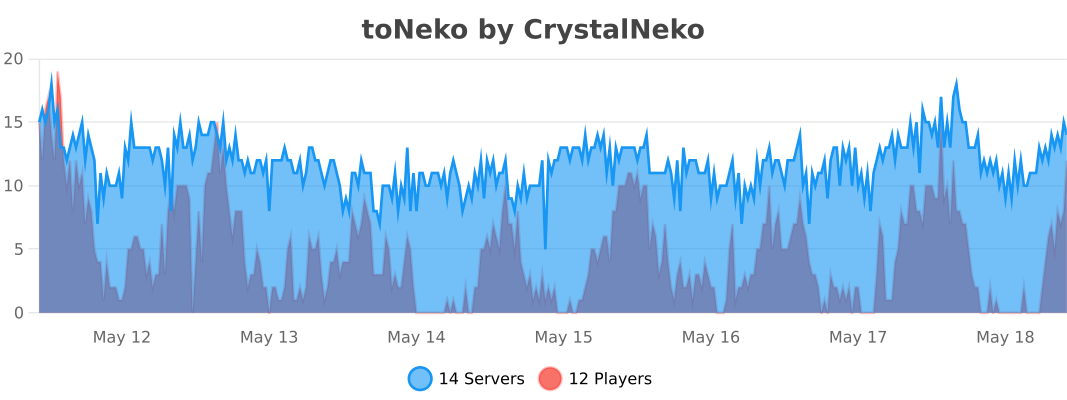
## bStats:
PVP Toggle
# PVP Toggle
A Paper 1.21 PVP toggle plugin: players choose whether to participate in PVP; admins can manage others’ state. Supports Folia, LuckPerms, PlaceholderAPI, and per-world PVP state.
—
## Features
– **Players**: `/pvp` or `/pvp on` / `off` / `toggle` to change your own PVP
– **Admins**: `/pvp on|off|toggle ` to manage someone else’s PVP
– **Status**: `/pvp status` for yourself, `/pvp status ` for others (with permission)
– **Reload**: `/pvp reload` to reload config (with permission)
– **Per-world**: Optional separate PVP state per world
– **Debounced save**: Fewer disk writes
– **Cooldown**: Configurable cooldown after toggling your own PVP
– **Feedback**: Configurable sound, ActionBar, and Title on toggle
– **PlaceholderAPI**: Placeholders like `%pvptoggle_status%`
– **Folia**: Region-aware scheduling; async save so it doesn’t block
– **LuckPerms**: Permissions handled by LuckPerms when installed
—
## Commands
| Command | Description | Permission |
|———|————–|————|
| `/pvp` | Same as `/pvp toggle`; toggles your PVP | pvptoggle.use |
| `/pvp on` | Enable PVP for yourself | pvptoggle.use |
| `/pvp off` | Disable PVP for yourself | pvptoggle.use |
| `/pvp toggle` | Toggle your PVP | pvptoggle.use |
| `/pvp status` | View your own PVP status | pvptoggle.use |
| `/pvp status ` | View another player’s PVP status | pvptoggle.status.other |
| `/pvp on|off|toggle ` | Set PVP for another player | pvptoggle.admin |
| `/pvp reload` | Reload config.yml | pvptoggle.reload |
—
## Permissions
| Permission | Description | Default |
|————|————–|———|
| `pvptoggle.use` | Use /pvp, on/off/toggle, and /pvp status (self) | true |
| `pvptoggle.admin` | Use /pvp on|off|toggle | op |
| `pvptoggle.reload` | Use /pvp reload | op |
| `pvptoggle.status.other` | Use /pvp status | op |
—
## config.yml
– **default-pvp**: Default PVP state for new or unknown players (true/false)
– **persist-on-rejoin**: Whether to keep each player’s choice when they rejoin
– **per-world**: Whether to store PVP state per world (separate per world)
– **save-debounce-seconds**: Debounce time in seconds before writing to disk; 0 = save every time
– **command-cooldown-seconds**: Cooldown in seconds after toggling your own PVP; 0 = no cooldown
– **toggle-feedback**: Feedback when toggling
– **play-sound**: Play a sound
– **sound**: Sound name (e.g. ENTITY_EXPERIENCE_ORB_PICKUP)
– **sound-volume** / **sound-pitch**: Volume and pitch
– **use-actionbar**: Show message in ActionBar
– **actionbar-message**: ActionBar text; `%status%` = on/off
– **use-title**: Show title
– **title** / **subtitle**: Title and subtitle; `%status%` = on/off
– **placeholder-on** / **placeholder-off**: Values returned by PlaceholderAPI placeholders
– **messages.***: All messages; supports `&` color codes and `%player%`, `%seconds%`, `%status%`
—
## PlaceholderAPI
With PlaceholderAPI installed, these placeholders are registered (return values are configurable):
| Placeholder | Description |
|————-|————-|
| `%pvptoggle_status%` | Current player’s PVP status (in that player’s context) |
| `%pvptoggle_status_%` | A specific player’s PVP status (e.g. `%pvptoggle_status_Steve%`) |
Default return values are `on` / `off`; change them with **placeholder-on** and **placeholder-off** in config.
—
## Compatibility
– **Server**: Paper 1.21+ (or compatible forks)
– **Folia**: Supported (`folia-supported: true`); uses AsyncScheduler for saves
– **LuckPerms**: Soft dependency; permissions are managed by LuckPerms when present
– **PlaceholderAPI**: Soft dependency; placeholders are registered when present
—