TreeChopperUltra
# 🌲 TreeChopper — Tree Felling Plugin with Falling Animation | Paper · Spigot · Folia 1.21-26.1.2
**Break one log. Watch the whole tree fall.**
TreeChopper is a lightweight, performance-focused tree felling plugin for Paper, Spigot, and Folia servers. Hit any log with an axe and the entire tree collapses — logs tumble down layer by layer with real physics, leaves decay automatically, and a sapling replants itself at the base.
No client mods. No heavy dependencies. Just drop the jar and it works.
—
## ✨ Why TreeChopper?
Most tree felling plugins were built years ago and never adapted to modern threaded servers. TreeChopper is built for **modern Minecraft 1.21-26.1.2**, with real **Folia support** and a full **falling log animation**.
> **A tree chopper plugin with both falling animation and real Folia compatibility.**
—
## 🪓 Core Features
**Falling animation**
Logs do not just vanish. They break top-to-bottom and fly outward as `FallingBlock` entities with real Minecraft physics.
**Smart tree separation**
Two trees growing side by side are treated independently. Chop one tree and the other stays intact. Ownership checks prevent cross-tree damage to leaves, roots, and attached vegetation.
**2×2 mega tree support**
Large Jungle, Spruce, and Dark Oak trees with a 2×2 trunk are detected and felled as a single unit.
**Improved vanilla tree handling**
Complex natural trees such as **Cherry**, **Pale Oak**, and **Mangrove** are handled more accurately, including irregular trunk shapes, hanging vegetation, propagules, cocoa, and mangrove roots.
**All vanilla wood types**
Oak · Birch · Spruce · Jungle · Dark Oak · Acacia · Cherry · Mangrove · Crimson Stem · Warped Stem · Mushroom Stem
**Automatic leaf decay**
After the logs fall, leaves from the chopped tree break automatically. Leaves shared with a neighboring tree are left untouched.
**Attached vegetation cleanup**
Vines, cocoa, pale hanging moss, mangrove propagules, and similar vegetation are detected and removed along with the correct tree.
—
## ⚖️ Balance & Gameplay Feel
**Durability & Unbreaking**
The axe loses one durability per log broken. Unbreaking is applied probabilistically across the whole tree, matching vanilla behavior.
**Fortune & Silk Touch**
Enchantments on your axe apply to every log that falls, not just the first one.
**Player-placed log protection**
Logs placed by players are tracked and never trigger mass felling.
**Structure detection**
Heuristic analysis helps prevent the plugin from treating village houses, outposts, and other generated structures as natural trees.
**Sneak activation modes**
Choose how the plugin activates:
– `ALWAYS_ON` — always active with an axe
– `SNEAK_DISABLE` — active by default, hold sneak to disable
– `SNEAK_ENABLE` — disabled by default, hold sneak to activate
**Per-player toggle**
Each player can enable or disable tree chopping for themselves using `/treechopper toggle`. State persists across sessions.
—
## 🔗 Plugin Integrations
| Plugin | Behavior |
|—|—|
| **WorldGuard** | Felling is blocked inside protected regions |
| **GriefPrevention** | Felling is blocked inside claimed land |
| **CoreProtect** | Every broken log and replanted sapling is logged under the player’s name |
All integrations are **soft dependencies**. TreeChopper works perfectly without any of them.
—
## 🌱 Auto-Replant
After a tree is felled, a sapling is automatically placed at the base:
– Supports regular and mega (2×2) trees
– Configurable: take sapling from player inventory, or place it for free
– Respects WorldGuard and GriefPrevention
– Fixed protection flow so saplings are **not consumed** if placement is denied
– Can be limited to natural trees only
– Per-world enable/disable list
—
## ⚙️ Configuration
config.yml — click to expand
“`yaml
language:
default: en # en · ru · uk
fallback: en
limits:
max-logs: 512
leaf-search-radius: 6
foreign-log-scan-radius: 8
performance:
max-blocks-per-task: 16
activation:
mode: SNEAK_DISABLE # ALWAYS_ON · SNEAK_DISABLE · SNEAK_ENABLE
player-toggle:
enabled: true
default-enabled: true
save-on-change: true
detection:
min-leaf-contacts: 4
min-mega-leaf-contacts: 8
max-structure-contacts: 4
protection:
enabled: true
use-worldguard: true
use-griefprevention: true
mode: FAIL_WHOLE_TREE
integrations:
coreprotect:
enabled: true
auto-replant:
enabled: true
require-sapling: false
consume-sapling: false
delay-ticks-after-fell: 20
replant-mega-trees: true
mega-mode: four-saplings # single · four-saplings
respect-protection: true
only-natural-trees: true
disabled-worlds: []
“`
—
## 💬 Commands & Permissions
| Command | Permission | Default | Description |
|—|—|—|—|
| `/treechopper toggle` | `treechopper.toggle` | everyone | Enable/disable tree chopping for yourself |
| `/treechopper reload` | `treechopper.reload` | op | Reload config and all services without restart |
—
## 🌍 Localization
Built-in translations: **English**, **Russian**, **Ukrainian**
Language files are in `plugins/TreeChopper/lang/` and can be freely edited. Switch language in `config.yml` under `language.default`.
—
## 📊 Stats
TreeChopper includes anonymous **bStats** metrics.
Public stats page: https://bstats.org/plugin/bukkit/TreeChopper/27579
—
## 🚀 Perfect For
– **SMP servers** — satisfying QoL without breaking survival balance
– **Vanilla+ servers** — feels like a natural part of the game
– **Economy servers** — Fortune applies to all logs; durability still matters
– **Folia servers** — safe threaded scheduling with falling animation
– **Servers using WorldGuard / GriefPrevention / CoreProtect** — native integration
—
## 📋 Requirements
– **Server:** Paper, Spigot, or Folia
– **Java:** 21+
– **Minecraft:** 1.21-26.1.2
—
*Built for modern servers. Tested with 49 passing unit tests. MIT licensed.*
Tree Recovery
Have you ever accidentally stripped a log while building?
With this plugin, you don’t need to break and replace the block anymore!
# ✨ Features
– **Easy Restoration**: Just right-click the stripped log with an axe again to restore the bark.
– **Zero Configuration**: No setup required! Just drop the .jar file into your plugins folder.
– **Seamless**: Works instantly as if nothing happened.
If you like this plugin, please leave a rating!
Need help? Join our support Discord server.
—
建築中にうっかり斧で右クリックして、原木の樹皮を剥いでしまったことはありませんか?
このプラグインがあれば、もうブロックを置き直す必要はありません!
# ✨ 特徴
– 簡単修復: 皮を剥いでしまった原木を、斧でもう一度右クリックするだけで元に戻ります。
– 設定不要: コンフィグ設定は一切なし。プラグインフォルダに入れるだけですぐに使えます。
– 直感的: 音とモーション付きで、違和感なく修復できます。
気に入っていただけたら、ぜひレビューをお願いします!
困ったことやバグ報告は、サポートDiscordまでお気軽にどうぞ。
TreeBreakerX
# 🌳 TreeBreakerX – Tree Felling Plugin 🌳
TreeBreakerX is a cool and customizable plugin that lets players cut entire trees by breaking a single block. Everything is configurable in the config.yml, from bound items to world settings and messages. Perfect for survival servers, minigames, or casual gameplay.
# ⚡ __Features__
– **Whole tree felling:** Break a tree with one swing.
– **Bound items system:** Bind tools with optional usage limits.
– **World control:** Enable or disable TreeBreakerX in any world.
– **Configurable messages:** Fully customizable messages with color codes (&).
– **Permissions based commands:** Control who can use admin features.
– **Safe & optimized:** Works across multiple worlds without lag.
# 🛠 __Commands__
– **/tbx help** – Shows a help menu with all commands.
– **/tbx setbound** – Save the item in your hand as the bound template (uses default from config).
– **/tbx bindhand** – Alias for /setbound.
– **/tbx unbind** – Remove binding from the item in your hand.
– **/tbx givebound** [material] [uses] – Give a bound item. Optional material and uses (default from config).
– **/tbx togglebinding** – Toggle whether only bound items can fell whole trees (admin).
– **/tbx enableworld ** – Enable TreeBreakerX in a world (admin).
– **/tbx disableworld ** – Disable TreeBreakerX in a world (admin).
– **/tbx listworlds** – List enabled and disabled worlds (admin).
– **/tbx reload** – Reload the plugin config (admin).
# ⚙ __Configurable Options__
– **Bound items:** Material, display name, usage count, and glint effect.
– **Require bound item toggle:** Decide if only bound items can fell trees.
– **Worlds:** Enable or disable TreeBreakerX per world.
– **Messages:** Customize all in-game messages with color codes.
– **Permissions:** Set which players or groups can use each command.
**TreeBreakerX is simple, fun, and fully configurable, giving your server a clean tree-felling experience without any hassle.**
Nee Version 1.0.0 ( Fixed some Bugs an improved the plugin )
# For Bugs – Discord
trDiscordSync


## Gereksinimler
– Java 8 veya daha yeni bir sürüm
– Spigot veya Forkleri (Paper, Purpur gibi)
– LuckPerms
## **ÖZELLİKLER:** (TR)
– **Otomatik Bilgilendirme Sistemi:** Eklenti, Minecraft sunucusunda gerçekleşen belirli olayları otomatik olarak Discord sunucusuna bildirir. Bu sistem sayesinde oyuncu aktiviteleri, eşleşme durumu ve özel bildirimler Discord üzerinden ilgili kanallara gönderilir. Bildirimler, config.yml dosyası aracılığıyla özelleştirilebilir ve kanal bazlı yönlendirme desteklenir.
– **2FA(İki Aşamalı Doğrulama Sistemi):** Hesabınıza farklı bir IP adresinden giriş yapıldığında, güvenliğiniz için Discord üzerinden size bir doğrulama mesajı gönderilir. Bu durumda, dilerseniz giriş yapan oyuncuyu sunucudan atabilir ya da doğrulama mesajını onaylayarak devam etmesine izin verebilirsiniz.
– **Dahili Gömülü Discord Botu:** Eklenti, harici bir bot kurulumuna gerek kalmadan kendi içerisinde çalışan bir entegre Discord botu barındırır.
Bu sayede sistem, herhangi bir 3. parti uygulamaya ihtiyaç duymadan bağımsız olarak çalışabilir.
Bot, Discord API üzerinden:
Mesaj gönderme
Rol atama
Kullanıcı adı güncelleme
Onay sistemi yönetimi
gibi işlemleri doğrudan gerçekleştirebilir.
– **Onaylı Kullanıcı Eşleştirme Sistemi:** Kullanıcıların Minecraft hesaplarını Discord hesaplarıyla bağlamadan önce bir onay sürecinden geçmeleri gerekmektedir. Bu sistem, sunucuda yetkisiz kullanıcı eşleşmelerinin önüne geçmek ve güvenliği artırmak için geliştirilmiştir.
– **6 Adet Dil Desteği:**
– Çince (Chinese)
– Türkçe (Turkish)
– İngilizce (English)
– Fransızca (French)
– İspanyolca (Spanish)
– Almanca (German)
– **Kullanıcı Adı Güncelleme Sistemi:** Başarılı eşleştirme sonrasında, kullanıcının Discord üzerindeki görünen adı otomatik olarak Minecraft kullanıcı adı ile güncellenir.
Bu özellik:
Sunucu içi düzeni artırır
Oyuncuların kimlik takibini kolaylaştırır
Anonim kullanıcı adlarının önüne geçer
Yapılandırma dosyası üzerinden bu özellik aktif/pasif hale getirilebilir.
– **Rol Atama ve Yetkilendirme Sistemi:** Eklenti, oyuncu eşleşmesini tamamladıktan sonra kullanıcının sahip olduğu özel üyelik durumuna göre Discord üzerindeki belirli rolleri otomatik olarak atar.
Rol tanımlamaları config.yml üzerinden yapılır ve şu kurallar desteklenir:
VIP, Premium, Elit gibi özel üyelik sistemleri
Çoklu rol desteği (birden fazla rol aynı anda atanabilir)
### Kurulum Talimatları
Yayınlanan jar dosyasını plugins/ klasörüne kopyalayın.
Sunucuyu başlatın ve plugins/AgnHesapEsle/ altında config.yml oluşturulmasına izin verin.
Gerekirse config.yml dosyasını düzenleyin.
### Komutlar
– **/hesapeşle eşle**: ➤ Discord botuna gönderilecek olan eşleştirme kodunu görüntüler.
– **/hesapeşle kaldır**: ➤ Mevcut eşleştirme bağlantısını kaldırı
– **/hesapeşle yenile**: ➤ messages.yml dosyasını yeniden yükler.
– **/hesapeşle kodiptal**: ➤ Onay sürecindeki kodunuzu iptal eder.
– **/hesapeşle liste** ➤ Hesabını eşleyen oyuncuların listesini gösterir.
– **/hesapeşle sıfırla OyuncuAdı** ➤ Belirtilen oyuncunun eşleşme bağlantısını sıfırlar.
### PLACEHOLDER
– **%agnesesle_server_toplam_eslesme%**: Sunucudaki, Toplam Eşleşme Sayısını Gösterir
– **%agnesesle_durum%**: Oyuncunun Eşledi mi, Eşlemedi mi Durumunu Gösterir.
– **%agnesesle_discord_id%**: Kullanıcının Discord Id’sini gösterir.
– **%agnesesle_discord_adi%**: Oyuncunun Discord Üzerinde’ki Adını Gösterir.
– **%agnesesle_2fa_durum%**: Oyuncunun 2FA(İki Aşamalı Doğrulama) Durumunu gösterir.
### İzinler
“`
agnesesle.admin (Tüm Komutlara Erişim Sağlar.)
“`
### Veritabanı
– Veri Tabana Dosya .yml Üzeridir İleri Zamanlarda Geçiş Yapılacaktır.
### Yapılandırma:
messages_tr.yml Dosyası
Tıkla
### İletişim
İletişim
Discord: **agnes9s_**
### ENG
## Requirements
– Java 8 or a newer Version
– Spigot or its forks (like Paper, Purpur)
– LuckPerms
### FEATURES: (EN)
– **Automatic Notification System:**
The plugin automatically reports specific events happening on the Minecraft server to the Discord server. Through this system, player activities, match status, and special notifications are sent to relevant channels on Discord. Notifications can be customized via the `config.yml` file and support channel-based routing.
– **2FA (Two-Factor Authentication System):**
When someone logs into your account from a different IP address, a verification message is sent to you via Discord for security purposes. You can either kick the player from the server or approve the login via the verification message.
– **Built-in Embedded Discord Bot:**
The plugin includes a built-in integrated Discord bot, eliminating the need for an external bot setup.
This allows the system to work independently without any third-party applications.
The bot can directly perform operations such as:
– Sending messages
– Assigning roles
– Updating usernames
– Managing the verification system
– **Verified User Matching System:**
Before users can link their Minecraft accounts to their Discord accounts, they must go through a verification process. This system is designed to prevent unauthorized user matches and enhance security on the server.
– **Support for 6 Languages:**
– Chinese
– Turkish
– English
– French
– Spanish
– German
– **Username Update System:**
After a successful account match, the user’s visible name on Discord is automatically updated to match their Minecraft username.
This feature:
– Improves in-server order
– Simplifies player identification
– Prevents anonymous usernames
It can be enabled/disabled via the configuration file.
– **Role Assignment and Authorization System:**
After matching, the plugin automatically assigns specific roles on Discord based on the player’s membership status (e.g., VIP, Premium, Elite).
Role definitions are managed via `config.yml` and support:
– Special membership roles
– Multi-role assignment
## Installation Instructions
1. Copy the released `.jar` file into the `plugins/` folder.
2. Start the server and allow the plugin to generate the `config.yml` under `plugins/AgnHesapEsle/`.
3. Edit the `config.yml` file if necessary.
## Commands
– **/hesapeşle eşle**: ➤ Displays the match code to be sent to the Discord bot.
– **/hesapeşle kaldır**: ➤ Removes the current match link.
– **/hesapeşle yenile**: ➤ Reloads the `messages.yml` file.
– **/hesapeşle kodiptal**: ➤ Cancels the pending verification code.
– **/hesapeşle liste** ➤ Displays the list of players who have matched their accounts.
– **/hesapeşle sıfırla ** ➤ Resets the match link of the specified player.
## PLACEHOLDER
– **%agnesesle_server_toplam_eslesme%**: Displays the total number of matches on the server.
– **%agnesesle_durum%**: Shows whether the player has matched or not.
– **%agnesesle_discord_id%**: Displays the user’s Discord ID.
– **%agnesesle_discord_adi%**: Shows the player’s name on Discord.
– **%agnesesle_2fa_durum%**: Displays the player’s 2FA (Two-Factor Authentication) status.
## Contact
Contact
Discord: **agnes9s_**
## Permissions
– agnesesle.admin (Grants access to all commands.)
## Database
– Data is stored in `.yml` files. Migration to a different system may be implemented in the future.
## Configuration
messages_en.yml File
Click
Trash-System
# Trash-System
**A sleek, lightweight plugin that provides players with a virtual trash bin GUI to safely dispose of unwanted items with confirmation protection.**
## Key Features
* **Virtual Trash Bin:** Players can dispose of unwanted items through an intuitive 6-row GUI.

* **Confirmation System:** Prevents accidental item deletion with a confirmation prompt before permanently removing items.

* **Security Features:** Border protection prevents item duplication exploits during server lag.
* **Multi-Language Support:** Fully translated in **English** and **German** with easy localization.
* **HEX Color Support:** Modern color codes including `&#RRGGBB` format for customizable messages.
* **Auto-Config Updates:** New config options are added automatically without losing your settings.
## How It Works
1. Player types `/trash` to open the trash bin GUI
2. Player places unwanted items into the GUI slots
3. Upon closing, a confirmation GUI appears
4. Player confirms deletion or cancels to retrieve items
## Commands & Permissions
| Role | Command | Permission |
| :— | :— | :— |
| Player | `/trash` | `trash.use` |
| Admin | `/trash reload` | `trash.reload` |
| Admin | Bypass Confirmation | `trash.bypass.confirm` |
—
## Configuration Highlights
“`yaml
# Language: “en” or “de”
language: “en”
# Customizable prefix with HEX support
prefix: “&#B8C4CE&lTRASH A8A99&l» &#FFFFFF”
# GUI Settings
gui:
rows: 6
fill-border: true
border-color: “GRAY”
# Confirmation timeout in seconds
confirmation:
enabled: true
timeout: 30
“`
—
### Dependencies (optional)
**We recommend installing LuckPerms** for a better permission management experience!
### Compatibility
✅ **Paper** 1.21.x
✅ **Folia** 1.21.x
✅ **Spigot** 1.21.x
### Support
For bugs or support: https://discord.gg/Mkgz7YK7Y8
Transactions

📋 Transactions


⚠️ Requirements:
• Version 1.21+
• Vault plugin
• Vault events plugin
## 🗒️ Player transfers
Player transfers are now logged when using /pay, so you can send money to other players without worrying about scams.

## 🎞️ Filters
Players can view transactions using filters for convenience.

## 🔳 Statistics for 1 week

## 🟨 TXT export
TXT export is available only to administrators and is uploaded to the server hosting.

## 🧭Commands
| Command |
Description |
| /tr clean |
Clear all transactions, OP only |
| /tr gmt <value> |
Available for everyone, allows setting a custom timezone |
| /tr player <player> |
Available for operators, view player transactions |
| /tr reload |
Reloads the plugin |
| /tr telegram |
Telegram integration (PRO version only) |
| /tr update |
Restores missing or corrupted plugin files |
## ⚙️ Config settings
| Setting |
Description |
| prefix: Ⓞ |
Symbol shown next to transaction amounts in the interface. |
| show-stats-button |
Enables or disables the “2-week statistics” button in the GUI. |
| save-interval-seconds |
Time interval (in seconds) for automatic saving of plugin data. |
| language |
Sets the plugin language (UI and messages). |
| income-message-color |
Color of incoming transaction text messages. |
| income-amount-color |
Color of income amount values. |
| expense-message-color |
Color of outgoing transaction text messages. |
| expense-amount-color |
Color of expense amount values. |
| yellow-message-color |
Color of neutral/special transaction messages. |
| yellow-amount-color |
Color of neutral/special transaction amounts. |
| clean-transactions-period |
Time period after which transactions are automatically deleted. |
| allow-balance-toggle |
Allows players to enable or disable balance display. |
| default-gmt-offset |
Default server timezone offset (GMT). |
| max-display-transaction-range |
Maximum number of days available for viewing transactions. |
| telegram.bot-token |
Telegram bot token used for integration with the plugin, avaible in pro version. |
## 🛡️ Permissions
| Permission |
Description |
| transactions.use |
Allows opening the personal transaction history GUI (/tr). |
| transactions.gmt |
Allows players to change their personal timezone offset (/tr gmt). |
| transactions.balance |
Allows players to toggle balance visibility in the menu (/tr balance). |
| transactions.view.others |
Allows viewing transaction logs of other players (/tr player). |
| transactions.download |
Allows exporting player logs into a .txt file via command. |
| transactions.reload |
Allows reloading the config and updating files (/tr reload, /tr update). |
| transactions.clean |
Allows full clearing of the transaction database (/tr clean). |
| transactions.range |
Allows configuring the maximum display range (/tr range). |
| transactions.source |
Show source transaction. |
TrailPaths
# TrailPaths
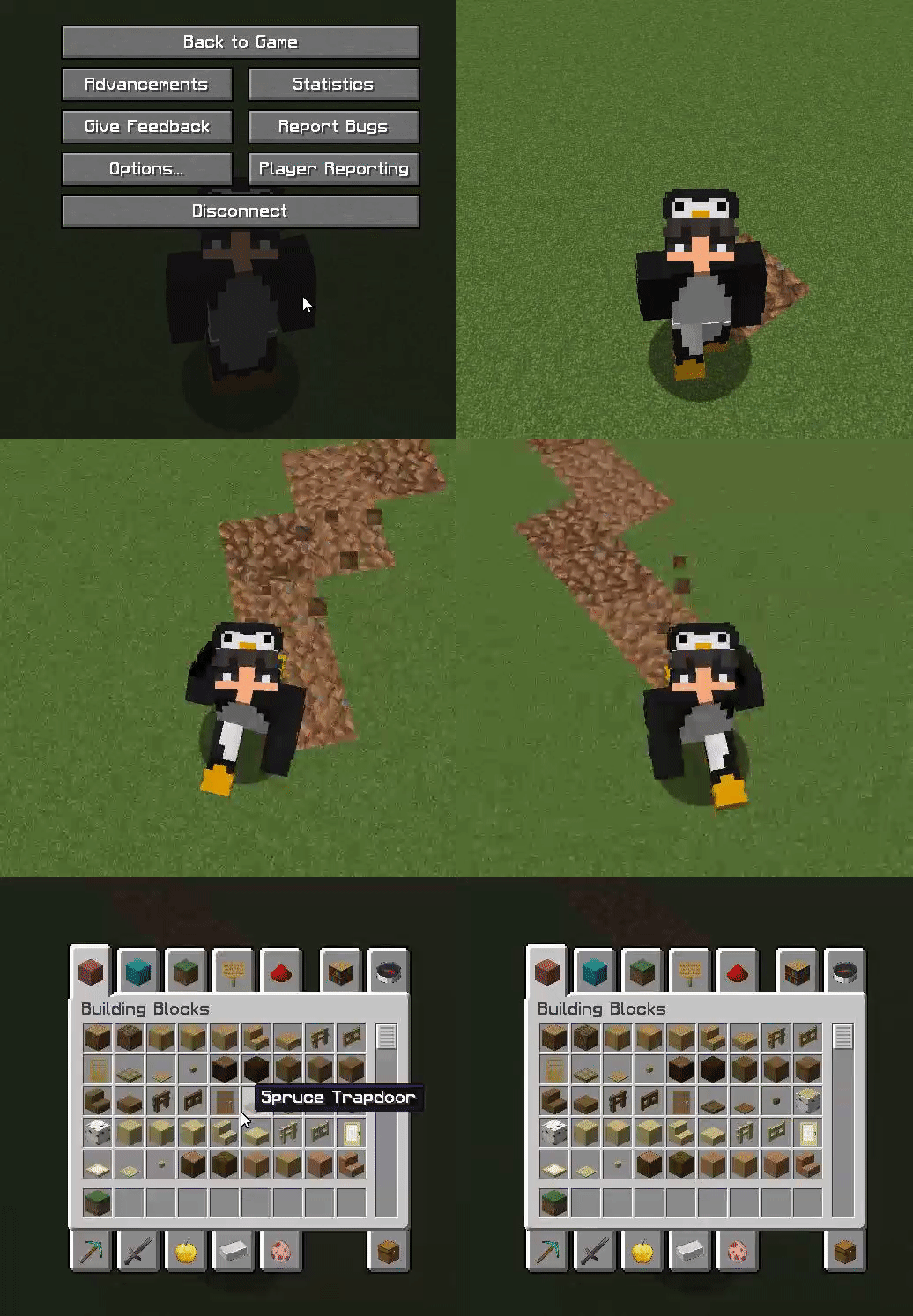
This plugin is very simple and lightweight. It allows players to create a “path” behind them while walking. This can be configured to be any block and change any type. You can also reset this path after x amount of time to return back to the original state. This is a unique addon for many servers.
Commands:
– /trails help – View the plugin commands.
– /trails reload – Reload the configuration files.
– /trails – Toggle your trail path on and off.
– /trails on – Toggle your trail path on.
– /trails off – Toggle your trail path off.
Permissions:
– TRAILS.* – Access to all commands.
– TRAILS.HELP – Use the /trails help command.
– TRAILS.RELOAD – Use the /trails reload command.
– TRAILS.TOGGLE – Use the /trails, /trails on, /trails off commands.
Images
TradePost
## 🛒 TradePost – SMP-Friendly Auction House
**TradePost** is a secure, SMP-friendly auction house plugin for **Paper 1.21+** with a **built-in item-based economy** **no Vault required**.
By default, the server uses a **global admin-selected currency** (emerald, diamond, gold, iron, redstone, or netherite). Players cannot change or filter currencies, ensuring a clean and fair market.
—
### ✨ Features
* Global **admin-controlled currency** (no player filtering or cycling)
* **Secure anti-dupe protections**
* **Offline payouts** (earn while logged out)
* Lightweight & survival-friendly performance
* No Vault or external economy plugins needed
* Designed for long-term SMP servers
* **Configurable GUI icons** (supports resource packs)
* **Multi-language support** (translations configurable in messages files)
* **Right-click shulker inspection** (preview contents before buying)
* **LuckPerms prefix support** for seller display names
* Optional **configurable tax system** (default off)
* **PlaceholderAPI support for scoreboards & TAB**
* Spigotmc
Modrinth
—
### 🔒 Source Code Policy
**TradePost is closed-source. Source code requests will be declined.**
Questions about features, usage, or behavior are always welcome.
—
### 🧩 PlaceholderAPI Support
TradePost includes **built-in placeholders** that can be used in **scoreboards, TAB, holograms, and chat formats**.
**Available placeholders:**
“`
%tradepost_iron%
%tradepost_gold%
%tradepost_redstone%
%tradepost_emerald%
%tradepost_diamond%
%tradepost_netherite%
%tradepost_total%
“`
**What they count:**
* Player **inventory**
* **Ender Chest**
* **Pending offline payouts**
If a player is offline, placeholders return **pending payouts only**.
—
### 🔑 Commands
“`
/ah
/market
/auction
/tradepost
/tradepost sell – Create a listing
/tradepost my – View your listings
/tradepost claim – Claim sales/returns
/tradepost watch [material] – Watch an item
/tradepost unwatch – Remove a watch
/tradepost watchlist – View your watchlist
/tradepost reload
/tradepost currency
/tradepost info
/tradepost remove [return]
/tradepost return
/tradepost purge [return]
“`
—
### 🔐 Permissions
“`
tradepost.use (players have this by default)
tradepost.admin (admin controls & reload)
tradepost.watch (watch features)
tradepost.limit (listing limit)
“`
—
### 🌍 Servers Using TradePost
The following Minecraft servers actively use **TradePost** as their primary auction house system:
**PlexSMP**
`play.plexsmp.xyz`
—
**Server Owners:**
If your server uses TradePost and you would like to be listed here, you may request inclusion by providing:
* Server Name
* Server IP
* Optional short description
Requests can be made via **CoffeeStudios Discord**.
> Listing is optional and free.
> TradePost does not collect or track server data.
> Servers are listed by owner request only.
—
Built for **Survival Multiplayer** servers that want a **simple, fair, and exploit-resistant** trading system with **modern admin tools and transparency**.
—
TraceSMP
# Plugin
This is a recreation of minecrafts Trace SMP. There will be many updates on this minecraft plugin. There are powers, effects, and particles.
## Why Download this?
It can add fun gameplay to your server, whether its pvp based, or just chilling. My friends used this for a minigame thing so they could find each other once (1.1).
## Who originally made this?
Jitscraft made TraceSMP with the custom plugin, shut down a bit later.
## What are the effects/powers
### Red
Effect: Fire resistance
Power: Right Click to turn lava into obsidian in a 5 block radius.
### Blue
Effect: Water Breathing
Power: Make a player Drown for a minute.
### Yellow
Effect: Speed
Power:Strike lightning
### Green
Effect: Hero Of The Village
Power: Get resistance 2 for 30 seconds
### Black
Effect: Invisability
Power: Teleport
### White
Effect: Slow falling. Do /slowfalling to toggle it. (Plugin version 1.2.1 or higher)
Power: Shoot up into the sky with levatation, no fall damage
### Pink
Effect: Regeneration
Power: gain 5 extra hearts for 30 seconds.
### Orange (Version 1.4.0+)
Effect: Strength
Power: Lazar Beam
# Stones (Upgrade, Version 1.4.1+)
You get a stone when you kill a mob. You need a different stone for each power.
### Black
Spiders (0.5%)
### White
Skeletons (0.5%)
### Green
Zombies (0.5%)
### Red
Blazes (1%)
### Blue
Drowned (1%)
### Pink
Which (1%)
### Yellow
Piglin (1%)
### Orange
Gaurdians (2%)
# Power Swapper
### Look in gallery for recipe!
# Help
You can get help in the discord under trace-smp-talk
TPA+


# SetHomes
# Menus & Features

## Join Discord Server (Custom Plugins/Community)

# Storage Options
DataBase Setup is Optional and not required by default

# **TPA+ PREMIUM TELEPORT SYSTEM**
**Version:** 2.1.9
**Platform Support:** Spigot • Paper • Purpur
**MC Compatibility:** 1.16 → 1.21.11
**Java Requirement:** 17+
—
## What makes TPA+ different?
**8-Language System**
English, Spanish, German, French, Portuguese, Chinese, Russian, Japanese
**Java 17 Performance**
Built to handle 1000+ players, async processing, and near-zero lag
**Dual Storage**
Optional MySQL & PostgreSQL support with database connection pooling
**Professional GUI**
Interactive menus, teleport dashboard, player stats, and request tracking
**Smart Anti-Abuse**
Cooldowns, request limits, player blocking, spam protection, and safe teleport checks
—
## Teleport Commands
/tpa
/tpahere
/tpaccept
/tpdeny
/tpcancel
/tpback
/tpatoggle
/tpblock
/tpastats
/tpasettings
/tpaadmin and more..
—
## Plugin Perks
– Lifetime updates and support
– All 8 language translations included
– Database setup assistance
– Configuration optimization help
—
## Why choose TPA+?
– Most teleport plugins still run on outdated Java versions
– TPA+ uses the latest JVM for better performance & flexibility
– Fully translated interfaces
– Reliable for large servers
– Fast support responses
—
## Wiki & Support
Click to open Wiki
DM me on Discord
Join Support Server
—
Need help? DM me anytime — I reply within 1 hour (unless a creeper reaches you first)
—
Made with love by **Luno**