UtilityCore
## Player Features
– Keep Inventory (balanced) – Items are kept on death, tools & armor lose 10% durability
– RTP (Random Teleport) – Teleport to a random location (configurable radius)
– /home system – Set up to 3 homes and teleport anytime
– /back – Return to your last death location
– /sit & /afk – Sit anywhere and enter AFK mode (auto spectator)
– Tree Feller – Break one log to fell the entire tree
– TPS Display – Live TPS shown above the hotbar
– Death Counter – Displays player deaths in the tab list
– /ping – Check your connection latency
## Admin Features
– /vanish – Become completely invisible (no particles, no tab list)
– /heal & /feed – Instantly heal or feed players
– /fly – Toggle flight for players
– /gui – Easy-to-use admin control panel
– Mob Stacking / XP Multiplier – Improve performance or rewards
## Additional Improvements
– Custom chat formatting
– Join & leave messages
– Night skip voting system
– Configurable anti-fall damage
– Most features toggleable via GUI
useTranslatedNames
## useTranslatedNames
JSON string replacement plugin with built-in translation name fetch function, which can be used for message replacement and translation of CoreProtect and other plugins.

download: https://modrinth.com/plugin/usetranslatednames
—
## Functions and commands
– `/utn` Show plugin information and statistics
– `/utn json ` – Test JSON string
– `/utn reload` – Reload configuration
– `/utn debug [Level]` – debug mode
The plug-in will capture the corresponding server message according to the configuration, then replace the item name in it and resend the message. For details, please refer to the “Configuration” section.
### Config
“`yaml
# 更新插件后, 需要手动修改配置版本号, 才能使用一些具有较大改动的功能
# 更新发布页面会显示版本号和新功能示例
configVersion: 4
dev:
# 选择解析消息的方式, 修改这部分以调整兼容性
# ChatComponents = 支持 1.20.4 和 ProtocolLib 5.2.0
# GetStrings = 支持 1.20.2 及以下版本
parser: ChatComponents
# 是否对输入的 JSON 进行序列化, 修改它可能影响现有的配置
# CreatePacket = 使用 protocolLib 创建新数据包再解析, 这没有意义
# ComponentSerializer = 这会使 JSON 内部的顺序发生变化, 并可能丢失部分原版消息
# NONE = 不进行序列化
serializedInput: NONE
# 将玩家消息转换为系统消息
# Convert = 转换消息并进行替换
# ConvertBypass = 转换消息并绕过替换
# NONE = 禁用此功能
convertPlayerMessages: NONE
list: # 替换列表
# 翻译实体名 :: 24.03/m 前 #**苦力怕** 破坏 草方块
– inspectLength: [240, 1024]
get: ‘{“text”:”#([a-z0-9_]+)§f([^”]+)”,”color”:”#31B0E8″}’
set: >-
{“text”:”§8#”},
{“translate”:”_$1:TranslatedName_”,”color”:”#31b0e8″},
{“text”:”§f_$2_”,”color”:”#31B0E8″}
inherit: LINK
# 翻译物品 :: 24.03/m 前 #苦力怕 破坏 **草方块**
– inspectLength: [240, 1024]
get: ‘{“text”:”(?:§m)?([a-z0-9_]+)(?:§f.{0,3})?”(?:,”strikethrough”:true)?,”color”:”#31B0E8″}’
set: >-
{“extra”:[
{“translate”:”_$1:TranslatedName_”},
{“text”:” §8_$1_”,
“hoverEvent”:{
“action”:”show_text”,
“contents”:{“text”:”§7点击复制IDn§8minecraft:_$1_”}
},
“clickEvent”:{“action”:”copy_to_clipboard”,”value”:”_$1_”}
}
],”color”:”#31b0e8″,”text”:””}
# [示例] 所有可用配置
# [可选] 仅对拥有该权限的玩家处理这条消息, 默认所有玩家
– permission: ‘minecraft.command’
# [必选] 检查消息长度是否在此区间内
# [50, 64] = 大于等于 50 且小于等于 64
# [64] = 等于 64
inspectLength: [50, 64]
# [必选] 使用正则表达式匹配
get: ‘^{“text”:””,”extra”:[“Missing required argument (d+)”]}$’
# [必选] 将消息替换为
# _$1_ = 正则匹配到的变量 1, 也可以是 _$2_ (第 2 个变量)…
# _$1:ItemType_ = 将 _$1_ 用于获取物品类型, 提供给 JSON hoverEvent 使用的物品类型 show_entity, show_item(block)
# _$1:TranslatedName_ = 将 _$1_ 用于名称翻译, 返回与语言路径对应的 KEY, 例如 `entity.minecraft.allay`
# _$1:Words:组名_ = 将 _$1_ 用于词替换, 需要配置 words.yml
# 其他示例:
# set: >- # YAML 语法中使用 `>-` 可以编写换行的文本, 效果如上
# set: ” # 如果为空, 则取消发送这条消息
# set: _USE_GET_ # 将 get 匹配到的消息原封不动的搬下来
set: ‘{“text”:”§bIpacEL §f> §b此指令需要至少§a_$1:Words:中文数字_个参数”}’
# [可选] 修改消息显示位置
# ACTION_BAR = 这条消息将会显示在操作栏
displayPlace: ACTION_BAR
# [可选] 修改消息显示对象
# _$1_ = 正则变量, 消息仅发送给匹配到的玩家名称, 其他玩家不会收到消息
# ALL = 将自己收到的消息广播给所有玩家
# EXCLUDE = 将自己收到的消息广播给所有玩家, 但不包括自己
# CONSOLE = 将消息转发到控制台, 自己不会收到
# COPY_TO_CONSOLE = 将消息复制到控制台
displayObject: ”
# [可选] 继承和其他配置. 将多个配置合并为组, 同时处理来提高性能
# LINK = 与下一条配置合并为组, 将此配置处理完毕的内容传递给下一条配置, 请确保存在下一条配置
# LINK_SER = 使 LINK 传递序列化后的 JSON 文本, 需要开启序列化功能
# CLOSE = 如果匹配, 则停止处理这条消息, 可用于排除一些被高频发送的消息
inherit: ”
“`
“`yaml
# 词替换配置文件
words:
# 创建一个组, 组名不应包含下划线 “_”
中文数字:
# 添加一个词替换
# 如果多个词的配置重复, 将会被忽略
– get: ‘1’ # [必选] 需要匹配的词
set: ‘一’ # [必选] 替换为
lang: ‘zh_cn’ # [可选, 默认直接替换] 当客户端语言与其匹配时进行替换
– get: ‘2’
set: ‘二’
lang: ‘zh_cn’
– get: ‘3’
set: ‘三’
lang: ‘zh_cn’
“`
### depend
– ProtocolLib
UsernameRegex
### Plugin Description
Uses custom regular expressions to determine if a player’s username meets the requirements when they log into the server.
### Configuration File
“`
# Presets
# Only allow English letters (uppercase and lowercase), numbers, and underscores: ^[a-zA-Z0-9_]+$
# Only allow Chinese characters: ^[u4e00-u9fa5]+$
# Allow Chinese characters, English letters (uppercase and lowercase), numbers, and underscores: ^[u4e00-u9fa5a-zA-Z0-9_]+$
# Only allow numbers: ^d+$
# No restrictions: .*
usernameRegex: “^[a-zA-Z0-9_]+$”
kickMessage: “&cYour username contains disallowed characters. Please change it and try again.”
“`
Useless Upgrade Template
# About Mod


[AVAILABLE ON HANGAR](https://hangar.papermc.io/break08/Useless-Upgrade-Teamplate)
This mod will keep the Netherite Upgrade Template but make it useless, you don’t need it to get Netherite Tools. Instead of, you can replace the template with a gold ingot; therefore, you don’t need to go to the dangerous bastion for the template and upgrading armor =)
### Note (especially 1.20.1 version)
**If the gold ingot can’t go in the template slot in smithing table when you hold Shift and click, try drag and drop in in the template slot**. Like this:
If shift + click don’t put gold ingot in template slot

### Support 26.1 and 26.2-snapshot
**Now support MC 26.1 + 26.2-snapshot (Fabric and Datapack)**

# Support removing **UPGRADE TEMPLATE** for other mods
Enderite Mod Support (1.20.1 and 1.21.11 Fabric)
Support for [Enderite Mod](https://modrinth.com/mod/enderite-mod)
No longer require **Enderite Upgrade TEMPLATE**, replace it with a **diamond** !

1.21.11 Fabric mods support list
> [Enderite Mod](https://modrinth.com/mod/enderite-mod) by Nic4Las
> [Advanced Netherite](https://modrinth.com/mod/advanced-netherite) by Autovw
> [Reinforced Barrels](https://modrinth.com/mod/reinforced-barrels) by Aton-Kish
> [Reinforced Chests](https://modrinth.com/mod/reinforced-chests) by Aton-Kish
> [Reinforced Shulker Boxes](https://modrinth.com/mod/reinforced-shulker-boxes) by Aton-Kish
> [Traveler’s Backpack](https://modrinth.com/mod/travelersbackpack) by Tiviacz1337
Just for Fabric 1.21.11
### More supported mod:
You can suggest me mod which you want to be supported, but not all mod will be accepted. Condition (Even if all these conditions are met, some mods may not be supported):
> Popularity (10 000 downloads or above)
> Mod uses recipe that includes **NETHERITE UPGRADE TEMPLATE** or anything that is similar to **UPGRADE TEMPLATE**
Go to ISSUES tab on GITHUB (Report bugs page), create new “Issues”, choose **Enhancement** label and provide mods’ name and link.
# Bugs and issues
**Report here:** https://github.com/break08/UselessUpgradeTemplate/issues
# Try my other mod
[New NameTag Recipe](https://modrinth.com/datapack/new-nametag-recipe): **Backport 26.1 Name Tag Recipe**
# Credit
Credit to MCreator for these version
List
**Forge**: 1.20.1
**NeoForge**: 1.20.4, 1.20.6, 1.21.1, 1.21.4, 1.21.8
**Fabric**: 1.21.8
**Datapack**: 1.20-1.20.1, 1.20.3-1.20.4, 1.20.5-1.20.6, 1.21-1.21.1, 1.21.4-1.21.5, 1.21.7-1.21.8
UseButtonHarvest
**UseButtonHarvest** makes farming in Minecraft more intuitive and efficient. With a single **right-click**, players can instantly harvest **mature crops** — no manual breaking or replanting needed.
—
## ✨ Features
* 🌿 **One-button harvesting** — just right-click a mature crop to harvest it instantly.
* 🪓 **Tool enchantments respected** — Fortune, Silk Touch, and other effects are applied when harvesting.
* 🤫 **Optional sneak-to-harvest** — require players to **sneak** to trigger harvesting (`require_sneak` in config).
* 🌱 **All farmland crops supported** — wheat, carrots, potatoes, beetroot, and more.
* 🔥 **Non-farmland crops supported** — such as **Nether Wart** and **Cocoa Beans** (configurable).
* 🪵 **Vertical crops support** — optional handling for **Sugar Cane** with `leave_base` option to keep the bottom block intact.
* 📦 **Vanilla-friendly behavior** — using **sugar cane on sugar cane** no longer triggers harvesting, so placement still works normally.
UniversalPluginUpdater
UniversalPluginUpdater
[](https://github.com/DreamVoid/UniversalPluginUpdater/releases/latest)

[简体中文](https://github.com/DreamVoid/UniversalPluginUpdater/blob/main/README.md) | English
—
## Introduction
UniversalPluginUpdater (UPU) is a Minecraft server plugin that allows you to quickly update existing server plugins, while also providing APIs to help developers easily implement automatic update functionality for their plugins.
The development of UniversalPluginUpdater was inspired by [APT](https://wiki.debian.org/zh_CN/Apt).
## Documents and tutorials
For first-time UPU users, reading the [UPU Help Manual](https://docs.upu.dreamvoid.me/en/) can help them get started quickly. Many questions can be answered by consulting the documentation, which also includes how UPU checks for updates to other plugins.
## Download
* Stable version
* [Modrinth](https://modrinth.com/plugin/upu/versions)
* [Hangar](https://hangar.papermc.io/DreamVoid/UniversalPluginUpdater/versions)
* [GitHub Releases](https://github.com/DreamVoid/UniversalPluginUpdater/releases)
## Commands
This is just a list of some commonly used commands. For a complete list of commands, please refer to the [documentation](https://docs.upu.dreamvoid.me/en/core/commands).
| Command | Description |
| — | — |
| /universalpluginupdater (/upu) | UniversalPluginUpdater main command |
| /upu update | update list of available plugins. |
| /upu list | list all available plugins |
| /upu download | download existing plugins’ newer version by downloading. |
| /upu upgrade | upgrade existing plugins by downloading/installing newer version. |
| /upu repo | configuration file repository sub-command |
## License
[GNU General Public License v3.0](https://github.com/DreamVoid/UniversalPluginUpdater/blob/main/LICENSE)
—
[DreamVoid](https://github.com/DreamVoid), Made with ❤.
GlobalMarket
# GlobalMarket| Support multiple markets | Full configuration
A powerful GUI-based server-wide market plugin that provides players with a convenient interactive mode for item trading.
Languages Supported:
Chinese, English, Korean, French, Russian, Thai, Turkish
#### The language files are located in the [/language](https://github.com/blank038/ServerMarket/tree/master/bukkit/src/main/resources/language) directory
## Dependencies
– **NBTAPI** [NBTAPI](https://modrinth.com/plugin/nbtapi)
– Optional: Vault, PlayerPoints, NyEconomy
> **Note:**
> – Starting from **v2.7.4**, AyCore is **no longer required** as a dependency.
> – Supports Folia.
#### Plugin data from different versions are incompatible with each other and cannot be easily migrated!
—
## Features
– Global market with multiple creatable markets
– Storage support: MySQL, YAML (Future support: SQLite, PostgreSQL)
– Multilingual support: zh_CN (default), en_US
– Supports Vault, PlayerPoints, NyEconomy
– Shift + Click to remove items from market
– Price limits (max, min)
– Custom economy display name
– Market permissions (on opening)
– Tax system (sell, shout) with custom permissions
– Effective time configuration
– Store warehouse
– Blacklist (by lore, item type)
– Filter by type
– Custom GUI (display item slots, lore, custom model data, sale item slots)
– Buttons support custom commands
– Support previewing items inside Shulker Boxes
—
## Commands
| Command | Description |
|———|————-|
| `/market open [marketId]` | Open the target (or default) market |
| `/market search [marketId] [keywords]` | Search for items in the market |
| `/market box` | View the market storage box |
| `/market show` | View market information |
| `/market reload` | Reload plugin configuration files |
> **Note:** “Short command” is the `short-command` setting in the market configuration.
| Short Command | Description |
|—————|————-|
| `/(short command)` | Open the target market |
| `/(short command) sell ` | Add an item to the market |
—
## Configuration
### `config.yml`
“`yaml
language: “zh_CN”
data-option:
type: MySQL
url: jdbc:mysql://localhost/minecraft?useSSL=false
user: “root”
password: “root”
time-out: 120
pull-notify: true
default-market: “example”
command-help: true
“`
### `market/example.yml`
“`yaml
source_id: “example”
vault-type: “Vault”
permission: “market.example”
display-name: “&cExample Market”
economy-name: “Vault”
price:
min: 1
max: 2000000
extra-price:
DIAMOND: 1000-10000
“props”: 20000-30000
sale-broadcast: true
show-sale-info: true
short-command: “exmarket”
tax:
header: “servermarket.tax.sell”
node:
default: 0.1
vip: 0.05
shout-tax:
header: “servermarket.tax.shout”
node:
default: 0.1
vip: 0.05
simple-date-format: “yyyy/MM/dd HH:mm:ss”
effective_time: 259200
black-list:
type:
– “STONE”
lore:
– “&fDenied Item”
types:
– “all”
– “props”
title: “&8Server Market”
size: 54
sale-item-slots: “0-44″
sale-info:
– ” ”
– “&aSeller: &f%seller%”
– “&aPrice: &f%price%”
– “&aDate: &f%time%”
items:
up:
type: paper
amount: 1
data: 0
name: “&fPrevious Page”
slot: 45
action: up
lore: [ ]
down:
type: paper
amount: 1
data: 0
name: “&fNext Page”
slot: 53
action: down
lore: [ ]
changeType:
type: STRING
amount: 1
data: 0
name: “&bFilter type”
slot: 46
action: “type”
lore:
– “&f”
– “&fCurrentType: &7%saleType%”
store:
type: chest
amount: 1
data: 0
name: “&eStorageBox”
slot: 49
action: store
lore: [ ]
“`
### `types.yml`
“`yaml
default:
all: “All”
none: “NONE”
types:
props:
– “STONE”
– “Custom Name”
“`
### `gui/store.yml`
“`yaml
title: “&8Storage Box”
size: 54
store-item-slots: “0-44”
items:
main:
type: torch
amount: 1
name: “&cBack”
slot: 49
action: market
lore: [ ]
“`
—
Issue for help:https://github.com/chenasyd/Global-Market/issues
Upgraded Stair Recipes
# What this Datapack/Mod does
This makes it where you can craft stairs with only 3 planks. the below is what the crafting recipe looks like
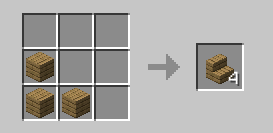
so you can craft it in you inventory
# Important
### All versions before 1.4 are unsupported and they may or may not work
if you have problems go to [The discord server](https://discord.gg/ZRTzwxD7WD)
**as you may have noticed this is pretty inactive it is mainly because nothing has really needed to be done xD**
UpgradableHoppersPlugin
💎 UpgradableHoppersThe Ultimate High-Performance Hopper Solution for Folia & PaperAuthor: XxTheyLuvShyxX🚀 OverviewUpgradableHoppers is a lightweight yet powerful utility designed specifically for modern, high-population servers. While standard hoppers are limited to moving a single item at a time—causing massive item backups and “hopper lag”—this plugin allows players to upgrade their infrastructure to handle entire stacks instantly.Engineered with Folia’s regionalized multi-threading in mind, this plugin uses advanced “Atomic Transfer” logic to ensure item movements are thread-safe, lightning-fast, and bypass the traditional 1-item-per-second bottleneck.✨ Key FeaturesTiered Upgrades: 5 distinct levels of speed ranging from 2x vanilla speed to a full 64-item “Instant Blast.”Folia Native: Built using the RegionScheduler to work perfectly on multi-threaded server environments.Intelligent Logic: Only moves what is necessary. If a chest has space for 10 items, it moves 10—never deleting or “voiding” items.Persistent Data: Hoppers retain their level even when broken and moved.Sleek GUI: A clean, intuitive interface for upgrading and managing your hoppers.Zero Console Noise: Optimized for silent, background operation.🛠 How to Use1. Obtaining an Upgraded HopperAdministrators can give themselves or players upgraded hoppers (or you can integrate them into your server shop/economy).2. Managing the HopperTo prevent interference with standard “Hopper Chains” and redstone builds, the upgrade menu is protected:To Open the Menu: Hold a Diamond in your hand, Sneak (Shift), and Right-Click the Hopper.Standard Interaction: Right-clicking without a diamond or without sneaking will open the regular Hopper inventory as usual.3. Hopper TiersTierItems Per TransferSpeed EquivalentLevel 12 Items2x VanillaLevel 24 Items4x VanillaLevel 38 Items8x VanillaLevel 416 Items16x VanillaLevel 564 ItemsFull Stack Instant📥 InstallationDownload the UpgradableHoppers.jar.Drop it into your server’s plugins folder.Restart your server.Enjoy lag-free item sorting!Note to Server Owners: This plugin is designed to reduce TileEntity ticking stress by moving more items in fewer ticks, significantly improving TPS on high-utilization technical servers.
UpgradableDispensers&DroppersPlugin
adds Upgradable Dispensers & Droppers up to level 5 (=64item/sec) to tp upgrade simply place a normal dispenser or dropper and shift click with a diamond to open the upgrade gui it also allowes level 5 dispensers to plant crops on farmland. id also reccomend download my other plugin with this one its called Upgradable Hoppers Plugin. have fun!!!