🚀 VertexNexus – The Ultimate AFK & KeyAll Rewards Plugin
VertexNexus is a powerful and modern Minecraft plugin designed to bring automation, engagement, and exciting rewards to your server. With its advanced systems and optimized performance, VertexNexus delivers a smooth experience for both players and server owners.
This plugin introduces a dynamic 4-Stage KeyAll system and an advanced AFK Zone reward system, allowing players to earn rewards automatically while keeping the server active and engaging. Built with performance in mind, VertexNexus works flawlessly with Paper, Spigot, Purpur, and Folia servers.
━━━━━━━━━━━━━━━━━━━━━━━━━━━━
✨ Core Features
🎁 4-Stage Global KeyAll System
Reward all online players automatically with a powerful staged reward system.
⚡ Automatic stage rotation (Stage 1 → Stage 4)
⚡ Custom commands for each stage
⚡ Configurable timers and intervals
⚡ Broadcast messages, titles, and sounds
⚡ Admin commands to control stages instantly
━━━━━━━━━━━━━━━━━━━━━━━━━━━━
🟦 Advanced AFK Zone Rewards
Keep your players engaged even while AFK.
Players inside the AFK zone will automatically receive rewards based on a multi-stage reward cycle.
✨ Multi-stage AFK reward system
✨ Rewards only for players inside the zone
✨ BossBar countdown timer display
✨ Entry title effects when players enter the zone
✨ Fully configurable commands and rewards
━━━━━━━━━━━━━━━━━━━━━━━━━━━━
🪄 Simple AFK Zone Creation
Creating AFK zones is quick and easy.
🔹 Use `/vn wand` to receive the selection tool
🔹 Left click to select the first position
🔹 Right click to select the second position
🔹 Use `/vn setzone` to save the AFK zone
Your AFK region will automatically be stored in the configuration files.
━━━━━━━━━━━━━━━━━━━━━━━━━━━━
📊 PlaceholderAPI Support
VertexNexus integrates perfectly with PlaceholderAPI, allowing you to display timers and stage information on scoreboards, tablists, and menus.
🔹 /vn wand – Get the zone selection tool
🔹 /vn setzone – Save the AFK zone
🔹 /vn reload – Reload all configurations
🔹 /vn info – Show plugin information
KeyAll Controls
🔹 /vn keyall now – Trigger the current stage
🔹 /vn keyall skip – Skip to the next stage
🔹 /vn keyall pause – Pause the KeyAll timer
🔹 /vn keyall resume – Resume the timer
━━━━━━━━━━━━━━━━━━━━━━━━━━━━
💾 Smart Data System
VertexNexus automatically saves important runtime data such as active stages and timers. This ensures that everything continues correctly even after server restarts.
No progress is lost and the system resumes seamlessly.
━━━━━━━━━━━━━━━━━━━━━━━━━━━━
⚡ Built for Performance
VertexNexus is designed with a clean Object-Oriented architecture and optimized scheduling to ensure high performance and stability.
✨ Lightweight and efficient
✨ Folia-compatible scheduling system
✨ Independent AFK and KeyAll timers
✨ Clean and maintainable code structure
━━━━━━━━━━━━━━━━━━━━━━━━━━━━
🎮 Why Use VertexNexus?
VertexNexus helps server owners create an engaging reward environment where players stay active, earn rewards automatically, and enjoy a modern server experience.
Whether you’re running a survival server, economy server, or community SMP, VertexNexus adds a powerful automated reward system that keeps your players excited and coming back for more.
━━━━━━━━━━━━━━━━━━━━━━━━━━━━
👑 Developer & Owner
Aarav Singh
VerifyMC
# 🛡️ VerifyMC
## 🚀 Introduction
**VerifyMC** is an ultra-lightweight, powerful whitelist management plugin for Minecraft servers. It supports web-based registration, auto/manual review, banning, theme switching, AuthMe integration, and high customizability, helping you secure and manage your server community with ease.
—
## 📝 Key Features
1. 🖥️ **Web Registration & Review**: Players can submit whitelist applications via a web page; admins can review, ban, and manage users online.
2. 🔒 **Auto/Manual Review**: Supports both automatic approval and manual admin review to fit different server needs.
3. 🚫 **Ban System**: Ban problematic players to keep your server safe.
4. 🎨 **GlassX Theme**: Beautiful glassmorphism design with smooth animations and modern UI.
5. 📨 **Email Verification & Domain Whitelist**: Integrated SMTP email verification, supports email domain whitelist and alias limit.
6. 🔐 **Self-hosted CAPTCHA**: Built-in graphical CAPTCHA (math/text) – no external services required.
7. 🎮 **Discord Integration**: OAuth2 Discord account linking with optional/required mode.
8. 📋 **Registration Questionnaire**: Customizable questionnaire system with multi-language support.
9. 📧 **User Notifications**: Automatic email notifications for whitelist approval/rejection.
10. 🌐 **Multi-language Support**: Both web UI and plugin messages support English and Chinese.
11. ⚙️ **Highly Customizable**: Set max accounts per email, player ID regex, whitelist bypass IPs, and more.
12. 🪶 **Lightweight**: Plugin jar is under 6MB, integrates multiple features, and runs efficiently.
13. 🔄 **Auto Update & Backup**: Config files auto-upgrade, with full backup before each update.
14. 🧩 **Flexible Whitelist Modes**: Supports Bukkit native whitelist sync, plugin self-management, and MySQL storage.
15. 💾 **MySQL & Data File Storage**: Easily switch between local file and MySQL storage; supports automatic migration.
16. 📝 **Audit Log Multi-Storage**: Audit logs can be stored in file or MySQL.
17. 🌍 **Custom Internationalization**: Auto-loads any messages_xx.properties file; users can add any language.
18. 🔐 **AuthMe Integration**: Seamless integration with AuthMe plugin for password management and auto-registration.
19. 🎮 **Bedrock Support**: Geyser/Floodgate player prefix support for cross-platform servers.
20. 🔗 **Proxy Support**: BungeeCord/Velocity proxy plugin for network-level whitelist enforcement.
—
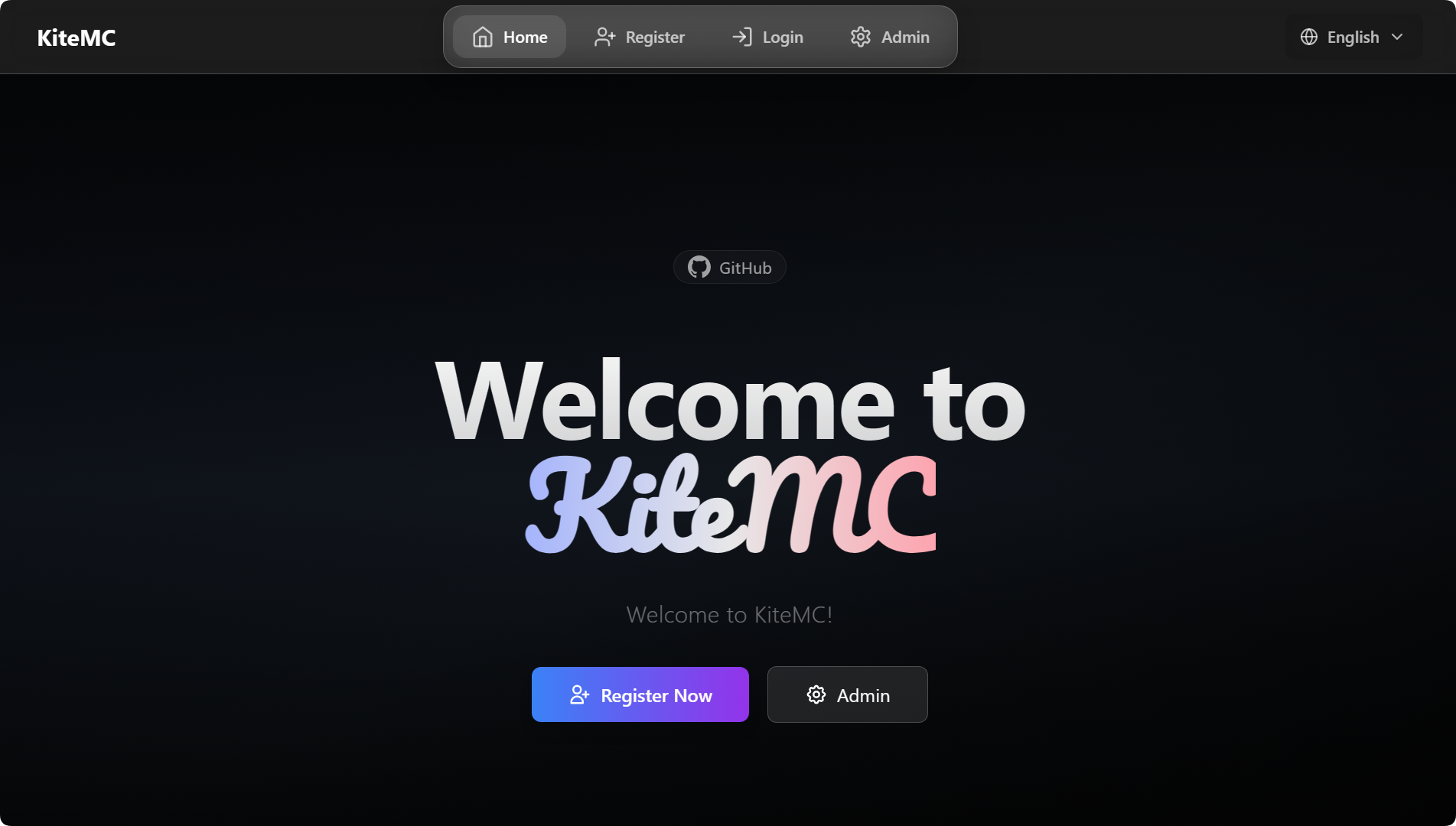
## 🖼️ Screenshots (GlassX Theme)
### Home Page
1. Download the latest `VerifyMC.jar` and place it in your server’s `plugins` directory.
2. Start the server to auto-generate config files, then edit `config.yml` as needed (see full example below).
3. Restart the server and visit `http://your_server_ip:8080` to access the admin panel.
“`yaml
# —————————————-
# General Settings
# —————————————-
# Global language setting. Affects plugin messages and web UI. (e.g., ‘zh’, ‘en’)
language: zh
# Enable detailed console logs for troubleshooting.
debug: false
# —————————————-
# Web Server
# —————————————-
# The port for the web interface.
web_port: 8080
# The server name displayed on the web interface.
web_server_prefix: ‘[ Name ]’
# —————————————-
# Verification & Whitelist
# —————————————-
# Supported authentication methods. Options: ’email’ (email verification), ‘captcha’ (graphical captcha).
# You can use multiple methods, e.g.: [email, captcha]
#
# [IMPORTANT] Configuring the captcha: section below does NOT enable captcha!
# To enable captcha, you MUST add ‘captcha’ to this list:
# Captcha only: auth_methods: [captcha]
# Both email and captcha: auth_methods: [email, captcha]
auth_methods:
– email
# Maximum number of game accounts that can be linked to a single email address.
max_accounts_per_email: 2
# Whitelist mode: ‘bukkit’ (syncs with server’s whitelist.json) or ‘plugin’ (uses internal database).
whitelist_mode: plugin
# Registration URL displayed to non-whitelisted players when in ‘plugin’ mode.
web_register_url: https://domain.com/
# —————————————-
# Registration
# —————————————-
# If true, new user registrations are automatically approved. If false, they require manual admin approval.
register:
auto_approve: false
# —————————————-
# User & Security
# —————————————-
# A regular expression to validate player names.
username_regex: “^[a-zA-Z0-9_-]{3,16}$”
# If false, usernames that only differ by case (e.g., “Player” and “player”) are treated as the same.
username_case_sensitive: false
# A list of IP addresses that can join the server without being whitelisted.
whitelist_bypass_ips:
– 127.0.0.1
# The password for accessing the admin panel on the web interface.
admin:
password: your_custom_password
# —————————————-
# User Notification
# —————————————-
# Send email notification to users when admin reviews their application.
user_notification:
# Whether to enable user notification feature
enabled: true
# Whether to send notification when application is approved
on_approve: true
# Whether to send notification when application is rejected
on_reject: true
# —————————————-
# Frontend (UI)
# —————————————-
frontend:
# The visual theme for the web interface. Options: ‘glassx’.
theme: glassx
# URL for the logo. Can be a web link or a local file path (e.g., ‘/logo.png’).
logo_url: /logo.png
# A message to display on the homepage.
announcement: Welcome to [ Name ]!
# —————————————-
# Sync Settings (for bukkit mode)
# —————————————-
# If true, automatically syncs changes from whitelist.json to the plugin’s database.
whitelist_json_sync: true
# If true, automatically adds approved users to whitelist.json and removes banned/deleted users.
auto_sync_whitelist: true
# If ‘bukkit’ mode is disabled, this setting (if true) cleans players from whitelist.json.
auto_cleanup_whitelist: true
# —————————————-
# Auto Update & Backup
# —————————————-
# If true, automatically adds new settings to your config.yml on plugin updates.
auto_update_config: true
# If true, automatically updates the language files.
auto_update_i18n: true
# If true, automatically updates the email templates.
auto_update_email: true
# If true, automatically updates theme files.
auto_update_static: true
# If true, creates a full backup of the plugin data folder before any auto-updates.
backup_on_update: true
# —————————————-
# Storage & Data Migration
# —————————————-
storage:
# Storage type, options: data (local file), mysql (external database)
type: data
# Whether to automatically migrate data from the original storage to the new storage when switching storage.type (e.g., data→mysql or mysql→data)
auto_migrate_on_switch: false
mysql:
host: localhost
port: 3306
database: verifymc
user: root
password: yourpassword
# —————————————-
# Authme Integration Configuration
# —————————————-
authme:
# Whether to enable Authme integration functionality
enabled: true
# Whether to require password input during web registration
require_password: true
# Whether to automatically register to Authme when approval is granted
auto_register: false
# Whether to automatically unregister from Authme when user is deleted
auto_unregister: false
# Password regex pattern
password_regex: “^[a-zA-Z0-9_]{3,16}$”
# —————————————-
# Captcha Configuration
# —————————————-
# Captcha can be used as an alternative or supplement to email verification
# Add ‘captcha’ to auth_methods to enable: auth_methods: [captcha]
# Or use both: auth_methods: [email, captcha]
captcha:
# Captcha type: math (math expression) or text (random characters)
type: math
# Length of text captcha (ignored for math type)
length: 4
# Captcha expiration time in seconds
expire_seconds: 300
# —————————————-
# Bedrock Player Support
# —————————————-
# For Geyser/Floodgate bedrock players
bedrock:
# Whether to enable bedrock player support
enabled: false
# Prefix for bedrock players (commonly “.” for Floodgate)
prefix: “.”
# Regex for bedrock usernames
username_regex: “^\.[a-zA-Z0-9_\s]{3,16}$”
# —————————————-
# Questionnaire Configuration
# —————————————-
# Detailed questions are configured in questionnaire.yml
questionnaire:
# Whether to enable questionnaire feature
enabled: false
# Minimum score to pass
pass_score: 60
# Auto-approve users who pass the questionnaire
auto_approve_on_pass: false
# —————————————-
# Discord Integration (OAuth2)
# —————————————-
# Requires creating a Discord application at https://discord.com/developers/applications
discord:
# Whether to enable Discord integration
enabled: false
# Discord application client ID
client_id: “”
# Discord application client secret
client_secret: “”
# OAuth2 redirect URI
redirect_uri: “https://yourdomain.com/api/discord/callback”
# Optional: require users to be in specific guild/server
guild_id: “”
# Whether Discord linking is required for registration
required: false
> ❤️ If you like this project, please Star, share, and give us feedback!
VeloraSafeTeleport
# VeloraSafeTeleport
VeloraSafeTeleport is a Paper plugin designed to prevent unsafe teleports and eliminate common teleport-related exploits. It validates teleport destinations before players land, protecting your server from glitches involving ender pearls, chorus fruit, and other teleport mechanics.
Built for modern servers, VeloraSafeTeleport ensures safe movement handling, prevents clipping exploits, and gives full control over where players are allowed to teleport.
## Features
– Ender pearl safety checks
– Chorus fruit safety checks
– Unsafe destination blocking
– Space validation for teleport locations
– World border support
– Custom bounds support
– Configurable teleport cause filtering
– Last safe location fallback system
– Lightweight and highly configurable
## New (v1.1.0-BETA)
– Added full Folia support
– Improved thread safety using VeloraEngine scheduler
– Optimized teleport validation performance
– Better stability on modern Paper/Folia servers
## Requirements
– Requires the latest version of VeloraEngine
– Supported platforms:
– Paper
– Purpur
– Folia
## How it works
VeloraSafeTeleport validates every teleport before it happens:
– Checks if the destination is inside a valid region
– Ensures enough space for the player
– Prevents teleporting into solid or illegal blocks
– Cancels unsafe teleports and applies fallback logic
## Notes
– This plugin is currently in beta
– Features and behavior may change between versions
– Recommended for servers that want extra protection against:
– teleport clipping
– wall glitches
– escape exploits
## Configuration
VeloraSafeTeleport is designed to be simple and flexible:
– Enable/disable specific teleport causes
– Configure safe bounds and limits
– Customize fallback behavior
## Future Plans
– More advanced anti-exploit checks
– Additional teleport validation rules
– Performance optimizations
– Expanded API & integration support
## Support
If you encounter issues or have suggestions, feel free to open an issue or contribute.
VeloraEngine
# VeloraEngine
VeloraEngine is the shared core library for Velora Paper plugins. It provides common utilities, command helpers, configuration tooling, messaging support, coroutine integration, and other reusable systems used across the Velora plugin ecosystem.
This project is designed to eliminate duplicated code, enforce consistent architecture, and provide a stable, scalable foundation for Velora-powered Minecraft servers.
## Features
– Shared Paper plugin base utilities
– Advanced scheduler with full Folia support (player/location/global execution)
– HookManager system for cross-plugin integrations
– PlaceholderAPI expansion system with custom namespaces
– Common command framework integration (Cloud)
– Configuration helpers and serializers (Okaeri)
– Messaging and component utilities (MiniMessage/Adventure)
– Coroutine-friendly plugin support (MCCoroutine)
– Built-in caching and async handling systems
– Reusable internal systems for Velora plugins
## Supported Platforms
– Paper
– Purpur
– Folia
## New (v1.1.0)
– Added full Folia support
– Introduced HookManager system
– Added PlaceholderAPI hook & expansion system
– Improved scheduler for thread-safe execution
– Enhanced coroutine handling and async safety
– Refactored internal architecture for better maintainability
## How it works
VeloraEngine acts as a shared backbone for all Velora plugins:
– Provides a unified scheduler for safe async + sync execution
– Handles cross-plugin communication via hooks
– Supplies reusable utilities for commands, configs, and messaging
– Ensures consistent development patterns across all plugins
## Notes
– VeloraEngine is a dependency/library project for other Velora plugins
– It is not intended to be used as a standalone gameplay plugin
– Only install it if a Velora plugin requires it
– Keep VeloraEngine updated to ensure compatibility with dependent plugins
## Future Plans
– Extended hook system (multi-provider support)
– Additional performance optimizations
– Expanded API for external plugin developers
– Improved debugging and monitoring tools
## Support
If you encounter issues or have suggestions, feel free to open an issue or contribute.
VelocityTitle
# VelocityTitle
**VelocityTitle** is a title plugin designed for **Minecraft Velocity networks**.
It stores and manages player title data on the **Velocity proxy**, then synchronizes data between the proxy and backend servers through plugin messaging channels. Titles can finally be displayed on backend servers through **PlaceholderAPI**, with **GUI support planned** for future versions.
This project is mainly intended to provide an **open-source and free solution** for cross-server title systems, especially for server networks that want to share prefixes, suffixes, and title data across multiple backend servers.
## Features
– Designed for Velocity server networks
– Centralized title data management on the Velocity proxy
– Cross-server synchronization
– PlaceholderAPI support for displaying prefix and suffix
– Supports creating, editing, deleting, granting, revoking, and wearing titles
– Command confirmation system for safer management
– Open-source and free to use
## Installation
1. Download the correct plugin build for your platform
2. Install the plugin on the corresponding server
3. **Velocity installation is required**, otherwise the plugin will not work
4. Complete the configuration according to the config files
5. If you want to display titles, use these PAPI placeholders:
– `velocitytitle_prefix`
– `velocitytitle_suffix`
## Notes
– `core` is not a standalone plugin and cannot be installed directly
– `reload` is currently unstable and not recommended
– Title names should only use English letters and underscores
– You can wrap display text in double quotes to input Chinese or other spaced text
## Easy to install
There isn’t that many usable Report plugin out there and there is an almost zero usable report plugin for Velocity networks. VelocityReport also supports multiple platforms like Spigot, Paper, Purpur, etc… as a back-end server.
## Feature packed
Everything you want and need from a report plugin for your Minecraft server is right here! There are a lot of features like BookGUI, different report stages, rewards, RGB/gradient/component messages, custom report reasons, and much more…
Also, there is a bunch of API methods and events that you can use to create addons for the plugin and add new features.
## Quality support
You’re able to [join our Discord](https://discord.gg/VZk2XU3kFg) and get help very quickly, up to instantly.
## Up to date
The plugin is not abandoned. It is constantly getting updated to fix reported bugs and get new optimizations that can help it run as smoothly as possible, whilst still doing what you want it to do.
## Multiple database types
You can use MySQL and SQLite as your database type.
## High performance
Unlike other plugins where “high performance” often means your CPU usage will be high, VelocityReport has an async database update that means there is no lag spike and high thread loads on your server.
VelKoth
# VelKoth
A modern, high-performance **King of the Hill (KoTH)** plugin built for PaperMC 1.21+ utilizing Java 21 features.
VelKoth supports multiple capture modes (`CAPTURE` and `SCORE`), O(1) mathematical region boundary checks for supreme performance, an automated integrated scheduler, and a robust configurable database-backed reward and statistics system.
## 🚀 Features
– **Modern Architecture**: Compiled against Paper 1.21+ using Java 21, **Folia-supported Regional/Entity Schedulers**, and the Incendo Cloud V2 native Brigadier command framework.
– **Multiple Capture Modes**:
– `CAPTURE`: Traditional KoTH where one player must hold the hill uninterrupted for the duration.
– `SCORE`: Point-based KoTH where players accumulate capture seconds until they reach the target score.
– **High Performance Regions**: Both Cuboid and Cylinder regions utilise O(1) containment algorithms removing loop-based block checks for zero server TPS impact.
– **Team Plugin Integrations**: Fully supports team and faction capturing! Players in the same team, faction, or party can capture hills together without contesting. Supports 12+ plugins natively.
– **Advanced Display Visuals**: Leverages modern Paper Adventure API to push ActionBars, custom BossBars, on-screen Titles, Particle effects, and Sounds. Includes **FastBoard-powered Scoreboards** (with smart-overrides for plugins like TAB and SimpleScore) and native **Paper TextDisplay Holograms** that are fully chunk-safe.
– **Robust Storage System**: Fully asynchronous SQLite/MySQL HikariCP connection pooling storing player total wins, daily wins, and weekly wins.
– **bStats Metrics Integration**: Uses anonymous metrics tracking to keep developers informed on adoption rates and usage.
– **Scheduler Integration**: Define exactly when specific arenas should run via Cron-like syntax or simple time formats. Now supports **Dynamic Scheduling** via in-game commands.
– **Dynamic Configuration**: Built on Okaeri Configs for instant YAML hot-reloading. Every system message, GUI layout, and internal setting can be modified.
– **Comprehensive Rewards**: Execute commands, distribute ItemStacks (with overflow drop handling), or give Vault Economy money to the winners.
– **Enhanced PlaceholderAPI**: Comprehensive support for multi-arena events, absolute/specific next event countdowns, and human-readable time formatting.
– **Developer API**: Features a full suite of Bukkit Events (`KothStartEvent`, `KothWinEvent`, `KothCaptureStartEvent`, etc.) and a static `VelKothAPI` state accessor for developers.
1. Grab the KoTH Wand by typing `/koth wand`.
2. Left-Click one corner of your hill, and Right-Click the opposite corner.
3. Type `/koth create ` to save the region.
4. Modify specific rules, timers, and rewards for this arena in the generated `plugins/VelKoth/arenas.yml` configuration!
### Administering Events
– Start an event manually: `/koth start `
– Pause an ongoing event (maintaining times/scores): `/koth pause `
– Stop an event completely: `/koth stop `
– Configure automatic daily/weekly events in `plugins/VelKoth/config.yml`.
—
## 🪧 Commands
VelKoth features a robust, auto-completing Brigadier command hierarchy.
| Command | Permission | Description |
| :— | :— | :— |
| `/koth help` | `velkoth.use` | View available commands |
| `/koth stats` | `velkoth.use` | View your personal KoTH wins (Daily/Weekly/All-time) |
| `/koth next ` | `velkoth.use` | See when is the next Koth gonna start |
| `/koth list` | `velkoth.admin` | View all arenas and their current status |
| `/koth wand` | `velkoth.admin` | Receive the region selection wand |
| `/koth create ` | `velkoth.admin` | Create a new arena from your wand selection |
| `/koth delete ` | `velkoth.admin` | Permanently delete an arena |
| `/koth start ` | `velkoth.admin` | Force start an arena immediately |
| `/koth pause ` | `velkoth.admin` | Pause an active capture session |
| `/koth resume ` | `velkoth.admin` | Resume a paused capture session |
| `/koth stop ` | `velkoth.admin` | Stop an active arena prematurely |
| `/koth schedule add
—
## 🎁 Rewards
VelKoth supports a powerful reward system that can be managed entirely in-game or via `arenas.yml`. Rewards are granted to the winning player (or all online members of a team/faction if team hooks are active).
### Reward Placeholders
* `%player%`: Name of the winner.
* `%arena%`: ID of the arena.
### Viewing Rewards
You can see exactly what rewards are configured for an arena using:
` /koth reward list `
This will display a numbered list of rewards with human-readable descriptions (e.g., *Command: give diamond 1*).
—
## 📜 Permissions
– **`velkoth.use`**: Default permission granted to all players allowing them to view help and check their personal statistics.
– **`velkoth.admin`**: Default OP permission granting full administrative access to edit arenas, bypass timers, and trigger events.
—
## 📦 Building from Source
To compile the standalone shadow JAR natively (including the Cloud command libraries and Okaeri configs):
“`bash
git clone https://github.com/YourName/VelKoth.git
cd VelKoth
./gradlew clean shadowJar
“`
Your compiled plugin will be deposited in `/build/libs/`.
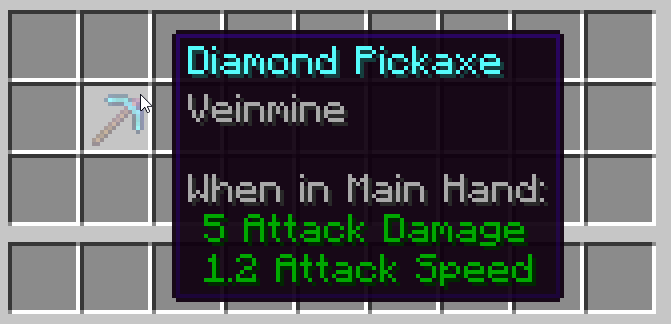
Addon for the popular [Veinminer](https://modrinth.com/project/veinminer) mod/plugin/data-pack that limits the use of veinmining to a new custom enchantment `Veinmine`! As long as this addon is installed, veinmining is only possible with the enchantment (still respecting block rules and settings).
## ⚠ Important
[**Veinminer**](https://modrinth.com/project/veinminer) needs to be installed too for this addon to work!
## ⚙ Settings
**DataPack**: open the zip file and navigate to `data/veinminer-enchantment/enchantment/veinminer.json`
**Fabric/Quilt/NeoForge**: open the jar file (winrar, 7zip, …) and navigate to `data/veinminer-enchantment/enchantment/veinminer.json`
**Paper/Folia**: navigate to `plugins/veinminer/enchantmentSettings.json`
| ID | Default | Description |
|:————:|:——-:|:————————————————————-:|
| `weight` | 1 | How often the enchantment appears (higher -> more common) |
| `min_cost` | 15 | At which level the enchantment appears in table |
| `max_cost` | 65 | At which level the enchantment stops appearing in table |
| `anvil_cost` | 7 | How much level combining in anvil costs (stacked with others) |
The enchantment name is defined by a translatable key `enchantment.veinminer-enchantment.veinminer` and defaults to `Veinmine`.
## ⛏️ Veinminer
Mine a single block to mine the whole vein!
Highly configurable and works everywhere, even on your vanilla server.
Make the tedious mining experience to something satisfying and fun!
Veinminer works server side, so all clients are supported. Even cross loaders & versions for addons!
> ### Client Hotkey & Highlighting
> Add the [**Hotkey Addon**](https://modrinth.com/datapack/veinminer-client) to only veinmine when pressing a hotkey & get a mining preview
> ### Use as Enchantment?
> Add the [**Veinminer Enchantment Addon**](https://modrinth.com/datapack/veinminer-enchantment) to limit veinmining to only enchanted tools!
**Veinminer comes in two different versions**
• **Version 2.x** -> Full customizable mod & plugin
• **Version 1.x** -> Light DataPack with vanilla & snapshot support
Both comes with preconfigured for ores and pickaxes. Read below how to extend it.
—
### Mod/Plugin Version (2.x)
The advanced (V2) version is a more powerful version that is only usable with Fabric/Quilt, Paper/PurPur/Folia & NeoForge servers.
| Command | Permission | Short Description |
|:———————–:|:——————–:|:———————————————————:|
| /veinminer **blocks** | `veinminer.blocks` | Edit blocks that are veinmineable with every tool |
| /veinminer **groups** | `veinminer.groups` | Edit blocks & tools with precise rules |
| /veinminer **toggle** | `veinminer.toggle` | Toggle Veinminer (server wide) |
| /veinminer **settings** | `veinminer.settings` | Change settings like cooldown, max chain and more |
| *Using Veinminer* | `veinminer.use` | If perm-restriction is active, this is needed to veinmine |
General Settings
To change a setting, enter `/veinminer settings … []`.
To check the current state, leave out the new value argument.
| Setting | Description | Default |
|:———————-:|:———————————————————:|:——-:|
| `mustSneak` | Players must sneak to veinmine | `false` |
| `cooldown` | Time between players are able to veinmine (in ticks) | `20` |
| `delay` | Time between each automated block breaking (in ticks) | `1` |
| `maxChain` | Max amount of blocks that can break from one source block | `100` |
| `needCorrectTool` | If blocks have a required tool, this must be used | `true` |
| `searchRadius` | Amount of blocks in between blocks to count connected | `1` |
| `permissionRestricted` | Only players with `veinminer.use` permission can veinmine | `false` |
| `mergeItemDrops` | All item drops are merged to the source block | `false` |
| `autoUpdate` | Check for updates and download new version if available | `true` |
| `durabilityDecrease` | If each mined block should reduce durability | `true` |
| `miningSpeedModifier` | Increase block mining duration based on vein size | `0.0` |
Block Groups – Advanced Settings
Block groups can hold multiple blocks together that will be treated like the same block.
`/veinminer groups create [] []`
All blocks inside one group will be mined together.
A block can be in multiple groups. New blocks can be added or removed from groups with the following commands:
`/veinminer groups edit add-block `
`/veinminer groups edit remove-block `
Groups can be limited to certain tools, for example group `wood` can only be mined by axes.
If no tool is added to a group, all tools are allowed. If a block is in multiple groups, all tools from those groups are allowed.
(If a block is in one unlimited tool group and one limited to axes, only axes work for this block)
`/veinminer groups edit add-tool `
`/veinminer groups edit remove-tool `
### Example (Logs)
“`
1. /veinminer groups create Logs
2. /veinminer groups edit Logs add-block #minecraft:logs
3. /veinminer groups edit Logs add-tool #minecraft:axes
“`
—
Block and item inputs allow block and item tags for easier editing.
For example, to add all logs enter `#minecraft:logs` into any block input.
Visit the wiki for a full list or look at a block with F3 under “looking at”.
—
You can also modify the group file directly inside `…/veinminer/default_groups.json` (`config/…` for mods, `plugins/…` for plugins)
Setting Overrides – Too Advanced Settings
Overrides are optional settings, that will override the normal setting if the player is effected by it.
See examples underneath for a better understanding, I don’t blame you if you think “why…”.
### Client Overrides
Those settings will be applied to all users that use the client addon (hotkey).
E.g. you want to have `mustSneak` enabled in general, but disabled for hotkey users:
– `/veinminer settings mustSneak true` – True for all
– `/veinminer settings client override mustSneak false` – False override for hotkey users
### Group Overrides
Those settings will be applied to all users that mine a block from this specific group.
Each group can have a different override, if a block is in multiple groups, only the override from the *oldest* group count (this behavior may see improvement later).
E.g. you dont want that your sand & dirt group consumes durability:
– `/veinminer settings decreaseDurability true` – True for all blocks
– `/veinminer groups shovel edit override decreaseDurability false` – False override for this group
—
If both, client and group overrides, collide the group override takes priority (`normal < client < group`).
You can remove overrides with `/veinminer ... override unset `.
OP players will have all permissions. To manually grant permissions see [Luckperms](https://luckperms.net/) (NeoForge not supported yet).
—
### DataPack Version (1.x)
The DataPack (V1) version is a simple version that is usable on every server and world.
Enter the config command to open an interactive chat menu to edit all settings.
| Command | Permission | Description |
|:—————————:|:———–:|:————————————-:|
| /function veinminer:_config | `OP/Cheats` | Access the full settings menu in chat |
If you get prompted something like `{category:”pickaxe”, namespace:””, id:””}`, you need to fill in the item/block namespace & ID (press F3+H to see them), e.g. `{category:”pickaxe”, namespace:”minecraft”, id:”sand”}` for `minecraft:sand`
## Some Advice
– To veinmine, your tool must be able to mine the block in normal conditions (unless disabled in V2)
– While Veinminer is running very lightweight, mining unnatural big veins can lag the client and the server through the amount of items
If you need any help or want to share some ideas to add, just hop on our Discord ([dc.mutils.net](https://dc.mutils.net))
VectorGuard
# VectorGuard
**Production-grade combat anti-cheat for Paper servers.**
VectorGuard is a 100% server-side anti-cheat plugin focused exclusively on **combat detection**. It uses packet-level analysis, tick-based telemetry, and multi-signal detection to identify cheaters with high accuracy and minimal false positives.
Built from the ground up for modern Paper servers (1.20.x–1.21.x) with Java 21.
—
## Product Overview
VectorGuard is a combat-only anti-cheat designed to catch the most common PvP exploits while staying light on performance and fair on legitimate players. Every check uses multiple independent signals (rotation, timing, movement, cooldown usage, and hit validation) and applies buffered violations with decay, so one-off spikes do not punish normal players. Ping-aware thresholds and packet-timing compensation reduce false positives for high-latency players.
Administrators get a fast response workflow: clickable in-game alerts with action buttons, a threat score that aggregates risk across checks, and a visual report command for quick evidence review. A built-in GUI lets staff adjust thresholds, toggle checks, and tune punishments without editing files or restarting the server. Alerts can also be mirrored to Discord for off-server monitoring.
VectorGuard ships as a single jar with no external dependencies. PacketEvents is embedded, and the plugin runs entirely server-side with no client mod required.
—
## Features
### Detection Engine
– **19 combat checks** targeting the most common cheat modules including Mace PvP exploits, crystal PvP automation, bow manipulation, and inventory exploits
– **Multi-signal compound detection** — each check combines multiple independent signals for high confidence
– **Buffered violation system** with configurable decay — prevents single-tick flukes from triggering punishments
– **Latency compensation** — all checks account for player ping to avoid false-flagging high-ping players
– **Tick-based analytics** with per-player position history and rotation profiling
### Admin Experience
– **Clickable chat alerts** with action buttons: `[TP]` `[VL]` `[DBG]` `[RPT]`
– **Threat score system** — composite 0–100% risk assessment across all checks
– **Visual threat reports** via `/vg report `
– **Sound alerts** for online admins (configurable)
– **Discord webhook integration** for off-server monitoring
– **In-game GUI** for editing thresholds, toggling checks, and tuning punishments
### Architecture
– **100% server-side** — no client mod required
– **PacketEvents** embedded and shaded — zero external dependencies
– **Modular check system** — each check is independent and fully configurable
– **Performance profiler** built-in (`/vg profile`)
– **Multi-version support** — Paper 1.20.x through 1.21.x
—
## Checks
### Combat
| Check | Description |
|——-|————-|
| **Aimbot** | Detects snap rotations, acceleration spikes, over-smooth curves, and precision patterns consistent with aim assistance |
| **TriggerBot** | Identifies automated attack timing with near-zero reaction delay after crosshair alignment |
| **AutoTotem** | Catches unrealistically fast offhand totem swaps during lethal damage windows |
| **Reach** | Eye-to-hitbox distance verification with ping, sprint, and movement leniency |
| **Velocity** | Detects Anti-Knockback by verifying displacement after server-sent velocity packets |
| **Criticals** | Identifies fake critical hits via spoofed position packets (abnormal crit rate, ground-flag oscillation, tiny Y offsets) |
| **AutoClicker** | Catches robotic click patterns through timing variance analysis (stddev, CPS, coefficient of variation) |
| **KillAura** | Detects multi-target attacks, angle mismatch, wall attacks, and perfect cooldown abuse |
| **Sprint** | Identifies backwards sprinting, KeepSprint, and sprint-toggle patterns around attacks |
| **MaceSpoof** | Detects spoofed fall-distance position packets for fake Mace smash damage (Criticals-Mace exploit) |
| **MaceNoFall** | Catches NoFall + Mace combos: players deal Mace fall-bonus damage but evade fall damage on landing |
| **MaceSwap** | Identifies automated weapon switching to Mace during falls (AttributeSwap / auto-swap patterns) |
| **CrystalAura** | Detects automated crystal place-and-break cycles (superhuman crystal attacks/sec, place→break pairing, fast-break ratio) |
| **BowManipulation** | Catches BowSpam and BowAimbot via charge variance analysis, fire rate, and abnormal hit rates at distance |
| **InventoryCleaner** | Identifies inhuman inventory manipulation speed (AutoTotem swaps, chest stealing, combat inventory use) |
| **AutoWeapon** | Detects automated weapon switching around attacks (pre-attack swap ratio, A→B→A swap-back patterns) |
| **HitboxExpand** | Catches expanded entity hitboxes via lateral offset analysis and edge-hit rate tracking |
| **AutoArmor** | Detects automated armor equipping during combat (rapid armor clicks, anti-break durability swaps) |
### Packet
| Check | Description |
|——-|————-|
| **Timer** | Detects game speed manipulation via packet rate analysis (burst, sustained, and average rate monitoring) |
1. Download `VectorGuard-x.y.z.jar`
2. Place it in your server’s `plugins/` folder
3. Start or restart the server
4. Edit `plugins/VectorGuard/config.yml` to customize thresholds
5. Use `/vg reload` to apply changes without restarting
—
## Commands
| Command | Description |
|———|————-|
| `/vg reload` | Reload configuration |
| `/vg debug ` | Toggle debug output for a player (or all) |
| `/vg vl ` | View violation levels |
| `/vg report ` | Generate a visual threat report |
| `/vg gui` | Open the in-game config editor |
| `/vg profile [seconds]` | Run performance profiler |
—
## Permissions
| Permission | Default | Description |
|————|———|————-|
| `vectorguard.admin` | op | Access to all `/vg` commands and GUI |
| `vectorguard.alert` | op | Receive in-game cheat alerts with action buttons |
| `vectorguard.debug.view` | op | View debug output |
| `vectorguard.report` | true | Allows using `/vg report` to generate threat reports |
—
## Configuration
All settings are in `plugins/VectorGuard/config.yml`.
### Check Configuration
Each check has:
– `enabled` — toggle the check on/off
– `buffer-threshold` — buffer must exceed this to flag
– `buffer-decay-per-tick` — buffer decreases each tick
– `vl-per-breach` — violation level added per flag
– `vl-decay-per-tick` — VL decreases each tick
– `thresholds.*` — check-specific tuning values
### Punishment Stages
“`yaml
punishments:
alert-vl: 2.5 # Send alert to admins
setback-vl: 6.0 # Teleport player to last safe position
punish-vl: 12.0 # Execute punishment command
punish-command: “kick %player% Unfair combat behavior detected by VectorGuard.”
“`
Run `/vg gui` to open an interactive GUI where you can:
– Toggle checks on/off
– Edit buffer thresholds and VL values
– Adjust punishment thresholds and cooldowns
– Save changes to config and reload
—
## FAQ
**Q: Does this require players to install anything?**
A: No. VectorGuard is 100% server-side.
**Q: Is PacketEvents required as a separate plugin?**
A: No. PacketEvents is embedded inside the VectorGuard jar.
**Q: Does it work with Purpur/Pufferfish/other Paper forks?**
A: Yes, any Paper fork should work.
**Q: Will it conflict with other anti-cheats?**
A: VectorGuard focuses only on combat. It can coexist with movement-focused anti-cheats, but running two combat anti-cheats may cause duplicate flagging.
**Q: How do I reduce false positives?**
A: Increase the `buffer-threshold` and `ping-cutoff-ms` values for checks that are flagging incorrectly. The defaults are tuned conservatively.
—
## Credits
**Created by Mr. Dev**
—
## License
Copyright (c) 2025 NeonDev. All Rights Reserved.
This software and its source code are the exclusive property of NeonDev.
No part of this software, including but not limited to the source code, compiled
binaries, documentation, configuration files, or any associated assets, may be
used, copied, modified, merged, published, distributed, sublicensed, sold, or
otherwise exploited for any purpose without the prior written permission of the
copyright holder.
Unauthorized use, reproduction, or distribution of this software, or any portion
of it, is strictly prohibited and may result in civil and criminal penalties.
THE SOFTWARE IS PROVIDED “AS IS”, WITHOUT WARRANTY OF ANY KIND, EXPRESS OR
IMPLIED, INCLUDING BUT NOT LIMITED TO THE WARRANTIES OF MERCHANTABILITY,
FITNESS FOR A PARTICULAR PURPOSE AND NONINFRINGEMENT. IN NO EVENT SHALL THE
AUTHOR BE LIABLE FOR ANY CLAIM, DAMAGES OR OTHER LIABILITY, WHETHER IN AN ACTION
OF CONTRACT, TORT OR OTHERWISE, ARISING FROM, OUT OF OR IN CONNECTION WITH THE
SOFTWARE OR THE USE OR OTHER DEALINGS IN THE SOFTWARE.

