Webcam
# Webcam
Mod and plugin that allows players to broadcast their webcams
## Downloads
– [Fabric / Quilt](https://modrinth.com/mod/webcam-mod/versions?l=fabric)
– [NeoForge](https://modrinth.com/mod/webcam-mod/versions?l=neoforge)
– [Bukkit / Spigot / Paper](https://modrinth.com/plugin/webcam-mod/versions?l=bukkit)
– [Velocity](https://modrinth.com/mod/webcam-mod/versions?l=velocity)
## ⚠️ Warning
This plugin requires special setup on server to work.
If you are a server administrator, please read the section `Setup on server` first
## Features
– High-quality webcam broadcasting
– H.264 video codec
– Video transmission via UDP using custom protocol
– AES encryption
– Bitrate control
– Video resolution control
– Different display shapes
– Display size and position configuration
– Display on player model face
– Display distance limit
– Webcam broadcast and view permissions
– Advanced client configuration ([Mod Menu](https://modrinth.com/mod/modmenu) & [Cloth Config API](https://modrinth.com/mod/cloth-config) required)
– Ability to hide selected players’ webcams
– Velocity proxy support
– Compatibility with [ReplayMod](https://modrinth.com/mod/replaymod) & [Flashback](https://modrinth.com/mod/flashback)

## Client Usage
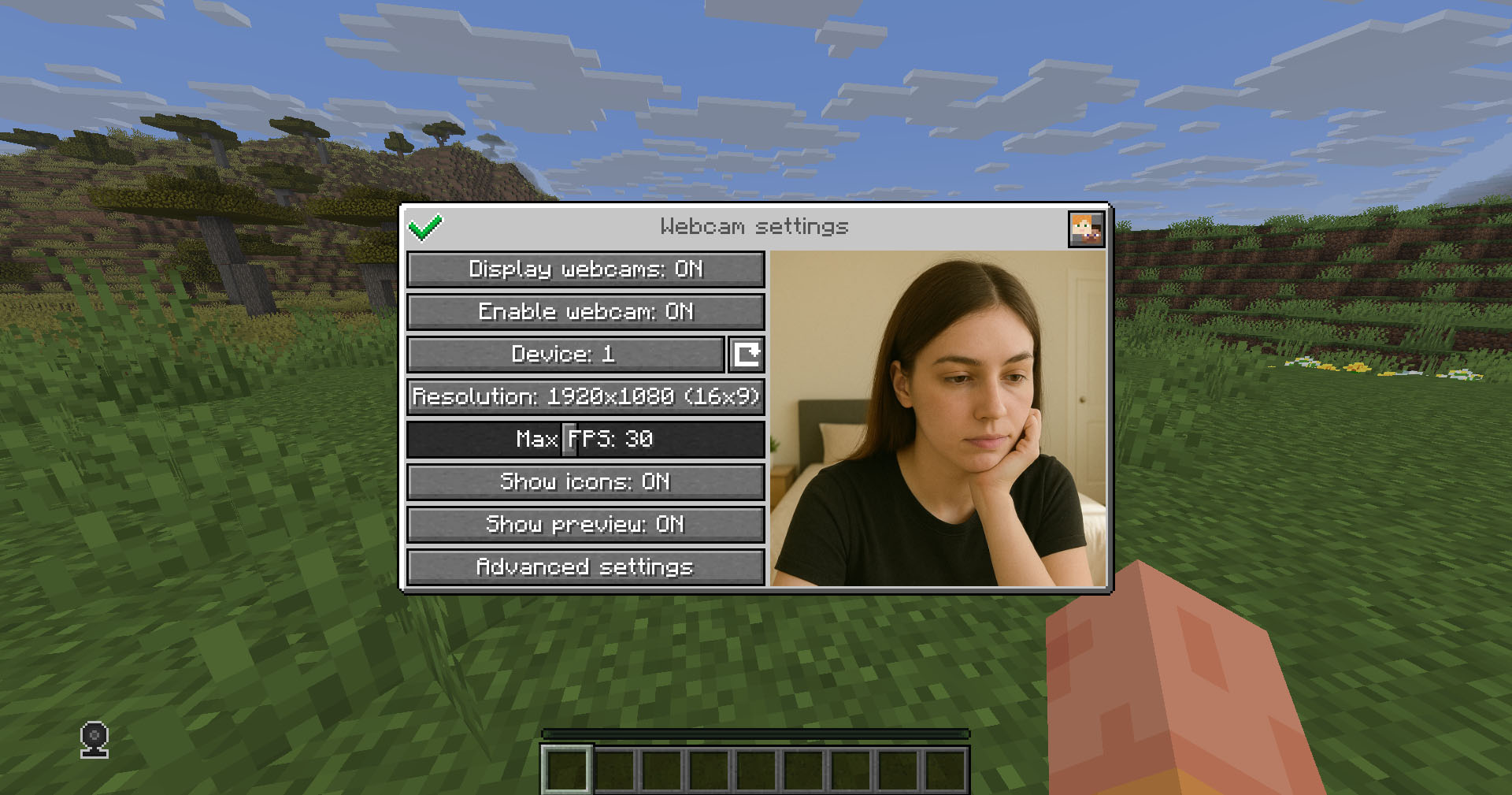
Put the mod in the `mods` directory (with the Fabric API if you are using Fabric). The settings menu can be opened by hotkey (`C` by default)
## Icons
| Icon | Description |
|:——————————————————–:|——————————–|
|  | Your webcam is enabled |
|  | Your webcam is disabled |
|  | Connecting to Webcam server |
|  | Not connected to Webcam server |
## Encryption
Webcam connection is encrypted, but we don’t guarantee the security of it. Use at your own risk!
## Setup on server
Webcam plugin uses UDP socket to transfer video packets.
So you need to open a UDP port in your server’s firewall and panel (if present) to make Webcam server work. This is port `25454/udp` by default. You can change the port in server config
If you are using Velocity, see `Setup on proxy`
### Server config
Location:
– Fabric / Quilt / NeoForge: `config/webcam/server.json`
– Bukkit / Spigot / Paper: `plugins/webcam/server.json`
Here are the default values with their descriptions:
“`
{
“port”: 25454, // Webcam UDP server port. This must not clash with any other used UDP port (like Simple Voice Chat port)
“bind_address”: “”, // Address to bind the Webcam server to. Leave blank to use the wildcard (0.0.0.0) address. F.e. use “127.0.0.1” to accept only local connections
“host”: “”, // The hostname that clients should use to connect to the Webcam server. Leave blank to use the address, that player is connected to Minecraft with. Can be a simple address or an address with port. This will be ignored, if the server is proxied
“keep_alive_period”: 1000, // Period of sending keep alive packets is milliseconds
“permission_check_period”: 60, // Period of checking webcam.broadcast and webcam.view permissions in ticks
“max_display_distance”: 100.0, // The distance in blocks from player, in which other players can see his webcam
“display_on_face”: false, // Whether to display webcam on player model face or above his head
“display_shape”: “round”, // Shape of webcams displayed above players’ head. Possible values: “round”, “square”
“display_offset_y”: 1.3, // Y offset of webcams displayed above players’ head
“display_size”: 1.2, // Size of webcams displayed above players’ head
“hide_nicknames”: true, // Whether to hide player’s nickname if his webcam is enabled
“display_self_webcam”: true, // Whether to show the player’s webcam to himself
“synced”: { // These settings are synchronized with clients
“image_dimension”: 360, // Side dimension of square webcam images
“mtu”: 1100, // Maximum Transmission Unit of packets. You can lower this, if image on webcam starts look glitchy or not arrives at all
“bitrate”: 500 // Target video bitrate (kbps)
},
“messages”: { // Custom transtalions for messages, that are sent to players in different situations. May contain placeholders – %s
“incompatible_mod_version”: “Incompatible Webcam version. Your – %s, server’s – %s” // The message that will be sent to player if he has incompatible Webcam mod version. You can set this to empty to disable sending this message
}
}
“`
### Commands
– `/webcamconfig [new_value]` – command to read/update config values. Requires `webcam.command.config` permission or OP.
### Permissions
– `webcam.command.config` – permission to modify Webcam server config (default: OP Level)
– `webcam.broadcast` – permission to broadcast webcam (default: true)
– `webcam.view` – permission to view webcams (default: true)
## Setup on proxy
Webcam has Velocity plugin that proxies Webcam servers on the backend MC servers and allows to connect to different Webcam servers through the single port.
So it acts like a UDP proxy.
If you running proxy and backend servers on the same machine, you need to configure different ports for them. See `Setup on server/Server config` and `Setup on proxy/Proxy config`
### Proxy config
Server config is located in `plugins/webcam/config.properties`
Here are the default values with their descriptions:
“`
#Webcam proxy config
# Webcam UDP server port. This must not clash with any other used UDP port (like Simple Voice Chat port)
port=25454
# Address to bind the Webcam server to. Leave blank to use the wildcard (0.0.0.0) address. F.e. use “127.0.0.1” to accept only local connections
bind_address=
# The hostname that clients should use to connect to the Webcam server. Leave blank to use the address, that player is connected to Minecraft with. Can be a simple address or an address with port. This will override configured values on backend server’s
host=
“`
## License
This mod is licensed under **No Unauthorized Distribution License**, which full text can be found at https://github.com/DimasKama/Webcam/blob/master/LICENSE.md
### Summary
– **Modpacks:** You can use this mod in modpacks, but you must not include its files directly. Instead, list it as a dependency (mod reference) that points to an official download source.
– **For Devs:** You’re allowed to create addons or integrate support for the mod, but you must not copy any of its code. Instead, make it an external dependency that gets downloaded from an official source.
– **Redistribution Limits:** You cannot re-upload or share the mod’s code or compiled files publicly without the author’s explicit permission. Forking for personal use is okay, but distributing a compiled fork is not allowed.
– **Personal Use:** You may use and modify the mod for personal use, but any changes must remain private and not be shared publicly.
– **Official Download Requirement:** Any dependency or modpack reference must point to the official download sources provided by the author.
Waypoints
# Waypoints
[](https://discord.gg/4xY9TcHQja)


Ever had the problem, that you were on a long trip and can’t find your base?
You could set a warp with a conventional plugin at your home and simply teleport back. But if you want to keep the survival experience of not being able to
teleport like that, this plugin could be just what your server needs!
## Direction Indicators
So, instead of just bringing the player back where he started, this plugin shows him the direction he has to walk, so he can explore the world even more. To
show the player the direction you can configure multiple direction indicators to guide the player to his destination.
### Bossbar Indicator
A compass will be visible at the top of the screen, with a highlighter marking in which direction the waypoint is
### Beacon
When the waypoint is in render distance, a beacon beam will appear at the location of the waypoint to make it easier to pinpoint the location of the waypoint.
### Trail
The plugin attempts to find a suitable path for you to walk and then shows it to you with particles.
### Hologram
Floating text like in the mods.
### Blinking Block
When the player is closer to the waypoint, the beacon will be replaced with a block sequence that will repeat. This is to help him get to the exact location.
### Compass
It won’t get any simpler than that if the player owns a compass. It will have the waypoint as it’s target and points into that direction.
### Actionbar Indicator
This is comparable to the compass but doesn’t require one. It will show the rough direction with small sections in the action bar of the player. If the player
is too far left, the sections in the right will light up and vice versa.
### Particles
Particles appear at the feet of the player pointing into the direction of the waypoint
## Player tracking
Although disabled by
default, [when enabled](https://github.com/Sytm/waypoints/blob/616d2f6db741d656edb8f5d98bb2d18f32cbe2ca/waypoints/src/main/resources/config.yml#L120) adds a
menu to the GUI where the player can choose another player to track. Now the compass, actionbar indicator and particles will help guide the player to the
tracked player.
– Players can choose to hide themselves in the menu to others (if enabled)
– Players must show themselves to others in order to track a player (if enabled)
– The player that gets tracked receives a notification who started tracking him (if enabled)
## Languages
The plugin is shipping translations for the following languages:
– English
– German
– Italian (by marcotech81)
– Simplified Chinese (by SnowCutieOwO)
– Traditional Chinese (by ItzTheBear)
– Brazilian Portuguese (partial, by gaugt980131gg2)
And if your language is not there, the plugin is fully translatable
## Other notable features
– Open the GUI by sneaking and right-clicking with a compass (by default)
– Set custom icons for waypoints and folders by clicking on their icon. The item in your main hand will be used
– Limit the amount of waypoints and folders a player can have
– Customizable teleport prices and price increases the more the player teleports (With Vault support)
– Direction indicators customizable
– Items in GUI fully customizable
– SQLite data storage
## Integrations
– Public waypoints are added to:
– [Dynmap](https://www.spigotmc.org/resources/dynmap%C2%AE.274/)
– [SquareMap](https://github.com/jpenilla/squaremap)
– [BlueMap](https://bluemap.bluecolored.de/)
– [Pl3xMap](https://modrinth.com/plugin/pl3xmap)
## Videos
DonKolia made a small video series of this plugins functionality where he demonstrates the basic functionality and all the available pointers.
It is in Spanish but with English subtitles: [Link to playlist](https://www.youtube.com/watch?v=mt3lmGMKZV8&list=PLop1Uc5d4Z6pTJIBRwTFumdL7cInrE7fL)
## Commands
`/waypoints` – Opens the GUI
`/waypoints select ` – Select an additional waypoint
`/waypoints deselectAll` – Deselect all selected waypoints
`/waypoints teleport ` – Teleport to waypoints (if allowed)
`/waypoints set ` – Create a waypoint only the player himself can see
`/waypoints setPublic ` – Create a waypoint visible for everyone
`/waypoints setPermission ` – Create a waypoint only visible for players with the given permission
`/waypoints setTemporary ` – Create a waypoint that is only visible for the time he is online
`/waypoints other ` – View the waypoints of another player
`/waypoints statistics` – Look at some rudimentary statistics about the database
`/waypoints reload` – Reload the configuration. (`/reload` **is not supported**)
### Scripting
`/waypointsscript deselectWaypoint ` – Deselect the current waypoints of a player with a command
`/waypointsscript selectWaypoint ` – Set the waypoint selection of a player with a command
`/waypointsscript temporaryWaypoint [Beacon-Color]` – Create a temporary waypoint for the player
`/waypointsscript uuid ` – Search for waypoints by their name to get the uuid of them
## Permissions
`waypoints.command.use`* – Allows the player to use the `/waypoints` command and open the GUI
`waypoints.command.other` – Allows the player to use the `/waypoints other` command
`waypoints.command.statistics` – Allows the player to use the `/waypoints statistics` command
`waypoints.command.reload` – Allows the player to use the `/waypoints reload` command
`waypoints.command.scripting` – Allows the player to use the `/waypointsscript` command and get the UUID of waypoints
`waypoints.modify.private`* – Allows the player to create, alter and delete private waypoints
`waypoints.modify.public` – Allows the player to create, alter and delete public waypoints
`waypoints.modify.permission` – Allows the player to create, alter, delete and always see permission waypoints
`waypoints.modify.anywhere` – Allows the player to place waypoints wherever they want, ignoring disabled worlds
`waypoints.modify.other` – Allows the player to modify the waypoints of another player when using `/waypoints other`
`waypoints.unlimited` – Allows the player to create more waypoints and folders than the limit in the config
`waypoints.temporaryWaypoint`* – Allows the player to create a waypoint that is only visible for the time he is online
`waypoints.temporaryWaypoint.other`* – Allows the player to create a waypoint for select players that is only visible for the time they is online
`waypoints.teleport.private` – Allows the player to teleport to private waypoints
`waypoints.teleport.public` – Allows the player to teleport to public waypoints
`waypoints.teleport.permission` – Allows the player to teleport to permission waypoints
`waypoints.tracking.enabled`* – Allows the player to use the player tracking feature
`waypoints.tracking.trackAll` – Allows the player to track players that are hidden
`waypoints.updateNotification` – The player receives a notification after a server restart if a new Version is found
*: These permissions are granted to all players by default
## Configuration
Almost everything is configurable. To have a look at the current configuration file
click [here](https://github.com/Sytm/waypoints/blob/v4/master/waypoints/src/main/resources/config.yml)
Also, you can change every piece of text to other languages or just change the colors.
[English Translation File](https://github.com/Sytm/waypoints/blob/v4/master/waypoints/src/main/resources/lang/en.yml)
## Additional notes
### Metrics
This plugin uses [bStats](https://bstats.org/) to collect basic metrics about the usage of this plugin. You can, of course, opt-out of this if you wish. For
further information have a look at “What data is collected?”
and “Disabling bStats” over [here](https://bstats.org/getting-started).
To view the metrics of this plugin, go [here](https://bstats.org/plugin/bukkit/waypoints2/6864).
### Java version
Java 21 is the minimum required version.
WaxShelf
# WaxShelf 🕯️
A lightweight and powerful Minecraft plugin that allows players to “wax” item frames and shelves to prevent unwanted interactions. Perfect for decorators, shop owners, and builders!
[](https://modrinth.com/plugin/waxshelf)
[](LICENSE)
## ✨ Features
* **Waxing Mechanics:** Use **Honeycombs** to wax item frames and bookshelves. Once waxed, they cannot be rotated, changed, or broken by regular means.
* **Unwaxing:** Use an **Axe** to remove the wax.
* **Invisible Item Frames:** Sneak-right-click an item frame with **Shears** to make it invisible. Use **Leather** to make it visible again.
* **Chiseled Bookshelf Support:** Fully compatible with Minecraft 1.20+ Chiseled Bookshelves (can be toggled in config).
* **Cross-Platform:** One JAR for **Spigot**, **Paper**, and **Folia**.
* **Hex Colors:** Use modern HEX colors (#RRGGBB) in all messages.
* **Action Bar Feedback:** Clean notifications that don’t spam the chat.
* **Config Migration:** Automatic configuration updates.
## 🛠 Commands & Permissions
| Command | Description | Permission |
|———|————-|————|
| `/waxshelf reload` | Reloads the configuration | `waxshelf.admin` |
| Permission | Description | Default |
|————|————-|———|
| `waxshelf.wax` | Apply wax to items | `true` |
| `waxshelf.unwax` | Remove wax from items | `true` |
| `waxshelf.invisible` | Toggle frame invisibility | `true` |
| `waxshelf.bypass` | Interact with waxed items | `op` |
| `waxshelf.admin` | Use reload command | `op` |
## ⚙️ Configuration
The plugin generates a `config.yml` with the following options:
“`yaml
# Enable or disable waxing mechanics
waxing:
shelves: true
chiseled-bookshelves: true
frames: true
# Enable or disable specific mechanics
mechanics:
shears-invisible-frames: true
leather-visible-frames: true
# Check for updates on startup (Modrinth API)
update-checker: true
“`
## 🚀 Installation
1. Download the latest JAR from [Modrinth](https://modrinth.com/plugin/waxshelf).
2. Drop it into your `plugins` folder.
3. Restart your server.
4. Enjoy your protected decorations!
—
Developed by **dscss2** with ❤️
Wandering Trader Folia
# WanderingTrader
**Fully customize Wandering Trader trades — with native Folia support.**
A simple, lightweight plugin that lets you define exactly what the Wandering Trader sells. Perfect for custom SMP servers, skyblock, or any server where you want control over trader inventory.
## ✨ Features
⚙️ **Complete Customization** — Define any item, any price, any amount
🎲 **Weighted Trades** — Control how often each trade appears
🚀 **Folia Native** — Built for multithreaded servers from day one
📦 **Zero Dependencies** — Just drop in and configure
🔄 **Hot Reload** — Change trades without restarting
—
## 📥 Installation
1. Download the JAR file
2. Place it in your `plugins` folder
3. Restart your server
4. Edit `plugins/WanderingTrader/config.yml`
—
## 🛠️ Commands
| Command | Description |
|———|————-|
| `/wt reload` | Reload the configuration |
| `/wt list` | View all configured trades |
| `/wt info` | Show plugin settings |
**Permission:** `wanderingtrader.admin` (default: OP)
—
## ⚙️ Configuration
### Basic Settings
“`yaml
settings:
min-trades: 5 # Minimum trades per trader
max-trades: 8 # Maximum trades per trader
replace-all-trades: true # true = custom only, false = add to vanilla
“`
### Creating Trades
“`yaml
trades:
elytra_trade:
enabled: true
result:
material: ELYTRA
amount: 1
cost:
material: DIAMOND_BLOCK
amount: 16
max-uses: 1
weight: 2 # Lower weight = rarer
“`
### Enchanted Books
“`yaml
trades:
mending:
enabled: true
result:
material: ENCHANTED_BOOK
amount: 1
cost:
material: EMERALD
amount: 24
enchantments:
MENDING: 1
max-uses: 1
weight: 5
“`
—
## 🎲 How Weights Work
Each trade has a `weight` value. When a Wandering Trader spawns, trades are randomly selected based on their weights:
– Higher weight = more likely to appear
– Weight of 10 is twice as likely as weight of 5
– Set `enabled: false` to disable a trade entirely
—
## 💡 Example Use Cases
– **Custom Economy** — Sell rare items for specific currencies
– **Skyblock** — Provide unobtainable resources
– **Hardcore SMP** — Balanced alternative progression
– **RPG Servers** — Quest items and special gear
—
## 📋 Requirements
– **Server:** Paper 1.21.4+ or Folia 1.21.4+
– **Java:** 21+
—
## ❓ FAQ
**Q: Do existing traders get new trades?**
A: No, only newly spawned traders use custom trades.
**Q: Does this work on Paper?**
A: Yes! Works on both Paper and Folia.
**Q: Can I add to vanilla trades instead of replacing?**
A: Yes, set `replace-all-trades: false` in config.
—
## 🐛 Issues & Suggestions
Found a bug or have an idea? [Open an issue on GitHub!](https://github.com/Whitebrim/BrimWorld-S5-Wandering-Trader/issues/new)
vUnstable
vUnstable
[](https://modrinth.com/plugin/vunstable)
[](https://modrinth.com/plugin/vunstable)
[](https://www.vprolabs.xyz/projects/license/raw)
[](https://www.oracle.com/java/)
[](https://papermc.io)
The Ultimate Orbital Strike Cannon plugin for Paper/Folia 1.21.x
2000 TNT with intelligent auto-optimization, synchronized explosions, and zero server freeze.
—
### TO-DO (in the future)
– 26.1 Support
– Add Fabric Support
– Add Forge/NeoForge Support
> These will be made in the future of this plugin, if you wanna support us to add these features faster then join our discord!
—
### Features
– **Nuke Rod**, Orbital strike with 2000 TNT entities, 10 concentric rings, 100×100 destruction area
– **Stab Rod**, Vertical shaft borer with INSTANT or FALL modes
– **Queue System**, Fire multiple nukes sequentially without spam
– **Auto-Optimization**, Automatically adjusts `spigot.yml` for optimal performance
– **Folia Support**, Full compatibility with regionized threading
– **Zero Dependencies**, Runs standalone with NMS MethodHandles
—
### Commands
| Command | Description | Permission |
|———|————-|————|
| `/vu give nuke [player]` | Give nuke rod | `vunstable.use` / `vunstable.give.others` |
| `/vu give stab [player]` | Give stab rod | `vunstable.use` / `vunstable.give.others` |
| `/vu update` | Check for updates | `vunstable.admin` |
| `/vu status` | Check optimization status | `vunstable.admin` |
| `/vu reload` | Reload configuration | `vunstable.admin` |
*Alias: `/vunstable` = `/vu`*
—
### Permissions
| Permission | Description | Default |
|————|————-|———|
| `vunstable.use` | Get rods for yourself | op |
| `vunstable.give.others` | Give rods to others | op |
| `vunstable.admin` | Admin commands | op |
—
### Configuration
View config.yml
“`yaml
# Auto-optimize spigot.yml max-tnt-per-tick for Nuke Rod
auto-optimize-spigot: true
nuke:
total-tnt: 2000
rings: 10
min-radius: 5
max-radius: 50
spawn-height: 67
velocity-y: -3.0
spawn-rate-per-tick: 200
sync-explosions: true
base-delay-ticks: 20
max-concurrent: 1
queue-size: 3
stab:
depth: 100
velocity: -10.0
fuse-ticks: 10
spawn-mode: INSTANT
“`
—
—
### Links
– 🌐 **Website:** https://vprolabs.xyz
– 💬 **Discord:** https://discord.gg/SNzUYWbc5Q
– 📦 **Modrinth:** https://modrinth.com/plugin/vunstable
– ☕ **Support:** https://ko-fi.com/v4bi
—
### License
This project is licensed under the **vProLabs General License**.
– Non-Commercial Use Only
– Attribution Required
– Share Alike
– [View Full License](https://www.vprolabs.xyz/projects/license/raw)
—
Villager Trade Lock


Paper plugin to prevent a villager monopoly by locking what a villager trades after its UI is opened.
“`
TESTED VERSIONS
NATIVE: 1.21.x
WORKING: 1.21.x, 1.20.6 (Folia)
“`
“(If you find out it works on another version shoot me a dm at Lupancham on discord with the version(s) and server software(s) :> )“
### Why do I need this?
Thats a great question! Ask yourself, would it be best to limit a potential threat to a server economy? If yes, this plugin might be for you as this plugin allows you to stop villager re-rolling!
### How Does this Work?
This works by checking if a villager has less than 1 xp, if so it will give tha villager 1 xp to lock its trades when a player opens its menu. To allow the server to use its main thread, this runs on a different thread rather than the one the server uses, this can be toggled in the config which is shown below.
config.yml
“`
# Configuration for VillagerTradeLockPlugin
# If true, the plugin will run experience-checking logic asynchronously on a separate thread.
# If false, the plugin will run this logic on the server’s main thread.
use-async-check: true
“`
### Hey! I need YOUR help :>
If you happen to test this plugin on a different server software or mc version, please please please shoot us a DM so I can add those versions to the supported versions list so people can know if the version they wish to run it on works :>, <3 Disc Realms/Lupancham
VoxasVoice
**VoxasVoice brings real proximity voice chat to Minecraft. 🎙️**
Talk to players around you with spatial audio that actually makes sense — the closer someone is, the louder they sound. Walk away and their voice naturally fades. It feels exactly how you’d expect voice chat in Minecraft to work.
**🗣️ Proximity Voice Chat**
Speak and be heard by nearby players. Voice volume scales with distance automatically — no setup needed, it just works.
**👥 Private Voice Groups**
Want to talk with your team across the map? Create a private voice group and invite your friends. Groups support password protection so strangers can’t join. Distance doesn’t matter inside a group.
**🔇 Player Controls**
See who’s talking nearby and take control. Mute specific players, adjust individual volumes, and manage your experience without leaving the game.
**🎛️ Advanced Audio Settings**
Fine-tune your microphone and speaker settings, enable noise reduction, and monitor your voice levels with a built-in voice meter.
**🔒 Encrypted & Secure**
All voice traffic is encrypted end-to-end. Your conversations stay private.VoxasVoice requires the Fabric mod on the client and the plugin-bridge on the server. Both are included in this release.
Ready to make your Minecraft world actually feel alive? Give it a try. 🌍
VoxaAegis
# VoxaAegis
VoxaAegis is a layered anti-bot protection system for Minecraft server networks.
It is built to reduce the impact of join floods, coordinated bot waves, repeated retry swarms, suspicious registration behavior, and abnormal post-join bot sessions through explainable server-side mitigation.
VoxaAegis does not try to be a DDoS firewall. It is a plugin-layer defense system for Minecraft traffic that helps operators detect, slow down, isolate, challenge, and block bot-like clients before they can damage the player experience.
## What It Does
VoxaAegis combines multiple protection layers instead of relying on one simple rate limit.
Main features:
– Join flood and burst-rate limiting
– Coordinated username, timing, IP, and subnet wave detection
– Risk scoring for suspicious usernames, fresh addresses, retry swarms, churn, and offender memory
– Quarantine flow for suspicious joins
– Fake entry gate / screening room for players under review
– Adaptive anti-bot challenges
– HumanityGate post-join verification
– Post-join liveness checks for physics-void and look-only sessions
– Client brand, locale, ping, movement, and interaction signal checks
– Repeated `/register` secret wave detection without storing plaintext passwords
– Persistent cooldown ledger for restart-safe mitigation memory
– Runtime bypass and temporary trust controls
– Operator-facing status, stats, diagnostics, event journal, and support dumps
## Commands
– `/voxaaegis help` — show command list
– `/voxaaegis status` — live protection overview
– `/voxaaegis stats` — mitigation and screening statistics
– `/voxaaegis profile` — current attack profile
– `/voxaaegis attacklog [limit]` — recent attack summaries
– `/voxaaegis events [limit]` — recent event journal
– `/voxaaegis dump` — write a support dump
– `/voxaaegis inspect ` — inspect a live player
– `/voxaaegis analyze [ip]` — preview join scoring
– `/voxaaegis doctor` — topology and runtime checks
– `/voxaaegis cache status` — cache and housekeeping state
– `/voxaaegis cache purge` — force cleanup
– `/voxaaegis release ` — release a quarantined player
– `/voxaaegis bypass add ` — add a runtime username bypass
– `/voxaaegis bypass add-ip ` — add a runtime IP bypass
– `/voxaaegis bypass remove ` — remove a runtime username bypass
– `/voxaaegis bypass remove-ip ` — remove a runtime IP bypass
– `/voxaaegis bypass list` — list runtime username bypasses
– `/voxaaegis bypass list-ip` — list runtime IP bypasses
– `/voxaaegis trust add ` — temporarily trust an address
– `/voxaaegis trust remove ` — remove temporary trust
– `/voxaaegis trust list` — list trusted addresses
– `/voxaaegis reload` — soft reload
– `/voxaaegis hard-reload` — full runtime rebuild reload
## Why Use It
VoxaAegis is designed for server owners who want practical anti-bot protection without losing visibility.
The plugin focuses on:
– layered mitigation instead of one brittle hard block
– readable operator diagnostics
– clear attack summaries
– configurable quarantine and challenge behavior
– safer handling of suspicious players before they reach the real server
– compatibility with authentication plugins through allowed auth commands
– actionable status output for tuning during attacks
## Supported Platforms
Primary backend line:
– Paper
– Purpur
– Pufferfish
– Spigot best-effort
Proxy / network line:
– Velocity
– BungeeCord / Waterfall
Secondary / experimental lines:
– Folia
– Sponge
– Legacy Spigot / Paper 1.16.5 – 1.19.4 through the separate legacy jar
## Version Support
Modern backend and proxy line:
– Minecraft `1.20 – 1.21.11`
Legacy backend line:
– Minecraft `1.16.5 – 1.19.4`
– Requires Java 17
– Uses the separate `voxa-aegis-legacy-0.3.jar`
## Important Notes
– Current release line: **0.3**
– Main recommended runtime: **Paper / Purpur / Pufferfish**
– Sponge is a narrow experimental line and should not be treated as equal to the Paper-family runtime.
– BungeeCord / Waterfall support exists, but Velocity is the preferred proxy platform.
– VoxaAegis is not a replacement for real network-layer DDoS protection.
– For very large attacks, use proper hosting protection and a proxy-first architecture.
Chat – Vox
**Vox** – A modern, convenient, customisable and evolving chat plugin that allows you to make your chat unique. There is a possibility of extensive configuration settings.
## Capabilities & Features
### Global Chat

### Local Chat

### Customizable Join & Quit Messages

### Death Messages

### Private Messages with sounds

## Commands
“`/voxchat“`, “`/vox“`, “`vc“`
## Update plan
– Chat for administration;
– Mentions;
– Scheduled Messages;
– More Customisation;
– World Channels
Votiful
## A High-Performance Vote Listener for NuVotifier
This plugin is a lightweight, high-performance addon for NuVotifier, designed specifically to handle a massive number of concurrent votes without impacting your server’s performance.
## Why Choose This Plugin?
Does your server lag when many players vote at once? This plugin was built to solve that exact problem. After struggling with performance issues on our own server, we developed a robust system capable of processing votes with extreme efficiency. It’s battle-tested and stable under pressure, ensuring your server remains responsive even during peak voting hours. If you run a demanding server and need a reliable vote-processing solution, this is the plugin for you.
## Features
This plugin expands NuVotifier by adding two core, performance-focused features:
* **Vote Statistics:** Track essential voting data with provided placeholders. Easily display total votes, top voters, and more on scoreboards, in GUIs, or anywhere else PlaceholderAPI is supported.
* **Vote Event:** A dedicated system allows admins to easily and reliably hook into the voting process to create custom rewards, trigger server commands, or integrate with other systems.
## Video
