WhitelistByTime
[](https://discord.gg/4XUPywnEyE)
## About
This is a plugin for a minecraft server. It allows you to add players for a certain time or permanently.
**The plugin is developed and tested for Paper and Folia 1.20.x-1.21.x. It also supports forks of Paper and Folia.**
## Features
– Fully **customizable**.
– Supports [**MiniMessage**](https://docs.advntr.dev/minimessage/format.html).
– Compatible with **any SQL database**.
– **Case-sensitive** nickname support.
– Player **freezing** feature.
– PlaceholderAPI (**PAPI**) support.
– **Lightweight**: minimal load on the **main thread**.
– **Multi-server** support: utilizes **SQL transactions**.
– **Safe**: the code is extensively covered by **automated tests**.
– **UUID support**: stores UUIDs in online/floodgate (GeyserMC) modes to handle nickname changes.
## Feedback
**Please report any bugs, errors, or feature suggestions on Discord:** [https://discord.gg/4XUPywnEyE](https://discord.gg/4XUPywnEyE)
## Stats
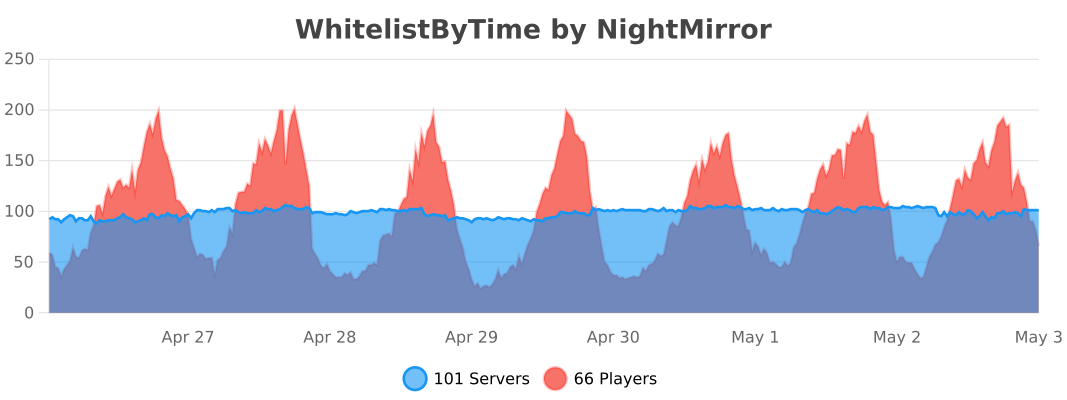
*Statistics are obtained through bstats metrics.*
WorldEditSelectionVisualizer
# WorldEditSelectionVisualizer
## Overview
WorldEditSelectionVisualizer (WESV) is essentially the famous [WorldEditCUI mod](http://www.minecraftforum.net/forums/mapping-and-modding/minecraft-mods/1292886-worldeditcui-1-11-2-version-available) in the form of a bukkit plugin, which means that players **don’t need to install anything on their client**.
## Features
* Spawns particles around WorldEdit selections so players can see them
* No client mod required
* Supports cuboid, sphere, ellipsoid, cylinder, polygon and convex selections
* Can display the current clipboard (use `/wesv toggle clipboard` to enable)
* Use `/wesv toggle` to toggle the visualizer
* Option to only show the selection when holding the selection item
* Configurable particle effect and view distance
* Prevent players from spawning too many particles when selecting huge regions
* Highly customizable for the performance of your server
* Supports both [WorldEdit](https://enginehub.org/worldedit) and [FastAsyncWorldEdit](https://www.spigotmc.org/resources/fastasyncworldedit.13932/)
* Compatible with all Minecraft versions starting with 1.7.10
* [PlaceholderAPI](https://placeholderapi.com/) support (you can use the placeholders `%wesv_toggled_selection%`, `%wesv_toggled_clipboard%`, `%wesv_volume_selection%` and `%wesv_volume_clipboard%`)
* Support for RGB color codes in messages on Minecraft 1.16 and higher, with the `&#rrggbb` format
* [Folia](https://github.com/PaperMC/Folia) support for better performance
## Screenshots
| Cuboid selection | Cylinder selection | Convex selection |
|——————————————————|——————————————————–|——————————————————|
|  |  |  |
[More screenshots](https://modrinth.com/plugin/wesv/gallery)
## Usage
### Commands
* `/wesv toggle` and `/wesv toggle clipboard`: toggle the selection/clipboard visualization
* `/wesv lock`: lock/unlock the origin of the clipboard visualization to your current location
* `/wesv lock tp`: teleport to the lock location (when clipboard visualization lock is enabled)
* `/wesv reload`: reload the configuration
### Permissions
* `wesv.toggle`: use the toggle command
* `wesv.use`: allows the visualizer to be turned on
* `wesv.reload`: allows the configuration of this plugin to be reloaded from the config.yml file
### Configuration
This plugin can be very resource expensive, try adjusting the configuration if you experience lag.
Configuration File
“`yaml
# WorldEditSelectionVisualizer configuration
# When enabled, if a new update is available it will display a message in the console on enable
check-updates: true
# You can edit the plugin messages here
messages:
no-permissions: “&cYou don’t have the permission to use this command.”
config-reloaded: “&aThe config was reloaded”
selection-too-large: “&6The visualizer only works with selections up to a size of %blocks% blocks.”
visualizer-enabled: “&6Your visualizer has been &eenabled.”
visualizer-disabled: “&6Your visualizer has been &cdisabled.”
visualizer-clipboard-enabled: “&6Your clipboard visualizer has been &eenabled&6.”
visualizer-clipboard-disabled: “&6Your clipboard visualizer has been &cdisabled&6.”
# When enabled, if a player disables the selection visualization and leaves the server, when he will
# come back, the selection visualization will be still disabled until he activates it again with /wesv toggle.
save-toggle: true
# Delay in ticks when the WorldEdit selection and clipboard are updated.
# This doesn’t affect particles spawning and players performances.
# The server impact is medium
selection-update-interval: 20
# When enabled, the particles are displayed only when holding the WorldEdit selection wand item (by default a wooden axe)
# You can change the WorldEdit wand item in the WorldEdit configuration
need-we-wand: false
# When enabled, top and bottom particles will be displayed for cuboid selections
cuboid-top-bottom: false
# Settings for visualization
# ‘selection’: The WorldEdit current selection
# ‘clipboard’: The WorldEdit clipboard (when you use //copy or //schem load )
# ‘primary’: The primary selection points (the region borders)
# ‘secondary’: The secondary selection points
# ‘fade-delay’: The number of seconds before the particles disappears. You can set it to 0 to remove the fade delay
# ‘max-selection-size’ : The maximum size of a selection to be display. A big value (> 1000000) can cause important lags
# ‘points-distance’: The distance between each particle. The higher this number is, fewer particles will be spawn
# ‘lines-gap’ (secondary selection only): The distance between each particles lines on cuboid and polygon. The higher this number is, fewer particles will be spawn. Set it to 0 to remove cuboid lines
# ‘update-interval’: The delay in ticks between particles spawn. This impact the players performances
# ‘view-distance’: The maximum distance in which players can see the particles. On 1.7.10 the particle distance is limited to 16 (Minecraft limitation)
# ‘particles’: The particles type and data. The data can be a color for redstone like in the form ‘r,g,b’ or a Material for block crack/item crack
# The particle types are available on https://hub.spigotmc.org/javadocs/spigot/org/bukkit/Particle.html
visualization:
selection:
fade-delay: 0
max-selection-size: 50000
primary:
points-distance: 1.0
update-interval: 12
view-distance: 64
particles:
type: “FLAME”
data: “”
secondary:
points-distance: 3.0
lines-gap: 5.0
update-interval: 18
view-distance: 32
particles:
type: “REDSTONE”
data: “RED”
clipboard:
fade-delay: 0
max-selection-size: 50000
primary:
points-distance: 1.0
update-interval: 12
view-distance: 64
particles:
type: “FLAME”
data: “”
secondary:
points-distance: 3.0
lines-gap: 5.0
update-interval: 18
view-distance: 32
particles:
type: “REDSTONE”
data: “BLUE”
“`
### Video
## Bugs & suggestions
Please don’t post bugs or suggestions in the review section, but please open an [issue on GitHub](https://github.com/MrMicky-FR/WorldEditSelectionVisualizer/issues).
If you just have a question, you can ask it on my [Discord server](https://discord.gg/q9uwabt).
And if you like this plugin you can leave a review or star the [GitHub project](https://github.com/MrMicky-FR/WorldEditSelectionVisualizer).
## Original Author
WorldEditSelectionVisualizer (WESV) has been originally created by [rojet601](https://dev.bukkit.org/members/rojet601). Since this user’s gone inactive since November 2015 and the plug-in contains some errors, [ZathrusWriter](https://www.spigotmc.org/members/zathruswriter.137995/) decided to release an 1.8. forward-compatible version with those errors fixed.
Wemmbu’s Orbital Strike Cannon
# 💣 Wemmbu’s Orbital Strike Cannon
> This plugin adds the Orbital Strike cannon weapon from the Unstable Universe with protagonists Wemmbu, ParrotX2, SpokeIsHere and FlameFrags. Supports both nuke and stab shots.
## ⚒️ Permission
Note – This is the permission that disallows the command, if a player some how gets one without the permission they will still be able to use the rod.
`wemmbu.orbital.use`
## 🤖 Commands
– `/orbital nuke` – gives you the nuke rod
– `/orbital stab` – gives you the stab rod
## 📸 Preview
A good preview is displayed in Wemmbu’s videos. This one in particular uses it for most of the video.
🔗 https://youtu.be/oBZ7ydMaQis?si=hAMVbYvIy4yMYiig
## ⚠️ Optional Dependencys
This plugin supports WorldGuard and Multiverse core to disable the orbital strike cannon in worlds and regions.
## 💻 Configuration
Configuration File
“`
# Worlds where orbital is DISABLED (comma-separated)
# Example: world, world_nether
disabled-worlds: “”
# WorldGuard region names that disable the orbital when the target is inside them (comma-separated)
# Example: spawn,protected-area
# NOTE: WorldGuard integration is optional and uses reflection; if WG is not present this list is ignored.
disabled-worldguard-regions: “”
# Default behaviour
default-type: “nuke” # nuke or stab
default-nuke-rings: 8
default-stab-depth: 320
default-delay-ticks: 10 # ticks to wait after right-click before strike spawns
# One-use in creative? true = consume rods in creative too.
one-use-creative: false
# Misc
range-blocks: 200
tnt-per-ring-base: 3
nuke-offset-height: 50
nuke-base-fuse: 60
stab-spacing: 3
stab-tnt-count: 5
stab-offset: 0.5
“`
WelcomeX
**WelcomeX** is a lightweight yet powerful Minecraft server plugin designed to give your community a warm, immersive, and professional welcome experience.
From the moment players join, WelcomeX greets them with fully customizable titles, subtitles, and sounds, setting the tone for your server’s personality and theme.
Even non-technical staff can tweak messages, colors, and effects on the fly, no server restarts required. ( **/welcomex reload** )
# __Features at a glance__
– 🎯 Customizable Join Titles & Subtitles, Edit colors and messages directly in config.yml.
– 🔊 Join Sounds & Effects, Trigger any Minecraft sound.
– ⚡ Instant Changes, No need to restart simply update the plugin with **/welcomex reload**
– 🎨 Highly Configurable, From text styles to fade timings, make every detail match your server’s theme.
# __Perfect for__
Community focused SMPs, event servers, themed worlds, and any Minecraft network looking to create a professional first impression that players will remember.
**With WelcomeX, your server doesn’t just say “hi”, it makes players feel like they belong.**
**For any bugs or suggetions please visit [Discord](https://discord.gg/jsThKrDA3d) and create a ticket**.
Welcome Mat
### A friendly way to roll out the welcome mat for your players!
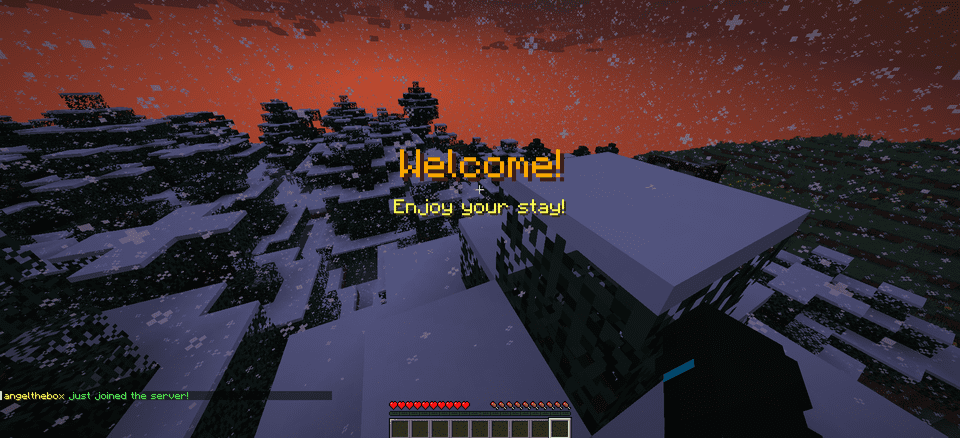
**WelcomeMat** is a lightweight, powerful plugin that enhances your server’s welcome experience. It provides customizable join/leave messages, titles, animations, and sounds to make players feel at home on every login.
## 🎉 What’s New!
### Version 1.3.1 (Latest)
– 🍃 **Folia-Ready Animations**: Visual effects now use the latest Folia entity schedulers (1.21.8+) with automatic signature detection, clamped delays, and no unsafe Bukkit fallbacks.
– 🧠 **Smarter Diagnostics**: If future Folia builds introduce new scheduler signatures, they’re logged automatically so you can keep running the same jar everywhere.
– 🧾 **Auto Version Metadata**: `plugin.yml` now inherits the Gradle version, guaranteeing accurate version strings inside the jar.
– 🌌 **Skyward & Copper Packs**: Two new message packs inspired by the 1.21 “Chase the Skies” and “Copper Age” updates, selectable right from the GUI.
### Version 1.2.x Highlights
– **Message Packs System**: Multiple themed collections (default, friendly, professional, funny, RPG) with GUI switching.
– **Multi-Language Support**: English and Spanish out of the box with easy CLI/GUI selection.
– **Improved Configuration Display**: Human-friendly display names and cleaner GUI organization.
—
## 🔄 Compatibility
– Fully tested on **Bukkit/Spigot, Paper, Purpur, and Folia** from **Minecraft 1.13 through 1.21.10**.
– Region-aware scheduler paths keep Folia’s watchdog happy while the same jar continues to run flawlessly on single-threaded servers.
—
## Features
– 🎨 **Customizable Messages**
– Rich join/leave text with color codes and placeholders
– Player-specific greetings and per-pack collections
– Display-name helpers and multi-language support (EN/ES)
– 📜 **Welcome Titles**
– Configurable title/subtitle timing and colors
– 🔊 **Interactive Sounds**
– Join/leave sounds with per-player toggles, volume, and pitch
– ✨ **Animation System**
– Fire Spiral, Green Spike Firework, and more join effects
– Folia-safe schedulers and per-player animation preferences
– ⚙️ **Extensive Configuration**
– Feature toggles, admin logging, instant `/wm reload`
– GUI-driven settings for packs, languages, sounds, and more
## 📋 Commands
– `/welcomemat` or `/wm` – Base command
– `/wm sound` – Toggle join/leave sounds for yourself
– `/wm reload` – Reload the plugin configuration
– `/wm help` – Show help message
– `/wm animation` – Toggle join animations for yourself
– `/wm language` – Change the plugin language
– `/wm pack` – Change the message pack
– `/wm config` – Modify plugin configuration
## 🔑 Permissions
– `welcomemat.reload` – Allow reloading the configuration (default: op)
– `welcomemat.bypass` – Bypass welcome messages (default: false)
– `welcomemat.sound.toggle` – Allow toggling sounds (default: true)
– `welcomemat.animation.toggle` – Allow toggling animations (default: true)
– `welcomemat.admin.log` – Receive admin log messages (default: op)
– `welcomemat.language` – Allow changing the plugin language (default: op)
– `welcomemat.pack` – Allow changing message packs (default: op)
– `welcomemat.config` – Allow modifying plugin configuration (default: op)
## 📦 Installation
1. Download the latest version of WelcomeMat
2. Place the `.jar` file in your server’s `plugins` folder
3. Restart your server
4. Configure the plugin in `plugins/WelcomeMat/config.yml`
## ⚙️ Configuration
“`yaml
features:
join-message: true
leave-message: true
join-title: true
join-sound: true
leave-sound: true
other-players-sounds: true
join-animation: true
admin-logging: true
messages:
join: “&e%player% &ajust joined the server!”
leave: “&e%player% &chas left the server!”
player-specific:
example-player:
join: “&6Welcome back, special player %player%!”
leave: “&eGoodbye, special player %player%!”
titles:
join:
title: “&6Welcome!”
subtitle: “&eEnjoy your stay!”
sounds:
join:
sound: ENTITY_PLAYER_LEVELUP
volume: 1.0
pitch: 1.0
leave:
sound: ENTITY_IRON_GOLEM_DEATH
volume: 0.5
pitch: 1.0
animations:
green-spike:
enabled: true
duration: 40
height: 2.0
# Message Packs
message-packs:
# Currently selected pack (default, friendly, professional, funny, rpg)
selected: “default”
# Default pack (original messages)
default:
join:
– “&e%player% &ajust joined the server!”
leave:
– “&e%player% &chas left the server!”
# Friendly pack
friendly:
join:
– “&d✨ &e%player% &ahas joined the party! &d✨”
– “&aWelcome back, &e%player%&a! We missed you! &d❤”
leave:
– “&e%player% &7had to go… &cSee you soon! &d💕”
– “&7Until next time, &e%player%&7! &d👋”
“`
## 🌐 Language Support
WelcomeMat now supports multiple languages:
“`yaml
# Available languages: english, spanish
selected-language: “english”
languages:
english:
name: “English”
messages:
reload:
success: “&aConfiguration reloaded successfully!”
sound:
enabled: “&aJoin/leave sounds enabled!”
disabled: “&cJoin/leave sounds disabled!”
spanish:
name: “Español”
messages:
reload:
success: “&a¡Configuración recargada con éxito!”
sound:
enabled: “&a¡Sonidos de entrada/salida activados!”
disabled: “&c¡Sonidos de entrada/salida desactivados!”
“`
## 🎵 Available Sounds
### Modern (1.13+)
– `ENTITY_PLAYER_LEVELUP`
– `ENTITY_IRON_GOLEM_DEATH`
– `BLOCK_NOTE_BLOCK_PLING`
– `BLOCK_NOTE_BLOCK_CHIME`
– `BLOCK_NOTE_BLOCK_BELL`
– And more…
### Legacy (1.8-1.12) (Under development)
– `LEVEL_UP`
– `IRONGOLEM_DEATH`
– `NOTE_PLING`
– `NOTE_PIANO`
– And more…
## 💡 Example Configurations
### Professional Server with Message Packs
“`yaml
# Use the professional message pack
message-packs:
selected: “professional”
# Set the language to English
selected-language: “english”
sounds:
join:
sound: BLOCK_NOTE_BLOCK_PLING
volume: 0.8
pitch: 1.5
animations:
green-spike:
enabled: true
duration: 30
height: 1.5
“`
### VIP Server with Custom Messages
“`yaml
messages:
join: “&d✨ &e%player% &ahas joined the party! &d✨”
leave: “&e%player% &7had to go… &cSee you soon!”
player-specific:
VIP_Player:
join: “&6⚡ The legendary &e%player% &6has arrived! ⚡”
leave: “&6The legend &e%player% &6must go… &7Until next time!”
sounds:
join:
sound: ENTITY_PLAYER_LEVELUP
volume: 1.0
pitch: 1.2
animations:
green-spike:
enabled: true
duration: 50
height: 2.5
“`
## 📝 Support
If you encounter any issues or have suggestions:
– Create an issue on our [GitHub repository](https://github.com/coffeeisle/welcome-mat)
– Join our [Discord server](https://discord.gg/cJ4uP2xF7h)
—
Made with ❤️ by angeldev0
[Download](https://modrinth.com/plugin/welcome-mat) • [Source](https://github.com/coffeeisle/welcome-mat) • [Discord](https://discord.gg/cJ4uP2xF7h)
WeHeads
A Minecraft plugin for **Spigot/Paper/Folia (1.20+)** that allows players to get custom heads using Base64 textures.
## Features
– **Simple Base64 Support**: Direct Base64 texture injection into SkullMeta
– **Easy to Use**: Single command with Base64 texture input
– **Inventory Management**: Automatic overflow protection
– **Permission System**: Built-in permission controls
## Commands
### `/wehead give `
Give yourself a custom head using a Base64 texture string from minecraft-heads.com.
**Example:**
“`
/wehead give eyJ0ZXh0dXJlcyI6eyJTS0lOIjp7InVybCI6Imh0dHA6Ly90ZXh0dXJlcy5taW5lY3JhZnQubmV0L3RleHR1cmUv…
“`
## Permissions
| Permission | Description | Default |
|————|————-|———|
| `wehead.give` | Allows using `/wehead give` command | `op` |
## Installation
1. Download the plugin JAR file
2. Place it in your server’s `plugins/` folder
3. Restart your server
4. Plugin is ready to use!
## Requirements
– **Minecraft Version**: 1.20+
– **Server Software**: Spigot, Paper, or Folia
– **Java Version**: 21+
## Building from Source
“`bash
git clone https://github.com/wethink/we-heads.git
cd we-heads
mvn clean package
“`
The compiled JAR will be in the `target/` directory.
## Getting Base64 Textures
1. Visit [minecraft-heads.com](https://minecraft-heads.com)
2. Find the head you want
3. Copy the Base64 texture value
4. Use it with `/wehead give `
## Error Handling
– **Invalid Command**: Shows usage message
– **No Permission**: Permission denied message
– **Invalid Texture**: Error message with texture validation
– **Full Inventory**: Drops head on ground if inventory is full
## Support
For issues, feature requests, or contributions, please visit our GitHub repository.
## License
This project is licensed under the MIT License.
WeGuardian
# 🛡️ WeGuardian





Professional Punishment Management System for Minecraft Servers
by WeThink
—
## ✨ Features
### 🔨 Punishment System
– **Ban & TempBan** – Permanently or temporarily ban players
– **IP Ban & TempIP Ban** – Ban players by IP address with automatic IP resolution
– **Mute & TempMute** – Silence players permanently or temporarily
– **IP Mute & TempIP Mute** – IP-based muting system
– **Kick** – Instantly remove players from the server
### 🎮 Interactive GUI
– **Punishment GUI** – Beautiful and intuitive punishment selection interface
– **Duration Selector** – Easy-to-use duration selection with presets
– **History Viewer** – Browse punishment history with pagination
### 📊 Database Support
– **SQLite** – Zero-configuration local storage (default)
– **MySQL** – Scale to larger servers with MySQL support
– **HikariCP** – High-performance connection pooling
– **Caffeine Caching** – Lightning-fast data retrieval
### 🌐 Web Dashboard
– Built-in web panel for remote management
– REST API for custom integrations
– Configurable branding and appearance
### 🔗 Discord Integration
– Webhook logging for all punishments
– Batched messages to avoid rate limits
– Beautiful embed formatting
### ⚡ Performance
– **Folia Support** – Full compatibility with Folia servers
– **Async Operations** – Non-blocking database operations
– **Lazy GUI Initialization** – Optimized GUI performance
—
## 📥 Installation
1. Download the latest `WeGuardian.jar`
2. Place it in your server’s `plugins` folder
3. Restart your server
4. Configure `plugins/WeGuardian/config.yml`
—
## 📝 Commands
| Command | Description | Permission |
|———|————-|————|
| `/ban [reason]` | Permanently ban a player | `weguardian.ban` |
| `/tempban [reason]` | Temporarily ban a player | `weguardian.tempban` |
| `/unban ` | Unban a player | `weguardian.unban` |
| `/banip [reason]` | IP ban a player | `weguardian.banip` |
| `/tempbanip [reason]` | Temp IP ban a player | `weguardian.tempbanip` |
| `/unbanip ` | Unban a player’s IP | `weguardian.unbanip` |
| `/mute [reason]` | Permanently mute a player | `weguardian.mute` |
| `/tempmute [reason]` | Temporarily mute a player | `weguardian.tempmute` |
| `/unmute ` | Unmute a player | `weguardian.unmute` |
| `/muteip [reason]` | IP mute a player | `weguardian.muteip` |
| `/tempmuteip [reason]` | Temp IP mute a player | `weguardian.tempmuteip` |
| `/unmuteip ` | Unmute a player’s IP | `weguardian.unmuteip` |
| `/kick [reason]` | Kick a player | `weguardian.kick` |
| `/punish ` | Open punishment GUI | `weguardian.punish` |
| `/history ` | View punishment history | `weguardian.history` |
| `/weguardian reload` | Reload configuration | `weguardian.admin` |
—
## 🔑 Permissions
| Permission | Description | Default |
|————|————-|———|
| `weguardian.staff` | All staff permissions | OP |
| `weguardian.admin` | Admin commands (reload) | OP |
| `weguardian.bypass` | Bypass all punishments | false |
—
## ⏱️ Duration Format
Durations support the following formats:
| Unit | Example | Description |
|——|———|————-|
| `s` | `30s` | Seconds |
| `m` | `30m` | Minutes |
| `h` | `6h` | Hours |
| `d` | `7d` | Days |
| `w` | `2w` | Weeks |
| `M` | `1M` | Months |
| `y` | `1y` | Years |
**Examples:** `1h`, `6h`, `1d`, `7d`, `30d`, `90d`
—
## ⚙️ Configuration
### Database (SQLite – Default)
“`yaml
database:
type: “sqlite”
sqlite:
file: “punishments.db”
“`
### Database (MySQL)
“`yaml
database:
type: “mysql”
mysql:
host: “localhost”
port: 3306
database: “weguardian”
username: “root”
password: “password”
“`
### Discord Webhook
“`yaml
discord:
enabled: true
webhook-url: “YOUR_WEBHOOK_URL”
batch-interval-seconds: 5
“`
### Web Dashboard
“`yaml
web-dashboard:
enabled: true
host: “0.0.0.0”
port: 8080
admin-api-key: “YOUR_SECURE_KEY”
“`
—
## 🛠️ Requirements
– **Minecraft Server:** Paper 1.21+ or Folia
– **Java:** 21 or higher
—
## 📚 Dependencies
– [Paper API](https://papermc.io/) – Server API
– [FoliaLib](https://github.com/TechnicallyCoded/FoliaLib) – Folia compatibility
– [Caffeine](https://github.com/ben-manes/caffeine) – Caching
– [HikariCP](https://github.com/brettwooldridge/HikariCP) – Connection pooling
– [ACF](https://github.com/aikar/commands) – Command framework
– [FastInv](https://github.com/MrMicky-FR/FastInv) – GUI framework
– [bStats](https://bstats.org/) – Plugin metrics
– [Javalin](https://javalin.io/) – Web framework
—
## 📞 Support
For support and questions, join our Discord or open an issue on GitHub.
—
## 📄 License
This project is licensed under the MIT License. See [LICENSE.md](LICENSE.md) for details.
—
Made with ❤️ by WeThink
WeFriends
# We-Friends
[](https://opensource.org/licenses/MIT)
[](https://www.oracle.com/java/)
[](https://papermc.io/)
[](https://github.com/PaperMC/Folia)
A comprehensive friend and party management system for Minecraft servers with cross-server support, built for Paper/Spigot and Folia.
## ✨ Features
### 🤝 Friend System
– **Friend Requests**: Send, accept, and deny friend requests
– **Friend List**: View online/offline friends with status indicators
– **Friend Chat**: Private messaging and group chat with friends
– **Join/Quit Notifications**: Get notified when friends join or leave
– **Request Toggle**: Enable/disable receiving friend requests
– **Cross-Server Support**: Friends can interact across multiple servers
### 🎉 Party System
– **Party Creation**: Create and manage parties with friends
– **Party Invites**: Invite friends to join your party
– **Party Chat**: Dedicated party chat channel
– **Party Roles**: Leader and member roles with permissions
– **Party Management**: Kick, promote, transfer leadership, and disband
– **Cross-Server Parties**: Party members can be on different servers
### 🌐 Cross-Server Support
– **Multi-Server Network**: Connect multiple servers with Redis
– **Real-time Sync**: Instant notifications across servers
– **Server Identification**: See which server friends/party members are on
– **Seamless Experience**: Chat and interact across the entire network
### 🔧 Advanced Features
– **Database Support**: SQLite and MySQL support
– **Redis Integration**: For cross-server communication
– **PlaceholderAPI**: Custom placeholders for other plugins
– **Folia Support**: Full compatibility with Folia servers
– **Chat Spy**: Staff can monitor friend/party chats
– **Chat Modes**: Toggle between normal, friend, and party chat
## 📋 Requirements
– **Java**: 17 or higher
– **Server Software**: Paper 1.21.1+ or Folia
– **Database**: SQLite (included) or MySQL
– **Redis**: Required for cross-server functionality (optional)
## 🚀 Installation
1. **Download** the latest release from [Releases](https://github.com/WeThink25/We-Friends/releases)
2. **Place** the JAR file in your server’s `plugins` folder
3. **Start** your server to generate the configuration files
4. **Configure** the plugin (see Configuration section)
5. **Restart** your server
## ⚙️ Configuration
### Basic Setup (Single Server)
“`yaml
# config.yml
database:
type: sqlite # Use SQLite for single server
server:
name: lobby # Your server name
cross-server:
enabled: false # Disable for single server
redis:
enabled: false # Not needed for single server
“`
### Multi-Server Setup
“`yaml
# config.yml
database:
type: mysql # Required for multi-server
mysql:
host: localhost
port: 3306
database: wefriends
username: root
password: “your_password”
server:
name: lobby # Unique name for each server
cross-server:
enabled: true # Enable cross-server features
sync-interval: 30
notification-timeout: 5
redis:
enabled: true # Required for cross-server
host: localhost
port: 6379
password: “”
channel: wefriends:events
limits:
max-friends: 200
max-party-size: 8
“`
### Database Setup (MySQL)
“`sql
CREATE DATABASE wefriends;
CREATE USER ‘wefriends’@’%’ IDENTIFIED BY ‘your_password’;
GRANT ALL PRIVILEGES ON wefriends.* TO ‘wefriends’@’%’;
FLUSH PRIVILEGES;
“`
## 🎮 Commands
### Friend Commands
– `/friend add ` – Send a friend request
– `/friend accept ` – Accept a friend request
– `/friend deny ` – Deny a friend request
– `/friend remove ` – Remove a friend
– `/friend list` – View your friends list
– `/friend requests` – View pending requests
– `/friend toggle` – Toggle friend requests on/off
– `/fchat ` – Send a message to all friends
– `/fmsg ` – Send a private message to a friend
### Party Commands
– `/party create` – Create a new party
– `/party invite ` – Invite a friend to your party
– `/party accept ` – Accept a party invite
– `/party deny ` – Deny a party invite
– `/party leave` – Leave your current party
– `/party kick ` – Kick a member from the party (leader only)
– `/party promote ` – Promote a member to leader (leader only)
– `/party transfer ` – Transfer leadership (leader only)
– `/party disband` – Disband the party (leader only)
– `/pc ` – Send a message to party members
### Chat Mode Commands
– `/fchatmode` – Toggle friend chat mode
– `/pchatmode` – Toggle party chat mode
– `/chatmode` – View current chat mode
### Admin Commands
– `/fchatspy` – Toggle friend chat spy (permission required)
– `/partyspy` – Toggle party chat spy (permission required)
– `/wefriends reload` – Reload the plugin configuration
## 🔑 Permissions
### Player Permissions
– `wefriends.friend.use` – Use friend commands
– `wefriends.party.use` – Use party commands
– `wefriends.chat.friend` – Use friend chat
– `wefriends.chat.party` – Use party chat
### Admin Permissions
– `wefriends.admin` – Access admin commands
– `wefriends.spy.friend` – Spy on friend chats
– `wefriends.spy.party` – Spy on party chats
– `wefriends.reload` – Reload plugin configuration
## 📊 PlaceholderAPI
The plugin provides placeholders for use with PlaceholderAPI:
– `%wefriends_friends_online%` – Number of online friends
– `%wefriends_friends_total%` – Total number of friends
– `%wefriends_party_size%` – Current party size
– `%wefriends_party_leader%` – Party leader name
– `%wefriends_in_party%` – Whether player is in a party (true/false)
## 🔧 API Usage
### Maven Dependency
“`xml
me.wethink
wefriends
1.0.0
provided
“`
### Basic API Examples
“`java
// Get the plugin instance
WeFriends plugin = WeFriends.getInstance();
// Check if two players are friends
boolean areFriends = plugin.getFriendManager().areFriends(player1UUID, player2UUID);
// Get a player’s friends
Set friends = plugin.getFriendManager().getFriendUuidsPublic(playerUUID);
// Get party information
String partyId = plugin.getPartyManager().getPartyIdPublic(playerUUID);
List partyMembers = plugin.getPartyManager().getPartyMembers(partyId);
“`
## 🌐 Cross-Server Setup Guide
### Step 1: Database Configuration
Set up a shared MySQL database accessible by all servers:
“`yaml
database:
type: mysql
mysql:
host: your-database-host
port: 3306
database: wefriends_network
username: wefriends_user
password: secure_password
“`
### Step 2: Redis Configuration
Configure Redis for real-time communication:
“`yaml
redis:
enabled: true
host: your-redis-host
port: 6379
password: redis_password
channel: wefriends:network
“`
### Step 3: Server Identification
Give each server a unique name:
“`yaml
server:
name: lobby # For lobby server
name: survival # For survival server
name: creative # For creative server
“`
### Step 4: Enable Cross-Server Features
“`yaml
cross-server:
enabled: true
sync-interval: 30
notification-timeout: 5
“`
## 🐛 Troubleshooting
### Common Issues
**Database Connection Failed**
– Verify MySQL credentials and host accessibility
– Check firewall settings
– Ensure database exists and user has proper permissions
**Redis Connection Failed**
– Verify Redis server is running
– Check Redis host and port configuration
– Verify Redis password if authentication is enabled
**Cross-Server Not Working**
– Ensure all servers use the same MySQL database
– Verify Redis configuration is identical across servers
– Check that server names are unique
– Confirm `cross-server.enabled` is true
**Plugin Not Loading**
– Verify Java 17+ is installed
– Check server software compatibility (Paper 1.21.1+)
– Review server logs for error messages
## 🤝 Contributing
We welcome contributions! Please follow these steps:
1. **Fork** the repository
2. **Create** a feature branch (`git checkout -b feature/amazing-feature`)
3. **Commit** your changes (`git commit -m ‘Add amazing feature’`)
4. **Push** to the branch (`git push origin feature/amazing-feature`)
5. **Open** a Pull Request
### Development Setup
1. Clone the repository
2. Import into your IDE (IntelliJ IDEA recommended)
3. Run `mvn clean install` to build
4. Test on a Paper 1.21.1+ server
## 📝 License
This project is licensed under the MIT License – see the [LICENSE](LICENSE) file for details.
## 🙏 Acknowledgments
– **Paper Team** – For the excellent server software
– **Folia Team** – For multi-threaded server support
– **PlaceholderAPI** – For placeholder integration
– **HikariCP** – For database connection pooling
– **Jedis** – For Redis connectivity
## 📞 Support
– **Issues**: [GitHub Issues](https://github.com/WeThink25/We-Friends/issues)
– **Discussions**: [GitHub Discussions](https://github.com/WeThink25/We-Friends/discussions)
—
Made with ❤️ by [WeThink](https://github.com/WeThink25)
WebShopX
We also support English—please scroll down.
## WebShopX:Web 驱动的 Minecraft 商城与交易系统





> 这不是网页模板,而是一套可运行的交易系统。
> 官方商城(B2C)+ 玩家市场(C2C)+ 拍卖行 + 订单履约 + 管理后台,一体化落地。
### 快捷导航 (可点击)
[](https://www.bilibili.com/video/BV16zdZBTEbV/)
[](https://www.bilibili.com/video/BV18eoSBaEPY/)
[](https://docs.akihito.dpdns.org/category/webshopx)
[](https://github.com/Cc-Cece/WebShopX-Issues/issues)
[](https://qun.qq.com/universal-share/share?ac=1&authKey=EMHvFOsEqOBnEQi%2FJZtN%2BFwamTisdy0A02IwhRsxJG8t9GWK4uKs2G4CgZpT3yHW&busi_data=eyJncm91cENvZGUiOiI2MzY4MDMzNzIiLCJ0b2tlbiI6ImlpV3lHR3BFT3NvdWxUYysrSnFBN3lSWGRGU1BlTmF4a3FJSnNXeFBNZkI0emZRVDUxdCszbzdEc1NzUlNDTS8iLCJ1aW4iOiI5NTg2MzAxNDYifQ%3D%3D&data=8nepSQv0_dZIm_ZCWW-lPMXP8xlcFXyNWUolkq1DvckJaLbB0JYLVwmuOfmH0Z7mKXGgRx6yhwpi9bjWCvi66Q&svctype=4&tempid=h5_group_info)
### 环境要求
– Java 17+
– Paper 1.18.2+ 或 Folia 1.19.4+
– SQLite(无需额外配置) 或 MariaDB / MySQL
– Vault(可选)
– 支持群组服
– Language:zh-CN / en-US
### 核心闭环
– 玩家网页登录与会话
– 钱包、流水、双币兑换
– 官方商品下单、发货、退款
– 玩家市场上架、购买、竞拍、结算
– 发货失败兜底(待领取命令 + 邮箱补偿)
– 后台运营与审计治理
—
## 你能得到什么
| 模块 | 已实现能力 |
|—|—|
| 官方商城 | 出售物品、回收商品、命令、药水效果、兑换码五大类型商品 |
| 动态定价 | 官方商品支持动态定价与需求热度衰减(多算法) |
| 玩家市场 | 普通上架、供货箱上架、自动补货、改价、备注、暂停/恢复/下架 |
| 拍卖模式 | 英式、荷兰式、维克里、烛台拍卖;支持竞价、反狙击延时、到期结算 |
| 履约兜底 | 自动发货失败后可 /ws claim,且支持 mailbox 补偿领取 |
| 通知体系 | 站内通知列表、未读计数、已读标记、后台全服公告 |
| 管理后台 | 商品/订单/兑换码/市场/经济参数/用户支持/管理员管理/审计日志 |
—
## 玩家端能力
– Minecraft 用户名 + 网页密码登录
– 查看钱包余额与账变流水
– 兑换码入账
– ShopCoin / GameCoin 双向兑换
– 浏览官方商城并下单
– 浏览市场与店铺,支持搜索、筛选、排序
– 市场购买与拍卖出价(按商品交易模式)
– 查看订单并在规则内申请退款
– 领取待发货内容
—
## 玩家市场与拍卖
### 交易模式
| **模式** | **核心说明** | **适用场景** |
| ———————- | ———————————————————— | ——————————– |
| **直接购买 (DIRECT)** | 卖家设定固定价格,买家支付后立即成交。支持库存自动补货。 | 常规材料、消耗品、量产装备。 |
| **拍卖模式 (AUCTION)** | 卖家设定起拍价,在规定时间内由买家竞价,最终根据算法决定归属。 | 极品武器、稀有收藏品、地皮转让。 |
### 拍卖算法
| **算法标识** | **简称** | **逻辑简述** | **特点** |
| ———— | ————– | ———————————————————— | ——————————– |
| `ENGLISH` | **英式拍卖** | 价格由低往高喊,出价最高者获胜。支持反狙击延时(有人最后出价则自动延长)。 | 最符合直觉,互动性最强。 |
| `DUTCH` | **荷兰式拍卖** | 价格由高往低随时间自动下降,第一个确认购买的买家即成交。 | 速度快,适合想快速出手的卖家。 |
| `VICKREY` | **维克里拍卖** | 密封投标(互相看不到出价),最高出价者获胜,但支付的是**第二高**的价格。 | 鼓励买家出示心中真实的最高价。 |
| `CANDLE` | **蜡烛拍卖** | 英式拍卖的变种,拍卖结束时间在最后阶段随机。 | 防止玩家在最后一秒恶意压秒出价。 |
### 市场特性
– 供货箱库存自动补货
– 市场广播
– 周期性市场结算任务
– 卖家成交日志查询
—
## 官方商城能力
– 商品类型:
| **类型标识** | **中文名称** | **功能描述** |
| ———————– | ————— | —————————————— |
| **`COMMAND`** | **指令执行** | 购买后由控制台或以玩家身份执行预设指令。 |
| **`GIVE_ITEM`** | **物品发放** | 系统直接生成物理道具并放入玩家背包。 |
| **`POTION_EFFECT`** | **药水效果** | 购买后为玩家施加特定的 药水效果。 |
| **`RECYCLE_ITEM`** | **回收/兑换** | 系统以特定价格回收玩家特定物品。 |
| **`GROUP_BUY_VOUCHER`** | **团购/兑换码** | 交付特定的序列号或兑换凭证,支持群体核销。 |
– 商品支持发布/下架时间窗
– 可配置库存、个人限购
– 回收与实物商品可启用动态定价
—
## 履约、退款与兜底
– 订单状态覆盖 **订单挂起**、**待领**、**完成**到**退款** 等流程
– 支持订单**冷静期**与**退款**策略配置
– 可选开启未发放前可退款
– 团购券支持核销状态管理与退款联动
– 自动发货失败时可通过命令领取或邮箱补偿
—
## 管理后台
– 管理员鉴权与会话
– 商品管理、上下架、限购重置
– 兑换码创建与列表
– 团购券核销
– 订单查询
– 经济参数管理(汇率、市场税费/手续费)
– 市场管理与强制下架
– 用户支持:查用户、重置密码、解绑、强制下线、钱包调整
– 全服系统公告
– 管理员账号与权限模板管理
– 审计日志查询
### 内置角色模板
| **角色标识** | **中文名称** | **核心职能定位** |
| —————— | ————– | ———————————————————— |
| `SUPER_ADMIN` | **超级管理员** | 拥有系统最高权限,可管理所有后台模块、配置参数及管理员账号。 |
| `SHOP_ADMIN` | **商城管理员** | 负责官方商城(B2C)的运营,包括商品上下架、限购设置、兑换码生成等。 |
| `MARKET_MODERATOR` | **市场监管员** | 负责玩家市场(C2C)的治理,有权强制下架违规商品或监控拍卖行为。 |
| `SUPPORT_ADMIN` | **客服管理员** | 负责用户支持工作,如查询玩家信息、重置密码、手动调整钱包余额等。 |
| `AUDITOR` | **审计员** | 仅拥有查看和导出权限,负责审计全局日志、交易流水及管理员操作记录。 |
—
## 命令(游戏内)
| 命令 | 说明 |
|—|—|
| /webshopx help | 帮助 |
| /webshopx password <新密码> | 设置/重置网页登录密码 |
| /webshopx market [gui] | 打开市场 GUI |
| /webshopx market sell [amount] [currency] | 兼容式快速上架 |
| /webshopx market logs [count] | 查看卖家近期成交日志 |
| /webshopx claim [all|ODR-…|MKT-…|CLM-…|MCL-…] | 领取待发货内容 |
| /webshopx mailbox claim | 领取邮箱待补偿物品 |
| /webshopx redeem create [max] [perUserMax] [minutes] [code] | 创建兑换码(管理员) |
| /webshopx reload | 重载配置与网页资源(管理员) |
别名:/ws
—
## 快速开始
请前往 [Wiki](https://docs.akihito.dpdns.org/category/webshopx) 查看文字教程,或点击查看 [视频教程](https://www.bilibili.com/video/BV18eoSBaEPY/) 。
—
## 反馈与支持
– 视频介绍:https://www.bilibili.com/video/BV16zdZBTEbV/
– 配置教程:https://www.bilibili.com/video/BV18eoSBaEPY/
– Wiki:https://github.com/Cc-Cece/WebShopX-Issues/wiki
– Issues:https://github.com/Cc-Cece/WebShopX-Issues/issues
– 公测交流群(QQ):[636803372](https://qun.qq.com/universal-share/share?ac=1&authKey=EMHvFOsEqOBnEQi%2FJZtN%2BFwamTisdy0A02IwhRsxJG8t9GWK4uKs2G4CgZpT3yHW&busi_data=eyJncm91cENvZGUiOiI2MzY4MDMzNzIiLCJ0b2tlbiI6ImlpV3lHR3BFT3NvdWxUYysrSnFBN3lSWGRGU1BlTmF4a3FJSnNXeFBNZkI0emZRVDUxdCszbzdEc1NzUlNDTS8iLCJ1aW4iOiI5NTg2MzAxNDYifQ%3D%3D&data=8nepSQv0_dZIm_ZCWW-lPMXP8xlcFXyNWUolkq1DvckJaLbB0JYLVwmuOfmH0Z7mKXGgRx6yhwpi9bjWCvi66Q&svctype=4&tempid=h5_group_info)
WebShopX 正在持续迭代,欢迎提出功能建议与真实运营场景反馈。
—
## WebShopX: Web-Driven Minecraft Store & Trading System





> This is not a web template, but a fully functional trading system.
> Official Store (B2C) + Player Market (C2C) + Auction House + Order Fulfillment + Admin Dashboard, all in one.
### Quick Navigation (Clickable)
[](https://www.bilibili.com/video/BV16zdZBTEbV/)
[](https://www.bilibili.com/video/BV18eoSBaEPY/)
[](https://docs.akihito.dpdns.org/category/webshopx)
[](https://github.com/Cc-Cece/WebShopX-Issues/issues)
[](https://qun.qq.com/universal-share/share?ac=1&authKey=EMHvFOsEqOBnEQi%2FJZtN%2BFwamTisdy0A02IwhRsxJG8t9GWK4uKs2G4CgZpT3yHW&busi_data=eyJncm91cENvZGUiOiI2MzY4MDMzNzIiLCJ0b2tlbiI6ImlpV3lHR3BFT3NvdWxUYysrSnFBN3lSWGRGU1BlTmF4a3FJSnNXeFBNZkI0emZRVDUxdCszbzdEc1NzUlNDTS8iLCJ1aW4iOiI5NTg2MzAxNDYifQ%3D%3D&data=8nepSQv0_dZIm_ZCWW-lPMXP8xlcFXyNWUolkq1DvckJaLbB0JYLVwmuOfmH0Z7mKXGgRx6yhwpi9bjWCvi66Q&svctype=4&tempid=h5_group_info)
### Requirements
– Java 21
– Paper 1.20.6+ (Spigot compatible)
– MariaDB / MySQL
– Vault (Optional)
– BungeeCord/Velocity proxy support
– Built-in languages: zh-CN / en-US
### Core Loop
– Player web login & session management
– Wallet, transaction history, dual-currency exchange
– Official store ordering, delivery, and refunds
– Player market listing, purchasing, bidding, and settlement
– Delivery failure fallback (claim command + mailbox compensation)
– Backend operations and audit governance
—
## What You Get
| Module | Implemented Capabilities |
|—|—|
| Official Store | 5 commodity types: Sell items, Recycle items, Commands, Potion effects, Redeem codes |
| Dynamic Pricing | Official products support dynamic pricing and demand decay (multiple algorithms) |
| Player Market | Standard listing, Shulker box listing, Auto-restock, Price editing, Notes, Pause/Resume/Unlist |
| Auction Mode | English, Dutch, Vickrey, Candle auctions; supports bidding, anti-sniper delay, expiry settlement |
| Fulfillment Fallback | Auto-delivery failure allows `/ws claim`, and supports mailbox compensation claim |
| Notification System | In-site notification list, Unread count, Mark as read, Global backend announcements |
| Admin Dashboard | Products / Orders / Redeem codes / Market / Economy params / User support / Admin management / Audit logs |
—
## Player Features
– Minecraft Username + Web Password login
– View wallet balance and transaction history
– Redeem codes
– ShopCoin / GameCoin bidirectional exchange
– Browse official store and place orders
– Browse market and shops, supports searching, filtering, and sorting
– Market purchasing and auction bidding (based on trading mode)
– View orders and apply for refunds within rules
– Claim pending deliveries
—
## Player Market & Auctions
### Trading Modes
| **Mode** | **Core Description** | **Use Case** |
| ———————- | ———————————————————— | ——————————– |
| **Direct Purchase (DIRECT)** | Seller sets a fixed price, buyer pays and receives it instantly. Supports auto-restock. | Common materials, consumables, mass-produced gear. |
| **Auction Mode (AUCTION)** | Seller sets a starting price, buyers bid within a time limit, algorithm decides winner. | Top-tier weapons, rare collectibles, plot transfers. |
### Auction Algorithms
| **Algorithm ID** | **Abbreviation** | **Logic Overview** | **Characteristics** |
| ———— | ————– | ———————————————————— | ——————————– |
| `ENGLISH` | **English Auction** | Price goes up, highest bidder wins. Supports anti-sniper delay. | Most intuitive, highly interactive. |
| `DUTCH` | **Dutch Auction** | Price drops automatically over time, first buyer to confirm wins. | Fast-paced, suitable for quick sales. |
| `VICKREY` | **Vickrey Auction** | Sealed-bid (blind), highest bidder wins but pays the **second-highest** price. | Encourages buyers to bid their true maximum value. |
| `CANDLE` | **Candle Auction** | Variation of English auction, end time is randomized in the final stage. | Prevents malicious last-second sniping. |
### Market Features
– Shulker box inventory auto-restock
– Market broadcasts
– Periodic market settlement tasks
– Seller transaction log queries
—
## Official Store Features
– Product Types:
| **Type ID** | **Name** | **Functional Description** |
| ———————– | ————— | —————————————— |
| **`COMMAND`** | **Command Execution** | Executes a preset command via console or player after purchase. |
| **`GIVE_ITEM`** | **Item Delivery** | System generates physical items and puts them in player’s inventory. |
| **`POTION_EFFECT`** | **Potion Effect** | Applies specific potion effects to the player after purchase. |
| **`RECYCLE_ITEM`** | **Recycle/Exchange** | System recycles specific player items at a set price. |
| **`GROUP_BUY_VOUCHER`** | **Group Buy/Voucher**| Delivers specific serials or vouchers, supports group verification. |
– Products support publish/unlist time windows
– Configurable stock and personal purchase limits
– Recycle and physical items can enable dynamic pricing
—
## Fulfillment, Refunds & Fallbacks
– Order status covers **Pending**, **To Claim**, **Completed**, and **Refunded**
– Supports order **Cool-down Period** and **Refund** policy configuration
– Optional toggle for refunds before delivery
– Group buy vouchers support verification status management linked with refunds
– Auto-delivery failure can be claimed via command or mailbox compensation
—
## Admin Dashboard
– Admin authentication & session management
– Product management, listing/unlisting, limit resets
– Redeem code creation and list
– Group buy voucher verification
– Order queries
– Economy parameter management (Exchange rates, Market taxes/fees)
– Market management and forced unlisting
– User support: Query users, reset passwords, unbind, kick offline, adjust wallets
– Global system announcements
– Admin accounts & permission template management
– Audit log queries
### Built-in Role Templates
| **Role ID** | **Name** | **Core Functionality** |
| —————— | ————– | ———————————————————— |
| `SUPER_ADMIN` | **Super Admin** | Highest system authority, manages all modules, configs, and admin accounts. |
| `SHOP_ADMIN` | **Store Admin** | Manages official store (B2C) operations, including products, limits, and codes. |
| `MARKET_MODERATOR` | **Market Mod** | Manages player market (C2C), can force-unlist items or monitor auctions. |
| `SUPPORT_ADMIN` | **Support Admin** | Handles user support, user queries, password resets, and manual wallet adjustments. |
| `AUDITOR` | **Auditor** | View and export permissions only, audits global logs, transactions, and admin actions. |
—
## Commands (In-Game)
| Command | Description |
|—|—|
| /webshopx help | Help menu |
| /webshopx password | Set/Reset web login password |
| /webshopx market [gui] | Open market GUI |
| /webshopx market sell [amount] [currency] | Compatible quick listing |
| /webshopx market logs [count] | View seller’s recent transaction logs |
| /webshopx claim [all|ODR-…|MKT-…|CLM-…|MCL-…] | Claim pending deliveries |
| /webshopx mailbox claim | Claim mailbox compensation items |
| /webshopx redeem create [max] [perUserMax] [minutes] [code] | Create redeem code (Admin) |
| /webshopx reload | Reload config and web resources (Admin) |
Alias: /ws
—
## Quick Start
Please check the [Wiki](https://docs.akihito.dpdns.org/category/webshopx) for written tutorials, or click to watch the [Video Tutorial](https://www.bilibili.com/video/BV18eoSBaEPY/).
—
## Feedback & Support
– Video Intro: https://www.bilibili.com/video/BV16zdZBTEbV/
– Setup Tutorial: https://www.bilibili.com/video/BV18eoSBaEPY/
– Wiki: https://docs.akihito.dpdns.org/
– Issues: https://github.com/Cc-Cece/WebShopX-Issues/issues
– Open Beta Group (QQ): [636803372](https://qun.qq.com/universal-share/share?ac=1&authKey=EMHvFOsEqOBnEQi%2FJZtN%2BFwamTisdy0A02IwhRsxJG8t9GWK4uKs2G4CgZpT3yHW&busi_data=eyJncm91cENvZGUiOiI2MzY4MDMzNzIiLCJ0b2tlbiI6ImlpV3lHR3BFT3NvdWxUYysrSnFBN3lSWGRGU1BlTmF4a3FJSnNXeFBNZkI0emZRVDUxdCszbzdEc1NzUlNDTS8iLCJ1aW4iOiI5NTg2MzAxNDYifQ%3D%3D&data=8nepSQv0_dZIm_ZCWW-lPMXP8xlcFXyNWUolkq1DvckJaLbB0JYLVwmuOfmH0Z7mKXGgRx6yhwpi9bjWCvi66Q&svctype=4&tempid=h5_group_info)
WebShopX is continuously iterating. Feature suggestions and real-world operational feedback are welcome.
Webmarket
# WebMarket Free
[Demo video](https://www.youtube.com/watch?v=tvTJZuOYvno) /
[Demo site](https://sd.kurt6.cn)
Supports Paper / Folia / Spigot / Bukkit / Purpur on `1.20+`. The web UI works on both desktop and mobile browsers.
The free edition focuses on the core web player market, inventory viewing, pending claims, trade logs, account flows, and economy features.
—
## Included Features
– Core player market
Players can list, buy, and delist items. The free edition is hard-limited to `100` concurrent player-market listings at runtime.
– Offline operations
Players can still view inventory / ender chest data and handle pending claims through the web UI while offline.
– Full item detail rendering
Durability, enchants, lore, custom names, potion effects, shulker-box contents, bundle contents, and other NBT data are preserved and displayed.
– Trade logs
Supports player trade log queries and material-based trade log queries.
– Account system
Supports web registration, in-game registration, account binding, password change, and API-key-based login.
– Built-in economy and Vault economy
Supports money trading, transfers, balance lookup, wealth leaderboard, and transaction history.
– Icon and asset fallback
Supports vanilla assets, partial custom-item resources, and generated web icon caching.
—
## Not Included in Free
– In-game GUI
– Buy request system
– Auction house
– Official shop sell / buyback
– Buff shop
– Special item / perk area
– Cross-server features
– Remote inventory operations
– Points currency trading
– Per-player permission-group overrides
—
## Installation
1. Put the free-edition jar into the server `plugins` directory.
2. Start the server once to generate the config files.
3. Edit `config.yml` or `config.en_us.yml` as needed.
4. Restart the server.
—
## Main Commands
All commands support the `/wm` prefix. Some also have short aliases.
| Command | Description |
|—|—|
| `/wm help` | Show available help |
| `/wm bind ` | Bind the web account to the Minecraft account |
| `/wm register [username]` | Register a web account in game |
| `/wm claim` | Claim pending items |
| `/wm sj ` | Quick-list the held item to the player market |
| `/wm marketlogs me` | Query your own trade logs |
| `/wm marketlogs [page] [filters]` | Admin query for a player's trade logs |
| `/wm marketlogs-material [page] [filters]` | Query logs for a material |
| `/wm restrict` | Manage basic player-market listing restrictions |
| `/wm blockitem` | Manage blocked NBT items |
| `/wm money` | Check balance |
| `/wm money pay [reason]` | Transfer money |
| `/wm money top [page]` | Wealth leaderboard |
| `/wm money history [player] [page]` | Query transaction history |
| `/wm economy [process]` | View or process economy status |
| `/wm resetpassword ` | Admin reset for web password |
---
## Permission Nodes
| Node | Purpose |
|---|---|
| `webmarket.use` | Base command access |
| `webmarket.resetpassword` | Reset web password |
| `webmarket.economy.view` | View economy status |
| `webmarket.economy.process` | Process offline economy records |
| `webmarket.restrict` | Manage market restrictions |
| `webmarket.marketlogs` | Query player/material trade logs |
| `webmarket.marketlogs.self` | Query your own trade logs |
| `webmarket.iconcache` | Manage web icon cache |
| `webmarket.blockitem` | Manage blocked listing items |
| `webmarket.money.balance` | View own balance |
| `webmarket.money.others` | View other players' balances |
| `webmarket.money.pay` | Transfer money |
| `webmarket.money.top` | View wealth leaderboard |
| `webmarket.money.history` | View own transaction history |
| `webmarket.money.history.others` | View other players' transaction history |
| `webmarket.money.admin` | Admin economy commands |
---
## bStats
---