✏️SketchBound
# ✏️ **SketchBound Shader**
Transform your Minecraft world into a **living sketchbook**! This unique stylized rendering shader brings an artistic pencil-drawn aesthetic to your gameplay, featuring hand-drawn style outlines and dynamic sketch-like hatchwork that makes every block look like it was sketched by an artist.
—
## 📺 **Trailer**
—
## ✨ **Features**
✏️ **Pencil-style outlines** – Give everything a hand-drawn appearance
🎨 **Dynamic hatching** – Mimics traditional sketching techniques
🌈 **Triple visual modes** – Choose between grayscale, vibrant color, or blue pen presets
⚙️ **Extensive customization** – Tweak settings to match your artistic vision
—
## 💬 **Community & Support**

Join our Discord
Share screenshots, suggest features, or get help with the shader! Your feedback helps make **SketchBound** even better.
—
## 🙏 **Credits**
Special thanks to **XorDev** for allowing the use of block model distortion, Voronoi texture effects, and water glare techniques from the [Unsquare Shaderpack](https://github.com/XorDev/Unsquare-Shaderpack) that help bring this artistic vision to life!
Sinus Shader – Sine Wave
### Sinus Shader is a Minecraft Optifine/Iris Shader that makes the game render in a Sine Wave.
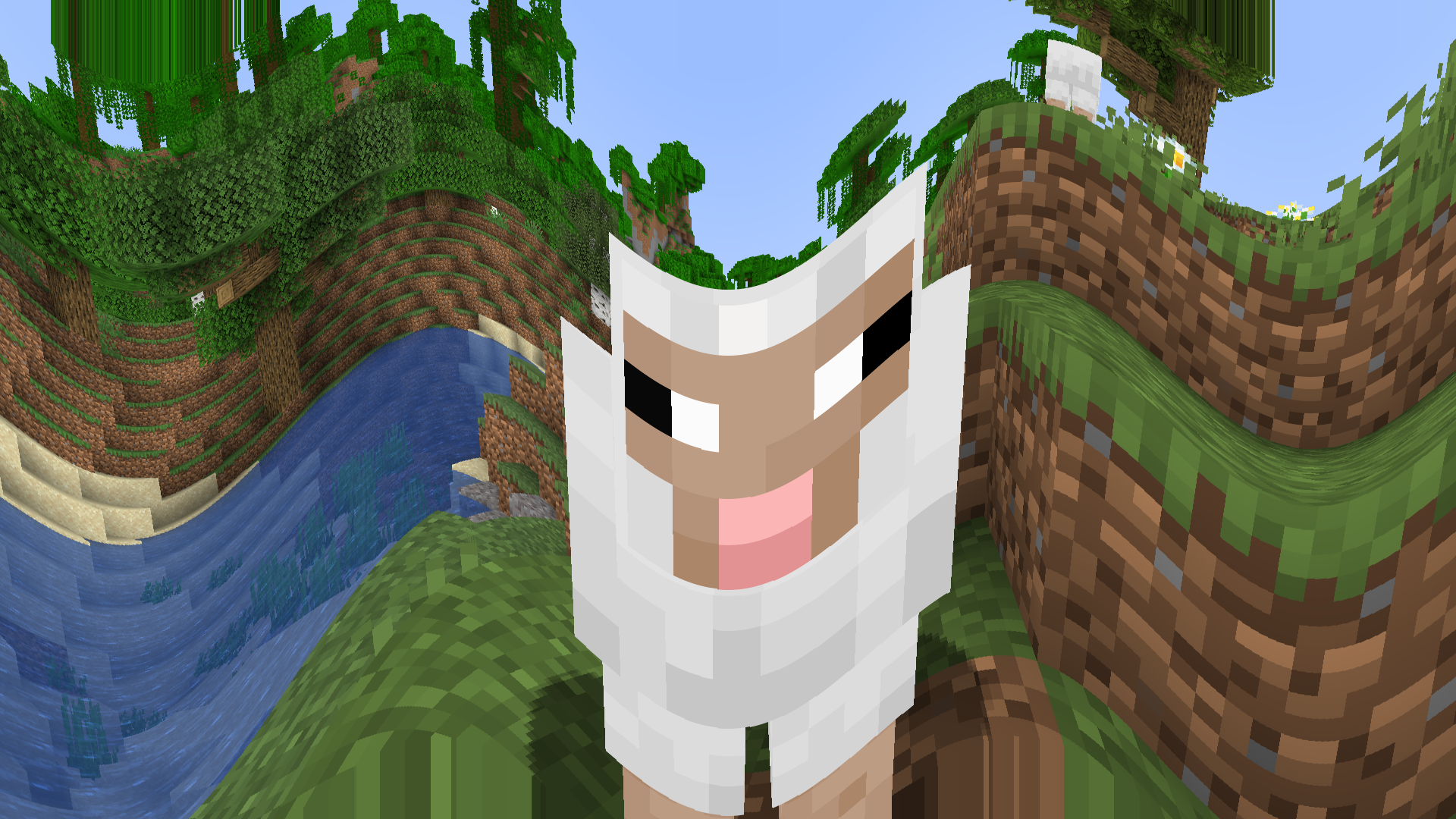
It is an interesting distortion effect and I like sine waves. The effect is customizable, you can set the direction from horizontal(0 in V1 | 1, 2 in V2) to vertical(1 in V1 | 3, 4 in V2), the frequency and the height(amplitude).
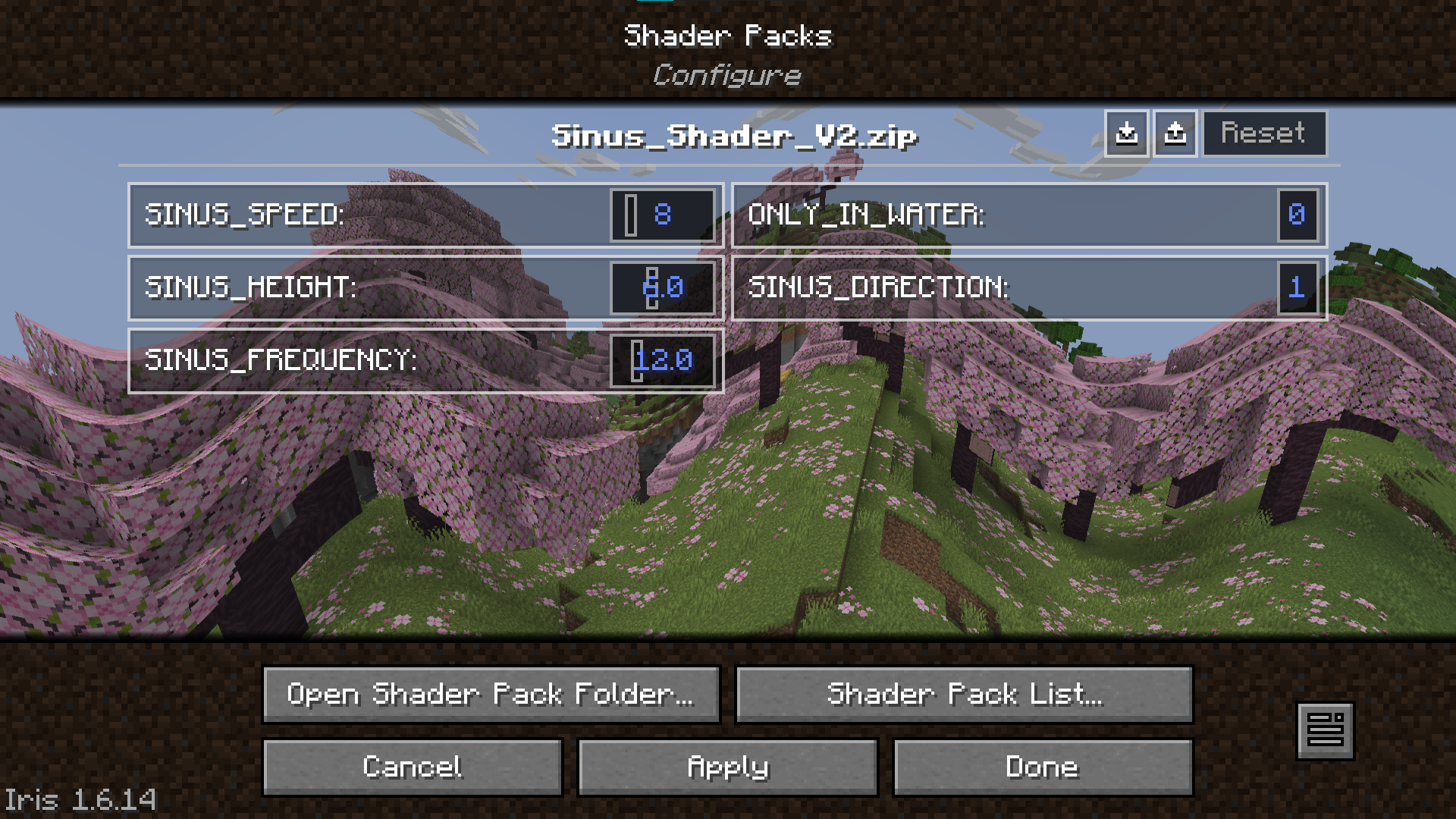
Version 2 also features customizable movement(left to right, right to left, top to bottom, bottom to top) and the option to only apply the effect if you are under water.
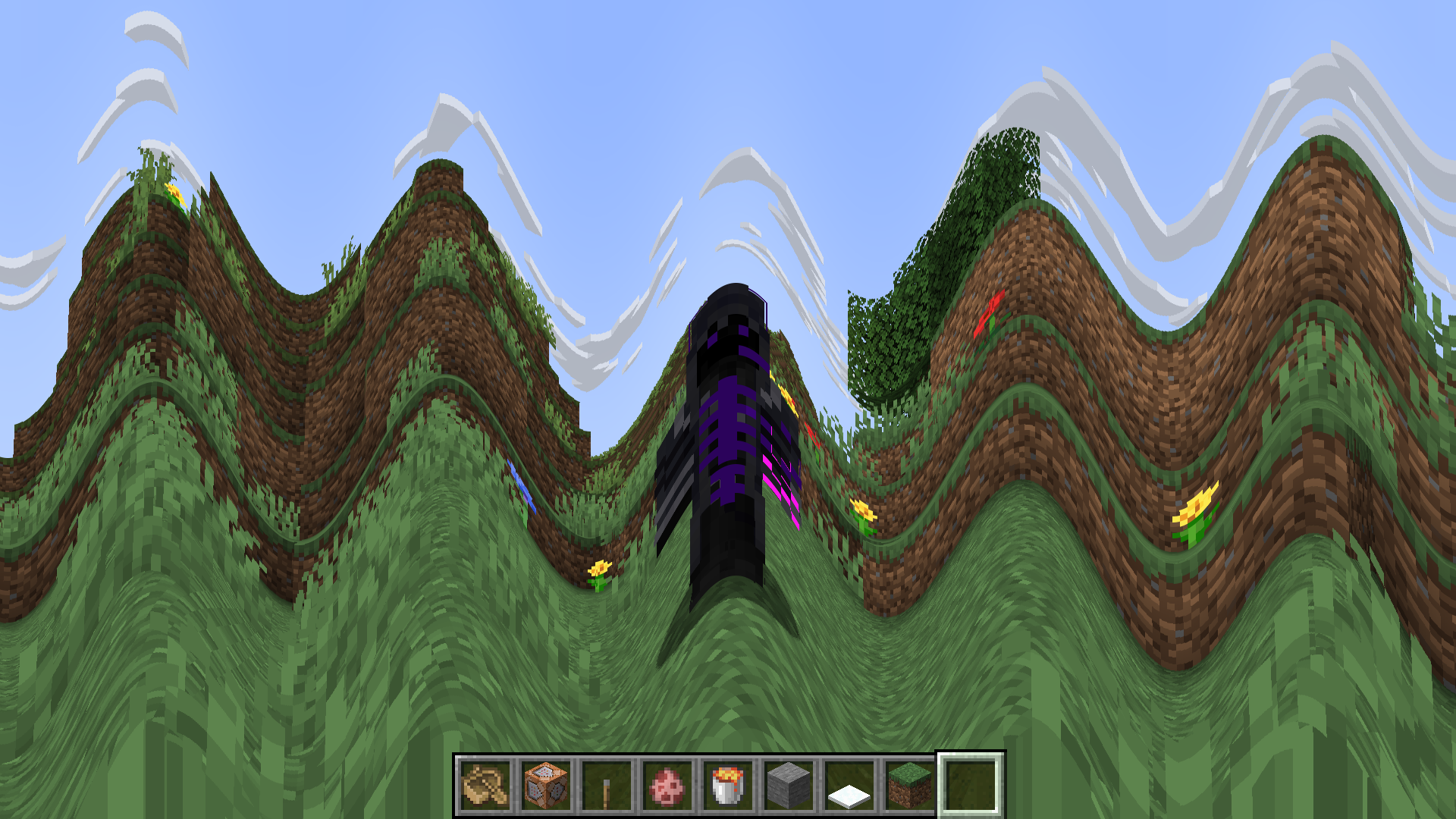
This Shader is completely useless and has no reason to exist, but you can use it anyways. Maybe it could be an interesting challenge, or something, idk. Have fun with the Shader and the motion sickness it causes.
SillyWankerShader
# About
[Discord](https://discord.gg/QCDXyjzQeU)
Silly Wanker Shader is a minecraft shader which aims to bring the vanilla look of minecraft while still having “shader” features any other shaders have. We also have a big heart for having as much features as possible. If you liked the shader you should also check out [Escheridia](https://modrinth.com/shader/escheridia)
# Download
– [GitHub](https://github.com/bomba-cat/SillyWankerShader)
– [CurseForge](https://www.curseforge.com/minecraft/shaders/sws)
– [Modrinth](https://modrinth.com/shader/sillywankershader)
# Credits
– [QuirkyPlague](https://modrinth.com/shader/escheridia), Developer
– Explo_GR, Developer
– Victor, Playtester, @VIC_TOR_ on YouTube
– Yoon, Logo Creator and Artist, @yoon_gm on Discord
– YSS Community, Special love to them
Sculk Enchantment Glint
Sculk around with this ancient disco ball glint.
(Set a high glint strength for the best effect!)
Note that this pack uses vanilla shaders to skew the texture.
It may not be compatible with Sodium and other renderers.
Retro Pixel Shader – NES Style

🎮 Retro Pixel Shader – NES Style Minecraft
Turn Minecraft into a retro 8-bit adventure inspired by the Nintendo Entertainment System.
This shaderpack transforms the game into a pixelated retro world while keeping the classic Minecraft colors and atmosphere.
Perfect for players who love retro graphics, pixel art, and nostalgic games.
⚡ Lightweight
🎮 Retro aesthetic
🧩 Fully customizable
✨ Features
🟩 NES-Style Pixel Graphics
Large retro pixels that recreate the look of classic 8-bit games.
🌈 Vanilla Minecraft Colors
The shader keeps the original Minecraft color palette.
⚡ Lightweight Performance
Designed to run smoothly on most computers.
📺 Optional CRT Effects
Scanlines
Dithering
Retro screen look
🔧 Adjustable Shader Settings
You can customize the shader directly in the shader menu:

Pixel Size
Blur Strength
Brightness
Saturation
Contrast
Scanlines
Dithering
🎥 What It Looks Like
Your Minecraft world becomes:
Pixelated landscapes
Retro-style lighting
Classic 8-bit visuals
It feels like playing Minecraft on an NES console.
⚙️ Recommended Settings
For the best retro look:
Pixel Size → 8 – 10
Blur → 0.25 – 0.35
Scanlines → Low
📦 Requirements
Minecraft Java Edition
Iris Shader Loader
Sodium (recommended)
📥 Installation
Install Iris + Sodium
Download the shaderpack
Place it inside:
.minecraft/shaderpacks
Enable it in:
Options → Video Settings → Shaders
🎬 YouTubers & Streamers Welcome
You are free to use this shaderpack in videos or streams. If you do, please consider linking the project page!
⭐ Seen this shader in a video? Download it here and try it yourself!
Rethinking Voxels
# Rethinking Voxels
This shader is an edit of [Complementary Reimagined](https://www.complementary.dev/reimagined) that aims to be decently fast (when compared to path tracing shaders) while having block lights cast sharp shadows.
### Notes
The lighting system is not perfect. Occasional sudden brightness changes are a side-effect of the way it works and cannot be completely removed without hurting performance or removing sharp shadows from light sources. To do the latter, disable `Per-Pixel Lighting` in the `Rethinking Voxels Settings`.
This shader is developed on Iris, using an AMD graphics card on linux, and it is also tested on an NVidia graphics card on linux. While it usually works on other platforms, bugs that appear only there are not caught by my testing and hence they take longer to fix. To use this shader pack, the Iris shader loader is required. Beta 18d and older versions also work on OptiFine.
### Contact
If you need support, please join the [shaderLabs discord server](https://discord.gg/8wT5KxF4TZ), where this shader has a channel (#rethinking-voxels-gri573).
### Partnership
I have entered a partnership with Ember, a Minecraft server hosting provider. This is because Ember hosts the complementary SMP server and has provided a better hosting experience / customer support than the previous hosting service, and because they reached out asking about it. If you need to host a Minecraft server and wish to support Rethinking Voxels’ development at the same time, do check them out! Using the promotional code `RETHINKING` in a first-time purchase will redirect 70% of the first month’s fee to me as well as give you a 10% discount.
[](https://billing.ember.host/aff.php?aff=13)
### Media
Video by youtube user iambeen that showcases rethinking voxels beta 18d (with custom settings), compared to the original reimagined:
Resident Craft
# Resident-Craft
A dark horror-inspired Minecraft shader pack built for a cold, cinematic, Resident Evil-style atmosphere.
## Overview
Resident-Craft is a custom shader project focused on tension, mood, and visibility control. It uses heavy fog, deep shadows, strong color grading, wet surface shading, and a flashlight-style lighting effect to create a tense survival-horror look.
## Features
* Heavy atmospheric fog
* Horror-style blue/teal color grading
* Strong contrast and darkness outside the light beam
* Flashlight-inspired lighting effect
* Fog-aware lighting so distant scenery fades naturally
* Wet and damp surface tinting
* Floating spores / dust-style particles
* Film grain and vignette for a cinematic look
## Best Experience
Resident-Craft is designed for:
* Dark forest environments
* Swamps, ruins, and abandoned structures
* Horror maps and adventure worlds
* Night scenes and low-light gameplay
## Recommended Settings
For the intended look, use:
* Dark or night scenes
* Low to medium render distance
* Fog enabled
* Bloom or extra post-processing kept minimal if possible
* A resource pack with muted colors if you want a stronger horror tone
## Compatibility
Compatible with:
* Iris
## Performance
The shader is designed to stay lightweight enough for lower-end systems while still producing a strong visual effect. Performance may vary depending on:
* Render distance
* Scene complexity
* Particle density
* Shader loader and GPU
## Credits
Made by Akshat Sharma.
—
If you use this shader pack in a video, mod showcase, or project submission, please credit Resident-Craft.
RedHat Shaders
– About
RedHat is a shaderpack that for Iris and Optifine.
It is an edit of an old version of Chocapic13, and has many features.
RedHat’s main features are lighting effects such as Godrays (3D, or 2D, if you have a low-end machine), Shadows, Underwater Light Absorption, and many more.
The shaderpack features reflections too, and reflects some light on all surfaces, to make everything look more similar to the Minecraft trailers style.
There are many cinematic options such as Lens Flares, Depth of Field (Chromatic Aberration included), Grain, Tilt Shift, and others.
The colors, which change depending on the time, make everything more realistic yet they keep the fantasy vibe.
There are many effects related to movement as well. All foliage or hanging things such as lanterns wave. Along those there are Waving Hand and Waving Camera options too, configurable as well.
If that wasn’t enough, RedHat supports all versions from 1.7.10 up to 1.21, and it supports custom skyboxes!
Lastly, there are many atmospherics effects such as Fog and Clouds, Round moon and sun, and other things like PBR support, Auto-Exposure, Stars, and many, many other things.
There are a lot of ways you can customize the shaderpack, and make it look like the way you want.
– Requirements
GPU: Must support OpenGL 3.2 and have at least 1GB of VRAM. AMD, NVIDIA and Intel are all supported (You’ll have to decrease some settings to play smoothly with Intel GPUs).
CPU: Must have a minimum clock speed of 1GHz
RAM: Must have located at least 1.5-2GB of RAM to your game
OS: Windows (7,8, 8.1, 10, 11), Linux (Mesa drivers might lead to issues)
Shadermod: Optifine or Iris
MC Version: 1.7.10, up to 1.21
> Light Settings Recommendation: i3/i5 3-4th Gen, 4GB DDR3 RAM, GT 1030 2GB GDDR5
> Balanced Settings Recommendation: i5/i7 8-9th Gen, 8GB DDR4 RAM, GTX 1050 Ti 4GB GDDR5
> Heavy Settings Recommendation: i5/i7/i9 10th+ Gen, 16GB DDR5 RAM, GTX 1660 Ti 6GB GDDR6
If you use RedHat without meeting these requirements, then keep in mind you’ll take a risk.
RedHat is a pretty heavy shaderpack, thus do not expect it to be FPS friendly on the default settings.
Raincore
—
The rain never stopped in 1998.

[](https://github.com/myueqf/Raincore/stargazers)
#### About:
Raincore is a shader pack that captures the petrichor scent of moist earth after the rain, featuring distinct pixelated effects and grain/lo-fi.
This is my fifth shader pack, built upon my previous work, [Lantern](https://modrinth.com/shader/lantern-shader). I hope you enjoy it! (^-^)
#### Performance:
No high-end hardware is required; integrated graphics are sufficient for a smooth experience.
For the best visual balance, a render distance of 8 chunks is recommended. While you can go lower, it is best kept between 8 to 11 chunks.
#### Links:
– >[Github](https://github.com/myueqf/Raincore)
– >[Discord](https://discord.gg/9ATsdr2ms7)
– >[CurseForge](https://www.curseforge.com/minecraft/shaders/raincore)
#### FAQ:
– **Q**: Can I include this shader in my Modpack?
– **A**: Distributing this shader as part of a modpack without modifying its source code is not considered creating a derivative work. Other components of the modpack are not bound by the GPLv3 license.
Pyvtron VX
## [Pyvtron VX](https://pyvton.pages.dev/minecraft-shaders/pyvtron-vx)
### Details
Features: Volumetric Fog, Water Caustics, Cumulus Clouds, Cirrus Clouds, High Resolution Graphics, ultra realistic rain and very much features that you will see in the game!
Performance Impact: High / Medium (Medium: If you have a good computer).
You can find older versions and the official release(s) of Pyvtron VX [here](https://pyvton.pages.dev/minecraft-shaders/pyvtron-vx) ([My Website](https://pyvton.pages.dev/))
### Requirements
AMD CPU (Recommended)
Nvidia GPU (Recommended)
A graphics card that supports OpenGL 4.6 or OpenGL 4
Note: I currently only have access to Nvidia GPUs for testing. I cannot make sure if Pyvtron VX works on Intel CPUs and AMD GPUs.
### Installation
Install it like other Minecraft Shaders or read this here if you don’t know how to install minecraft shaders:
1. First download the Iris Shaders Installer / Mod
2. Run the .jar and click on Install.
3. Download the latest version of Pyvtron VX
4. Open the Minecraft Launcher. You’ll see the Iris Shaders profile – select it and start Minecraft.
5. Go to Options → Video Settings → Shaders → Shaderpacks Folder.
6. Drag the downloaded shaderpack into the shaderpacks folder.
7. Select the shaderpack ingame.
8. Enjoy.
### Other Stuff
Before you modify or do something with this shaderpack, you must read the [license](https://pyvton.pages.dev/licenses/pccl)
Pyvtron VX is not path traced etc. VX means Version X
If you want to know, how to add support for modded dimensions (for new dimension mods) read this here on my [docs](https://pyvton.pages.dev/docs/minecraft-shaders/modding/how-to-add-mod-support-for-modded-dimensions)