Our server recently started a new modded survival game based on [Create].
We also installed [Create Craft & Addition].
However, we encountered an issue: “Why can’t I craft Electrum?”
After checking the recipe JSON file, we discovered it requires an item `c:silver_ingot`.
Upon further investigation, we found that many tech mods don’t support `Fabric 1.20.1` yet,
so we decided to create a new mod that adds just silver.
## Features
Add (deepslate) silver ore, raw silver ,silver ingot, silver nugget and block of silver.
## Acknowledgement
– [Create]:
Ores worldgen, recipes
– Fabric Modding Tutorial:
Very impressive works, help us a lot.
**Yeth’s TPA is a Teletransportation Accept mod for Minecraft designed to be compatible, stable, and sufficient.**
## Commands
– **/tpa ** Sends a TPA request to a user
– **/tpa accept ** Accepts a TPA request from a user
– **/tpa here** Sends a TPA Here request to a user
– **/tpa cancel** Cancels an outgoing TPA request
– **/tpa ignore ** Ignores a player from making TPA requests
– **/tpa help** Sends a list of all commands
– **/tpa disable** Disables TPA requests from being sent to you
– **/tpa enable** Enables TPA requests to be sent to you
– **/tpa setting ** Configures settings in TPA
## Features
– Automatic expiry of TPA requests
– TP delay w/ countdown
– Multiple request handling
– Permissions for server owners
– Anti-TPA-traps
## Support
Yeth’s TPA supports the following mod loaders:
– Fabric
– Neoforge
– Forge
– Quilt
– Legacy Fabric
– Babric
– Ornithe
– BTA
– LiteLoader
For Minecraft versions 1.7.2 – 26.1.2
Cobblemon – Yet Another Chance Booster
## About mod
The mod allows you to increase the player’s chances of having a shiny version of a pokemon for a certain period of time, as well as the spawn weight of a pokemon of a certain species or pokemon that have certain labels (e.g. “gen1, legendary”).
## Commands
“`/yacb boost “` – command to increase the spawn chance.
**Arguments:**
– “`“` – player to be boosted;
– “`“` – the value of how many times the chance of a shiny or weight will be increased;
– “`“` – duration in server ticks;
– “`“` – boost type, can be “`shiny“`, a species id, or a string listing labels separated by commas (e.g. “`legendary, mythical“`).
“`/yacb list “` – command that displays the specified player’s boosts. “`“` can be “`all“`, “`shiny“`, “`species“`, or “`labels“`
## My other Cobblemon side-mods
Yet Another Vanilla But Better (YAVBB)
Yet Another Vanilla But Better is exactly what the name implies : another vanilla+ modpack. You’ve seen this before, I don’t need to explain what that means.
It includes **performance mods**, **aesthetic mods** (probably more than a person would realistically need), lots of **QoL mods** to make gameplay feel better and many tools like WorldEdit, Axiom, MiniHUD and Litematica. There’s probably more mods in this than the average vanilla+ modpack, so it’s not the ideal pack if all you want is pure performance, but for anyone else it’s totally worth it, trust, you just need to see _the vision_.
Is this compatible with vanilla?
…kind of! Players on vanilla clients or that are missing some mods included here won’t be able to join a world hosted using this modpack, but **you should be able to join any server a vanilla client can** (though some server-side features like crawling or armor stand posing may not work). I wouldn’t recommend joining public servers though, as some mods like ItemSwapper, Better Climbing or Reacharound might be considered cheating for some. Most importantly, worlds created using this modpack have **no issues being played in vanilla** and vice versa, meaning you aren’t stuck using this modpack if it stops updating (or if you try it and hate it).
Why use this vanilla+ modpack instead of any other?
Uhhh… _*looks through notes*_ umm well you see this modpack is uhhhh it’s better than the others because… well y’know, you see, it’s like…
Jokes aside, there isn’t really a reason for this modpack to exist other than the fact that I don’t want to have to rely on someone else updating their modpack to play the latest versions. There isn’t something that makes it stand out from the rest, all the included mods are probably ones you already know well by now and there aren’t any fancy custom resource packs or anything (yet, at least). I put it on Modrinth only because it’s easier for both me to share this modpack and for others to update it if it’s uploaded here instead of somewhere like MediaFire or Google Drive.
Using Flashback
The Flashback mod doesn’t work entirely by default : you can record replays, but can’t load them later. This is because it’s incompatible with C2ME and Very Many Players, so if you want to load replays, you’ll need to uninstall/disable those two mods.
Using e4mc
If you don’t like Essential, you can enable and use e4mc instead which is disabled by default. Doing this requires you to disable Krypton though, as there’s currently an incompatibility between the two that should be fixed once Krypton releases an update.
Using Voxy
The Voxy mod is installed, but its effects are disabled by default since it can have a reasonable performance impact, can be buggy and generally isn’t for everyone. It can be reenabled in video settings.
Known Bugs
– The Edit World and Create New World menus softlock you, forcing you do kill the game and to reopen it
– The More Culling config menu sliders don’t work (you can still edit the config via the file though)
I don’t know how to fix these and they’ll probably get fixed by mods updating, so I guess just don’t interact with those things in the meantime?
Yet Another TPA
# YATPA

YATPA is a teleport plugin/mod project for modern Minecraft servers:
– `paper/`: Paper plugin (1.21.x API target)
– `fabric/`: Fabric dedicated-server mod (1.21.x Mojmap/Fabric API scaffold)
What makes YATPA stand out is that it combines full teleport-request/home/back/spawn/RTP/death tooling with a clickable in-chat command UX (`/tp` menu, paged pickers, and paged logs), while also exposing granular cost controls per teleport type. Economy mode is configurable as `NONE`, `XP_LEVELS`, `ITEM`, or `CURRENCY`; Paper supports `CURRENCY` through Vault (with EssentialsX or another Vault economy provider). OPs have an optional GUI menu to fine tune settings in-game.
## Screenshots
#### Help (via /TPAHELP)

#### Clickable TP Menu (via /TP)

#### Clickable TP Logs for OPs (via /TPLOG)

#### Clickable Home List (via /TPHOME LIST)

#### Clickable User List (via /TPA with no username specified)

## Features
– Clickable teleport menu:
– `/tp`
– Includes shortcuts for homes, RTP, spawn, death-back, TPA/TPHere, toggle, block, and unblock.
– Player pickers are paginated (5 per page) for `/tpa`, `/tphere`, `/tpablock`, and `/tpaunblock`.
– Player teleport requests:
– `/tpa `
– `/tpahere ` or `/tphere `
– `/tpaccept`
– `/tpdeny`
– `/tpatoggle`
– `/tpablock `
– `/tpaunblock `
– Homes:
– `/tphome set [name]`
– `/tphome set default `
– `/tphome delete `
– `/tphome list`
– `/tphome [name]` or `/tpahome [name]`
– Home list is clickable and shows coordinates.
– The default home is marked with `(default)`.
– Utility teleports:
– `/rtp`
– `/spawn`
– `/tpaback` or `/tpdeath` (last death location, one use per death)
– OP commands:
– `/ytp `
– `/ytp `
– `/ytp [realm]`
– `/ytp [realm]`
– `/tpoffline `
– `/tpalog [page]`
– In-game admin config (OP):
– `/yatpa settings`
– `/yatpa gui` (Paper, paginated inventory editor for all settings; click to toggle/edit)
– `/yatpa set `
– `/yatpa reload`
– `/setspawn`
– Player help page:
– `/tpahelp`
– `/tphelp`
– `/yatpa help`
– Public help intentionally excludes admin commands.
– When teleport costs are enabled, a `Costs` section is shown at the bottom listing only teleports with non-zero costs.
## Notable Behavior
– Requests:
– Timeout + cooldown are enforced.
– Accept/deny messages are clickable.
– If an accepted delayed teleport is cancelled (move/damage), the other player is notified.
– Teleports:
– Delayed teleports show a countdown.
– Costs are validated before countdown and charged on execution.
– Players are told exactly what they paid (XP, items, or currency).
– `ytp`/`rtp` use safe landing checks to avoid unsafe blocks and lava.
– `/tpaback` and `/tpdeath` consume the saved death location after successful use, and require a new death to refresh.
– Teleport logging:
– `/tpalog` is paginated and clickable.
– Log lines include context details (for example home name, target player, coords, or offline target) where relevant.
– Costs and settings:
– Cost modes: `NONE`, `XP_LEVELS`, `ITEM`, `CURRENCY`.
– Realm-specific RTP costs and min/max RTP distance overrides are supported.
– Paper `/yatpa gui` and `/yatpa set` expose currency paths directly.
– Restrictions and routing:
– Per-dimension restrictions can disable `/rtp` only or all YATPA teleports.
– `/rtp` supports blacklist + optional overworld routing.
– Spawn destination is configurable via `settings.spawn.*` and `/setspawn`.
– Platform note:
– Vault/EssentialsX currency charging is Paper-only in this release.
– Command/UX behavior in this README applies to both Paper and Fabric unless noted.
## Configuration
Paper config files:
– `paper/src/main/resources/config.yml`
– `paper/src/main/resources/messages.xml`
– `paper/src/main/resources/plugin.yml`
Fabric `config.properties` supports the same restrictions with either:
– `settings.dimension_restrictions.disable_rtp=overworld,minecraft:the_nether`
– `settings.dimension_restrictions.disable_teleport=minecraft:the_end,my_custom_dimension`
– Dynamic keys like `settings.dimension_restrictions.disable_teleport.minecraft:the_nether=true`
Licensed under `GNU General Public License v3.0` (GPL-3.0-only). See [LICENSE](LICENSE).
Yet Another Semi-Vanilla Pack
I want a **vanilla** experience, wait no… I want it more **modded**…
**no! scratch that, more vanilla!**
This modpack aims to solve the this exact issue – where there is imbalance between a vanilla and a modded feeling, while still being fun and lengthy!
**There are plenty of adventures, builds, action, and some grinding to perform:**
– For adventures, using a combination of multiple world generation-changing-mods like **Better Nether**, **Better End**, **Terralith**, **Cavernous**, **Oh The Biomes We’ve Gone** will shape your world and make it more exciting to travel. These mods include their own unique structures and dungeons with the addition of custom blocks and mobs.
– In terms of building, many skilled builders will appreciate the various decoration and block forming mods available in order to fill the gaps from vanilla minecraft’s blocks (yes, vertical slabs included!)
– Grinding and action will be your main struggle in the beginning of the modpack, because of the inclusion of the mod **LevelZ**, you will have to climb your way up the levels using special XP orbs obtained from monsters to level up your skills like in an MMORPG game, unlocking skills like Mining, Smithing, Farming to be able to even **use** simple blocks and
items!
### General Recommendations:
– Music **ON**
– Render Distance **8 or below** (When using Distant Horizons)
– Shaders **ON** (If you have the specs in order to run them)
### Distinct Features:
– Custom recipes
– Special world-generation-changing mod combinations and mixing
### Coming In The Future:
– Quests
– More custom recipes
> All mod credits go to their respective creators / owners and can be accessed through the “Versions” tab by clicking on a release and then on the mod’s name below “Dependencies”.
YANTR
Black Dye, Paper, and an Iron Nugget:
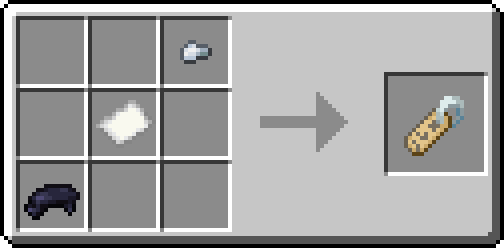
That’s it. That’s the mod.
—
Tested with Fabric API 0.92.0+1.20.1
Spoiler
This mod is provided “as is”. It should technically work on all 1.20.X
versions of the game. I am not planning to update/backport this mod to a
different version of Minecraft. You’re free to do so yourself, however.
Yet Another Bingo


#### Looking for a modpack? Check out Yet Another Bingo: Ultimate!
This is a multiplayer BINGO/Lockout mod + lobby, which works on the client or on a dedicated server.
– When installed on a server, players do not need any mods or resource packs to join.
– When installed on the client, it provides additional functionality for server games, and can run local games in singleplayer or LAN.
Teams can compete to collect items on the BINGO card. Score items in horizontal, vertical, or diagonal
lines to win the game.
—
⌨ Press “Y” to see the Bingo Card in an inventory view!
🖱️ Vanilla clients can right-click when holding the map to do the same.
*For an introduction to Minecraft BINGO, read “What is Minecraft BINGO?” on the wiki!*
*Make sure to install Mod Menu and YetAnotherConfigLib to use the built-in config screen!*
– #### Unique gamemodes
The gamemode toggles and goal options offer some interesting combinations. Try the “Lockout”, “Hidden Items”, or “Replace Goals” settings for a fun time!
– #### Unnecessary polish
Features an interactive lobby, ready-up timer, and score notifications. Integrates with Simple Voice Chat to manage team groups. Use your choice of JEI/REI/EMI to see crafting recipes by clicking the bingo card!
– #### A ton of settings
Give players infinite elytra, provide a spawn kit, and individually tune the items and difficulty of the bingo card – all without leaving the lobby.
– #### Configure literally anything!
Supports customizing the lobby build, changing textures in resource packs, adding custom objectives, and more!
Commands
This is a brief summary of the most important commands. See the Command Cheatsheet for a complete list of bingo commands and descriptions!
Global commands:
– `/coords` prints the current player coordinates in the team chat
– `/coords list` displays a list of the team’s previous “/coords” messages
– `/all` or `/g` sends a message to the global chat (sending a regular chat message defaults to team chat when in-game)
– `/join ` (when in the lobby) allows a player to join the specified team
BINGO commands (operator-only, unless you use LuckPerms):
– `/bingo reroll` rerolls for a new Bingo Card with different items
– `/bingo seed` shows or sets the random seed used to generate the current Bingo Card
– `/bingo end` immediately ends the current game and displays the winner (or a draw)
– `/join ` assigns a player to a different team – will respawn them if in-game
Credits
The very pretty Bingo Card HUD and “Bingo!” button textures were made by @marceles!
Parts of this mod are inspired from Extremelyd1/minecraft-bingo, the awesome Spigot/Paper version of this gamemode.
The logo design was inspired by Aikoyori/ProgrammingVTuberLogos
### Translations

**Help translate this mod into your language!** All text in this project is available on CrowdIn for anyone to submit translations.
Chinese Simplified translations were contributed by Fishlanding, tovv3r, Young912, BoredYukolin, yzy_sheep, nageih, teaSummer, Nattiden, ZnianXgang, and SpongeCouna!
Chinese Traditional translations were contributed by Leo_768, BoredYukolin, notlin4, Lavskiy Ilias, and Sear!
Chinese Traditional (Hong Kong) translations were contributed by Furina_de_zh_hant and Sear!
Czech translations were contributed by Džerry!
Danish translations were contributed by Libreh!
Dutch translations were contributed by GrangerTheDog!
Finnish translations were contributed by Diamonddevv!
French translations were contributed by Yosh64, Guillarda, Narkotiqu, and Barbie192!
German translations were contributed by Butterkeks and CryptoGamer1612!
Hungarian translations were contributed by petya0927 and Remarci!
Italian translations were contributed by noah and sculk1!
Japanese translations were contributed by おほしさまちゃんねる!
Korean translations were contributed by LegendLier!
Literary Chinese translations were contributed by Sorajima Asugawa!
Polish translations were contributed by Toniemax!
Portuguese translations were contributed by Lucsdev_!
Russian translations were contributed by Milleol, XakVit, Ofterkino, Mrpavel, Май, Lucky Wayч, yukkovna, lazdni, and Encidi!
Spanish translations were contributed by ANDY, GatoEnCaja, and TheJokerDev!
Swedish translations were contributed by Vica50 Rosvall!
Turkish translations were contributed by Erkin_!
Ukrainian translations were contributed by Dan4ikPlayUA and RealWinord!
### ⚠️ NOTICE :
This mod is being ***BRUTALLY DECIMATED*** and merged into the revamp of Building But Better. After the merge, this mod will no longer be maintained, but I will implement things to BBB to make the transition smooth so blocks do not disappear. Thank you!
—
### 📋 About
**Yet Another Furniture** is a furniture mod designed to be a replacement for Another Furniture which has had its entire concept and branding completely solidified. It is a re-imagination of our original mod bringing new features and blocks in a new art style.
It contains furniture types such as Drawers, Sofas, Lamps, Cabinets, and more!
A simple mod to connect the in-game chat with a Discord channel.
## Why another one?
– This one focuses on simplicity. It is as light as it gets with only the basic functionality and very little required setup!
**Setup:**
1. Go to https://discord.com/developers and create a new application
2. Copy the ID and invite the bot with the following url (dont forget to change the ID or else the link won’t work:
“`url
https://discord.com/oauth2/authorize?permissions=2953964624&scope=bot%20applications.commands&client_id=APPLICATION_ID
“`
3. Enable developer mode on discord to be able to right-click a channel and copy its channel ID
4. Download the mod into the mods folder and let it generate the config file. The server will crash on first launch since the Bot Token is invalid.
5. Paste the copied channel ID of the channel that you would like the chat to be linked to into the config file (name: `config/yadclconfig.properties`)
6. On the discord developer dashboard, in your application, go to the bot tab on the sidebar and reset and copy the bot token and paste it into the config file.
7. Restart the server and you should be good to go. Check that the bot has read/write permission in that channel.
*Alternative suggested Setup Guide (not by me):*
https://erdbeerbaerlp.de/projects/discord-integration/quick-setup