## General
This datapack allows you to use the smithing table to upgrade diamond gear into multiple different equipment types, instead of just netherite. The “netherite upgrade” item has been replaced with the “upgrade template”, which can be used to upgrade diamond gear into netherite, or any of the new materials. It can be found in ancient cities as well as bastions; it can be duplicated with the same recipe as the netherite upgrade, but you can also use deeplsate or cobbled deepslate instead of netherrack.
## Equipment Types
### Mithril
A mithril ingot is crafted with 4 prismarine crystals, 4 iron ingots, and 1 echo shard. A mithril ingot can be used with an upgrade template in a smithing table to turn diamond gear into mithril gear.
Mithril armour provides the same protection as netherite, but it provides more armour toughness at the cost of providing no knockback resistance. The mithril sword and tools have the same stats as netherite.
### Dragon’s Mithril
A dragon’s mithril ingot is crafted with one mithril ingot and one dragon’s breath. A dragon’s mithril ingot can be used with an upgrade template in a smithing table to turn diamond gear into dragon’s mithril gear. All dragon’s mithril gear has the same stats as mithril; the only difference is the texture.
### Emerald
A reinforced emerald is crafted with one emerald and one netherite ingot. a reinforced emerald can be used with an upgrade template in a smithing table to turn diamond gear into emerald gear. All emerald gear has the same stats as netherite gear, the only difference is the texture.
## Important Notes
Mithril ingots, dragon’s mithril ingots, and reinforced emeralds are technically spawn eggs. This is because there is currently no way to add recipes (through data packs) that require the ingredients to have custom nbt data, so I had to use items unobtainable in survival for the recipes. This means that:
a) If it is possible for players to obtain spawn eggs in your world, then they will be able to use them in place of the custom ingots in the smithing table.
b) If a player right clicks with a custom ingot, it will be consumed, and a command will attempt to give it back to them. However, in some situations the command may not run, or it may give the custom ingot to a different player who is nearby. Please do not right click with the custom ingots.
This datapack has a required resource pack; you will not be able to see the custom textures without it.
yyz’s backpack
# Inventory Expansion – yyz’s Backpack Mod
**Directly Integrated Backpacks**
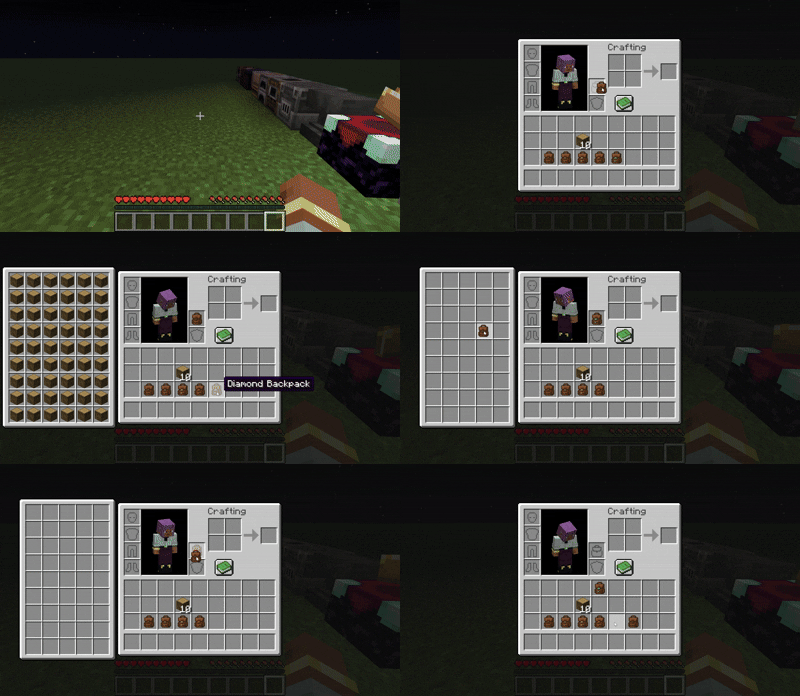
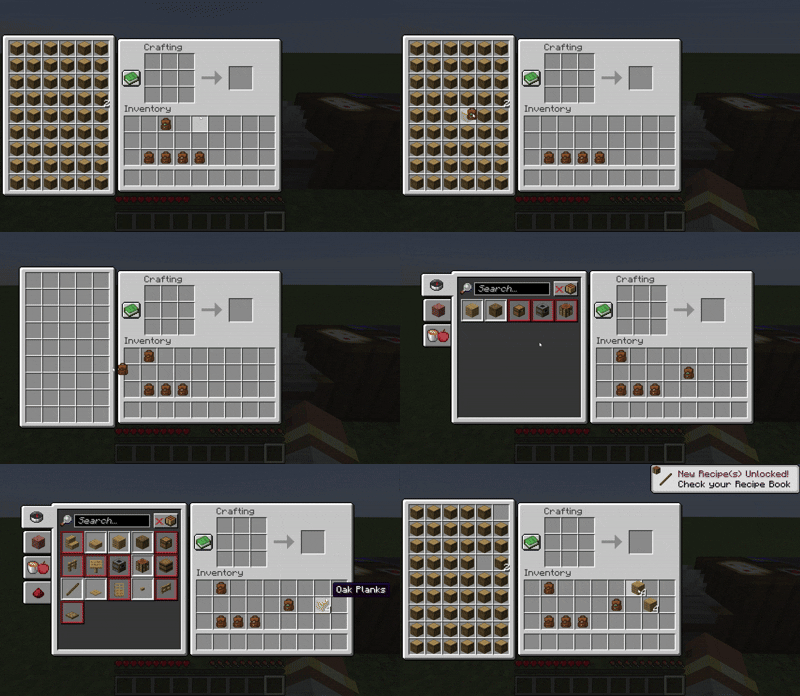
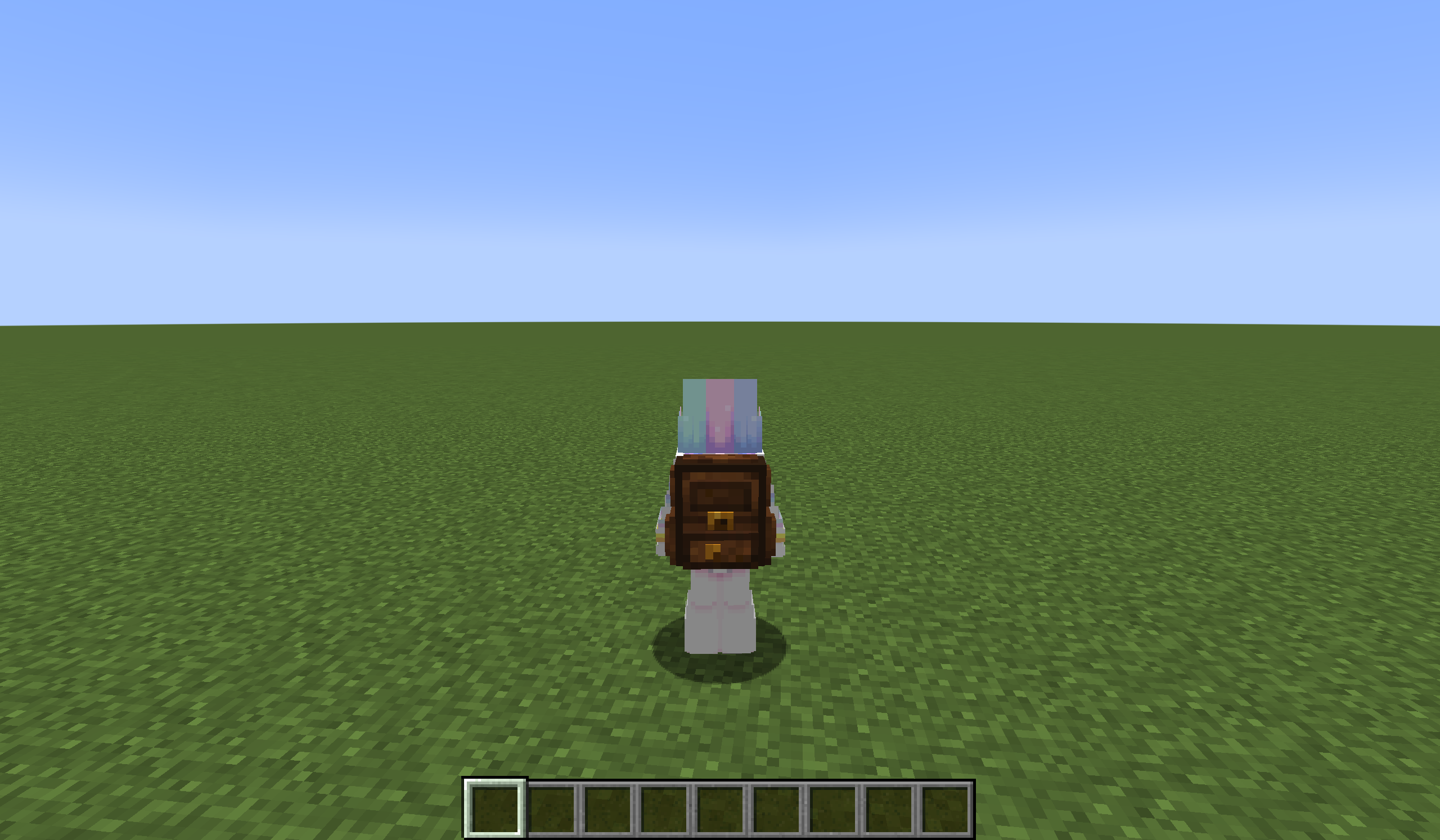
## 🌟 Mod Highlights
### ⚡ Seamless GUI Integration
Backpack slots appear directly in **work GUIs** (inventory/crafting table/chest etc.) without opening extra interfaces.
### 🛠️ Enhanced Features
– 🖱️ **Item Transfer**
`Shift+Left Click` → Transfer to main inventory
`Shift+Right Click` → Transfer to backpack
`Double Click` → Auto sort items
– 📦 **Item Collection**
Automatically stores items in backpack when inventory is full
Backpack drops as single item upon death (contents preserved)
– 🔥 **JEI/REI/EMI Integration**
Supports using backpack items **directly in JEI/REI/EMI crafting**
Real-time backpack content display in recipe interface
– 💍 **Accessory Support**
Backpacks can be placed in **Curios/Trinkets slots**
## 🎒 Backpack Tiers
| Backpack Type | Extra Slots | Special Ability |
|—————-|————-|———————-|
| Iron | +18 | Basic capacity |
| Gold | +36 | Basic capacity |
| Diamond | +54 | Basic capacity |
| **Netherite** | **+54** | **Fire Immunity** |
## ⚙️ Compatibility
### Status Key
– ✅ **Fully Compatible**
– ⚠️ **Partial Support**
– ⌛ **Planned**
– ❌ **Unsupported**
## ❓ Why This Backpack?
Traditional backpack mods = mobile chests requiring separate GUIs. Our solution:
1. **Seamless experience** – Access backpack items directly in **work GUIs**
2. **Native interaction** – Full support for recipe book/JEI/REI/EMI
3. **Backpack swapping** – Swap when placing backpack in backpack slot/inside
4. **Continuous expansion** – Growing mod compatibility support
## ⚠️ Current Status
### The mod is currently in a very early stage. If you find any bugs, you can report them via GitHub or Discord
❗ Found an issue or have suggestions? Report now!
– [GitHub](https://github.com/yyz729/yyzsbackpack/issues)
– [Discord](https://discord.com/invite/3NPKBgXxVU)
🔧 **In development**:
– More GUI support
– Backpack 3D models
– Expanded mod compatibility
> ✨ **Design Philosophy**: Make backpacks a natural extension of the main inventory
### Harbinger’s Requiem:
This gives Hoes higher damage similar to an axe
### Harbinger’s Blaze:
This is just fire aspect BUT for Hoes
### Scythe Master:
This increases range by +2 Blocks and gives them a SWEEP attack
### Triple Shot:
This is just multishot BUT for Bows!!!
yTrain
# 🎯 yTrain – Train Against Custom Zombies with Ease
## 📖 Description
A lightweight Bukkit/Spigot plugin designed to enhance PvE training by allowing players to spawn customizable zombies. Features a user-friendly GUI for managing zombie armor and totem counts, with full admin control over configurations.
—
## ⚙️ Features
– ✅ **Customizable zombie spawning** with adjustable health, absorption, and enchantments
– ✅ **GUI for toggling armor** and setting totem counts
– ✅ **Totem auto-equip** for zombies (simulated in 1.12, native in 1.16+)
– ✅ **Configurable zombie settings** (name, visibility, glowing, etc.)
– ✅ **Cooldown system** for spawning zombies
– ✅ **Blacklisted worlds support**
– ✅ **Admin configuration reload command**
—
## 🔨 Commands
📜 Command List
– **`/train`** – Open the training GUI to spawn a zombie
– **`/yTrain reload`** – Reload the plugin configuration (admin only)
—
## 🔑 Permissions
🔐 Permissions List
– **`ytrain.train`** – Use `/train` to open the GUI and spawn zombies
– **`ytrain.reload`** – Use `/yTrain reload` to reload the configuration
—
## 📦 Dependencies
**None**
—
## 🌐 Join Our Discord!
[)](https://discord.gg/HxHcyBWU3V)
### 🔗 [Click Here to Join!](https://discord.gg/HxHcyBWU3V)
YTech
# YTech
brings you to Stone Age, increasing difficulty on early game by forcing you to use primitive technology for progression.
Also, vanilla mobs like cows, pigs, sheep and chickens are replaced by their wild ancestors.
Vanilla recipes for early game items are modified, forcing tools on some blocks and adding new tools, items and blocks to help you with progression.
Currently mod covers
– Stone age
– Bronze age
– Beginning of iron age (crafting iron ingot is final step right now)
## Compatibility
These dependencies are optional, but highly recommended:
– The One Probe – Provides more information about in-world blocks and entities
– Just Enough Items – You can see all changed recipes
– Curios API – Needed for jewelry effects, otherwise items are useless
– KubeJS – Easy way to add/modify/remove YTech recipes (API described on [wiki](https://github.com/yanny7/YTech/wiki))
– EMI – You can browse all recipes
– Jade – Provides more information about in-world blocks and entities
All bugs report on [GitHub](https://github.com/yanny7/ytech).
Ideas for expanding implemented ages or for next ages can be shared on [discord](https://discord.gg/HauMDpbkNN).
**For more information check [wiki](https://github.com/yanny7/YTech/wiki)**
## Hints
> – You can’t mine wood and dirt without correct tool
> – Your first goal is to find flint and hit stone with it
> – Grass fibers can be obtained by breaking grass with sharp flint
> – Look for deer, you need it for your first pickaxe
> – Only deer with antlers drops correct item
> – Primitive Smelter and Primitive Alloy Smelter needs chimneys for increasing temperature
> – Each type of chimney can be up to 4 blocks high, otherwise it collapse
> – Using reinforced chimney you can increase height up to 8 blocks, with 4 of each chimney
> – Lead and Cassiterite can be gathered using Strainer
> – It’s recommended to use JEI
> – You have to breed wild animals to get their domesticated versions
> – Aurochs -> Cow
> – Mouflon -> Sheep
> – Fowl -> Chicken
> – Wild Boar -> Pig
YouTuber Swords
Youtuber Swords
The YouTuber Swords datapack adds a bunch of new unique, crazy, and OP swords themed around your favorite YouTubers. Unlike my other datapacks, this one is meant to be overpowered and fun to mess around with, while not needing to fit perfectly into an SMP. This pack requires my Moar Swords datapack to be installed in order to use this datapack.
You can craft them in the Vanilla Crafting Table. All recipes can all be found HERE, or in-game in the Recipe Guide
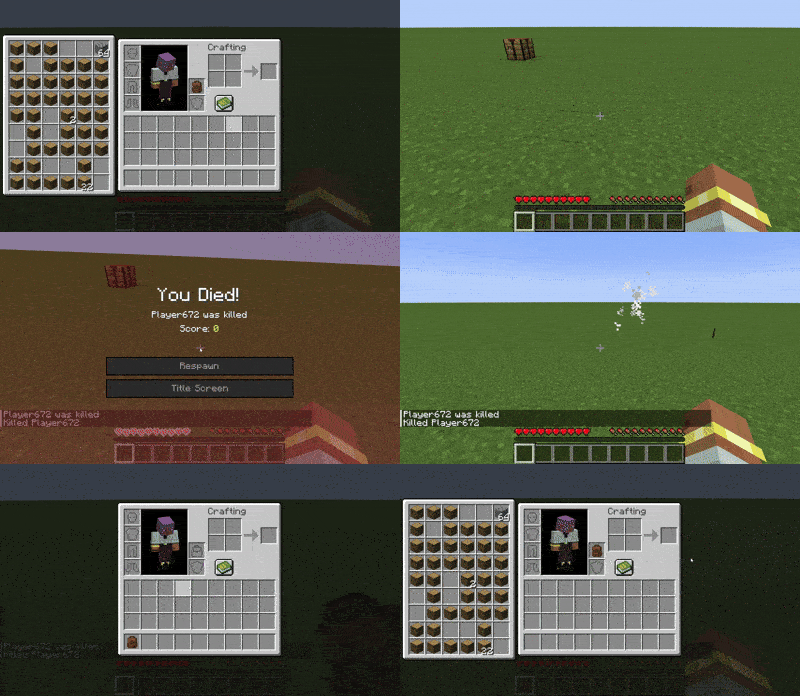
This mod is part of The Vanilla Experience modpack and Serilum’s Quality of Life Bundle mod. Your Items Are Safe is a mod which can function as an alternative to the existing gravestone mods, by using only vanilla blocks. When a player dies, it will keep their items from despawning. It does this by creating an armor stand with equiped gear and a chest with the items from the inventory. A sign will be placed on the chest with the player’s name. If the inventory does not fit into one chest, another one above it is generated. The armor stand stands above the chest. All features can be turned on/off via the config. If a player dies in the void, the chest will be placed above the death coordinates.
To keep it balanced the chests and armor stand can only be created if the player has enough wood in its inventory. A chest requires either 2 logs, 8 planks or an actual chest. The armor stand requires 1 log or 3 planks. The mod searches for logs first, then planks, then chests. If it can’t find the raw material needed, the chest and armor stand is not generated. If you’d like to always generate them, even without raw materials, this can be set in the config file as well.
The mod also contains the functionality to generate a player head and put it on the armor stand. This makes it easier to identify which player has died where. If the player had a helmet equiped, it is placed inside the chest. Enabled by default. But again, this can be disabled in the config.
Configurable:( how do I configure? ) mustHaveItemsInInventoryForCreation (default = true): When enabled and a player dies without any items in their inventory, no chest or armor stand is generated. addPlayerHeadToArmorStand (default = true): If a player head should be added to the armor stand. If a helmet is worn, this will be placed into the chest. createArmorStand (default = true): Whether an armor stand should be created on death. If disabled, the player’s gear will be placed inside the chest. createSignWithPlayerName (default = true): Whether a sign should be placed on the chest with the name of the player who died there.
needChestMaterials (default = true): Whether materials are needed for the chest which spawns on death. This can be the actual chest or the costs in raw materials. needArmorStandMaterials (default = true): Whether materials are needed for the armor stand to spawn on death. This can be the actual armor stand or the costs in raw materials. needSignMaterials (default = false): Whether materials are needed for the creation of the sign when ‘createSignWithPlayerName’ is enabled. ignoreStoneMaterialNeed (default = true): Only relevant if ‘needChestAndArmorStandMaterials’ is enabled. An armor stand needs 1 stone slab to be created, but I think it’s alright to ignore that requirement. If enabled, no stone is needed in the inventory on death.
createChestAboveVoid (default = true): If a chest should be placed right above the minimum build height when a player dies in the void. createVoidPlatform (default = true): If a 3×3 platform should be created below the chest above the void. ‘createChestAboveVoid’ must be enabled.
sendMessageOnCreationFailure (default = true): If a message should be sent if the chest or armor stand can’t be created due to missing materials. sendMessageOnCreationSuccess (default = true): If a message should be sent on successful creation of the chest(s) and armor stand. sendDeathCoordinatesInChat (default = true): If the player’s death coordinates should be sent in the chat below the ‘sendMessageOnCreationFailure’/’sendMessageOnCreationSuccess’ message.
creationFailureMessage (default = “Your items are not safe due to having insufficient materials. Missing: %plankamount% planks.”): The message sent on creation failure with ‘sendMessageOnCreationFailure’ enabled. Possible replacement values: %plankamount%, %stoneamount%. creationSuccessMessage (default = “Your items are safe at your death location.”): The message sent on creation success with ‘sendMessageOnCreationSuccess’ enabled.
Some examples: An armor stand and chest generated after death:
Two chests generated after death, because the inventory didn’t fit in a single one:
One chest and an armor stand created after death:
Show Spoiler
The previous death results in the following:
Show Spoiler
Here the player has no wood in its inventory. The chest/armor stand is not generated:
Show Spoiler
The player does have some planks in its inventory, but not enough. This is shown in the chat via a message:
Show Spoiler
The inventory is completely full, so 2 chests are needed to store everything. Luckily the player has more than 19 planks:
Show Spoiler
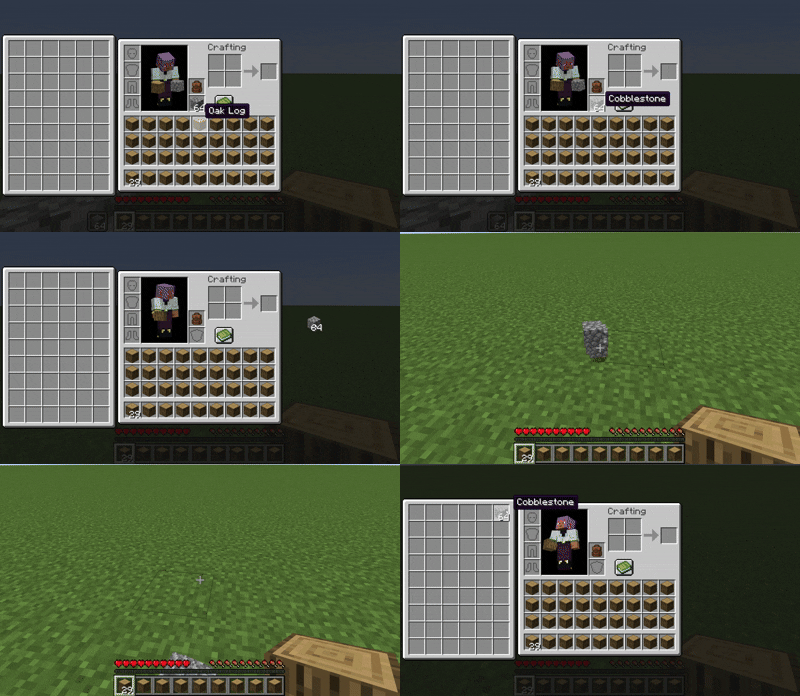
When a player dies in the void, the chest is placed on the initial position above it with a cobblestone platform.
Death coordinates are sent in the chat. Can be disabled in the config.
——————
You may freely use this mod in any modpack, as long as the download remains hosted within the Modrinth ecosystem.
Serilum.com contains an overview and more information on all mods available.
Comments are disabled as I’m unable to keep track of all the separate pages on each mod. For issues, ideas, suggestions or anything else there is the Github repo. Thanks!
You Need Bait!

Dive into a deeper fishing experience with this mod, featuring fully custom 3D models and unique animations for every new fish you catch. Gear up with a specialized fishing rod that supports powerful modifiers to boost your haul, and expand your toolkit with multiple bait types, a required hook, a handy tacklebox, a minnow trap, and more to discover.
* **Expanded Aquatic Life:** Discover a variety of new fish species, each with unique 3D models, textures, and animations. Encounter Walleye, Largemouth Bass, Muskellunge, Northern Pike, Black Crappie, White Crappie, Catfish, and Pumpkinseed Sunfish in their natural habitats.
* **Custom Fishing Rod:** Craft and wield the “Fancy Fishing Rod,” a custom 3D model with dedicated slots for bait, hooks, and powerful modifiers. This rod is obtainable through a progressive trading system with the Master Fisherman Villager.
* **Modifiers:** Enhance your fishing with modifiers like Glow Berries (experience bonus) or an Iron Hoe (chance to convert junk items to seeds or Onion Bulbs).
* **Diverse Bait System:** No more fishing empty-handed! This mod introduces a variety of bait types, including Worms, Caterpillars, Minnows, Sucker Minnows, Leeches, and Nightcrawlers. At least one type of bait is required in your inventory to fish, with a 10% chance of consumption per catch.
* **Essential Fishing Tools:**
* **Tacklebox:** A handy storage solution for your fishing gear, featuring a new 3D model and inventory screen. The basic version offers 4 slots and can only hold “fishing” items.
* **Minnow Trap:** Place these traps in rivers or swamps to slowly gather minnows or leeches over time.
* **Fish Cleaning Station:** Clean your catches with a Filet Knife for delicious food items and a 10% chance of bonus loot.
* **New Items & Food:** Explore a range of new items like Azuromite Ingots and Blocks, Mutilated Flesh, and a variety of food items such as Less Suspicious Stew, Raw Fish Fillets, Salted Beef, Beef Jerky, and more.
* **Dynamic Fish Weights:** Each custom fish species now has a unique weight range, configurable to be displayed in pounds (lb) or kilograms (kg). Adjust the “fish weight bias” to control the rarity of catching record-sized fish.
* **Configurable Gameplay:** Customize your fishing experience with a new configuration file (`config/youneedbait.toml`) allowing you to adjust settings like bait requirement, bait usage percentage, fish weight units, and weight bias.
* **Enhanced Villager Trading:** The Master Fisherman Villager now offers an expanded and progressive trade system, making the Fancy Fishing Rod and other valuable fishing items more accessible.
* **World Generation:** Discover abandoned houses randomly spawning in some biomes, occasionally featuring a parrot. Salt Blocks also generate naturally during world creation.
* **Achievements & Tooltips:** Track your progress with custom advancements and benefit from informative tooltips for new items.
* **Compatibility:** Verified compatibility with JEI (Just Enough Items).
**Future Updates:** Many future updates are planned to further diversify fishing features and expand the mod’s content.


