# DonutTools
DonutTools is a high-performance, lightweight Minecraft plugin optimized for version 1.21x. It is designed to provide a smooth, lag-free gameplay experience with fully customizable configuration.
## Available Tools
The plugin includes 11 distinct tools, allowing you to choose between use-based or time-based mechanics:
* **Utility:** Shovel, Nether Hoe
* **Specialty:** Tree Chopper, Rocket, Jump Feather
* **Fluid Management:** Water Bucket, Lava Bucket, Water Drain Bucket, Lava Drain Bucket, Fluid Drain Bucket
– **Permission-Based Cooldowns**: Set different cooldown durations based on player permissions
– **Command Aliases**: Define aliases for commands that share the same cooldown
– **Customizable Messages**: Fully customizable messages with MiniMessage format support
– **Action Bar Support**: Display cooldown messages in the action bar instead of chat
– **Admin Commands**: Reload configuration, clear cooldowns, and more
– **Persistent Cooldowns**: Cooldowns persist across server restarts
– **Folia Compatible**: Works with both Paper and Folia servers
1. Download the latest release from [Modrinth](https://modrinth.com/plugin/zcommandcooldown/versions)
2. Download the appropriate version of MCKotlin from [Modrinth](https://modrinth.com/plugin/mckotlin)
3. Place the JAR file in your server’s `plugins` folder
4. Restart your server
5. Edit the configuration files in the `plugins/ZCommandCooldown/` directory to customize the plugin
## Configuration (`cooldowns.yml`)
“`yaml
cooldowns:
repair: # Command that a cooldown will be applied to.
aliases: # Other aliases for the command. All share the same cooldown.
– fix
– erepair
durations: # Set durations of cooldown according to permission. If player has multiple of these perms, the lowest duration is used.
default: 600 # 600 seconds for players by default
group.group1: 120 # 2 minutes for players with group.group1 permission
group.group2: 60 # 1 minute for players with group.group2 permission
custom.repair.fast: 30 # 30 secods for players with the custom.repair.fast permission
“`
zCombat
**Author:** veltronthegoat
A lightweight and efficient **combat logging prevention plugin** designed for **Paper 1.21.11** servers.
This plugin ensures fair PvP by placing players into combat only when they **directly hit another player**, preventing abuse through unintended triggers like ender pearls or team interactions. Combat duration is fully configurable and displayed in real-time via the action bar for a clean user experience.
While in combat, players are restricted from using commands, eliminating escape exploits. If a player logs out during combat, they are instantly killed, their inventory is dropped at their location, and a lightning effect marks the spot. The opponent is immediately released from combat to maintain smooth gameplay flow.
The plugin also integrates with **BetterTeams**, ensuring that teammates cannot trigger combat with each other.
Built to be minimal, optimized, and free from unnecessary spam, this plugin is ideal for SMP and PvP-focused servers looking for a reliable and clean combat system.
ZavShop
## Features
– 🛒 **GUI Shop System** – Beautiful categorized shop with 5 categories (Nether, Gear, Food, End, Misc)
– 🏷️ **Auction House** – Player-driven marketplace with search, filter, and sort options
– 💰 **Sell System** – Quick sell items for configured prices
– 📋 **Tab Completion** – Full auto-completion for all admin commands
– 🔐 **Permission System** – Control access to admin features
– 💾 **YAML Configuration** – Easy editing of items and prices via config files
– 🚫 **Block/Item Blocker** – Prevent placement or usage of specific materials
– ⚡ **Hot Reload** – Reload configurations without server restart
## Installation
1. Download the `zavshop-1.0.jar` file
2. Place it in your `plugins/` folder
3. Make sure you have **Vault** and an economy plugin installed (e.g., EssentialsX)
4. Restart the server
5. The plugin creates `plugins/ZavShop/` with config files
## Commands
### Player Commands
| Command | Description |
|———|————-|
| `/shop` | Opens the main shop GUI |
| `/sell` | Sells the item in hand for configured price |
| `/ah` | Opens the Auction House |
| `/ah sell ` | Lists held item for auction |
### Admin Commands (requires `zavshop.admin`)
| Command | Description |
|———|————-|
| `/shopadd ` | Add an item to shop |
| `/shopremove ` | Remove an item from shop |
| `/shopprice ` | Update item price |
| `/shopreload` | Reload all configuration files |
| `/blocker ban block ` | Ban a block from being placed |
| `/blocker ban item ` | Ban an item from being used |
| `/blocker unban ` | Remove a ban |
| `/blocker list` | Show all banned items |
## Shop Categories
– **Nether Shop** – Blaze Rods, Nether Wart, Glowstone, Magma Cream, etc.
– **Gear Shop** – Obsidian, Totem of Undying, Ender Pearls, Golden Apples
– **Food Shop** – All food items with configurable prices
– **End Shop** – End-related items like Shulker Shells, Dragon Breath
– **Misc Shop** – Custom items added by admins
## Auction House Features
– 🔍 **Search** – Find items by name
– 🎯 **Filter** – Filter by category (Blocks, Tools, Food, Combat, Potions, Books, Ingredients, Utilities)
– 📊 **Sort** – Sort by Newest, Oldest, Price (Low to High), Price (High to Low)
– 👤 **Your Items** – View only your listings
– ✏️ **Manage** – Right-click your listings to remove them
## Permissions
| Permission | Description |
|————|————-|
| `zavshop.admin` | Access to all admin commands
### Spells
#### This Mod adds 11 new Spells to the Game!
– Arrow Spell – Shoots a barrage of Arrows in front of you.
– Dash Spell – Dodge attacks and escape fights.
– Pull Spell – Pulls Players to you.
– Push Spell – Pushes Players away from you.
– Fire Spell – Ignite your opponents.
– Ice Spell – Frezze your opponents.
– Rewind Spell – Teleports back in to your Past.
– Suicide Spell – Trapped in a Prison? Your free way out!
– Sprout Spell – Lets Plants grow.
– Teleport Spell – Teleports you to a Player in your surrounding.
– Supernova Spell***¹** – BIG BOOM
– Juggernaut Spell***¹** – Become the Juggernaut, for 2 Minutes.
Most of these Spells are available through the Spell Table, a new Block. 
This Block can be charged through the power of lightning. But only natural Lightning don’t even try to use channeling.
Or you can learn them directly with `/learn @s all`
# Mana
You can brew Mana Potions using a Brewing stand (who would have thought that).
You can use Chorus Flowers, to brew your Mana Potions.
You can have up to **20** Mana.
# Vanilla compatibility
Through [Polymer](https://modrinth.com/mod/polymer) Vanilla players are able to play on a Server using this Mod.
They will not be able to use the Features of this Mod when playing with Vanilla.
# Tranlsation
😺 Lol-Cat ✅
🇩🇪 German ✅
🇺🇸 English ✅
🇪🇸 Spanish ⏳ (wip)
# Modpack?
This Mod is developed for the the [ChainSMP](https://discord.gg/fQUHbP6EmM).
You can still use it for yourself, if you include it in a Modpack credit would be nice.
### *¹This Spell is not obtainable in Survival.
Sapphire 16x
Sapphire 16x is a blue themed pvp texturepack for all of you blue enjoyers. It features a recolor of most pvp items to make you appreciate your favourite colour even more. Here are just some of the textures:
– All diamond set
– All netherite set
– Enchantement glint
– Totem of Undying
– Golden Apples
– Enderpearls
– End Crystals and Respawn Anchors
– Bows and Crossbows
– And MUCH more…
Zapped
**zapped has been achived because I am not happy with its current quality.
zapped will get a full rework when the time is right**
Zapped is a Data-pack that turns lightning rods from a useless block to a way to transport zaps so you can power machines and productivity armour.
1.2 update released
-music disc (creator disc combined with a zap)
-config (/function zapped:config/config)
-armour texture (enable in config)
**Requires a Resource-pack to see tools (copper tools appear gold) or to see the armour texture**
**( armour texture disabled by default in config)**
Copper Lines
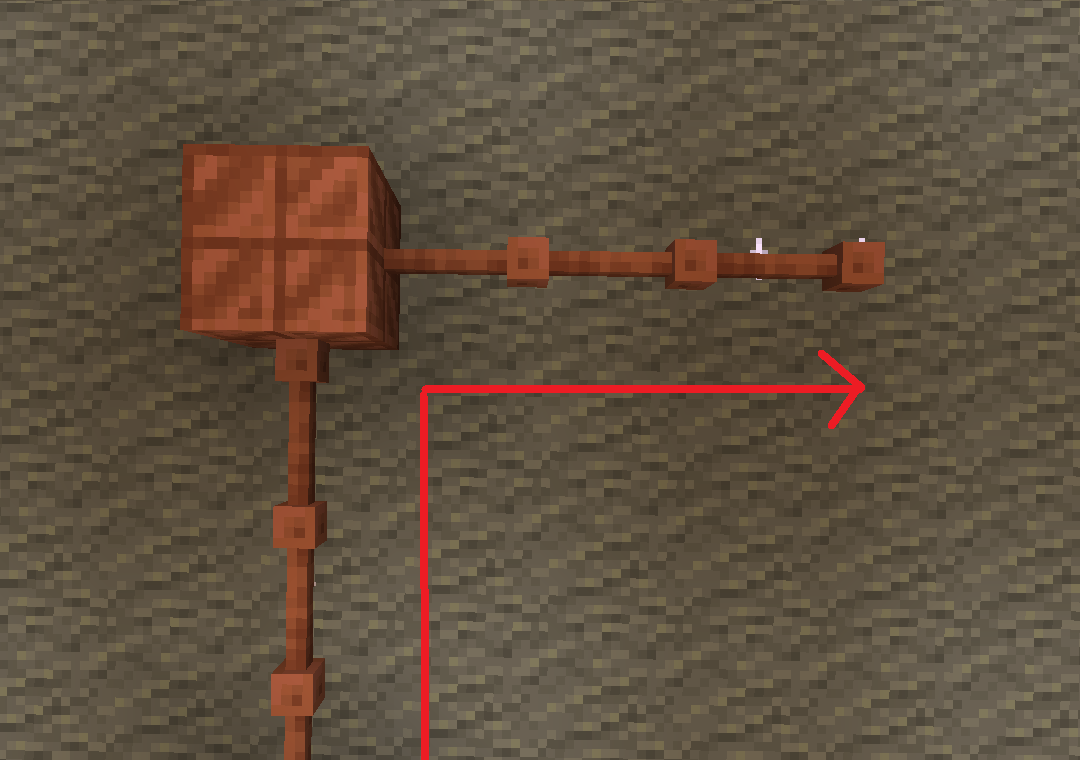
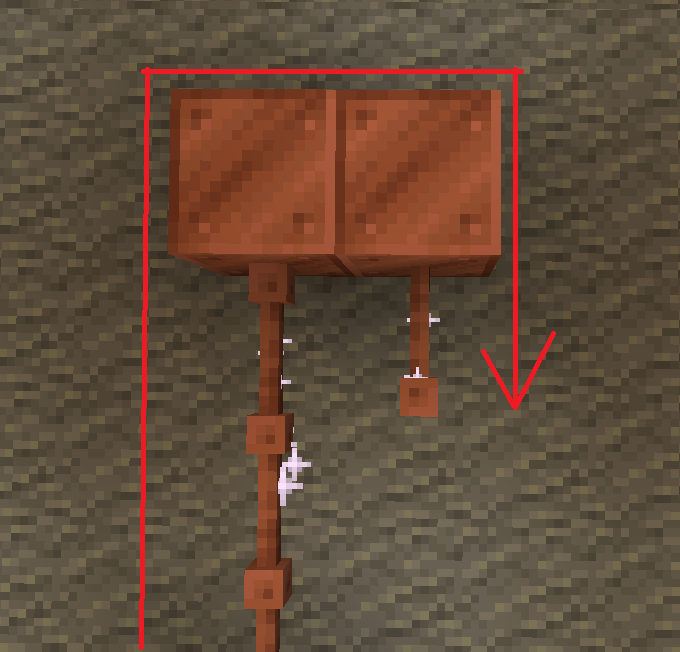
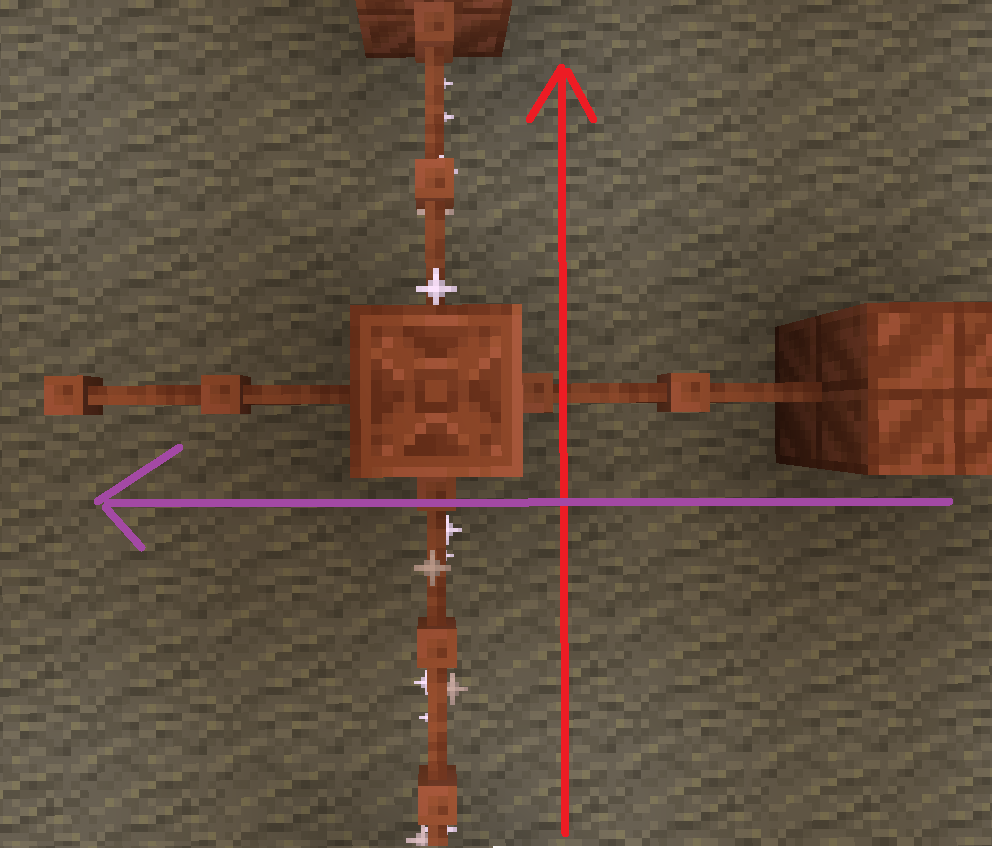
batteries store up to 32. though rusted batteries turn 32 into 16

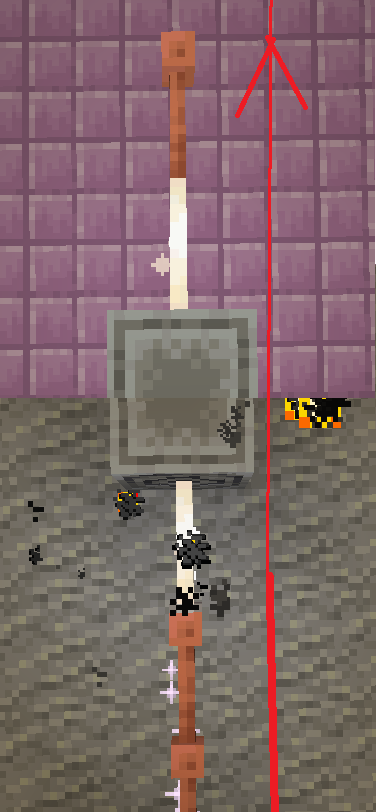
Don’t use copper blocks like that. Also, there is a chance it stays within the blocks and expires.

The most common thing to power is the productivity armour/tools or copper armour/tools.
The armour and tools are weak and easily destroyed. The armour gives less protection than iron and tools are slightly better than stone.
armor recipe
Because of copper’s malleability, it requires a structure.
The copper armour must be conductive, making golden armour a perfect cadet because it is also conductive.
But don’t let the tools fool you these are powerful assets.
With the power of zaps, you can charge the armour to be better than they once were.
Armour at max charge now gives as much protection as a diamond. They also give you a faster and extended grip (R.I.P-Crab). The boots also decrease fall damage.
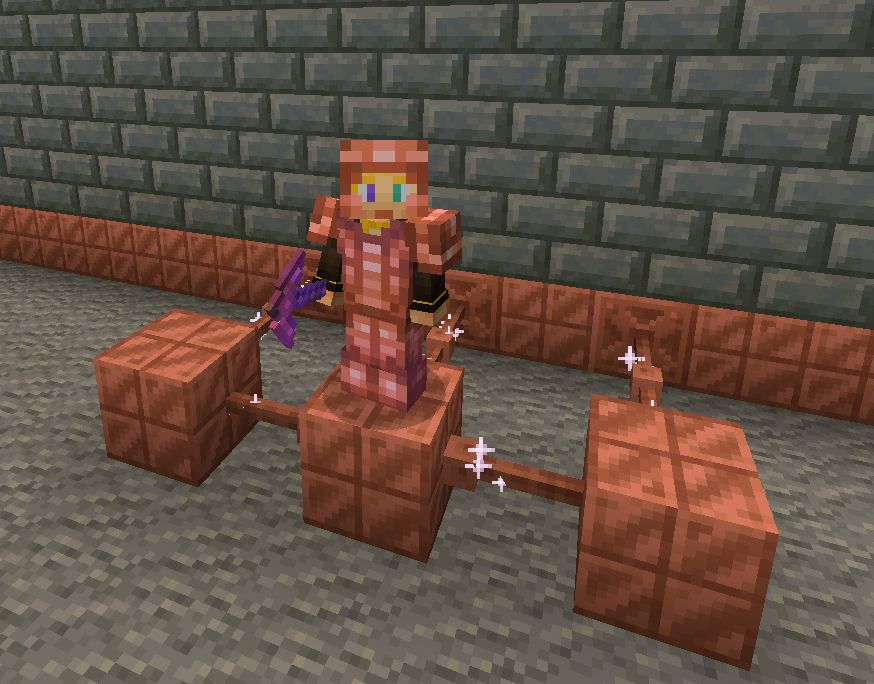
Tired of charging your armour?
With the use of the heavy core, you can change your armour wirelessly!
However due to the zaps exposure to the air it requires 40 zaps for one charge.
Going into the late game there is the gateway.
To make a gateway you need to align 2 lodestones together at the same cords in both the end and overworld. It also doubles up as a chunk loader.
-A use for the conduit (I think it will allow the productivity armour to go underwater)
-~~amethest?~~ (different project)
-some sort of transport, maybe with the beacon
-lightning weapon, a sister weapon to the mace perhaps
-better visuals
Whats not to come
1.20.6 and lower (probably)
The meaning of life
Known bugs
-on 1.21-1.21.3 versions leather armour texture can apair white
PLS LOVE YOURSELF AND MAKE BACKUPS.
I will not be held accountable for my bad code.
And that’s it.
If you want to submit an issue or want to request a feature or just want to roast the data pack, the link is here:
[https://github.com/Wangle17/Zapped-Datapack/issues](https://github.com/Wangle17/Zapped-Datapack/issues)
Zaphkiel-Plus
## Introduction
Zaphkiel is a powerful custom item system for Minecraft servers, providing a complete solution for item creation, management, and interaction.
Through simple YAML configuration files, you can create custom items with complex behaviors, including dynamic display, event response, and data persistence.
### Core Features
– 🎯 **Simple Configuration** – Define items using YAML files
– 🔄 **Dynamic Display** – Item names and descriptions can be updated in real time based on data
– ⚡ **Event-Driven** – Supports multiple interaction events such as right-click, left-click, and attack
– 💾 **Data Persistence** – A complete NBT data management and serialization system
– 🔧 **Highly Extensible** – Rich API interfaces to support plugin integration
– 🌍 **Multi-Language Support** – Automatically detects the player’s client language and provides localized item experiences
## Compatibility
The latest version has been successfully tested in the `Leaf 1.21.4` and `Leaf 1.21.8` environments.
If you encounter compatibility issues, please feel free to submit feedback in [GitHub Issues](https://github.com/iiabc/Zaphkiel-Plus/issues).
A mod to alter the transparency or fully hide armor and equipment with multiplayer support, without any dependencies – supporting a wide range of game versions and available for Fabric, Quilt and NeoForge.
### Features
– **Per-slot opacity sliders** for helmet, chestplate, leggings, boots and offhand
– **Enchantment glint control** to selectively hide the glint on any slot
– **Combat detection** let you automatically show armor when in combat
– **Full multiplayer sync** so other players see your settings when the server has the mod
– **Works client-side only** too without server mod required
– **Live in-game preview** of your changes
– **Keybindings** to quickly toggle Armor Hider or open the settings screen
– **Admin controls** for server operators (force armor visible, server-wide combat detection)
I track issues (including feature requests) via GitHub and do my best to close out any bugs timely (plus, I get way too excited about new features myself..). If you don’t have an account, feel free to join the Discord server and let me know there.
—
## Customizability
Find Armor Hider’s settings integrated into the game via “Skin Customization” in the game settings (or via ‘Zannagh’s Armor Hider’ on older game versions). When in-game, the mod settings feature a live preview of your changes.
### Armor Opacity
The mod allows you to define an opacity between 0% (hidden, cancelling the rendering) and 100% (the mod doesn’t do anything) for each armor item slot. In addition, it’s possible to specify whether skull items (skeleton/wither/… skull) should be affected by the helmet setting and if Elytras should be affected by the chestslot setting.
Furthermore, you can selectively hide the enchantment glint on any of the slots.
If you’d like to have armors visible in combat, you can choose whether combat will temporarily show your armor or not, see [Combat Detection](#combat-detection) below.
### Offhand Opacity
Armor Hider additionally offers to hide the offhand slot if you don’t want your fancy skin obstructed by a shield or other items.
## Synchronization
If the mod is installed on the server you’re joining, all of your local preferences will get sent to the server on change or join. The server-side mod then takes care of relaying your preferences to all other clients. That way, if the mod is present on the server, everyone will see your avatar exactly as you’ve configured it (including combat detection, glint and other features).
Combat events are synchronized and not only client-side, so when the server runs the mod, you’ll see another player’s armor once they enter combat (granted they have the related setting enabled).
If a host is not yet running the mod, there’s a setting available which lets you define whether the then ‘unknown’ players should have their armor rendering unaffected or carry over your own settings.
## Advanced Settings
* **Apply your settings to unknown players**: Whether to use your own opacity settings or the default settings (armor
shown normally, as without the mod) when a player’s settings cannot be determined — for example when using the mod
only client-side on an unmodded server (see [Server communication matrix](#server-communication-matrix) below)
* **Disable Armor Hider features**: Globally disable Armor Hider on your client. If the server is forcing Armor Hider
off, this setting is overridden
* **Disable Armor Hider for other players**: Disable Armor Hider rendering for other players’ armors only. If the server is forcing Armor Hider off or the global disable is set, this setting is ignored
### Administrative Settings
For hosts, these settings require moderator/operator permissions (for compatibility reasons, the mod only checks for permission level >= 3) and are applied server-wide, overriding individual player preferences.
* **Armor in combat (server)**: Forces combat detection server-wide — when enabled, armor is always shown for any player in combat, overriding each player’s individual combat detection setting – useful for PvP servers
* **Force Armor Hider off for all players**: Forces Armor Hider to be disabled for all players on the server (especially useful when you’re running a PvP server and don’t want people to hide other players’ armors)
### Combat Detection
Combat Detection
With combat detection enabled, your armor automatically becomes visible when you take or deal damage.
Your locally set preferences get sent to the server on change or join. Players joining a server will retrieve the
preference library from the server in order to apply other players’ preferences on their client.
The following matrix shows how preferences are resolved depending on where the mod is installed:
| Mod on Server | Mod on Client | Behavior |
|:—:|:—:|—|
| Yes | Yes | Full functionality. Your preferences are synced to the server and relayed to other players. You see other players’ actual configured armor opacity. Combat events are relayed by the server for synchronized combat detection. |
| Yes | No | No effect. The server stores preferences but the vanilla client cannot render transparency changes. |
| No | Yes | Client-side only. Other players’ preferences cannot be determined. Depending on the **”Apply your settings to unknown players”** setting: **ON** — your own opacity settings are applied to all players; **OFF** — default settings are used (armor rendered normally, as without the mod). Combat events will not be passed around in the server. |
| No | No | No effect. The mod is not present. |
## Community
Join the [Discord server](https://discord.gg/AMwbYqdmQb) for support, discussion, and feature requests.
## Issues and Feature Requests
As mentioned before, feel free to create an issue on the GitHub repository or reach out on Discord to make me aware of problems or ideas that could make this mod better.
## Supported Game Versions and Loaders




**Optional:**
> for better experience:
> – [Tissuo’s zombie pack – Zombie skin variation](https://www.curseforge.com/minecraft/texture-packs/tissous-zombie-pack-optifine-1-7x-1-20)
> – [Spawncap control utils – enable more zombie to spawn](https://www.curseforge.com/minecraft/mc-mods/spawncapcontrolutility)
# Introduction
**This data pack is what you would expect in a normal zombie apocalypse data pack, difficulty varies heavily on your chosen in-game difficulty and there are more than just zombie for you to discover**
> Meant to be a zombie datapack that doesn’t make them too oppressive like being able to break blocks and mess up your world, no AI is changed and they possess obvious weaknesses to exploit.
## **List of additions:**
– Custom gun and gun skins
– Skill tree
– Zombies are strong and comes in big number.
– No common zombies
– Zombie variants
– Pillager variants and attack zombies
– Air drop
– Flare gun
– Events
– Radio
– Custom mechanics and gamerule by default
– Lots of commands to tailor your experience
– Extended day time
Copyright: All right reserved, do not repost. However, you may include Hatred datapack in your modpack/datapack collections
and credit would be appreciated.
discord for contacting: lynusc
Email: [email protected] [email protected]
– Any ideas, bugs and issues please mention either below or send an email/DM. It would help alot.