## Server Hosting Discount
**Follow the link below and use code “JACKBUSTERS” at checkout for 25% off server hosting.**

## Media
Totems of Warping
Download the optional resource pack HERE
The Totem of Warping allows players to teleport to various locations. The totem can either be used to teleport to the player’s spawn point or, if connected to a lodestone, it can be used to teleport back to it at any time. Use the totem for 5 seconds to warp.
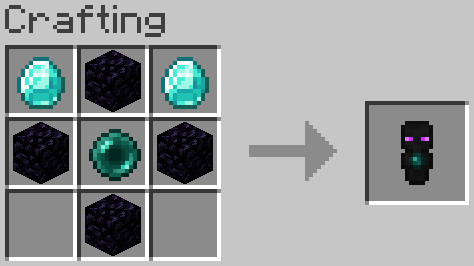
The Totem of Recovery allows players to teleport to their last death location.
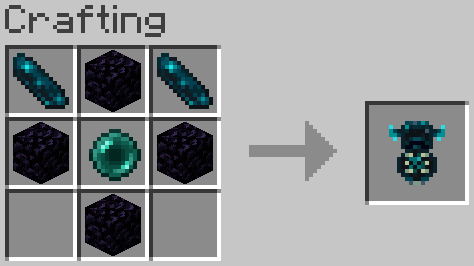
Two versions are available, the Single Use version and the Infinite Use version. Single use consumes the totems on use. Infinite Use can be used indefinitely but offers a toggle which will consume either Ender Pearls or Echo Shards. The toggle can be found in data/xtligh/function/warp_totem/config.json
Stylish Ghasts
Download the REQUIRED resource pack HERE
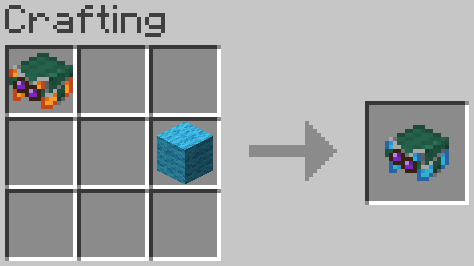
When crafting a ghast harness of any color the glass can be replaced by any stained glass to change the color of its goggles.
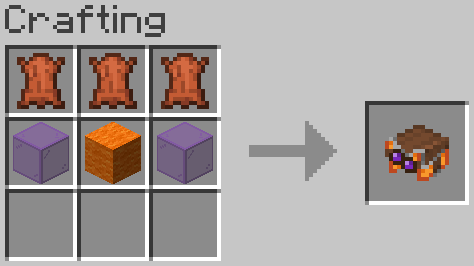
Harnesses can now be dyed similar to leather armor, this changes the the color of the harness’ upper half.
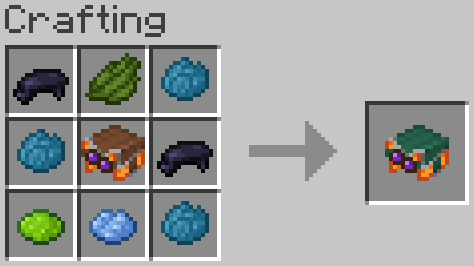
To prevent conflict with the vanilla crafting recipes, wool is used to change the base color of the harness instead of dye.
Better TnT Explosive Sulfur Cubes
(Let me know of any bugs & suggestions on discord: maxipetri05)
# TnT Sulfur Cubes!!!
– Give a TnT to Sulfur Cubes and Unleash Mayhem! if they’re going fast enough they will explode on Impact! (on xyz axis)
(dont watch on full screen, quality is bugged)
## Features :
– If they’re slowed back down they wont explode on impact.
– Leashed Sulfur Cubes with TnT wont explode if they Impact Vertically!!(Y axis) So you can bring them to your friendly ghasts safely!
– Light Them up on Fire and you’ll have 1 second to react before they Explode! So make sure you can punch them away fast enough!
– Customise The Explosion (if you have op) with: **_/trigger xsexplosivesulfurcubes.settings_**
**Explosion Power:** controls the explosion power of the basic impact speed (0-4).
**Explosion Power Override:** controls the explosion power of the basic impact speed (Any Number, -1 will mean that it will use **Explosion Power:** instead).
**Minimum Impact Speed:** controls the minimum speed required to trigger the basic explosion on impact.
**Safe Fall Distance:** controls how far it can fall vertically without exploding, even if its going fast enough.
**Strong Explosion Power:** controls the explosion power of the Strong impact speed (-1 means it will use the Basic >**Explosion Power**< Values for the Strong Explosion)
**Minimum Strong Impact Speed:** controls the minimum speed required to trigger the Strong explosion on Strong impact.
# **X-Rooms**
### *Advanced BoxPVP room management for your server*
### 📝 **Description**
X-Rooms is a powerful, all-in-one plugin for creating and managing PvP rooms (BoxPVP) on your server. Define combat zones with WorldEdit, set up custom kits, potion effects, rewards, holograms and winner destinations — all from an intuitive in-game GUI. Compatible with Minecraft 1.8.8 to 1.21.x+.
### ✨ **Features**
– **WorldEdit Integration:** Select a region with WorldEdit/FAWE and instantly create a PvP room with `/xr create`.
– **Full GUI Management:** Edit every room property (name, sounds, abilities, equipment, rewards) from a clean visual interface — no config editing needed.
– **10 Configurable Abilities:** Strength, Speed, Resistance, Haste, Regeneration, Fire Resistance, Jump Boost, Saturation, Absorption, and Fly — each with adjustable levels per room.
– **Ability Level Limits:** Set global maximum levels for each ability in `config.yml` to prevent overpowered setups.
– **Custom Equipment & Rewards:** Define kit items players receive on match start and reward items for the winner, all via GUI.
– **Automatic Inventory Management:** Player inventories are backed up and restored automatically. No items lost.
– **Combat Logging Protection:** Configurable punishment for players who disconnect during PvP — keep or delete their backup inventory.
– **Winner Teleport Location:** Set a custom destination for the match winner per room, or let them stay in the room.
– **Configurable End Delay:** A customizable delay after the match ends before players are teleported out. Players are invulnerable and locked in the room during this period.
– **PvP Countdown:** Visual countdown (Titles + Sounds) before combat begins with a configurable timer.
– **Hologram Support:** Automatic holograms showing room name, player count and time remaining. Supports DecentHolograms and HolographicDisplays.
– **Per-Room Permissions:** Enable or disable permission requirements per room. Rooms are public by default.
– **Anti-Escape System:** Players cannot walk or teleport out of a room during active PvP.
– **Barrier Material:** Configure a visible or invisible barrier material during countdowns.
– **Entry Titles & Sounds:** Custom welcome titles, subtitles and sounds when entering a room region.
– **PlaceholderAPI:** Full PAPI integration for holograms and messages. Supports both internal and global placeholders.
– **HEX Color Support:** Use `&#RRGGBB` colors in messages and titles (1.16+). Falls back gracefully on older versions.
– **Multi-Language:** 3 built-in language files (English, Spanish, French) with automatic config updater.
– **Folia Support:** Full compatibility with Folia’s regionized threading — all teleports and tasks use async-safe methods.
– **Config Auto-Updater:** Detects outdated configs and updates them automatically without losing your settings.
Need help? Join our Discord or report issues in the discussion section.
xray ore detector
# Feature
Add an enchantment to the pickaxe that add xray to nearby ore near the player.
The ore has different color to differentiate the different kind of ore

can xray :
– copper ore
– iron ore
– emerald ore
– gold ore
– diamond ore
– redstone
– coal
– ancient debris
# Installation
– Download the file
– open minecraft launcher
– create a new world
– in the **more** tab click the **datapack button**
– copy paste the downloaded file in the directory
XP SMP Datapack
# XP SMP Datapack
### About
A datapack used for the XP SMP that makes it so every level you get you gain a heart. But there’s a twist: every so often you lose a bit of xp.
### Tips
– Try to get high level quick because when your level is higher you lose xp slower.
### Installation
Installed just like any other datapack. A tutorial on how to do that can be found on the minecraft wiki here.
Experienced Powers
> This data pack is now discontinued.
> This means that it will no longer receive any more updates.
This data pack gives another use for experience, Magical powers!
You can use this experience points to trade for magical powers (well, effects in other words). For example, You can use 10 experience levels to get fire resistance for 30 seconds, or 7 experience levels to heal yourself.
Yeah I know, it can be a bit overpowered.
To use this data pack, simply use this Command: `/trigger `
Here is a full list of all “powers” and “power_id”:
| Name | Id | Description | XP level required | XP cost
|—————-|—————|—————————————|——|—–|
| Fire resistance | xpower.fire_resistance | Gives 30 seconds of fire resistance. | 25 | 12
| Fire resistance+ | xpower.fire_resistance+ | Gives 2 minutes of fire resistance. | 30 | 18
| Fire resistance++ | xpower.fire_resistance++ | Gives 10 minutes of fire resistance. | 40 | 25
| Slow falling | xpower.slow_falling | Gives 30 seconds of slow falling. | 15 | 5
| Water Breathing | xpower.water_breathing | Gives 1 minutes of water breathing. | 15 | 8
| Water Breathing+ | xpower.water_breathing+ | Gives 5 minutes of water breathing. | 20 | 15
| Water Breathing++ | xpower.water_breathing++ | Gives 20 minutes of water breathing. | 25 | 25
| Heal | xpower.heal | Gives 4 seconds of regeneration V, enough to fill your health bar. | 15 | 5
| Strength+ | xpower.strength+ | Gives 5 minutes of strength I. | 30 | 10
| Strength++ | xpower.strength++ | Gives 10 minutes of strength I. | 35 | 15
| Haste | xpower.haste | Gives 30 seconds of haste I. | 20 | 10
| Haste+ | xpower.haste+ | Gives 2 minutes of haste I. | 30 | 20
| Haste++ | xpower.haste++ | Gives 10 minutes of haste I. | 40 | 25
| Night vision | xpower.night_vision | Gives 2 minutes of night vision | 15 | 4
XPlosives
# 🧨 XPlosives
**XPlosives** is a datapack for Minecraft 1.16 and above.
It adds many new explosives to the game and a detonator to trigger them from a distance.

—
## 🎨 Obtaining Items in Creative
Use the functions:
“`
function xplosives:explosives/{item-name}/give
“`
Instant TNT
Detonator
—
## 🛠️ Using the Items
TNTs function like default TNT but create more interesting explosions.
### Using the Transmitter/Receiver (aka Detonator):
1. **Set Your Channel**
“`
/trigger xplosives.s.chnl set {channel}
“`
## 🛠️ Filing Issues / Merging
Xplosives
File an issue
## ⚖️ License
Under Creative Commons Attribution 4.0 International
Xplosive Dogs
**[English description]:**
Ever wanted to equip a TNT to your wolf pet without the risk of losing your little buddy?
Wait no more!
XplosiveDogs Datapack contains a simple way to equip explosives to tamed wolves!
Just throw a TNT block next to them and it will be equipped, if the wolf starts attacking hostile mobs
it will explode after a few seconds (without resulting hurt!)
**Custom command:**
/trigger explosive_info (will show a menu on chat)
this datapack contains two languages! (more coming soon)(?)
Will be updated soon…
**[Spanish description]:**
¿Alguna vez has querido equipar a tu lobo mascota con una TNT sin el riesgo de perderlo para siempre?
!Pues no esperes más!
XplosiveDogs Datapack Cuenta con una forma simple de equipar explosivos a los lobos domesticados!
Solo lanza un bloque de TNT cerca y se equipará automáticamente, si el lobo comienza a atacar mobs hostiles
explotará luego de pocos segundos (sin resultar herido!)
**Comando personalizado:**
/trigger explosive_info (mostrará un menú del datapack)
Este datapack contiene dos idiomas (más próximamente)(?)
Se actualizará pronto…
Join my discord community to get updates and more content I made for minecraft!